Posted in Cool Tool

Monday Morning Cool Tool: AutoDraw

I love learning about new tools to make social media marketing more creative and effective, so I’ve decided to share some of my favourite tools with you at the start of each week. This week’s cool tool recommendation is AutoDraw  – an online drawing tool by Google.

AutoDraw pairs the magic of machine learning with drawings from talented artists to help everyone create anything visual, fast.  Watch this short video to learn more about how you can use this cool tool.

Posted in Cool Tool

Monday Morning Cool Tool: Giphy

I love learning about new tools to make social media marketing more creative and effective, so I’ve decided to share some of my favourite tools with you at the start of each week. This week I’m recommending Giphy  – a source of free animated gifs.

Why use Gifs?

Hootsuite recommends the use of Gifs “to spice up, excite and wake up your social audience.”

A little motion makes your content marketing more memorable. Though use sparingly, otherwise it distracts rather than enhances.

This Friday is #CappuccinoDay  so why not celebrate with a Gif like the one below?

Posted in Cool Tool

Monday Morning Cool Tool: Tweriod

I love learning about new tools to make social media marketing more creative and effective, so I’ve decided to share some of my favourite tools with you at the start of each week.

This week’s cool tool recommendation is Twerioda  Twitter tool that helps you identify the best times to post on Twitter for your audience of followers.

Use the tool to pinpoint the days and times of the week when your followers are online to maximize the reach of your tweets.  Here’s a snapshot of my account showing me that engagement is highest on weekdays between 4 pm and 5 pm; 6 pm and 7 pm and 10 pm and 11 pm.

001556ea-7d85-40c4-9000-690ec6de15e0

Try it for yourself and adjust your tweeting schedule to reflect the results. Use a tool like Hootsuite or Buffer to schedule your tweets according to the optimum times for your audience on Twitter.

Posted in Cool Tool

Monday Morning Cool Tool: ImageQuote

I love learning about new tools to make social media marketing more creative and effective, so I’ve decided to share some of my favourite tools with you at the start of each week.

This week’s cool tool recommendation is ImageQuote –  a super easy tool to create quote images for sharing on social media.

imagequote

You can choose from high-quality background collections or use your own photos for images. Then choose from 50+ creative font choices to customise your text. When you’re happy with your image you can export it to Instagram, Facebook, or Twitter for easy sharing.


Posted in Cool Tool

Monday Morning Cool Tool: Trendsmap

I love learning about new tools to make social media marketing more creative and effective, so I’ve decided to share some of my favourite tools with you at the start of each week.

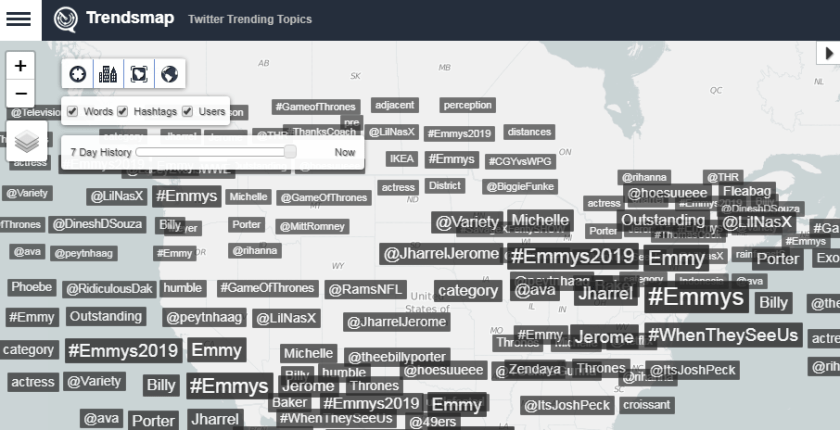
This week’s cool tool recommendation is Trendsmapa real-time map of the latest Twitter trending hashtags and topics from anywhere in the world.

e3cd82f8-50ec-4c53-af5d-c056874cf050

Click on a word, zoom into your area of interest, and explore. You can also jump directly to  Locations or Top tweets.

1b78c5a4-36fc-400a-a979-aef07ec04541

Tapping into cultural trends is all about marketing in the moment. This works because people are most interested in “what’s happening now.” This tool is super useful to help you keep tabs on trending topics on a daily basis.


You might also like to read How To Leverage A Cultural Trend


Posted in Cool Tool

Monday Morning Cool Tool: Mail Tester

download - 2019-08-11T125603.063

I love learning about new tools to make social media marketing more creative and effective, so I’ve decided to share some of my favourite tools with you at the start of each week. This week’s cool tool recommendation will be of interest to those of you who send email marketing (like newsletters) to subscribers.

Mail Tester is a free tool which tests the “spammyness” of your email. It will analyze your message, your mail server, your sending IP and assign you a spam score along with a detailed report of what’s configured properly and what’s not.

Your result will be accessible for 7 days with the free version or 30 days if you created an account and used your own prefix.

Visit https://www.mail-tester.com to try it out.


You might also like to read How to Build Your Email List On A Firm Foundation


Posted in Cool Tool

Monday Morning Cool Tool: Listen Notes

3430d8098532468ca657e210f21cdaf8.jpg
Image Source: Listen Notes

I love learning about new tools to make social media marketing more creative and effective, so I’ve decided to share some of my favourite tools with you at the start of each week. This week’s cool tool recommendation is Listen Notes  – a free podcast search engine.

With this tool, you can not only search the whole Internet’s podcasts, but you can also curate your own podcast playlists. (Note that the Listen Notes search engine is designed to help you find content such as people topics, not specific shows.)  If you’re researching a specific person or topic, the search tool can help you find related episodes from a range of podcasts. You can then add results that interest you to a playlist.  After you create a playlist in Listen Notes, you receive a playlist URL that you can copy and paste into your favorite podcast app so you can listen to that playlist. You can also use the URL to share the playlist.

More cool features include the clipping feature which lets you annotate, save, and share audio clips from podcast episodes.  You can add individual episodes to Listen Later playlists and bring these playlists to your podcast player apps via RSS.

The tool is totally free and if, as many people are these days, you are a podcast fan, you will want to add this tool to your toolkit.

Posted in Cool Tool, Visual Marketing

Monday Morning Cool Tool: Easil

download (34).png

I love learning about new tools to make social media marketing more creative and effective, so I’ve decided to share some of my favourite tools with you at the start of each week. This week’s cool tool recommendation is graphic design tool Easil  an online graphic design tool with templates that are especially useful for Instagram and Facebook stories.

Easil is a simple, browser-based system with pre-made templates that you can adapt in seconds with simple drag-and-drop tools.  The vertical image templates are especially good and make this tool great for stories.  The website also hosts a blog with super helpful design tips.

The free version of Easil is for individuals and limits the types of files you can download. For example, with the free version, you can’t download a GIF or PDF. The Plus service costs $7.50 per month, and the Edge service costs $59 per month.

Posted in Cool Tool

Monday Morning Cool Tool: Word2cleanhtml

This week’s cool tool recommendation is Word2cleanhtml, a free converter tool which cleans up HTML pasted from Word documents.

How it works

download

The tool strips out invalid or proprietary tags, which Microsoft Office puts in its HTML and gives you a well-formatted result that you can paste directly into a web page, ebook or content editing system.


Posted in Cool Tool

Monday Morning Cool Tool: Iconosquare


download (88).png

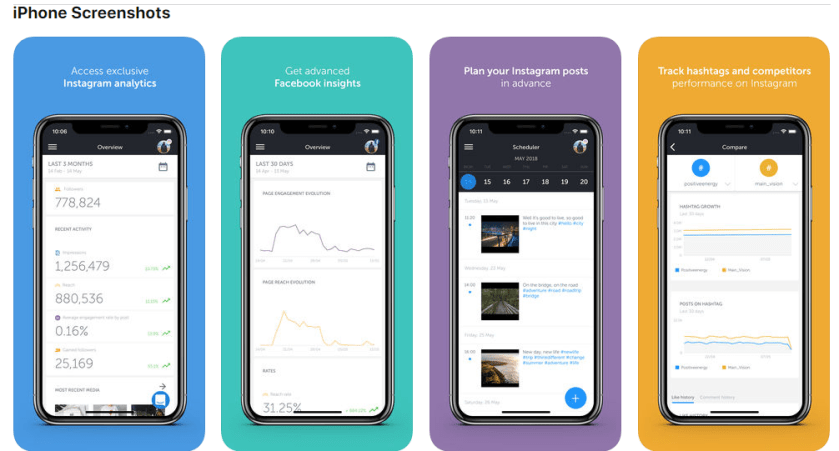
I love learning about new tools to make social media marketing more creative and effective, so I’ve decided to share some of my favourite tools with you at the start of each week. This week’s cool tool recommendation is Iconosquare, a smartphone app for managing your Facebook and Instagram presence.

Features Include:

Instagram analytics: visualize how your community is growing, see how many followers you gained and lost, identify your most engaging media and more.  For Business profiles, get also access to Stories insights, to community demographics and to reach and impressions data.

Facebook analytics: see how your number of fans is growing and how many fans you gained and lost, access demographics of your community, visualize the reach and impressions of your posts, see your most engaging publications etc.


Instagram Post Scheduler: plan ahead and schedule all your Instagram posts in advance from your computer. Upload photos and videos, type captions and get notified on your smartphone when it’s time to post.


Instagram Comment tracker: monitor comments received on your Instagram posts. Reply to them, mark them as read and delete inappropriate ones.

Multi-Account Management: schedule and manage for all your Instagram accounts and Facebook pages from within the app.

Get On: App Store | Google Play