Posted in Cool Tool

Monday Morning Cool Tool: Planable

This week’s cool tool recommendation is Planable – a social media management tool.

Planable is a platform designed to streamline social media workflows, primarily focusing on collaboration and content planning. It acts as a central hub for teams to create, review, and approve social media content before it’s published.

Key Features

  • Content Planning and Scheduling: It allows users to plan and schedule social media posts across various platforms.
  • Team Collaboration: It facilitates team collaboration through features like tagging, commenting, and approval workflows.
  • Visual Content Calendar: It offers customizable calendar views (calendar, list, etc.) to visualize scheduled content.
  • Workflow Automation: It automates parts of the social media posting process, reducing manual effort.
  • Future Analytics: They plan to integrate analytics to provide insights into social media performance.

Pricing

Planable offers a free plan, which is great for getting started and familiarizing yourself with the platform. However, the free plan has limitations, such as a cap on the total number of posts you can create. The pro plan provides more advanced features, catering to growing teams and agencies with more complex needs.

Posted in Cool Tool

Monday Morning Cool Tool: Picsart

This week’s cool tool recommendation is Photoroom – an AI background generator that transforms your images with ease.

Photoroom is a mobile and web application that uses artificial intelligence to effortlessly remove, replace, and generate backgrounds. Users can either remove existing backgrounds or generate entirely new ones using text prompts or image inputs.

Unlike traditional image editing software, Photoroom prioritizes simplicity and speed, making complex background changes accessible to anyone without requiring extensive technical skills.

Pricing

Photoroom offers a free tier that provides core background removal and basic editing functionalities, suitable for everyday users. A subscription unlocks premium features like high-resolution exports, batch editing, and access to a wider range of AI-generated backgrounds.

Posted in Cool Tool

Monday Morning Cool Tool: Picsart

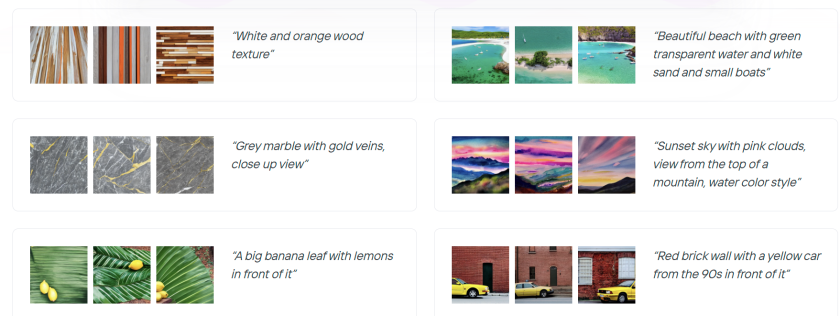
This week’s cool tool recommendation is Picsart – a free AI image generator.

PicsArt is a mobile and desktop editing platform that combines powerful AI-driven tools with an intuitive interface. It allows users to edit photos, create digital art, design marketing materials, and even edit videos—all from their smartphones. Unlike traditional editing software, PicsArt is built for speed and ease of use, making it a great choice for those who want professional-looking visuals without the learning curve of tools like Photoshop.

One of PicsArt’s biggest advantages is its AI-driven tools. Features like background removal, smart selection, and AI-powered filters allow users to transform images with a single tap. Features like blending modes, layers, and masking—tools typically found in professional software—are simplified for everyday users. Whether you’re creating a logo, designing a social media post, or experimenting with artistic edits, the interface is intuitive and beginner-friendly.

PicsArt isn’t just for photos—it also offers robust video editing features. Users can trim clips, add effects, overlay text, and apply filters to enhance their videos for platforms like TikTok and Instagram.

Pricing

Picsart’s free tier provides a robust set of tools, from filters to ready-made templates, and editing tools for the everyday user, while a subscription unlocks advanced features.

So, if you haven’t tried PicsArt yet, why not explore its features and see what you can create?

Posted in Cool Tool

Monday Morning Cool Tool: FindSounds

This week’s cool tool recommendation is FindSounds – a website and search engine to assist in locating specific sounds or audio clips.

FindSounds is a search engine for locating specific audio clips and sound effects. Use it to add professional polish to multimedia projects and digital content. You can search for background music, ambient sounds, or specific audio elements to match the theme of your content.

For live streaming or webinars, you can use FindSounds to find intro music, outro music, or background music to make your broadcasts more polished and engaging. You can also use it to add sound effects for interactive elements or notifications.

You might also like to consider searching for music and sounds via Soundcloud.

Posted in Cool Tool

Monday Morning Cool Tool: Preview

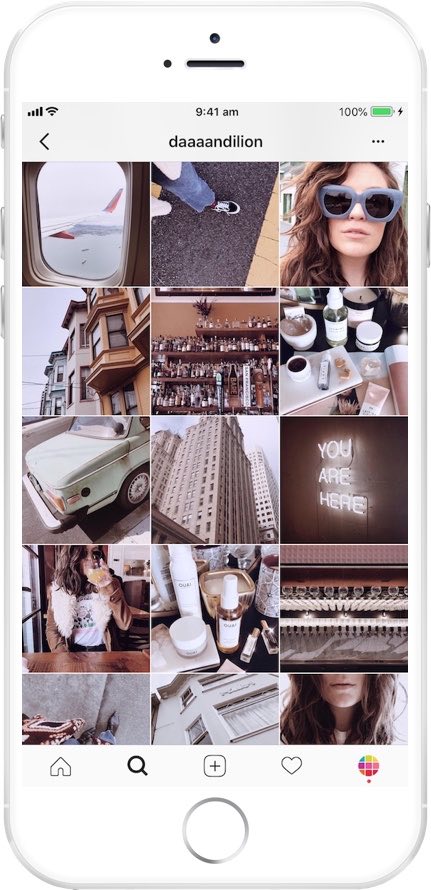
instagram-feed-planner-app-preview-8.jpg

This week’s cool tool recommendation is Preview, a super useful Instagram app.

Preview is an Instagram planner that simplifies content creation and helps you design a cohesive aesthetic and optimize your social media strategy. It allows you to see how your grid will look before hitting “post,” ensuring your feed stays cohesive and visually engaging.

Want to learn more?

Visit my Substack to learn more about the key features of Preview and pricing plans.


Posted in Cool Tool

Monday Morning Cool Tool: Thumbnail.Ai

This week’s cool tool recommendation is Thumbnail.Ai – a handy tool to generate thumbnails for your social media channels.

A thumbnail is a small, reduced-size image or preview of a larger picture, video, or document. Think of them as mini-billboards for your content. Whether it’s a YouTube video, a blog post, or an Instagram Reel, a compelling thumbnail is the first thing people see. The primary purpose of thumbnails is to provide a visual preview and assist users in quickly identifying and selecting content of interest without the need to open or load the full-sized version. Thumbnails are typically much smaller in size compared to the original content, making them easily manageable and loadable, even on devices with limited screen space or slower internet connections.

  • Image Galleries: From photo apps on your phone to online portfolios, thumbnails provide a quick visual overview of your images.
  • Video Sharing Platforms: YouTube, Vimeo, and other video platforms rely heavily on thumbnails to entice viewers to watch. A compelling thumbnail is crucial for video success.
  • File Browsers: Thumbnails in your operating system help you quickly identify files without having to open each one.
  • Web Search Results: Search engines use thumbnails to give you a visual preview of web pages and images, helping you find what you’re looking for faster.
  • Social Media: Thumbnails are the face of your posts and videos on platforms like Instagram, Facebook, and Twitter. They’re key to driving engagement.

How Thumbnail.Ai Works

Thumbnail.Ai simplifies thumbnail creation with an intuitive interface. Simply:

  • Generate & Share: Preview your thumbnail and make any final adjustments. Once you’re happy, download your high-resolution thumbnail and instantly share it across your social media channels.
  • Choose a Template: Select from a wide variety of professionally designed templates tailored for different platforms and content types.
  • Customize: Easily personalize your chosen template by adding your own text, images, logos, and branding elements. Experiment with different fonts, colors, and layouts to create a unique design.

Posted in AI, Cool Tool

Monday Morning Cool Tool: Opus Clip

This week’s cool tool recommendation is Opus Clip an AI-powered video repurposing tool.

OpusClip’s AI analyzes your content, finds the most engaging moments, and turns them into short, shareable clips—complete with captions and resized formats for social media, all in minutes.

Perfect for:

  • Webinar highlights
  • Podcast clips
  • YouTube interview snippets
  • Thought-leadership content

Key Features & Benefits:

  • AI Curation: OpusClip’s AI scans your video, pinpointing highlights, key takeaways, emotional peaks, and impactful visuals. It then stitches these together to create concise, compelling clips that retain the essence of the original while catering to shorter attention spans.
  • AI B-Roll & Overlays: Seamlessly enhance your clips with AI-generated or stock B-roll footage, as well as overlays, captions, and other visual elements to maintain viewer interest and reinforce key messages.
  • Customisable Brand Templates: Apply your own fonts, colours, and logos to ensure each clip is instantly recognisable and aligned with your brand identity.
  • Auto-Captions & Filler Word Removal: Generate accurate, multi-language captions in seconds while automatically removing “ums,” pauses, and filler words for a polished, professional final product.
  • Multi-Platform Optimisation: Create clips tailored for TikTok, Instagram Reels, YouTube Shorts, LinkedIn, and more—maximising reach and engagement across platforms.

Further Reading: Work Smarter, Not Harder: How to Extend the Life of Your Social Content

Posted in Cool Tool

Monday Morning Cool Tool:

This week’s cool tool recommendation is Screenrec – a free screen recording and capture tool.

ScreenRec is a versatile and user-friendly tool designed to improve communication and collaboration efforts.

Key Features:

  • Effortless Screen Recording: Capture your screen with a single click, making it incredibly easy to record tutorials, product demos, software walkthroughs, and more.
  • Powerful Analytics: Gain valuable insights into audience engagement. Track viewership metrics to understand which parts of your recordings are most impactful.
  • Seamless Sharing: Share recordings and screenshots instantly via private sharing links, eliminating the need for cumbersome file transfers.
  • Secure Cloud Storage: Access and manage your recordings and screenshots from anywhere with secure cloud storage.
  • Cross-Platform Compatibility: ScreenRec functions seamlessly across various devices and operating systems, ensuring accessibility for all users.
  • Enhanced Security: Your content is protected with robust encryption, ensuring privacy and confidentiality.

Posted in Cool Tool

Monday Morning Cool Tool: PhotoRoom

This week’s cool tool recommendation is PhotoRoom – a user-friendly AI-powered tool that simplifies the process of removing and replacing image backgrounds

While not a comprehensive photo editor, its intuitive interface and reliable AI make it a fantastic choice for beginners and anyone seeking a quick and efficient solution for background swaps.

How PhotoRoom Works

  1. Image Selection: Begin by uploading your desired image in PNG or JPG format. Higher resolution images generally yield better results.
  2. Background Removal: PhotoRoom’s AI swiftly analyzes the image and automatically removes the background. You can then fine-tune the selection by adjusting the crop as needed.
  3. Background Replacement: A vast library of backgrounds awaits. Explore a diverse range of textures, colors, and patterns, or delve into themed collections like “Nature” (featuring skies, starry nights) and “Art” (inspired by Van Gogh, masterpieces).
  4. Downloading: Save a low-resolution preview of your edited image with a watermark for free. To obtain the high-definition version, a Pro account is necessary.

Key Advantages

  • Effortless Background Removal: AI-powered technology makes background removal a breeze, even for those with no prior photo editing experience.
  • Intuitive Interface: The user-friendly design ensures a smooth and enjoyable editing experience.
  • Versatile Background Library: A wide array of backgrounds caters to various needs and creative visions.
  • Time-Saving: Quickly and efficiently replace backgrounds, streamlining your workflow.

Pricing

While basic backgrounds like blank tiles are available for free, premium options, including more sophisticated and creative backgrounds, require a Pro account subscription.

Posted in Cool Tool

Monday Morning Cool Tool: Design Cap

This week’s cool tool recommendation is Design Cap an online graphic design tool, designed to be user-friendly, even for those without prior design experience.

Key Features

  • Effortless Design: Intuitive interface designed to be user-friendly, even for those without prior design experience.
  • Extensive Template Library: Choose from a vast collection of professionally designed templates for posters, flyers, social media, and more.
  • Effortless Customization: Easily personalize templates with your own text, images, and colors to match your unique brand.
  • Powerful Editing Tools: Fine-tune your designs with a range of tools for text formatting, image adjustments, and shape manipulation.
  • Rich Stock Resources: Access a library of high-quality stock photos and icons to elevate your designs.

Whether you’re a marketer, educator, small business owner, or simply someone who wants to express their creativity, DesignCap provides the tools and flexibility to bring your vision to life.