Posted in Cool Tool

Monday Morning Cool Tool: TweetsMap

I love learning about new tools to make social media marketing more creative and effective, so I  share some of my favourite tools with you at the start of each week. This week I’m recommending iOS Twitter tool –  Tweeps Map 

The free version of this tool is limited to a visual representation of where  your Twitter followers are based geographically. 

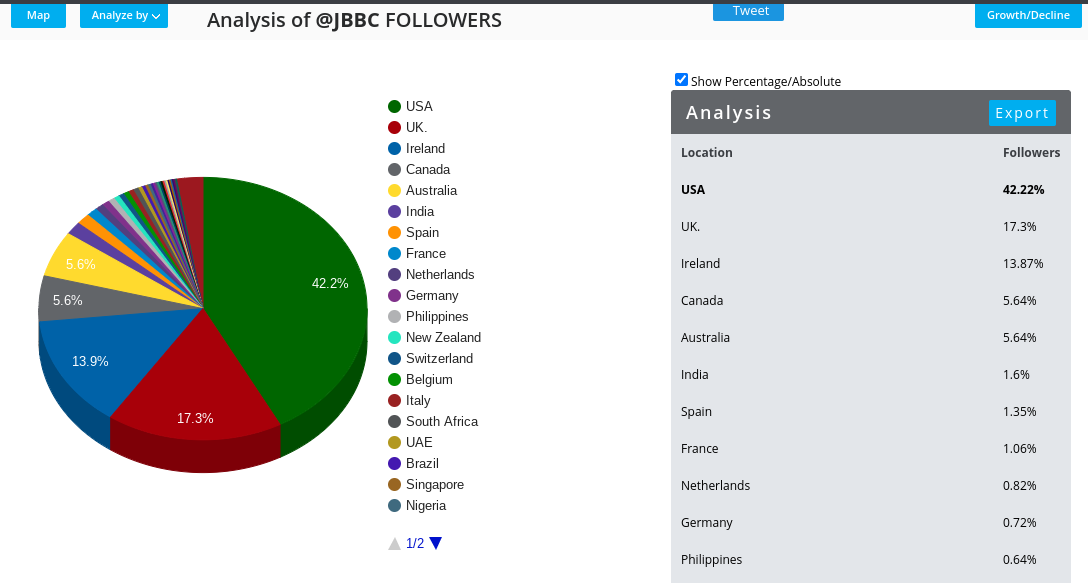
This can be useful to determine whether the content and the language and references you are using are actually relevant to where your followers are living.  In my case, although I live in Ireland, the majority of my followers are based in the USA. 
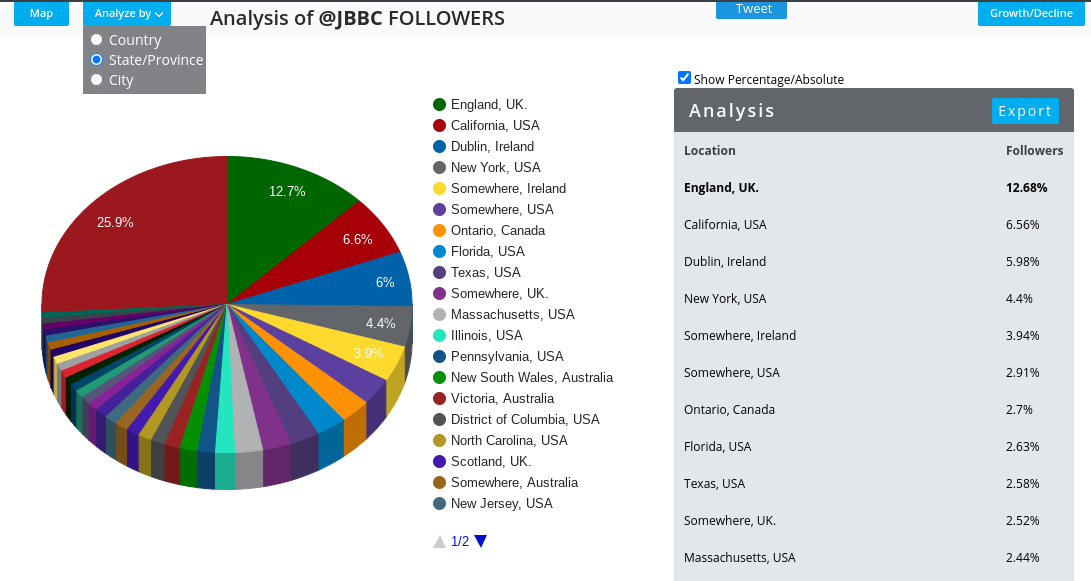
I can further break this down to State and Province
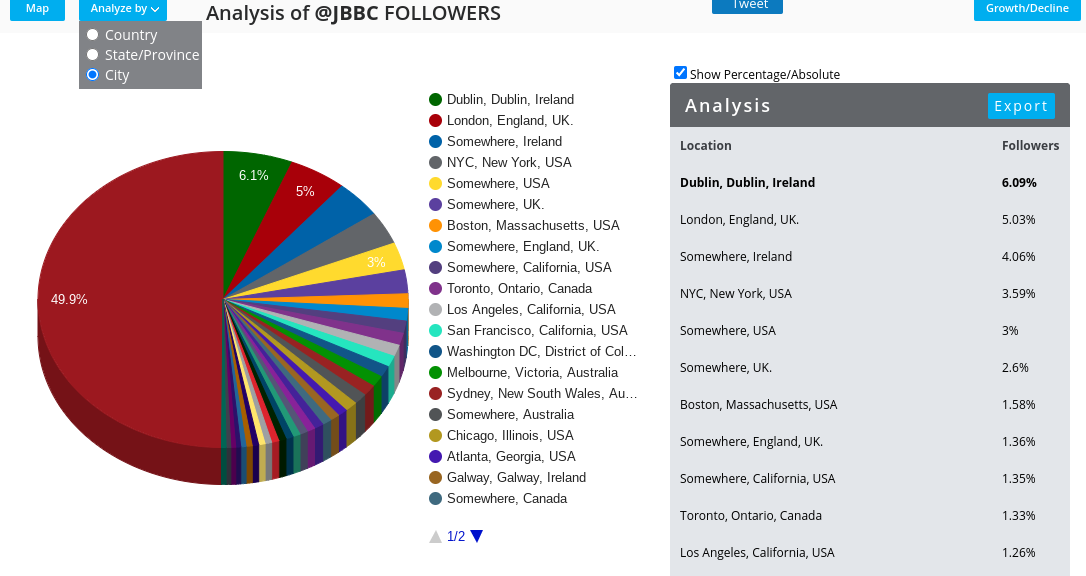
And City
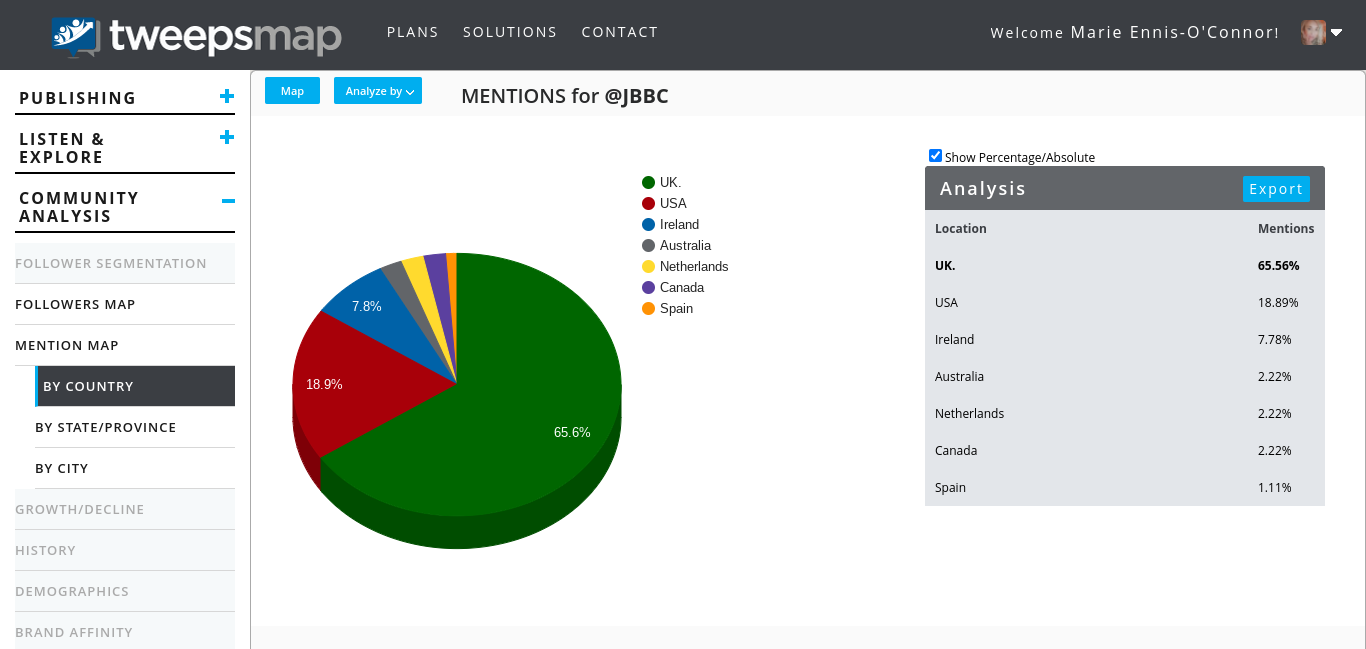
I can also track which follower geographic locations mention my Twitter account most.
The free plan will allow you to also track top unfollowers and inactive accounts.

Learn more at https://tweepsmap.com/

Posted in Cool Tool

Monday Morning Cool Tool:WordSwag

I love learning about new tools to make social media marketing more creative and effective, so I’ve decided to share some of my favourite tools with you at the start of each week. This week I’m recommending WordSwag – a free mobile application that turns your ideas, quotes, and content into attractive graphics that can be shared on social media.

Here’s how it works

1. Select your picture (Word Swag also includes 590,000+ free backgrounds!)
2. Edit your text (you can also choose from hundreds of captions and quotes)
3. Select one of 48 text styles.
5. Save or share your creative design on Instagram, Twitter & Facebook.

Posted in Cool Tool

Monday Morning Cool Tool: Pixaloop

I love learning about new tools to make social media marketing more creative and effective, so I’ve decided to share some of my favourite tools with you at the start of each week. This week I’m recommending photo animation app – Pixaloop.

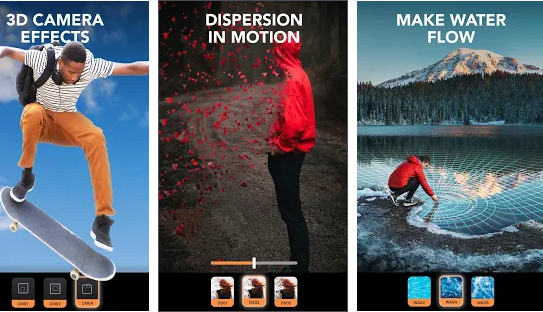
This animation creator lets you create and edit moving photos with easy and powerful editing tools, bringing life to images, creating animation picture effects and cinemagraphs.   Animate photos and add picture effects to watch your image come to life as incredible videos that boomerang back and forth or flow like a GIF.

download - 2020-07-13T143716.478


The app is free to download from Gooogle Play and the Apple Store. 

Posted in Cool Tool

Monday Morning Cool Tool: PocketVideo

I love learning about new tools to make social media marketing more creative and effective, so I  share some of my favourite tools with you at the start of each week. This week I’m recommending iOS video editing app PocketVideo.

download - 2020-01-13T121057.371

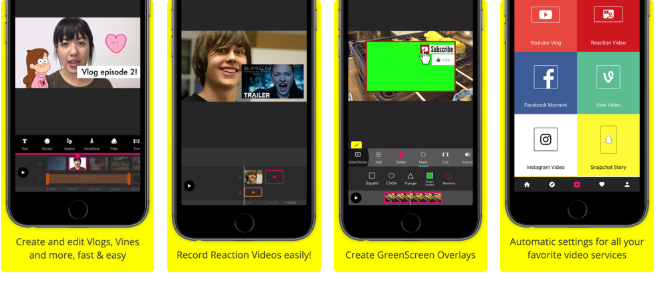
With PocketVideo you can create, shoot and edit your videos easily. The app supports any kind of video format: Horizontal (Landscape), Vertical (Portrait) or Square videos.

Features include:

  • Video Overlaying, Green Screen overlays and Picture in Picture.
  • Animated Doodle Tool to draw on top or your videos, synchronized with the playback.
  • Easy to use, one-tap “Reaction Cam” Feature for easy creation of reaction videos.
  • Commercial-free music library
  • Animated text titles
  • Stickers, GIFs and PNGs

If you want to create compelling and professional looking Youtube Vlogs, Snapchat Memories, Instagram Stories, Facebook Videos and more, then check out this app.

Posted in Cool Tool

Monday Morning Cool Tool: Mojo

I love learning about new tools to make social media marketing more creative and effective, so I’ve decided to share some of my favourite tools with you at the start of each week. This week I’m recommending Mojo video app – a free dedicated story-maker for Instagram.

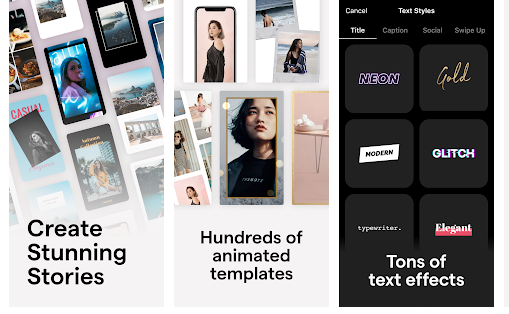
Mojo gives you access to 300+ templates. You can combine text effects and GIFs, add music and share your story on any social platform.

You don’t need an account. Just download the mojo story maker and start creating insta stories or video collage stories for other platforms with ease.

Upgrade to the Pro version ($39.99/year) to use your own logo and fonts.

Posted in Cool Tool

Monday Morning Cool Tool: Veed

Say goodbye to clunky video software and hello to one-click editing online with this week’s social media cool tool.

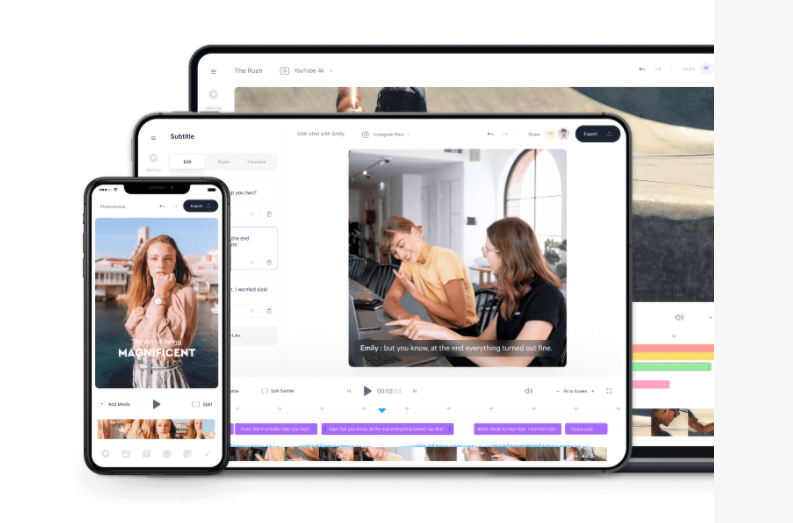
VEED is a simple online video editing platform – great for small editing tasks such as resizing videos, adding images, subtitles, text to videos and much more.

It’s perfect for anyone looking for simple and fast video editing without the need to install or set up complex software.

It’s free to use for videos under ten minutes and 250 MB; paid plans have start at $13 per month.

You can find out more about at VEED.IO

Posted in Cool Tool

Monday Morning Cool Tool: StoryArt

I love learning about new tools to make social media marketing more creative and effective, so I’ve decided to share some of my favourite tools with you at the start of each week. This week I’m recommending StoryArt, a freemium app for more creative Instagram Stories and Reels.

StoryArt is an Instagram story editor app that offers 2000+ customizable story templates to help you create beautiful collage layouts for Instagram Stories and Reels.  You can add in your own photos and videos, change fonts and colors, add captions, or even edit video speeds. When you’re done, you can share it to your Instagram story with a single click.

The app is free but if you want access to extra tools, filters, and layouts, there is a monthly fee of  $2.99 or a full-year subscription for $9.99. 

StoryArt is available for both iOS and Android.

Posted in Cool Tool

Monday Morning Cool Tool: MockoFUN

I love learning about new tools to make social media marketing more creative and effective, so I’ve decided to share some of my favourite tools with you at the start of each week. This week I’m recommending browser-based graphic designer tool MockoFUN.

The_Best_Online_Graphic_Design_Tool_MockoFUN

An intuitive drag and drop online graphic design tool, you can easily use and customize hundreds of pre-made mockups and templates to edit text and photo and create logos.

You can use MockoFUN for free or you can also upgrade to premium or access to extra resources and unlimited access to all templates and mockups.

Posted in Cool Tool

Monday Morning Cool Tool: Later

I love learning about new tools to make social media marketing more creative and effective, so I’ve decided to share some of my favourite tools with you at the start of each week.

This week’s cool tool recommendation is Later, a scheduling and planning tool for Instagram.

d3d64a12-c671-4ed3-8f83-6968bef89adb

Use the app to sync photos and videos from your phone, desktop, Google Drive, or Dropbox and create a different content library for each Instagram account. And you can also search by hashtag, then save posts directly to your content library.

Pricing

You can add one account per user for free. Paid plans start at $9 per month.

Posted in Cool Tool

Monday Morning Cool Tool: Anchor

anchor

I love learning about new tools to make social media marketing more creative and effective, so I’ve decided to share some of my favorite tools with you at the start of each week. This week I’m recommending a super recording app called Anchor.

Anchor is an audio recording app for micro-podcasting, audio broadcasting, Q&As, and more. Features like sound clips and transcriptions make it simple to create audio for social media. Billed as “the easiest way to make a podcast, ever,” it lets you record a high-quality podcast, and distribute it everywhere (including Apple Podcasts) — all in one place. No fancy equipment or podcasting experience necessary, and it’s 100% free!