Posted in Cool Tool

Monday Morning Cool Tool: Unfold

I love learning about new tools to make social media marketing more creative and effective, so I’ve decided to share some of my favourite tools with you at the start of each week. This week I’m recommending photo editor  Unfold – an app to help you easily create and edit Instagram Stories templates.

download - 2019-11-29T134700.069

Once downloaded you can choose from a wide range of 150+ templates to add pages to an Unfold story,  use advanced text tools with curated fonts and add unique stickers and export your stories in high resolution for seamless sharing to Instagram.

·The app is free- however, some of its templates do require in-app purchases to unlock.

Posted in Cool Tool

Monday Morning Cool Tool: Over

I love learning about new tools to make social media marketing more creative and effective, so I’ve decided to share some of my favourite tools with you at the start of each week. This week I’m recommending free photo editing app Over

5c9b768ffeba5a2c10897461_premium-content@2x-min

This tool allows you to add text and captions to your photos, but equally, you get full access to stock photography on Unsplash, Pixabay and Google Images. Use it to create eye-catching designs and make them your own with our blending and masking tools, and use layers to edit elements in isolation.


Posted in Cool Tool

Monday Morning Cool Tool: Rank Tracker

I love learning about new tools to make social media marketing more creative and effective, so I’ve decided to share some of my favorite tools with you at the start of each week. This week I’m recommending keyword ranking tool  – Rank Tracker.

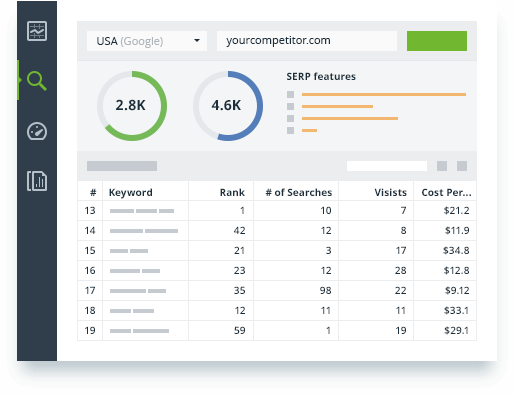
Use this tool to track keywords with no limit, check positions in SERPs, see rankings for the exact location, and analyze the ranking performance of any keyword — all in one ranking tool.

23 keyword tools in one

All the top keyword research tools are integrated right into the Rank Tracker keyword rank tool. Used together, these sources will give you thousands of keywords you wouldn’t have found elsewhere on the web.

screen-03

As you find keyword ideas, the tool will automatically group them by topic, so you can analyze and target entire keyword groups instead of going through bulks of terms one by one.

Geo-specific rankings

Rank Tracker is the only local rank tracking software that accurately checks positions for the exact location of your choice: country, state, city, or even an exact street address.

Keyword analysis

The keyword position checker will not only find thousands of keywords for your site; it’ll also help you pick the best ones and prioritize them for targeting.

screen-04

In addition to such SEO metrics as search volume data and competition, the rank checker can calculate Keyword Difficulty for every term — a complex metric that takes into account all SEO strengths and weaknesses of the sites of your top 10 competitors.

Competitive SEO intelligence

The keyword rank checker lets you track competitors’ keyword tactics and see how well they’re doing in organic search results. The rank checking software will track keywords your competitors already rank for. Analyze their valuable SEO metrics and weigh your chances to rank for those keywords as well.
ranking-keywords


Download Rank Tracker at www.link-assistant.com/rank-tracker

Posted in Cool Tool

Monday Morning Cool Tool: Keyword Tool

I love learning about new tools to make social media marketing more creative and effective, so I’ve decided to share some of my favorite tools with you at the start of each week. This week I’m recommending keyword tool  – Keyword Tool.

download - 2020-04-04T093638.936

You can use Keyword Tool for free, even without creating an account. The free version of Keyword Tool generates up to 750+ long-tail keyword suggestions for every search term.

You can also use the tool to find popular Twitter and Instagram hashtags. If you’re looking for keywords for your YouTube videos, Keyword Tool uses YouTube autocomplete feature to generate highly relevant long-tail keywords about a particular topic.  Keyword Tool for YouTube helps you get over 750+ long tail keywords from YouTube autocomplete by appending and prepending the keyword that you specify with various letters and numbers. To make keyword suggestions more relevant, Keyword Tool allows you to localize results to all countries and languages supported by YouTube.


Posted in Cool Tool

Monday Morning Cool Tool: Metricool

metricool-instagram-analytics-2020-home

I love learning about new tools to make social media marketing more creative and effective, so I’ve decided to share some of my favorite tools with you at the start of each week. This week I’m recommending Metricool – a social media marketing tool that analyzes, manages, and grows your social presence.

Metricool unifies the data from your web, social networks and online ads in one place, so it’s easy for you to check them, make the right decisions and improve your strategy.

download - 2020-03-29T101721.724

You can use it to create and manage your Google Ads and Facebook Ads campaigns, and compare the performance of both platforms to optimize your online advertising investment.

896a7a45-2919-4e7d-9051-377826ea87be

The free plan offers basic features.

If you want access to advanced features, opt for one of their paid plans.

Posted in Cool Tool

Monday Morning Cool Tool: Charcounter

I love learning about new tools to make social media marketing more creative and effective, so I’ve decided to share some of my favourite tools with you at the start of each week. This week I’m recommending Charcounter –  a free tool that will count the number of characters, letters and words in your text.

download - 2020-02-23T211549.779

It’s a simple tool but certainly useful.

Posted in Cool Tool

Monday Morning Cool Tool: Hype Type

8cd84772-826d-4571-85a2-925cb7cf67e8

I love learning about new tools to make social media marketing more creative and effective, so I’ve decided to share some of my favourite tools with you at the start of each week. This week I’m recommending video text animator Hype Type.

Hype Type is an iOS app that lets you add moving text and typography over images. It’s a super useful tool for Instagram Stories.

Hype Type also provides easy-to-use editing tools for speeding up, slowing down, flipping, or reversing your videos.

Once you’re happy with how your image looks, export it for sharing on Instagram, Facebook, Twitter, or wherever else you want to showcase your motion typography-enhanced photo or video.

Posted in Cool Tool

Monday Morning Cool Tool: Giphy

I love learning about new tools to make social media marketing more creative and effective, so I’ve decided to share some of my favourite tools with you at the start of each week. This week I’m recommending Giphy  – a source of free animated gifs.

Why use Gifs?

Hootsuite recommends the use of Gifs “to spice up, excite and wake up your social audience.”

A little motion makes your content marketing more memorable. Though use sparingly, otherwise it distracts rather than enhances.

This Friday is #CappuccinoDay  so why not celebrate with a Gif like the one below?

Posted in Cool Tool

Monday Morning Cool Tool: Mail Tester

download - 2019-08-11T125603.063

I love learning about new tools to make social media marketing more creative and effective, so I’ve decided to share some of my favourite tools with you at the start of each week. This week’s cool tool recommendation will be of interest to those of you who send email marketing (like newsletters) to subscribers.

Mail Tester is a free tool which tests the “spammyness” of your email. It will analyze your message, your mail server, your sending IP and assign you a spam score along with a detailed report of what’s configured properly and what’s not.

Your result will be accessible for 7 days with the free version or 30 days if you created an account and used your own prefix.

Visit https://www.mail-tester.com to try it out.


You might also like to read How to Build Your Email List On A Firm Foundation


Posted in Cool Tool

Monday Morning Cool Tool: Listen Notes

3430d8098532468ca657e210f21cdaf8.jpg
Image Source: Listen Notes

I love learning about new tools to make social media marketing more creative and effective, so I’ve decided to share some of my favourite tools with you at the start of each week. This week’s cool tool recommendation is Listen Notes  – a free podcast search engine.

With this tool, you can not only search the whole Internet’s podcasts, but you can also curate your own podcast playlists. (Note that the Listen Notes search engine is designed to help you find content such as people topics, not specific shows.)  If you’re researching a specific person or topic, the search tool can help you find related episodes from a range of podcasts. You can then add results that interest you to a playlist.  After you create a playlist in Listen Notes, you receive a playlist URL that you can copy and paste into your favorite podcast app so you can listen to that playlist. You can also use the URL to share the playlist.

More cool features include the clipping feature which lets you annotate, save, and share audio clips from podcast episodes.  You can add individual episodes to Listen Later playlists and bring these playlists to your podcast player apps via RSS.

The tool is totally free and if, as many people are these days, you are a podcast fan, you will want to add this tool to your toolkit.