Posted in AI, Cool Tool

Monday Morning Cool Tool: MagicRoll.ai

This week’s tool cool recommendation is TextJam – an AI-powered writing editor.

Features

  • Pen vs. Pencil editing model — You can “lock in” parts of your draft (pen) that are final, and mark other parts (pencil) for the AI to polish or rework. It’s a neat way to preserve your unique voice while getting help.
  • Inline prompting and co-writing — Instead of pasting chunks into a separate chat or prompt box, you can leave notes directly in your document. That makes the workflow more fluid and context-aware.
  • Flexible collaboration — Whether you’re working solo, with co-authors, or with AI, TextJam supports a multi-user, real-time editing environment. Great for team writing, co-writing books, or peer-review workflows.
  • Smart editing + reflow capabilities — You can resize sections (sentences, paragraphs, entire blocks) and ask the AI to rework them to match the new length/flow — useful for trimming, summarising or expanding without losing clarity.

Pricing

TextJam offers a free trial. Paid plans start at US $10/month (Starter), which gives access to AI-assisted words, real-time dictation, narration, and a limited number of real-time collaborators.


Posted in AI, Cool Tool

Monday Morning Cool Tool: MagicRoll.ai

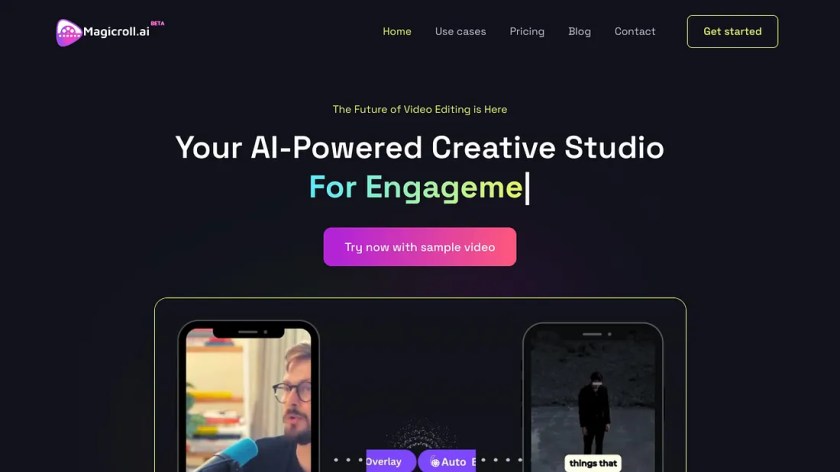
This week’s tool cool recommendation is MagicRoll.ai – an AI-powered video editing tool that automates video creation.

If you often film talking-head videos, short explainers, reviews, tutorials, or social clips, this is very much the type of tool built for you.

Features

  • Adds b-roll for you — The tool automatically selects and inserts complementary footage (B-roll) into your main video (A-roll)
  • Swaps your background — you can change your backdrop with a single click.
  • Generates subtitles automatically — in multiple languages, which is great for accessibility and reach.

Pricing: There’s a 30-day trial with credits, so you can see whether it fits your workflow before paying for anything.


Posted in AI, Cool Tool

Monday Morning Cool Tool: Lummi

This week’s cool tool recommendation is Lummi, an AI-powered stock image site.

Lummi offers free (and paid-upgrade) stock visuals: photos, illustrations, and 3D assets. Their free images are available for both personal and commercial use. The licence allows for editing and combining, meaning you can adapt images to your brand/style (colour palette, etc.). However, while Lummi states broad rights, you still should review the specific licence version applicable at download time.

Posted in AI, Cool Tool

Monday Morning Cool Tool: getimg.ai

This week’s cool tool recommendation is getimg.ai – an AI image generator.

Features

  • Image Generator – Create images from text.
  • Video Generator – Create short videos from images or text prompts.
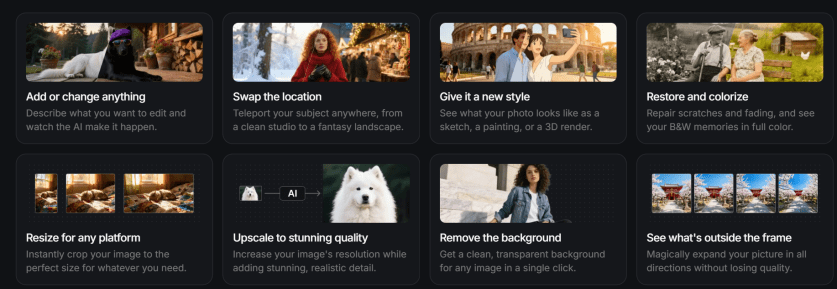
  • Image Editor – Edit images with AI (great for retouching, background tweaks, or adding new elements).
  • AI Resizer – Resize or upscale images intelligently without losing quality.
  • Uncrop – Expand images beyond their borders (handy for banner or social post layouts).
  • BG Remover – Instantly remove or replace backgrounds.
  • Vector Generator: Convert raster images into crisp, editable vector files.
  • Mockup Creator: Drop your designs into real-world settings instantly.
  • Recolouring & Text Remover: Adjust tones, palettes, or typography with ease.

Pricing

The free plan includes 40 credits per day and access to three image models — more than enough to experiment and explore its capabilities. Paid tiers unlock higher limits and advanced features for power users.

Posted in AI, Cool Tool

Monday Morning Cool Tool: Subtitle

This week’s cool tool recommendation is SubtitleBee- an auto caption generator.

Captions don’t just make your content accessible to people who are deaf or hard of hearing—they help everyone. They keep viewers watching on mute, boost comprehension for non-native speakers, and even improve SEO.

Healthcare is global, and so are its audiences. Captions and subtitles bridge not only hearing differences but also language gaps, literacy levels, and learning styles. Captions don’t just improve accessibility; they improve performance. Most people scroll social media on mute—especially in healthcare spaces where privacy matters. Captioned videos hold attention longer, encourage shares, and boost recall. They also help algorithms index your content for search and translation, extending the life of your message online.

Luckily, a wave of AI-powered caption tools can now generate subtitles for us. SubtitleBee also includes translation in over 100 languages. It also offers editing of timing, styling (fonts, colours, backgrounds) and branding (logos/custom overlays) so your captions look professional.

Key things to look out for

  • Check the free-plan limits (e.g., number of videos, video length) so you don’t hit an unexpected paywall.
  • Make sure your translations are accurate (even with AI support you may need to tweak terminology).
  • When styling captions, ensure readability: font size, background contrast, sufficient on-screen duration.
  • For training/advocacy, make sure captions are not an afterthought: they’re part of the message.
  • Consider exporting both burnt-in captions and separate caption files (SRT/VTT) for different uses.
  • For inclusive accessibility: include captions even when sound is on; helpful for learners with hearing differences, non-native speakers, and those watching without audio.
  • Don’t forget to review/edit to ensure accuracy (especially technical terms, names, medical/advocacy vocabulary).

Posted in AI, Cool Tool

Monday Morning Cool Tool: Recraft

This week’s cool tool recommendation is Recraft – an AI image generator.

Recraft turns your text prompts into high-quality visuals in a consistent, customisable style. You can define your own brand palette, adjust colours and composition, and even refine outputs with built-in editing tools such as background removal and upscaling.

Unlike many AI image generators that only produce raster files (pixel-based images that blur when enlarged), Recraft also creates vector graphics (SVGs) — images built from shapes and lines rather than pixels. That means they stay sharp at any size and can be easily edited or recoloured later in tools like Illustrator, Canva, or Figma.

Features:

  • AI image generator & editor – Create, refine, and enhance visuals from text prompts.
  • AI vector generator & image vectorizer – Turn raster files into clean, editable vector art.
  • Mockup generator – Instantly visualise designs in real-world settings.
  • AI photo editor, upscaler, background remover, eraser, and image combiner – Edit, sharpen, or expand your images with simple, intuitive controls.
  • Recolouring and text remover tools – Quickly adjust tones, palettes, and typography.
  • Image expanding – Extend the boundaries of an existing image without losing composition.

It also supports a full range of format conversions — from JPG to SVG, PNG to SVG, WebP or JPG to Lottie, and JPG to TIFF, with custom DPI and CMYK options for print-quality output.

Pricing

  • Free plan: Get started at no cost. Daily credit allowance; images appear in the public gallery.
  • Pro plan: From around US $10/month (billed annually). Includes full commercial rights, private image generation, and ~1,000 monthly credits.
  • Higher tiers: Up to ~US $48/month for heavier use with larger credit allowances.
    (Free plans have limited rights and credits don’t roll over each month.)

Posted in AI, Cool Tool

Monday Morning Cool Tool: Visla

This week’s tool-cool recommendation is Visla—an AI-powered video creation and editing tool.

Visla helps users create professional videos with features such as screen recording, narration assistance, and text overlays. With Visla’s AI capabilities, narratives can be made from a script, a blog post, or simply a few bullet points.

Key Features

  • Collaboration Tools: Streamline feedback and approval processes.
  • Customization Options: Tailor your videos to your brand and message.
  • Easy-to-Use Interface: Create professional videos even if you’re a beginner.

Visla offers a free subscription plan with 50 minutes of video creation per month.

Visit https://www.visla.us for more information.

Posted in AI, Cool Tool

Monday Morning Cool Tool: Descript

This week’s tool cool recommendation is an AI video generator – Descript.

Descript is a text-based editing system, making it easier for those who are not familiar with video editing to create professional videos.

Top Features

Automated Transcription: Manually transcribing audio and video files can be a tedious and time-consuming process. Descript streamlines this by automatically transcribing your recordings in up to 23 languages. The real magic is that you can edit your audio or video simply by editing the transcribed text. Descript’s automatic transcription capabilities are a major time-saver, making it easy to repurpose your content or create subtitles.

Overdub Voice Cloning: Type in the corrected or missing text, and Descript will generate the new audio in your voice or even a cloned voice of a guest, making the process seamless and efficient.

Studio Sound Editing: Studio Sound elevates your audio quality, ensuring your content sounds professional and polished.

Video Green Screen and AI Eye Contact: Descript’s green screen background editor allows you to change the background of your videos, giving you more control over your presentation. The AI eye contact feature subtly adjusts your gaze to maintain eye contact with the camera, adding a touch of realism and engagement to your video.

While there are many great benefits to this tool, it’s worth noting that for novices, the text-based editing approach may take some getting used to, especially for those familiar with traditional timeline-based editors.

Pricing

Descript offers a range of pricing plans to suit different needs:

  • Free Tier
  • Creator Tier: $15 per user per month
  • Pro Tier: $30 per user per month
  • Enterprise Tier: Custom pricing

Posted in Cool Tool

Monday Morning Cool Tool: Filmora

This week’s cool tool recommendation is Filmora a user-friendly video editing tool.

Filmora offers a balance of powerful features and an intuitive interface, making it accessible for those new to video editing while still providing tools for more creative projects.

Key Features

Filmora boasts a wide array of features, including:

  • Basic Editing: Trimming, cutting, splitting, merging, rotating, and adjusting video speed.
  • Visual Effects: A large library of filters, transitions, titles, and motion elements.
  • Audio Editing: Tools for adjusting audio levels, adding background music, recording voiceovers, and noise reduction.
  • Colour Correction and Grading: Options for adjusting colour balance, applying LUTs, and enhancing the visual look of videos.
  • Text and Titles: Customisable text and title templates, including animated options.
  • Motion Tracking: The ability to track objects within a video and apply effects or elements that follow their movement.
  • Green Screen (Chroma Key): Tools for removing and replacing backgrounds.
  • Screen Recording: The ability to record your computer screen.
  • AI-Powered Features: Recent versions include AI tools like:
    • AI Text-Based Editing: Editing video by manipulating its transcription.
    • AI Music Generator: Creating royalty-free background music.
    • AI Portrait Cutout: Removing video backgrounds.
    • AI Smart Masking: Automatically creating masks around objects.
    • AI Audio Denoise: Reducing background noise in audio.
    • AI Voice Enhancer: Improving vocal clarity.
    • AI Smart Cut: Identifying and clipping interesting moments.
    • AI Smart Short Clips: Creating short clips for social media.
    • AI Image to Video: Turning still images into moving videos.
    • AI Sound Effect Generator: Creating custom sound effects from text prompts.
    • AI Voice Cloning: Creating an AI voice clone.
    • AI Translation & Lip Sync: Translating speech and syncing it to lip movements.
  • Templates and Assets: Built-in templates, royalty-free music, sound effects, and the ability to access more through the Filmora Effects Store.
  • Social Media Integration: Features designed for creating content for platforms like YouTube, TikTok, and Instagram, including auto-reframe tools.

Pricing

Filmora offers a free version that gives you access to basic editing tasks and access to a selection of built-in filters, transitions, titles, and motion elements. It’s a great way to try out the software, learn its interface; however, the watermark on exported videos makes it unsuitable for projects where a professional, unbranded output is necessary. To remove the watermark and access the full range of features and assets, you would need to purchase a paid subscription or a perpetual license.

Posted in AI, Cool Tool

Monday Morning Cool Tool: Opus Clip

This week’s cool tool recommendation is Opus Clip an AI-powered video repurposing tool.

OpusClip’s AI analyzes your content, finds the most engaging moments, and turns them into short, shareable clips—complete with captions and resized formats for social media, all in minutes.

Perfect for:

  • Webinar highlights
  • Podcast clips
  • YouTube interview snippets
  • Thought-leadership content

Key Features & Benefits:

  • AI Curation: OpusClip’s AI scans your video, pinpointing highlights, key takeaways, emotional peaks, and impactful visuals. It then stitches these together to create concise, compelling clips that retain the essence of the original while catering to shorter attention spans.
  • AI B-Roll & Overlays: Seamlessly enhance your clips with AI-generated or stock B-roll footage, as well as overlays, captions, and other visual elements to maintain viewer interest and reinforce key messages.
  • Customisable Brand Templates: Apply your own fonts, colours, and logos to ensure each clip is instantly recognisable and aligned with your brand identity.
  • Auto-Captions & Filler Word Removal: Generate accurate, multi-language captions in seconds while automatically removing “ums,” pauses, and filler words for a polished, professional final product.
  • Multi-Platform Optimisation: Create clips tailored for TikTok, Instagram Reels, YouTube Shorts, LinkedIn, and more—maximising reach and engagement across platforms.

Further Reading: Work Smarter, Not Harder: How to Extend the Life of Your Social Content