Posted in Cool Tool

Monday Morning Cool Tool: StoryArt

This week I’m recommending StoryArt, a freemium app for more creative Instagram Stories and Reels.

StoryArt is an Instagram story editor app that offers over 3,000 customizable collage and animated story templates for Instagram Stories and Reels.  In addition, you can access  500+ post templates for feed posts and 500+ highlight cover templates to beautify your profile.

The app is free but if you want access to extra tools, filters, and layouts, there is a monthly fee of  $2.99 or a full-year subscription for $9.99. 

StoryArt is available for both iOS and Android.

Posted in AI, Cool Tool

Monday Morning Cool Tool: OpenArt.ai

This week I’m recommending OpenArt.ai – an AI-powered art platform that allows users to create, edit, and enhance images using artificial intelligence.

Key Features

AI Image Generation
Create images from text prompts using a range of advanced models, including DALL·E 3 and Stable Diffusion. You can also generate visuals without prompts, offering boundary-free creative exploration.

Advanced Image Editing Tools
OpenArt includes a robust suite of AI editing capabilities to refine your work, such as:

  • Inpainting & Outpainting – Add, remove, or expand elements in your image beyond its original frame.
  • Upscaling – Improve image resolution to produce crisp, detailed artwork.
  • Background Removal & Replacement – Effortlessly swap or eliminate image backgrounds.
  • Find & Replace – Replace specific objects using simple text prompts.
  • Consistent Characters – Generate the same character in multiple poses, styles, and scenes—ideal for storytelling or brand consistency.
  • Facial Editing – Adjust expressions, eye color, or hairstyles for fine-tuned control.

Customization & Creative Control
You can train custom models to reflect your unique style and use “Image Guidance” to steer outputs based on reference images (pose, style, composition, etc.).

Community & Learning Resources
Access a vibrant community feed, Discord support, tutorials, and prompt books to help you get the most from the platform.

Image to Video Tool
Transform static images into dynamic videos in just a few clicks.

Pricing

OpenArt offers a free trial with limited credits for new users. For ongoing or professional use, there are several paid plans—Essential, Advanced, Infinite, and Team—each offering increasing credits, features, and simultaneous generations. Costs vary based on the tools and AI models you use.

Posted in AI, Cool Tool

Monday Morning Cool Tool: The Urlist

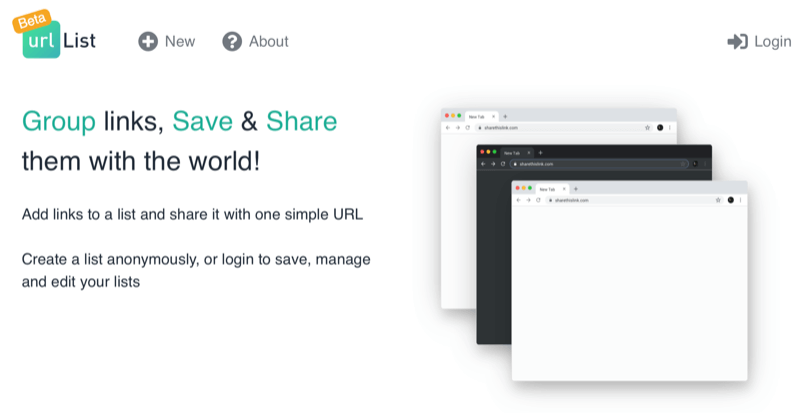
This week I’m recommending The Urlist – a simple way to share multiple links with a single URL.

How it works

Just paste in the links you want to share, and The Urlist automatically pulls in titles and descriptions using Open Graph metadata. You can rearrange the order, customise the URL if you like, and hit publish. You now have a single link to a curated list of resources.

Use it for:

  • Post-event resource lists
  • Email footers with curated reading
  • Link collections for students or patients
  • Collaborative planning (e.g., shared articles for discussion)

Pricing

Completely free. No sign-up is needed unless you want to save and edit lists later (in which case you can log in using your X/Twitter account).

Try it here: https://www.theurlist.com

Posted in AI, Cool Tool

Monday Morning Cool Tool: insMind

This week I’m recommending insMind – a text-to-image AI tool.

How It Works

The process is very straightforward. Simply enter a short prompt, click ‘Generate,’ and insMind converts your text into an image. The tool offers a variety of artistic styles to choose from, including realistic photos, abstract art, and cartoon illustrations.

You can also enhance your pictures using insMind’s suite of AI image tools. like AI image expansion, AI filters, and object removal.

InsMind is available for free, though the free version includes a watermark and has limited download capabilities. To remove the watermark and gain access to additional styles, templates, and increased downloads, you can try the Pro version with a 7-day free trial.

Posted in #HCSM

A Strategic Guide to Instagram Stories for Healthcare Communicators in 2025

Instagram Stories aren’t just a social feature; they’re a communication channel with real strategic value. For healthcare communicators, this format is a versatile tool that can carry everything from urgent health updates to nuanced patient education.

Stories allow you to connect in ways that are immediate, visual, and personal. The question is no longer whether to use Instagram Stories—it’s how to use them well.

Why Stories Still Matter in Healthcare

Stories aren’t like regular posts. They disappear after 24 hours, but their impact can last far longer. They’re direct, sequential, and immersive—perfect for walking someone through a quick tip, showing what happens behind the scenes, or debunking a common myth.

Done well, Stories can turn passive viewers into active participants: clicking links to book a screening, watching a tutorial on inhaler technique, or submitting a question to a specialist. That kind of engagement is hard to come by—and it’s worth building for.

From Swipe to Substance: Making the Most of the Format

The Stories format is fast, but that doesn’t mean your strategy should be rushed. Success comes from combining thoughtful design with genuine purpose.

Here’s how to approach it:

  • Keep it clean: Avoid cramming too much into one slide. One idea per frame works best. Use icons, colour cues, and simple language to guide people through your message, whether it’s a flu vaccine update or a healthy eating tip.
  • Put a face to the facts: Audiences respond more positively to real people. A brief clip of a nurse explaining when to go to urgent care, or a physiotherapist demonstrating a stretch, does more for credibility than any stock image ever could.
  • Be consistent, not flashy: Templates and visual identity matter, but don’t get lost in the aesthetics. What matters most is clarity, tone, and rhythm. Use the same fonts, colours, and voice across Stories to build trust and recognition over time.

Formats That Work: Proven Story Structures for Healthcare

There’s no one-size-fits-all formula, but some formats lend themselves naturally to healthcare communication. Here are a few to start with:

  • Quick Series: Break a larger message into smaller chunks. For example, “3 ways to support someone with epilepsy” could run across three slides—each one focused, clear, and actionable.
  • Myth vs Fact: Tackle misinformation head-on. Start with a bold claim on Slide 1 (“You can’t exercise if you have a heart condition”), then swipe to the evidence-based clarification with a trusted source.
  • Behind the Scenes: Show your human side. A look inside a vaccination centre, an introduction to a midwife team, or a day-in-the-life view from a community health worker builds transparency and warmth.
  • Call to Action: Don’t forget to guide your audience. Whether it’s “Swipe up to check symptoms,” “Tap here to book,” or “Share with someone who needs this,” make your ask clear and easy to follow.

Continue reading for free on Substack

Posted in AI, Cool Tool

Monday Morning Cool Tool: Descript

This week’s tool cool recommendation is an AI video generator – Descript.

Descript is a text-based editing system, making it easier for those who are not familiar with video editing to create professional videos.

Top Features

Automated Transcription: Manually transcribing audio and video files can be a tedious and time-consuming process. Descript streamlines this by automatically transcribing your recordings in up to 23 languages. The real magic is that you can edit your audio or video simply by editing the transcribed text. Descript’s automatic transcription capabilities are a major time-saver, making it easy to repurpose your content or create subtitles.

Overdub Voice Cloning: Type in the corrected or missing text, and Descript will generate the new audio in your voice or even a cloned voice of a guest, making the process seamless and efficient.

Studio Sound Editing: Studio Sound elevates your audio quality, ensuring your content sounds professional and polished.

Video Green Screen and AI Eye Contact: Descript’s green screen background editor allows you to change the background of your videos, giving you more control over your presentation. The AI eye contact feature subtly adjusts your gaze to maintain eye contact with the camera, adding a touch of realism and engagement to your video.

While there are many great benefits to this tool, it’s worth noting that for novices, the text-based editing approach may take some getting used to, especially for those familiar with traditional timeline-based editors.

Pricing

Descript offers a range of pricing plans to suit different needs:

  • Free Tier
  • Creator Tier: $15 per user per month
  • Pro Tier: $30 per user per month
  • Enterprise Tier: Custom pricing

Posted in #HCSM

Is Search Still the Starting Point for Patients Seeking Health Information?

In 2024, 65% of Google searches ended in zero clicks. More people are finding answers directly in AI-generated summaries, TikTok videos, Reddit threads, and “People Also Ask” boxes—without ever visiting a website.

For healthcare communicators and marketers, this shift isn’t just about SEO rankings—it’s about visibility, credibility, and relevance in an increasingly fragmented discovery landscape.

In my latest Substack article, I discuss why Google is no longer the only gateway to health content and what this means for your content strategy going forward.

đź”— Read the full article

Posted in Cool Tool

Monday Morning Cool Tool: Bitly

This week, I’m recommending Bitly – a handy URL shortener tool.

How we share information in healthcare is just as important as what we share. The link itself is part of the message, whether it’s an educational resource, a campaign sign-up link, or an event registration page. Here’s where Bitly comes in.

What Is Bitly?

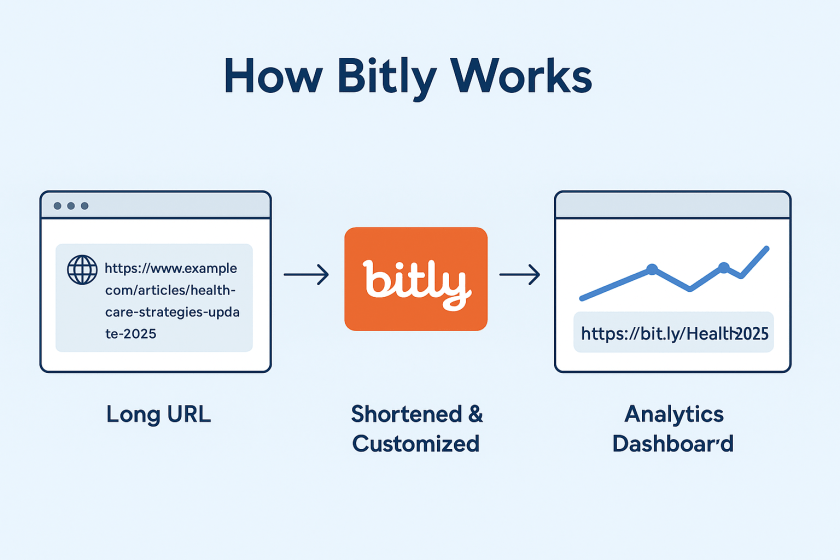
Bitly is a platform that takes long, often unwieldy URLs and shortens them into compact links that are easier to share and track. It’s one of the most widely used URL shorteners in the world and is trusted by organisations ranging from global brands to local nonprofits.

Let’s say you’re running a digital campaign for epilepsy awareness. You’ve created a resource page that lives at: https://yourorg.org/programmes/epilepsy-awareness-week-2025/download-resources
That’s a lot to include in a tweet, an Instagram bio, or a printed flyer. With Bitly, you could shorten it to: https://bit.ly/epilepsyweek2025
Much better, right?

But more importantly, you can track how that link performs. How many people clicked it? Where were they located? Did one social platform drive more traffic than another?

What Else Can You Do with Bitly?

Once you’re inside the platform, you’ll find several additional features that make Bitly especially powerful for healthcare communication and outreach.

🔹 Link Customisation
You can edit the end of a Bitly link to make it more descriptive or branded, like:
bit.ly/CaregiverGuide2025
This improves trust and helps people understand what they’re clicking on.

🔹 Analytics Dashboard
Bitly provides real-time data on link performance, including:

  • Click volume
  • Geographic location of users
  • Referral sources (e.g., Twitter, email, WhatsApp)

🔹 Branded Domains (Paid)
With a paid plan, you can use your own short domain (like yourclinic.org/guide) to create even more trust and continuity in your communications.

🔹 Link Management Tools
You can organise links into folders, label them by campaign, and even set expiration dates for time-sensitive URLs (paid feature)

🔹 QR Codes

Every time you shorten a link with Bitly, you also have the option to create a QR code with a single click. That means you can easily place your link on:

  • Clinic posters
  • Flyers and leaflets
  • Event banners
  • Conference slides
  • Prescription inserts or appointment cards

QR codes make it effortless for patients, staff, or the public to scan and access information using just their phone – no typing required. For example, a hospital running a flu vaccination campaign uses a Bitly link to direct patients to the booking form. They place the QR code version of that link on posters in waiting rooms, allowing patients to scan and schedule right from their seats.

Is Bitly Free?

Yes—and no. Bitly offers a free plan that allows basic link shortening, custom back-halves, and limited analytics. For more advanced features like branded domains, deeper analytics, and team collaboration, they offer tiered paid plans.

For small teams or individual professionals, the free plan is often enough. For hospitals, health systems, or nonprofits running large campaigns, the paid options can be well worth the investment.

Posted in #HCSM

How a Tiny Link Can Make a Big Impact: The Surprisingly Powerful Role of Short Links in Healthcare Communication

A few weeks ago, I sent a patient education link to a colleague via WhatsApp. It was long, so long that it broke into two lines on her screen, making it difficult to click, especially on mobile. “What is this?” she messaged back, hesitant to open something that looked confusing and, frankly, suspicious. Her response made me reflect on how something as mundane as a URL—the link itself—can either support or undermine trust in a healthcare setting.

Why Short Links Matter in Healthcare

In clinical practice, public health campaigns, and health education, we often think about what we say, but not always about how we share it. Clarity, confidence, and usability matter, especially when you’re dealing with sensitive health topics or time-pressed readers. A shortened URL isn’t just tidier. It’s more accessible, more user-friendly, and often more trustworthy—if used wisely.

Let’s say you’re linking to a new vaccination clinic schedule or a sign-up page for a mental health webinar. Here are your two options:

https://healthsystem.gov/community/events/primary-care/mental-health-week-2025/register-now-form.html

or

https://yourclinic.org/mhweek2025

Which one feels easier to trust and click?

Beyond the Aesthetics: What Shortened URLs Actually Do

A URL shortener takes a long, complex link and generates a much shorter one that redirects to the same destination. But the best tools offer more than just a cosmetic makeover—they provide tracking, branding, and behavioural insight.

Many shorteners (like Bitly, Rebrandly, and TinyURL Pro) allow you to:

  • Track click-through rates (how many people actually click your link)
  • See geographic data and referral sources (helpful for outreach campaigns)
  • Customise the back-half of the link for clarity and brand alignment

In other words, shortened links don’t just look better—they help you communicate better.

Continue reading this article for free on Substack

Posted in Cool Tool

Monday Morning Cool Tool: CoSchedule’s Subject Line Tester

This week, I’m recommending CoSchedule’s Subject Line Tester.

CoSchedule’s Email Subject Line Tester is a free online tool designed to give you instant feedback on your subject lines. It analyzes your headline against a database of successful emails, providing a score and actionable recommendations to help you boost your open rates and overall email campaign performance.

How to Use the Tester in 5 Simple Steps

  1. Type Your Subject Line: Simply enter the subject line you’re considering into the provided field on the CoSchedule website.
  2. Get Instant Analysis: The tool immediately processes your input and provides an analysis.
  3. Receive a Score & Breakdown: You’ll get a numerical score (typically out of 100) along with a detailed breakdown of its strengths and weaknesses.
  4. Review Suggestions: The tester provides specific suggestions for improvement, such as adding power words, emotional words, or adjusting its length for optimal readability.
  5. Refine and Test Again: Tweak your subject line based on the feedback and re-test until you achieve a score you’re happy with. It’s an iterative process that leads to better results!

The beauty of CoSchedule’s tester lies in its comprehensive analysis. It doesn’t just give you a score; it breaks down your subject line’s effectiveness across several critical factors. You’ll see how your subject line performs based on:

  • Overall Score: A quick check of your subject line’s predicted performance.
  • Word Balance: It assesses the mix of common, uncommon, emotional, and power words, guiding you towards a more impactful blend.
  • Length: Provides recommendations for ideal character and word counts to ensure readability on various devices.
  • Sentiment: Analyzes whether your subject line conveys a positive, negative, or neutral tone.
  • Spam Triggers: Helps you identify and avoid words or phrases that might trigger spam filters.
  • Preview: Shows you how your subject line will likely appear in common inbox displays, so you can catch truncation issues.
  • Keywords: Highlights strong keywords that resonate with your audience and search intent (if applicable).

Best Practices for Writing Effective Email Subject Lines

While the tester is fantastic, remember these timeless best practices that the tool helps you optimize for:

  • Be Clear & Concise: Get straight to the point. Subscribers should know what your email is about at a glance.
  • Create Urgency/Scarcity (where appropriate): Phrases like “Limited Time Offer” or “Don’t Miss Out!” can drive immediate action.
  • Personalization: Using the recipient’s name or other relevant data can significantly boost engagement.
  • Pique Curiosity: Ask a question or hint at valuable information to encourage an open, but always deliver on that promise inside the email.
  • Focus on Benefit: What’s in it for the reader? Highlight the value they’ll gain by opening your email.
  • Use Emojis Sparingly: Emojis can boost open rates, but use them thoughtfully and know your audience. Too many or irrelevant emojis can look unprofessional.
  • A/B Test Relentlessly: The best way to know what works for your audience is to test different subject lines against each other.

Curious about the effectiveness of this blog post’s title as an email subject line, I entered it into the tool. Take a look at its performance score below:

Here’s an improved score with a different heading; however, it has too many words.

Click Here to Try CoSchedule’s Email Subject Line Tester