Posted in Cool Tool

Monday Morning Cool Tool: FindSounds

This week’s cool tool recommendation is FindSounds – a website and search engine to assist in locating specific sounds or audio clips.

FindSounds is a search engine for locating specific audio clips and sound effects. Use it to add professional polish to multimedia projects and digital content. You can search for background music, ambient sounds, or specific audio elements to match the theme of your content.

For live streaming or webinars, you can use FindSounds to find intro music, outro music, or background music to make your broadcasts more polished and engaging. You can also use it to add sound effects for interactive elements or notifications.

You might also like to consider searching for music and sounds via Soundcloud.

Posted in #HCSM

Monday Morning Cool Tool: Ribbet

This week I’m recommending Ribbet – a user-friendly online photo editor.

Ribbet’s intuitive interface and straightforward tools make it accessible to everyone.

Here are some noteworthy features:

  • Ribbet’s interface is designed for simplicity, allowing you to crop, resize, adjust brightness, or enhance colors easily.
  • Ribbet’s extensive library of filters and effects helps you find the perfect filter to enhance your images.
  • Whether you want to add a catchy caption or a fun emoji, Ribbet makes it easy to customize your visuals.
  • Ensure your photos look their best on any platform with Ribbet’s resizing and cropping tools. Easily adjust your images to the optimal dimensions for Instagram, Facebook, X, and more.
  • Need to quickly remove a blemish, or whiten teeth? Ribbet has those tools as well.
  • Finally, if you are looking for a quick start, Ribbet has many templates that allow you to easily create content.

What I like best about Ribbet is how user-friendly it is. Its intuitive interface and social media-ready tools make it a great choice for anyone looking to elevate their graphics. And the best part? It’s totally free. So, ditch the complicated software and give Ribbet a try.

Posted in #HCSM

Handling Misinformation on Social Media

This post is part of my series on social media challenges faced by healthcare communicators.

Misinformation spreads rapidly on social media, especially in the healthcare space. From misleading “miracle cures” to conspiracy theories about vaccines, false health claims can cause confusion, undermine trust in medical professionals, and even put lives at risk. In an age where social media serves as a primary source of health information for many, healthcare communicators must be on the frontlines of combating misinformation with accurate, evidence-based content.


The Challenge: The Spread of Health Misinformation

The nature of social media algorithms and human behaviour makes battling misinformation especially difficult for healthcare organisations.

❌ Rapid Spread – Misinformation often spreads more quickly than factual content because it tends to be sensational, emotionally charged, or “too good to be true.” Studies show that false information spreads significantly faster on platforms like X (formerly Twitter) compared to accurate, fact-checked information.

❌ Erosion of Trust – When false claims about healthcare go viral, they can undermine trust in legitimate sources, including hospitals, doctors, and public health authorities. Once trust is broken, it becomes much harder to re-establish credibility with your audience.

❌ Algorithmic Bias – Social media algorithms often prioritize content that generates high engagement, regardless of its accuracy. Unfortunately, misinformation tends to be more provocative and emotionally engaging, making it more likely to surface in users’ feeds.

❌ Complex Response – Correcting misinformation isn’t as simple as posting a fact-check. The way you respond matters—coming across as dismissive or condescending can alienate audiences, even if your information is correct. A respectful, empathetic approach is crucial for engaging audiences who may already be skeptical of traditional healthcare institutions.


Solutions: Strategies to Combat Healthcare Misinformation

1. Share Verified, Evidence-Based Content

Your first line of defense against misinformation is to ensure that everything you publish is accurate, clear, and backed by credible sources. This not only protects your organization’s reputation but also positions your brand as a trusted resource.

✔ Fact-Check Before You Post: Always verify information using reliable sources such as the World Health Organization (WHO)Centers for Disease Control and Prevention (CDC)National Institutes of Health (NIH), or peer-reviewed journals.

✔ Simplify Complex Topics: Medical jargon can alienate your audience. Break down complex health information into easy-to-understand language. Use analogies, plain language, and real-world examples to make scientific concepts more accessible.

✔ Cite Reputable Sources: Reference authoritative organizations in your posts, and where possible, link directly to the original research or official statements. This reinforces your credibility and allows readers to verify the information themselves.

💡 Practical Tip: Create engaging visual content such as infographics, explainer videos, or animated reels that simplify complex health information. Visual formats are often more shareable and digestible than lengthy text posts.

Continue Reading on Substack

Posted in Cool Tool

Monday Morning Cool Tool: Preview

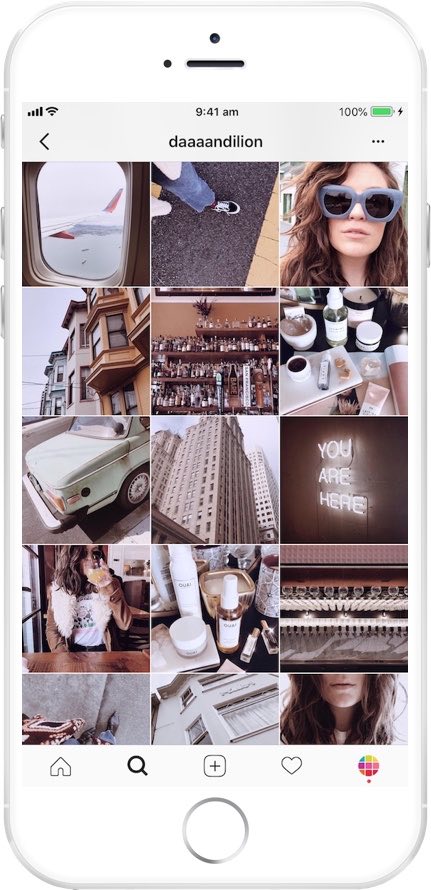
instagram-feed-planner-app-preview-8.jpg

This week’s cool tool recommendation is Preview, a super useful Instagram app.

Preview is an Instagram planner that simplifies content creation and helps you design a cohesive aesthetic and optimize your social media strategy. It allows you to see how your grid will look before hitting “post,” ensuring your feed stays cohesive and visually engaging.

Want to learn more?

Visit my Substack to learn more about the key features of Preview and pricing plans.


Posted in Cool Tool

Monday Morning Cool Tool: Thumbnail.Ai

This week’s cool tool recommendation is Thumbnail.Ai – a handy tool to generate thumbnails for your social media channels.

A thumbnail is a small, reduced-size image or preview of a larger picture, video, or document. Think of them as mini-billboards for your content. Whether it’s a YouTube video, a blog post, or an Instagram Reel, a compelling thumbnail is the first thing people see. The primary purpose of thumbnails is to provide a visual preview and assist users in quickly identifying and selecting content of interest without the need to open or load the full-sized version. Thumbnails are typically much smaller in size compared to the original content, making them easily manageable and loadable, even on devices with limited screen space or slower internet connections.

  • Image Galleries: From photo apps on your phone to online portfolios, thumbnails provide a quick visual overview of your images.
  • Video Sharing Platforms: YouTube, Vimeo, and other video platforms rely heavily on thumbnails to entice viewers to watch. A compelling thumbnail is crucial for video success.
  • File Browsers: Thumbnails in your operating system help you quickly identify files without having to open each one.
  • Web Search Results: Search engines use thumbnails to give you a visual preview of web pages and images, helping you find what you’re looking for faster.
  • Social Media: Thumbnails are the face of your posts and videos on platforms like Instagram, Facebook, and Twitter. They’re key to driving engagement.

How Thumbnail.Ai Works

Thumbnail.Ai simplifies thumbnail creation with an intuitive interface. Simply:

  • Generate & Share: Preview your thumbnail and make any final adjustments. Once you’re happy, download your high-resolution thumbnail and instantly share it across your social media channels.
  • Choose a Template: Select from a wide variety of professionally designed templates tailored for different platforms and content types.
  • Customize: Easily personalize your chosen template by adding your own text, images, logos, and branding elements. Experiment with different fonts, colors, and layouts to create a unique design.

Posted in AI, Cool Tool

Monday Morning Cool Tool: Opus Clip

This week’s cool tool recommendation is Opus Clip an AI-powered video repurposing tool.

OpusClip’s AI analyzes your content, finds the most engaging moments, and turns them into short, shareable clips—complete with captions and resized formats for social media, all in minutes.

Perfect for:

  • Webinar highlights
  • Podcast clips
  • YouTube interview snippets
  • Thought-leadership content

Key Features & Benefits:

  • AI Curation: OpusClip’s AI scans your video, pinpointing highlights, key takeaways, emotional peaks, and impactful visuals. It then stitches these together to create concise, compelling clips that retain the essence of the original while catering to shorter attention spans.
  • AI B-Roll & Overlays: Seamlessly enhance your clips with AI-generated or stock B-roll footage, as well as overlays, captions, and other visual elements to maintain viewer interest and reinforce key messages.
  • Customisable Brand Templates: Apply your own fonts, colours, and logos to ensure each clip is instantly recognisable and aligned with your brand identity.
  • Auto-Captions & Filler Word Removal: Generate accurate, multi-language captions in seconds while automatically removing “ums,” pauses, and filler words for a polished, professional final product.
  • Multi-Platform Optimisation: Create clips tailored for TikTok, Instagram Reels, YouTube Shorts, LinkedIn, and more—maximising reach and engagement across platforms.

Further Reading: Work Smarter, Not Harder: How to Extend the Life of Your Social Content

Posted in Cool Tool

Monday Morning Cool Tool:

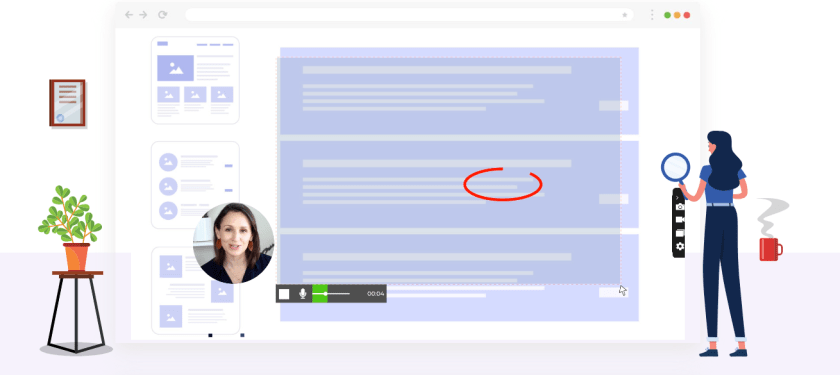
This week’s cool tool recommendation is Screenrec – a free screen recording and capture tool.

ScreenRec is a versatile and user-friendly tool designed to improve communication and collaboration efforts.

Key Features:

  • Effortless Screen Recording: Capture your screen with a single click, making it incredibly easy to record tutorials, product demos, software walkthroughs, and more.
  • Powerful Analytics: Gain valuable insights into audience engagement. Track viewership metrics to understand which parts of your recordings are most impactful.
  • Seamless Sharing: Share recordings and screenshots instantly via private sharing links, eliminating the need for cumbersome file transfers.
  • Secure Cloud Storage: Access and manage your recordings and screenshots from anywhere with secure cloud storage.
  • Cross-Platform Compatibility: ScreenRec functions seamlessly across various devices and operating systems, ensuring accessibility for all users.
  • Enhanced Security: Your content is protected with robust encryption, ensuring privacy and confidentiality.

Posted in #HCSM

How To Demonstrate the Value of Social Media

For healthcare communicators, demonstrating the value of your social media efforts can be challenging but essential to securing buy-in, allocating resources, and achieving long-term success.

The Challenge: Proving Social Media Return on Investment (ROI)

  1. Defining ROI in Healthcare Contexts: Unlike direct-to-consumer businesses, where ROI often translates into sales or conversions, healthcare ROI can be more nuanced. Metrics might include increased awareness, patient engagement, or referrals—intangibles that can be hard to quantify.
  2. Data Overload: With countless metrics to track (likes, shares, comments, reach, impressions, click-through rates, etc.), it’s easy to get overwhelmed or lose focus on the most meaningful indicators of success.
  3. Attribution Issues: Patients rarely make decisions based on a single social media interaction. Tracking the journey from initial engagement to appointment booking can be complex and indirect.
  4. Limited Resources: Many healthcare organizations have lean marketing teams juggling multiple priorities, leaving little time for in-depth analytics.

Solutions: Actionable Strategies for Measuring Social Media ROI

1. Define Clear Objectives

Start by identifying what success looks like for your organization. In healthcare, these might include:

  • Brand Awareness: Growing your follower count or increasing post reach.
  • Patient Engagement: Encouraging interactions like comments, shares, or messages.
  • Conversions: Tracking leads to website visits, newsletter sign-ups, or appointment requests.

💡 Tip: Use SMART goals—specific, measurable, achievable, relevant, and time-bound—to frame your objectives.

2. Focus on Key Metrics

Not all metrics are equally valuable. Prioritize those that align with your goals:

  • Awareness Goals: Track impressions, reach, and follower growth.
  • Engagement Goals: Monitor likes, shares, comments, and direct messages.
  • Conversion Goals: Use click-through rates, form submissions, or website analytics to measure tangible actions.

Continue Reading

Posted in #HCSM

How Pharmacists Can Lead with Integrity, Innovation, and Impact in the Digital Age

January 12th marks National Pharmacist Day, a time to celebrate the vital role pharmacists play in healthcare. Today, social media can be a powerful tool for pharmacists to make an even bigger difference. They can use it to educate the public, connect with patients, and even advocate for better healthcare. This article will explore how pharmacists can effectively and ethically use social media in their practice, from building a strong online presence to influencing healthcare policy and improving public health.

The Expanding Role of Social Media in Pharmacy

Social media has become a cornerstone of modern communication. For pharmacists, this medium offers unparalleled opportunities to expand their influence and provide critical health education. This section explores how social media empowers pharmacists to contribute to public health, enhance patient care, and address pressing healthcare challenges.

  1. Combat Health Misinformation: Social media is rife with health myths and pseudoscience. Pharmacists are uniquely positioned to act as gatekeepers of credible information, counteracting harmful narratives with evidence-based content and real-time engagement.
  2. Enhance Medication Adherence: By creating dynamic and interactive campaigns about the importance of proper medication use, pharmacists can address one of the leading causes of poor health outcomes while building trust with their audience.
  3. Promote Public Health Initiatives: From vaccination drives to chronic disease prevention programs, pharmacists can amplify critical public health messages to large, diverse, and often underserved audiences.
  4. Foster Inclusivity and Accessibility: Social media offers an unparalleled opportunity to break down barriers in healthcare communication. Pharmacists can create content in multiple languages, incorporate captions in videos, and ensure health literacy for all audience levels.
  5. Strengthen Crisis Communication: In times of public health crises or natural disasters, pharmacists can leverage social media to provide timely updates, dispel panic-driven misinformation, and coordinate community responses.

Continue Reading on Medium

Posted in #HCSM

How To Deal With Negative Feedback and Comments Online

In my last post, I discussed the ever-changing landscape of social media algorithms. Now, let’s tackle another significant challenge: managing negative reviews and comments.

No healthcare organization or practitioner is immune to negative feedback. Whether it’s a critical review on Google, a frustrated comment on a social media post, or a negative mention on a patient forum, navigating these situations requires careful consideration and a thoughtful response.

However, by approaching these situations with a proactive and patient-centered approach, you can turn these challenges into opportunities for growth. Let’s explore some strategies for effectively managing negative feedback.

Read for free on Substack