Posted in Cool Tool

Monday Morning Cool Tool: Zoomerang

This week’s cool tool recommendation is music video editor tool – Zoomerang

Zoomerang is a video creator designed for iPhone. No sign up or account required. Share it on TikTok, Instagram, Snapchat or other platforms right from the app, or save your video to your camera roll to share later.

Cool features include lots of step by step tutorials and templates, transtions and effects to enhance your video creation.

The app is free with the option to upgrade to Pro account after a free trial period. 


Posted in #HCSM

The Social Media Trap: Are You Mistaking Tactics for Strategy?

Are you constantly chasing the latest social media trends and tactics, hoping for a magic bullet to boost your online presence?

Social media is constantly evolving, with new platforms and features popping up all the time. While jumping on every bandwagon is tempting, this reactive approach can be detrimental to your long-term growth.

Understanding “Strategy” vs “Tactics”

One common mistake is confusing “strategy” with “tactics.” Tactics are the specific actions you take — like posting a reel, using a trending hashtag, or running a giveaway. Strategy, on the other hand, is the overarching plan that gives those tactics purpose and connects them to your broader goals. It’s about seeing the big picture rather than focusing on isolated efforts.

Why Strategy Matters

A well-defined social media strategy serves as the backbone of your online efforts. It provides clarity, direction, and purpose, ensuring that every post and campaign aligns with your business objectives and resonates with your target audience. Without a strategy, you’re simply reacting to trends, which can leave your online presence feeling fragmented and unsustainable.

Continue reading on Medium

Posted in Cool Tool

Monday Morning Cool Tool: RiteTag

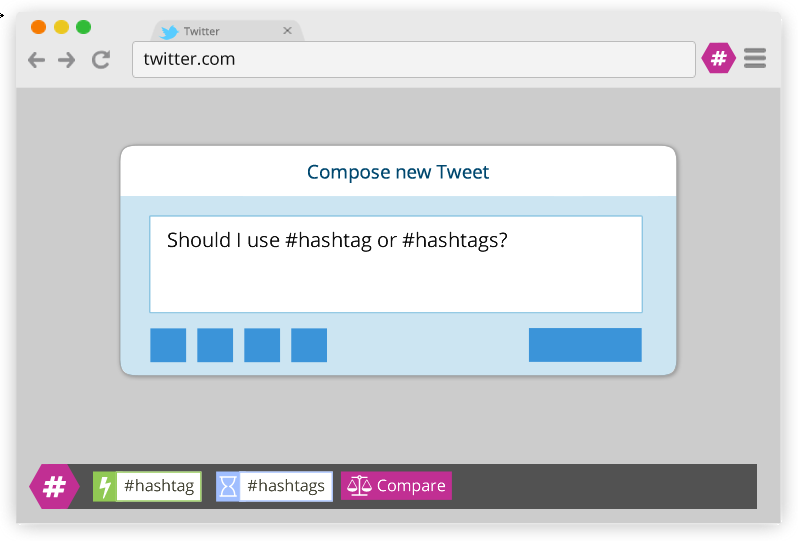
This week’s cool tool recommendation is RiteTag, a useful Chrome extension which gives you instant feedback on your hashtag choices as you type them.

ritetag-instant-feedback.png

How It Works 

RiteTag shows you how hashtags are performing on Twitter and Facebook before you post content. Once you log in to RiteTag using your Twitter or Facebook credentials, it checks the hashtags you begin typing in real time and color codes them:

  • If your hashtag is green, it means the hashtag will help your content be seen now.
  • If your hashtag is blue, it means the hashtag will help your content be seen over time.
  • If your hashtag is gray, you should select a new hashtag because it has low levels of engagement.
  • If your hashtag is red, you should select a new hashtag because it’s so popular, your content will disappear into the crowd.

RiteTag is available as a Chrome Extension. Download it here. 

Posted in Cool Tool

Monday Morning Cool Tool: Keyword Surfer

This week I’m recommending Keyword Surfer –  a free Chrome extension that gives you keyword search volume in Google search results.

This intuitive tool seamlessly integrates with Google Search, providing real-time data without disrupting the user’s workflow. By simply typing a query, users can instantly access estimated monthly search volumes, so you can instantly check if a keyword is a good fit.

Key Features and Benefits

  • Real-time Search Volume Data: Keyword Surfer displays estimated search volumes directly within Google Search results, eliminating the need for separate keyword research tools.
  • Related Keyword Suggestions: The extension provides a list of related keywords with corresponding search volumes, enabling users to discover new content opportunities and expand their keyword portfolio.
  • Traffic Estimates for Top-Ranking Pages: Keyword Surfer offers insights into the estimated organic traffic of high-ranking pages, allowing users to gauge potential content performance and set realistic goals.
  • Content Optimization Guidelines: By analyzing top-ranking content, Keyword Surfer provides data-driven recommendations on optimal word count, keyword density, and related keyword integration, enhancing on-page optimization efforts.
  • Global Data Coverage: With support for 70 countries, Keyword Surfer facilitates international SEO strategies by providing location-specific keyword data.7

Considerations

While Keyword Surfer offers valuable insights, it is essential to acknowledge that the data provided are estimates. For comprehensive analysis and competitive intelligence, utilizing additional keyword research tools is recommended.

Watch the short video below to learn more.


Posted in #HCSM

How Healthcare Marketers Can Leverage YouTube Shorts and Clips

YouTube Shorts and Clips are dynamic tools that can significantly expand your audience, boost engagement, and drive views across your entire channel. While long-form videos provide depth and detail, relying solely on them can limit your reach and strain your budget. Short-form videos, like Shorts and Clips, offer a cost-effective way to create engaging content and tap into new audiences.

Here’s why short-form content should be a cornerstone of your YouTube strategy:

  • Cost-Effective Patient Education: Producing high-quality long-form videos can be resource-intensive. Shorts and Clips offer a more affordable way to create educational content, repurpose existing materials, and maximize your budget.
  • Reach a Wider Audience: Short-form videos are easily discoverable, appearing in YouTube’s Shorts feed, suggested videos, and even on users’ homepages. This allows you to reach potential patients who might not otherwise encounter your content.
  • Drive Engagement with Longer Content: Think of Shorts and Clips as entry points to your more detailed videos. By creating engaging short-form content that highlights key health tips, addresses common concerns, or offers a glimpse into your services, you can pique viewers’ interest and guide them to your long-form videos.
  • Stay Ahead of the Curve: YouTube’s algorithm favors short-form content. Incorporating Shorts and Clips into your strategy ensures you’re aligned with the platform’s trends and increases your visibility.

The Evolving YouTube Algorithm: Connecting Short-Form and Long-Form Content

YouTube’s algorithm has undergone significant changes since the introduction of Shorts in 2021. In August 2022, YouTube updated its algorithm to connect Shorts and long-form content. Previously, separate algorithms meant limited crossover between the audiences of these formats. Now, a unified algorithm ensures Shorts viewers are also exposed to your long-form videos, and vice versa.

How This Change Benefits You

  • Enhanced Discoverability: Viewers who engage with your Shorts can be recommended your long-form videos, increasing your content’s exposure.
  • Build Trust and Authority: Engaging Shorts can attract new viewers who might then be directed to your long-form content, where you can provide more in-depth information about your services, expertise, and patient care philosophy.
  • Content Synergy: Shorts and long-form videos work together to create a comprehensive content ecosystem. Use Shorts to promote longer videos, answer FAQs, or share quick health tips.

This shift emphasizes the importance of a holistic YouTube strategy that incorporates both short-form and long-form content to maximize your reach and engagement.

YouTube Clips: Creating and Sharing Engaging Snippets

Clips are shareable, short segments (5–60 seconds) you can create from your longer videos, showcasing key moments or highlights.

How to Create a Clip

  1. Open a YouTube video (desktop or mobile).
  2. Below the video player, click or tap the “Clip” button.
  3. A pop-up window will appear, allowing you to select the start and end time for your clip (between 5 and 60 seconds).
  4. Give your clip a title, and you’re done!

Tips for Promotion

  • Cross-Platform Sharing: Post Clips on social media to drive traffic back to your channel.
  • Foster Community Engagement: Encourage viewers to create and share Clips from your videos, boosting interaction.
  • Use Clips as Conversation Starters: Pair them with questions or calls to action to spark discussion in your comments.

Expanding Reach Beyond YouTube

While you can’t share Clips directly within YouTube, they are incredibly versatile for cross-platform promotion.

Here’s how you can share your YouTube Clips

  • Social Media: Share Clips and Shorts on Facebook, Instagram, LinkedIn, and TikTok.
  • Websites & Blogs: Embed Clips in posts to enrich your content and drive traffic to your channel.
  • Email Marketing: Include Clips in newsletters to add engaging visuals and boost click-through rates.

Repurposing Long-Form Content into Shorts

YouTube Shorts offer a fantastic opportunity to repurpose your long-form content and reach a wider audience.

Creating Shorts from Existing Videos

  • Use a Video Editing App: Edit your long-form video into a vertical, full-screen format (up to 60 seconds). Enhance it with filters, effects, and text overlays. Upload via YouTube Studio and include a link to the original video in the description.
  • Create Shorts Directly on YouTube: Open the long-form video in the YouTube app, tap the “Remix” button, and select “Edit into a Short.” Choose your clip (up to 60 seconds), enhance it with music, text, and effects, and publish it. YouTube automatically adds a link to the original video.

Tips for Creating Effective Shorts

  • Hook Quickly: Grab attention within the first few seconds.
  • Optimize Aspect Ratio: Ensure content fits the vertical format.
  • Include CTAs: Add verbal and visual cues directing viewers to your long-form videos.
  • Boost Discoverability: Use relevant keywords, hashtags, and engaging thumbnails.

Driving Long-Form Views with Shorts.

  • Include Clear CTAs: Guide viewers to your long-form videos with verbal and visual cues.
  • Create Compelling Content: Hook viewers with engaging snippets that leave them wanting more.
  • Optimize for Discoverability: Use relevant keywords and hashtags in your Short’s description.

By strategically creating and promoting Shorts and Clips, you can effectively leverage these formats to drive patient engagement, expand your reach, and establish a stronger online presence.

Posted in Cool Tool

Monday Morning Cool Tool: LunaPic

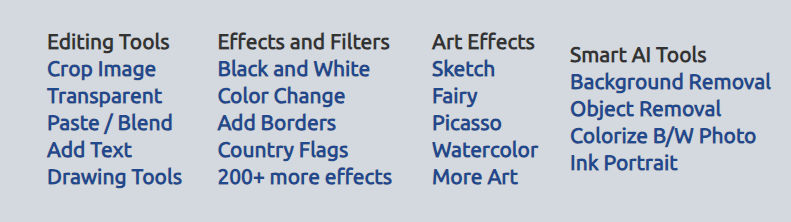
This week’s cool tool recommendation is LunaPic – a free online photo editor.

LunaPic offers a wide variety of tools for editing, adjusting, and creating images. It’s a popular choice for quick and easy image editing without needing to download or install any software.

Additionally, it provides filters and effects, including animating images, that can enhance your creativity.

If you’re looking for a quick and convenient way to edit your photos online, LunaPic is definitely worth checking out.

Posted in #HCSM

Level Up Your Healthcare Communications with Instagram Reels

Instagram Reels are no longer just a trend; they’re a powerful communication tool for the healthcare sector. Whether aiming to boost patient engagement, educate the public, or market your practice, Reels offer a dynamic way to connect with your audience.

1. The “3 S’s” of Effective Reels

  • Simplicity Rules: Healthcare is full of complex jargon. Use Reels to break down complicated topics into bite-sized pieces. Explain medical conditions, procedures, or healthy habits in clear, concise language.
  • Shareworthy Content: Create Reels that resonate with your audience. Think inspiring patient stories, practical health tips, myth-busting facts, or even a touch of humor (when appropriate).
  • Short and to the Point: Respect your audience’s time. Keep your Reels concise and focused, ideally under 30 seconds, to maintain engagement.

2. Captions that Count

  • Inform and Educate: Use captions to provide valuable context, answer common questions, and offer resources.
  • Empathy Matters: Craft captions that speak to your audience’s emotions and needs, whether it’s patients, colleagues, or the general public.
  • Drive Action: Encourage viewers to take the next step, whether it’s scheduling an appointment, learning more about a health issue, or participating in a public health initiative.

3. “Happenings” Beyond Marketing

  • Humanize Healthcare: Showcase the people behind the scenes. Introduce doctors, nurses, researchers, support staff – anyone who contributes to your organization’s mission.
  • Transparency Builds Trust: Offer glimpses into different aspects of healthcare. Show what happens in a lab, during a clinical trial, or at a community health event.
  • Celebrate Successes: Highlight achievements, milestones, and positive patient outcomes (with consent, of course).

4. Hook Your Viewers from the Start

  • Pose Intriguing Questions: “What are the early signs of [condition]?” or “Are you doing enough to protect yourself from [illness]?”
  • Share Eye-Opening Facts: “Did you know that [statistic]?”
  • Start with a Strong Visual: A microscopic image, a healthy lifestyle scene, or an emotional moment can capture attention instantly.

Beyond the Basics: Expanding Your Reels Toolkit

  • Jump on Trends: Use trending audio or participate in popular challenges to increase visibility and reach.
  • Collaborate for Impact: Partner with other healthcare organizations, influencers, or even patients to create compelling content.
  • Add Interactive Elements: Use polls, quizzes, and Q&A stickers to encourage audience participation.
  • Prioritize Accessibility: Always include captions to make your Reels accessible to everyone.
  • Maintain a Consistent Presence: Regular posting keeps your audience engaged and reinforces your message.

Examples of Healthcare Reels

1. Cleveland Clinic

  • What they do: They often use Reels to share quick health tips, like this one on foods that cause inflammation. It’s simple, shareable, and uses on-screen text effectively.
  • Why it works: It’s visually appealing, easy to understand, and provides actionable advice.

2. Mayo Clinic

  • What they do: They use Reels to showcase their expertise and the patient experience. This Reel features a doctor explaining how pancreatic cancer is detected.
  • Why it works: It builds trust by featuring a medical expert and provides valuable information on an important health topic.

3. Nicklaus Children’s Hospital

  • What they do: They use Reels to humanize their brand and celebrate patient successes. This Reel shows a child who benefited from Nicklaus Children’s Heart Institute’s free EKG screenings program.
  • Why it works: It’s emotionally engaging, highlights their specialized care, and celebrates a positive outcome.

These are just a few examples of how healthcare organizations are using Instagram Reels effectively. By studying these examples and applying the tips we discussed, you can create engaging and informative Reels that resonate with your audience.

Posted in Cool Tool

Monday Morning Cool Tool: Adobe Color

This week’s cool tool recommendation is Adobe Color – a free online tool that allows you to create and explore color palettes.

Here are some of the things you can do with Adobe Color:

  • Create color palettes based on color theory: Use the color wheel to create palettes that are harmonious and pleasing to the eye. You can also use different color harmonies, such as complementary, analogous, and triadic.
  • Extract themes from images: Upload an image and Adobe Color will extract a color palette from it. This is a great way to create a palette that matches the colors in an image you like.
  • Explore pre-made themes: Browse thousands of user-created color palettes for inspiration. You can search by keyword, mood, or even specific color.
  • Accessibility tools: Adobe Color helps you create accessible themes that are usable for people with color blindness.
  • Integration with Adobe products: Once you’ve created a palette, you can easily use it in other Adobe products like Photoshop, Illustrator, and InDesign.

Website: https://color.adobe.com/

Posted in #HCSM

Prescribing Success: A/B Testing for Healthcare Marketing

Healthcare marketing is highly competitive, and engaging your target audience requires more than simply sharing relevant content. To truly connect with patients and achieve your marketing goals, you must understand what resonates with them. A/B testing offers a powerful solution, allowing you to optimize your campaigns and drive meaningful results.

What is A/B Testing?

A/B testing involves creating two versions of your marketing materials (version A and version B) with one key element changed, such as the headline, image, or call to action. These variations are then presented to separate segments of your audience, and their performance is tracked to determine which version yields better results.

A/B testing empowers healthcare marketers to make data-driven decisions, ensuring that campaigns resonate effectively with their target audience. It allows you to:

  • Optimize Content: Discover what types of headlines, visuals, and messaging resonate most with patients.
  • Increase Engagement: Enhance patient interaction with your website, social media posts, and email campaigns.
  • Improve Conversion Rates: Drive more appointments, inquiries, and sign-ups for your services.

Implementing A/B Testing in Healthcare Marketing: A Step-by-Step Guide

  1. Start with Research: Analyze your past marketing performance and identify areas for improvement. Examine your competitors’ strategies for inspiration.
  2. Choose a Variable: Select one element to test, such as the headline, image, call to action, or email subject line.
  3. Create Variations: Develop two versions of your marketing material with one key difference. Ensure both versions align with your brand and messaging.
  4. Segment Your Audience: Divide your audience into two groups, ensuring a random distribution to avoid bias.
  5. Launch and Monitor: Implement your A/B test and use analytics tools to track key metrics like website traffic, engagement, and conversions.
  6. Analyze and Implement: Compare the performance of both versions. Identify the winning variation and implement its elements in your future campaigns.

Key Elements to Test in Healthcare Marketing

  • Headlines: Test different lengths, styles, and focuses (e.g., benefits-oriented vs. problem-focused).
  • Visuals: Experiment with different image styles, patient testimonials, or videos showcasing your facility and services.
  • Call to Action: Try variations in wording, placement, and urgency (e.g., “Book an Appointment Today” vs. “Learn More”).
  • Email Subject Lines: Test different approaches to increase open rates (e.g., personalized vs. informative).
  • Landing Pages: Optimize your website landing pages for conversions by testing different layouts, headlines, and forms.

Let’s see this in action!

1. Headlines

  • Version A: “Managing Diabetes? 5 Tips for a Healthier Lifestyle” (practical and informative)
  • Version B: ” reclaim Your Health: Diabetes Management Starts Now” (empowering and action-oriented)

2. Visuals

  • Version A: Image of a person with diabetes actively engaged in a healthy activity, like exercising or cooking a nutritious meal.
  • Version B: Infographic outlining the key benefits of the diabetes management program.

3. Call to Actions

  • Version A: “Download our Free Guide to Diabetes Management” (offers a valuable resource)
  • Version B: “Schedule a Consultation with Our Diabetes Specialists” (encourages direct engagement)

4. Email Subject Lines

  • Version A: “Important Information About Your Diabetes Management” (formal and informative)
  • Version B: “Living Well with Diabetes: Tips and Support” (supportive and patient-focused)

5. Landing Pages

  • Version A: Landing page with a detailed explanation of the diabetes management program and a contact form at the bottom.
  • Version B: Landing page with a video testimonial from a satisfied patient and a prominent “Schedule a Consultation” button above the fold.

These examples illustrate how A/B testing can be applied to various elements of healthcare marketing campaigns. Remember to tailor your tests to your specific goals and target audience to achieve the best results.

The Importance of Continuous Optimization

A/B testing is not a one-time activity; it’s an ongoing process of continuous improvement. Regularly test different elements, analyze the results, and refine your approach to stay ahead of the curve and keep your audience engaged.

Want to stay informed about the latest in healthcare marketing?

Subscribe to my newsletter for a curated selection of articles, tips, and resources delivered straight to your inbox.

Posted in Cool Tool

Monday Morning Cool Tool: ClipChamp

This week’s cool tool recommendation is Clipchamp a free video editor.

Here are some of the things you can do with Clipchamp

  • Edit your videos: Trim, split, and combine video clips, add transitions, and adjust the speed and volume.  
  • Enhance your videos: Add text, filters, effects, and music to your videos.  
  • Create videos from scratch: Use Clipchamp’s library of templates to create professional-looking videos quickly.  
  • Record your screen and webcam: Create video tutorials, presentations, or record yourself speaking directly to your audience.  
  • Use Clipchamp with Microsoft 365: If you have a Microsoft 365 subscription, you get access to even more features in Clipchamp, like premium filters and effects, and 1 TB of OneDrive cloud storage.  

Key Benefits of Clipchamp

  • Easy to use: The interface is simple and intuitive, so you can start editing videos right away.  
  • Free: Clipchamp is free to use, with no watermarks on your exported videos.  
  • Cloud-based: You can access your videos and edit them from any device with an internet connection.
  • Integrated with Windows 11: Clipchamp is built into Windows 11, so you can easily access it from the Start menu or search bar.