Posted in Cool Tool

Monday Morning Cool Tool: GTmetrix

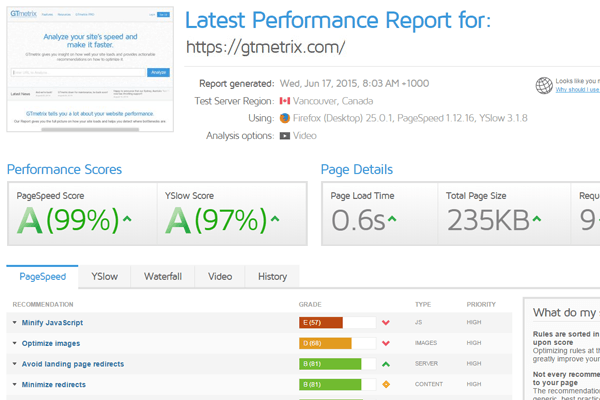
I love learning about new tools to make social media marketing more creative and effective, so I’ve decided to share some of my favorite tools with you at the start of each week. This week I’m recommending website speed test tool –  GTmetrix.

features-home-screenshot

GTmetrix has a suite of features and options to make optimizing your website clear and easy. It gives you insight on how well your site loads and provides actionable recommendations on how to optimize it. You can also use the tool to analyze the page load of your site from 28 servers in 7 different regions around the world.

How fast your website loads is critical – a good site will load in 2 seconds. Research shows that a single second delay in site load time can reduce your conversions by 7 percent. If your site is taking longer than that, consider that around 40% of people will leave a website if it doesn’t load in 3 seconds.

The faster your site, the better. Google announced back in July 2018, page speed will be a ranking factor for mobile searches too.

Visit https://gtmetrix.com to try out this tool’s features.


Posted in Cool Tool

Monday Morning Cool Tool: Display Purposes

I love learning about new tools to make social media marketing more creative and effective, so I’ve decided to share some of my favorite tools with you at the start of each week. This week I’m recommending a tool called Display Purposes which helps you find the best hashtags to use on social media.

The tool is particularly helpful for Instagram, where hashtags are how people find your content.

So simple to use, and really effective. Here’s how it works when I add “Monday” to the search bar.

download

On Instagram you should aim to use a mix of popular hashtags (which many people browse), and less popular hashtags that you stand a chance of getting a spot in “Top” for. The tool is very useful for this as it returns the search results in order of descending popularity.

And something really super-cool, I can zoom in on my local region to gauge the popularity of the hashtag.

download

You might like to check out this new report which looks at the latest Instagram best practices, including hashtag use. 


Posted in Cool Tool

Monday Morning Cool Tool: Apester

download

I love learning about new tools to make social media marketing more creative and effective, so I’ve decided to share some of my favorite tools with you at the start of each week. This week I’m recommending a digital storytelling tool called Apester

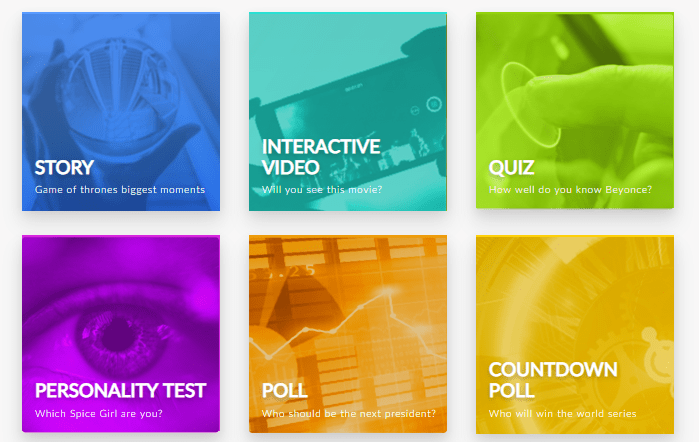
Described as a novel way to tell any story visually and natively blend it into any webpage, Apester’s plug and play tool mixes text and images with interactive content to create compelling stories. More cool features include the ability to create interactive content such as polls and quizzes.

Amazingly for such a super cool tool Apester is totally free! Check it out at apester.com


Posted in Cool Tool

Monday Morning Cool Tool: Banner Stack

VPMdNzl0.jpg

I love learning about new tools to make social media marketing more creative and effective, so I’ve decided to share some of my favorite tools with you at the start of each week. This week I’m recommending online banner maker Banner Stack.

Banner Stack is a cloud-based, easy-to-use, professional banner maker compatible with all the main social media platforms. You have everything you need to build creative static, animated and/or interactive web banners in minutes, including stock photos, drag and drop text, images, buttons, cliparts and high-quality fonts.

The free plan allows you to design 10 banners. Pro Plans start at $7 per month.


Posted in Cool Tool

Monday Morning Cool Tool: Boomerang for Gmail

unnamed (2)

I love learning about new tools to make social media marketing more creative and effective, so I’ve decided to share some of my favorite tools with you at the start of each week. This week I’m recommending Boomerang for Gmail.

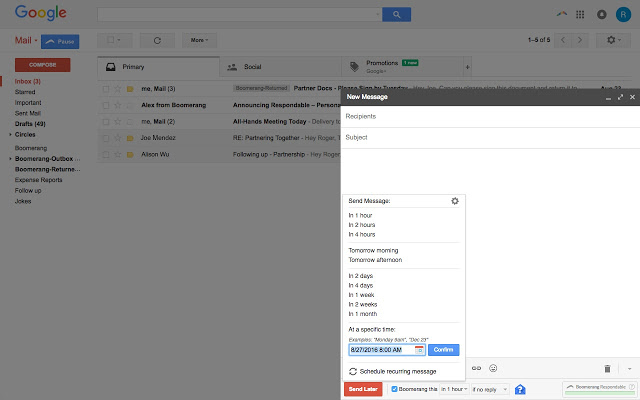
Boomerang allows you to schedule messages to be sent or returned at a later date. Write a message now, send it whenever, even if you’re not online. Track messages to make sure you hear back, and schedule reminders right inside Gmail and know whether your email got read with cross-platform read receipts.

Boomerang also helps you to postpone (“snooze”) incoming emails, by making them disappear from your Inbox into a folder or label, then bringing them back to the top of the message list at the specified time. It helps you keep your Inbox clean, without losing track of important messages. I also like to use the Inbox Pause feature to temporarily pause my Inbox so I can work more productively.

Price: 10 Free message credits per month; unlimited credits $4.99 pm.

Posted in Cool Tool

Monday Morning Cool Tool: InShot

inshot

I love learning about new tools to make social media marketing more creative and effective, so I’ve decided to share some of my favorite tools with you at the start of each week. This week I’m recommending InShot a mobile video editor for iOS or Android.

InShot allows you to add music, effects, voiceovers, emojis, and text. You can also adjust the video speed, and control where elements you add appear on the video timeline. This app will work perfectly for any videos you create for Instagram, Facebook Stories, Facebook news feed, and so on.

The app can work with vertical, landscape, and square video formats. It can even transform one format into another. Unlike some mobile video apps, you don’t have to record video within the InShot app. You can import video, and even merge separate videos from your camera roll and arrange them in a specific order.

The InShot app is free, but with in-app purchases, you can add effects, filters, stickers, and stamps


Posted in Cool Tool

Monday Morning Cool Tool: The De-Jargonizer

I love learning about new tools to make social media marketing more creative and effective, so I’ve decided to share some of my favorite tools with you at the start of each week. This week I’m recommending The De-Jargonizer.

The De-Jargonizer is an automated jargon identification program aimed at helping science communicators adapt vocabulary use for a variety of audiences. The tool is highly applicable to healthcare marketers, particularly when we need to communicate scientific-based medical information.

The program determines the level of vocabulary and terms in a text and divides the words into three levels: high frequency/common words; mid-frequency/normal words; and jargon – rare and technical words.

It couldn’t be simpler to use. Choose the file you wish to evaluate or copy and paste it in the empty text box. Then press “START.”

download

The text will then be presented on the screen, and results are displayed both by color and by percentage. Words in black are common words, words in orange are mid-frequency words, and words in red are jargon. The table on the right presents the number of words in the text and the results: the number of words and the percentage of words for each frequency (high, mid and jargon).

download

Posted in Cool Tool

Monday Morning Cool Tool: Buffer Stories Creator

instagram_tools_buffer_stories_creator

I love learning about new tools to make social media marketing more creative and effective, so I’ve decided to share some of my favorite tools with you at the start of each week. This week I’m recommending Buffer Stories Creator.

Using Stories Creator, you can create the foundation of your Stories with customizable text, graphics, and a background image or color. A quick way to create and download images for your Instagram Stories, it’s a totally free, standalone tool that anyone can use.

How to design great Stories images – advice from Buffer

1. Keep it simple

To tell a powerful story, simplicity is best. The Guardian found that, for their Instagram Stories, simple static graphics and quick explainer videos outperformed their professionally-produced videos.

  1. Use a background image to quickly tell a story
  2. Add a short copy to convey your message
  3. Decorate with up to three graphics

2. Maintain a consistent theme

The second principle is to be consistent. Keeping to a consistent theme makes it easier to create Stories images as you do not have to re-invent the wheel every time you create a new one. It also helps you create a style that will help your followers recognize your brand instantly.

Here are a few things to pay attention to:

  1. Style of images or videos
  2. Color combinations
  3. Layout
  4. Fonts

3. Experiment with interactive features

Instagram offers three cool stickers that you can use to drive engagement on your Instagram Stories:

  1. Poll
  2. Emoji slider
  3. Questions

These features make it super easy for your followers to interact with you. Test them in your Instagram Stories to see what engagement you can get. Here are a few examples:

693c6df8-9ff9-4652-8e81-65853263e3ab

2 ideas to increase your Stories reach


1. Use hashtags and location tag

Instagram aggregates selected Instagram Stories to display on hashtag and location pages. When you follow a hashtag, the selected Instagram Stories will also appear in your Instagram Stories feed.

2. Add to your highlights

Your Instagram Stories don’t have to disappear after 24 hours. Add them to your Story Highlights on your profile so that they are viewable forever!

Do you create Stories? Have you used this tool for your Instagram Stories? 


Posted in Cool Tool

Monday Morning Cool Tool: Google Dataset Search

I love learning about new tools to make social media marketing more creative and effective, so I’ve decided to share some of my favorite tools with you at the start of each week. This week I’m recommending a Google Dataset Search.

For all you data-geeks, Google has launched a new search engine to help scientists, journalists, and the more data-centric content marketers among us find the datasets they need.

Here’s a snapshot of a search I did which didn’t exactly return what I was looking for, but it’s instructive to see it nonetheless.


download (47)


Posted in Cool Tool, Visual Marketing

Monday Morning Cool Tool: Pikwizard

156c447adfe8d3ea5064898507736b5a-m.jpg
Image Source: Pikwizard

I love learning about new tools to make social media marketing more creative and effective, so I’ve decided to share some of my favorite tools with you at the start of each week. This week I’m recommending a free stock photo site called Pikwizard . 

As regular readers know, I am obsessed with visuals in marketing, but it’s hard to find medical related stock images that haven’t been used ad infinitum.  I was really pleased to hear about Pikwizard and find a super selection of medical-themed images. The site is particularly good for aesthetic procedures and dentistry-related images.

73db96f8662102c3683d4e22acf167b9-m.jpg
Image Source: Pikwizard

Pikwizard hosts over 100,000 completely free images, with over 20,000 of those exclusive to the site.  Adding new images to their stock library daily, the site’s ultimate goal is to get to more than 1 million images!

Visit  www.pikwizard.com next time you need an image to enhance your medical marketing.