Posted in Cool Tool

Monday Morning Cool Tool: Filmora

This week’s cool tool recommendation is Filmora a user-friendly video editing tool.

Filmora offers a balance of powerful features and an intuitive interface, making it accessible for those new to video editing while still providing tools for more creative projects.

Key Features

Filmora boasts a wide array of features, including:

  • Basic Editing: Trimming, cutting, splitting, merging, rotating, and adjusting video speed.
  • Visual Effects: A large library of filters, transitions, titles, and motion elements.
  • Audio Editing: Tools for adjusting audio levels, adding background music, recording voiceovers, and noise reduction.
  • Colour Correction and Grading: Options for adjusting colour balance, applying LUTs, and enhancing the visual look of videos.
  • Text and Titles: Customisable text and title templates, including animated options.
  • Motion Tracking: The ability to track objects within a video and apply effects or elements that follow their movement.
  • Green Screen (Chroma Key): Tools for removing and replacing backgrounds.
  • Screen Recording: The ability to record your computer screen.
  • AI-Powered Features: Recent versions include AI tools like:
    • AI Text-Based Editing: Editing video by manipulating its transcription.
    • AI Music Generator: Creating royalty-free background music.
    • AI Portrait Cutout: Removing video backgrounds.
    • AI Smart Masking: Automatically creating masks around objects.
    • AI Audio Denoise: Reducing background noise in audio.
    • AI Voice Enhancer: Improving vocal clarity.
    • AI Smart Cut: Identifying and clipping interesting moments.
    • AI Smart Short Clips: Creating short clips for social media.
    • AI Image to Video: Turning still images into moving videos.
    • AI Sound Effect Generator: Creating custom sound effects from text prompts.
    • AI Voice Cloning: Creating an AI voice clone.
    • AI Translation & Lip Sync: Translating speech and syncing it to lip movements.
  • Templates and Assets: Built-in templates, royalty-free music, sound effects, and the ability to access more through the Filmora Effects Store.
  • Social Media Integration: Features designed for creating content for platforms like YouTube, TikTok, and Instagram, including auto-reframe tools.

Pricing

Filmora offers a free version that gives you access to basic editing tasks and access to a selection of built-in filters, transitions, titles, and motion elements. It’s a great way to try out the software, learn its interface; however, the watermark on exported videos makes it unsuitable for projects where a professional, unbranded output is necessary. To remove the watermark and access the full range of features and assets, you would need to purchase a paid subscription or a perpetual license.

Posted in Cool Tool

Monday Morning Cool Tool: Flux AI

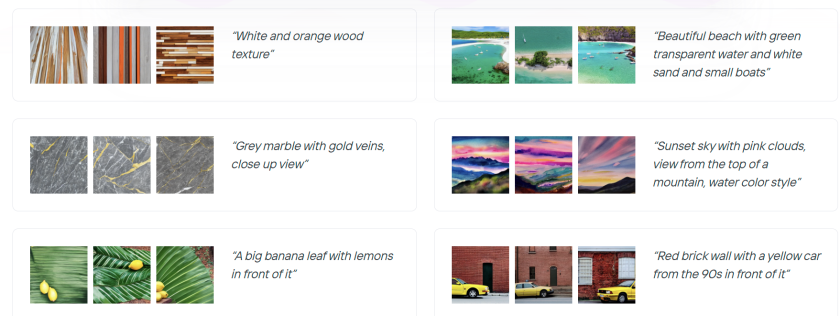
This week’s cool tool recommendation is Flux AI, a web-based image and video tool.

Key Features and Capabilities

  • Flux AI Image Generator
    • This tool allows users to generate images from textual descriptions. Users can input a prompt, and the AI will produce corresponding visuals, offering a powerful way to bring creative ideas to life.  
    • It also supports image-to-image generation, enabling users to modify and transform existing images.
  • Flux AI Video Generator
    • Moving beyond static images, Flux AI extends its capabilities to video creation. Users can generate dynamic videos from text prompts or images, opening up new possibilities for video content production.  
  • Free Tools
    • Flux AI provides a suite of free tools that enhance the content creation process:
      • Image-to-Prompt Generator: This tool helps users refine their prompts by analyzing existing images and suggesting relevant keywords.
      • Image Upscaler: Users can improve the resolution and quality of their images with the upscaler tool.
      • Image Converter: The platform facilitates seamless image format conversions.

Free: New users get 40 credits, and daily check-ins provide 20 credits. This plan includes 5 daily prompt generations and 5 daily image-to-prompt conversions.


Posted in Cool Tool

Monday Morning Cool Tool: Picsart

This week’s cool tool recommendation is Photoroom – an AI background generator that transforms your images with ease.

Photoroom is a mobile and web application that uses artificial intelligence to effortlessly remove, replace, and generate backgrounds. Users can either remove existing backgrounds or generate entirely new ones using text prompts or image inputs.

Unlike traditional image editing software, Photoroom prioritizes simplicity and speed, making complex background changes accessible to anyone without requiring extensive technical skills.

Pricing

Photoroom offers a free tier that provides core background removal and basic editing functionalities, suitable for everyday users. A subscription unlocks premium features like high-resolution exports, batch editing, and access to a wider range of AI-generated backgrounds.

Posted in Cool Tool

Monday Morning Cool Tool: Picsart

This week’s cool tool recommendation is Picsart – a free AI image generator.

PicsArt is a mobile and desktop editing platform that combines powerful AI-driven tools with an intuitive interface. It allows users to edit photos, create digital art, design marketing materials, and even edit videos—all from their smartphones. Unlike traditional editing software, PicsArt is built for speed and ease of use, making it a great choice for those who want professional-looking visuals without the learning curve of tools like Photoshop.

One of PicsArt’s biggest advantages is its AI-driven tools. Features like background removal, smart selection, and AI-powered filters allow users to transform images with a single tap. Features like blending modes, layers, and masking—tools typically found in professional software—are simplified for everyday users. Whether you’re creating a logo, designing a social media post, or experimenting with artistic edits, the interface is intuitive and beginner-friendly.

PicsArt isn’t just for photos—it also offers robust video editing features. Users can trim clips, add effects, overlay text, and apply filters to enhance their videos for platforms like TikTok and Instagram.

Pricing

Picsart’s free tier provides a robust set of tools, from filters to ready-made templates, and editing tools for the everyday user, while a subscription unlocks advanced features.

So, if you haven’t tried PicsArt yet, why not explore its features and see what you can create?

Posted in #HCSM

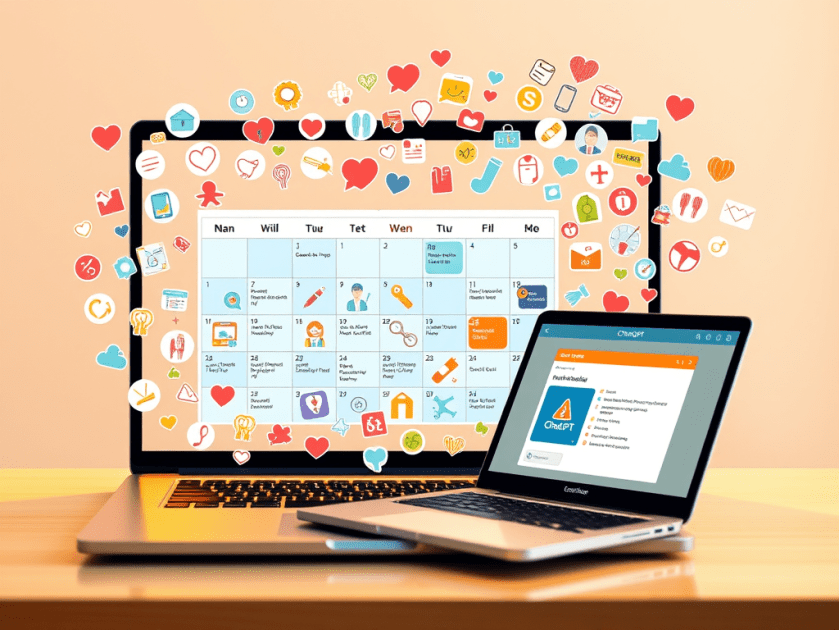
How to Create a Healthcare Communications and Marketing Content Calendar with ChatGPT

In the healthcare industry, clear and consistent communication is essential for patient engagement, education, and satisfaction. Whether you’re a hospital, clinic, private practice, or health-focused organization, a well-planned content calendar can help you stay organized and connect with your audience effectively.

This article will guide you through leveraging ChatGPT, a powerful language model, to streamline your content creation process and create a dynamic content calendar tailored to the specific needs of a healthcare audience.

How to Use ChatGPT for Healthcare Content Calendaring

  1. Generate Content Ideas:
    • Prompt Example: “Suggest 15 blog post ideas for a cardiology clinic focusing on heart-healthy lifestyle changes.”
    • Pro Tip: Customize ideas for different formats: articles, infographics, videos, patient testimonials, etc.
  2. Create Monthly Themes:
    • Prompt Example: “Develop a monthly content theme plan for a diabetes awareness campaign.”
    • Pro Tip: Organize content around relevant health observances (e.g., Heart Health Month, Diabetes Awareness Month).
  3. Plan Around Key Dates and Events:
    • Prompt Example: “List important health awareness dates in October and suggest content ideas for each.”
    • Pro Tip: Integrate relevant health awareness days, seasonal health tips, and local community events.
  4. Outline a Calendar:
    • Prompt Example: “Create a weekly social media content calendar for a dental practice promoting preventative care.”
    • Pro Tip: Include post types, topics, captions, relevant hashtags, and links to resources.
  5. Enhance Engagement Strategies:
    • Prompt Example: “Suggest interactive Instagram story ideas to encourage flu shot appointments.”
    • Pro Tip: Incorporate polls, Q&A sessions with healthcare providers, quizzes, and patient success stories.
  6. Content Repurposing Plans:
    • Prompt Example: “How can I repurpose a webinar on managing stress into shorter social media posts and an email newsletter?”
  7. Track and Optimize:
    • Prompt Example: “How can I analyze the performance of a content calendar focused on patient education and make improvements?”
    • Pro Tip: Use ChatGPT to identify key metrics for tracking engagement and patient satisfaction.

Steps to Create a Healthcare Content Calendar Using AI

  1. Define Your Goals and Target Audience: What do you want to achieve with your content? Who are your ideal patients?
  2. Identify Key Health Topics: What health concerns are most relevant to your target audience?
  3. Generate Content Ideas with AI: Use ChatGPT to brainstorm content ideas based on identified health topics and patient needs.
  4. Create a Content Calendar Template: Organize your content plan with key elements like publication date, content format, target audience, and call to action.
  5. Ensure Medical Accuracy: Review and verify all medical information with qualified healthcare professionals.
  6. Schedule and Promote Your Content: Utilize social media scheduling tools and email marketing platforms.
  7. Analyze Content Performance: Track website traffic, social media engagement, and patient feedback to measure effectiveness.

Sample Healthcare Content Calendar

DateContent TopicKeywordsFormatTarget AudienceContent GoalsCall to Action
Jan 810 Tips for Managing Winter Allergiesallergies, winter, healthBlog PostAllergy SufferersEducate patients, reduce symptomsDownload a free guide, book an appointment
Jan 15Understanding the Benefits of Annual Checkupscheckup, prevention, wellnessInfographicGeneral PublicPromote preventative care, increase appointmentsSchedule a checkup, learn more about services
Jan 22Ask the Doctor: Common Cold vs. Flucold, flu, symptomsLive Video (Social)PatientsProvide expert advice, build trustSubmit questions in advance, follow on social media
Jan 29Healthy Eating Habits for Busy Lifestylesnutrition, health, recipesShort VideoWorking ProfessionalsPromote healthy lifestyle, increase engagementDownload a recipe book, share video on social media
Feb 5Patient Success Story: Overcoming [Condition]condition, treatment, recoveryBlog Post/TestimonialPotential PatientsBuild credibility, inspire hopeSchedule a consultation, learn about treatment options
Feb 12The Ultimate Guide to [Health Topic]guide, health topic, wellnessEbook/Long-form Blog PostPatientsEstablish expertise, provide valuable resourcesDownload the guide, subscribe to blog updates

Posted in #HCSM

Essential AI Terminology for Healthcare Professionals

Artificial intelligence (AI) is rapidly transforming the healthcare landscape, offering the potential to revolutionize diagnosis, treatment, and patient care. From AI-powered diagnostic tools to personalized treatment plans, the applications of this technology in healthcare are vast and promising.

However, the complex terminology surrounding AI can be a barrier for healthcare professionals seeking to understand and embrace these advancements. This glossary is designed to provide a clear and concise introduction to key AI terms. By familiarizing yourself with these essential concepts, you can gain a deeper understanding of the AI landscape and its implications for your practice.

  • Algorithm: A set of instructions or rules followed by a computer to perform a specific task or solve a problem.
  • Artificial Intelligence (AI): A broad field encompassing the development of computer systems capable of performing tasks that typically require human intelligence, such as learning, problem-solving, decision-making, and language understanding.  
  • AI Bias: Systematic errors in AI models that lead to unfair or inaccurate predictions, often due to biased training data or algorithmic design.
  • Clinical Decision Support (CDS): AI tools that assist healthcare professionals in making informed decisions about patient care by providing relevant information and recommendations.
  • Data Privacy and Security: The protection of sensitive patient information from unauthorized access or misuse, crucial in the context of AI applications in healthcare.
  • Deep Learning: A type of ML that utilizes artificial neural networks with multiple layers to analyze complex patterns in large datasets, often used for image and speech recognition.
  • Ethical Considerations: The responsible and ethical development and deployment of AI in healthcare, ensuring patient safety, privacy, and fairness.
  • Explainable AI (XAI): The ability to understand and interpret the reasoning behind an AI model’s decisions, crucial for building trust and ensuring transparency in healthcare.
  • Machine Learning (ML): A subset of AI that focuses on algorithms enabling systems to learn from data and improve their performance on specific tasks without being explicitly programmed.
  • Model: An AI system trained on data to perform a specific task, such as diagnosing diseases or predicting patient outcomes.
  • Natural Language Processing (NLP): A field focusing on the interaction between computers and human language, enabling tasks like text analysis, translation, and chatbots.
  • Neural Network: A computing model inspired by the human brain, composed of interconnected nodes (neurons) that process and transmit information, enabling pattern recognition and learning.
  • Precision Medicine: The tailoring of medical treatment to individual patients based on their genetic, environmental, and lifestyle factors, often aided by AI analysis of large datasets.
  • Predictive Analytics: The use of AI to analyze patient data and predict future events, such as disease progression or readmission risk.
  • Training Data: The dataset used to teach an AI model to recognize patterns and make predictions.
  • AI-Enabled Medical Devices: Devices that incorporate AI algorithms to enhance their functionality, such as diagnostic imaging equipment or wearable health monitors.

You may also be interested in reading this publication which I co-authored.

Charting the future of patient care: A strategic leadership guide to harnessing the potential of artificial intelligence

Posted in Cool Tool

Monday Morning Cool Tool: Vizly

Elevate your data insights with this week’s cool tool recommendation: AI-powered data visualization tool – Vizly.

Here’s how it works

  • Upload a file you would like to analyze – simply drag and drop a CSV, Excel, or JSON file into the chat.
  • Ask any question about your data in plain language, or click the suggestions Vizly automatically produces.
  • Vizly can support any visualization type, including scatter plots, bar charts, pie charts and line charts.
  • Generate a comprehensive report of your analysis, share a link, and export to Word, PDF, and more.

Pricing

Try it for free: Vizly offers a free trial, allowing up to 10 messages per month.

Posted in AI, Cool Tool

Monday Morning Cool Tool:Leonardo.Ai

This week I’m recommending an AI-powered image generator – Leonardo.Ai.

If you’re new to the world of AI image generators, Leonardo.Ai is an excellent starting point. It’s a free tool that allows you to experiment with ease. Creating the ideal image starts with a prompt that outlines the style, aesthetics, size, and specific details you’re looking for. Leonardo.Ai assists in this process with two key features: a random prompt generator to ignite your creativity and a prompt enhancement tool that suggests alternative wording or keywords to improve the quality and relevance of your generated images.

Should I disclose that my image is made by AI?

Yes. If you are using an image that is entirely created by an AI image generator, you should disclose that wherever you are sharing it.

Pricing

When you sign up to Leonardo.AI you automatically get access to their free plan, which gives you 150 tokens every eight hours. This is more than enough to experiment with the platform and create a variety of images. If you want to take your image generation to the next level, you can upgrade to one of their premium plans. These plans offer additional editing tools and capabilities, allowing you to fine-tune your creations and achieve even more impressive results. Keep in mind that images generated on the free plan are public, so if you prefer to keep your creations private, consider subscribing to a paid plan.

I highly recommend giving Leonardo.Ai a try. It’s a fun and intuitive way to explore the possibilities of AI-generated art!