Posted in Cool Tool

Monday Morning Cool Tool: CoSchedule’s Subject Line Tester

This week, I’m recommending CoSchedule’s Subject Line Tester.

CoSchedule’s Email Subject Line Tester is a free online tool designed to give you instant feedback on your subject lines. It analyzes your headline against a database of successful emails, providing a score and actionable recommendations to help you boost your open rates and overall email campaign performance.

How to Use the Tester in 5 Simple Steps

  1. Type Your Subject Line: Simply enter the subject line you’re considering into the provided field on the CoSchedule website.
  2. Get Instant Analysis: The tool immediately processes your input and provides an analysis.
  3. Receive a Score & Breakdown: You’ll get a numerical score (typically out of 100) along with a detailed breakdown of its strengths and weaknesses.
  4. Review Suggestions: The tester provides specific suggestions for improvement, such as adding power words, emotional words, or adjusting its length for optimal readability.
  5. Refine and Test Again: Tweak your subject line based on the feedback and re-test until you achieve a score you’re happy with. It’s an iterative process that leads to better results!

The beauty of CoSchedule’s tester lies in its comprehensive analysis. It doesn’t just give you a score; it breaks down your subject line’s effectiveness across several critical factors. You’ll see how your subject line performs based on:

  • Overall Score: A quick check of your subject line’s predicted performance.
  • Word Balance: It assesses the mix of common, uncommon, emotional, and power words, guiding you towards a more impactful blend.
  • Length: Provides recommendations for ideal character and word counts to ensure readability on various devices.
  • Sentiment: Analyzes whether your subject line conveys a positive, negative, or neutral tone.
  • Spam Triggers: Helps you identify and avoid words or phrases that might trigger spam filters.
  • Preview: Shows you how your subject line will likely appear in common inbox displays, so you can catch truncation issues.
  • Keywords: Highlights strong keywords that resonate with your audience and search intent (if applicable).

Best Practices for Writing Effective Email Subject Lines

While the tester is fantastic, remember these timeless best practices that the tool helps you optimize for:

  • Be Clear & Concise: Get straight to the point. Subscribers should know what your email is about at a glance.
  • Create Urgency/Scarcity (where appropriate): Phrases like “Limited Time Offer” or “Don’t Miss Out!” can drive immediate action.
  • Personalization: Using the recipient’s name or other relevant data can significantly boost engagement.
  • Pique Curiosity: Ask a question or hint at valuable information to encourage an open, but always deliver on that promise inside the email.
  • Focus on Benefit: What’s in it for the reader? Highlight the value they’ll gain by opening your email.
  • Use Emojis Sparingly: Emojis can boost open rates, but use them thoughtfully and know your audience. Too many or irrelevant emojis can look unprofessional.
  • A/B Test Relentlessly: The best way to know what works for your audience is to test different subject lines against each other.

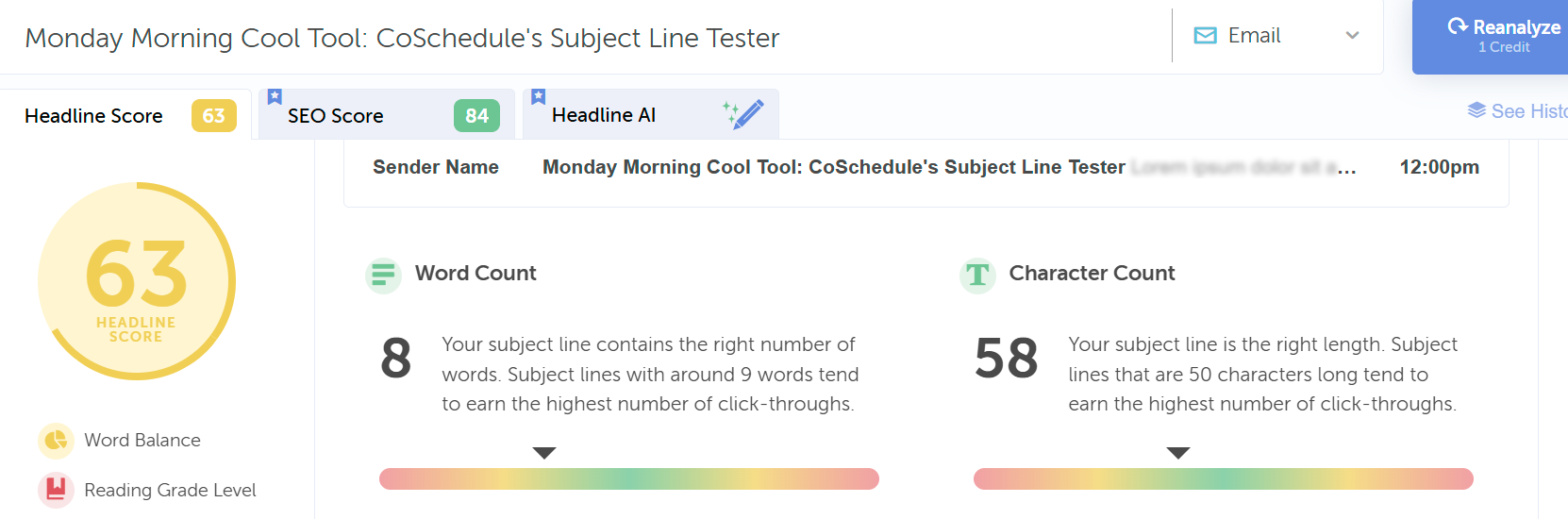
Curious about the effectiveness of this blog post’s title as an email subject line, I entered it into the tool. Take a look at its performance score below:

Here’s an improved score with a different heading; however, it has too many words.

Click Here to Try CoSchedule’s Email Subject Line Tester

Posted in Cool Tool

Monday Morning Cool Tool: Hotjar

This week I’m recommending Hotjar, a website optimization tool.

1_PtZNvuc_ZMJr8aRS0xOe-Q

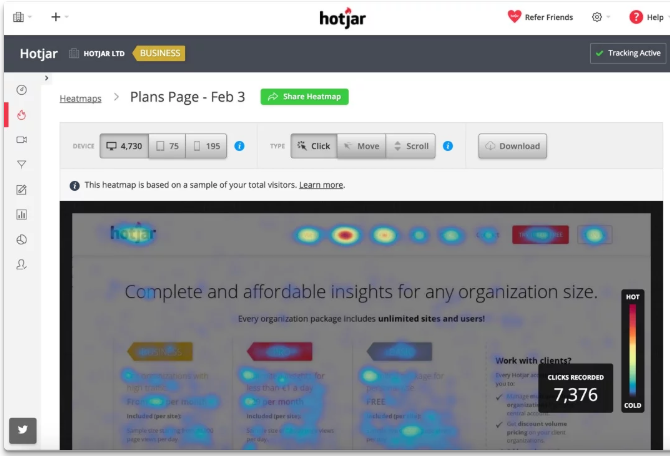
Imagine being able to see your website through your visitors’ eyes. Tools like heatmaps, scroll maps, and click maps make this a reality. Heatmaps highlight the most engaged areas of your pages, showing you where visitors instinctively click or tap. Scroll maps show how far down the page visitors typically venture, indicating if crucial content is being missed. Click maps pinpoint exactly where users are trying (and sometimes failing) to interact. This visual feedback provides an immediate understanding of user attention and potential points of confusion.

Going beyond static snapshots, visitor recordings offer a dynamic view of individual user sessions. By watching recordings of clicks, taps, and mouse movements, you can witness firsthand the user experience. This allows you to identify usability issues that might not be apparent from aggregated data. Perhaps a button is unclear, a form field is causing hesitation, or a navigation element is proving difficult to locate. These real-time journeys can uncover hidden frustrations and highlight areas needing immediate attention.

Platforms like Hotjar cleverly combine these powerful Analysis tools with Feedback tools, offering a holistic view of the user experience. This synergy provides the “big picture” – not just what users are doing, but also their direct opinions and frustrations. By understanding both the “what” and the “why,” you gain the knowledge necessary to make data-driven decisions that enhance your site’s usability, improve performance, and ultimately drive higher conversion rates.

Price: Hotjar offers a tiered pricing structure (including a free tier with limitations) with different plans based on your needs and the volume of website traffic and usage.

Posted in Cool Tool

Monday Morning Cool Tool: Snappa

This week’s cool tool recommendation is Snappa – a cloud-based graphic design tool.

Snappa is a user-friendly graphic design tool, particularly well-suited for those who need to quickly create visuals without a steep learning curve or expensive software.

Key Features

  • Extensive Library of Templates: Offers thousands of pre-designed templates for various purposes (social media posts, blog graphics, ads, etc.) that are customizable.  
  • Vast Stock Photo & Graphics Library: Provides access to millions of royalty-free, high-definition photos and a wide selection of graphics, icons, and vectors.  
  • Text Editor: Allows users to add and customize text with a variety of fonts, sizes, colors, and effects.  
  • Image Editor: Includes basic image editing tools like cropping, resizing, flipping, rotating, and adjusting brightness/contrast.  
  • Background Remover: A one-click tool to remove backgrounds from images.  
  • Image Resizer: Makes it easy to resize graphics for different social media platforms with pre-set dimensions.  
  • Custom Font Uploads: Paid plans allow users to upload their own brand fonts for consistency.  
  • Social Media Integrations: Offers direct integration with platforms like Buffer for easy scheduling and publishing (on paid plans).  
  • Team Collaboration: Team plans allow multiple users to collaborate on designs.  
  • Brand Kit: Enables users to save brand colors and logos for easy access.  

Pricing:

Snappa offers different pricing tiers, including a free plan with limitations:  

  • Free Plan: Typically includes access to all templates and the stock photo library but limits the number of downloads per month (usually 3) and the number of connected social accounts. It’s generally for single users.  
  • Pro Plan: A paid plan for individuals, usually offered at a monthly or annual fee, that unlocks unlimited downloads, social media integrations, custom font uploads, background removal, and more.  
  • Team Plan: Aimed at teams, offering the same features as the Pro plan but for multiple users (typically up to 5 on the standard team plan), often with collaboration features.  

Posted in Cool Tool

Monday Morning Cool Tool: Filmora

This week’s cool tool recommendation is Filmora a user-friendly video editing tool.

Filmora offers a balance of powerful features and an intuitive interface, making it accessible for those new to video editing while still providing tools for more creative projects.

Key Features

Filmora boasts a wide array of features, including:

  • Basic Editing: Trimming, cutting, splitting, merging, rotating, and adjusting video speed.
  • Visual Effects: A large library of filters, transitions, titles, and motion elements.
  • Audio Editing: Tools for adjusting audio levels, adding background music, recording voiceovers, and noise reduction.
  • Colour Correction and Grading: Options for adjusting colour balance, applying LUTs, and enhancing the visual look of videos.
  • Text and Titles: Customisable text and title templates, including animated options.
  • Motion Tracking: The ability to track objects within a video and apply effects or elements that follow their movement.
  • Green Screen (Chroma Key): Tools for removing and replacing backgrounds.
  • Screen Recording: The ability to record your computer screen.
  • AI-Powered Features: Recent versions include AI tools like:
    • AI Text-Based Editing: Editing video by manipulating its transcription.
    • AI Music Generator: Creating royalty-free background music.
    • AI Portrait Cutout: Removing video backgrounds.
    • AI Smart Masking: Automatically creating masks around objects.
    • AI Audio Denoise: Reducing background noise in audio.
    • AI Voice Enhancer: Improving vocal clarity.
    • AI Smart Cut: Identifying and clipping interesting moments.
    • AI Smart Short Clips: Creating short clips for social media.
    • AI Image to Video: Turning still images into moving videos.
    • AI Sound Effect Generator: Creating custom sound effects from text prompts.
    • AI Voice Cloning: Creating an AI voice clone.
    • AI Translation & Lip Sync: Translating speech and syncing it to lip movements.
  • Templates and Assets: Built-in templates, royalty-free music, sound effects, and the ability to access more through the Filmora Effects Store.
  • Social Media Integration: Features designed for creating content for platforms like YouTube, TikTok, and Instagram, including auto-reframe tools.

Pricing

Filmora offers a free version that gives you access to basic editing tasks and access to a selection of built-in filters, transitions, titles, and motion elements. It’s a great way to try out the software, learn its interface; however, the watermark on exported videos makes it unsuitable for projects where a professional, unbranded output is necessary. To remove the watermark and access the full range of features and assets, you would need to purchase a paid subscription or a perpetual license.

Posted in #HCSM

Monday Morning Cool Tool: Ribbet

This week I’m recommending Ribbet – a user-friendly online photo editor.

Ribbet’s intuitive interface and straightforward tools make it accessible to everyone.

Here are some noteworthy features:

  • Ribbet’s interface is designed for simplicity, allowing you to crop, resize, adjust brightness, or enhance colors easily.
  • Ribbet’s extensive library of filters and effects helps you find the perfect filter to enhance your images.
  • Whether you want to add a catchy caption or a fun emoji, Ribbet makes it easy to customize your visuals.
  • Ensure your photos look their best on any platform with Ribbet’s resizing and cropping tools. Easily adjust your images to the optimal dimensions for Instagram, Facebook, X, and more.
  • Need to quickly remove a blemish, or whiten teeth? Ribbet has those tools as well.
  • Finally, if you are looking for a quick start, Ribbet has many templates that allow you to easily create content.

What I like best about Ribbet is how user-friendly it is. Its intuitive interface and social media-ready tools make it a great choice for anyone looking to elevate their graphics. And the best part? It’s totally free. So, ditch the complicated software and give Ribbet a try.

Posted in Cool Tool

Monday Morning Cool Tool: Preview

instagram-feed-planner-app-preview-8.jpg

This week’s cool tool recommendation is Preview, a super useful Instagram app.

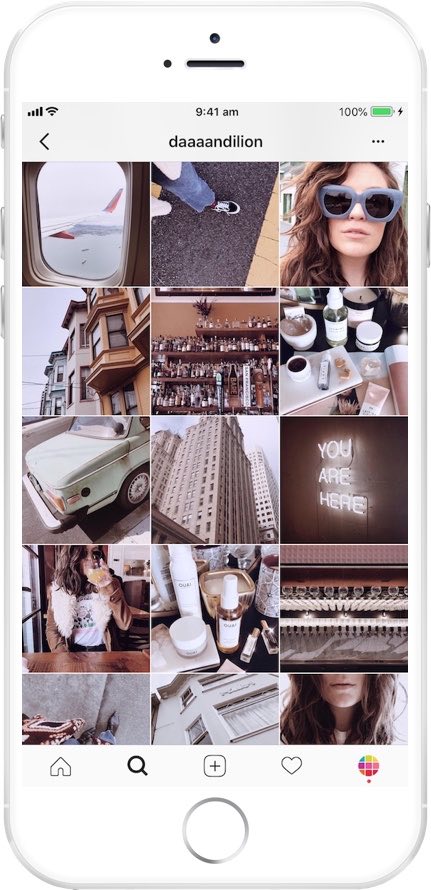
Preview is an Instagram planner that simplifies content creation and helps you design a cohesive aesthetic and optimize your social media strategy. It allows you to see how your grid will look before hitting “post,” ensuring your feed stays cohesive and visually engaging.

Want to learn more?

Visit my Substack to learn more about the key features of Preview and pricing plans.


Posted in #HCSM

How To Demonstrate the Value of Social Media

For healthcare communicators, demonstrating the value of your social media efforts can be challenging but essential to securing buy-in, allocating resources, and achieving long-term success.

The Challenge: Proving Social Media Return on Investment (ROI)

  1. Defining ROI in Healthcare Contexts: Unlike direct-to-consumer businesses, where ROI often translates into sales or conversions, healthcare ROI can be more nuanced. Metrics might include increased awareness, patient engagement, or referrals—intangibles that can be hard to quantify.
  2. Data Overload: With countless metrics to track (likes, shares, comments, reach, impressions, click-through rates, etc.), it’s easy to get overwhelmed or lose focus on the most meaningful indicators of success.
  3. Attribution Issues: Patients rarely make decisions based on a single social media interaction. Tracking the journey from initial engagement to appointment booking can be complex and indirect.
  4. Limited Resources: Many healthcare organizations have lean marketing teams juggling multiple priorities, leaving little time for in-depth analytics.

Solutions: Actionable Strategies for Measuring Social Media ROI

1. Define Clear Objectives

Start by identifying what success looks like for your organization. In healthcare, these might include:

  • Brand Awareness: Growing your follower count or increasing post reach.
  • Patient Engagement: Encouraging interactions like comments, shares, or messages.
  • Conversions: Tracking leads to website visits, newsletter sign-ups, or appointment requests.

💡 Tip: Use SMART goals—specific, measurable, achievable, relevant, and time-bound—to frame your objectives.

2. Focus on Key Metrics

Not all metrics are equally valuable. Prioritize those that align with your goals:

  • Awareness Goals: Track impressions, reach, and follower growth.
  • Engagement Goals: Monitor likes, shares, comments, and direct messages.
  • Conversion Goals: Use click-through rates, form submissions, or website analytics to measure tangible actions.

Continue Reading

Posted in Cool Tool

Monday Morning Cool Tool: PhotoRoom

This week’s cool tool recommendation is PhotoRoom – a user-friendly AI-powered tool that simplifies the process of removing and replacing image backgrounds

While not a comprehensive photo editor, its intuitive interface and reliable AI make it a fantastic choice for beginners and anyone seeking a quick and efficient solution for background swaps.

How PhotoRoom Works

  1. Image Selection: Begin by uploading your desired image in PNG or JPG format. Higher resolution images generally yield better results.
  2. Background Removal: PhotoRoom’s AI swiftly analyzes the image and automatically removes the background. You can then fine-tune the selection by adjusting the crop as needed.
  3. Background Replacement: A vast library of backgrounds awaits. Explore a diverse range of textures, colors, and patterns, or delve into themed collections like “Nature” (featuring skies, starry nights) and “Art” (inspired by Van Gogh, masterpieces).
  4. Downloading: Save a low-resolution preview of your edited image with a watermark for free. To obtain the high-definition version, a Pro account is necessary.

Key Advantages

  • Effortless Background Removal: AI-powered technology makes background removal a breeze, even for those with no prior photo editing experience.
  • Intuitive Interface: The user-friendly design ensures a smooth and enjoyable editing experience.
  • Versatile Background Library: A wide array of backgrounds caters to various needs and creative visions.
  • Time-Saving: Quickly and efficiently replace backgrounds, streamlining your workflow.

Pricing

While basic backgrounds like blank tiles are available for free, premium options, including more sophisticated and creative backgrounds, require a Pro account subscription.

Posted in #HCSM

10 Content Pillars for Effective Healthcare Communication on Social Media

By establishing a strong foundation of engaging content, healthcare organizations can effectively leverage social media to improve patient care, enhance their reputation, and strengthen their online presence.

This article outlines 10 key content pillars that should form the cornerstone of any successful healthcare social media strategy, along with real-world examples.

1. Patient Testimonials and Success Stories

St. Jude Children’s Research Hospital shares patient recovery stories on Facebook, often featuring photos and heartfelt quotes from patients or families.

Purpose: To inspire and connect with audiences on an emotional level.

Why It Works: Personal stories humanize healthcare and foster trust. They also serve as social proof, showcasing successful outcomes and patient satisfaction.

How to Create: Collaborate with patients who are willing to share their experiences. Use video or written testimonials accompanied by photos to maximize emotional impact. Obtain written consent from patients. Focus on authentic, relatable stories.


2. Educational Content

American Heart Association pairs educational content with captivating graphics.

Purpose: To inform audiences about health topics, treatments, and preventative care.

Why it works: People actively seek credible health information online. Educational posts establish your organization as a trusted authority. These posts can also drive traffic to your website or blog, where you can provide in-depth resources.

How to Create

  • Create short, informative videos or infographics.
  • Share articles and blog posts on relevant health topics.
  • Use simple, easy-to-understand language.

3. Behind-the-Scenes Content

Johns Hopkins Medicine’s TikTok videos provide a glimpse into a day in the life of their healthcare professionals, from lab researchers to ER nurses.

Purpose: To showcase the people and processes behind healthcare organizations.

Why It Works: Humanizing your team builds trust and relatability. Audiences appreciate seeing the faces and stories behind the organization.

How to Create: Share photos or videos of staff at work, team celebrations, or day-in-the-life content. Highlight the dedication and expertise of your team and the organization’s culture and values.

Continue reading this article for free on Substack

Posted in #HCSM

Master Your Healthcare Marketing: 7 Proven Content Planning Strategies for 2025

Effective content planning is the cornerstone of any successful healthcare marketing strategy. It ensures you create content that addresses the unique needs of patients, caregivers, and healthcare professionals while aligning with your organizational goals.

In an industry as dynamic and sensitive as healthcare, strategic content planning is more critical than ever. By planning your content for the year ahead, you can:

  • Prioritize patient-centric efforts: Focus on creating content that informs, supports, and empowers your target audience.
  • Enhance trust and credibility: Build a reputation as a reliable source of health information.
  • Optimize resources effectively: Streamline the creation of high-quality, impactful content within available budgets and timelines.

The Peril of “Random Acts of Content”

Without a clear plan, healthcare organizations risk producing inconsistent or irrelevant content. This “random acts of content” approach can:

  • Undermine patient trust
  • Waste valuable resources
  • Make it difficult to track and measure outcomes

Consequences of Random Acts of Content:

  • Misalignment with patient and professional needs
  • Overlapping or redundant messaging
  • Missed opportunities to provide timely and impactful information

7 Types of Content Planning for 2025 Success

1. Weekly/Monthly/Quarterly Content

Strategy: Establish a consistent schedule of content tailored to your audience, such as blogs on medical advancements, newsletters with health tips, or videos addressing common patient concerns.
Benefits: Builds trust, keeps your audience informed, and reinforces your role as a healthcare leader.
Example: A monthly newsletter with health and wellness tips, patient success stories, and updates on new treatments or services.


2. Seasonal Content

Strategy: Align content with health observances, seasonal trends, and community health needs.
Benefits: Promotes timely health awareness and engages audiences with relevant topics.
Example: A flu season campaign emphasizing vaccination benefits, or educational content for Breast Cancer Awareness Month.


3. Event-Related Content

Strategy: Develop content around key healthcare events, such as health fairs, medical conferences, or patient support group meetings.
Benefits: Increases event participation and drives awareness.
Example: Social media posts, email campaigns, and live-streams promoting a health screening day or participation in a global healthcare summit.

Continue reading this article for free on Substack