Posted in Cool Tool

Monday Morning Cool Tool: Dreamina

This week’s cool tool recommendation is Dreamina – an AI-powered creative suite that makes it easy to create high-quality images and videos.

You can start by typing a text prompt or uploading a reference image. Try these prompt ideas:

  • For Patient Education: A clean, friendly 3D isometric illustration of a modern telehealth consultation. A diverse doctor and a smiling patient on a laptop screen, soft pastel colours, minimalist icons for ‘heart rate’ and ‘chat,’ bright and airy aesthetic.”
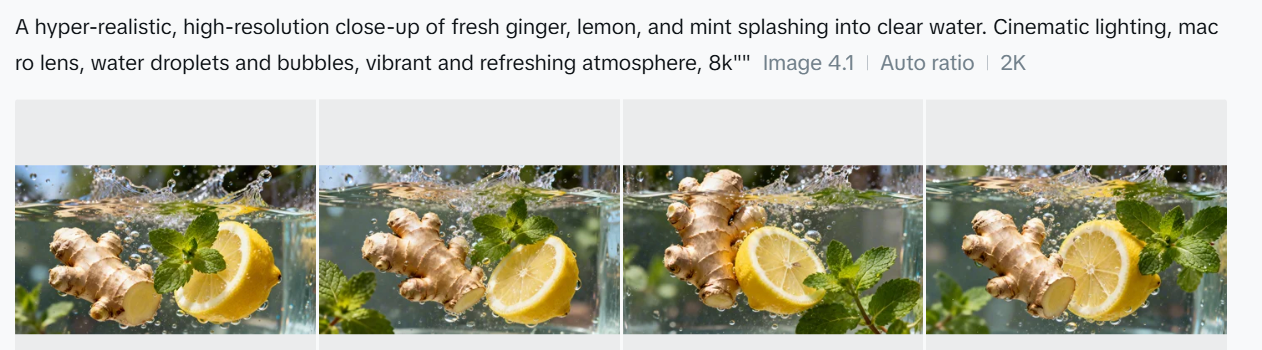
  • For Wellness Branding: “A hyper-realistic, high-resolution close-up of fresh ginger, lemon, and mint splashing into clear water. Cinematic lighting, macro lens, water droplets and bubbles, vibrant and refreshing atmosphere.”
  • For Inclusive Representation: “A warm, photorealistic portrait of an active elderly couple jogging in a sun-dappled forest. Natural lighting, shallow depth of field, focused on their joyful expressions, professional photography style.”

The AI generates four versions, so you can choose your favourite to enhance or use the Retouch tool to refine details. You can also turn a still image into a video with realistic motion.

Pricing

Dreamina offers free credits every day, so you can try it at no cost. If you want faster results, commercial rights, or high-definition exports, you’ll need a Pro subscription.

Posted in Cool Tool

Monday Morning Cool Tool: PhotoRoom

This week’s cool tool recommendation is PhotoRoom – a user-friendly AI-powered tool that simplifies the process of removing and replacing image backgrounds

While not a comprehensive photo editor, its intuitive interface and reliable AI make it a fantastic choice for beginners and anyone seeking a quick and efficient solution for background swaps.

How PhotoRoom Works

  1. Image Selection: Begin by uploading your desired image in PNG or JPG format. Higher resolution images generally yield better results.
  2. Background Removal: PhotoRoom’s AI swiftly analyzes the image and automatically removes the background. You can then fine-tune the selection by adjusting the crop as needed.
  3. Background Replacement: A vast library of backgrounds awaits. Explore a diverse range of textures, colors, and patterns, or delve into themed collections like “Nature” (featuring skies, starry nights) and “Art” (inspired by Van Gogh, masterpieces).
  4. Downloading: Save a low-resolution preview of your edited image with a watermark for free. To obtain the high-definition version, a Pro account is necessary.

Key Advantages

  • Effortless Background Removal: AI-powered technology makes background removal a breeze, even for those with no prior photo editing experience.
  • Intuitive Interface: The user-friendly design ensures a smooth and enjoyable editing experience.
  • Versatile Background Library: A wide array of backgrounds caters to various needs and creative visions.
  • Time-Saving: Quickly and efficiently replace backgrounds, streamlining your workflow.

Pricing

While basic backgrounds like blank tiles are available for free, premium options, including more sophisticated and creative backgrounds, require a Pro account subscription.

Posted in Cool Tool

Monday Morning Cool Tool: Glasp AI YouTube Summarizer

This week’s cool tool recommendation is Glasp AI YouTube Summarizer a free Chrome extension to generate summaries and give you the full transcript of any YouTube video.

Key Features

  • Pulls up transcripts of YouTube videos in multiple languages and summarizes them.
  • Summary can be generated via ChatGPT, Claude, Mistral AI, Gemini.
  • You can set how long or detailed the summary should be.
  • Summaries can include timestamps so you can navigate to specific parts of video.
  • You can highlight parts of the transcript, add notes, and export highlights/notes to tools like Obsidian, Notion, etc., in formats like Markdown, HTML, CSV, JSON.
  • Get the transcript of the video in multiple languages. Watch the video with the transcript on the side and get the content quickly or simply copy the transcript.

How it works:

  1. Install the extension.
  2. Open a YouTube video.
  3. Click the Glasp “Transcript & Summary” bar on the top right.
  4. Copy the transcript with one click.
  5. Paste it into your doc.

Limitations / Considerations

  • You’ll need an internet-connected browser that supports the extension.
  • Accuracy depends on the quality of the video’s transcript and AI summarization.
  • Complex or nuance-heavy videos may lose depth if the summary is too short.

Posted in Cool Tool

Monday Morning Cool Tool: Adobe Podcast

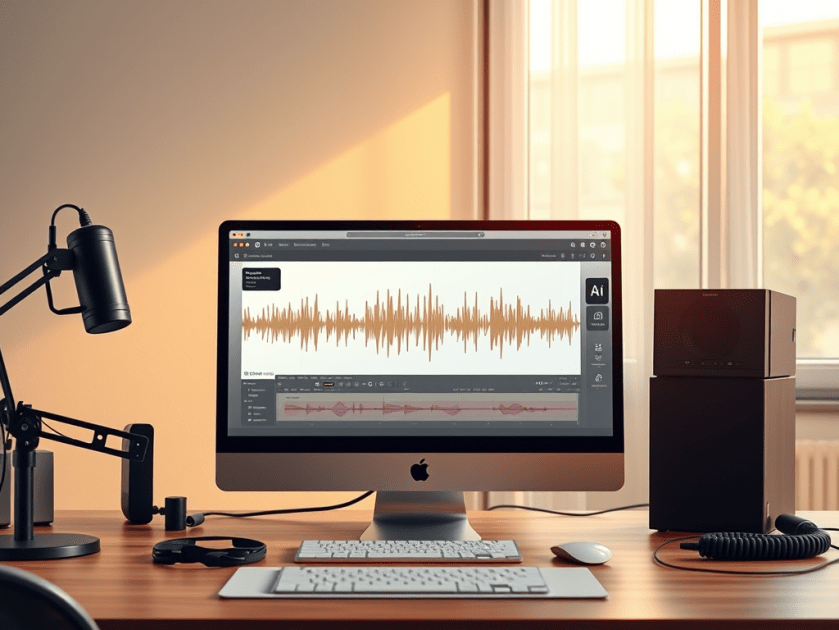
This week’s cool tool recommendation is Adobe Podcast — a browser-based audio recording, editing, and enhancement tool.

What It Does

Adobe Podcast packs in several features designed to simplify audio workflows:

  • Record & Edit in Browser – No need for complex local DAWs. You can record directly in the browser, edit your audio, manage speaker tracks, and even convert to video if needed.
  • Enhance Speech & Clean-up – Tools for removing background noise, reducing echo, improving clarity. If you don’t have a perfect setup (mic, acoustics, etc.), this helps a lot.
  • Mic Check – A diagnostic tool to test your mic and environment, giving feedback so you can optimise your setup before recording.
  • Transcription & Captions – Automatically generate transcripts or captions from your audio/video. Great for accessibility or social media snippets.
  • Royalty-Free Music & Sound Effects – Built-in library so you can add intros, backgrounds, and effects without hunting down licensing issues.

Best Use Cases

  • Recording remote interviews, podcasts, or voiceovers without a full studio setup.
  • Repurposing audio into social media content (videos, captions, audiograms) quickly.
  • Educators or health professionals who want to share audio content but need accessible tools.
  • Anyone looking for high-quality voice recordings without incurring significant expenses on hardware or software.

Pricing

The free plan includes:

  • Enhance Speech (audio only) — remove background noise & echo
  • Mic Check — evaluate your mic & setup using AI to detect issues.
  • Studio (browser-record/edit/enhance) with some limits: you can download projects up to 30 minutes, but with limits on how many per day. Files over a certain size/duration / original recordings may not be downloadable.

The free plan is sufficient for small projects, short podcast episodes, or testing out new ideas. Upgrading to the paid plan unlocks additional features.


Note: If you’re interested in exploring similar tools, consider comparing Descript, Audacity (a free, desktop-based option), or Riverside.fm (for remote interviews/video and audio).

Posted in Cool Tool

Monday Morning Cool Tool: SkyReels

This week’s cool tool recommendation is SkyReels AI Studio, an AI-powered video creation platform.

SkyReels AI Studio enables anyone to create dynamic videos through intuitive, end-to-end workflows from scriptwriting and storyboarding to AI voice-overs, lip-syncing, music, and video editing.

Key Features

Video Tools

  • Import Storyboards & Clips — Import your own storyboards or short clips to jumpstart the creative process and save production time.
  • AI Video Generator — With one click, convert text to video or image to video. Instantly turn ideas into personalised, high-quality videos.
  • AI Image and Video Generator — Generate dynamic sequences from simple text prompts, powered by advanced AI synthesis.
  • Video Editing Tools — Fine-tune every frame, transition, and effect to ensure your video aligns with your creative vision.
  • Video Cutter — Trim, split, crop, resize, compress, or rotate videos effortlessly. Create polished, professional clips in SkyReels’ all-in-one video editor.

Image Tools

  • Image Generator — Create customised AI images from text or reference images with diverse models and art styles. The generator maintains character consistency for a cohesive look across your project.

Audio Tools

  • Text to Speech — Convert text to lifelike speech in seconds with a library of emotive, natural-sounding voices.
  • Lip Sync — Upload a video or image and generate accurate lip-synced results automatically, bringing stills and clips to life with custom voices.
  • AI Sound Effects — Instantly create professional sound effects tailored to your project—no more trawling through stock libraries or worrying about licensing.
  • Music Generator — Produce the perfect soundtrack or song to match your video’s mood. Generate music on demand for shorts, ads, presentations, or creative projects.

Why this tool is a valuable addition to your content creation toolkit

SkyReels stands out by streamlining the video creation process into a few simple steps—all within a single platform. The magic lies in its AI-driven capabilities:

  • End-to-end automation: No hopping between script, visuals, and audio tools.
  • Creative consistency: Maintains character look, motion, and audio styling across scenes.
  • Time-saving: Accelerates content production, particularly for short-form formats like Reels and Shorts.

Pricing

SkyReels is free to try. You get 300 credits upfront plus 50 daily credits to experiment.

If you need more, paid plans start at $7.90/month (Basic), with Standard ($28) and Pro ($76) tiers offering higher credit limits, faster queues, and extra features.

It’s flexible enough that you can dip your toe in without commitment, then scale up if you find it fits your workflow.

Posted in #HCSM

Hashtags at 18: What They’ve Meant for Healthcare and Advocacy

Today is International Hashtag Day, and it also marks the hashtag’s 18th birthday. What began as a niche idea on Twitter in 2007 is now part of how healthcare professionals, patient advocates, and communities connect, learn, and campaign for change.

The Birth of the Hashtag

On 23 August 2007, Chris Messina suggested using the # symbol to group conversations on Twitter. Initially dismissed as “too nerdy,” the idea caught on when people began using hashtags to share updates during the San Diego wildfires later that year. By 2009, Twitter had made hashtags clickable, and soon they spread to Instagram, Facebook, LinkedIn, and TikTok.

Since then, hashtags have become cultural shorthand. They’ve carried lighthearted trends (#ThrowbackThursday), breaking news, and, importantly, social movements (#MeToo, #BlackLivesMatter).

Hashtags in Healthcare

In healthcare, hashtags have served as digital gathering places. Movements like #ILookLikeASurgeon challenged stereotypes and celebrated diversity in surgery. #MedTwitter, #CardioTwitter, and #IDTwitter have connected clinicians and patients across the world, enabling rapid sharing of evidence, insights, and professional solidarity.

Hashtags also underpin #FOAMed (Free Open Access Medical Education), where health professionals use tags to curate and share open educational resources. During the COVID-19 pandemic, hashtags provided real-time access to emerging research and peer commentary.

The Risks

As with any tool, hashtags are not without risks. They can be used performatively, with little action behind them. They can create echo chambers, exclude certain voices, or be hijacked for misinformation. Yet when used with intention, they remain a powerful part of digital health communication.

Hashtags at 18: Coming of Age in Healthcare

Eighteen often marks adulthood — a moment when identity and responsibility converge. Hashtags, too, have reached that stage. Algorithms may increasingly shape what people see, but hashtags still serve as anchors for visibility, belonging, and collective voice.

For healthcare professionals and advocates, they remain one of the simplest yet most effective tools for connecting communities, amplifying trusted information, and driving meaningful change.

So here’s a question to mark the hashtag’s 18th birthday: What hashtag has shaped you the most — whether it made you laugh, taught you something new, or gave you a sense of belonging?

Posted in #HCSM

Getting Health Messages Shared: What Really Works on Instagram

Instagram has evolved far beyond being a hub for fashion, food, and lifestyle brands. With more than 2 billion monthly users, it has become one of the most potent platforms for storytelling, education, and awareness-building. For healthcare communicators, that reach is impossible to ignore.

What makes Instagram especially effective is its ability to translate complex or sensitive health information into visual, accessible, and emotionally resonant content. Reels, carousels, and infographics allow you to distil big ideas into bite-sized, shareable moments. The platform also connects directly with younger demographics — Millennials and Gen Z — who are less likely to seek health information through traditional media or institutional websites.

But here’s the critical insight: shares matter more than likes.

  • A like signals agreement.
  • A comment shows engagement.
  • But a share extends your reach into entirely new networks — multiplying visibility and influence far beyond your existing followers.

For health messages — where the goal is often awareness, education, or behaviour change — shares are the ultimate form of amplification.

So, what makes people hit the share button? Let’s look at five proven types of content that consistently get shared.

1. Motivational or Inspirational Content

Why it works: Inspiration is universal. People share motivational content because it makes them feel uplifted, and they want others to feel the same.

Healthcare examples

  • A resilience story highlighting a patient’s recovery journey (with consent and sensitivity).
  • A reel showcasing the dedication of frontline staff during a public health campaign.
  • A quote graphic emphasising the importance of small, daily habits for long-term health.

Tip: Keep it authentic. Forced positivity rings hollow, but real, human stories resonate deeply. When possible, focus on lessons learned or a hopeful outcome, not just glossy “success.”

👉 Continue reading the full article on my Substack

Posted in #HCSM

Why Listicles Still Work In Healthcare Communication 

In health communication, clarity isn’t just helpful; it’s essential. That’s why one of the most enduring formats in digital communication remains the listicle.

Yes, the listicle. It may carry associations with lifestyle blogs or clickbait headlines, but when done well, it’s an effective tool for building understanding, trust, and engagement across audiences in healthcare.

What Is a Listicle?

A listicle is a structured article built around a numbered or ordered list—typically with subheadings, explanations, or visuals. It offers a clear roadmap through a topic, making it easier to scan, digest, and act on.

You’ve likely used or encountered them before:

  • “5 Signs of a Stroke Everyone Should Know”
  • “10 Things to Ask at Your Next GP Appointment”
  • “7 Lessons from Running a National Health Campaign”

They’re concise, focused, and—when crafted with care—highly effective in reaching busy, distracted, or overwhelmed audiences.

Why Listicles Work in Health Communication

1. They Provide Cognitive Closure

A title like “6 Questions to Ask Before Starting a New Medication” gives readers a straightforward task. It sets expectations and satisfies them. That sense of completion can increase comprehension and retention.

2. They Reduce Information Overload

Especially for patients navigating new diagnoses or caregivers juggling multiple responsibilities, dense paragraphs are daunting. A list offers a manageable way in.

3. They Match Digital Behaviour

Most people don’t read health content from start to finish. They scan for relevance. Listicles cater to that pattern, offering defined entry points that support better engagement.

4. They Support Accessibility

With short sections, bold headings, and bullet points, listicles are easier to navigate, especially on mobile devices or for readers with cognitive or visual impairments.

5. They’re Discoverable and Shareable

Listicles often perform well in search and on social media. Their clear structure is favoured by SEO algorithms and lends itself to being bookmarked, shared, or quoted in other content.

Examples in Healthcare Comms

Patient Education

“7 Questions to Ask Before Elective Surgery”
Used in clinic brochures or hospital blogs, this format empowers patients to participate more actively in their care—and improves shared decision-making.

Public Awareness Campaigns

“6 Myths About Vaccines—Debunked”
Structured myth-busting content can be shared across platforms, from Instagram carousels to printed factsheets. Each point reinforces public trust through clear, evidence-based language.

Internal Communications or Training

“5 Things to Know About the New Referral Process”
Listicles can help clinical staff or administrative teams quickly absorb policy updates without needing to read a full SOP document.

Advocacy and Engagement

“10 Ways to Support People Living with Epilepsy”
Ideal for NGOs or awareness days, these lists can drive real-world action, reinforce respectful language, and make allyship more tangible.

Writing Listicles That Inform—Not Oversimplify

There’s a misconception that listicles are shallow. But in healthcare, the best list-based content doesn’t dilute—it distils. The goal isn’t to reduce nuance but to make key messages more usable.

Here are a few guidelines:

  • Be specific. “7 Tips for Mental Health” is vague. “7 Ways to Cope with Post-Surgical Anxiety” is useful.
  • Don’t overinflate the count. If you have four strong points, stick with four. Padding the list undermines trust.
  • Layer in links or next steps. A good listicle can serve as a gateway to more detailed resources or actions.
  • Design with accessibility in mind. Use bold text, short sentences, and consider screen reader compatibility.
  • Tailor tone to audience. A patient-facing list needs a different voice than one written for policymakers or funders.

Have you used listicles in your work—successfully or otherwise?
I’d love to hear how they’ve worked (or fallen flat) in your campaigns, publications, or patient materials.

Posted in Cool Tool

Monday Morning Cool Tool: StoryArt

This week I’m recommending StoryArt, a freemium app for more creative Instagram Stories and Reels.

StoryArt is an Instagram story editor app that offers over 3,000 customizable collage and animated story templates for Instagram Stories and Reels.  In addition, you can access  500+ post templates for feed posts and 500+ highlight cover templates to beautify your profile.

The app is free but if you want access to extra tools, filters, and layouts, there is a monthly fee of  $2.99 or a full-year subscription for $9.99. 

StoryArt is available for both iOS and Android.

Posted in AI, Cool Tool

Monday Morning Cool Tool: OpenArt.ai

This week I’m recommending OpenArt.ai – an AI-powered art platform that allows users to create, edit, and enhance images using artificial intelligence.

Key Features

AI Image Generation
Create images from text prompts using a range of advanced models, including DALL·E 3 and Stable Diffusion. You can also generate visuals without prompts, offering boundary-free creative exploration.

Advanced Image Editing Tools
OpenArt includes a robust suite of AI editing capabilities to refine your work, such as:

  • Inpainting & Outpainting – Add, remove, or expand elements in your image beyond its original frame.
  • Upscaling – Improve image resolution to produce crisp, detailed artwork.
  • Background Removal & Replacement – Effortlessly swap or eliminate image backgrounds.
  • Find & Replace – Replace specific objects using simple text prompts.
  • Consistent Characters – Generate the same character in multiple poses, styles, and scenes—ideal for storytelling or brand consistency.
  • Facial Editing – Adjust expressions, eye color, or hairstyles for fine-tuned control.

Customization & Creative Control
You can train custom models to reflect your unique style and use “Image Guidance” to steer outputs based on reference images (pose, style, composition, etc.).

Community & Learning Resources
Access a vibrant community feed, Discord support, tutorials, and prompt books to help you get the most from the platform.

Image to Video Tool
Transform static images into dynamic videos in just a few clicks.

Pricing

OpenArt offers a free trial with limited credits for new users. For ongoing or professional use, there are several paid plans—Essential, Advanced, Infinite, and Team—each offering increasing credits, features, and simultaneous generations. Costs vary based on the tools and AI models you use.