Posted in Cool Tool

Monday Morning Cool Tool: Preview

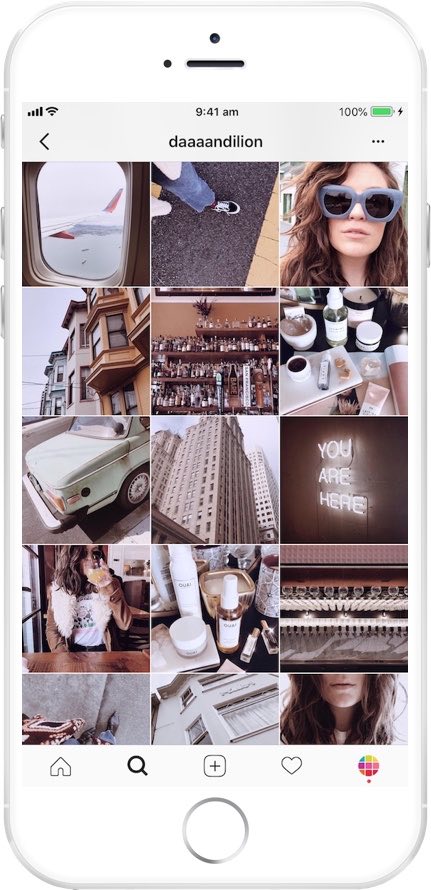
instagram-feed-planner-app-preview-8.jpg

This week’s cool tool recommendation is Preview, a super useful Instagram app.

Preview is an Instagram planner that simplifies content creation and helps you design a cohesive aesthetic and optimize your social media strategy. It allows you to see how your grid will look before hitting “post,” ensuring your feed stays cohesive and visually engaging.

Want to learn more?

Visit my Substack to learn more about the key features of Preview and pricing plans.


Posted in #HCSM

How To Demonstrate the Value of Social Media

For healthcare communicators, demonstrating the value of your social media efforts can be challenging but essential to securing buy-in, allocating resources, and achieving long-term success.

The Challenge: Proving Social Media Return on Investment (ROI)

  1. Defining ROI in Healthcare Contexts: Unlike direct-to-consumer businesses, where ROI often translates into sales or conversions, healthcare ROI can be more nuanced. Metrics might include increased awareness, patient engagement, or referrals—intangibles that can be hard to quantify.
  2. Data Overload: With countless metrics to track (likes, shares, comments, reach, impressions, click-through rates, etc.), it’s easy to get overwhelmed or lose focus on the most meaningful indicators of success.
  3. Attribution Issues: Patients rarely make decisions based on a single social media interaction. Tracking the journey from initial engagement to appointment booking can be complex and indirect.
  4. Limited Resources: Many healthcare organizations have lean marketing teams juggling multiple priorities, leaving little time for in-depth analytics.

Solutions: Actionable Strategies for Measuring Social Media ROI

1. Define Clear Objectives

Start by identifying what success looks like for your organization. In healthcare, these might include:

  • Brand Awareness: Growing your follower count or increasing post reach.
  • Patient Engagement: Encouraging interactions like comments, shares, or messages.
  • Conversions: Tracking leads to website visits, newsletter sign-ups, or appointment requests.

💡 Tip: Use SMART goals—specific, measurable, achievable, relevant, and time-bound—to frame your objectives.

2. Focus on Key Metrics

Not all metrics are equally valuable. Prioritize those that align with your goals:

  • Awareness Goals: Track impressions, reach, and follower growth.
  • Engagement Goals: Monitor likes, shares, comments, and direct messages.
  • Conversion Goals: Use click-through rates, form submissions, or website analytics to measure tangible actions.

Continue Reading

Posted in Cool Tool

Monday Morning Cool Tool: PhotoRoom

This week’s cool tool recommendation is PhotoRoom – a user-friendly AI-powered tool that simplifies the process of removing and replacing image backgrounds

While not a comprehensive photo editor, its intuitive interface and reliable AI make it a fantastic choice for beginners and anyone seeking a quick and efficient solution for background swaps.

How PhotoRoom Works

  1. Image Selection: Begin by uploading your desired image in PNG or JPG format. Higher resolution images generally yield better results.
  2. Background Removal: PhotoRoom’s AI swiftly analyzes the image and automatically removes the background. You can then fine-tune the selection by adjusting the crop as needed.
  3. Background Replacement: A vast library of backgrounds awaits. Explore a diverse range of textures, colors, and patterns, or delve into themed collections like “Nature” (featuring skies, starry nights) and “Art” (inspired by Van Gogh, masterpieces).
  4. Downloading: Save a low-resolution preview of your edited image with a watermark for free. To obtain the high-definition version, a Pro account is necessary.

Key Advantages

  • Effortless Background Removal: AI-powered technology makes background removal a breeze, even for those with no prior photo editing experience.
  • Intuitive Interface: The user-friendly design ensures a smooth and enjoyable editing experience.
  • Versatile Background Library: A wide array of backgrounds caters to various needs and creative visions.
  • Time-Saving: Quickly and efficiently replace backgrounds, streamlining your workflow.

Pricing

While basic backgrounds like blank tiles are available for free, premium options, including more sophisticated and creative backgrounds, require a Pro account subscription.

Posted in #HCSM

10 Key Questions to Guide Your 2025 Healthcare Social Media Strategy

Social media provides a platform to connect with patients, build brand awareness, educate the public, and enhance patient engagement. However, effective healthcare social media marketing requires a strategic, data-driven approach that goes beyond sporadic posting.

This article outlines 10 essential questions to guide your healthcare organization’s social media journey. By carefully considering these questions and implementing the insights gained, you’ll be well-equipped to build a strong online presence and achieve your healthcare marketing goals in 2025 and beyond.

1. Who Is Your Target Audience?

Before embarking on any social media strategy, you must clearly understand your target audience.

  • Analyze your existing audience: Examine your current social media followers and website traffic to identify their demographics, health conditions, and online behavior. Tools like Google Analytics, Facebook Insights, and Twitter Analytics provide valuable insights into your audience’s characteristics and engagement patterns.
  • Develop detailed patient personas: Create fictional representations of your ideal patients, including their demographics, health conditions, concerns, and online behavior. These personas will serve as valuable guides for your content creation and targeting efforts.

2. What Are Your Social Media Goals?

A cornerstone of any successful healthcare social media strategy lies in defining clear, measurable, and achievable goals.

  • Use the SMART goal-setting framework: Ensure your goals are Specific, Measurable, Achievable, Relevant, and Time-bound.
    • Example: “Increase patient appointment bookings from social media by 10% within the next quarter.”
  • Align social media goals with overall healthcare objectives: Ensure your social media efforts contribute to broader healthcare objectives, such as improving patient satisfaction, increasing brand awareness, or promoting healthy behaviors.
  • Set regular benchmarks: Track your progress towards your goals regularly and adjust your strategy as needed.

Further Reading: Creating A Social Media Mission Statement: Your Blueprint for Success

3. Which Platforms Should You Use?

Not all social media platforms are created equal.

  • Identify where your target audience spends their time: Conduct thorough research to determine which platforms your target audience frequents most.
  • Consider the nature of each platform:
    • LinkedIn: Ideal for connecting with other healthcare professionals, sharing industry insights, and recruiting talent.
    • Facebook: A versatile platform for reaching a broad audience, sharing patient stories, and promoting health awareness campaigns.
    • Instagram: Excels for visually-driven content, showcasing the human side of healthcare, and engaging with younger audiences.
    • X: Excellent for real-time communication during health emergencies, sharing breaking news, and engaging in discussions about health issues.
    • TikTok: Ideal for creating short-form video content, engaging health education videos and reaching younger demographics.
  • Focus on a few key platforms: Avoid spreading your resources too thin. Concentrate your efforts on the platforms where your target audience is most active and where you can achieve the greatest impact.

4. What Content Will You Create and Share?

Create a diverse content mix that resonates with your target audience and aligns with healthcare best practices.

  • Prioritize valuable and informative content: Share health tips, educational resources, patient testimonials, and engaging stories that address your audience’s health concerns.
  • Experiment with different content formats: Include a mix of text posts, images, videos, infographics, live streams, and interactive content.
  • Ensure content accuracy and compliance: Ensure all content is accurate, evidence-based, and complies with relevant healthcare regulations and ethical guidelines.
  • Plan and schedule your content: Use a content calendar to ensure consistent and timely posting. Consider using social media scheduling tools to automate your posting schedule.
  • Analyze content performance: Regularly review your content performance data to identify what’s working and what’s not. Adjust your strategy based on these insights.

5. How Will You Measure Success?

To measure the effectiveness of your healthcare social media efforts, track key performance indicators.

  • Website Traffic: Track referrals from social media platforms to your website and analyze user behavior on your site.
  • Patient Engagement: Monitor website visits, appointment bookings, and patient feedback received through social media channels.
  • Brand Mentions: Track mentions of your brand and engage in relevant conversations.
  • Health Literacy: Track the reach and impact of your health education campaigns.
  • Reputation Management: Monitor online reviews and respond to patient feedback to maintain a positive online reputation.

6. How Will You Engage With Your Audience?

Social media is a two-way street. Building strong relationships with your patients is paramount.

  • Respond promptly and empathetically: Respond to comments, messages, and mentions in a timely and compassionate manner.
  • Go beyond superficial interactions: Engage in meaningful conversations, address patient concerns, and offer personalized support.
  • Encourage patient interaction: Host Q&A sessions, polls, and contests to encourage active participation.
  • Showcase patient success stories: Share inspiring patient stories (with patient consent) to build trust and demonstrate the positive impact of your care.
  • Monitor and respond to patient reviews: Address both positive and negative reviews to demonstrate your commitment to patient satisfaction.

Further Reading: The Golden Rule of Social Media: Give More Than You Take

7. How Much Should You Spend on Social Media?

While the core social media platforms are free, building a successful healthcare social media presence often requires investment.

  • Consider your healthcare goals: More ambitious goals may require a larger budget.
  • Evaluate platform costs: Reaching specific demographics on certain platforms may require paid advertising.
  • Assess industry competition: If your healthcare market is highly competitive, you may need to invest more in paid advertising and high-quality content.
  • Factor in internal resources: Determine if you have the necessary internal resources (time, personnel) or if you need to hire freelancers or agencies specializing in healthcare marketing.
  • Start with a modest budget: Begin with a manageable budget and gradually increase your investment as you gain experience and see positive results.

Further Reading: Where Does Your Social Media Budget Perform Best?

8. How Much Should Time Should You Spend On Social Media Marketing?

Successful healthcare social media marketing demands a significant time commitment.

  • Consider the time required for each task: Content creation, audience engagement, platform monitoring, and strategy analysis all require time and attention.
  • Assess your available resources: Determine if you have the internal resources to dedicate to these tasks.
  • Explore time-saving strategies: Consider hiring a social media manager, outsourcing content creation, or utilizing social media management tools to streamline your workflow.
  • Prioritize your efforts: Focus on the platforms and activities that deliver the greatest return on investment for your healthcare organization.

9. How Will You Stay Updated On Social Media Changes and Trends?

The healthcare and social media landscapes are constantly evolving.

  • Stay informed about healthcare industry news: Regularly read industry publications, attend healthcare conferences, and stay updated on the latest healthcare trends.
  • Monitor platform algorithm changes: Keep abreast of updates to platform algorithms and adjust your strategies accordingly.
  • Analyze competitor activities: Monitor your competitors’ social media activities to identify best practices and areas for improvement.

Further Reading: 25 Digital Marketing Predictions for 2025

10. How Will You Integrate Social Media with Other Marketing Efforts?

Social media should not operate in isolation.

  • Maintain a consistent brand voice and visual identity: Ensure consistent messaging and branding across all marketing channels, including social media, website, email, and print materials.
  • Leverage social media to support other healthcare marketing campaigns: Use social media to promote health screenings, patient education events, and community outreach programs.
  • Track cross-channel performance: Analyze how social media contributes to overall healthcare marketing goals and identify opportunities for cross-channel synergies.

By addressing these 10 key questions, you can develop a robust and effective healthcare social media strategy. Remember that flexibility and continuous improvement are essential. By adapting to the evolving healthcare and social media landscapes and consistently refining your approach, you can achieve significant success in your healthcare social media marketing endeavors.

What are your biggest challenges when it comes to healthcare social media marketing? Share your experiences and insights in the comments below.
Posted in #HCSM

How to Create a Healthcare Communications and Marketing Content Calendar with ChatGPT

In the healthcare industry, clear and consistent communication is essential for patient engagement, education, and satisfaction. Whether you’re a hospital, clinic, private practice, or health-focused organization, a well-planned content calendar can help you stay organized and connect with your audience effectively.

This article will guide you through leveraging ChatGPT, a powerful language model, to streamline your content creation process and create a dynamic content calendar tailored to the specific needs of a healthcare audience.

How to Use ChatGPT for Healthcare Content Calendaring

  1. Generate Content Ideas:
    • Prompt Example: “Suggest 15 blog post ideas for a cardiology clinic focusing on heart-healthy lifestyle changes.”
    • Pro Tip: Customize ideas for different formats: articles, infographics, videos, patient testimonials, etc.
  2. Create Monthly Themes:
    • Prompt Example: “Develop a monthly content theme plan for a diabetes awareness campaign.”
    • Pro Tip: Organize content around relevant health observances (e.g., Heart Health Month, Diabetes Awareness Month).
  3. Plan Around Key Dates and Events:
    • Prompt Example: “List important health awareness dates in October and suggest content ideas for each.”
    • Pro Tip: Integrate relevant health awareness days, seasonal health tips, and local community events.
  4. Outline a Calendar:
    • Prompt Example: “Create a weekly social media content calendar for a dental practice promoting preventative care.”
    • Pro Tip: Include post types, topics, captions, relevant hashtags, and links to resources.
  5. Enhance Engagement Strategies:
    • Prompt Example: “Suggest interactive Instagram story ideas to encourage flu shot appointments.”
    • Pro Tip: Incorporate polls, Q&A sessions with healthcare providers, quizzes, and patient success stories.
  6. Content Repurposing Plans:
    • Prompt Example: “How can I repurpose a webinar on managing stress into shorter social media posts and an email newsletter?”
  7. Track and Optimize:
    • Prompt Example: “How can I analyze the performance of a content calendar focused on patient education and make improvements?”
    • Pro Tip: Use ChatGPT to identify key metrics for tracking engagement and patient satisfaction.

Steps to Create a Healthcare Content Calendar Using AI

  1. Define Your Goals and Target Audience: What do you want to achieve with your content? Who are your ideal patients?
  2. Identify Key Health Topics: What health concerns are most relevant to your target audience?
  3. Generate Content Ideas with AI: Use ChatGPT to brainstorm content ideas based on identified health topics and patient needs.
  4. Create a Content Calendar Template: Organize your content plan with key elements like publication date, content format, target audience, and call to action.
  5. Ensure Medical Accuracy: Review and verify all medical information with qualified healthcare professionals.
  6. Schedule and Promote Your Content: Utilize social media scheduling tools and email marketing platforms.
  7. Analyze Content Performance: Track website traffic, social media engagement, and patient feedback to measure effectiveness.

Sample Healthcare Content Calendar

DateContent TopicKeywordsFormatTarget AudienceContent GoalsCall to Action
Jan 810 Tips for Managing Winter Allergiesallergies, winter, healthBlog PostAllergy SufferersEducate patients, reduce symptomsDownload a free guide, book an appointment
Jan 15Understanding the Benefits of Annual Checkupscheckup, prevention, wellnessInfographicGeneral PublicPromote preventative care, increase appointmentsSchedule a checkup, learn more about services
Jan 22Ask the Doctor: Common Cold vs. Flucold, flu, symptomsLive Video (Social)PatientsProvide expert advice, build trustSubmit questions in advance, follow on social media
Jan 29Healthy Eating Habits for Busy Lifestylesnutrition, health, recipesShort VideoWorking ProfessionalsPromote healthy lifestyle, increase engagementDownload a recipe book, share video on social media
Feb 5Patient Success Story: Overcoming [Condition]condition, treatment, recoveryBlog Post/TestimonialPotential PatientsBuild credibility, inspire hopeSchedule a consultation, learn about treatment options
Feb 12The Ultimate Guide to [Health Topic]guide, health topic, wellnessEbook/Long-form Blog PostPatientsEstablish expertise, provide valuable resourcesDownload the guide, subscribe to blog updates

Posted in #HCSM

The Social Media Trap: Are You Mistaking Tactics for Strategy?

Are you constantly chasing the latest social media trends and tactics, hoping for a magic bullet to boost your online presence?

Social media is constantly evolving, with new platforms and features popping up all the time. While jumping on every bandwagon is tempting, this reactive approach can be detrimental to your long-term growth.

Understanding “Strategy” vs “Tactics”

One common mistake is confusing “strategy” with “tactics.” Tactics are the specific actions you take — like posting a reel, using a trending hashtag, or running a giveaway. Strategy, on the other hand, is the overarching plan that gives those tactics purpose and connects them to your broader goals. It’s about seeing the big picture rather than focusing on isolated efforts.

Why Strategy Matters

A well-defined social media strategy serves as the backbone of your online efforts. It provides clarity, direction, and purpose, ensuring that every post and campaign aligns with your business objectives and resonates with your target audience. Without a strategy, you’re simply reacting to trends, which can leave your online presence feeling fragmented and unsustainable.

Continue reading on Medium

Posted in Cool Tool

Monday Morning Cool Tool: RiteTag

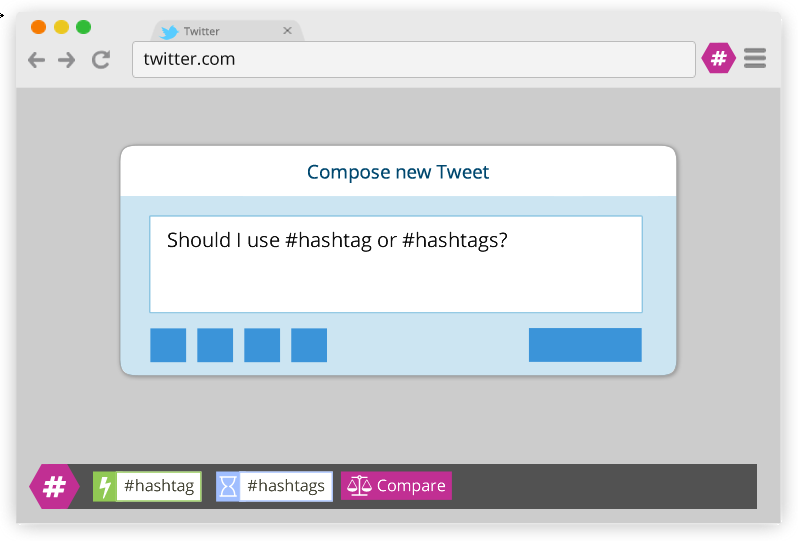
This week’s cool tool recommendation is RiteTag, a useful Chrome extension which gives you instant feedback on your hashtag choices as you type them.

ritetag-instant-feedback.png

How It Works 

RiteTag shows you how hashtags are performing on Twitter and Facebook before you post content. Once you log in to RiteTag using your Twitter or Facebook credentials, it checks the hashtags you begin typing in real time and color codes them:

  • If your hashtag is green, it means the hashtag will help your content be seen now.
  • If your hashtag is blue, it means the hashtag will help your content be seen over time.
  • If your hashtag is gray, you should select a new hashtag because it has low levels of engagement.
  • If your hashtag is red, you should select a new hashtag because it’s so popular, your content will disappear into the crowd.

RiteTag is available as a Chrome Extension. Download it here. 

Posted in Cool Tool

Monday Morning Cool Tool: Keyword Surfer

This week I’m recommending Keyword Surfer –  a free Chrome extension that gives you keyword search volume in Google search results.

This intuitive tool seamlessly integrates with Google Search, providing real-time data without disrupting the user’s workflow. By simply typing a query, users can instantly access estimated monthly search volumes, so you can instantly check if a keyword is a good fit.

Key Features and Benefits

  • Real-time Search Volume Data: Keyword Surfer displays estimated search volumes directly within Google Search results, eliminating the need for separate keyword research tools.
  • Related Keyword Suggestions: The extension provides a list of related keywords with corresponding search volumes, enabling users to discover new content opportunities and expand their keyword portfolio.
  • Traffic Estimates for Top-Ranking Pages: Keyword Surfer offers insights into the estimated organic traffic of high-ranking pages, allowing users to gauge potential content performance and set realistic goals.
  • Content Optimization Guidelines: By analyzing top-ranking content, Keyword Surfer provides data-driven recommendations on optimal word count, keyword density, and related keyword integration, enhancing on-page optimization efforts.
  • Global Data Coverage: With support for 70 countries, Keyword Surfer facilitates international SEO strategies by providing location-specific keyword data.7

Considerations

While Keyword Surfer offers valuable insights, it is essential to acknowledge that the data provided are estimates. For comprehensive analysis and competitive intelligence, utilizing additional keyword research tools is recommended.

Watch the short video below to learn more.


Posted in #HCSM

How Healthcare Marketers Can Leverage YouTube Shorts and Clips

YouTube Shorts and Clips are dynamic tools that can significantly expand your audience, boost engagement, and drive views across your entire channel. While long-form videos provide depth and detail, relying solely on them can limit your reach and strain your budget. Short-form videos, like Shorts and Clips, offer a cost-effective way to create engaging content and tap into new audiences.

Here’s why short-form content should be a cornerstone of your YouTube strategy:

  • Cost-Effective Patient Education: Producing high-quality long-form videos can be resource-intensive. Shorts and Clips offer a more affordable way to create educational content, repurpose existing materials, and maximize your budget.
  • Reach a Wider Audience: Short-form videos are easily discoverable, appearing in YouTube’s Shorts feed, suggested videos, and even on users’ homepages. This allows you to reach potential patients who might not otherwise encounter your content.
  • Drive Engagement with Longer Content: Think of Shorts and Clips as entry points to your more detailed videos. By creating engaging short-form content that highlights key health tips, addresses common concerns, or offers a glimpse into your services, you can pique viewers’ interest and guide them to your long-form videos.
  • Stay Ahead of the Curve: YouTube’s algorithm favors short-form content. Incorporating Shorts and Clips into your strategy ensures you’re aligned with the platform’s trends and increases your visibility.

The Evolving YouTube Algorithm: Connecting Short-Form and Long-Form Content

YouTube’s algorithm has undergone significant changes since the introduction of Shorts in 2021. In August 2022, YouTube updated its algorithm to connect Shorts and long-form content. Previously, separate algorithms meant limited crossover between the audiences of these formats. Now, a unified algorithm ensures Shorts viewers are also exposed to your long-form videos, and vice versa.

How This Change Benefits You

  • Enhanced Discoverability: Viewers who engage with your Shorts can be recommended your long-form videos, increasing your content’s exposure.
  • Build Trust and Authority: Engaging Shorts can attract new viewers who might then be directed to your long-form content, where you can provide more in-depth information about your services, expertise, and patient care philosophy.
  • Content Synergy: Shorts and long-form videos work together to create a comprehensive content ecosystem. Use Shorts to promote longer videos, answer FAQs, or share quick health tips.

This shift emphasizes the importance of a holistic YouTube strategy that incorporates both short-form and long-form content to maximize your reach and engagement.

YouTube Clips: Creating and Sharing Engaging Snippets

Clips are shareable, short segments (5–60 seconds) you can create from your longer videos, showcasing key moments or highlights.

How to Create a Clip

  1. Open a YouTube video (desktop or mobile).
  2. Below the video player, click or tap the “Clip” button.
  3. A pop-up window will appear, allowing you to select the start and end time for your clip (between 5 and 60 seconds).
  4. Give your clip a title, and you’re done!

Tips for Promotion

  • Cross-Platform Sharing: Post Clips on social media to drive traffic back to your channel.
  • Foster Community Engagement: Encourage viewers to create and share Clips from your videos, boosting interaction.
  • Use Clips as Conversation Starters: Pair them with questions or calls to action to spark discussion in your comments.

Expanding Reach Beyond YouTube

While you can’t share Clips directly within YouTube, they are incredibly versatile for cross-platform promotion.

Here’s how you can share your YouTube Clips

  • Social Media: Share Clips and Shorts on Facebook, Instagram, LinkedIn, and TikTok.
  • Websites & Blogs: Embed Clips in posts to enrich your content and drive traffic to your channel.
  • Email Marketing: Include Clips in newsletters to add engaging visuals and boost click-through rates.

Repurposing Long-Form Content into Shorts

YouTube Shorts offer a fantastic opportunity to repurpose your long-form content and reach a wider audience.

Creating Shorts from Existing Videos

  • Use a Video Editing App: Edit your long-form video into a vertical, full-screen format (up to 60 seconds). Enhance it with filters, effects, and text overlays. Upload via YouTube Studio and include a link to the original video in the description.
  • Create Shorts Directly on YouTube: Open the long-form video in the YouTube app, tap the “Remix” button, and select “Edit into a Short.” Choose your clip (up to 60 seconds), enhance it with music, text, and effects, and publish it. YouTube automatically adds a link to the original video.

Tips for Creating Effective Shorts

  • Hook Quickly: Grab attention within the first few seconds.
  • Optimize Aspect Ratio: Ensure content fits the vertical format.
  • Include CTAs: Add verbal and visual cues directing viewers to your long-form videos.
  • Boost Discoverability: Use relevant keywords, hashtags, and engaging thumbnails.

Driving Long-Form Views with Shorts.

  • Include Clear CTAs: Guide viewers to your long-form videos with verbal and visual cues.
  • Create Compelling Content: Hook viewers with engaging snippets that leave them wanting more.
  • Optimize for Discoverability: Use relevant keywords and hashtags in your Short’s description.

By strategically creating and promoting Shorts and Clips, you can effectively leverage these formats to drive patient engagement, expand your reach, and establish a stronger online presence.

Posted in Cool Tool

Monday Morning Cool Tool: Adobe Color

This week’s cool tool recommendation is Adobe Color – a free online tool that allows you to create and explore color palettes.

Here are some of the things you can do with Adobe Color:

  • Create color palettes based on color theory: Use the color wheel to create palettes that are harmonious and pleasing to the eye. You can also use different color harmonies, such as complementary, analogous, and triadic.
  • Extract themes from images: Upload an image and Adobe Color will extract a color palette from it. This is a great way to create a palette that matches the colors in an image you like.
  • Explore pre-made themes: Browse thousands of user-created color palettes for inspiration. You can search by keyword, mood, or even specific color.
  • Accessibility tools: Adobe Color helps you create accessible themes that are usable for people with color blindness.
  • Integration with Adobe products: Once you’ve created a palette, you can easily use it in other Adobe products like Photoshop, Illustrator, and InDesign.

Website: https://color.adobe.com/