Posted in Cool Tool

Monday Morning Cool Tool: Ideogram

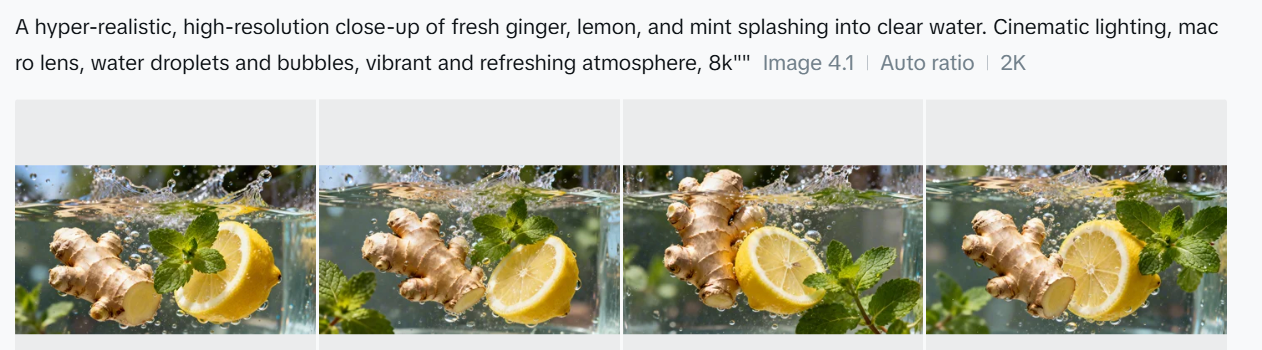
Made with Ideogram

This week’s featured creative tool is Ideogram.ai — a text‑to‑image generator.

What You Can Do on Ideogram.ai

Generate image sets: Ideogram produces four unique interpretations per prompt (e.g. “modern poster with stylized typography and pastel gradient”).

Fine‑tune text: Unlike most AIs, it reliably places readable labels, product names, or slogans with correct spelling—especially useful for logos, t‑shirts, banners, and diagrams.

Customize styles: Pick from styles including Design, Realistic, 3D, and Anime. Each is tailored for different use‑cases.

Pricing

Free version – up to 40 images/day – 1024p download in .JPG – Paid from $8/mo

Posted in Cool Tool

Monday Morning Cool Tool: Clyp.it

This week’s featured creative tool is Clyp.it—a web-based audio recorder and file-sharing service that allows you to record, upload, and share short voice clips online.

Clyp.it offers a streamlined solution with its online voice recorder—a browser-based tool perfect for quick audio notes, voice messages, or digital storytelling.

How it works

  • Click the button to start recording.

  • You’ll need to grant microphone access in a compatible modern browser (Chrome or Firefox, desktop only — mobile and older browsers may not support recording)

  • There’s a 60-second limit per recording — if you exceed that, the clip may not upload properly and could be lost.

  • After recording, you can listen, discard, or upload it. Uploaded clips generate a shareable direct link and embeddable player code

Additional features

  • You can also upload existing audio files instead of recording live.
  • No account required for basic use, but creating one unlocks additional features like longer uploads, lossless quality, and custom branding.
  • Clyp offers embed widgets so you can integrate audio recording or playback directly into your own website or blog.

Use Cases

  • Create short podcast snippets or trailers
  • Add a personal voice intro to your newsletter
  • Share voice messages on social media

Things to Keep in Mind

  • 60-second limit on recordings
  • Desktop only – some mobile browsers may not support the recorder
  • No editing tools – recordings are raw and unfiltered
  • Public sharing by default – be mindful of sensitive content

You can create a free account to manage uploads, but it’s optional.

Posted in Cool Tool

Monday Morning Cool Tool: Adobe Firefly

This week’s cool tool recommendation is Adobe Firefly – a suite of generative AI tools used for creating images, videos, audio, text effects, and vector graphics based on text prompts.

One of Firefly’s most impressive features is the level of creative control it gives—without overwhelming you. You can specify not just the art style but also the camera angle (think macro, wide-angle, or close-up), depth of field, colour tone (pastel, monochrome, muted, and more), and even apply playful special effects.

Once you click Generate, Firefly produces four unique images, each with its own variation on your prompt. A handy drop-down menu beneath each image lets you generate similar versions, use it as a style reference for a new prompt, or jump straight into Adobe Express—Adobe’s Canva-style editor—for quick customisation.

Pricing

While the web version is free (with 25 monthly generative credits and watermarking), paid plans start at just $9.99/month for heavier use or watermark-free assets.

Posted in Cool Tool

Monday Morning Cool Tool: StoryArt

This week I’m recommending StoryArt, a freemium app for more creative Instagram Stories and Reels.

StoryArt is an Instagram story editor app that offers over 3,000 customizable collage and animated story templates for Instagram Stories and Reels.  In addition, you can access  500+ post templates for feed posts and 500+ highlight cover templates to beautify your profile.

The app is free but if you want access to extra tools, filters, and layouts, there is a monthly fee of  $2.99 or a full-year subscription for $9.99. 

StoryArt is available for both iOS and Android.

Posted in Cool Tool

Monday Morning Cool Tool: Preview

instagram-feed-planner-app-preview-8.jpg

This week’s cool tool recommendation is Preview, a super useful Instagram app.

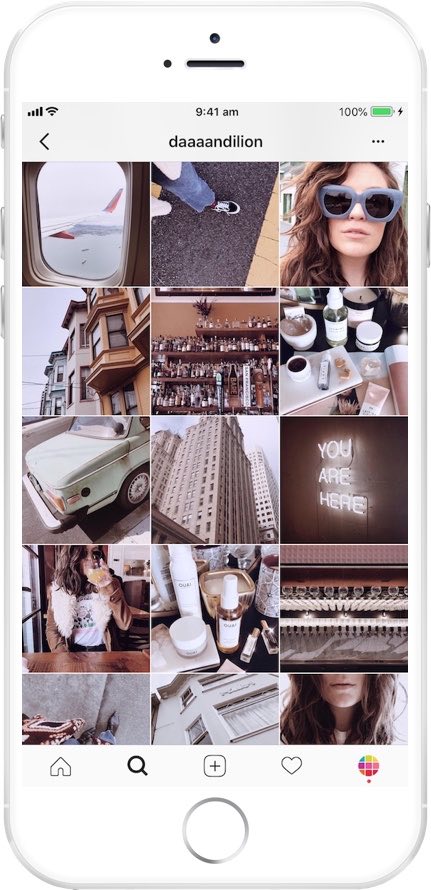
Preview is an Instagram planner that simplifies content creation and helps you design a cohesive aesthetic and optimize your social media strategy. It allows you to see how your grid will look before hitting “post,” ensuring your feed stays cohesive and visually engaging.

Want to learn more?

Visit my Substack to learn more about the key features of Preview and pricing plans.


Posted in Cool Tool

Monday Morning Cool Tool: Thumbnail.Ai

This week’s cool tool recommendation is Thumbnail.Ai – a handy tool to generate thumbnails for your social media channels.

A thumbnail is a small, reduced-size image or preview of a larger picture, video, or document. Think of them as mini-billboards for your content. Whether it’s a YouTube video, a blog post, or an Instagram Reel, a compelling thumbnail is the first thing people see. The primary purpose of thumbnails is to provide a visual preview and assist users in quickly identifying and selecting content of interest without the need to open or load the full-sized version. Thumbnails are typically much smaller in size compared to the original content, making them easily manageable and loadable, even on devices with limited screen space or slower internet connections.

  • Image Galleries: From photo apps on your phone to online portfolios, thumbnails provide a quick visual overview of your images.
  • Video Sharing Platforms: YouTube, Vimeo, and other video platforms rely heavily on thumbnails to entice viewers to watch. A compelling thumbnail is crucial for video success.
  • File Browsers: Thumbnails in your operating system help you quickly identify files without having to open each one.
  • Web Search Results: Search engines use thumbnails to give you a visual preview of web pages and images, helping you find what you’re looking for faster.
  • Social Media: Thumbnails are the face of your posts and videos on platforms like Instagram, Facebook, and Twitter. They’re key to driving engagement.

How Thumbnail.Ai Works

Thumbnail.Ai simplifies thumbnail creation with an intuitive interface. Simply:

  • Generate & Share: Preview your thumbnail and make any final adjustments. Once you’re happy, download your high-resolution thumbnail and instantly share it across your social media channels.
  • Choose a Template: Select from a wide variety of professionally designed templates tailored for different platforms and content types.
  • Customize: Easily personalize your chosen template by adding your own text, images, logos, and branding elements. Experiment with different fonts, colors, and layouts to create a unique design.

Posted in Cool Tool

Monday Morning Cool Tool: PhotoRoom

This week’s cool tool recommendation is PhotoRoom – a user-friendly AI-powered tool that simplifies the process of removing and replacing image backgrounds

While not a comprehensive photo editor, its intuitive interface and reliable AI make it a fantastic choice for beginners and anyone seeking a quick and efficient solution for background swaps.

How PhotoRoom Works

  1. Image Selection: Begin by uploading your desired image in PNG or JPG format. Higher resolution images generally yield better results.
  2. Background Removal: PhotoRoom’s AI swiftly analyzes the image and automatically removes the background. You can then fine-tune the selection by adjusting the crop as needed.
  3. Background Replacement: A vast library of backgrounds awaits. Explore a diverse range of textures, colors, and patterns, or delve into themed collections like “Nature” (featuring skies, starry nights) and “Art” (inspired by Van Gogh, masterpieces).
  4. Downloading: Save a low-resolution preview of your edited image with a watermark for free. To obtain the high-definition version, a Pro account is necessary.

Key Advantages

  • Effortless Background Removal: AI-powered technology makes background removal a breeze, even for those with no prior photo editing experience.
  • Intuitive Interface: The user-friendly design ensures a smooth and enjoyable editing experience.
  • Versatile Background Library: A wide array of backgrounds caters to various needs and creative visions.
  • Time-Saving: Quickly and efficiently replace backgrounds, streamlining your workflow.

Pricing

While basic backgrounds like blank tiles are available for free, premium options, including more sophisticated and creative backgrounds, require a Pro account subscription.

Posted in Cool Tool

Monday Morning Cool Tool: Design Cap

This week’s cool tool recommendation is Design Cap an online graphic design tool, designed to be user-friendly, even for those without prior design experience.

Key Features

  • Effortless Design: Intuitive interface designed to be user-friendly, even for those without prior design experience.
  • Extensive Template Library: Choose from a vast collection of professionally designed templates for posters, flyers, social media, and more.
  • Effortless Customization: Easily personalize templates with your own text, images, and colors to match your unique brand.
  • Powerful Editing Tools: Fine-tune your designs with a range of tools for text formatting, image adjustments, and shape manipulation.
  • Rich Stock Resources: Access a library of high-quality stock photos and icons to elevate your designs.

Whether you’re a marketer, educator, small business owner, or simply someone who wants to express their creativity, DesignCap provides the tools and flexibility to bring your vision to life.

Posted in Cool Tool

Monday Morning Cool Tool: Flaticon

This week’s cool tool recommendation is Flaticon – a website that offers a large collection of free and premium icons.

There are numerous categories of icons available from Flaticon, including business, technology, nature, and many others. The icons are available in a variety of formats, such as PNG, SVG, EPS, and more. With the platform’s powerful search and filter options, users can quickly find specific icons or narrow down their choices based on styles, colors, and categories.

Pricing

Flaticon offers a generous free tier with a vast selection of icons available for use with attribution. For unlimited access and attribution-free downloads, consider upgrading to a premium subscription.

Posted in Cool Tool

Monday Morning Cool Tool: Snipclip

This week’s cool tool recommendation is Snipclip – a versatile browser-based screen recorder.

With Snipclip you get a straightforward and feature-rich recording experience, free of any watermarks and barriers (like sign-up or installation). After the recording is complete, Snipclip saves the recording in the .webm format, which ensures seamless playback across any device and platform you choose to use.