Posted in Cool Tool

Monday Morning Cool Tool: Hotjar

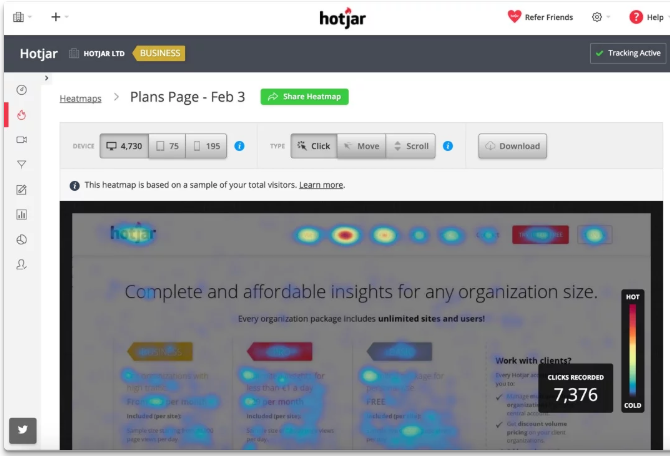
This week I’m recommending Hotjar, a website optimization tool.

1_PtZNvuc_ZMJr8aRS0xOe-Q

Imagine being able to see your website through your visitors’ eyes. Tools like heatmaps, scroll maps, and click maps make this a reality. Heatmaps highlight the most engaged areas of your pages, showing you where visitors instinctively click or tap. Scroll maps show how far down the page visitors typically venture, indicating if crucial content is being missed. Click maps pinpoint exactly where users are trying (and sometimes failing) to interact. This visual feedback provides an immediate understanding of user attention and potential points of confusion.

Going beyond static snapshots, visitor recordings offer a dynamic view of individual user sessions. By watching recordings of clicks, taps, and mouse movements, you can witness firsthand the user experience. This allows you to identify usability issues that might not be apparent from aggregated data. Perhaps a button is unclear, a form field is causing hesitation, or a navigation element is proving difficult to locate. These real-time journeys can uncover hidden frustrations and highlight areas needing immediate attention.

Platforms like Hotjar cleverly combine these powerful Analysis tools with Feedback tools, offering a holistic view of the user experience. This synergy provides the “big picture” – not just what users are doing, but also their direct opinions and frustrations. By understanding both the “what” and the “why,” you gain the knowledge necessary to make data-driven decisions that enhance your site’s usability, improve performance, and ultimately drive higher conversion rates.

Price: Hotjar offers a tiered pricing structure (including a free tier with limitations) with different plans based on your needs and the volume of website traffic and usage.

Posted in Cool Tool

Monday Morning Cool Tool: DiffusionArt

This week’s cool tool recommendation is DiffusionArt – a user-friendly, AI art generator

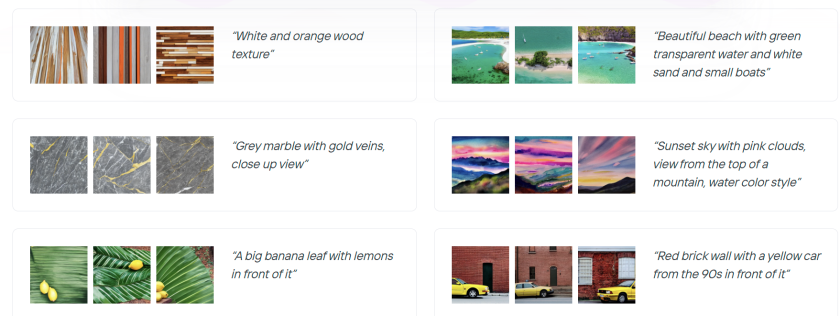
DiffusionArt is a browser-based platform that makes it easy to generate AI art from simple text prompts. It houses a curated library of open-source AI art models specializing in creating various types of images, including art pieces, anime characters, and photorealistic images. It also provides tools like a Prompt Generator, Conceptualizer, and even Anime Video Generators.

Pricing

DiffusionArt is free to use with a generous daily limit, making it perfect for casual creators. Paid tiers offer expanded limits, priority processing, and access to premium models for those who want to take their AI art to the next level.

Posted in Cool Tool

Monday Morning Cool Tool: Snappa

This week’s cool tool recommendation is Snappa – a cloud-based graphic design tool.

Snappa is a user-friendly graphic design tool, particularly well-suited for those who need to quickly create visuals without a steep learning curve or expensive software.

Key Features

  • Extensive Library of Templates: Offers thousands of pre-designed templates for various purposes (social media posts, blog graphics, ads, etc.) that are customizable.  
  • Vast Stock Photo & Graphics Library: Provides access to millions of royalty-free, high-definition photos and a wide selection of graphics, icons, and vectors.  
  • Text Editor: Allows users to add and customize text with a variety of fonts, sizes, colors, and effects.  
  • Image Editor: Includes basic image editing tools like cropping, resizing, flipping, rotating, and adjusting brightness/contrast.  
  • Background Remover: A one-click tool to remove backgrounds from images.  
  • Image Resizer: Makes it easy to resize graphics for different social media platforms with pre-set dimensions.  
  • Custom Font Uploads: Paid plans allow users to upload their own brand fonts for consistency.  
  • Social Media Integrations: Offers direct integration with platforms like Buffer for easy scheduling and publishing (on paid plans).  
  • Team Collaboration: Team plans allow multiple users to collaborate on designs.  
  • Brand Kit: Enables users to save brand colors and logos for easy access.  

Pricing:

Snappa offers different pricing tiers, including a free plan with limitations:  

  • Free Plan: Typically includes access to all templates and the stock photo library but limits the number of downloads per month (usually 3) and the number of connected social accounts. It’s generally for single users.  
  • Pro Plan: A paid plan for individuals, usually offered at a monthly or annual fee, that unlocks unlimited downloads, social media integrations, custom font uploads, background removal, and more.  
  • Team Plan: Aimed at teams, offering the same features as the Pro plan but for multiple users (typically up to 5 on the standard team plan), often with collaboration features.  

Posted in #HCSM

Still Overlooking YouTube for Patient Education? It’s Time to Rethink

As YouTube celebrates 20 years, healthcare communicators have a golden opportunity to meet patients where they already are—on video.

In my latest Substack article, I share:

🎥Why YouTube matters for patient education

🎥How to use videos, Shorts, and podcasts to educate and connect

🎥3 simple videos you can start creating today

Your next breakthrough in patient education might just start with a simple video!

Click here to read

Posted in Cool Tool

Monday Morning Cool Tool: Tailwind

This week’s cool tool recommendation is social media marketing app – Tailwind.

Originally a popular Pinterest scheduler for automating pin publishing, today the tool also supports Instagram, Facebook, and email marketing.

Noteworthy Capabilities

  • Beyond basic scheduling, Tailwind intelligently recommends optimal posting times based on audience activity, allowing you to schedule a week’s worth of content across platforms.
  • The integrated Ghostwriter AI provides on-demand content generation for Instagram captions, Pinterest descriptions, email subject lines, and full email copy – a valuable asset for overcoming creative blocks.
  • Tailwind’s hashtag tool streamlines discoverability by suggesting relevant hashtags and allowing users to save and apply curated lists.
  • Recent expansion into email marketing offers user-friendly templates, landing page creation, and automated sequences, enhanced by Ghostwriter AI for effortless copy generation within the platform.

Pricing Overview

A Free Forever Plan allows new users to explore basic features, with paid upgrades available for more advanced functionality.

Posted in Cool Tool

Monday Morning Cool Tool: Filmora

This week’s cool tool recommendation is Filmora a user-friendly video editing tool.

Filmora offers a balance of powerful features and an intuitive interface, making it accessible for those new to video editing while still providing tools for more creative projects.

Key Features

Filmora boasts a wide array of features, including:

  • Basic Editing: Trimming, cutting, splitting, merging, rotating, and adjusting video speed.
  • Visual Effects: A large library of filters, transitions, titles, and motion elements.
  • Audio Editing: Tools for adjusting audio levels, adding background music, recording voiceovers, and noise reduction.
  • Colour Correction and Grading: Options for adjusting colour balance, applying LUTs, and enhancing the visual look of videos.
  • Text and Titles: Customisable text and title templates, including animated options.
  • Motion Tracking: The ability to track objects within a video and apply effects or elements that follow their movement.
  • Green Screen (Chroma Key): Tools for removing and replacing backgrounds.
  • Screen Recording: The ability to record your computer screen.
  • AI-Powered Features: Recent versions include AI tools like:
    • AI Text-Based Editing: Editing video by manipulating its transcription.
    • AI Music Generator: Creating royalty-free background music.
    • AI Portrait Cutout: Removing video backgrounds.
    • AI Smart Masking: Automatically creating masks around objects.
    • AI Audio Denoise: Reducing background noise in audio.
    • AI Voice Enhancer: Improving vocal clarity.
    • AI Smart Cut: Identifying and clipping interesting moments.
    • AI Smart Short Clips: Creating short clips for social media.
    • AI Image to Video: Turning still images into moving videos.
    • AI Sound Effect Generator: Creating custom sound effects from text prompts.
    • AI Voice Cloning: Creating an AI voice clone.
    • AI Translation & Lip Sync: Translating speech and syncing it to lip movements.
  • Templates and Assets: Built-in templates, royalty-free music, sound effects, and the ability to access more through the Filmora Effects Store.
  • Social Media Integration: Features designed for creating content for platforms like YouTube, TikTok, and Instagram, including auto-reframe tools.

Pricing

Filmora offers a free version that gives you access to basic editing tasks and access to a selection of built-in filters, transitions, titles, and motion elements. It’s a great way to try out the software, learn its interface; however, the watermark on exported videos makes it unsuitable for projects where a professional, unbranded output is necessary. To remove the watermark and access the full range of features and assets, you would need to purchase a paid subscription or a perpetual license.

Posted in Cool Tool

Monday Morning Cool Tool: Flux AI

This week’s cool tool recommendation is Flux AI, a web-based image and video tool.

Key Features and Capabilities

  • Flux AI Image Generator
    • This tool allows users to generate images from textual descriptions. Users can input a prompt, and the AI will produce corresponding visuals, offering a powerful way to bring creative ideas to life.  
    • It also supports image-to-image generation, enabling users to modify and transform existing images.
  • Flux AI Video Generator
    • Moving beyond static images, Flux AI extends its capabilities to video creation. Users can generate dynamic videos from text prompts or images, opening up new possibilities for video content production.  
  • Free Tools
    • Flux AI provides a suite of free tools that enhance the content creation process:
      • Image-to-Prompt Generator: This tool helps users refine their prompts by analyzing existing images and suggesting relevant keywords.
      • Image Upscaler: Users can improve the resolution and quality of their images with the upscaler tool.
      • Image Converter: The platform facilitates seamless image format conversions.

Free: New users get 40 credits, and daily check-ins provide 20 credits. This plan includes 5 daily prompt generations and 5 daily image-to-prompt conversions.


Posted in Cool Tool

Monday Morning Cool Tool: Planable

This week’s cool tool recommendation is Planable – a social media management tool.

Planable is a platform designed to streamline social media workflows, primarily focusing on collaboration and content planning. It acts as a central hub for teams to create, review, and approve social media content before it’s published.

Key Features

  • Content Planning and Scheduling: It allows users to plan and schedule social media posts across various platforms.
  • Team Collaboration: It facilitates team collaboration through features like tagging, commenting, and approval workflows.
  • Visual Content Calendar: It offers customizable calendar views (calendar, list, etc.) to visualize scheduled content.
  • Workflow Automation: It automates parts of the social media posting process, reducing manual effort.
  • Future Analytics: They plan to integrate analytics to provide insights into social media performance.

Pricing

Planable offers a free plan, which is great for getting started and familiarizing yourself with the platform. However, the free plan has limitations, such as a cap on the total number of posts you can create. The pro plan provides more advanced features, catering to growing teams and agencies with more complex needs.

Posted in Cool Tool

Monday Morning Cool Tool: Picsart

This week’s cool tool recommendation is Photoroom – an AI background generator that transforms your images with ease.

Photoroom is a mobile and web application that uses artificial intelligence to effortlessly remove, replace, and generate backgrounds. Users can either remove existing backgrounds or generate entirely new ones using text prompts or image inputs.

Unlike traditional image editing software, Photoroom prioritizes simplicity and speed, making complex background changes accessible to anyone without requiring extensive technical skills.

Pricing

Photoroom offers a free tier that provides core background removal and basic editing functionalities, suitable for everyday users. A subscription unlocks premium features like high-resolution exports, batch editing, and access to a wider range of AI-generated backgrounds.

Posted in Cool Tool

Monday Morning Cool Tool: Picsart

This week’s cool tool recommendation is Picsart – a free AI image generator.

PicsArt is a mobile and desktop editing platform that combines powerful AI-driven tools with an intuitive interface. It allows users to edit photos, create digital art, design marketing materials, and even edit videos—all from their smartphones. Unlike traditional editing software, PicsArt is built for speed and ease of use, making it a great choice for those who want professional-looking visuals without the learning curve of tools like Photoshop.

One of PicsArt’s biggest advantages is its AI-driven tools. Features like background removal, smart selection, and AI-powered filters allow users to transform images with a single tap. Features like blending modes, layers, and masking—tools typically found in professional software—are simplified for everyday users. Whether you’re creating a logo, designing a social media post, or experimenting with artistic edits, the interface is intuitive and beginner-friendly.

PicsArt isn’t just for photos—it also offers robust video editing features. Users can trim clips, add effects, overlay text, and apply filters to enhance their videos for platforms like TikTok and Instagram.

Pricing

Picsart’s free tier provides a robust set of tools, from filters to ready-made templates, and editing tools for the everyday user, while a subscription unlocks advanced features.

So, if you haven’t tried PicsArt yet, why not explore its features and see what you can create?