Articles

Posted in AI, Cool Tool

Monday Morning Cool Tool: MagicRoll.ai

This week’s tool cool recommendation is TextJam – an AI-powered writing editor.

Features

  • Pen vs. Pencil editing model — You can “lock in” parts of your draft (pen) that are final, and mark other parts (pencil) for the AI to polish or rework. It’s a neat way to preserve your unique voice while getting help.
  • Inline prompting and co-writing — Instead of pasting chunks into a separate chat or prompt box, you can leave notes directly in your document. That makes the workflow more fluid and context-aware.
  • Flexible collaboration — Whether you’re working solo, with co-authors, or with AI, TextJam supports a multi-user, real-time editing environment. Great for team writing, co-writing books, or peer-review workflows.
  • Smart editing + reflow capabilities — You can resize sections (sentences, paragraphs, entire blocks) and ask the AI to rework them to match the new length/flow — useful for trimming, summarising or expanding without losing clarity.

Pricing

TextJam offers a free trial. Paid plans start at US $10/month (Starter), which gives access to AI-assisted words, real-time dictation, narration, and a limited number of real-time collaborators.


Posted in #HCSM

Illness in the Digital Sphere: Rethinking How Social Media Shapes Health Communication

For much of modern medical history, health communication followed a familiar path: information moved from clinicians to patients, supplemented by family narratives, pamphlets, and the occasional media report.

The expansion of the Internet — and particularly the rise of social media — disrupted this model not simply by increasing access to information, but by changing the social and emotional dynamics through which people engage with illness.

A 2017 study examining Iranian online health forums provides a useful lens for understanding this shift. Its insights, though modest in scale, highlight a pattern that resonates beyond a single national context. What emerges is not merely a description of digital information-seeking but a portrait of how individuals use social platforms to compensate for structural gaps in healthcare communication and emotional support.

The study identifies five consistent functions that online spaces now serve in the experience of illness: social support, encouragement, education, information-seeking, and experiential knowledge-sharing.

Continue reading on Substack

Posted in AI, Cool Tool

Monday Morning Cool Tool: MagicRoll.ai

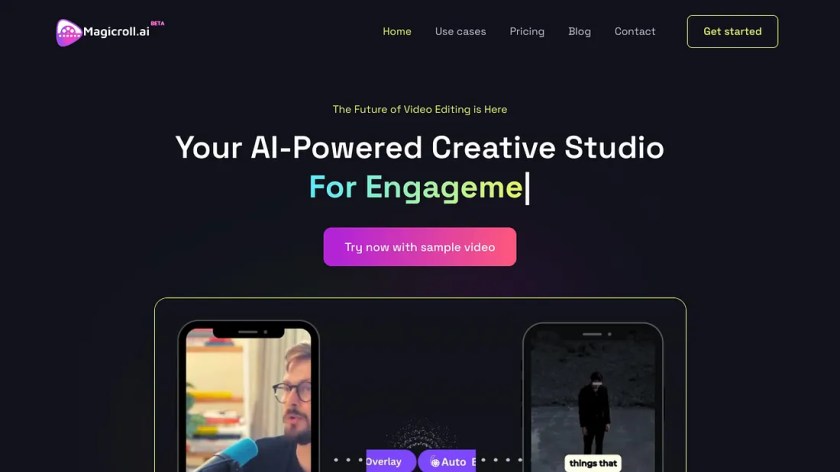
This week’s tool cool recommendation is MagicRoll.ai – an AI-powered video editing tool that automates video creation.

If you often film talking-head videos, short explainers, reviews, tutorials, or social clips, this is very much the type of tool built for you.

Features

  • Adds b-roll for you — The tool automatically selects and inserts complementary footage (B-roll) into your main video (A-roll)
  • Swaps your background — you can change your backdrop with a single click.
  • Generates subtitles automatically — in multiple languages, which is great for accessibility and reach.

Pricing: There’s a 30-day trial with credits, so you can see whether it fits your workflow before paying for anything.


Posted in #HCSM

Dr Google Has Become Dr ChatGPT: What This Shift Means for Health Communication

I’ve been thinking a lot about how people look for health information now — and how quickly things have changed without most of us fully noticing. For years, “Dr Google” shaped what people knew (or misunderstood) about symptoms, treatments, and diagnoses.

But that era has shifted.

Today, people don’t search the way they used to.
They ask.
They describe their concerns in plain language.
And increasingly… they ask an AI.

In many households, Dr Google has already become Dr ChatGPT — a tool that doesn’t just retrieve information but also interprets, organises, and presents it as guidance.

This has huge implications for healthcare communication:

  • how patients form first impressions,
  • how they prepare for appointments,
  • how they evaluate risks,
  • how they find trusted organisations in the first place

I wrote a new piece exploring what this shift means for all of us who work in health, advocacy, or patient communication.

If you’re curious about how the health information journey is being rewritten, you can read it here.

Posted in AI, Cool Tool

Monday Morning Cool Tool: Lummi

This week’s cool tool recommendation is Lummi, an AI-powered stock image site.

Lummi offers free (and paid-upgrade) stock visuals: photos, illustrations, and 3D assets. Their free images are available for both personal and commercial use. The licence allows for editing and combining, meaning you can adapt images to your brand/style (colour palette, etc.). However, while Lummi states broad rights, you still should review the specific licence version applicable at download time.

Posted in #HCSM

The Rise of the Niche: Why Health Conversations Are Moving from Mega Platforms to Micro Communities

For over a decade, health communicators were told that reach was everything. Post widely, engage broadly, and the message would find its audience. But the tides have turned. Today, people are stepping away from crowded public feeds and moving into micro-communities, such as closed groups, condition-specific forums, and peer-led chats, where genuine connections can occur.

For health communicators, this shift changes everything. It’s no longer about broadcasting messages — it’s about belonging, trust, and dialogue.

Social media isn’t dying — it’s reorganising around the timeless human need for connection. The question is: are we ready to meet audiences there?

Read the full piece: The Rise of the Niche: Why Health Conversations Are Moving from Mega Platforms to Micro Communities

Posted in AI, Cool Tool

Monday Morning Cool Tool: getimg.ai

This week’s cool tool recommendation is getimg.ai – an AI image generator.

Features

  • Image Generator – Create images from text.
  • Video Generator – Create short videos from images or text prompts.
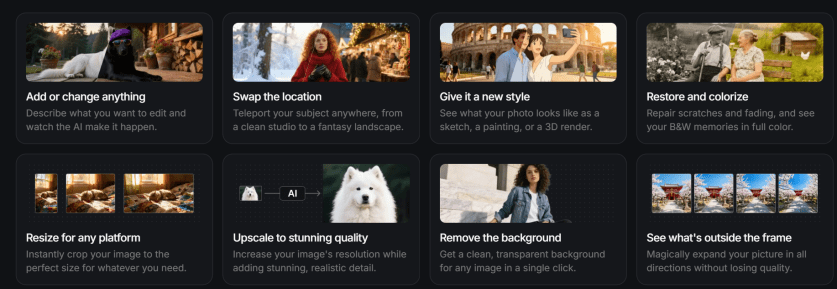
  • Image Editor – Edit images with AI (great for retouching, background tweaks, or adding new elements).
  • AI Resizer – Resize or upscale images intelligently without losing quality.
  • Uncrop – Expand images beyond their borders (handy for banner or social post layouts).
  • BG Remover – Instantly remove or replace backgrounds.
  • Vector Generator: Convert raster images into crisp, editable vector files.
  • Mockup Creator: Drop your designs into real-world settings instantly.
  • Recolouring & Text Remover: Adjust tones, palettes, or typography with ease.

Pricing

The free plan includes 40 credits per day and access to three image models — more than enough to experiment and explore its capabilities. Paid tiers unlock higher limits and advanced features for power users.

Posted in AI, Cool Tool

Monday Morning Cool Tool: Subtitle

This week’s cool tool recommendation is SubtitleBee- an auto caption generator.

Captions don’t just make your content accessible to people who are deaf or hard of hearing—they help everyone. They keep viewers watching on mute, boost comprehension for non-native speakers, and even improve SEO.

Healthcare is global, and so are its audiences. Captions and subtitles bridge not only hearing differences but also language gaps, literacy levels, and learning styles. Captions don’t just improve accessibility; they improve performance. Most people scroll social media on mute—especially in healthcare spaces where privacy matters. Captioned videos hold attention longer, encourage shares, and boost recall. They also help algorithms index your content for search and translation, extending the life of your message online.

Luckily, a wave of AI-powered caption tools can now generate subtitles for us. SubtitleBee also includes translation in over 100 languages. It also offers editing of timing, styling (fonts, colours, backgrounds) and branding (logos/custom overlays) so your captions look professional.

Key things to look out for

  • Check the free-plan limits (e.g., number of videos, video length) so you don’t hit an unexpected paywall.
  • Make sure your translations are accurate (even with AI support you may need to tweak terminology).
  • When styling captions, ensure readability: font size, background contrast, sufficient on-screen duration.
  • For training/advocacy, make sure captions are not an afterthought: they’re part of the message.
  • Consider exporting both burnt-in captions and separate caption files (SRT/VTT) for different uses.
  • For inclusive accessibility: include captions even when sound is on; helpful for learners with hearing differences, non-native speakers, and those watching without audio.
  • Don’t forget to review/edit to ensure accuracy (especially technical terms, names, medical/advocacy vocabulary).

Posted in AI, Cool Tool

Monday Morning Cool Tool: Recraft

This week’s cool tool recommendation is Recraft – an AI image generator.

Recraft turns your text prompts into high-quality visuals in a consistent, customisable style. You can define your own brand palette, adjust colours and composition, and even refine outputs with built-in editing tools such as background removal and upscaling.

Unlike many AI image generators that only produce raster files (pixel-based images that blur when enlarged), Recraft also creates vector graphics (SVGs) — images built from shapes and lines rather than pixels. That means they stay sharp at any size and can be easily edited or recoloured later in tools like Illustrator, Canva, or Figma.

Features:

  • AI image generator & editor – Create, refine, and enhance visuals from text prompts.
  • AI vector generator & image vectorizer – Turn raster files into clean, editable vector art.
  • Mockup generator – Instantly visualise designs in real-world settings.
  • AI photo editor, upscaler, background remover, eraser, and image combiner – Edit, sharpen, or expand your images with simple, intuitive controls.
  • Recolouring and text remover tools – Quickly adjust tones, palettes, and typography.
  • Image expanding – Extend the boundaries of an existing image without losing composition.

It also supports a full range of format conversions — from JPG to SVG, PNG to SVG, WebP or JPG to Lottie, and JPG to TIFF, with custom DPI and CMYK options for print-quality output.

Pricing

  • Free plan: Get started at no cost. Daily credit allowance; images appear in the public gallery.
  • Pro plan: From around US $10/month (billed annually). Includes full commercial rights, private image generation, and ~1,000 monthly credits.
  • Higher tiers: Up to ~US $48/month for heavier use with larger credit allowances.
    (Free plans have limited rights and credits don’t roll over each month.)

Posted in Cool Tool

Monday Morning Cool Tool: YouTubeToWav

This week’s cool tool recommendation is YouTubeToWav, a free, browser-based converter that lets you paste a YouTube link and download the audio in WAV format (or other formats like MP3, FLAC, OGG, and M4A).

What are WAV files?

If you’ve ever worked with audio, you’ve probably come across WAV files. They’re one of the oldest digital audio formats around. WAV remains a gold standard when you need sound that’s crystal-clear and uncompressed.

WAV (short for Waveform Audio File Format) was created by Microsoft and IBM back in the 1990s. Unlike MP3 or AAC, which shrink audio down by compressing it, WAV keeps every detail intact, making it ideal for recording, mixing, or mastering. This makes it perfect for preserving original sound files without worrying about future degradation.

Common Uses

  • Podcasters grabbing background clips (with permission).
  • Educators saving lecture snippets for offline use.
  • Anyone wanting a higher-quality copy of audio to work with.

Why Use

  • Quick and simple: No registration, no software download.
  • High quality: Offers up to 1536 kbps for clarity.
  • Flexible: Works on desktop or mobile with all major browsers.

⚠️ Copyright Compliance: Downloading audio from YouTube may infringe on copyrights—ensure you have the right to do so.


Bottom line: WAV isn’t the format you’ll use for everyday playlists (unless you have unlimited storage), but when quality matters, it’s the format you want in your toolbox. And if you need an easy way to get started, YouTubeToWav is a lightweight, no-fuss option.

Posted in Cool Tool

Monday Morning Cool Tool: ReadyScriptPro

This week’s cool tool recommendation is ReadyScriptPro — an AI-powered script generator designed to help content creators develop polished scripts for short films, TikToks, YouTube videos, and more.

If you’ve ever struggled with writer’s block, inconsistent dialogue, or finding the right pacing for a short-form video, ReadyScriptPro is like having a creative partner on demand.

The platform streamlines the creative process by:

  • Generating complete scripts from simple prompts.
  • Offering a “script doctor” feature to improve pacing, tone, or clarity.
  • Suggesting scene directions and dialogue flow.
  • Helping creators produce professional-sounding content faster.

The tool works in a browser, with a clean dashboard that makes drafting, editing, and exporting scripts straightforward.

Tool Snapshot

FeatureWhat It Does
Script GeneratorCreates full scripts from simple text prompts
Script DoctorImproves pacing, tone, and dialogue
Creative suggestionsOffers alternative lines, plot turns, or dialogue choices
Freemium modelFree to start, with advanced features possibly in premium plans

Pricing

ReadyScriptPro follows a freemium model. You can get started for free with basic script generation, making it easy to experiment without upfront cost. A paid tier with premium features (such as longer scripts, advanced editing, and expanded creative suggestions) is expected, though official pricing details have not yet been fully published.

Posted in Cool Tool

Monday Morning Cool Tool: Glasp AI YouTube Summarizer

This week’s cool tool recommendation is Glasp AI YouTube Summarizer a free Chrome extension to generate summaries and give you the full transcript of any YouTube video.

Key Features

  • Pulls up transcripts of YouTube videos in multiple languages and summarizes them.
  • Summary can be generated via ChatGPT, Claude, Mistral AI, Gemini.
  • You can set how long or detailed the summary should be.
  • Summaries can include timestamps so you can navigate to specific parts of video.
  • You can highlight parts of the transcript, add notes, and export highlights/notes to tools like Obsidian, Notion, etc., in formats like Markdown, HTML, CSV, JSON.
  • Get the transcript of the video in multiple languages. Watch the video with the transcript on the side and get the content quickly or simply copy the transcript.

How it works:

  1. Install the extension.
  2. Open a YouTube video.
  3. Click the Glasp “Transcript & Summary” bar on the top right.
  4. Copy the transcript with one click.
  5. Paste it into your doc.

Limitations / Considerations

  • You’ll need an internet-connected browser that supports the extension.
  • Accuracy depends on the quality of the video’s transcript and AI summarization.
  • Complex or nuance-heavy videos may lose depth if the summary is too short.

Posted in Cool Tool

Monday Morning Cool Tool: Adobe Podcast

This week’s cool tool recommendation is Adobe Podcast — a browser-based audio recording, editing, and enhancement tool.

What It Does

Adobe Podcast packs in several features designed to simplify audio workflows:

  • Record & Edit in Browser – No need for complex local DAWs. You can record directly in the browser, edit your audio, manage speaker tracks, and even convert to video if needed.
  • Enhance Speech & Clean-up – Tools for removing background noise, reducing echo, improving clarity. If you don’t have a perfect setup (mic, acoustics, etc.), this helps a lot.
  • Mic Check – A diagnostic tool to test your mic and environment, giving feedback so you can optimise your setup before recording.
  • Transcription & Captions – Automatically generate transcripts or captions from your audio/video. Great for accessibility or social media snippets.
  • Royalty-Free Music & Sound Effects – Built-in library so you can add intros, backgrounds, and effects without hunting down licensing issues.

Best Use Cases

  • Recording remote interviews, podcasts, or voiceovers without a full studio setup.
  • Repurposing audio into social media content (videos, captions, audiograms) quickly.
  • Educators or health professionals who want to share audio content but need accessible tools.
  • Anyone looking for high-quality voice recordings without incurring significant expenses on hardware or software.

Pricing

The free plan includes:

  • Enhance Speech (audio only) — remove background noise & echo
  • Mic Check — evaluate your mic & setup using AI to detect issues.
  • Studio (browser-record/edit/enhance) with some limits: you can download projects up to 30 minutes, but with limits on how many per day. Files over a certain size/duration / original recordings may not be downloadable.

The free plan is sufficient for small projects, short podcast episodes, or testing out new ideas. Upgrading to the paid plan unlocks additional features.


Note: If you’re interested in exploring similar tools, consider comparing Descript, Audacity (a free, desktop-based option), or Riverside.fm (for remote interviews/video and audio).

Posted in Cool Tool

Monday Morning Cool Tool: SkyReels

This week’s cool tool recommendation is SkyReels AI Studio, an AI-powered video creation platform.

SkyReels AI Studio enables anyone to create dynamic videos through intuitive, end-to-end workflows from scriptwriting and storyboarding to AI voice-overs, lip-syncing, music, and video editing.

Key Features

Video Tools

  • Import Storyboards & Clips — Import your own storyboards or short clips to jumpstart the creative process and save production time.
  • AI Video Generator — With one click, convert text to video or image to video. Instantly turn ideas into personalised, high-quality videos.
  • AI Image and Video Generator — Generate dynamic sequences from simple text prompts, powered by advanced AI synthesis.
  • Video Editing Tools — Fine-tune every frame, transition, and effect to ensure your video aligns with your creative vision.
  • Video Cutter — Trim, split, crop, resize, compress, or rotate videos effortlessly. Create polished, professional clips in SkyReels’ all-in-one video editor.

Image Tools

  • Image Generator — Create customised AI images from text or reference images with diverse models and art styles. The generator maintains character consistency for a cohesive look across your project.

Audio Tools

  • Text to Speech — Convert text to lifelike speech in seconds with a library of emotive, natural-sounding voices.
  • Lip Sync — Upload a video or image and generate accurate lip-synced results automatically, bringing stills and clips to life with custom voices.
  • AI Sound Effects — Instantly create professional sound effects tailored to your project—no more trawling through stock libraries or worrying about licensing.
  • Music Generator — Produce the perfect soundtrack or song to match your video’s mood. Generate music on demand for shorts, ads, presentations, or creative projects.

Why this tool is a valuable addition to your content creation toolkit

SkyReels stands out by streamlining the video creation process into a few simple steps—all within a single platform. The magic lies in its AI-driven capabilities:

  • End-to-end automation: No hopping between script, visuals, and audio tools.
  • Creative consistency: Maintains character look, motion, and audio styling across scenes.
  • Time-saving: Accelerates content production, particularly for short-form formats like Reels and Shorts.

Pricing

SkyReels is free to try. You get 300 credits upfront plus 50 daily credits to experiment.

If you need more, paid plans start at $7.90/month (Basic), with Standard ($28) and Pro ($76) tiers offering higher credit limits, faster queues, and extra features.

It’s flexible enough that you can dip your toe in without commitment, then scale up if you find it fits your workflow.

Posted in #HCSM

How to Create a Custom GPT in Under One Hour

Step-by-step instructions to build your own AI assistant for healthcare writing, communication, and education.

If you’ve ever tried ChatGPT and felt frustrated by inconsistent results—or found yourself rewriting prompts over and over—you’re not alone. For healthcare professionals, researchers, and advocates, reliability matters: you need outputs that are accurate, professional, and aligned with ethical standards.

That’s where Custom GPTs come in. These are personalised versions of ChatGPT that you can design for very specific, repeatable healthcare tasks—such as drafting plain-language patient leaflets, summarising journal articles, preparing LinkedIn updates for your department, or turning a webinar transcript into teaching slides.

The benefit? Once you set one up, you no longer waste time tinkering with prompts. Your GPT already knows your requirements—style, structure, disclaimers, and audience—and produces consistent, trustworthy results every time. Best of all, you can build one in under an hour.

Here’s how.

Step 1 — Choose one narrow task (5 minutes)

Custom GPTs are most effective when they do one job well. Instead of trying to make a “digital assistant for everything,” pick a single use case you repeat often.

Healthcare examples:

  • Summarise clinical guidelines into a 1-page plain-language handout for patients.
  • Convert academic abstracts into accessible summaries for social media.
  • Draft CPD or teaching materials from journal articles.
  • Turn a conference session transcript into a structured LinkedIn post.

Step 2 — Gather your “source of truth” (5–10 minutes)

Collect the resources your GPT should follow, such as:

  • Your organisation’s style guide.
  • Examples of plain-language explanations you like.
  • Compliance or privacy guidelines (e.g., including “this information is not medical advice” disclaimers).
  • Evergreen references (like terminology guides or advocacy frameworks).

Step 3 — Create the shell (2 minutes)

In ChatGPT, go to Explore GPTs → Create. Use the Create tab to describe your assistant in plain language (the one-sentence task from Step 1). Then switch to the Configure tab to fine-tune the details.

Step 4 — Write clear instructions (10–15 minutes)

This step makes or breaks your Custom GPT. Spell out exactly what you want it to do, who it’s for, and how the outputs should look.

Include:

  • Role: Define what the GPT is (“You are a health communication assistant who creates plain-language resources from research papers”).
  • Goals: The outcomes you expect (“Summarise in one paragraph, extract three key points, add a disclaimer”).
  • Inputs: What the GPT will usually receive (transcripts, journal articles, policy notes).
  • Process: The steps to follow (extract → summarise → format).
  • Voice & Tone: Audience (patients, clinicians, policymakers) and reading level (plain English, no jargon).
  • Output Format: Be precise (“1-paragraph summary + 3 bullet points + disclaimer”).
  • Boundaries: Clarify what not to do (e.g., “Do not give medical advice or fabricate references”).

Continue reading this article on Substack for free

Posted in #HCSM

Hashtags at 18: What They’ve Meant for Healthcare and Advocacy

Today is International Hashtag Day, and it also marks the hashtag’s 18th birthday. What began as a niche idea on Twitter in 2007 is now part of how healthcare professionals, patient advocates, and communities connect, learn, and campaign for change.

The Birth of the Hashtag

On 23 August 2007, Chris Messina suggested using the # symbol to group conversations on Twitter. Initially dismissed as “too nerdy,” the idea caught on when people began using hashtags to share updates during the San Diego wildfires later that year. By 2009, Twitter had made hashtags clickable, and soon they spread to Instagram, Facebook, LinkedIn, and TikTok.

Since then, hashtags have become cultural shorthand. They’ve carried lighthearted trends (#ThrowbackThursday), breaking news, and, importantly, social movements (#MeToo, #BlackLivesMatter).

Hashtags in Healthcare

In healthcare, hashtags have served as digital gathering places. Movements like #ILookLikeASurgeon challenged stereotypes and celebrated diversity in surgery. #MedTwitter, #CardioTwitter, and #IDTwitter have connected clinicians and patients across the world, enabling rapid sharing of evidence, insights, and professional solidarity.

Hashtags also underpin #FOAMed (Free Open Access Medical Education), where health professionals use tags to curate and share open educational resources. During the COVID-19 pandemic, hashtags provided real-time access to emerging research and peer commentary.

The Risks

As with any tool, hashtags are not without risks. They can be used performatively, with little action behind them. They can create echo chambers, exclude certain voices, or be hijacked for misinformation. Yet when used with intention, they remain a powerful part of digital health communication.

Hashtags at 18: Coming of Age in Healthcare

Eighteen often marks adulthood — a moment when identity and responsibility converge. Hashtags, too, have reached that stage. Algorithms may increasingly shape what people see, but hashtags still serve as anchors for visibility, belonging, and collective voice.

For healthcare professionals and advocates, they remain one of the simplest yet most effective tools for connecting communities, amplifying trusted information, and driving meaningful change.

So here’s a question to mark the hashtag’s 18th birthday: What hashtag has shaped you the most — whether it made you laugh, taught you something new, or gave you a sense of belonging?

Posted in Cool Tool

Monday Morning Cool Tool: Text Optimizer

This week’s cool tool recommendation is Text Optimizer – a tool to help you optimize your content to rank better on SERPs (Search Engine Results Pages)

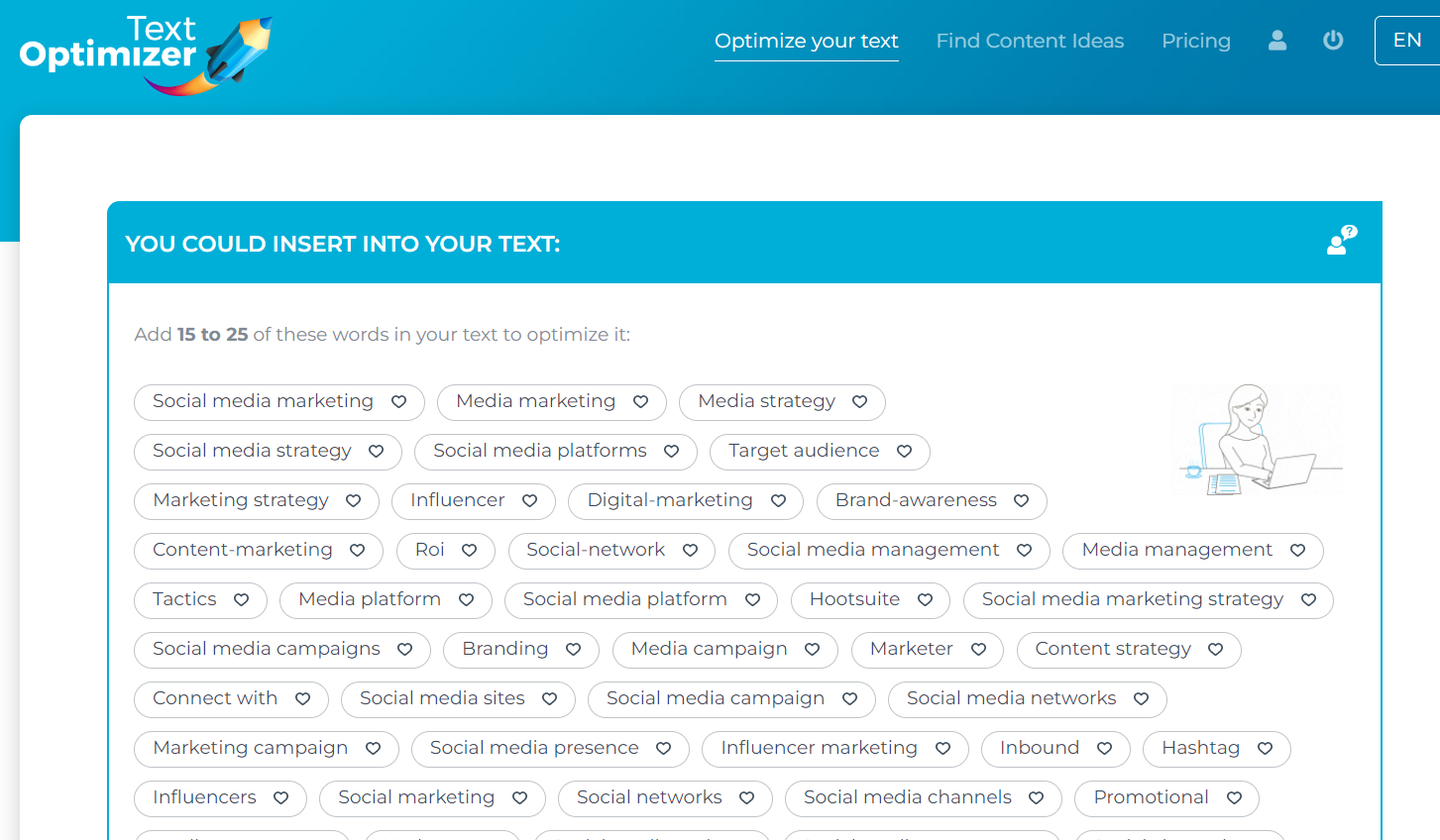
Text Optimizer extracts terms and concepts from search engine results pages (SERPs) and analyzes their semantics to generate a list of questions for inclusion in your articles.

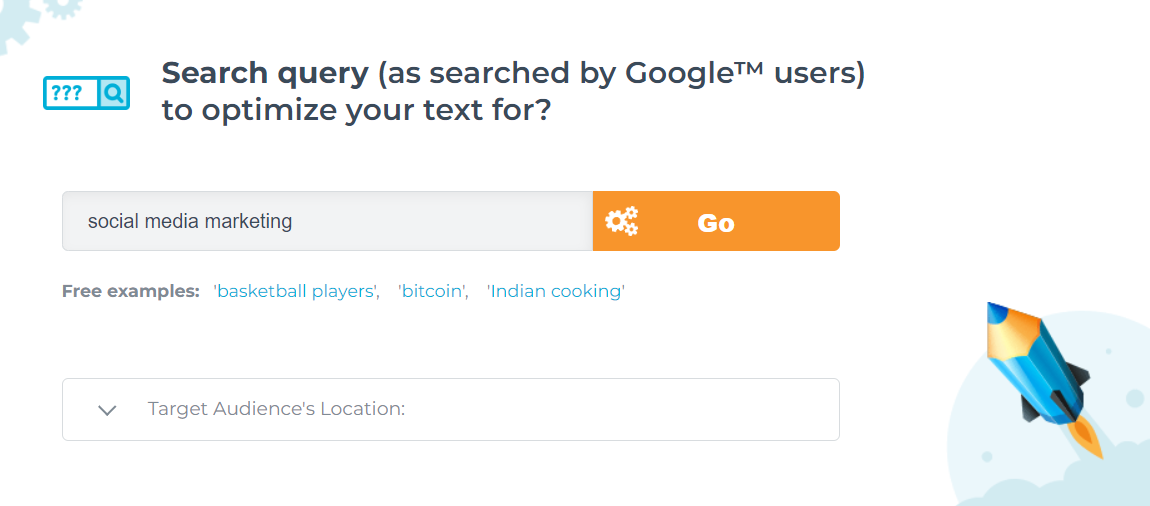
Choose the search engine you wish to optimize for, input the desired search terms, select a target location, and either paste your text or provide a link to your existing content.

And here are just some of my results – the tool returns many more suggestions.

You can use the tool to compare your existing text to the snippets Google returns for that query if you already have a page you want to rank. After scoring your text, it will suggest adding some of those suggested terms to your content.

Why this tool is a valuable addition to your online content strategy

Google generates its search snippets based on which sentences from ranked pages best answer the query. In other words, the search snippets are Google’s best (in its opinion) summary of the topic of the query. The semantic analysis of these snippets and the extraction of related terms and topics will give you a better understanding of what you need to include in your content.

Posted in #HCSM

Getting Health Messages Shared: What Really Works on Instagram

Instagram has evolved far beyond being a hub for fashion, food, and lifestyle brands. With more than 2 billion monthly users, it has become one of the most potent platforms for storytelling, education, and awareness-building. For healthcare communicators, that reach is impossible to ignore.

What makes Instagram especially effective is its ability to translate complex or sensitive health information into visual, accessible, and emotionally resonant content. Reels, carousels, and infographics allow you to distil big ideas into bite-sized, shareable moments. The platform also connects directly with younger demographics — Millennials and Gen Z — who are less likely to seek health information through traditional media or institutional websites.

But here’s the critical insight: shares matter more than likes.

  • A like signals agreement.
  • A comment shows engagement.
  • But a share extends your reach into entirely new networks — multiplying visibility and influence far beyond your existing followers.

For health messages — where the goal is often awareness, education, or behaviour change — shares are the ultimate form of amplification.

So, what makes people hit the share button? Let’s look at five proven types of content that consistently get shared.

1. Motivational or Inspirational Content

Why it works: Inspiration is universal. People share motivational content because it makes them feel uplifted, and they want others to feel the same.

Healthcare examples

  • A resilience story highlighting a patient’s recovery journey (with consent and sensitivity).
  • A reel showcasing the dedication of frontline staff during a public health campaign.
  • A quote graphic emphasising the importance of small, daily habits for long-term health.

Tip: Keep it authentic. Forced positivity rings hollow, but real, human stories resonate deeply. When possible, focus on lessons learned or a hopeful outcome, not just glossy “success.”

👉 Continue reading the full article on my Substack

Posted in Cool Tool

Monday Morning Cool Tool: Ideogram

Made with Ideogram

This week’s featured creative tool is Ideogram.ai — a text‑to‑image generator.

What You Can Do on Ideogram.ai

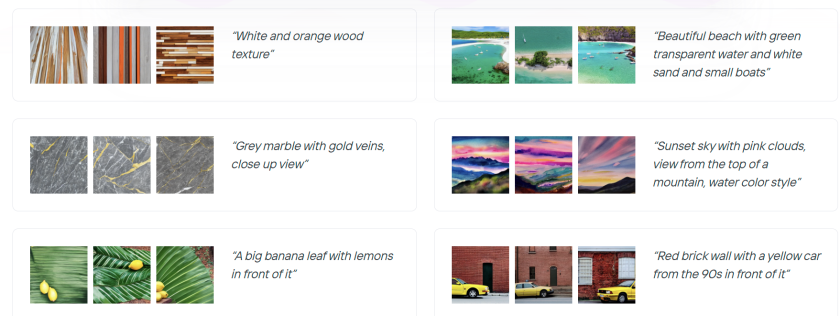
Generate image sets: Ideogram produces four unique interpretations per prompt (e.g. “modern poster with stylized typography and pastel gradient”).

Fine‑tune text: Unlike most AIs, it reliably places readable labels, product names, or slogans with correct spelling—especially useful for logos, t‑shirts, banners, and diagrams.

Customize styles: Pick from styles including Design, Realistic, 3D, and Anime. Each is tailored for different use‑cases.

Pricing

Free version – up to 40 images/day – 1024p download in .JPG – Paid from $8/mo

Posted in #HCSM

Why Listicles Still Work In Healthcare Communication 

In health communication, clarity isn’t just helpful; it’s essential. That’s why one of the most enduring formats in digital communication remains the listicle.

Yes, the listicle. It may carry associations with lifestyle blogs or clickbait headlines, but when done well, it’s an effective tool for building understanding, trust, and engagement across audiences in healthcare.

What Is a Listicle?

A listicle is a structured article built around a numbered or ordered list—typically with subheadings, explanations, or visuals. It offers a clear roadmap through a topic, making it easier to scan, digest, and act on.

You’ve likely used or encountered them before:

  • “5 Signs of a Stroke Everyone Should Know”
  • “10 Things to Ask at Your Next GP Appointment”
  • “7 Lessons from Running a National Health Campaign”

They’re concise, focused, and—when crafted with care—highly effective in reaching busy, distracted, or overwhelmed audiences.

Why Listicles Work in Health Communication

1. They Provide Cognitive Closure

A title like “6 Questions to Ask Before Starting a New Medication” gives readers a straightforward task. It sets expectations and satisfies them. That sense of completion can increase comprehension and retention.

2. They Reduce Information Overload

Especially for patients navigating new diagnoses or caregivers juggling multiple responsibilities, dense paragraphs are daunting. A list offers a manageable way in.

3. They Match Digital Behaviour

Most people don’t read health content from start to finish. They scan for relevance. Listicles cater to that pattern, offering defined entry points that support better engagement.

4. They Support Accessibility

With short sections, bold headings, and bullet points, listicles are easier to navigate, especially on mobile devices or for readers with cognitive or visual impairments.

5. They’re Discoverable and Shareable

Listicles often perform well in search and on social media. Their clear structure is favoured by SEO algorithms and lends itself to being bookmarked, shared, or quoted in other content.

Examples in Healthcare Comms

Patient Education

“7 Questions to Ask Before Elective Surgery”
Used in clinic brochures or hospital blogs, this format empowers patients to participate more actively in their care—and improves shared decision-making.

Public Awareness Campaigns

“6 Myths About Vaccines—Debunked”
Structured myth-busting content can be shared across platforms, from Instagram carousels to printed factsheets. Each point reinforces public trust through clear, evidence-based language.

Internal Communications or Training

“5 Things to Know About the New Referral Process”
Listicles can help clinical staff or administrative teams quickly absorb policy updates without needing to read a full SOP document.

Advocacy and Engagement

“10 Ways to Support People Living with Epilepsy”
Ideal for NGOs or awareness days, these lists can drive real-world action, reinforce respectful language, and make allyship more tangible.

Writing Listicles That Inform—Not Oversimplify

There’s a misconception that listicles are shallow. But in healthcare, the best list-based content doesn’t dilute—it distils. The goal isn’t to reduce nuance but to make key messages more usable.

Here are a few guidelines:

  • Be specific. “7 Tips for Mental Health” is vague. “7 Ways to Cope with Post-Surgical Anxiety” is useful.
  • Don’t overinflate the count. If you have four strong points, stick with four. Padding the list undermines trust.
  • Layer in links or next steps. A good listicle can serve as a gateway to more detailed resources or actions.
  • Design with accessibility in mind. Use bold text, short sentences, and consider screen reader compatibility.
  • Tailor tone to audience. A patient-facing list needs a different voice than one written for policymakers or funders.

Have you used listicles in your work—successfully or otherwise?
I’d love to hear how they’ve worked (or fallen flat) in your campaigns, publications, or patient materials.

Posted in Cool Tool

Monday Morning Cool Tool: Clyp.it

This week’s featured creative tool is Clyp.it—a web-based audio recorder and file-sharing service that allows you to record, upload, and share short voice clips online.

Clyp.it offers a streamlined solution with its online voice recorder—a browser-based tool perfect for quick audio notes, voice messages, or digital storytelling.

How it works

  • Click the button to start recording.

  • You’ll need to grant microphone access in a compatible modern browser (Chrome or Firefox, desktop only — mobile and older browsers may not support recording)

  • There’s a 60-second limit per recording — if you exceed that, the clip may not upload properly and could be lost.

  • After recording, you can listen, discard, or upload it. Uploaded clips generate a shareable direct link and embeddable player code

Additional features

  • You can also upload existing audio files instead of recording live.
  • No account required for basic use, but creating one unlocks additional features like longer uploads, lossless quality, and custom branding.
  • Clyp offers embed widgets so you can integrate audio recording or playback directly into your own website or blog.

Use Cases

  • Create short podcast snippets or trailers
  • Add a personal voice intro to your newsletter
  • Share voice messages on social media

Things to Keep in Mind

  • 60-second limit on recordings
  • Desktop only – some mobile browsers may not support the recorder
  • No editing tools – recordings are raw and unfiltered
  • Public sharing by default – be mindful of sensitive content

You can create a free account to manage uploads, but it’s optional.

Posted in Cool Tool

Monday Morning Cool Tool: Adobe Firefly

This week’s cool tool recommendation is Adobe Firefly – a suite of generative AI tools used for creating images, videos, audio, text effects, and vector graphics based on text prompts.

One of Firefly’s most impressive features is the level of creative control it gives—without overwhelming you. You can specify not just the art style but also the camera angle (think macro, wide-angle, or close-up), depth of field, colour tone (pastel, monochrome, muted, and more), and even apply playful special effects.

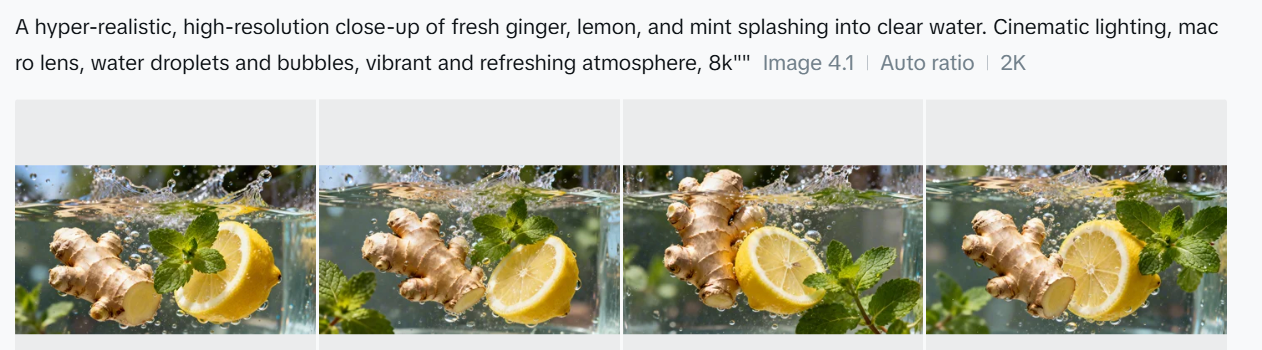
Once you click Generate, Firefly produces four unique images, each with its own variation on your prompt. A handy drop-down menu beneath each image lets you generate similar versions, use it as a style reference for a new prompt, or jump straight into Adobe Express—Adobe’s Canva-style editor—for quick customisation.

Pricing

While the web version is free (with 25 monthly generative credits and watermarking), paid plans start at just $9.99/month for heavier use or watermark-free assets.

Posted in #HCSM

The 10-Minute Social Media Routine for Busy Healthcare Professionals

A common challenge among healthcare professionals is knowing the value of social media but never quite having the time.

But what if you had a system designed — one that helps you stay visible, build trust, and share credible content… in just 10 minutes a day?

What could change for you if social media felt sustainable?

I’ve created a framework that’s focused, intentional, and realistic.

Read my guide to social media in ten minutes a day on Substack.

Posted in Cool Tool

Monday Morning Cool Tool: StoryArt

This week I’m recommending StoryArt, a freemium app for more creative Instagram Stories and Reels.

StoryArt is an Instagram story editor app that offers over 3,000 customizable collage and animated story templates for Instagram Stories and Reels.  In addition, you can access  500+ post templates for feed posts and 500+ highlight cover templates to beautify your profile.

The app is free but if you want access to extra tools, filters, and layouts, there is a monthly fee of  $2.99 or a full-year subscription for $9.99. 

StoryArt is available for both iOS and Android.

Posted in AI, Cool Tool

Monday Morning Cool Tool: OpenArt.ai

This week I’m recommending OpenArt.ai – an AI-powered art platform that allows users to create, edit, and enhance images using artificial intelligence.

Key Features

AI Image Generation
Create images from text prompts using a range of advanced models, including DALL·E 3 and Stable Diffusion. You can also generate visuals without prompts, offering boundary-free creative exploration.

Advanced Image Editing Tools
OpenArt includes a robust suite of AI editing capabilities to refine your work, such as:

  • Inpainting & Outpainting – Add, remove, or expand elements in your image beyond its original frame.
  • Upscaling – Improve image resolution to produce crisp, detailed artwork.
  • Background Removal & Replacement – Effortlessly swap or eliminate image backgrounds.
  • Find & Replace – Replace specific objects using simple text prompts.
  • Consistent Characters – Generate the same character in multiple poses, styles, and scenes—ideal for storytelling or brand consistency.
  • Facial Editing – Adjust expressions, eye color, or hairstyles for fine-tuned control.

Customization & Creative Control
You can train custom models to reflect your unique style and use “Image Guidance” to steer outputs based on reference images (pose, style, composition, etc.).

Community & Learning Resources
Access a vibrant community feed, Discord support, tutorials, and prompt books to help you get the most from the platform.

Image to Video Tool
Transform static images into dynamic videos in just a few clicks.

Pricing

OpenArt offers a free trial with limited credits for new users. For ongoing or professional use, there are several paid plans—Essential, Advanced, Infinite, and Team—each offering increasing credits, features, and simultaneous generations. Costs vary based on the tools and AI models you use.

Posted in #HCSM

A Strategic Guide to Instagram Stories for Healthcare Communicators in 2025

Instagram Stories aren’t just a social feature; they’re a communication channel with real strategic value. For healthcare communicators, this format is a versatile tool that can carry everything from urgent health updates to nuanced patient education.

Stories allow you to connect in ways that are immediate, visual, and personal. The question is no longer whether to use Instagram Stories—it’s how to use them well.

Why Stories Still Matter in Healthcare

Stories aren’t like regular posts. They disappear after 24 hours, but their impact can last far longer. They’re direct, sequential, and immersive—perfect for walking someone through a quick tip, showing what happens behind the scenes, or debunking a common myth.

Done well, Stories can turn passive viewers into active participants: clicking links to book a screening, watching a tutorial on inhaler technique, or submitting a question to a specialist. That kind of engagement is hard to come by—and it’s worth building for.

From Swipe to Substance: Making the Most of the Format

The Stories format is fast, but that doesn’t mean your strategy should be rushed. Success comes from combining thoughtful design with genuine purpose.

Here’s how to approach it:

  • Keep it clean: Avoid cramming too much into one slide. One idea per frame works best. Use icons, colour cues, and simple language to guide people through your message, whether it’s a flu vaccine update or a healthy eating tip.
  • Put a face to the facts: Audiences respond more positively to real people. A brief clip of a nurse explaining when to go to urgent care, or a physiotherapist demonstrating a stretch, does more for credibility than any stock image ever could.
  • Be consistent, not flashy: Templates and visual identity matter, but don’t get lost in the aesthetics. What matters most is clarity, tone, and rhythm. Use the same fonts, colours, and voice across Stories to build trust and recognition over time.

Formats That Work: Proven Story Structures for Healthcare

There’s no one-size-fits-all formula, but some formats lend themselves naturally to healthcare communication. Here are a few to start with:

  • Quick Series: Break a larger message into smaller chunks. For example, “3 ways to support someone with epilepsy” could run across three slides—each one focused, clear, and actionable.
  • Myth vs Fact: Tackle misinformation head-on. Start with a bold claim on Slide 1 (“You can’t exercise if you have a heart condition”), then swipe to the evidence-based clarification with a trusted source.
  • Behind the Scenes: Show your human side. A look inside a vaccination centre, an introduction to a midwife team, or a day-in-the-life view from a community health worker builds transparency and warmth.
  • Call to Action: Don’t forget to guide your audience. Whether it’s “Swipe up to check symptoms,” “Tap here to book,” or “Share with someone who needs this,” make your ask clear and easy to follow.

Continue reading for free on Substack

Posted in #HCSM

Is Search Still the Starting Point for Patients Seeking Health Information?

In 2024, 65% of Google searches ended in zero clicks. More people are finding answers directly in AI-generated summaries, TikTok videos, Reddit threads, and “People Also Ask” boxes—without ever visiting a website.

For healthcare communicators and marketers, this shift isn’t just about SEO rankings—it’s about visibility, credibility, and relevance in an increasingly fragmented discovery landscape.

In my latest Substack article, I discuss why Google is no longer the only gateway to health content and what this means for your content strategy going forward.

🔗 Read the full article

Posted in Cool Tool

Monday Morning Cool Tool: Bitly

This week, I’m recommending Bitly – a handy URL shortener tool.

How we share information in healthcare is just as important as what we share. The link itself is part of the message, whether it’s an educational resource, a campaign sign-up link, or an event registration page. Here’s where Bitly comes in.

What Is Bitly?

Bitly is a platform that takes long, often unwieldy URLs and shortens them into compact links that are easier to share and track. It’s one of the most widely used URL shorteners in the world and is trusted by organisations ranging from global brands to local nonprofits.

Let’s say you’re running a digital campaign for epilepsy awareness. You’ve created a resource page that lives at: https://yourorg.org/programmes/epilepsy-awareness-week-2025/download-resources
That’s a lot to include in a tweet, an Instagram bio, or a printed flyer. With Bitly, you could shorten it to: https://bit.ly/epilepsyweek2025
Much better, right?

But more importantly, you can track how that link performs. How many people clicked it? Where were they located? Did one social platform drive more traffic than another?

What Else Can You Do with Bitly?

Once you’re inside the platform, you’ll find several additional features that make Bitly especially powerful for healthcare communication and outreach.

🔹 Link Customisation
You can edit the end of a Bitly link to make it more descriptive or branded, like:
bit.ly/CaregiverGuide2025
This improves trust and helps people understand what they’re clicking on.

🔹 Analytics Dashboard
Bitly provides real-time data on link performance, including:

  • Click volume
  • Geographic location of users
  • Referral sources (e.g., Twitter, email, WhatsApp)

🔹 Branded Domains (Paid)
With a paid plan, you can use your own short domain (like yourclinic.org/guide) to create even more trust and continuity in your communications.

🔹 Link Management Tools
You can organise links into folders, label them by campaign, and even set expiration dates for time-sensitive URLs (paid feature)

🔹 QR Codes

Every time you shorten a link with Bitly, you also have the option to create a QR code with a single click. That means you can easily place your link on:

  • Clinic posters
  • Flyers and leaflets
  • Event banners
  • Conference slides
  • Prescription inserts or appointment cards

QR codes make it effortless for patients, staff, or the public to scan and access information using just their phone – no typing required. For example, a hospital running a flu vaccination campaign uses a Bitly link to direct patients to the booking form. They place the QR code version of that link on posters in waiting rooms, allowing patients to scan and schedule right from their seats.

Is Bitly Free?

Yes—and no. Bitly offers a free plan that allows basic link shortening, custom back-halves, and limited analytics. For more advanced features like branded domains, deeper analytics, and team collaboration, they offer tiered paid plans.

For small teams or individual professionals, the free plan is often enough. For hospitals, health systems, or nonprofits running large campaigns, the paid options can be well worth the investment.

Posted in #HCSM

How a Tiny Link Can Make a Big Impact: The Surprisingly Powerful Role of Short Links in Healthcare Communication

A few weeks ago, I sent a patient education link to a colleague via WhatsApp. It was long, so long that it broke into two lines on her screen, making it difficult to click, especially on mobile. “What is this?” she messaged back, hesitant to open something that looked confusing and, frankly, suspicious. Her response made me reflect on how something as mundane as a URL—the link itself—can either support or undermine trust in a healthcare setting.

Why Short Links Matter in Healthcare

In clinical practice, public health campaigns, and health education, we often think about what we say, but not always about how we share it. Clarity, confidence, and usability matter, especially when you’re dealing with sensitive health topics or time-pressed readers. A shortened URL isn’t just tidier. It’s more accessible, more user-friendly, and often more trustworthy—if used wisely.

Let’s say you’re linking to a new vaccination clinic schedule or a sign-up page for a mental health webinar. Here are your two options:

https://healthsystem.gov/community/events/primary-care/mental-health-week-2025/register-now-form.html

or

https://yourclinic.org/mhweek2025

Which one feels easier to trust and click?

Beyond the Aesthetics: What Shortened URLs Actually Do

A URL shortener takes a long, complex link and generates a much shorter one that redirects to the same destination. But the best tools offer more than just a cosmetic makeover—they provide tracking, branding, and behavioural insight.

Many shorteners (like Bitly, Rebrandly, and TinyURL Pro) allow you to:

  • Track click-through rates (how many people actually click your link)
  • See geographic data and referral sources (helpful for outreach campaigns)
  • Customise the back-half of the link for clarity and brand alignment

In other words, shortened links don’t just look better—they help you communicate better.

Continue reading this article for free on Substack

Posted in Cool Tool

Monday Morning Cool Tool: CoSchedule’s Subject Line Tester

This week, I’m recommending CoSchedule’s Subject Line Tester.

CoSchedule’s Email Subject Line Tester is a free online tool designed to give you instant feedback on your subject lines. It analyzes your headline against a database of successful emails, providing a score and actionable recommendations to help you boost your open rates and overall email campaign performance.

How to Use the Tester in 5 Simple Steps

  1. Type Your Subject Line: Simply enter the subject line you’re considering into the provided field on the CoSchedule website.
  2. Get Instant Analysis: The tool immediately processes your input and provides an analysis.
  3. Receive a Score & Breakdown: You’ll get a numerical score (typically out of 100) along with a detailed breakdown of its strengths and weaknesses.
  4. Review Suggestions: The tester provides specific suggestions for improvement, such as adding power words, emotional words, or adjusting its length for optimal readability.
  5. Refine and Test Again: Tweak your subject line based on the feedback and re-test until you achieve a score you’re happy with. It’s an iterative process that leads to better results!

The beauty of CoSchedule’s tester lies in its comprehensive analysis. It doesn’t just give you a score; it breaks down your subject line’s effectiveness across several critical factors. You’ll see how your subject line performs based on:

  • Overall Score: A quick check of your subject line’s predicted performance.
  • Word Balance: It assesses the mix of common, uncommon, emotional, and power words, guiding you towards a more impactful blend.
  • Length: Provides recommendations for ideal character and word counts to ensure readability on various devices.
  • Sentiment: Analyzes whether your subject line conveys a positive, negative, or neutral tone.
  • Spam Triggers: Helps you identify and avoid words or phrases that might trigger spam filters.
  • Preview: Shows you how your subject line will likely appear in common inbox displays, so you can catch truncation issues.
  • Keywords: Highlights strong keywords that resonate with your audience and search intent (if applicable).

Best Practices for Writing Effective Email Subject Lines

While the tester is fantastic, remember these timeless best practices that the tool helps you optimize for:

  • Be Clear & Concise: Get straight to the point. Subscribers should know what your email is about at a glance.
  • Create Urgency/Scarcity (where appropriate): Phrases like “Limited Time Offer” or “Don’t Miss Out!” can drive immediate action.
  • Personalization: Using the recipient’s name or other relevant data can significantly boost engagement.
  • Pique Curiosity: Ask a question or hint at valuable information to encourage an open, but always deliver on that promise inside the email.
  • Focus on Benefit: What’s in it for the reader? Highlight the value they’ll gain by opening your email.
  • Use Emojis Sparingly: Emojis can boost open rates, but use them thoughtfully and know your audience. Too many or irrelevant emojis can look unprofessional.
  • A/B Test Relentlessly: The best way to know what works for your audience is to test different subject lines against each other.

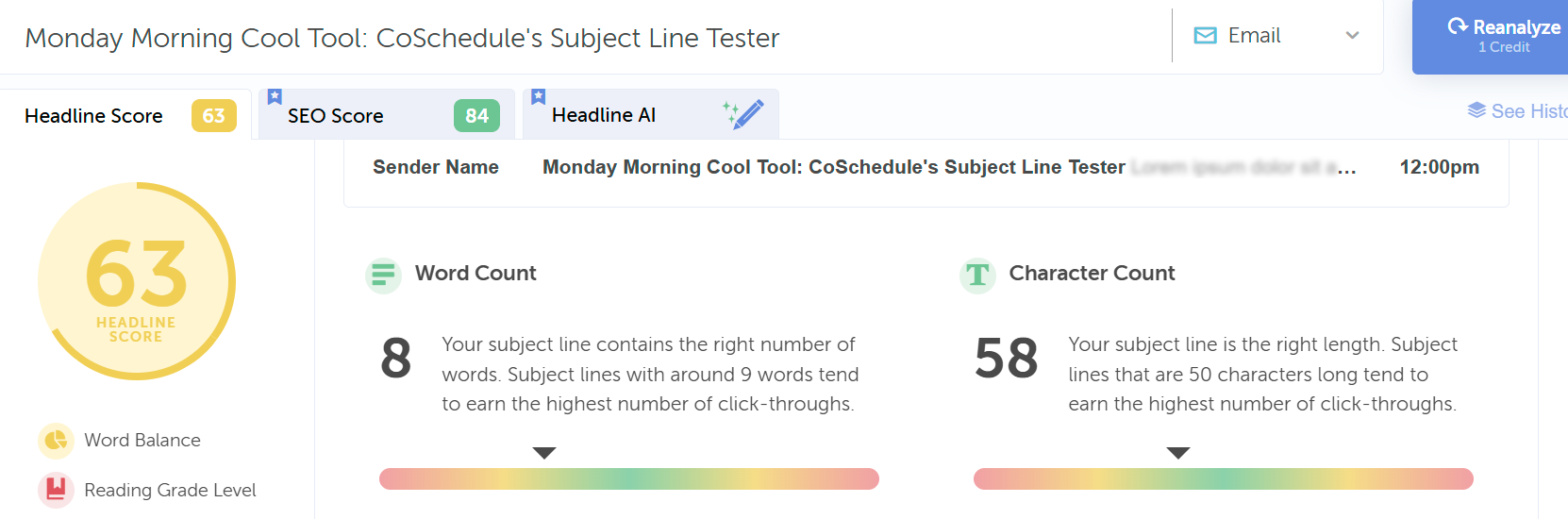
Curious about the effectiveness of this blog post’s title as an email subject line, I entered it into the tool. Take a look at its performance score below:

Here’s an improved score with a different heading; however, it has too many words.

Click Here to Try CoSchedule’s Email Subject Line Tester

Posted in Cool Tool

Monday Morning Cool Tool: Hotjar

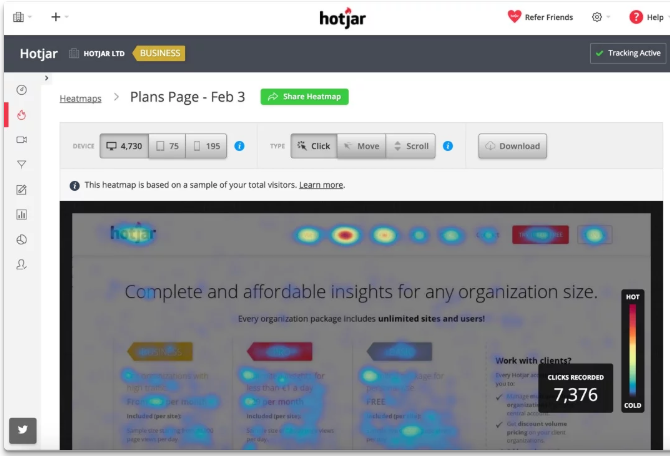
This week I’m recommending Hotjar, a website optimization tool.

1_PtZNvuc_ZMJr8aRS0xOe-Q

Imagine being able to see your website through your visitors’ eyes. Tools like heatmaps, scroll maps, and click maps make this a reality. Heatmaps highlight the most engaged areas of your pages, showing you where visitors instinctively click or tap. Scroll maps show how far down the page visitors typically venture, indicating if crucial content is being missed. Click maps pinpoint exactly where users are trying (and sometimes failing) to interact. This visual feedback provides an immediate understanding of user attention and potential points of confusion.

Going beyond static snapshots, visitor recordings offer a dynamic view of individual user sessions. By watching recordings of clicks, taps, and mouse movements, you can witness firsthand the user experience. This allows you to identify usability issues that might not be apparent from aggregated data. Perhaps a button is unclear, a form field is causing hesitation, or a navigation element is proving difficult to locate. These real-time journeys can uncover hidden frustrations and highlight areas needing immediate attention.

Platforms like Hotjar cleverly combine these powerful Analysis tools with Feedback tools, offering a holistic view of the user experience. This synergy provides the “big picture” – not just what users are doing, but also their direct opinions and frustrations. By understanding both the “what” and the “why,” you gain the knowledge necessary to make data-driven decisions that enhance your site’s usability, improve performance, and ultimately drive higher conversion rates.

Price: Hotjar offers a tiered pricing structure (including a free tier with limitations) with different plans based on your needs and the volume of website traffic and usage.

Posted in Cool Tool

Monday Morning Cool Tool: DiffusionArt

This week’s cool tool recommendation is DiffusionArt – a user-friendly, AI art generator

DiffusionArt is a browser-based platform that makes it easy to generate AI art from simple text prompts. It houses a curated library of open-source AI art models specializing in creating various types of images, including art pieces, anime characters, and photorealistic images. It also provides tools like a Prompt Generator, Conceptualizer, and even Anime Video Generators.

Pricing

DiffusionArt is free to use with a generous daily limit, making it perfect for casual creators. Paid tiers offer expanded limits, priority processing, and access to premium models for those who want to take their AI art to the next level.

Posted in Cool Tool

Monday Morning Cool Tool: Snappa

This week’s cool tool recommendation is Snappa – a cloud-based graphic design tool.

Snappa is a user-friendly graphic design tool, particularly well-suited for those who need to quickly create visuals without a steep learning curve or expensive software.

Key Features

  • Extensive Library of Templates: Offers thousands of pre-designed templates for various purposes (social media posts, blog graphics, ads, etc.) that are customizable.  
  • Vast Stock Photo & Graphics Library: Provides access to millions of royalty-free, high-definition photos and a wide selection of graphics, icons, and vectors.  
  • Text Editor: Allows users to add and customize text with a variety of fonts, sizes, colors, and effects.  
  • Image Editor: Includes basic image editing tools like cropping, resizing, flipping, rotating, and adjusting brightness/contrast.  
  • Background Remover: A one-click tool to remove backgrounds from images.  
  • Image Resizer: Makes it easy to resize graphics for different social media platforms with pre-set dimensions.  
  • Custom Font Uploads: Paid plans allow users to upload their own brand fonts for consistency.  
  • Social Media Integrations: Offers direct integration with platforms like Buffer for easy scheduling and publishing (on paid plans).  
  • Team Collaboration: Team plans allow multiple users to collaborate on designs.  
  • Brand Kit: Enables users to save brand colors and logos for easy access.  

Pricing:

Snappa offers different pricing tiers, including a free plan with limitations:  

  • Free Plan: Typically includes access to all templates and the stock photo library but limits the number of downloads per month (usually 3) and the number of connected social accounts. It’s generally for single users.  
  • Pro Plan: A paid plan for individuals, usually offered at a monthly or annual fee, that unlocks unlimited downloads, social media integrations, custom font uploads, background removal, and more.  
  • Team Plan: Aimed at teams, offering the same features as the Pro plan but for multiple users (typically up to 5 on the standard team plan), often with collaboration features.  

Posted in #HCSM

Still Overlooking YouTube for Patient Education? It’s Time to Rethink

As YouTube celebrates 20 years, healthcare communicators have a golden opportunity to meet patients where they already are—on video.

In my latest Substack article, I share:

🎥Why YouTube matters for patient education

🎥How to use videos, Shorts, and podcasts to educate and connect

🎥3 simple videos you can start creating today

Your next breakthrough in patient education might just start with a simple video!

Click here to read

Posted in Cool Tool

Monday Morning Cool Tool: Tailwind

This week’s cool tool recommendation is social media marketing app – Tailwind.

Originally a popular Pinterest scheduler for automating pin publishing, today the tool also supports Instagram, Facebook, and email marketing.

Noteworthy Capabilities

  • Beyond basic scheduling, Tailwind intelligently recommends optimal posting times based on audience activity, allowing you to schedule a week’s worth of content across platforms.
  • The integrated Ghostwriter AI provides on-demand content generation for Instagram captions, Pinterest descriptions, email subject lines, and full email copy – a valuable asset for overcoming creative blocks.
  • Tailwind’s hashtag tool streamlines discoverability by suggesting relevant hashtags and allowing users to save and apply curated lists.
  • Recent expansion into email marketing offers user-friendly templates, landing page creation, and automated sequences, enhanced by Ghostwriter AI for effortless copy generation within the platform.

Pricing Overview

A Free Forever Plan allows new users to explore basic features, with paid upgrades available for more advanced functionality.

Posted in Cool Tool

Monday Morning Cool Tool: Filmora

This week’s cool tool recommendation is Filmora a user-friendly video editing tool.

Filmora offers a balance of powerful features and an intuitive interface, making it accessible for those new to video editing while still providing tools for more creative projects.

Key Features

Filmora boasts a wide array of features, including:

  • Basic Editing: Trimming, cutting, splitting, merging, rotating, and adjusting video speed.
  • Visual Effects: A large library of filters, transitions, titles, and motion elements.
  • Audio Editing: Tools for adjusting audio levels, adding background music, recording voiceovers, and noise reduction.
  • Colour Correction and Grading: Options for adjusting colour balance, applying LUTs, and enhancing the visual look of videos.
  • Text and Titles: Customisable text and title templates, including animated options.
  • Motion Tracking: The ability to track objects within a video and apply effects or elements that follow their movement.
  • Green Screen (Chroma Key): Tools for removing and replacing backgrounds.
  • Screen Recording: The ability to record your computer screen.
  • AI-Powered Features: Recent versions include AI tools like:
    • AI Text-Based Editing: Editing video by manipulating its transcription.
    • AI Music Generator: Creating royalty-free background music.
    • AI Portrait Cutout: Removing video backgrounds.
    • AI Smart Masking: Automatically creating masks around objects.
    • AI Audio Denoise: Reducing background noise in audio.
    • AI Voice Enhancer: Improving vocal clarity.
    • AI Smart Cut: Identifying and clipping interesting moments.
    • AI Smart Short Clips: Creating short clips for social media.
    • AI Image to Video: Turning still images into moving videos.
    • AI Sound Effect Generator: Creating custom sound effects from text prompts.
    • AI Voice Cloning: Creating an AI voice clone.
    • AI Translation & Lip Sync: Translating speech and syncing it to lip movements.
  • Templates and Assets: Built-in templates, royalty-free music, sound effects, and the ability to access more through the Filmora Effects Store.
  • Social Media Integration: Features designed for creating content for platforms like YouTube, TikTok, and Instagram, including auto-reframe tools.

Pricing

Filmora offers a free version that gives you access to basic editing tasks and access to a selection of built-in filters, transitions, titles, and motion elements. It’s a great way to try out the software, learn its interface; however, the watermark on exported videos makes it unsuitable for projects where a professional, unbranded output is necessary. To remove the watermark and access the full range of features and assets, you would need to purchase a paid subscription or a perpetual license.

Posted in Cool Tool

Monday Morning Cool Tool: Picsart

This week’s cool tool recommendation is Photoroom – an AI background generator that transforms your images with ease.

Photoroom is a mobile and web application that uses artificial intelligence to effortlessly remove, replace, and generate backgrounds. Users can either remove existing backgrounds or generate entirely new ones using text prompts or image inputs.

Unlike traditional image editing software, Photoroom prioritizes simplicity and speed, making complex background changes accessible to anyone without requiring extensive technical skills.

Pricing

Photoroom offers a free tier that provides core background removal and basic editing functionalities, suitable for everyday users. A subscription unlocks premium features like high-resolution exports, batch editing, and access to a wider range of AI-generated backgrounds.

Posted in Cool Tool

Monday Morning Cool Tool: Picsart

This week’s cool tool recommendation is Picsart – a free AI image generator.

PicsArt is a mobile and desktop editing platform that combines powerful AI-driven tools with an intuitive interface. It allows users to edit photos, create digital art, design marketing materials, and even edit videos—all from their smartphones. Unlike traditional editing software, PicsArt is built for speed and ease of use, making it a great choice for those who want professional-looking visuals without the learning curve of tools like Photoshop.

One of PicsArt’s biggest advantages is its AI-driven tools. Features like background removal, smart selection, and AI-powered filters allow users to transform images with a single tap. Features like blending modes, layers, and masking—tools typically found in professional software—are simplified for everyday users. Whether you’re creating a logo, designing a social media post, or experimenting with artistic edits, the interface is intuitive and beginner-friendly.

PicsArt isn’t just for photos—it also offers robust video editing features. Users can trim clips, add effects, overlay text, and apply filters to enhance their videos for platforms like TikTok and Instagram.

Pricing

Picsart’s free tier provides a robust set of tools, from filters to ready-made templates, and editing tools for the everyday user, while a subscription unlocks advanced features.

So, if you haven’t tried PicsArt yet, why not explore its features and see what you can create?

Posted in Cool Tool

Monday Morning Cool Tool: FindSounds

This week’s cool tool recommendation is FindSounds – a website and search engine to assist in locating specific sounds or audio clips.

FindSounds is a search engine for locating specific audio clips and sound effects. Use it to add professional polish to multimedia projects and digital content. You can search for background music, ambient sounds, or specific audio elements to match the theme of your content.

For live streaming or webinars, you can use FindSounds to find intro music, outro music, or background music to make your broadcasts more polished and engaging. You can also use it to add sound effects for interactive elements or notifications.

You might also like to consider searching for music and sounds via Soundcloud.

Posted in #HCSM

Monday Morning Cool Tool: Ribbet

This week I’m recommending Ribbet – a user-friendly online photo editor.

Ribbet’s intuitive interface and straightforward tools make it accessible to everyone.

Here are some noteworthy features:

  • Ribbet’s interface is designed for simplicity, allowing you to crop, resize, adjust brightness, or enhance colors easily.
  • Ribbet’s extensive library of filters and effects helps you find the perfect filter to enhance your images.
  • Whether you want to add a catchy caption or a fun emoji, Ribbet makes it easy to customize your visuals.
  • Ensure your photos look their best on any platform with Ribbet’s resizing and cropping tools. Easily adjust your images to the optimal dimensions for Instagram, Facebook, X, and more.
  • Need to quickly remove a blemish, or whiten teeth? Ribbet has those tools as well.
  • Finally, if you are looking for a quick start, Ribbet has many templates that allow you to easily create content.

What I like best about Ribbet is how user-friendly it is. Its intuitive interface and social media-ready tools make it a great choice for anyone looking to elevate their graphics. And the best part? It’s totally free. So, ditch the complicated software and give Ribbet a try.

Posted in #HCSM

Handling Misinformation on Social Media

This post is part of my series on social media challenges faced by healthcare communicators.

Misinformation spreads rapidly on social media, especially in the healthcare space. From misleading “miracle cures” to conspiracy theories about vaccines, false health claims can cause confusion, undermine trust in medical professionals, and even put lives at risk. In an age where social media serves as a primary source of health information for many, healthcare communicators must be on the frontlines of combating misinformation with accurate, evidence-based content.


The Challenge: The Spread of Health Misinformation

The nature of social media algorithms and human behaviour makes battling misinformation especially difficult for healthcare organisations.

❌ Rapid Spread – Misinformation often spreads more quickly than factual content because it tends to be sensational, emotionally charged, or “too good to be true.” Studies show that false information spreads significantly faster on platforms like X (formerly Twitter) compared to accurate, fact-checked information.

❌ Erosion of Trust – When false claims about healthcare go viral, they can undermine trust in legitimate sources, including hospitals, doctors, and public health authorities. Once trust is broken, it becomes much harder to re-establish credibility with your audience.

❌ Algorithmic Bias – Social media algorithms often prioritize content that generates high engagement, regardless of its accuracy. Unfortunately, misinformation tends to be more provocative and emotionally engaging, making it more likely to surface in users’ feeds.

❌ Complex Response – Correcting misinformation isn’t as simple as posting a fact-check. The way you respond matters—coming across as dismissive or condescending can alienate audiences, even if your information is correct. A respectful, empathetic approach is crucial for engaging audiences who may already be skeptical of traditional healthcare institutions.


Solutions: Strategies to Combat Healthcare Misinformation

1. Share Verified, Evidence-Based Content

Your first line of defense against misinformation is to ensure that everything you publish is accurate, clear, and backed by credible sources. This not only protects your organization’s reputation but also positions your brand as a trusted resource.

✔ Fact-Check Before You Post: Always verify information using reliable sources such as the World Health Organization (WHO)Centers for Disease Control and Prevention (CDC)National Institutes of Health (NIH), or peer-reviewed journals.

✔ Simplify Complex Topics: Medical jargon can alienate your audience. Break down complex health information into easy-to-understand language. Use analogies, plain language, and real-world examples to make scientific concepts more accessible.

✔ Cite Reputable Sources: Reference authoritative organizations in your posts, and where possible, link directly to the original research or official statements. This reinforces your credibility and allows readers to verify the information themselves.

💡 Practical Tip: Create engaging visual content such as infographics, explainer videos, or animated reels that simplify complex health information. Visual formats are often more shareable and digestible than lengthy text posts.

Continue Reading on Substack

Posted in Cool Tool

Monday Morning Cool Tool: Preview

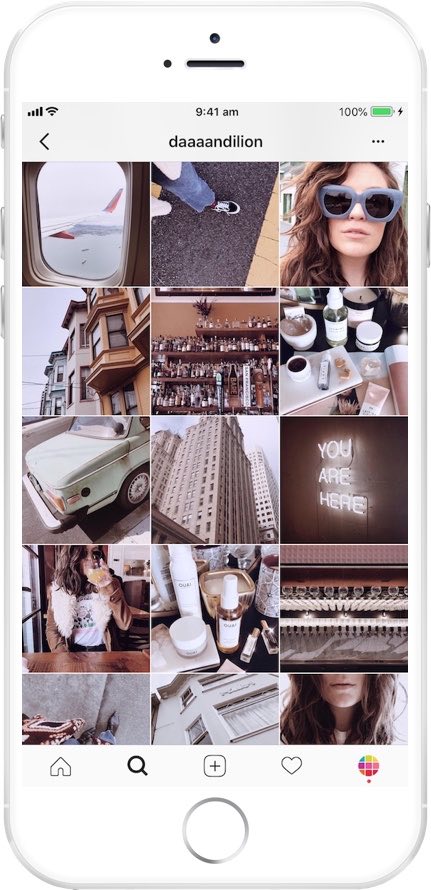
instagram-feed-planner-app-preview-8.jpg

This week’s cool tool recommendation is Preview, a super useful Instagram app.

Preview is an Instagram planner that simplifies content creation and helps you design a cohesive aesthetic and optimize your social media strategy. It allows you to see how your grid will look before hitting “post,” ensuring your feed stays cohesive and visually engaging.

Want to learn more?

Visit my Substack to learn more about the key features of Preview and pricing plans.


Posted in #HCSM

How To Demonstrate the Value of Social Media

For healthcare communicators, demonstrating the value of your social media efforts can be challenging but essential to securing buy-in, allocating resources, and achieving long-term success.

The Challenge: Proving Social Media Return on Investment (ROI)

  1. Defining ROI in Healthcare Contexts: Unlike direct-to-consumer businesses, where ROI often translates into sales or conversions, healthcare ROI can be more nuanced. Metrics might include increased awareness, patient engagement, or referrals—intangibles that can be hard to quantify.
  2. Data Overload: With countless metrics to track (likes, shares, comments, reach, impressions, click-through rates, etc.), it’s easy to get overwhelmed or lose focus on the most meaningful indicators of success.
  3. Attribution Issues: Patients rarely make decisions based on a single social media interaction. Tracking the journey from initial engagement to appointment booking can be complex and indirect.
  4. Limited Resources: Many healthcare organizations have lean marketing teams juggling multiple priorities, leaving little time for in-depth analytics.

Solutions: Actionable Strategies for Measuring Social Media ROI

1. Define Clear Objectives

Start by identifying what success looks like for your organization. In healthcare, these might include:

  • Brand Awareness: Growing your follower count or increasing post reach.
  • Patient Engagement: Encouraging interactions like comments, shares, or messages.
  • Conversions: Tracking leads to website visits, newsletter sign-ups, or appointment requests.

💡 Tip: Use SMART goals—specific, measurable, achievable, relevant, and time-bound—to frame your objectives.

2. Focus on Key Metrics

Not all metrics are equally valuable. Prioritize those that align with your goals:

  • Awareness Goals: Track impressions, reach, and follower growth.
  • Engagement Goals: Monitor likes, shares, comments, and direct messages.
  • Conversion Goals: Use click-through rates, form submissions, or website analytics to measure tangible actions.

Continue Reading

Posted in Cool Tool

Monday Morning Cool Tool: PhotoRoom

This week’s cool tool recommendation is PhotoRoom – a user-friendly AI-powered tool that simplifies the process of removing and replacing image backgrounds

While not a comprehensive photo editor, its intuitive interface and reliable AI make it a fantastic choice for beginners and anyone seeking a quick and efficient solution for background swaps.

How PhotoRoom Works

  1. Image Selection: Begin by uploading your desired image in PNG or JPG format. Higher resolution images generally yield better results.
  2. Background Removal: PhotoRoom’s AI swiftly analyzes the image and automatically removes the background. You can then fine-tune the selection by adjusting the crop as needed.
  3. Background Replacement: A vast library of backgrounds awaits. Explore a diverse range of textures, colors, and patterns, or delve into themed collections like “Nature” (featuring skies, starry nights) and “Art” (inspired by Van Gogh, masterpieces).
  4. Downloading: Save a low-resolution preview of your edited image with a watermark for free. To obtain the high-definition version, a Pro account is necessary.

Key Advantages

  • Effortless Background Removal: AI-powered technology makes background removal a breeze, even for those with no prior photo editing experience.
  • Intuitive Interface: The user-friendly design ensures a smooth and enjoyable editing experience.
  • Versatile Background Library: A wide array of backgrounds caters to various needs and creative visions.
  • Time-Saving: Quickly and efficiently replace backgrounds, streamlining your workflow.

Pricing

While basic backgrounds like blank tiles are available for free, premium options, including more sophisticated and creative backgrounds, require a Pro account subscription.

Posted in #HCSM

10 Social Media Challenges Healthcare Communicators Face; Part 2 – Maintaining a Consistent Brand Voice

Part 2 of my 10-part series on “Social Media Challenges for Healthcare Communicators” is now available!

In this installment, I tackle the challenge of maintaining a consistent voice across all your social media channels.

A strong and consistent brand voice is essential for building trust, credibility, and a recognizable online presence. Here I discuss practical strategies to ensure your messaging is clear, cohesive, and impactful.

Read for free on Substack

Posted in #HCSM

10 Content Pillars for Effective Healthcare Communication on Social Media

By establishing a strong foundation of engaging content, healthcare organizations can effectively leverage social media to improve patient care, enhance their reputation, and strengthen their online presence.

This article outlines 10 key content pillars that should form the cornerstone of any successful healthcare social media strategy, along with real-world examples.

1. Patient Testimonials and Success Stories

St. Jude Children’s Research Hospital shares patient recovery stories on Facebook, often featuring photos and heartfelt quotes from patients or families.

Purpose: To inspire and connect with audiences on an emotional level.

Why It Works: Personal stories humanize healthcare and foster trust. They also serve as social proof, showcasing successful outcomes and patient satisfaction.

How to Create: Collaborate with patients who are willing to share their experiences. Use video or written testimonials accompanied by photos to maximize emotional impact. Obtain written consent from patients. Focus on authentic, relatable stories.


2. Educational Content

American Heart Association pairs educational content with captivating graphics.

Purpose: To inform audiences about health topics, treatments, and preventative care.

Why it works: People actively seek credible health information online. Educational posts establish your organization as a trusted authority. These posts can also drive traffic to your website or blog, where you can provide in-depth resources.

How to Create

  • Create short, informative videos or infographics.
  • Share articles and blog posts on relevant health topics.
  • Use simple, easy-to-understand language.

3. Behind-the-Scenes Content

Johns Hopkins Medicine’s TikTok videos provide a glimpse into a day in the life of their healthcare professionals, from lab researchers to ER nurses.

Purpose: To showcase the people and processes behind healthcare organizations.

Why It Works: Humanizing your team builds trust and relatability. Audiences appreciate seeing the faces and stories behind the organization.

How to Create: Share photos or videos of staff at work, team celebrations, or day-in-the-life content. Highlight the dedication and expertise of your team and the organization’s culture and values.

Continue reading this article for free on Substack

Posted in #HCSM

Master Your Healthcare Marketing: 7 Proven Content Planning Strategies for 2025

Effective content planning is the cornerstone of any successful healthcare marketing strategy. It ensures you create content that addresses the unique needs of patients, caregivers, and healthcare professionals while aligning with your organizational goals.

In an industry as dynamic and sensitive as healthcare, strategic content planning is more critical than ever. By planning your content for the year ahead, you can:

  • Prioritize patient-centric efforts: Focus on creating content that informs, supports, and empowers your target audience.
  • Enhance trust and credibility: Build a reputation as a reliable source of health information.
  • Optimize resources effectively: Streamline the creation of high-quality, impactful content within available budgets and timelines.

The Peril of “Random Acts of Content”

Without a clear plan, healthcare organizations risk producing inconsistent or irrelevant content. This “random acts of content” approach can:

  • Undermine patient trust
  • Waste valuable resources
  • Make it difficult to track and measure outcomes

Consequences of Random Acts of Content:

  • Misalignment with patient and professional needs
  • Overlapping or redundant messaging
  • Missed opportunities to provide timely and impactful information

7 Types of Content Planning for 2025 Success

1. Weekly/Monthly/Quarterly Content

Strategy: Establish a consistent schedule of content tailored to your audience, such as blogs on medical advancements, newsletters with health tips, or videos addressing common patient concerns.
Benefits: Builds trust, keeps your audience informed, and reinforces your role as a healthcare leader.
Example: A monthly newsletter with health and wellness tips, patient success stories, and updates on new treatments or services.


2. Seasonal Content

Strategy: Align content with health observances, seasonal trends, and community health needs.
Benefits: Promotes timely health awareness and engages audiences with relevant topics.
Example: A flu season campaign emphasizing vaccination benefits, or educational content for Breast Cancer Awareness Month.


3. Event-Related Content

Strategy: Develop content around key healthcare events, such as health fairs, medical conferences, or patient support group meetings.
Benefits: Increases event participation and drives awareness.
Example: Social media posts, email campaigns, and live-streams promoting a health screening day or participation in a global healthcare summit.

Continue reading this article for free on Substack

Posted in #HCSM

10 Key Questions to Guide Your 2025 Healthcare Social Media Strategy

Social media provides a platform to connect with patients, build brand awareness, educate the public, and enhance patient engagement. However, effective healthcare social media marketing requires a strategic, data-driven approach that goes beyond sporadic posting.

This article outlines 10 essential questions to guide your healthcare organization’s social media journey. By carefully considering these questions and implementing the insights gained, you’ll be well-equipped to build a strong online presence and achieve your healthcare marketing goals in 2025 and beyond.

1. Who Is Your Target Audience?

Before embarking on any social media strategy, you must clearly understand your target audience.

  • Analyze your existing audience: Examine your current social media followers and website traffic to identify their demographics, health conditions, and online behavior. Tools like Google Analytics, Facebook Insights, and Twitter Analytics provide valuable insights into your audience’s characteristics and engagement patterns.
  • Develop detailed patient personas: Create fictional representations of your ideal patients, including their demographics, health conditions, concerns, and online behavior. These personas will serve as valuable guides for your content creation and targeting efforts.

2. What Are Your Social Media Goals?

A cornerstone of any successful healthcare social media strategy lies in defining clear, measurable, and achievable goals.

  • Use the SMART goal-setting framework: Ensure your goals are Specific, Measurable, Achievable, Relevant, and Time-bound.
    • Example: “Increase patient appointment bookings from social media by 10% within the next quarter.”
  • Align social media goals with overall healthcare objectives: Ensure your social media efforts contribute to broader healthcare objectives, such as improving patient satisfaction, increasing brand awareness, or promoting healthy behaviors.
  • Set regular benchmarks: Track your progress towards your goals regularly and adjust your strategy as needed.

Further Reading: Creating A Social Media Mission Statement: Your Blueprint for Success

3. Which Platforms Should You Use?

Not all social media platforms are created equal.

  • Identify where your target audience spends their time: Conduct thorough research to determine which platforms your target audience frequents most.
  • Consider the nature of each platform:
    • LinkedIn: Ideal for connecting with other healthcare professionals, sharing industry insights, and recruiting talent.
    • Facebook: A versatile platform for reaching a broad audience, sharing patient stories, and promoting health awareness campaigns.
    • Instagram: Excels for visually-driven content, showcasing the human side of healthcare, and engaging with younger audiences.
    • X: Excellent for real-time communication during health emergencies, sharing breaking news, and engaging in discussions about health issues.
    • TikTok: Ideal for creating short-form video content, engaging health education videos and reaching younger demographics.
  • Focus on a few key platforms: Avoid spreading your resources too thin. Concentrate your efforts on the platforms where your target audience is most active and where you can achieve the greatest impact.

4. What Content Will You Create and Share?

Create a diverse content mix that resonates with your target audience and aligns with healthcare best practices.

  • Prioritize valuable and informative content: Share health tips, educational resources, patient testimonials, and engaging stories that address your audience’s health concerns.
  • Experiment with different content formats: Include a mix of text posts, images, videos, infographics, live streams, and interactive content.
  • Ensure content accuracy and compliance: Ensure all content is accurate, evidence-based, and complies with relevant healthcare regulations and ethical guidelines.
  • Plan and schedule your content: Use a content calendar to ensure consistent and timely posting. Consider using social media scheduling tools to automate your posting schedule.
  • Analyze content performance: Regularly review your content performance data to identify what’s working and what’s not. Adjust your strategy based on these insights.

5. How Will You Measure Success?

To measure the effectiveness of your healthcare social media efforts, track key performance indicators.

  • Website Traffic: Track referrals from social media platforms to your website and analyze user behavior on your site.
  • Patient Engagement: Monitor website visits, appointment bookings, and patient feedback received through social media channels.
  • Brand Mentions: Track mentions of your brand and engage in relevant conversations.
  • Health Literacy: Track the reach and impact of your health education campaigns.
  • Reputation Management: Monitor online reviews and respond to patient feedback to maintain a positive online reputation.

6. How Will You Engage With Your Audience?

Social media is a two-way street. Building strong relationships with your patients is paramount.

  • Respond promptly and empathetically: Respond to comments, messages, and mentions in a timely and compassionate manner.
  • Go beyond superficial interactions: Engage in meaningful conversations, address patient concerns, and offer personalized support.
  • Encourage patient interaction: Host Q&A sessions, polls, and contests to encourage active participation.
  • Showcase patient success stories: Share inspiring patient stories (with patient consent) to build trust and demonstrate the positive impact of your care.
  • Monitor and respond to patient reviews: Address both positive and negative reviews to demonstrate your commitment to patient satisfaction.

Further Reading: The Golden Rule of Social Media: Give More Than You Take

7. How Much Should You Spend on Social Media?

While the core social media platforms are free, building a successful healthcare social media presence often requires investment.

  • Consider your healthcare goals: More ambitious goals may require a larger budget.
  • Evaluate platform costs: Reaching specific demographics on certain platforms may require paid advertising.
  • Assess industry competition: If your healthcare market is highly competitive, you may need to invest more in paid advertising and high-quality content.
  • Factor in internal resources: Determine if you have the necessary internal resources (time, personnel) or if you need to hire freelancers or agencies specializing in healthcare marketing.
  • Start with a modest budget: Begin with a manageable budget and gradually increase your investment as you gain experience and see positive results.

Further Reading: Where Does Your Social Media Budget Perform Best?

8. How Much Should Time Should You Spend On Social Media Marketing?

Successful healthcare social media marketing demands a significant time commitment.

  • Consider the time required for each task: Content creation, audience engagement, platform monitoring, and strategy analysis all require time and attention.
  • Assess your available resources: Determine if you have the internal resources to dedicate to these tasks.
  • Explore time-saving strategies: Consider hiring a social media manager, outsourcing content creation, or utilizing social media management tools to streamline your workflow.
  • Prioritize your efforts: Focus on the platforms and activities that deliver the greatest return on investment for your healthcare organization.

9. How Will You Stay Updated On Social Media Changes and Trends?

The healthcare and social media landscapes are constantly evolving.

  • Stay informed about healthcare industry news: Regularly read industry publications, attend healthcare conferences, and stay updated on the latest healthcare trends.
  • Monitor platform algorithm changes: Keep abreast of updates to platform algorithms and adjust your strategies accordingly.
  • Analyze competitor activities: Monitor your competitors’ social media activities to identify best practices and areas for improvement.

Further Reading: 25 Digital Marketing Predictions for 2025

10. How Will You Integrate Social Media with Other Marketing Efforts?

Social media should not operate in isolation.

  • Maintain a consistent brand voice and visual identity: Ensure consistent messaging and branding across all marketing channels, including social media, website, email, and print materials.

  • Leverage social media to support other healthcare marketing campaigns: Use social media to promote health screenings, patient education events, and community outreach programs.

  • Track cross-channel performance: Analyze how social media contributes to overall healthcare marketing goals and identify opportunities for cross-channel synergies.
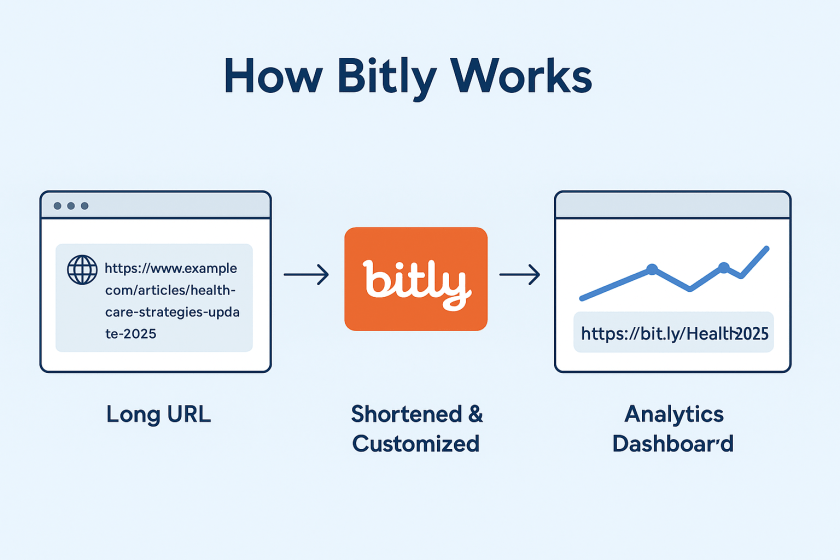
By addressing these 10 key questions, you can develop a robust and effective healthcare social media strategy. Remember that flexibility and continuous improvement are essential. By adapting to the evolving healthcare and social media landscapes and consistently refining your approach, you can achieve significant success in your healthcare social media marketing endeavors.

What are your biggest challenges when it comes to healthcare social media marketing? Share your experiences and insights in the comments below.

Posted in #HCSM

Why Your Health Content Needs a Conversation Strategy — Not Just a Publishing Plan

Healthcare communication has always mattered — but audiences’ expectations have changed dramatically.

People now move fluidly between clinic visits, search engines, peer communities, and social platforms. They cross-reference, compare, question, and seek reassurance in places far beyond formal care.

In this landscape, a message is no longer enough. People don’t want to be spoken at. They want dialogue, clarity, and the sense that someone is genuinely listening.

If you’re still creating content for people rather than with them, you’re missing the shift already happening in healthcare. I break down the change — and what to do next — in my latest Substack.