Posted in Cool Tool

Monday Morning Cool Tool: Readable.​io

promo_highlights.png

I love learning about new tools to make social media marketing more creative and effective, so I’ve decided to share some of my favorite tools with you at the start of each week. This week’s cool tool recommendation is Readable.io – a tool to help you measure the readability of any text.

How It Works

Put in your written text – paste it, upload a document or a URL – and you will get a set of scores and measures:

  • Readability scores – including Flesch-Kincaid, Gunning Fog and the SMOG index
  • Text analytics – text statistics (like letter, word and syllable counts), composition stats (like adjective, noun and adverb counts)
  • Keywork densities – for single words, and two or three word phrases
  • Reading and speaking time
  • Sentiment analysis – is the text positive, negative or neutral

Once you’ve scored your text, you’ll want to start working to improve it, and the tool can help there as well. Alongside your readability scores and text analytics, you’ll see an advanced highlighting engine showing areas where your text might be improved:

  • Long sentences are highlighted in yellow – or where very long, in red
  • Long and difficult words are highlighted and underlined
  • Uses of passive voice are highlighted in blue
  • Adverbs are usually shown in gold
  • Spotting cliches is as easy as shooting fish in a barrel

Readible.io is free – with a premium option available from just $3 per month.

Posted in Cool Tool, Visual Marketing

Monday Morning Cool Tool: Typorama

iPhone

I love learning about new tools to make social media marketing more creative and effective, so I’ve decided to share some of my favorite tools with you at the start of each week. This week’s cool tool recommendation is Typorama  another super easy design tool to enhance your social media and content marketing.

Choose from more than 40 different typographic styles, and add professional photo filters, overlays and adjustment tools.  Advanced crop options let you create the perfect size pictures for social media posts, wallpapers, posters, flyers and postcards.

Typorama is available for download from the App Store. 

Posted in Cool Tool, LinkedIn, Visual Marketing

Monday Morning Cool Tool: Dux-Soup

I love learning about new tools to make social media marketing more creative and effective, so I’ve decided to share some of my favorite tools with you at the start of each week. This week’s cool tool recommendation is Dux-Soup  – a browser plug-in which works with Google Chrome as your virtual assistant on LinkedIn.

Dux-Soup keeps track of every single profile you visit and allows you to make notes directly on the profile page which are saved. Profile date and notes can be export as a .CSV file to be opened in Microsoft Excel or similar. The .CSV file includes data such as the name of the person whose profile you visited, job title, company name, location, email and notes.

You can take and save notes on each profile such as: have sent invite/need to reply to a message / likes Opera etc. Dux-Soup can save you hours of manual data entry when it comes to tracking all your leads you interact with on LinkedIn.

You can opt to use the free version (which enables you to view a hundred LinkedIn profiles a day) or upgrade to the paid version (which allows you to set the number of profile visits you need to make per day and export the .CSV file and make use of the data you gathered.

Dux-Soup is available as a browser plug-in which works with Google Chrome. Download here.

Posted in Cool Tool

Monday Morning Cool Tool: Page Analytics

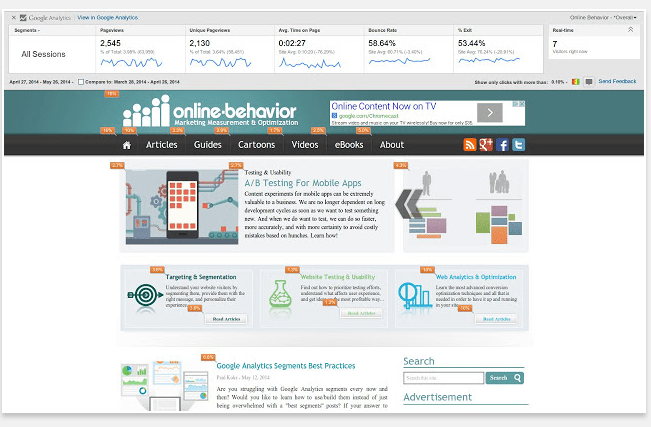
I love learning about new tools to make social media marketing more creative and effective, so I’ve decided to share some of my favorite tools with you at the start of each week. This week’s cool tool recommendation is Page Analytics  a Google Chrome Extension.

download (2).png

The Page Analytics Chrome Extension allows you to see how vistors interact with your web pages, including what they click and don’t click. You can use these insights to optimize your website layout, improve user experience, and increase conversions.

Click here to download the app.

Posted in Cool Tool, Visual Marketing

Monday Morning Cool Tool: Aviary

download.png

I love learning about new tools to make social media marketing more creative and effective, so I’ve decided to share some of my favourite tools with you at the start of each week. This week’s cool tool recommendation is Aviary a simple graphics editor that you can use from your browser window or as an app for your phone.

Use Aviary to fine-tune your photos with a full range of filters and one-touch tools for adjusting lighting, focus and color. You can also erase blemishes and brighten whites in a tap, or personalize your pictures with stickers, frames and overlays.

Go to aviary.com to download the app, or use the desktop version and let the magic begin. 


Posted in Cool Tool, Visual Marketing

Monday Morning Cool Tool: PicMonkey

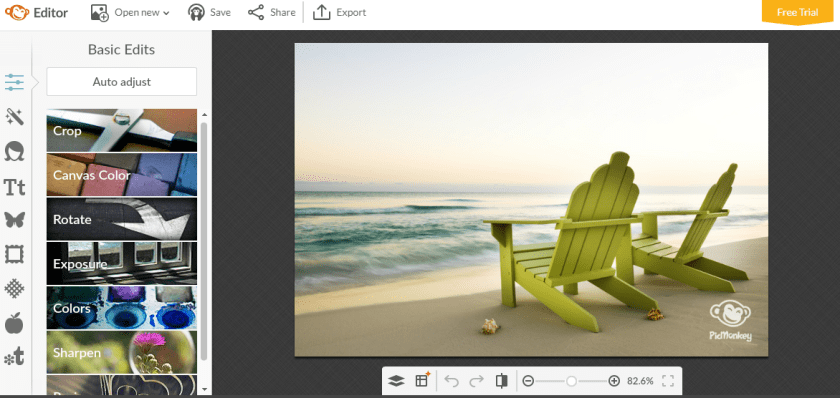
I love learning about new tools to make social media marketing more creative and effective, so I’ve decided to share some of my favourite tools with you at the start of each week. This week’s cool tool recommendation is Picmonkey  – another super easy design tool to enhance your social media and content marketing.

download.png

Picmonkey is a “freemium” tool with the option of paying for extras, but I’ve accomplished a lot with the free version.  Some of the features I like most include themed seasonal overlays and Photoshop style cosmetic enhancement features. It’s a great tool to touch up your images. I often use Picmonkey for quick resizing and enhancement of images before I post them online.

download.png

Key Features:

  • Enables you to create custom graphics and customize them.
  • Lets you touch up your images and photographs using a broad collection of features.
  • Provides a vast library of templates to help speed up your work.
  • Lets you export your projects as images to use as you wish.

Visit www.picmonkey.com and try it for yourself!


Posted in Cool Tool

Monday Morning Cool Tool: Twitonomy

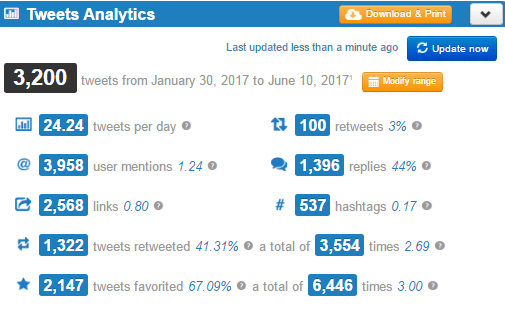
I love learning about new tools to make social media marketing more creative and effective, so I’ve decided to share some of my favourite tools with you at the start of each week. This week’s cool tool recommendation is Twitonomy a freemium tool which yields insights on your followers, influence and interests.

Here’s a snapshot of my analytics — and yes, I do tweet a lot!

1-3ovXIKf-htFMiMoZbUKoMQ.png

You can also get search analytics on any hashtag, user or keyword. With the pro version you can download tweets, mentions, RTs, favorites and reports to Excel & PDF documents — a useful reporting tool.


Posted in Cool Tool

Monday Morning Cool Tool: Photofeeler

I love learning about new tools to make social media marketing more creative and effective, so I’ve decided to share some of my favourite tools with you at the start of each week. This week’s cool tool recommendation is Photofeeler, billed as the “world’s smartest photo feedback” tool.  I’m intrigued by this free tool designed to help you make the right impression online.


Advanced algorithms by Carnegie Mellon University Ph.D. mathematicians make Photofeeler a valid scientific tool, not just a toy or game.  Photofeeler’s co-founder has a PhD in Optimization Algorithms and experience writing artificial intelligence for Fortune 500 companies. What Photofeeler does with algorithms and machine learning, is monitor vote quality, detect all manners of voter fraud in real time, and use sophisticated score distribution analysis — accounting for factors like individual voter styles — to optimize the accuracy of test results. The consequence is statistical accuracy far beyond what a small number of votes could normally provide.

How It Works

When you start a test on a photo, other logged-in Photofeeler users (within your selected voter demographic) can see that photo on the voting page in order to give their feedback. When the test is ended, the photo becomes entirely private again.


Photofeeler Ranks are a comparison between your photo’s score and all the rest that have been tested on the Photofeeler platform. Photofeeler Ranks are given as a percentile. So, for instance, a Rank of 58% means your photo did better than 58% of photos.

Let me know if you try this tool out – I’d love to hear how you get on with it. 

Sign up at http://www.photofeeler.com


Posted in Cool Tool

Monday Morning Cool Tool: Bit.ly

I love learning about new tools to make social media marketing more creative and effective, so I’ve decided to share some of my favourite free tools with you at the start of each week. This week’s cool tool recommendation is Bit.ly, a tool which creates shortened links to track the performance of your content once you promote it. If you create a custom short link for each content promotion campaign, you can track what works well and what doesn’t.

index

Also check out Snip.ly  a url shortner tool which allows you to enhance every link you share (whether your own content or someone else’s) with a call to action.

download (72).png

When people click on the Sniply-generated link, they can view the article you shared and see a CTA.

Both these tools are extremely useful to track how your content is performing and if  you aren’t already using them, I highly recommend you start today.

Posted in Cool Tool

Monday Morning Cool Tool: Instagrok

I love learning about new tools to make social media marketing more creative and effective, so I’ve decided to share some of my favourite tools with you at the start of each week.

This week’s cool tool recommendation is Instagrok which allows you to research any topic with an interactive concept map, that you can customize and share.


As you can see from the above example it’s an interesting site to input your particular topics and get related information, giving you the ability to learn about the topics in detail before you brainstorm and giving you a new interactive way to share information with your audience.