Posted in Cool Tool

Monday Morning Cool Tool: Zoomerang

This week’s cool tool recommendation is music video editor tool – Zoomerang

Zoomerang is a video creator designed for iPhone. No sign up or account required. Share it on TikTok, Instagram, Snapchat or other platforms right from the app, or save your video to your camera roll to share later.

Cool features include lots of step by step tutorials and templates, transtions and effects to enhance your video creation.

The app is free with the option to upgrade to Pro account after a free trial period. 
 

Posted in Cool Tool

Monday Morning Cool Tool: ApowerSoft Screen Recorder

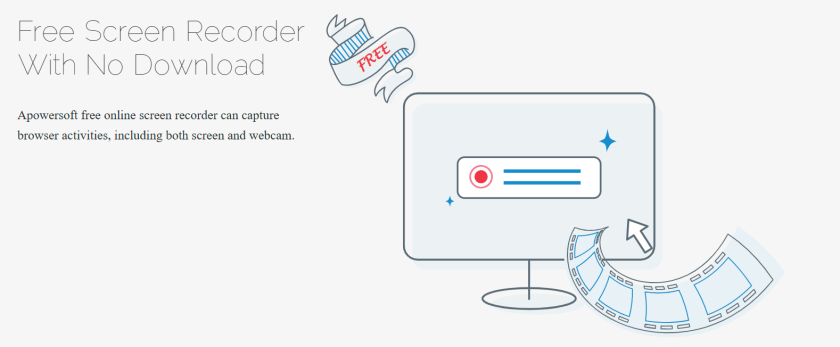
This week’s cool tool recommendation is a free screen recording tool –  ApowerSoft Screen Recorder.

This versatile tool enables you to capture browser windows, desktop activities, or webcam footage simultaneously, without any time restrictions or the need for downloads.

The resulting video can be stored on the local drive, uploaded to a cloud platform, and shared on social media or with others.

For similar tools, check out :

Posted in Cool Tool, Video

Monday Morning Cool Tool: Clip Creator

This week’s cool tool recommendation is Clip Creator – a free AI-powered video maker from HubSpot. 

Creating engaging and professional videos can often seem like a daunting task, especially for beginners with no prior experience in video editing. However, with the advent of AI-powered tools, this process has become significantly easier. Among these innovative tools, Clip Creator stands out as an intuitive AI video generator for beginners.

Clip Creator provides an extensive selection of video templates suitable for a variety of needs and formats. Whether you aim to craft a landscape video for YouTube or a portrait video for Instagram Stories, Clip Creator has the tools you need.

Posted in Cool Tool

Monday Morning Cool Tool: Screenity

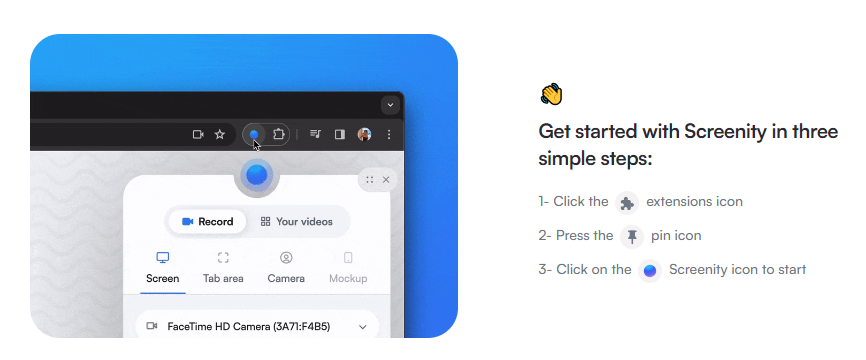
This week’s cool tool recommendation is Screenity –  a free screen recorder and annotation tool.

Here are some of its features:

  1. Recording: You can make unlimited recordings of your tab, desktop, any application, and camera.
  2. Annotation: Annotate your recordings by drawing anywhere on the screen, adding text, and creating arrows.
  3. Mouse Interaction: Highlight your clicks, focus on your mouse, or hide it from the recording.
  4. Audio Controls: Individual microphone and computer audio controls, push to talk, and more.
  5. Customization: Customize countdowns, show controls only on hover, and explore other customization options.
  6. Export Formats: Export your recordings as MP4, GIF, and WebM.
  7. Privacy-Friendly: No sign-in required
 

Posted in Cool Tool

Monday Morning Cool Tool: Cutt.ly

This week’s cool tool recommendation is Cutt.ly – a URL shortening tool.

What is a URL Shortener?

A URL (Uniform Resource Locator) is the address you type to access a website on the Internet. A URL shortener (also called a link shortener) makes it easy to manage long URLs. By using a URL shortener, you can reduce the length of your URL, which makes them more shareable and memorable. 

In addition, long URLs with letters, numbers, backslashes, and question marks can appear suspicious. As a result, people may be reluctant to click on the link.

There are several URL shorteners on the market, and today I am going to share one of those with you – Cutt.ly.

Let’s see it in action. 

As well as shortening your URL, Cutt.ly lets you create QR codes and customize your link to match your brand name or indicate what it is about (this is available on the paid plan). Furthermore, you can find out who clicks on them, where they are, and when they do so you can assess their effectiveness. 

Posted in Cool Tool

Monday Morning Cool Tool: VSCO

This week’s cool tool recommendation is photo and video editing tool, VSCO.

VSCO is a photo editing and sharing tool that offers both free and paid versions. In the free version, users can access basic editing tools like white balance, exposure, and contrast, along with a selection of preset filters. They can try out different presets themselves or use the “for this photo” feature to get recommended presets for specific pictures. The free version also lets users explore others’ photos and curated portfolios, finding inspiration in themes like “humankind,” “editorial,” and “summer.”

Posted in Cool Tool, Infographics, Visual Marketing

Monday Morning Cool Tool: Lumen 5

I love learning about new tools to make social media marketing more creative and effective, so I’ve decided to share some of my favourite tools with you at the start of each week. This week’s cool tool recommendation is  Lumen5 is a desktop tool designed for bloggers to convert their blog posts into video.

I geeked out over this tool last year when I discovered it. Simply input your blog post’s url and Lumen 5 will import the text and images from that post and auto-create your video. You can then edit it, swap out images, upload other images and add music before you hit publish.  The video above is one I created with  Lumen 5 from an original blog post

The free plan includes unlimited videos, access to 10 million video files, and 480p-quality video with the Lumen5 watermark. You can also upload your own logo. Upgrading to the Pro plan ($49/month) lets you remove the Lumen5 branding, upload your own watermark and outro, and more.


Posted in Cool Tool

Monday Morning Cool Tool: Loom

I love learning about new tools to make social media marketing more creative and effective, so I’ve decided to share some of my favourite tools with you at the start of each week.

This week’s cool tool recommendation is video app –  Loom.

Combining face and screen video recording with audio, Loom makes it easy to create quick, personal videos ready for sharing via email, social media, YouTube, or as an embedded video on your website.

Check out this video which walks you through the desktop version (you can also use it as a Chrome extension or download iOS app). 

The basic version is free and allows you to record up to 25 videos.

Posted in Cool Tool

Monday Morning Cool Tool: Beatleap

This week I’m recommending a new video tool – with a twist. 

Beatleap offers a new, powerful video editing experience, allowing you to create and edit videos by automatically matching songs with your video clips.

The app uses machine learning to automatically match songs to your video, then gives you a number of editing tools such as special effects, filters, and overlays to make your clips unique.

Features include:

  • 20 editing tools and effects as well as 50 filters to choose from
  • A library of over 1,000 professional songs to synchronize with the user’s video
  • Automatic trimming, cutting, and mixing of clips according to the beat of a selected track
  • Stunning video effects which are automatically placed at the perfect timing
  • Trendy filters and overlays to give users complete control over the look and feel of their videos

It’s perfect for TikTok, but you can use it for any social platform.

Note: This app is available only on the App Store for iPhone and iPad.

Posted in Cool Tool

Monday Morning Cool Tool: Videoshop

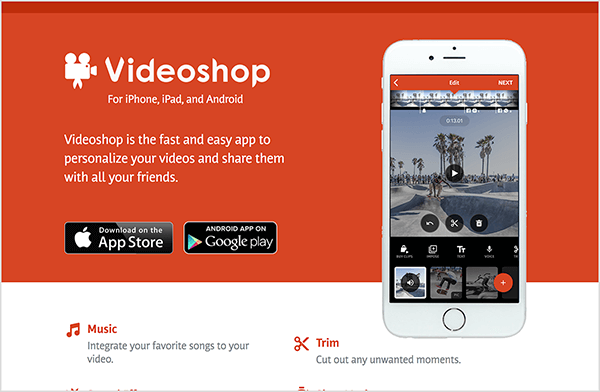
This week I’m recommending Videoshop a free stand-alone video recorder and editing app.

videoshop-edits-video-on-mobile-devices-600

Because the app enables you to record and edit video in one place, you don’t have to use several different apps to create your video. Features include the ability to integrate your favorite songs to your video, add subtitles and noises like applause sounds. You can also adjust video speed to slow or fast, merge multiple clips into one and choose transitions to animate between video clips.

Videoshop is available on iOS or Android.