Articles

Posted in #HCSM

When Are The Best Times To Post On Social Media In 2021?

Content has no value unless it’s amplified. One way to ensure amplification and optimize your social media reach is to post your content at the right so they reach your audience when they are online.

If you search for optimum posting times, you will find many guides online. You can follow these recommendations as a starting point, but I do recommend you do your own testing to see which days and times work best for your own particular audience within your industry.

Sprout Social has published its latest listing of the best times to post to each of the major social media platforms, which is based on the company’s 20,000+ customer base, who use the platform to schedule and post online. It may provide a good point for you to start testing optimum times for your own social media posts.

Best Times to Post on Facebook

While Sprout Social observed that “compared to past years, there were few completely ‘off’ times for Facebook when reviewing the past year of data. Weekends, late night and earlier morning all showed more consistent engagement and have become much more opportune times for brands to get eyes on their content.” (This seems at odds with its recommended worst time to post being Saturday – but again it proves my point that it is best to test for yourself).

  • Best times: Tuesday, Wednesday and Friday 9 a.m.–1 p.m.
  • Best days: Tuesday, Wednesday, Friday
  • Worst day: Saturday

Best Times to Post on Instagram

Similar to Instagram’s parent company Facebook, the top times to post on Instagram expanded in 2020 compared to previous years. Midday engagement during weekdays became even denser with top times throughout the 11 a.m.–2 p.m. range, and evenings and weekend times showed increased opportunities for engagement.

  • Best times: Tuesday 11 a.m.–2 p.m., Monday through Friday 11 a.m.
  • Best day: Tuesday
  • Worst day: Sunday

Best Times to Post on Twitter

  • Best times: Wednesday 9 a.m.– 3 p.m., Tuesday through Thursday 9–11 a.m.
  • Best day: Wednesday
  • Worst day: Saturday

Best Times to Post on LinkedIn
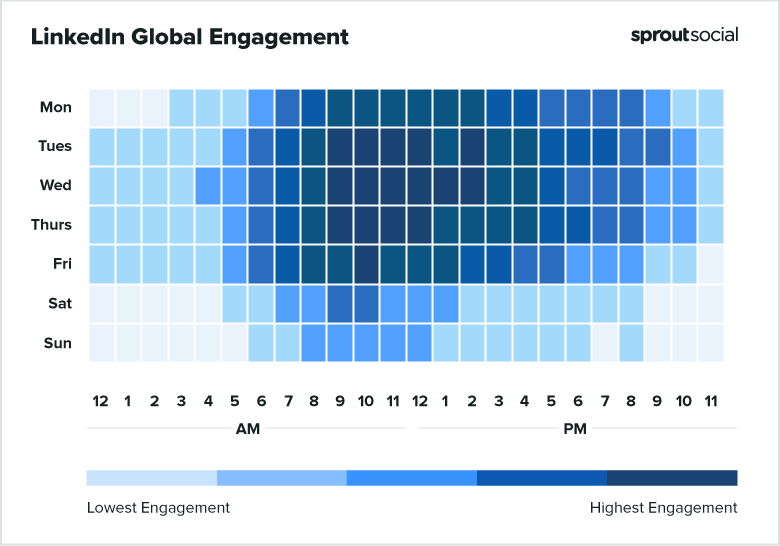
  • Best times: Tuesday through Thursday 9 a.m.–noon
  • Best days: Tuesday and Wednesday
  • Worst day: Sunday

To sum up

Consistent social sharing can help you stay top of mind with your audience. It’s a common mistake to only post content once and then not again. To get the most engagement, visibility and reach, reshare your content on multiple networks at various times and in different ways. Vary your updates when you do — for example, highlight a different statistic or quote, or ask your audience a question.

These data points are general but they provide a good starting point to start testing your audience engagement. Try them for a month, take note of your findings and see if your engagement shifts at the end of the month.
Posted in Thursday Tip

#ThursdayTip: How To Create Graphics With Canva

Welcome to this week’s social media quick tip.  This week I want to show you how to create great graphics with Canva. 

Canva is one of my every-day go-to tools when I am creating visuals. It’s so easy and quick to use it with a multitude of layout options, fonts, images and illustrations to choose from. And best of all it’s free! If you want more advanced features, you do also have the option to upgrade for a small fee.

Whether you want a Twitter post or Facebook profile picture, you can create them quickly using Canva’s drag and drop editor. Select from a number of pre-set designs, or create something from scratch. You can also add elements such as custom icons, fonts, charts, and illustrations.

Here’s how to use it

i. Sign up at canva.com. The sign-up process is quick and easy.

ii. Next click on “Create a design” and choose the platform for which you wish to create a visual, for example, blog, Facebook, Twitter, etc. Your image will be automatically resized to fit the size dimensions of each platform.

canva

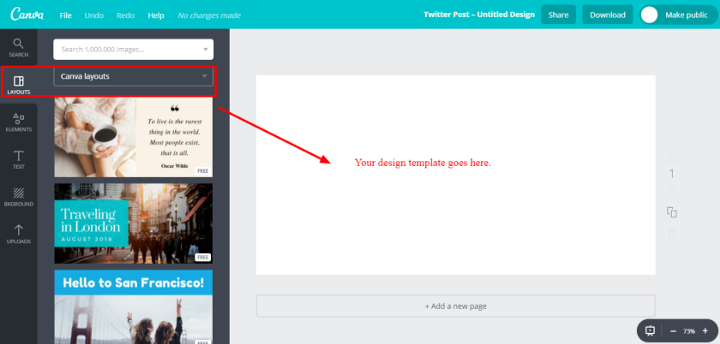
iii. Click on “Layouts” to select a layout for your graphic. There are tons of layouts to choose from. When you find one you like, click on it and it will automatically populate the blank screen for you to work with. You can change out the design at any time by clicking into another layout template.

canvaq

iv. To add an image, select “Elements” which allows you to choose from a variety of shapes, illustrations, and photos from the royalty-free library. Note that not all images are free, some are priced at $1 each. You can also upload your own images to use.

canvaa

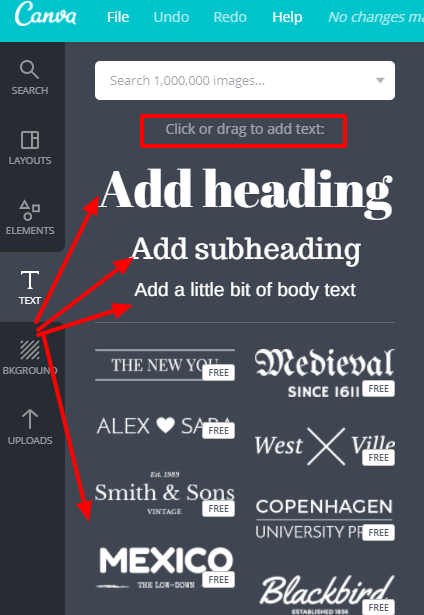
v. To add text, click on “Text” and simply drag and drop your heading, subheading and body text. You can also choose from some pre-designed fonts, most of which are free.

can

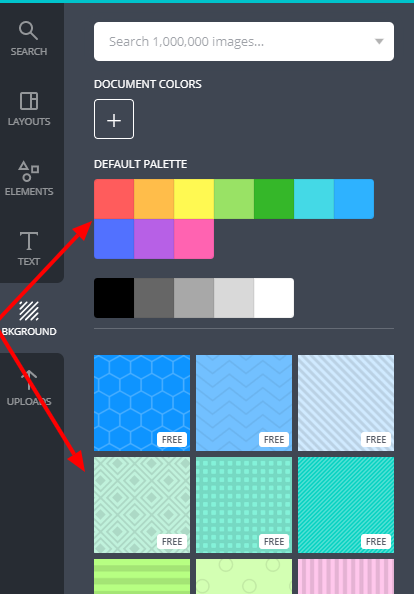
vi. Selecting “Background” allows you to choose different background colours and textures.

backgr

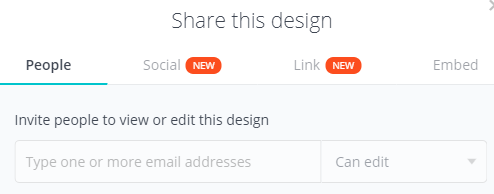
vii. When you’re happy with your design, you have the option to embed it or share it from Canva straight to a social media platform, share a link for others to see the design or edit it if you wish. You can also download it to your computer in jpeg, png, or pdf format.

0_NsY6M3f9nRKMgZ5P

That’s it. You’re all set to create customised graphics for your marketing.

Here’s to your social media success!


Posted in Cool Tool

Monday Morning Cool Tool: Pixaloop

I love learning about new tools to make social media marketing more creative and effective, so I’ve decided to share some of my favourite tools with you at the start of each week. This week I’m recommending photo animation app – Pixaloop.

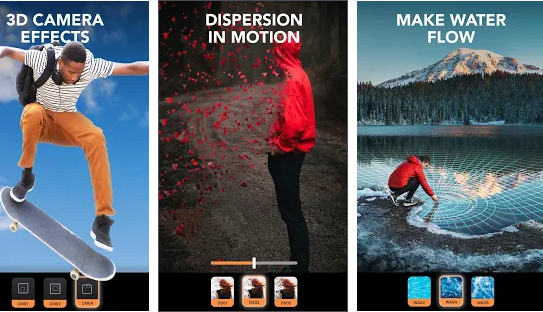
This animation creator lets you create and edit moving photos with easy and powerful editing tools, bringing life to images, creating animation picture effects and cinemagraphs.   Animate photos and add picture effects to watch your image come to life as incredible videos that boomerang back and forth or flow like a GIF.

download - 2020-07-13T143716.478


The app is free to download from Gooogle Play and the Apple Store. 

Posted in Cool Tool

Monday Morning Cool Tool: PocketVideo

I love learning about new tools to make social media marketing more creative and effective, so I  share some of my favourite tools with you at the start of each week. This week I’m recommending iOS video editing app PocketVideo.

download - 2020-01-13T121057.371

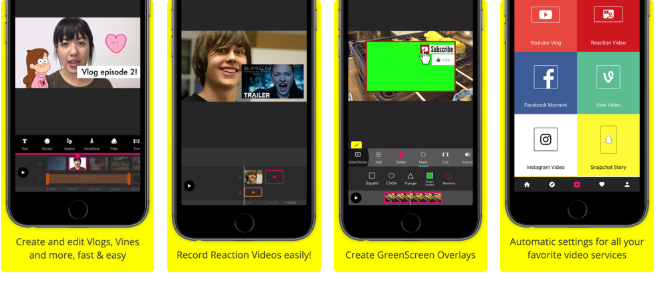
With PocketVideo you can create, shoot and edit your videos easily. The app supports any kind of video format: Horizontal (Landscape), Vertical (Portrait) or Square videos.

Features include:

  • Video Overlaying, Green Screen overlays and Picture in Picture.
  • Animated Doodle Tool to draw on top or your videos, synchronized with the playback.
  • Easy to use, one-tap “Reaction Cam” Feature for easy creation of reaction videos.
  • Commercial-free music library
  • Animated text titles
  • Stickers, GIFs and PNGs

If you want to create compelling and professional looking Youtube Vlogs, Snapchat Memories, Instagram Stories, Facebook Videos and more, then check out this app.

Posted in #HCSM, Twitter

What To Post on Twitter: A Cheat Sheet For Healthcare Tweeters

Have you recently joined Twitter and are wondering what you should tweet beyond “This is my first Tweet”? Or have you been on Twitter for a while now but are running out of things to post? 

If your tweeting needs a fresh injection of ideas, check out the following list of tweets you can adapt and post to your followers.

  1. Link to a new post on your blog – ok this is one of the most obvious tweets to send, but if you haven’t blogged in a while, why not see this as an opportunity to revisit your website and identify your most popular posts. Pull out a quote, or a statistic or turn your headline into a question before tweeting a fresh link to your chosen post.
  2. Share an inspiring or motivational quote – tag it with #MondayMotivation for more traction.
  3. Post a behind-the-scenes photo of your office.  People love to see behind the scenes stuff – so bring your camera to your next staff meeting, lunch or event. Sharing pictures of your employees (with their permission, of course) makes your practice so much more relatable. Furthermore, it helps to build a sense of camaraderie
  4. Participate in Follow Friday – #FollowFriday or #FF on Twitter is a tradition in which people send tweets recommending other Twitter users they think are interesting to follow. The tweets are sent on Fridays and contain the hashtag #ff or #FollowFriday.
  5. Use Hashtags strategically. Use hashtags to identify real-time opportunities for engagement in news and events, identify current trends and key influencers. Find trending hashtags with tools like TwitonomyHashtagify.me and RiteTag.
  6. Thank a new follower – thank someone by name when they follow you. People love to be acknowledged by name.
  7. Share a health care tip. Share a quick seasonal wellness or preventative care tip with your followers.
  8. Tweet a “Did you know?” or “True or False” style tweet. These kinds of tweets are popular for encouraging interactions among your followers.
  9. Conduct a poll. Ask your followers a question using Twitter’s Poll Feature. Use it to get a snapshot of readers’ attitudes on health topics like vaccination, screening, complementary therapy, mental health – the list is endless. Share the results in a follow-up tweet.
  10. Live tweet. Live tweeting is a great way to share valuable information at conferences and events.
  11. Post a “fill-in-the-blank” prompt. This is a fun way to engage your audience. Here’s an example:  Fill in the blank: ________________ always makes me smile.
  12. Tweet about cause awareness events. It could be Breast Cancer Awareness Month, Alzheimer’s Disease Awareness Month or Healthy Weight Week. Join in using the relevant hashtag on Twitter.
  13. Post holiday-themed tweets (Christmas, Hanukah, 4th July, etc.) You could also join in fun holidays like National Donut Day. Check out this calendar to keep you right up to date with ideas.
  14. Share news and updates from your practice. Are you rolling out a new program, product or service? Let your followers know about it in a tweet. You can highlight when someone on your team achieves a new certification level or when you acquire a new piece of equipment that affords better care. Patients will appreciate you keeping them informed.
  15. Share your thoughts on an industry trend. Healthcare is constantly changing and evolving. Can you predict or comment on the latest healthcare trend? Set up Google Alerts to keep updated on emerging trends in your industry to provide the latest information for your readers.
  16. Create a Twitter Moment. Twitter gives you the ability to create “Moments,” which  allows you to curate a series, or gallery, of tweets revolving around a particular theme. Follow this step-by-step guide to create your first Twitter Moment.
  17. Engage with your patients around relevant conversations. Join a health-related Twitter chat – you’ll find a comprehensive list at Symplur.com.

So there you have it, some suggestions for things to post on Twitter when you have run out of ideas. Of course the most important thing about Twitter, indeed any social network, is that it’s just that.. social. Don’t just engage in one-way tweeting. Twitter is a two-way communication tool.  Make sure you are also taking the time to be sociable – like and respond to others tweets, retweet and comment often.


Want more tips like these? 

Sign up for my weekly newsletter to be in the know. 

Posted in Cool Tool

Monday Morning Cool Tool: PhotoScape X

I love learning about new tools to make social media marketing more creative and effective, so I’ve decided to share some of my favourite tools with you at the start of each week.

This week’s cool tool recommendation is PhotoScape X – an all in one photo editing software tool. 

It has a ton of features  – too numerous to list here. 

Its editing platform is easy to use and you can see your edits appear in real-time directly on your image.You can even create animated GIFs.

Check it out at http://x.photoscape.org


Posted in #HCSM, Thursday Tip

#ThursdayTip: How To Create Content With Emotional Resonance

Welcome to this week’s social media tip. Today I want you to think about how you can create emotional resonance through your content marketing.

The word “emotion” is a combination of the prefix e-, meaning “away,” and the Latin word movere, meaning “to move.” In this sense, emotions break us away from our standstills, moving us in new directions and prompting us to take action.

Numerous studies have found emotional arousal plays a key role in driving social sharing. In 2012, researchers Jonah Berger and Katherine Milkman published research based on an analysis of 7,000 articles from the New York Times to see which types of articles were most shared by email.

1_z9Gy_P_eVc44TVx_0QKXVA

The results indicate that virality is partially driven by physiological arousal.

“Content that evokes high-arousal positive (awe) or negative (anger or anxiety) emotions is more viral. Content that evokes low-arousal, or deactivating, emotions (e.g., sadness) is less viral.” — What Makes Online Content Viral?

The Harvard Business Review released research in 2016 which showed that creating a powerful emotional experience increases the chances of going viral. The research, based on an analysis by Frac.tl of the top 100 images of the year from imgur.com, as voted on Reddit.com, found:

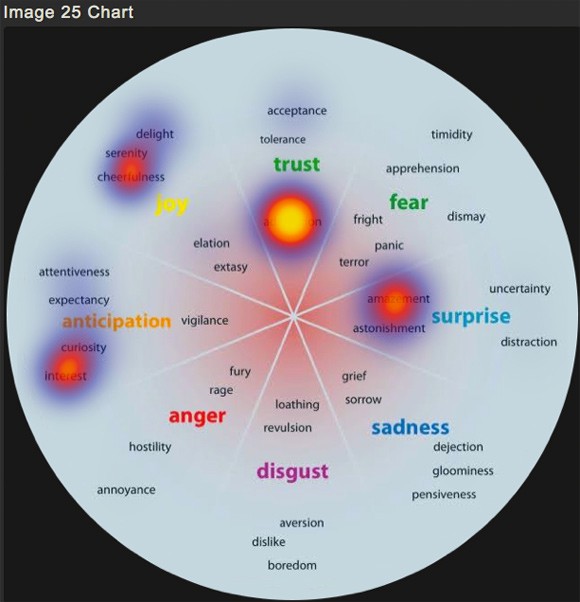
  • A significant correlation between content views and positive feelings (specifically joy, interest, anticipation, and trust).
  • Negative emotions were less commonly found in highly viral content than positive emotions, but viral success was still possible when negative emotion also evoked anticipation and surprise.
  • The emotion of admiration was very commonly found in highly shared content, an unexpected result.

1_kBhD0w1ocN5rogIlHR76CA
Heatmap of the aggregate emotional data, representing the totals compiled (HBR)

One way to create emotional resonance is to tell a heartwarming story.

Effective stories inspire people by creating human connection and emotional resonance. In 2015, an article about a husband and wife celebrating 82 years of marriage, topped USA Today’s most shared content. Not only was the story uplifting and inspirational, but it also shared insights on reaching over 100 years of age (if you’re interested — the couple describes a healthy diet and frequent naps as the secret to growing old).

1_LbgwswX5Q6kztsl7kP6Oww.jpeg

Marie Yoland Eveillard speaks with her father Duranord Veillard, who will celebrate his 108th birthday on Saturday, and mother Jeanne Veillard, who turns 105 in May. The couple got married in Haiti in 1932. Tania Savayan/The Journal News

Once you understand how to strike the right emotional chords with your message, you can greatly increase your chance of getting your content widely shared.

Here’s to your social media success!


Posted in Cool Tool

Monday Morning Cool Tool: Mojo

I love learning about new tools to make social media marketing more creative and effective, so I’ve decided to share some of my favourite tools with you at the start of each week. This week I’m recommending Mojo video app – a free dedicated story-maker for Instagram.

Mojo gives you access to 300+ templates. You can combine text effects and GIFs, add music and share your story on any social platform.

You don’t need an account. Just download the mojo story maker and start creating insta stories or video collage stories for other platforms with ease.

Upgrade to the Pro version ($39.99/year) to use your own logo and fonts.

Posted in Thursday Tip

#ThursdayTip: How To Create An Animated Image For Social Media

Welcome to this week’s social media quick tip.  This week I want to show you how to add variety to your social media posts with an animated image.  

We are going to use Canva to create our animated image. If you aren’t already using this tool, I highly recommend you add it to your social media toolkit. 

Click here for a step by step guide to using Canva.

It’s super quick and easy to do as you can see from the video instructions below.

Note: This is a Pro Canva feature.

You can also access a range of social media templates with built-in animations. They’re fully customizable so you can add even more animation or change any element to make them your own
Posted in #HCSM

Public Disclosure on Twitter of Identifiable Patient Information by Health Professionals

Social media tools provide a unique set of opportunities in healthcare, but with these new opportunities come a number of potential challenges.

As health care professionals (HCPs) navigate the increasingly complex world of social media, concerns have arisen regarding questions of ethics and professionalism and how the use of social media fits within the social contract between the medical profession and society.

In order to maintain the trust of the public and that of individual patients, HCPs increasingly need to understand the limits and risks of disclosure of certain types of information online. 

A study published in 2020 which sought to quantify potentially identifiable content shared on Twitter by physicians and other health care providers found nurses, physicians, and other health professionals may sometimes share more information than patients or families might expect.

The retrospective study describes a physician-initiated event sharing health-related stories and information on Twitter using the hashtag #ShareAStoryInOneTweet. The tweeted stories became widely shared, attracting media attention and disseminating the information widely. Almost none (either explicitly or appear to) confirm consent to share information publicly. HCPs commenting using the hashtag were “more likely to express support for the event and encourage others to participate than they were to raise concerns about patient privacy breaches.”

The study showed a relatively high incidence of sharing stories including details that might make them potentially identifiable to patients themselves or to families and friends in a setting that involved a large number of health care professionals. This finding highlights a lack of awareness about the privacy issues intrinsically connected to interactions on social media. 

The study authors conclude with recommendations for more research to confirm the findings of this study and determine how to ensure physicians, nurses, and other professionals adapt their behavior to maintain medical professionalism in the digital age. This will required greater specification of professional ethical standards in this context along with evidence-based training in ethical digital communications skills for the undergraduate, graduate, and continuing medical education.

Ahmed W, Jagsi R, Gutheil TG, Katz MS
Public Disclosure on Social Media of Identifiable Patient Information by Health Professionals: Content Analysis of Twitter Data
J Med Internet Res 2020;22(9):e19746

Related Reading: Social Media: Professional Boon or Bane? It’s Complicated