Articles

Posted in Cool Tool

Monday Morning Cool Tool: PNG Transparency Creator

I love learning about new tools to make social media marketing more creative and effective, so I’ve decided to share some of my favourite tools with you at the start of each week.

This week’s cool tool recommendation is PNG Transparency Creator

ead866c1-e78a-4e5b-a7ae-15834b068a5a

Billed as the world’s simplest online Portable Network Graphics (PNG) transparency maker. Just import your PNG image in the editor and you will instantly get a transparent PNG. Free, quick, and instantaneous it’s a super easy tool to add to your image creation toolbox.

Posted in #HCSM

Write Better Headlines With These 9 Winning Formulas

“The purpose of a title is to get potential readers to read the first line of your content.” – David Ogilvy

David Ogilvy, the original Mad Man of advertising, once famously said, “On the average, five times as many people read the headline as read the body copy. When you have written your headline, you have spent eighty cents out of your dollar.”

Ogilvy’s remark reminds us never to underestimate the power of the humble headline.

Even in this digital age, headlines count.

Think about how many headlines you read every day while searching online or browsing social media. What makes you actually click on an article or post to read it?

Quite often it’s the headline.

According to Copyblogger, on average, 8 out of 10 people will read headline copy, but only 2 out of 10 will read the rest.

Your headline is the first (perhaps only) impression you make on a prospective reader.

And yet many content creators treat their titles as an afterthought. The good news is that writing captivating headlines is a skill you can learn and hone to perfection.

Over the years, I have developed some tried and tested formulas for writing headlines which compel readers to click and read more.

In this post, you will learn nine secrets to writing great headlines that work every time.

My Post Copy 6 (5)

There’s no absolute rule on how long your title should be, but try not to make it any longer than it needs to be.

As a rough guide aim for 6-10 words or 50-60 characters.  It’s worth remembering that when the length of your headline exceeds 62 characters, search engines ignore the remainder of the headline (which may decrease your click-through rate).

CoSchedule has some good information on optimal headline length here: What Really Is the Best Headline Length?

My Post Copy 6 (6)

People love number-style articles. Our brains are attracted to numbers because they automatically organize information into a logical order.

Several research studies have shown that headlines with numbers tend to generate 73% more social shares and engagement (interestingly, research shows that headlines that contain odd numbers have a higher click-through rate than headlines with even numbers).

When adding numbers to your title, use the numeral, not the word. Web users scan headlines and using a numeral makes your title more scannable.

My Post Copy 6 (7)

Question headlines have two benefits. Firstly, they leverage a reader’s curiosity.   Secondly, a question headline boosts your SEO efforts.

Increasingly, people are using voice search on their smartphones, tablets or voice assistants (like the Amazon Echo or Google Home devices) to search for information on the Internet. It’s estimated that by 2020, 50% percent of all searches will likely be voice searches. In essence, voice searches are largely about answering questions, not about focusing on individual keywords.

Question headlines help future-proof your content for SEO. To quote NewsCred, “If you’re a marketer, ‘What’s the Alexa strategy?’ will be a question you’ll be expected to answer.”

My Post Copy 6 (8)

It’s important to include keywords in your titles if you want to rank higher for particular search terms. Adding them at the start of your headline can have a greater SEO-impact than if you include them at the end of a title.

When researching keywords I like to turn to Google Related Searches. You’ve probably noticed that Google displays related search results at the bottom of the first page when you type in your Google search query. This is a helpful resource as it returns ideas that are relevant to your topic based on user interest and contextual words.

My Post Copy 6 (9)

Personalizing your title by adding a “You” or “Yours” makes your headline more effective since it speaks to your readers’ concerns and sounds more conversational. It’s important to use the words and language your audience actually uses. If you’re not sure what that language is, use social media as a listening tool to find out.

My Post Copy 6 (10)

All great headlines are benefit-driven. David Ogilvy said that the headlines which work best are those that promise the reader a benefit. Keep the benefit upfront and specific in your title. Will your readers learn something new? Are you offering actionable steps for them to take?

Including words like tips, ways, strategies, etc. in your headline promises your readers that they will know more and do more after they have read your post. Be sure you deliver on that promise. Ask yourself: “As a reader, what would I expect to read if I clicked through to this post?”

My Post Copy 6 (11)

Research by CoSchedule found that content with emotional value gets shared significantly more than content that contains little emotional value. Emotion is a key driver for making people click and share your content, with positive emotions driving more clicks and shares than negative or neutral content.

If you want to test this theory for yourself, plug your headline into the Advanced Marketing Institute’s Emotional Marketing Value (EMV) Headline Analyzer. This tool scores the EMV of your headline with a breakdown of why it scored that value. A perfect score would be 100%, but don’t despair if yours doesn’t match up. According to the Institute, “most professional copywriters’ headlines will have 30%-40% EMV Words in their headlines, while the most gifted copywriters will have 50%-75% EMV words in headlines.”

My Post Copy 6 (12)

All words are not created equal. Although I’m no fan of hyped-up phrases, the judicious use of power words in your headline will grab a reader’s attention fast.

Try reading the title of this post, omitting the adjective “Winning”, and it’s not quite so compelling. The key here is to make sure the choice of word is justified. Don’t say your solution is “easy” if it clearly involves a lot of work. Download a list of 90 headline power words here.

My Post Copy 6 (13)

By nature we are curious beings, so leverage that curiosity in your titles. Learn from the masters of the headline craft, Buzzfeed and Upworthy. A word of caution here—when using this formula, never resort to click-baiting. Always craft a headline that links to authentic and relevant content.

Over to you

Test out the suggestions in this post next time you sit down to write a piece of content. There is no excuse to settle for a “good enough” headline. Keep a swipe file handy for inspiration, adding to it every time you see a great headline. The more you practice, the more skilled you will become as a headline writer.

Do let me know what your favorite headline formula is. Which headlines work best for your audience? Share your best tips with readers in the comments below.


This post first published  Mayo Clinic Social Media Network

Posted in Thursday Tip

#ThursdayTip: How To Snoop On Your Competitors on Facebook

Welcome to this week’s social media quick tip.  This week I want to show you how you can find out which kinds of ads your industry peers and competitors are running on their Facebook pages. 

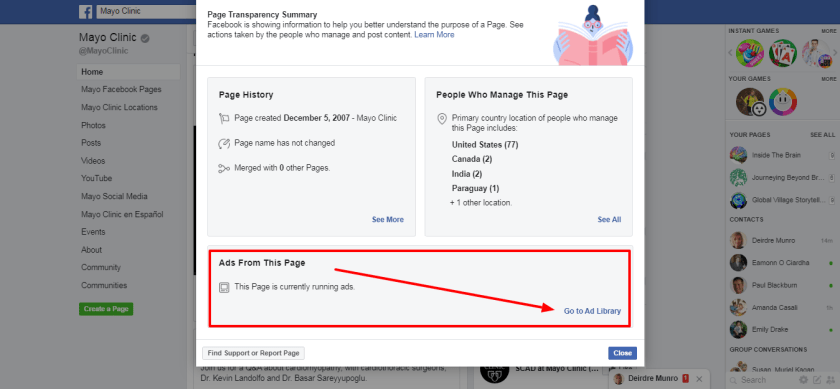
In an effort to increase accountability and transparency of Pages, Facebook is showing more information about Pages and the people who manage them in the Page Transparency section on Pages, which formerly appeared on the Info and Ads tab.

This gives you the ability to see which kinds of ads a Page is running, which can provide a useful comparator for your own social media marketing.

Here’s how to works

In this example, I’m going to check out the Mayo Clinic’s Facebook Page.

5b9518ef-181e-4971-8115-1504312296cd

To access this information as a page visitor, visit any Page’s Timeline, scroll down to the Page Transparency below the About section and tap See More. 


13a95aab-bb96-4d4a-8350-9232c42eee8a

Now you can scroll through the ads currently running and in which countries (note you can’t see how the ads are doing in terms of engagement).

c33d4e3b-d3c3-44a6-8112-736179784d3a

Why this feature is useful to your social media marketing

This kind of competitive analysis can be helpful to you to improve your own Facebook advertising. I’m not saying you should copy the ad creative, but you can certainly use it as inspiration for your own campaigns. Using this feature you can gain valuable insights into the kinds of images, headlines and call-to-actions that successful industry players are employing.

Here’s to your social media success!


Posted in Cool Tool

Monday Morning Cool Tool: PicPlayPost

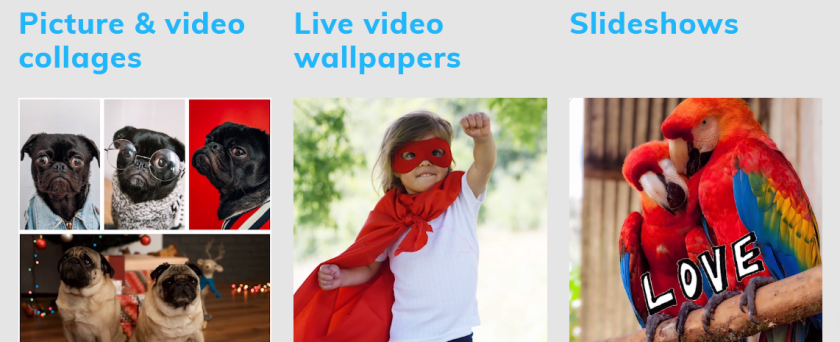
This week I’m recommending PicPlayPost – a free app for combining multiple videos and photos into a collage.

index

Features

  • Full editing capabilities
  • Create up to 30 minute videos
  • Trim, speed up, slow down videos
  • Add multiple songs
  • Supports all formats (photos, videos, Gifs, live photos) and ratios (9:16 for IG stories, TikTok and Snap, 16:9 for YouTube)

It’s available for both iOS and Android.

Posted in #HCSM

How Does The Facebook News Feed Predict What You See?

At the start of 2018, Facebook announced major changes to the Facebook news feed which means that firstly, people will see fewer posts from Pages and more from personal connections.

What this essentially means, is that Facebook will prioritize content that engages users in their Newsfeed.

But how exactly does the Facebook algorithm determine what to show you? This short video from Facebook explains in simple terms how it decides what you will see when you log in to the platform.

Want to learn more?

Check out my Medium article 7 Ways To Increase Organic Reach and Create Engaging Content on Facebook.

Posted in Cool Tool

Monday Morning Cool Tool: Otter Voice Notes

otter-hero-screens-2

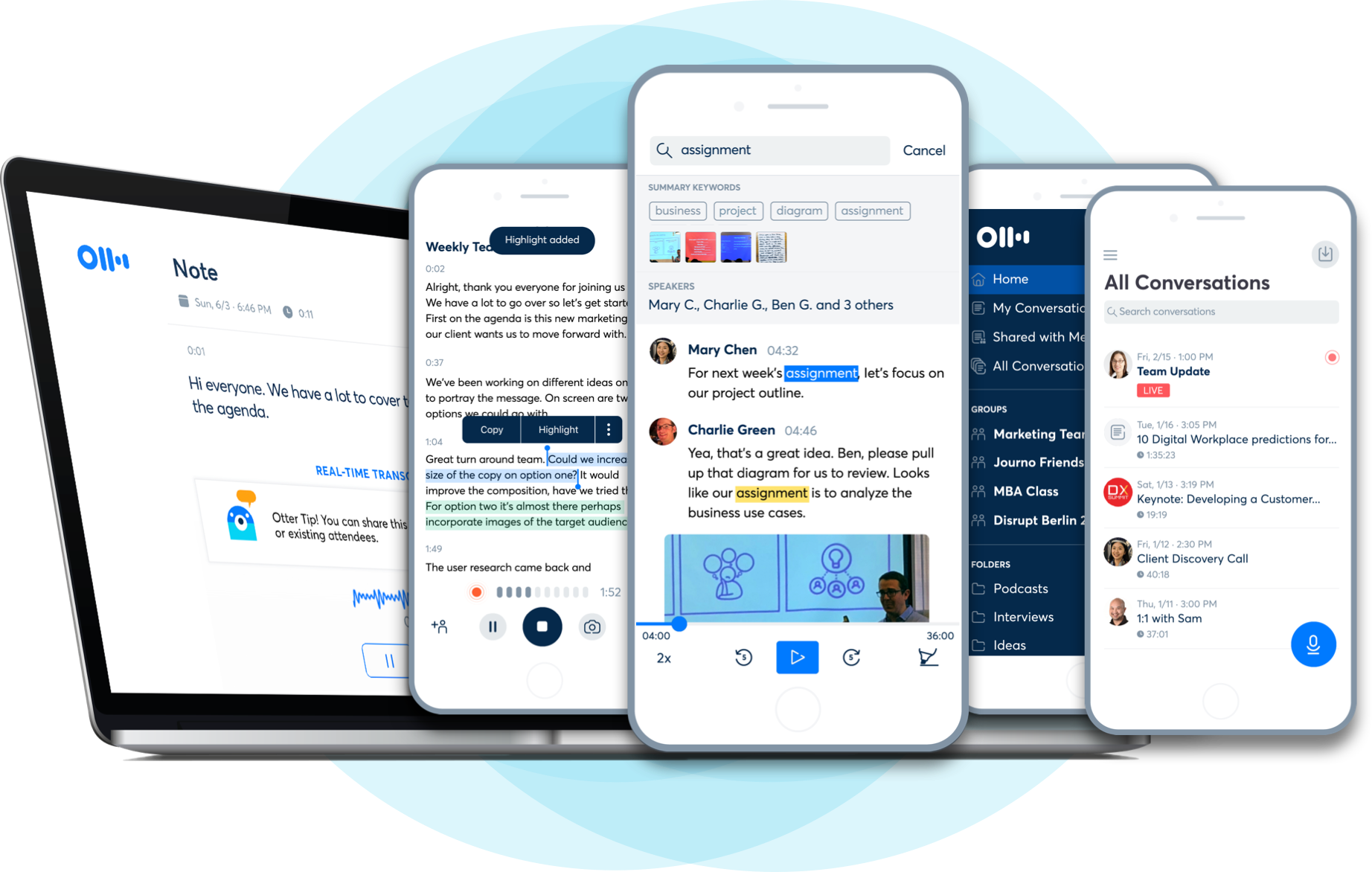
I love learning about new tools to make social media marketing more creative and effective, so I’ve decided to share some of my favourite tools with you at the start of each week. This week I’m recommending Otter Voice Notes – a super useful tool that helps you take voice notes and generate transcripts simultaneously, or transcribe pre-recorded audio and video files.

Here’s how it works

  • Record conversations using Otter on your phone or web browser. Import or sync recordings from other services.  You can integrate the tool with Zoom.
  • Get real-time streaming transcripts and, within minutes, rich, searchable notes with text, audio, images, speaker ID, and key phrases.
  • Share or export voice notes to inform others and get on the same page. Create groups to invite collaborators and keep organized.

Pricing Otter Voice Notes lets you transcribe up to 600 minutes per month for free with a pricing structure based on Basic, Premium, and Teams subscriptions.

Posted in #HCSM

How To Handle a Healthcare Social Media Crisis

Knowing how to maintain an online reputation is an essential component of healthcare marketing. In this blog post, I will show you how to put an effective crisis response strategy in place for your healthcare brand.

Having an online presence has so many advantages when it comes to healthcare marketing, but it also comes with some risks. With the click of a mouse, patients can share their experiences online – good and bad – and their comments travel at lightening-speed through their social network. A social media crisis can escalate rapidly and you must be ready to step in and remedy the situation without delay. The only way to do this is to have a crisis plan already in place.

Crisis management involves dealing with threats before, during, and after they have occurred. Let’s look at these three stages in more detail.

crisis plan
Image: HCSMMonitor

Stage 1 Preparation

Proactively prepare by developing a crisis response plan. The following elements are involved.

#1 Crisis Definition

First, define what constitutes a crisis. Three elements are common to a crisis (a) a threat to the organization, (b) the element of surprise, and (c) a short decision time.

A crisis can fall into several categories including:

(a) Technological (eg; your website has been hacked);

(b) Confrontation (disgruntled employee, client, or patient attacks you online);

(c) Rumours (eg; spreading false information about you, your product or service online);

(d) Malevolence (eg; In 1982, a murderer added cyanide to some Tylenol capsules on store shelves, killing seven people).

#2 Monitor Online Chatter

An effective social media strategy requires active listening to the online chatter about your healthcare organization. Should a crisis occur, listening to the conversation will help you shape a more insightful and effective response. Responding in real time to issues strengthens public perception that your focus is firmly on patient satisfaction. In addition, use monitoring to find the healthcare conversations you can add value to. Investing in community building online now will pay dividends in the form of support should a crisis hit you.

There are many free and paid monitoring tools available to you. These tools vary in scope and range across a number of sites, real-time or delayed searching, the sophistication of analytics, the flexibility of data presentation, integration with other applications, and of course, price. When it comes to reputation management, choose a tool that does more than just track mentions of your name. You need to be able to evaluate the sentiment (the ratio of mentions that are positive to those that are negative) attached to the mentions. Mention is a freemium monitoring tool that includes sentiment. Tweets that include words like “not working,” “fail” or “poor experience” should be resolved immediately.

#3 Create a Written Plan

Your written plan should include the following:

  • Clear guidelines on how to respond to each of the different situations outlined above in #1.
  • Links to your terms of service.
  • Who should respond – establish a clear chain of command and list contact information.
  • Make sure every member of your team knows this plan is in place, how to access it, and how to put the plan into action.

Stage 2:  Action

Now’s the time to put your carefully crafted crisis plan into place. The following are key considerations:

  • Determine the exact nature of the crisis. How and where did it originate? How is it affecting your patients or clients?
  • Go to the source. Find where the complaint originated and with whom. Determine their sphere of influence. If a blogger has published something that is untrue or misrepresentative of you, ask them to remove, amend, or modify the piece if this is appropriate.
  • Be respectful, polite and engaged. Never get into a public argument or talk down to anyone.
  • Be as transparent as possible as quickly as possible. Acknowledge that you are aware of the situation and that you are dealing with it straight away.
  • Respond swiftly and appropriately. Every moment counts on social media. The longer you wait, the more the conversation will heat up. Twitter, in particular, is a place where people expect a quick response no matter what time of day.
  • Don’t lie or try to hide the truth; admit when the fault is yours.
  • Use the same channel on which you were criticized to respond.
  • Don’t censor or remove the critical comments that appear on your social media platforms. Tempting as this may appear, it will only fan the flames of the social media fire.
  • Channel communication to your own website. Develop an area on your website or blog that houses the information about the crisis and what your organization is doing about it.
  • Communicate your story. A story gets out of control when you haven’t told your side and people begin to speculate. While you can’t control the story, you can provide the facts, information, and access to key people that allow journalists and bloggers to help you frame it in the right way.

Stage 3: Review

When the crisis has passed, go over what happened. Ask yourself the following questions:

  • How well did you handle the situation?
  • Did it escalate to a bigger problem than it was?
  • What could you have done differently?
  • Prepare to deliver on your word. Make changes based on feedback if those changes are warranted and if you have promised to put them in place.

If handled well a crisis may even turn out to be an opportunity to show your commitment to your patients and consumers. Remember the Tylenol example above? Johnson & Johnson recalled and destroyed 31 million capsules at a cost of $100 million. The CEO appeared in television ads and at news conferences informing consumers of the company’s actions. Tamper-resistant packaging was quickly introduced, and Tylenol sales bounced back to near pre-crisis levels.

While you can’t control everything that happens on social media, you can control your response. The best way to handle a crisis is to have your response plan in place. If you haven’t already made one, then do it today.

Related Reading

Posted in Cool Tool

Monday Morning Cool Tool: DuetCam

I love learning about new tools to make social media marketing more creative and effective, so I’ve decided to share some of my favorite tools with you at the start of each week.

This week I’m recommending DuetCam– an iOS app that lets you record both the front-facing and back-facing cameras at the same time stitched together on your iPhone.

Features include:

* videos are saved directly to your library, similar as to the stock camera app

* apply digital zoom using any of the available lenses

* change the position of the PIP image while recording

* switch front and back cameras while recording

* browse your videos within the app

* play videos and share them without leaving the app

* share your videos as an IG story directly from the app

DuetCam costs $2.99

* Note this app requires the iPhone XR, iPhone XS, iPhone XS Max, iPhone 11, iPhone 11 Max, iPhone 11 Max Pro or the iPad Pro with A12 chip or better to be able to use 2 cameras simultaneously.

Posted in Cool Tool

Monday Morning Cool Tool: PhotoRoom

I love learning about new tools to make social media marketing more creative and effective, so I’ve decided to share some of my favorite tools with you at the start of each week.

This week I’m recommending image-editing app PhotoRoom.

PhotoRoom lets you capture, edit, and mix images by editing objects. In one tap, you can remove the background in your photos and select from different backgrounds like a solid color or design, or import your own image. You can also blur the background, erase it, or desaturate it for a color splash of the subject.

Available for free at Apple Store and Google Play Store.

Posted in Cool Tool

Monday Morning Cool Tool: RecordScreen.io

I love learning about new tools to make social media marketing more creative and effective, so I’ve decided to share some of my favorite tools with you at the start of each week.

This week I’m recommending the web-based screen-recording tool RecordScreen.io.

This cool tool couldn’t be simpler to use. There’s no software or app to download, nor account needed to access this tool. It’s all web-based and works right from the browser.

You have the choice of recording your screen only or screen with camera.

RecordScreen.io is free to use and compatible with all web browsers.