Posted in #HCSM

How To Better Manage Social Media With Hootsuite

Juggling several social media accounts across multiple platforms can be quite the challenge. I rely on a variety of digital marketing tools to streamline my social media activity, and top of the list is Hootsuite.

What Is Hootsuite?

Hootsuite is a very useful application for managing all your social media channels in one place.   The basic Hootsuite plan is free. It enables you to view and monitor multiple streams in a single dashboard and allows you to keep tabs on key phrases, terms, keywords, brand mentions, etc.

What are the Benefits of Using Hootsuite?

Among the many benefits of using Hootsuite (either as part of a team or as an individual) is the ability to save time by scheduling your social updates in advance. Simply pick a day and time of your own choosing. This enables you to create a social media schedule that includes optimal times when your audience is online – even when you aren’t.

How To Use Hootsuite.

In today’s post, I am going to take you step-by-step through the process of setting up a Hootsuite account, and how to get the most from it.

Step 1: Create a Hootsuite account

index

Go to https://hootsuite.com and click Sign Up in the top-right corner.

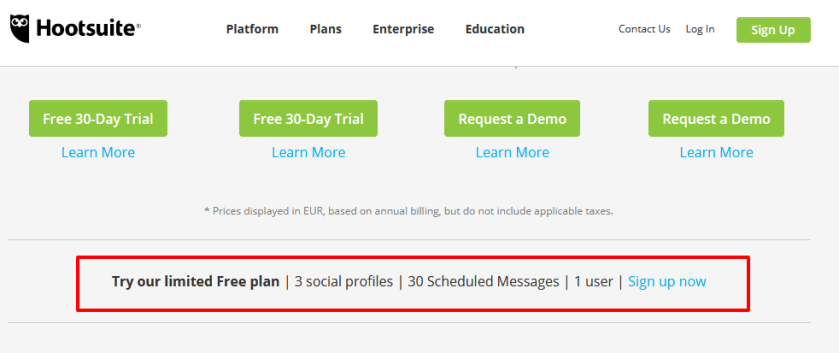
Click to select the plan type that fits your needs.  If you’re looking for a free plan, scroll down the page until you come to this:
index

A free plan is perfect for an individual just getting started.

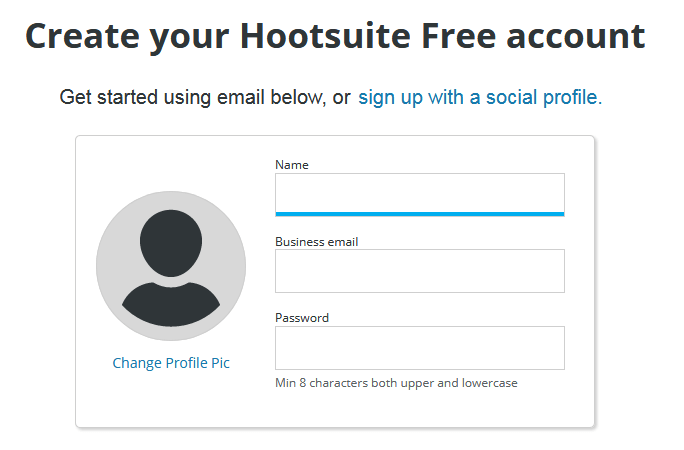
Enter your information.
index

Once you set up an account and log in, Hootsuite will guide you through the basics of connecting networks and organizing streams.

Step 2: Add social networks

Hootsuite is optimized for managing Twitter accounts, but you can also post to your personal Facebook and LinkedIn accounts, as well as to pages and groups of which you’re a member or administrator. You can manage up to three social networks with Hootsuite Free.

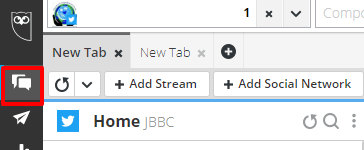
In the Hootsuite dashboard, select Streams  from the launch menu.

download (65)

Click Add Social Network

download (66)

Select a social network from the list.

download (67)

Click Connect – you will then be asked to authorize your accounts to connect to the Hootsuite dashboard.

Step 3: Set up tabs and streams

Now that you’ve added social networks to your dashboard, set up streams for each one to monitor conversations and engage with your followers.

download (68)

Select Streams  from the launch menu.

download (65)

Click Add Tab  in the top-left corner, give it a name, and then press ENTER.

Inside each tab, click Add Stream.

download (71)

Click the streams you want to add for that profile.

Below is a screenshot of how my own Hootsuite dashboard looks with just three streams added.

download (72)

You can add more streams and you can drag and drop the order of each stream to suit you.

Add a Search Stream

Search streams are especially valuable for finding social activity around specific users, locations, hashtags or keywords.

To add a search stream

Select Streams  from the launch menu.

Select a social network from the list on the left, and then select a profile from the drop-down list. I’ve chosen to search for keywords on Twitter in this example.

Enter a search term. You can enter up to 3 words or phrases you would like to track.
download (74)

Twitter searches can include more complex queries. Click Show examples to see how to format search queries. (It’s not essential to include this step unless you want to do a  more robust search.)

download (76)

Click Add Stream when you are done.

This will create a real-time stream of people who are tweeting using that keyword.

download (75)

For more detailed information on adding Search Streams, visit Hootsuite’s Guide. 

Step 4: Publish messages

When you want to publish an update, follow these steps. Click New Post New_post.png in the top-right corner of the dashboard.

This brings up a full-screen Composer window which lets you preview your posts on each social network before you send or schedule them.

Click Select social networks, and then select the social profiles to post your message to. You can search by social network or profile name to surface the right profile.

download (77).png

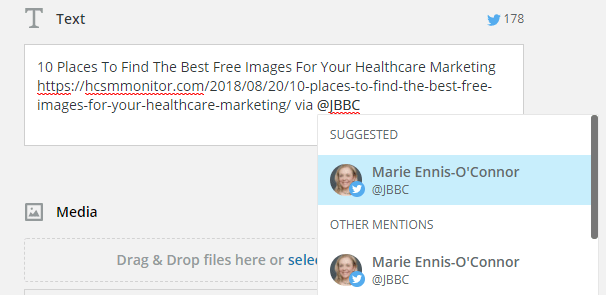
In the Text field, enter the content of your message. The character count for each social network selected will display above the Text field.  To mention a Twitter user, enter @ followed by their username, and then select the correct user from the list that populates.
download (81)

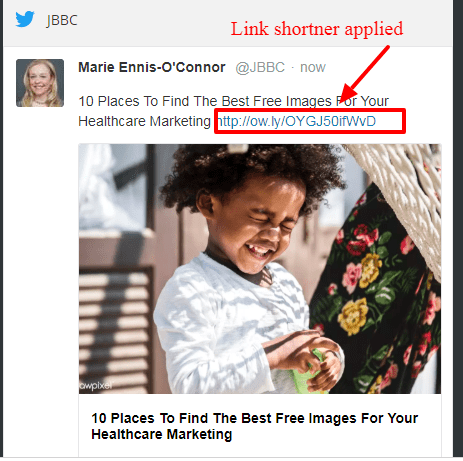
Enter or paste links right into the Text field. You will also be given the option to shorten your link.  

A link preview will appear on the right of the Composer screen.
download (90)


To upload an image, drag and drop files into the Media box or click select a file to upload to attach your own images or a video to your post. Hootsuite will also suggest images it has found in your post to you.

download (84)

Or, you can click Open Media Library to search free stock images or GIFs to include in your message. Click an image to attach it to your post (you can choose up to 4 images).

download (85)Click Close Media Library in the top-right corner when you’ve chosen an image.

On any attached image, you have the ability to edit, crop, add overlays and text, or make other adjustments to it by clicking on Edit with Creative Cloud.

download (86)

Click Save when you are done editing.

download (87)

Find more details about posting images click here.

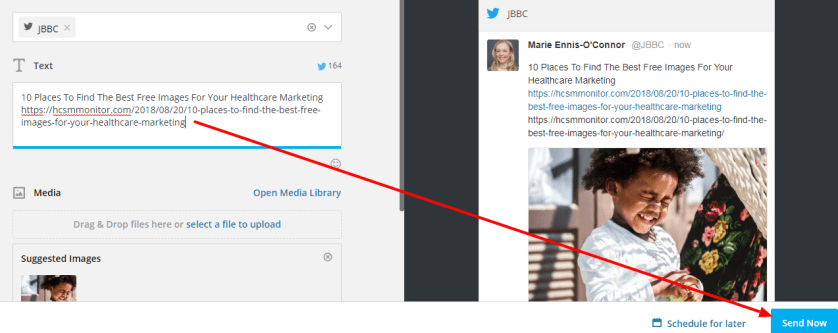
To post the message right away, click Send Now in the bottom-right corner.
download (88).png

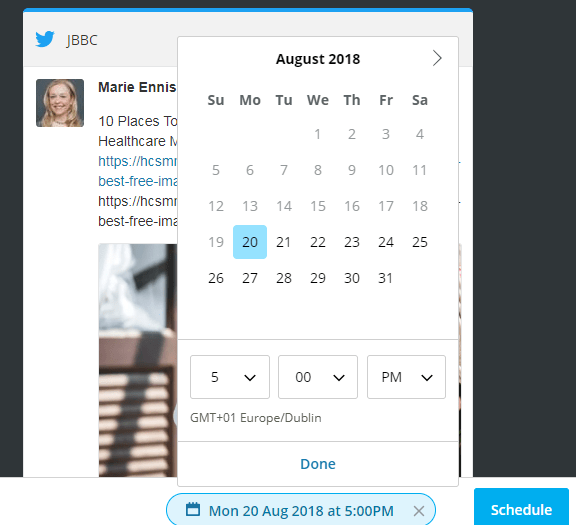
To schedule the message, click Schedule for later, select a date and time to publish the post, click Done, and then click Schedule.
download (89)

You can view your scheduled posts in an easy-to-read calendar format.

download (91)

Other Features To Try

Hootsuite on Mobile

You can manage your social media on the go with the Hootsuite mobile apps for Android and iPhone, iPad & iPod Touch. These can be downloaded from your device’s app store.

Advanced Hootsuite

The Hootsuite App Directory is a library of free and paid third-party apps developed to extend the functionality of the Hootsuite dashboard.

  1. Select App Directory App_Directory.png from the launch menu.
  2. Click Install App beside the app.
  3. Click Finish.

See Install Apps for more details.


Posted in #HCSM

A Grammar Tip for #GrammarDay

Today, March 4, is designated as #GrammarDay and the perfect opportunity to remind you of the importance of good grammar and spelling as a way to present a positive and professional online impression. 

Even those of us who pride ourselves on our composition and spelling can slip up. It’s easy to type fast and miss that you wrote “their” instead of “there.”

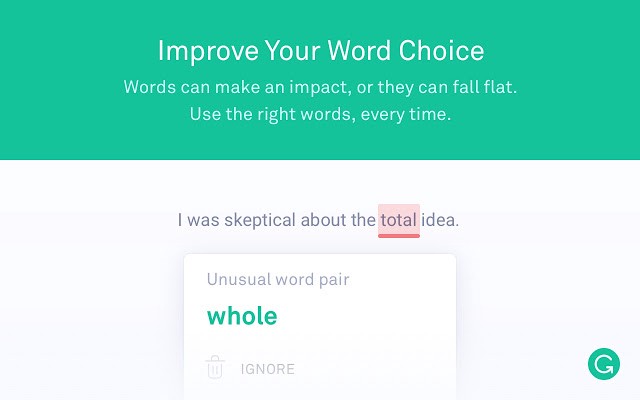
To help avoid these kinds of mistakes, I use Grammarly a free writing app available as a Google Chrome Extension. Grammarly will catch those easy to make mistakes and question your use of the word. It also suggests better ways to get your message across.

1_Ph3S3n5pIJXsucyTRxWUkQ

Adding Grammarly to Chrome means that your spelling and grammar will be vetted on Gmail, Facebook, Twitter, Linkedin, Tumblr, and nearly everywhere else you write on the web.

I use it all the time and find it super useful.

Click here to download the app.

You might also like to read 8 Proofreading Tips and Techniques 

Posted in #HCSM

How to Care for the Millennial Patient

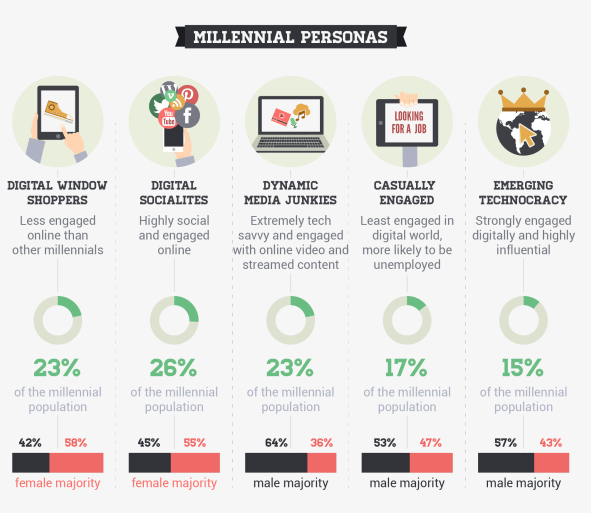
Millennials (aged 20-35) are often called the “C” generation, “C” standing for “connected.” They are the first generation to be born in today’s digital environment where they’ve had 24/7 access to streams of information and constant connection via technology.   Along with this shift in demographics comes changes in experiences, attitudes, and expectations, all of which have implications for health care providers.

download (1).png

2012 study from ZocDoc and Harris Interactive found that 51 percent of millennials surveyed visit a physician less than once per year. They believe seeing a doctor is too much of a “pain.”  According to a Salesforce’s State of the Connected Patient report, millennials are generally frustrated with filling out repetitive forms, and the time wasted waiting in a doctor’s waiting room.  Seeing a doctor is an unwieldy, expensive and unwelcome errand.

Understand that millennials are heavily invested in technology, and then get your own technology in order.

In contrast to authority-driven customer communication modes, nearly half of all millennials want their healthcare experience to feel more accessible and engaging.  While millennials have different and sometimes non-existent relationships with their doctors, they believe digital health has the potential to change that.

Digital healthcare that gives a greater sense of control is of great value to millennials.  Commonly cited examples of digital health include health tracking devices like Fitbit, self-diagnosing websites like WebMD, and apps that make it easier to make appointments, order medication, store individual health data, and recommend preventative health measures.

Millennials Turn Online For Health Information

Millennials are driven by information. It is how they make buying decisions and decisions about their own health.  Unlike previous generations, millennials don’t rely on a strong relationship with their doctor.  They are mistrustful of authority (in a study conducted by Greyhealth Group and Kantar Health, only 58 percent of millennials said they trust their doctors), preferring to google their symptoms and self-diagnose prior to scheduling a doctor’s appointment

Compared to any other generation, they default to — and prefer — information corroborated by multiple channels and influencers. In fact, before even meeting with a healthcare professional, 54% of Millennials have consulted as many as seven information sources for purposes of self-diagnosis from blogs to medical message boards, ratings and reviews and more.

Become The Trusted Online Source

Making a practice accessible online is essential to attract millennial patients.

Take a look at how you deliver information to your patients, as well as how you offer appointment scheduling.  Millennials want health information to be readily available and easily understandable.

Review your website. Weed out any industry jargon and hard-to-digest information.  Make forms available on your site so patients can fill them out ahead of time online.

Embrace social media and content marketing. Create and share high-quality content that provides engaging, important information about self-care.

While millennials are glued to their smartphones, few actually use the device to make a call –  so use more email and automated text messaging (a 2014 Gallup poll shows that 68% of people ages 18-29 utilize text messaging)  to communicate. with them.

Embracing The Future of Healthcare

Millennials are the first of a technologically-savvy generation of health seekers – closely followed by Generation Z (born between 1995 and 2010).  Embracing the future of healthcare means embracing communication channels that reflect millennials’ wants and expectations.  Regardless of specialty, ensuring your practice offers the accommodations younger patients seek out should become a higher priority in 2019.

Further Reading

Posted in #HCSM, Thursday Tip

#ThursdayTip: How to Create Twitter Moments

Welcome to this week’s quick social media tip. This week I want to show you how to create Twitter Moments.

Twitter Moments are curated stories about what’s happening around the world—powered by Tweets. It’s easy to create your own story with Twitter Moments.

There are three ways to begin creating your own Moment via twitter.com.

You can access Moments through the Moments tab, your profile page, or through a Tweet detail.

Note: Moment creation is only available on twitter.com. It is no longer possible to create a Moment from your Twitter for iOS or Android app. 

To get started from the Moments tab follow these instructions:

From the Moments tab, click the Create new Moment button.

index

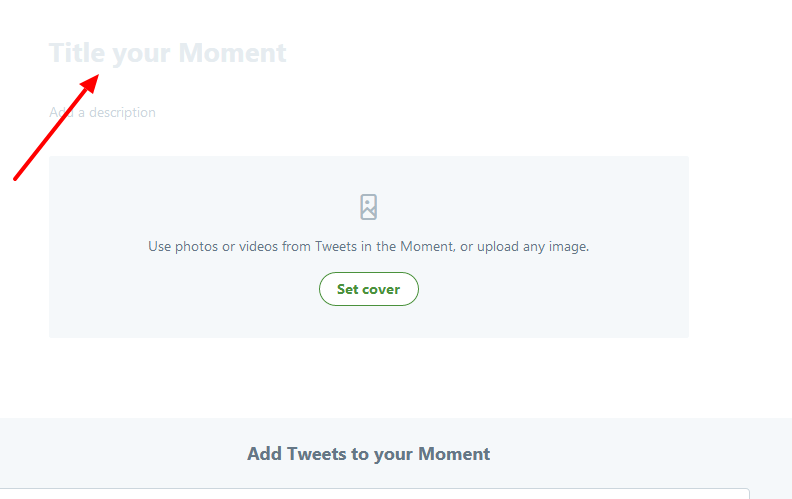
Click the Title your Moment field to give your Moment a name.

index

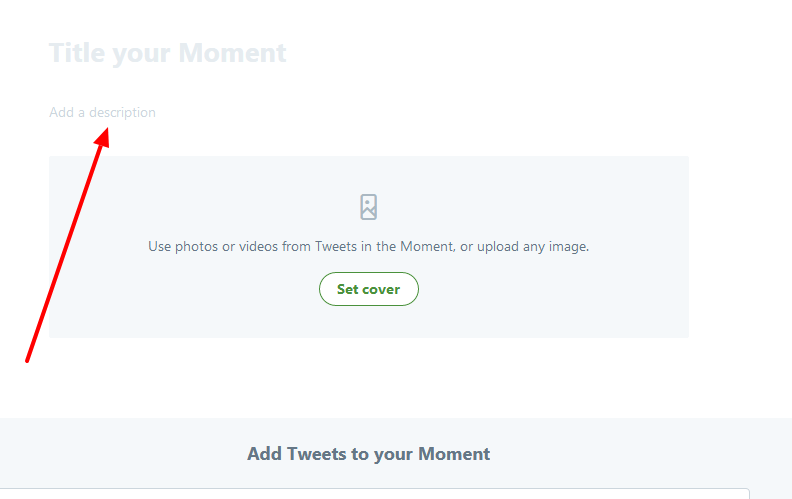
Click the Add a description field to type in a description for your Moment.

index

Choose Tweets to add to your Moment

index

From the Add Tweets to your Moment section at the bottom of the page, quickly access content to select Tweets from Tweets I’ve liked, Tweets by account, Tweet link, and Tweet search prompts. To add a Tweet to your Moment, click on the checkmark.

index


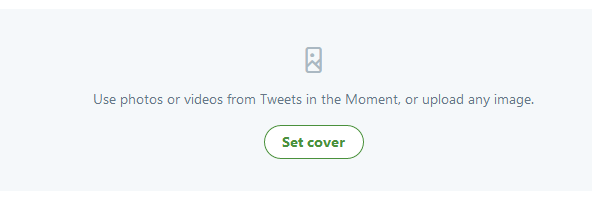
Click Set cover to choose a cover image from one of your selected Tweets, or to upload an image from your computer.

index

index

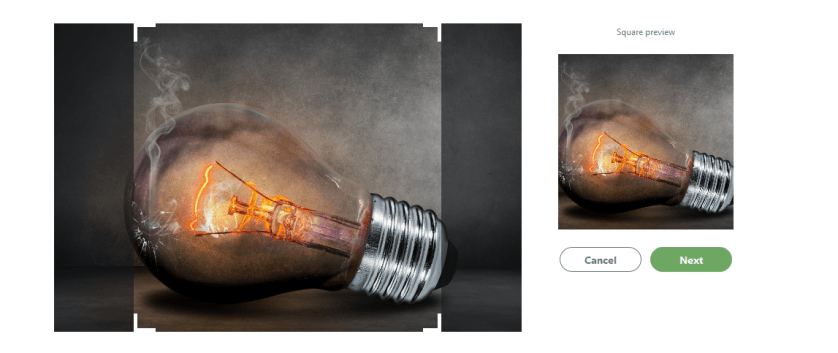
Drag your selected image to set a Mobile preview, click the Next button, then click the Save button.

index

As you can see this image is cut off in mobile preview, so I might want to change it for something that will show up better on a mobile device.  To change your selected image, hover over the cover image and click on Change cover media.

Once you have Tweets in your collection, click on the up or down arrow buttons to the right of a Tweet to move it up or down.

index

Click on the delete (x) button to remove a Tweet from your Moment.

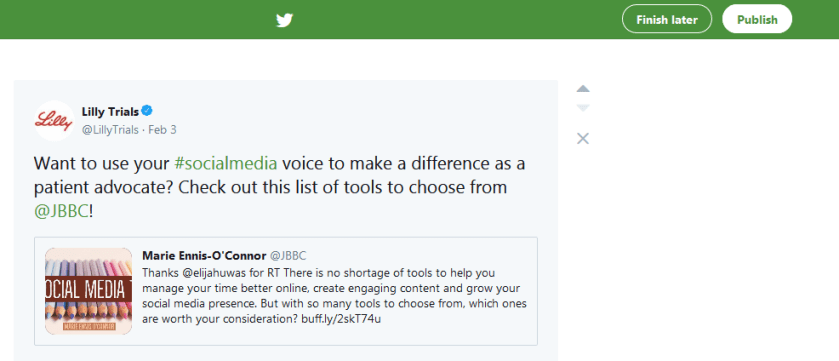
Click the Finish later button at the top of the page to save a draft.When you are ready to make your Moment live, click on the Publish button at the top of the page.

index

You have the option to share Moments privately, making the Moment available to only those whom you share a link with.
Posted in #HCSM

50 Power Words To Super Charge Your Content Marketing


Did you know that on average, 8 out of 10 people will read headline copy, but only 2 out of 10 will read the rest? Your headline is the first impression you make on a prospective reader. An eye-catching headline is a key factor in getting readers to click through to your article.

An attention-getting headline will capture the reader’s attention right away and compel them to want to find out more. Clear, concise, and original content is important, but words that appeal to their emotions is the magic ingredient to giving your visitors a reason to want to diver deeper.
Business2Community

Trigger words can entice readers to your content, but use these words with caution because they can also trigger skepticism and distrust. Make sure your content carries through on the promise in the headline and always avoid click-baiting.  Clickbait headlines typically aim to exploit the “curiosity gap”, providing just enough information to make the reader curious, but not enough to satisfy their curiosity without clicking through to the linked content. Always craft a headline that links to authentic and relevant content.

Download a list of 90 headline power words here.

For a deep dive into which words and phrases drive the most shares and engagement, Buzzsumo analyzed 100 million article headlines and reported their findings here.

Further Related Reading


Posted in #HCSM

Middle East Healthcare Social Media Summit

eb7f0a86-38ac-44a4-8bc4-970ec377f86b

I’ve just returned from Dubai where I was part of the teaching faculty for the Mayo Clinic’s first Middle East Healthcare Social Media Summit.  It was an amazing experience and wonderful to see how many people there are already embracing social media in healthcare.

Before the two-day conference commenced, I taught on the social media residency clinic sharing advanced Facebook and Instagram tips. You’ll find links to the slide decks below.

As always, any questions, feel free to contact me via the comments below.

Posted in #HCSM

Social Media And Ethical Concerns For Healthcare Professionals

Social media offers innovative ways to enhance health communication, collegiality, and clinical care, but the tenets of professionalism should always guide online interactions.

Professional standards do not change in social media; rather social media proposes new circumstances to which the established ethical and professional principles can still apply. Upholding public trust in the healthcare profession is fundamental to successfully incorporating social media in clinical care.

Posted in #HCSM

Tweeting The Meeting: 6 Tips on Live-Reporting From Conferences and Events

dubai

I’m excited to be on the Mayo Clinic teaching faculty for the first Middle East Healthcare Social Media Summit in Dubai next week. I’ll be teaching on the Social Media Residency Clinic which takes place a day before the conference and also delivering a talk on the role of hashtags in healthcare on day two of the conference.

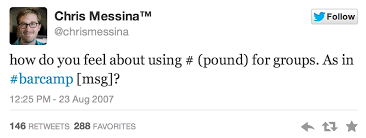
Did you know that the very first Twitter hashtag was prompted by a conference?

download - 2019-12-02T113341.372

So it should come as no surprise that hashtags are super useful for disseminating knowledge presented at conferences. As part of my talk, I will highlight some best practice tips for tweeting the meeting – which I will also share for you here.

1. Tag Your Tweets with the Event Hashtag

Pretty self-explanatory but be sure to use the designated event hashtag which should be displayed by the organizers. If you are organizing the event, keep an eye on unofficial hashtags. Sometimes, people tweet using hashtags that make sense to them instead of using the official hashtag. This shouldn’t be an issue if you have chosen a simple, intuitive hashtag and promoted it in advance, but it is still a good idea to an eye out for rogue hashtags and direct the users to the official one.

Let your Twitter followers know the meaning of the hashtag and why you are tweeting from the conference so that people have some context to what you’re tweeting about. It is good practice to let your followers know in advance that you are live-tweeting so they can mute the hashtag if they aren’t interested in those tweets.

2. Focus on Value

The true aim of live-tweeting is to provide value to others, so avoid tweeting sound-bites that won’t make sense to online listeners. Be selective about the quotes or insights you choose to tweet and only post high-quality photos and videos that your followers will find interesting. No one wants to see a blurry photo of a speaker or a slide.

Strive for originality and context and make it relatable to your Twitter followers.  Tweet links to websites, studies, or other information which will enhance understanding of the topic. It’s fine to highlight your own expertise, but don’t spam. Retweet attendees and speakers who represent your mission and core values. Search for questions being asked using the event hashtag which you can answer.

3. Don’t “Binge Tweet”

Be selective, share key points only and avoid flooding your timeline with tweets. Don’t mindlessly re-tweet what everyone else is already tweeting, unless you can add a unique perspective. When live-Tweeting, one Tweet every five minutes is a good rule of thumb.

4. Give Correct Attribution

Be sure to attribute quotes to the speaker who made them, by using quotation marks. Whenever you cite a speaker, add their Twitter handle and affiliation if known (this is where those pre-prepared Twitter lists come in useful). Separate your own comments/viewpoints from the speaker’s own words.

5. Encourage Engagement

Don’t tweet in a vacuum; engage with fellow live tweeters and contribute to a larger conversation. Involve online listeners by asking questions; e.g. “Speaker X says doctors need to be more empathetic – do you agree/what do you think about this?”

6. Be Social

Finally, don’t restrict yourself to tweeting behind a screen; take the opportunity to network and meet new people face-to-face too. Live-tweeting is a great way to meet like-minded people, so use it to organize “tweetups” at coffee and lunch breaks during the event to further the connection.

39e92ea1-399e-4de8-9379-693ebfa6689c

Bonus Tip

After the event has finished, you can still add value by using a tool like Twitter Moments to archive tweets.  You could also summarise the event in a follow-up blog, embedding selected tweets to illustrate your points.

You might also like to read

 Why You Should Live-Tweet Your Next Conference 

How To Add A Search Stream To Twitter

Posted in #HCSM

Why You Should Live-Tweet Your Next Conference

What is Live-Tweeting?

Live-tweeters use the hashtag relevant to the event they are tweeting about (which can usually be located on the conference’s website or Twitter profile). Twitter followers who cannot be at the event in person can follow along using the hashtag and this in turn expands the reach of the conference.

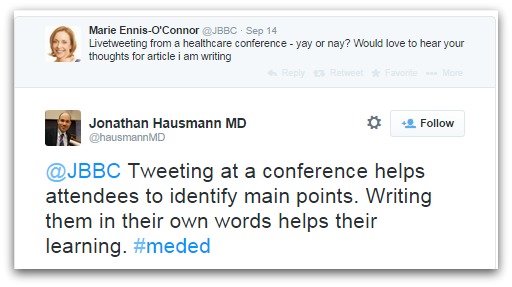
Live-tweeting enhances personal learning

Live-tweeting can also enhance your own personal learning as it requires you to listen more carefully and focus more sharply on the key details of a talk in order to better summarize what the speakers are saying. Furthermore, live-tweeting is a means of amplifying the conference experience, generating global reach and stimulating collaborative potential.

hausmann.jpg

This learning is further consolidated with an archive of tweets on which you can reflect further after the event.  Sarah Chapman, whose work at the UK Cochrane Centre focuses on disseminating Cochrane evidence through social media, observes how this in-the-moment tweeting captures the immediacy and energy of the event: “Live tweeting can convey the atmosphere generated by a controversial or entertaining presentation in a way that will be lost by the time you get to look at the slides uploaded on the internet”.

Many times the original tweet will be supplemented by pertinent comments on Twitter from other conference attendees and also from those listening in online.  For example, someone may respond to a tweet by questioning the strength of the clinical outcomes of a study, or a practicing physician might respond with their experiences treating patients.  As a review published in J. Clin. Med. states: “The diversity of expertise and backgrounds that can communicate on Twitter is unique, and this exchange of information can be extremely beneficial.”

Live-tweeting enhances virtual learning

Reporting live from a medical conference or event allows you to provide valuable insights to those who are unable to attend in person.  Due to rising costs, concern about our carbon footprint and increasing time commitments, virtual attendance is becoming more commonplace at healthcare events – hence the rise in live-tweeting.

steph.jpg

There are enumerate conferences and symposia to choose from these days, and that choice often becomes impossible due to the sheer diversity. Following attendees using meeting, hashtags permits in real-time remote access to the meeting, viewed through their interest / opinion spectrum. Wong, Wilkinson & Malbrain, Using social media in medicine to your advantage, with care!

Mark Brown, a UK-based mental health advocate, points out that “There have been many recent publications and events imploring us to have a national conversation about mental health.  Why then do so many fascinating discussions happen at conferences, uncaptured and inaccessible to people wanting to join them?”

susannah.jpg

Brown believes “this democratisation of access is vital if we want to broaden our mental health discussions and raise the level of sophistication in our arguments and debates. For this to happen we need some brave souls who know how to cover an event via live tweeting and who are prepared to do so out of a sense of public service.”

You might also like to read Make Your Mark at Medical Meetings with Social Media


This is the first in a two-part guide to live-tweeting.  In part 2,  I will share my tips for best practice in live-tweeting. Whether you are a conference organizer, a speaker, or an attendee these tips will help you make the most of the opportunity to report live from your next event.