Posted in Cool Tool, Infographics, Visual Marketing

Monday Morning Cool Tool: Stockvault

Capture

I love learning about new tools to make social media marketing more creative and effective, so I’ve decided to share some of my favourite tools with you at the start of each week. This week’s cool tool recommendation is royalty free stock image resource Stockvault.

Stockvault is a free stock photo community where photographers and artists can share their own photos and artwork. It hosts over 35,000 royalty-free images, pictures and illustrations and also has a large collection of free textures ranging from grunge, dirt, paint, rock, plastic, wood and liquid to metallic and rusty surfaces and backgrounds.

Check it out at http://www.stockvault.net

Posted in Cool Tool, Infographics, Visual Marketing

Monday Morning Cool Tool: Rawpixel

Capture

I love learning about new tools to make social media marketing more creative and effective, so I’ve decided to share some of my favourite tools with you at the start of each week. This week’s cool tool recommendation is royalty free stock image resource Rawpixel.

Rawpixel prides itself on having the most diverse collection of stock photos on the web. It wants to change the face of stock photography by creating design resources that reflect today’s society as it really is. To this end it has started the (one) world face project with the ultimate goal of photographing people from every nation in the world.

Check it out at https://www.rawpixel.com

Posted in Cool Tool, Infographics, Visual Marketing

Monday Morning Cool Tool: Magic Eraser

I love learning about new tools to make social media marketing more creative and effective, so I’ve decided to share some of my favourite tools with you at the start of each week. This week’s cool tool recommendation is image editing app Magic Eraser.

There’s no need to open Photoshop as this app lets you cut out and save transparent images for use in logos, keynote presentations, documents, image editors, etc.
Remove the background of any picture with just a few taps and save as PNG or JPG. Just touch where you want to remove, and the “Magic Wand” function removes the area of similar color automatically.

Magic Eraser is available for free for iOS.


Posted in Cool Tool, Infographics, Visual Marketing

Monday Morning Cool Tool: A Color Story

Summer-Day-1-1200x800.jpgI love learning about new tools to make social media marketing more creative and effective, so I’ve decided to share some of my favourite tools with you at the start of each week. This week’s cool tool recommendation is image editing app  A Color Story.
The app lets you choose from a large selection of filters to make your photos stand out. Instead of filtering your photos to look all the same, A Color Story filters aim to enhance the color you’ve chosen in your composition. Bright whites, rich color, and clean adjustments.

One very helpful feature of the app is that it lets you save your editing steps to reuse for future edits, which will save time when batch-editing photos.

A Color Story is available free for iOS and Android .


Posted in Cool Tool, Infographics, Visual Marketing

Monday Morning Cool Tool: Infogr.am

I love learning about new tools to make social media marketing more creative and effective, so I’ve decided to share some of my favourite tools with you at the start of each week. This week’s cool tool recommendation is Infogr.am – a free design tool which makes it super simple to put together an infographic.

How to use it:

1. Go to https://infogr.am and log in with your Google or Facebook account.

download (4).png

2. Choose from one of the three available themes – Infographic, Chart/Graph, or Map  – or you can click on “Data import or source” to start with your numbers.

download (5).png

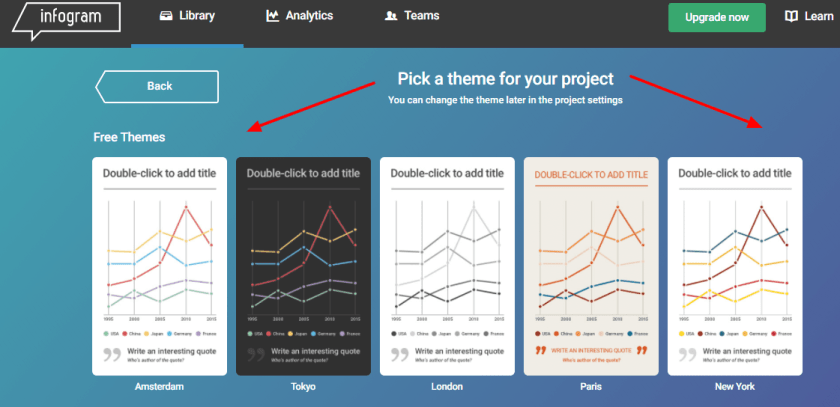
3. Pick a theme for your project.

download (6).png

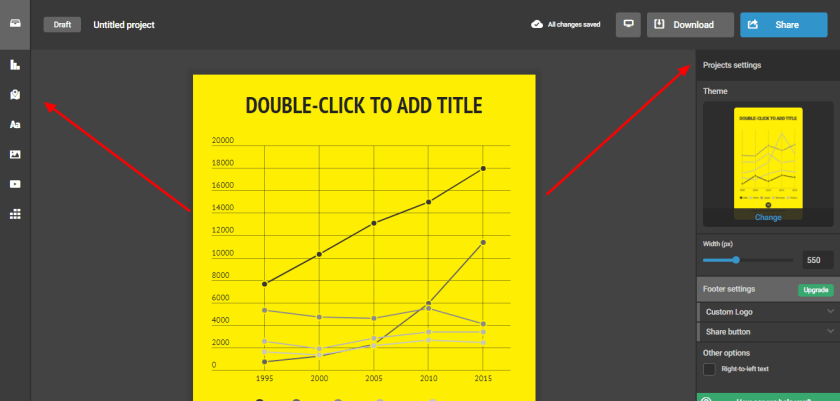
4. To your right, you’ll see the settings bar that lets you set the width, theme, add a custom logo, and specify a share button. To your left, you’ll see several icons. Clicking on them lets you customize your infographic with a map, a chart, text boxes, pictures, data, and even videos.

download (9).png

5. When your project is complete, give your infographic a title and description. Decide on your permission settings. Do you want to make this public? Or is it just for your own use (public is the default setting; you will have to upgrade your account to keep it private)?  Click “Share” to send out your infographic to your social networks, or to get an embed link to add it to your blog or website!

Posted in Cool Tool, Visual Marketing

Monday Morning Cool Tool: Gratisography


425_1.jpg

I love learning about new tools to make social media marketing more creative and effective, so I’ve decided to share some of my favourite tools with you at the start of each week. This week’s cool tool recommendation is Gratisography, a collection of free high-resolution pictures you can use on your personal and commercial projects, free of copyright restrictions.

What I really like about this site is many of the images are quirky and fun – no cheesy stock images here!

Check it out at https://gratisography.com and see for yourself.

Images: Gratisography

Posted in Cool Tool, Infographics, Visual Marketing

Monday Morning Cool Tool: Plotagraph 

I love learning about new tools to make social media marketing more creative and effective, so I’ve decided to share some of my favourite tools with you at the start of each week. This week’s cool tool recommendation is Plotagraph – a really cool app that animates images with magical effects.

download.png
Although you can’t see it in this still image, in Plotograph the water is moving!

You can use Plotagraph to create a looping video, animated GIF, or animated PNG. Then upload your eye-catching image to various social media platforms.  Most of the time, you make looping videos or animated images from a video. However, Plotagraph begins with a still image and creates the movement with what appears to be CGI effects. You can upload an image to the app or website, or take a photo inside the app.

Plotagraph is available via the web for free and the iOS app costs $4.99.


Posted in Cool Tool, Visual Marketing

Monday Morning Cool Tool: Typorama

iPhone

I love learning about new tools to make social media marketing more creative and effective, so I’ve decided to share some of my favorite tools with you at the start of each week. This week’s cool tool recommendation is Typorama  another super easy design tool to enhance your social media and content marketing.

Choose from more than 40 different typographic styles, and add professional photo filters, overlays and adjustment tools.  Advanced crop options let you create the perfect size pictures for social media posts, wallpapers, posters, flyers and postcards.

Typorama is available for download from the App Store. 

Posted in Cool Tool, LinkedIn, Visual Marketing

Monday Morning Cool Tool: Dux-Soup

I love learning about new tools to make social media marketing more creative and effective, so I’ve decided to share some of my favorite tools with you at the start of each week. This week’s cool tool recommendation is Dux-Soup  – a browser plug-in which works with Google Chrome as your virtual assistant on LinkedIn.

Dux-Soup keeps track of every single profile you visit and allows you to make notes directly on the profile page which are saved. Profile date and notes can be export as a .CSV file to be opened in Microsoft Excel or similar. The .CSV file includes data such as the name of the person whose profile you visited, job title, company name, location, email and notes.

You can take and save notes on each profile such as: have sent invite/need to reply to a message / likes Opera etc. Dux-Soup can save you hours of manual data entry when it comes to tracking all your leads you interact with on LinkedIn.

You can opt to use the free version (which enables you to view a hundred LinkedIn profiles a day) or upgrade to the paid version (which allows you to set the number of profile visits you need to make per day and export the .CSV file and make use of the data you gathered.

Dux-Soup is available as a browser plug-in which works with Google Chrome. Download here.

Posted in Cool Tool, Visual Marketing

Monday Morning Cool Tool: Aviary

download.png

I love learning about new tools to make social media marketing more creative and effective, so I’ve decided to share some of my favourite tools with you at the start of each week. This week’s cool tool recommendation is Aviary a simple graphics editor that you can use from your browser window or as an app for your phone.

Use Aviary to fine-tune your photos with a full range of filters and one-touch tools for adjusting lighting, focus and color. You can also erase blemishes and brighten whites in a tap, or personalize your pictures with stickers, frames and overlays.

Go to aviary.com to download the app, or use the desktop version and let the magic begin.