Posted in Cool Tool

Monday Morning Cool Tool: YouTubeToWav

This week’s cool tool recommendation is YouTubeToWav, a free, browser-based converter that lets you paste a YouTube link and download the audio in WAV format (or other formats like MP3, FLAC, OGG, and M4A).

What are WAV files?

If you’ve ever worked with audio, you’ve probably come across WAV files. They’re one of the oldest digital audio formats around. WAV remains a gold standard when you need sound that’s crystal-clear and uncompressed.

WAV (short for Waveform Audio File Format) was created by Microsoft and IBM back in the 1990s. Unlike MP3 or AAC, which shrink audio down by compressing it, WAV keeps every detail intact, making it ideal for recording, mixing, or mastering. This makes it perfect for preserving original sound files without worrying about future degradation.

Common Uses

  • Podcasters grabbing background clips (with permission).
  • Educators saving lecture snippets for offline use.
  • Anyone wanting a higher-quality copy of audio to work with.

Why Use

  • Quick and simple: No registration, no software download.
  • High quality: Offers up to 1536 kbps for clarity.
  • Flexible: Works on desktop or mobile with all major browsers.

⚠️ Copyright Compliance: Downloading audio from YouTube may infringe on copyrights—ensure you have the right to do so.


Bottom line: WAV isn’t the format you’ll use for everyday playlists (unless you have unlimited storage), but when quality matters, it’s the format you want in your toolbox. And if you need an easy way to get started, YouTubeToWav is a lightweight, no-fuss option.


Posted in Cool Tool

Monday Morning Cool Tool: ReadyScriptPro

This week’s cool tool recommendation is ReadyScriptPro — an AI-powered script generator designed to help content creators develop polished scripts for short films, TikToks, YouTube videos, and more.

If you’ve ever struggled with writer’s block, inconsistent dialogue, or finding the right pacing for a short-form video, ReadyScriptPro is like having a creative partner on demand.

The platform streamlines the creative process by:

  • Generating complete scripts from simple prompts.
  • Offering a “script doctor” feature to improve pacing, tone, or clarity.
  • Suggesting scene directions and dialogue flow.
  • Helping creators produce professional-sounding content faster.

The tool works in a browser, with a clean dashboard that makes drafting, editing, and exporting scripts straightforward.

Tool Snapshot

FeatureWhat It Does
Script GeneratorCreates full scripts from simple text prompts
Script DoctorImproves pacing, tone, and dialogue
Creative suggestionsOffers alternative lines, plot turns, or dialogue choices
Freemium modelFree to start, with advanced features possibly in premium plans

Pricing

ReadyScriptPro follows a freemium model. You can get started for free with basic script generation, making it easy to experiment without upfront cost. A paid tier with premium features (such as longer scripts, advanced editing, and expanded creative suggestions) is expected, though official pricing details have not yet been fully published.

Posted in Cool Tool

Monday Morning Cool Tool: Text Optimizer

This week’s cool tool recommendation is Text Optimizer – a tool to help you optimize your content to rank better on SERPs (Search Engine Results Pages)

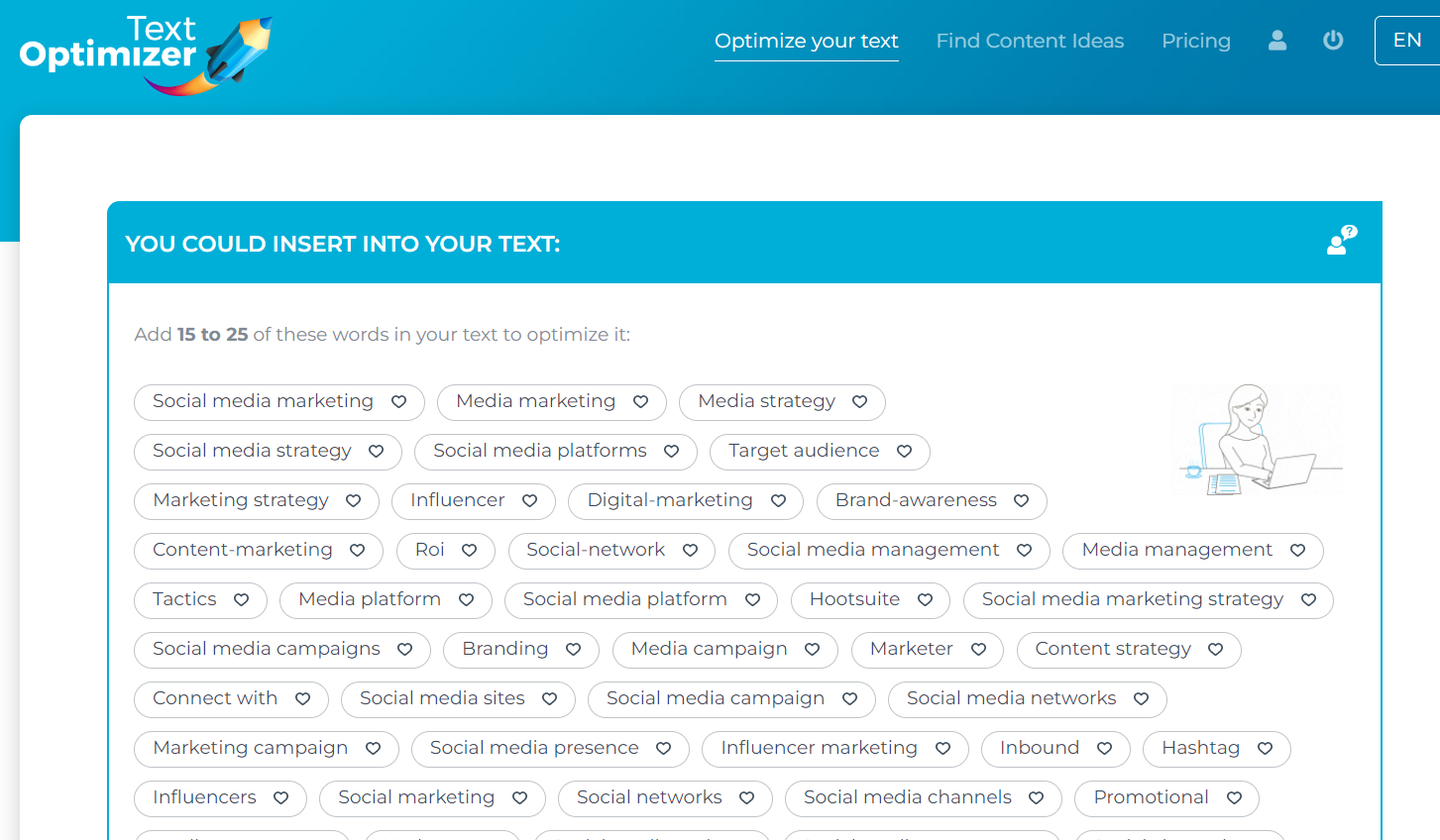
Text Optimizer extracts terms and concepts from search engine results pages (SERPs) and analyzes their semantics to generate a list of questions for inclusion in your articles.

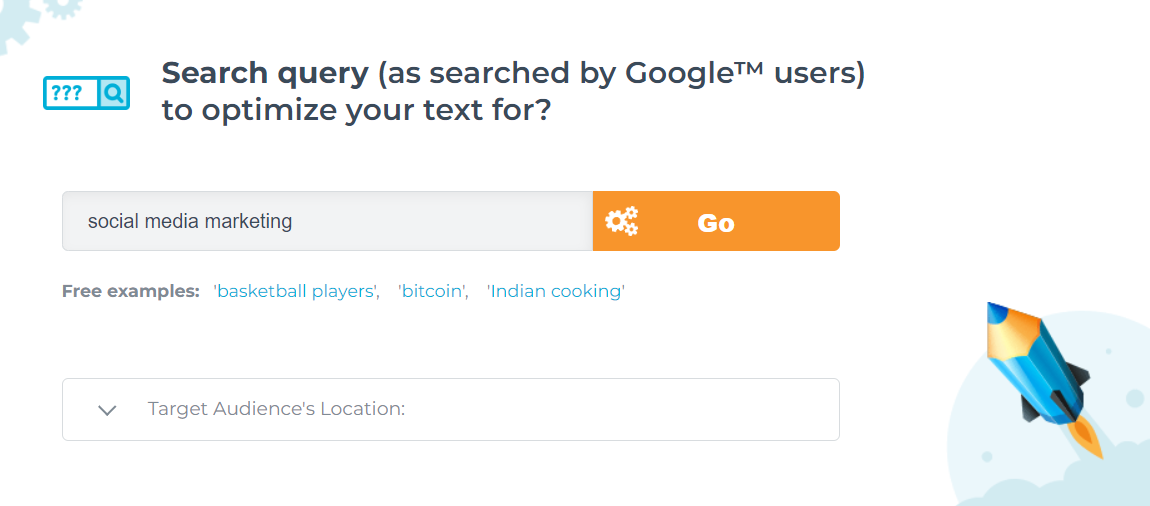
Choose the search engine you wish to optimize for, input the desired search terms, select a target location, and either paste your text or provide a link to your existing content.

And here are just some of my results – the tool returns many more suggestions.

You can use the tool to compare your existing text to the snippets Google returns for that query if you already have a page you want to rank. After scoring your text, it will suggest adding some of those suggested terms to your content.

Why this tool is a valuable addition to your online content strategy

Google generates its search snippets based on which sentences from ranked pages best answer the query. In other words, the search snippets are Google’s best (in its opinion) summary of the topic of the query. The semantic analysis of these snippets and the extraction of related terms and topics will give you a better understanding of what you need to include in your content.

Posted in Cool Tool

Monday Morning Cool Tool: Design Cap

This week’s cool tool recommendation is Design Cap an online graphic design tool, designed to be user-friendly, even for those without prior design experience.

Key Features

  • Effortless Design: Intuitive interface designed to be user-friendly, even for those without prior design experience.
  • Extensive Template Library: Choose from a vast collection of professionally designed templates for posters, flyers, social media, and more.
  • Effortless Customization: Easily personalize templates with your own text, images, and colors to match your unique brand.
  • Powerful Editing Tools: Fine-tune your designs with a range of tools for text formatting, image adjustments, and shape manipulation.
  • Rich Stock Resources: Access a library of high-quality stock photos and icons to elevate your designs.

Whether you’re a marketer, educator, small business owner, or simply someone who wants to express their creativity, DesignCap provides the tools and flexibility to bring your vision to life.

Posted in Cool Tool

Monday Morning Cool Tool: Content Row Headline Generator

This week’s cool tool recommendation is a headline generator from Content Row.

An effective headline has the power to captivate readers and encourage them to delve deeper into your content. In addition to engaging readers, headlines play a crucial role in search engine optimization (SEO). Search engines rely on headlines to understand the essence of your content, and a well-crafted headline can contribute to increasing your content’s ranking in search results.

How it works

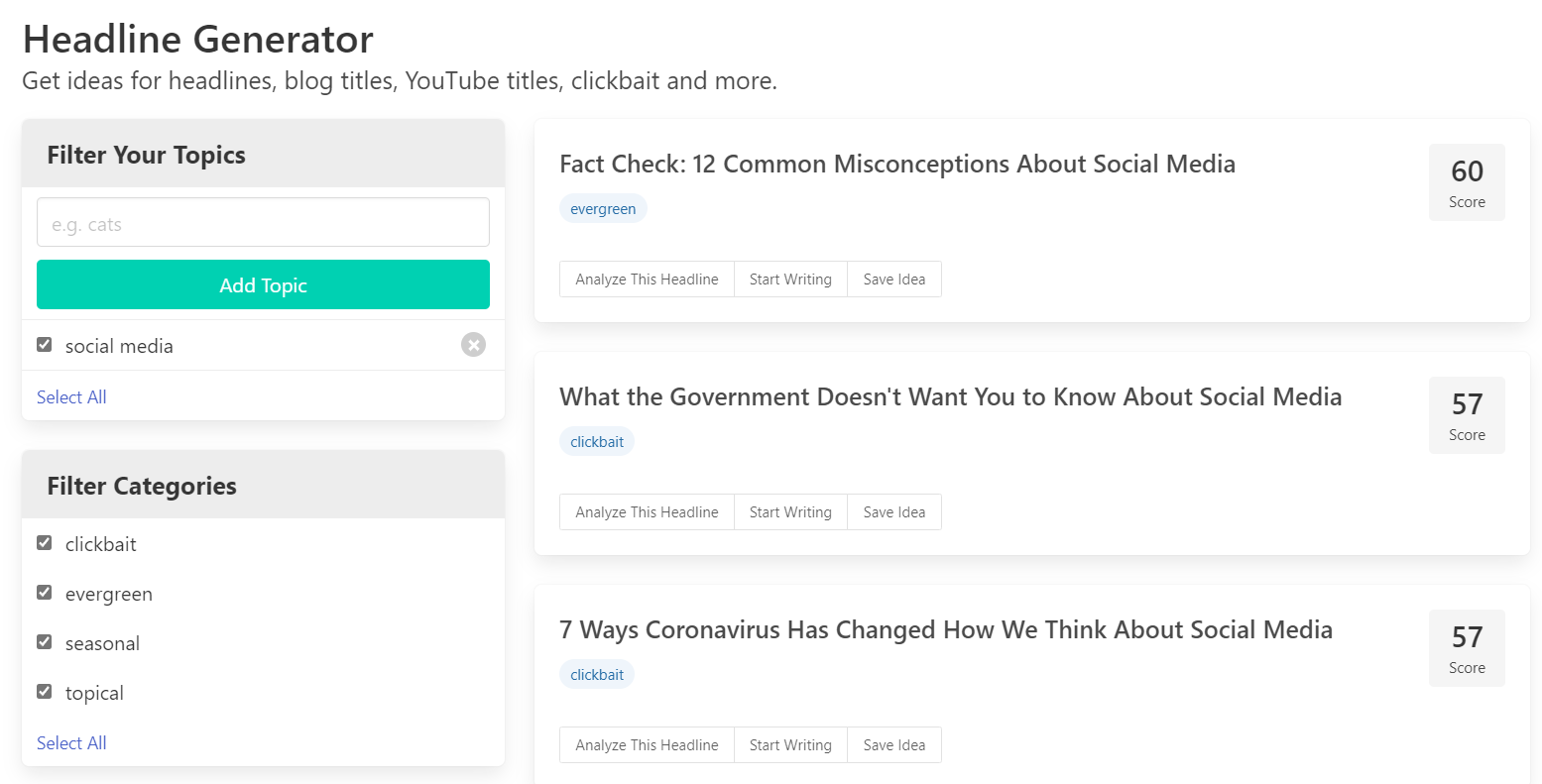
Using the term “social media” the tool provides the following suggested headlines for me. Keep in mind that as it’s an AI tool results are not an exact science, so it’s advisable to disregard clickbait titles. Once you’re logged in as a user, you have the option to filter out clickbait in your search.

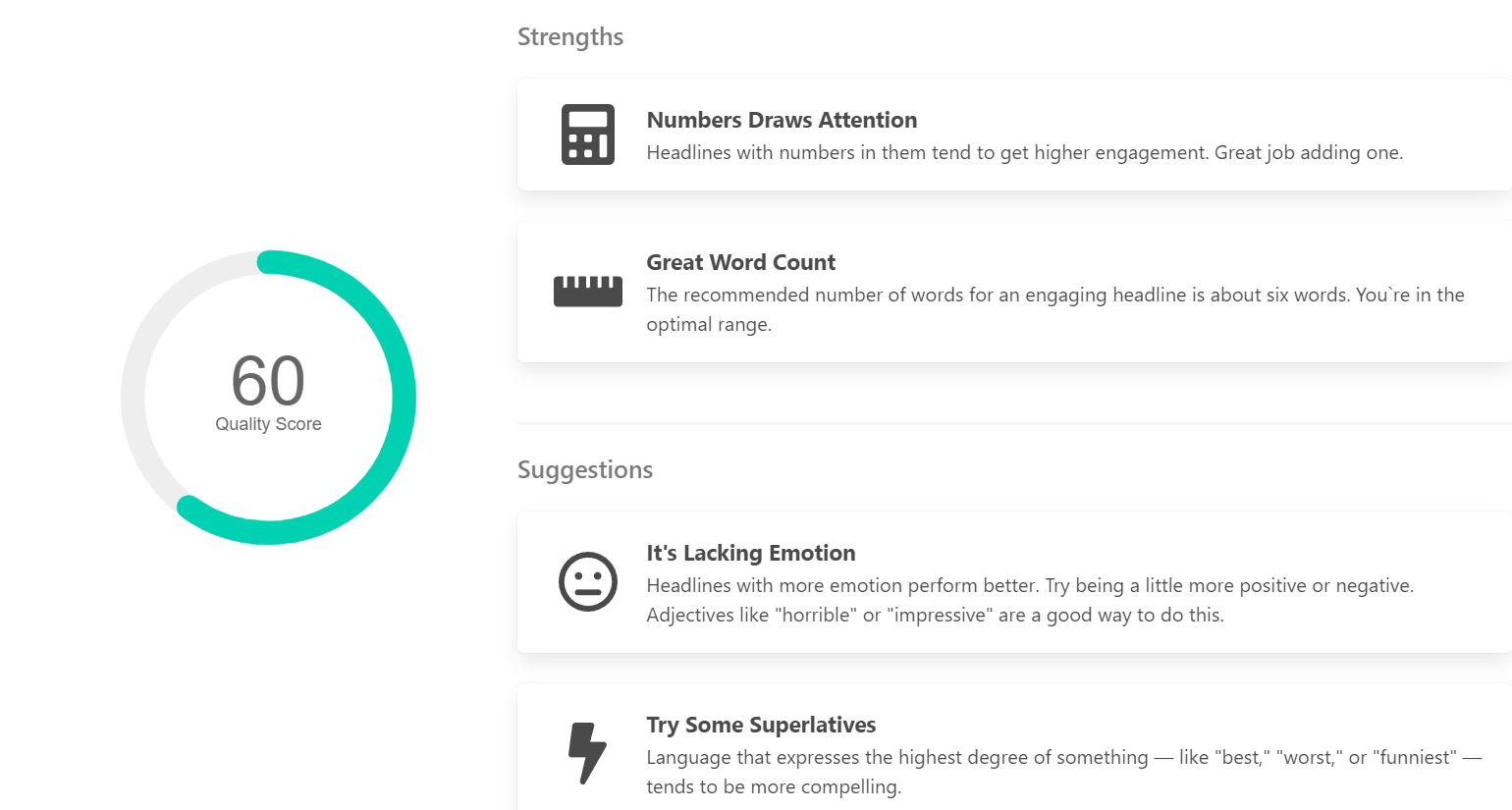
Each headline is given a score, and you can click on the option to analyze it, which is a nice feature as it gives you some suggestions on how to improve it.

While these tools aren’t perfect, they can kickstart the creative thinking process when it comes to writing headlines. 

You might also like to read:

Posted in Thursday Tip

#ThursdayTip: How To Repurpose Your Digital Content

Welcome to this week’s social media quick tip.  This week I want to show you how to repurpose your existing content.  

One key to maintaining a steady stream of quality content is to re-purpose what you already have. Repurposing content simply means taking one asset and reusing it somewhere else.

The first step is to identify your most popular content through your blog analytics tool and by using Google Analytics. Perhaps the content can be turned into an infographic or a slide-deck. By re-purposing content you have already written, you can extend and breathe new life into your current and past content.

1_97rO00W0PFXG7zL-5AiijQ
Source: TopRank Marketing

Pay special attention to the content you published some time ago. Is some of this content out of date? If so, update it, and simply republish it again as an updated post. It’s important to update older content to make sure it continues to be relevant to your readers.

Get into the habit of creating each new piece of content with repurposing in mind. Read How To Create Six Unique Social Shares From Just One Piece of Content for some ideas on how to do this.

By focusing on producing one piece of really great content for repurposing, rather than several lower-quality pieces, you will improve the quality of your marketing.

Here’s to your social media success!

Posted in Cool Tool

Monday Morning Cool Tool: Emotional Marketing Value Headline Analyzer

This week’s cool tool recommendation is the Emotional Marketing Value (EMV) Headline Analyzer.

This headline analyzer is a free tool from the Advanced Marketing Institute that you can use to calculate the EMV of your own headlines. It scores the EMV of your headline with a breakdown of why it scored that value. A perfect score would be 100%, but don’t despair if yours doesn’t match up. According to the Institute, “most professional copywriters’ headlines will have 30%-40% EMV Words in their headlines, while the most gifted copywriters will have 50%-75% EMV words in headlines.”

Here’s how it works. 

Enter your headline in the space provided and choose the industry you are targeting your message to.

download (51)

Click Submit. 

Here’s my score:

download

While the score is low on EMV, I am still happy with it, as it fulfills my aim of arousing curiosity in the reader.

Your headline carries words that predominantly appeal to most people’s intellectual sphere. Intellectual impact words are especially effective when your goal is to arouse curiosity.

For more headline tools like this, read: 7 Tools To Find Inspiration For Your Headlines

Posted in Thursday Tip

#ThursdayTip: How To Create Recurring Content

Welcome to this week’s social media quick tip.  This week I want to show you how to create a recurring content feature. 

What is recurring blog content?

Recurring content is consistent content published on a regular schedule using a defined structure. This content has the ability to form hooks that keep readers interested in coming back to your site for more of the same.

I’ve experimented over the years with many different types of regular recurring columns on various blogs, for example the Cool Tool feature which I post each Monday morning.

Why create recurring content?

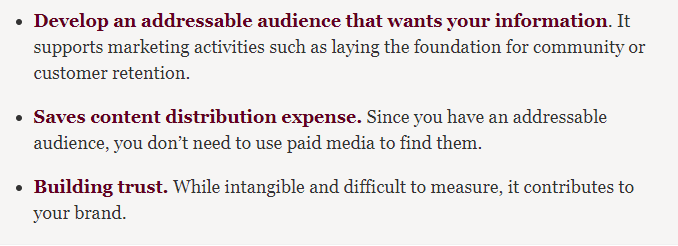
Marketer Heidi Cohen outlines the following three advantages to creating consistent content.

f16688d2-76bc-4f2f-a1b6-f2f4b728b507

She goes on to outline the business value

2a8ac089-2685-4c49-9296-ec750e4eee42

Before you introduce a regular feature to readers, it’s important to take some time to choose a topic that matches your content strategy and crucially won’t have you running out of ideas after a few weeks.  Ideally, your topic should be associated with your keyword phrases to support your organic search efforts.

Once you’ve decided on your topic, decide on the elements you will use to maintain consistency in the design and format of your content.  Choose the same day and time to publish so readers know to expect it at that time each week – this helps build an audience for your content.  To quote Cohen, “as the digital version of appointment media your audience depends on receiving your information at the same time every week. Over time, this builds share of audience attention.”

Finally, keep the format and design elements consistent.

Here are three types of recurring features to add to your content marketing.

1. Advice Column

Set aside one day a week to provide step-by-step instructions, or answer readers’ questions.

2. Interview Series

I ran an interview series, Social Spotlight, last year with healthcare thought leaders.  It followed a consistent question format, with some tailoring to the interviewee, and was a popular addition to my content calendar.

3. Weekly Round-Up Post

I run several weekly round-up style posts for client blogs focussed on their niche. I curate the most helpful, interesting and topical news from their industry and publish them in a blog post, usually on a Friday.  It’s always the most read content when I check the weekly blog stats.

Of course, your recurring content can live outside the written word. With the popularity of video, consider adding a regular vlog or even more popular, a Facebook Live recurring feature.

To sum up

Recurring posts of high value keeps your audience interested and coming back for more. By adding a regular recurring feature to your content marketing you give your audience something to look forward, while at the same time building a unique and recognisable element into your brand.

Here’s to your social media success!

Posted in Thursday Tip

#ThursdayTip: How To Brainstorm Fresh Content Ideas

Welcome to this week’s social media quick tip.  This week I want to show you how to generate content ideas when you are running out of inspiration.

Next time you’re stuck for something to write about,  try brainstorming using a tool like HubSpot’s Blog Topic Generator. It lets you input up to three different nouns and returns five blog topic ideas that will exercise your writing muscles again.

Here are the suggestions generated for me when I input the terms “social media” and “marketing” into the tool.

1_E-S7L4CmtyaE0zF1fTRqzA (2)

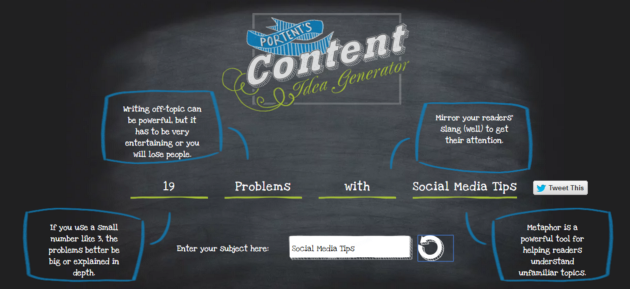
A similar tool to Hubspot, Portent’s Content Idea Generator allows you to generate ideas with just one keyword. Be prepared that the tool can throw up some quirky suggestions, but don’t let that put you off. Keep playing around with it until you find one you can work with. I also really like how it shows you best practice tips, such as using metaphors in your writing.

1_eNc_si2txKAEyzq83wicLQ


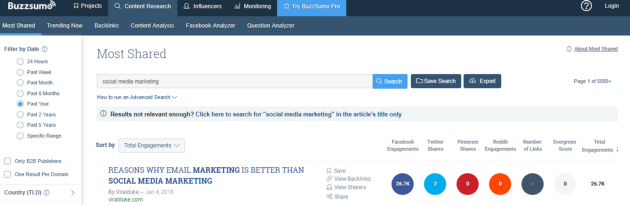
I also like to use Buzzsumo to find inspiration by searching which popular content is most shared right now on social media. These are the topics people want to read about so it’s worth brainstorming ideas around this content.

1_xV4T2-3JQQ_YEZa8EyOv4g (1)

Here’s to your socia media success!

Posted in #HCSM

9 Tips to Help You Build a Better Healthcare Blog

Do you blog for your healthcare communications?

Whether you’re new to blogging, or you’ve been blogging for some time, these tips are designed to steer you in the right direction of building a better blog.

1.Perfect Your About Page

For new visitors to your blog, this will be one of the first pages they will visit, so it’s worth taking time to make it as professional as possible. Use this space to share the story of why you do what you do to advocate for disease awareness and educate and support your community.

2. Check Your Blog’s Load Speed

Does your blog load quickly? A good site will load in 2 seconds. If your blog is taking longer than that, consider that around 40% of people will leave a site if it doesn’t load in 3 seconds. You can check your blog’s loading speed with a tool like GTMetrix.com.

Insider Tip: If you like to add lots of images to your blog, be aware that large images can slow your blog down. Resizing your images can speed up the loading time. Upload your image to Picresize.com for quick and easy resizing.

3. Declutter Your Sidebar

Does your blog have a sidebar? Has it become crowded with widgets? Then it’s time to declutter Marie Kondo style. Get rid of anything that doesn’t add something valuable to the reader’s experience.

4. Showcase Popular Content

One thing that you should keep on your sidebar is a list of your most popular content. Use this space to showcase your best writing. And be sure to put hyperlinks in each of your posts that direct people to other popular posts on the same topic.

5. Make It Easy For Readers to Find Information on Your Site

Providing helpful information is great, but you also need to be sure that readers can find that information. By adding categories and tags to your posts, you make it easy for readers to find the information they need when they come to your blog. It also increases views on your other posts tagged with the same keywords.

6. Create An Email Sign-Up Form

Encourage readers to sign up to receive your latest posts. Nancy Stordahl, who blogs at NancysPoint.com, advises “anyone who wants to increase readership to her/his blog to consider sending out a monthly or weekly email with links to new posts and possibly one or two older ones. “I became very frustrated with Facebook’s algorithms because it seemed no one was seeing posts I shared. Having your own email list puts you and your readers in control.”

7. Add Social Sharing Buttons

By making it easy for visitors to your blog to share your content, you increase the likelihood that they will take this action. When more people share your content, you increase the chance of driving more visitors to your blog, and having your content seen by more people.

8. Choose Typography Carefully

Typography is made up of elements such as font type and size, kerning (white space between individual characters or letters), and tracking and spacing. It’s an important factor in making your content more readable for visitors to your site.

9. Backup Your Blog

Finally, you’ve put a lot of effort and time into your blog and you don’t want to risk losing all your great content. You never know when your blog might get hacked, and the best defense is scheduling regular backups using a plug-in like BackWPup.

You might also like to read: Need a topic for your healthcare blog? Here are 12 ideas to get you started