Posted in Cool Tool

Monday Morning Cool Tool: Foller.me

I love learning about new tools to make social media marketing more creative and effective, so I’ve decided to share some of my favourite tools with you at the start of each week. This week’s cool tool recommendation is Foller.Me a simple, yet effective tool to get insights about any public Twitter profile.

How It Works

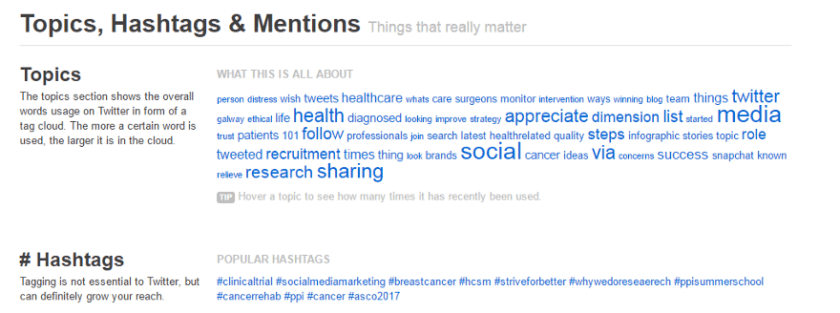
Foller.me is a Twitter analytics application that gives you rich insights about any public Twitter profile. The tool gathers near real-time data about topics, mentions, hashtags, followers, location and more. It then analyzes the tweet’s contents and tells you about topics usage in form of “tag clouds” so that you can easily understand which words were the most popular. Here’s what my tag cloud looks like:
1-dgx0cH8EHOA3bvy8Q3ukiQ.png

Foller.me is a free tool – visit https://foller.me to try it for yourself today.


Posted in Cool Tool, Infographics, Visual Marketing

Monday Morning Cool Tool: Infogr.am

I love learning about new tools to make social media marketing more creative and effective, so I’ve decided to share some of my favourite tools with you at the start of each week. This week’s cool tool recommendation is Infogr.am – a free design tool which makes it super simple to put together an infographic.

How to use it:

1. Go to https://infogr.am and log in with your Google or Facebook account.

download (4).png

2. Choose from one of the three available themes – Infographic, Chart/Graph, or Map  – or you can click on “Data import or source” to start with your numbers.

download (5).png

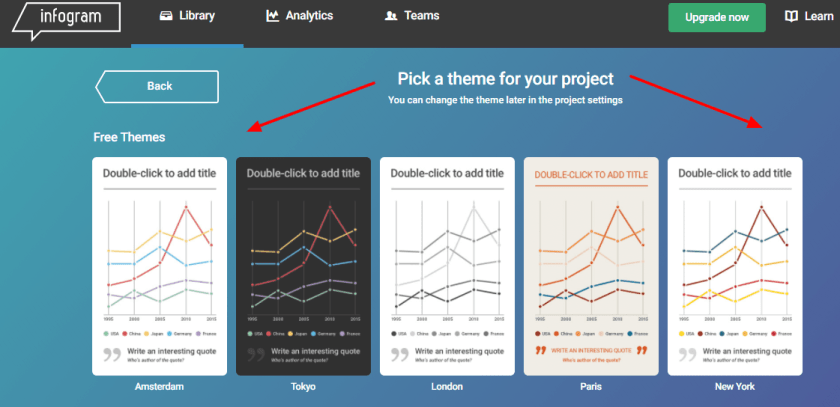
3. Pick a theme for your project.

download (6).png

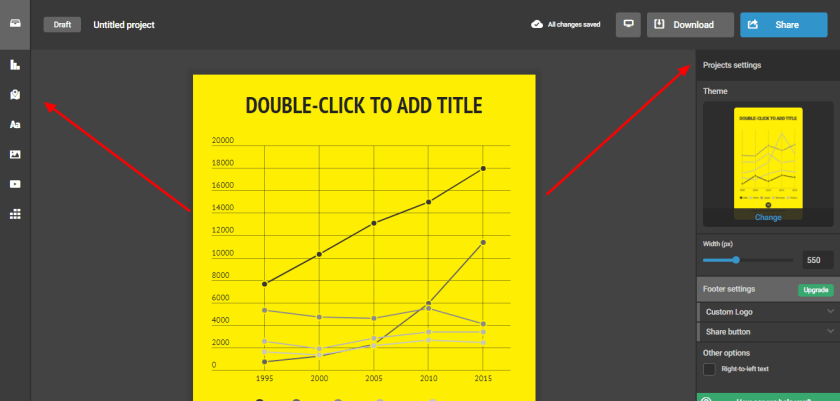
4. To your right, you’ll see the settings bar that lets you set the width, theme, add a custom logo, and specify a share button. To your left, you’ll see several icons. Clicking on them lets you customize your infographic with a map, a chart, text boxes, pictures, data, and even videos.

download (9).png

5. When your project is complete, give your infographic a title and description. Decide on your permission settings. Do you want to make this public? Or is it just for your own use (public is the default setting; you will have to upgrade your account to keep it private)?  Click “Share” to send out your infographic to your social networks, or to get an embed link to add it to your blog or website!

Posted in Cool Tool

Monday Morning Cool Tool: Crazy Egg

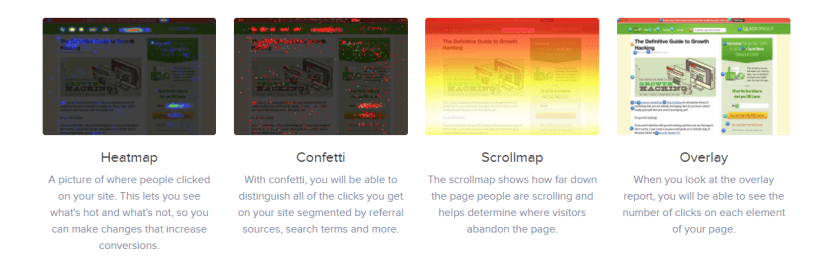
I love learning about new tools to make social media marketing more creative and effective, so I’ve decided to share some of my favorite tools with you at the start of each week. This week’s cool tool recommendation is  Crazy Egg – a tool that tracks scrolls and clicks behavior on web pages to better understand customer interactions.

download.png

Its features include:

Heatmap

A picture of where people clicked on your site.

Confetti

With confetti, you will be able to distinguish all of the clicks you get on your site segmented by referral sources, search terms and more.

Scrollmap

The scrollmap shows how far down the page people are scrolling and helps determine where visitors abandon the page.

Overlay

When you look at the overlay report, you will be able to see the number of clicks on each element of your page.

All plans are FREE for the first 30 days.


Posted in Cool Tool, Infographics, Visual Marketing

Monday Morning Cool Tool: Plotagraph 

I love learning about new tools to make social media marketing more creative and effective, so I’ve decided to share some of my favourite tools with you at the start of each week. This week’s cool tool recommendation is Plotagraph – a really cool app that animates images with magical effects.

download.png
Although you can’t see it in this still image, in Plotograph the water is moving!

You can use Plotagraph to create a looping video, animated GIF, or animated PNG. Then upload your eye-catching image to various social media platforms.  Most of the time, you make looping videos or animated images from a video. However, Plotagraph begins with a still image and creates the movement with what appears to be CGI effects. You can upload an image to the app or website, or take a photo inside the app.

Plotagraph is available via the web for free and the iOS app costs $4.99.


Posted in Cool Tool, Visual Marketing

Monday Morning Cool Tool: Typorama

iPhone

I love learning about new tools to make social media marketing more creative and effective, so I’ve decided to share some of my favorite tools with you at the start of each week. This week’s cool tool recommendation is Typorama  another super easy design tool to enhance your social media and content marketing.

Choose from more than 40 different typographic styles, and add professional photo filters, overlays and adjustment tools.  Advanced crop options let you create the perfect size pictures for social media posts, wallpapers, posters, flyers and postcards.

Typorama is available for download from the App Store. 

Posted in Cool Tool, Visual Marketing

Monday Morning Cool Tool: PicMonkey

I love learning about new tools to make social media marketing more creative and effective, so I’ve decided to share some of my favourite tools with you at the start of each week. This week’s cool tool recommendation is Picmonkey  – another super easy design tool to enhance your social media and content marketing.

download.png

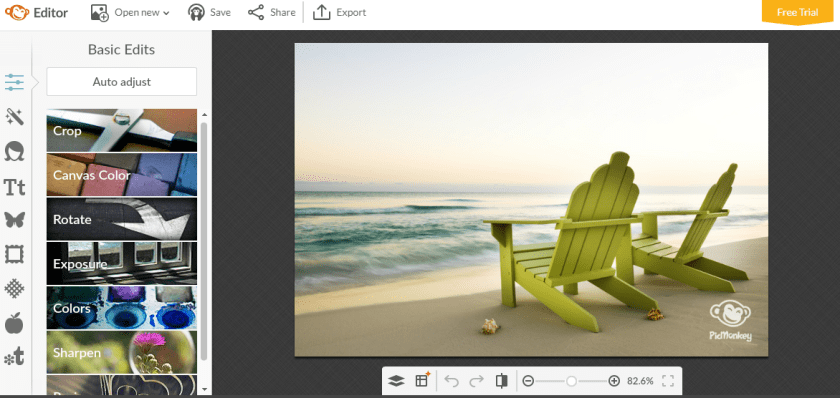
Picmonkey is a “freemium” tool with the option of paying for extras, but I’ve accomplished a lot with the free version.  Some of the features I like most include themed seasonal overlays and Photoshop style cosmetic enhancement features. It’s a great tool to touch up your images. I often use Picmonkey for quick resizing and enhancement of images before I post them online.

download.png

Key Features:

  • Enables you to create custom graphics and customize them.
  • Lets you touch up your images and photographs using a broad collection of features.
  • Provides a vast library of templates to help speed up your work.
  • Lets you export your projects as images to use as you wish.

Visit www.picmonkey.com and try it for yourself!


Posted in Cool Tool

Monday Morning Cool Tool: Twitonomy

I love learning about new tools to make social media marketing more creative and effective, so I’ve decided to share some of my favourite tools with you at the start of each week. This week’s cool tool recommendation is Twitonomy a freemium tool which yields insights on your followers, influence and interests.

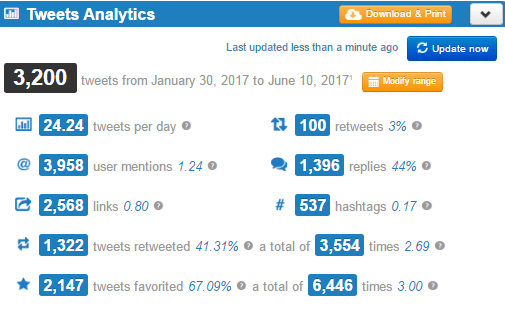
Here’s a snapshot of my analytics — and yes, I do tweet a lot!

1-3ovXIKf-htFMiMoZbUKoMQ.png

You can also get search analytics on any hashtag, user or keyword. With the pro version you can download tweets, mentions, RTs, favorites and reports to Excel & PDF documents — a useful reporting tool.


Posted in Cool Tool

Monday Morning Cool Tool: Photofeeler

I love learning about new tools to make social media marketing more creative and effective, so I’ve decided to share some of my favourite tools with you at the start of each week. This week’s cool tool recommendation is Photofeeler, billed as the “world’s smartest photo feedback” tool.  I’m intrigued by this free tool designed to help you make the right impression online.


Advanced algorithms by Carnegie Mellon University Ph.D. mathematicians make Photofeeler a valid scientific tool, not just a toy or game.  Photofeeler’s co-founder has a PhD in Optimization Algorithms and experience writing artificial intelligence for Fortune 500 companies. What Photofeeler does with algorithms and machine learning, is monitor vote quality, detect all manners of voter fraud in real time, and use sophisticated score distribution analysis — accounting for factors like individual voter styles — to optimize the accuracy of test results. The consequence is statistical accuracy far beyond what a small number of votes could normally provide.

How It Works

When you start a test on a photo, other logged-in Photofeeler users (within your selected voter demographic) can see that photo on the voting page in order to give their feedback. When the test is ended, the photo becomes entirely private again.


Photofeeler Ranks are a comparison between your photo’s score and all the rest that have been tested on the Photofeeler platform. Photofeeler Ranks are given as a percentile. So, for instance, a Rank of 58% means your photo did better than 58% of photos.

Let me know if you try this tool out – I’d love to hear how you get on with it. 

Sign up at http://www.photofeeler.com


Posted in Cool Tool

Monday Morning Cool Tool: Bit.ly

I love learning about new tools to make social media marketing more creative and effective, so I’ve decided to share some of my favourite free tools with you at the start of each week. This week’s cool tool recommendation is Bit.ly, a tool which creates shortened links to track the performance of your content once you promote it. If you create a custom short link for each content promotion campaign, you can track what works well and what doesn’t.

index

Also check out Snip.ly  a url shortner tool which allows you to enhance every link you share (whether your own content or someone else’s) with a call to action.

download (72).png

When people click on the Sniply-generated link, they can view the article you shared and see a CTA.

Both these tools are extremely useful to track how your content is performing and if  you aren’t already using them, I highly recommend you start today.

Posted in Cool Tool

Monday Morning Cool Tool: GIMP

I love learning about new tools to make social media marketing more creative and effective, so I’ve decided to share some of my favourite tools with you at the start of each week. This week’s cool tool recommendation is GIMP – a free and open source image editor for such tasks as photo retouching, image composition and image authoring.

GIMP (an acronym for GNU Image Manipulation Program) has many uses from a simple paint program and a quality photo retouching tool to an image format converter and an online batch processing system. Here’s an example from one of GIMP’s step-by-step tutorials showing how to modify the filesize of an image when exporting it to a format like JPEG.

This  is a basic feature, but there are many more advanced features to explore. It’s a useful alternative to Photoshop for those who don’t have access to it. Check it out at www.gimp.org and see for yourself.