Posted in Cool Tool

Monday Morning Cool Tool: Bitly

This week, I’m recommending Bitly – a handy URL shortener tool.

How we share information in healthcare is just as important as what we share. The link itself is part of the message, whether it’s an educational resource, a campaign sign-up link, or an event registration page. Here’s where Bitly comes in.

What Is Bitly?

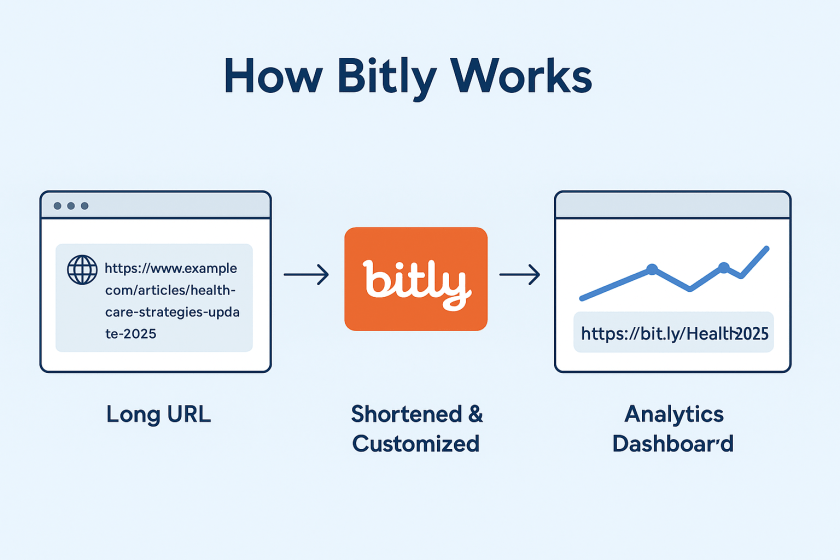
Bitly is a platform that takes long, often unwieldy URLs and shortens them into compact links that are easier to share and track. It’s one of the most widely used URL shorteners in the world and is trusted by organisations ranging from global brands to local nonprofits.

Let’s say you’re running a digital campaign for epilepsy awareness. You’ve created a resource page that lives at: https://yourorg.org/programmes/epilepsy-awareness-week-2025/download-resources
That’s a lot to include in a tweet, an Instagram bio, or a printed flyer. With Bitly, you could shorten it to: https://bit.ly/epilepsyweek2025
Much better, right?

But more importantly, you can track how that link performs. How many people clicked it? Where were they located? Did one social platform drive more traffic than another?

What Else Can You Do with Bitly?

Once you’re inside the platform, you’ll find several additional features that make Bitly especially powerful for healthcare communication and outreach.

🔹 Link Customisation
You can edit the end of a Bitly link to make it more descriptive or branded, like:
bit.ly/CaregiverGuide2025
This improves trust and helps people understand what they’re clicking on.

🔹 Analytics Dashboard
Bitly provides real-time data on link performance, including:

  • Click volume
  • Geographic location of users
  • Referral sources (e.g., Twitter, email, WhatsApp)

🔹 Branded Domains (Paid)
With a paid plan, you can use your own short domain (like yourclinic.org/guide) to create even more trust and continuity in your communications.

🔹 Link Management Tools
You can organise links into folders, label them by campaign, and even set expiration dates for time-sensitive URLs (paid feature)

🔹 QR Codes

Every time you shorten a link with Bitly, you also have the option to create a QR code with a single click. That means you can easily place your link on:

  • Clinic posters
  • Flyers and leaflets
  • Event banners
  • Conference slides
  • Prescription inserts or appointment cards

QR codes make it effortless for patients, staff, or the public to scan and access information using just their phone – no typing required. For example, a hospital running a flu vaccination campaign uses a Bitly link to direct patients to the booking form. They place the QR code version of that link on posters in waiting rooms, allowing patients to scan and schedule right from their seats.

Is Bitly Free?

Yes—and no. Bitly offers a free plan that allows basic link shortening, custom back-halves, and limited analytics. For more advanced features like branded domains, deeper analytics, and team collaboration, they offer tiered paid plans.

For small teams or individual professionals, the free plan is often enough. For hospitals, health systems, or nonprofits running large campaigns, the paid options can be well worth the investment.

Posted in Cool Tool

Monday Morning Cool Tool: CoSchedule’s Subject Line Tester

This week, I’m recommending CoSchedule’s Subject Line Tester.

CoSchedule’s Email Subject Line Tester is a free online tool designed to give you instant feedback on your subject lines. It analyzes your headline against a database of successful emails, providing a score and actionable recommendations to help you boost your open rates and overall email campaign performance.

How to Use the Tester in 5 Simple Steps

  1. Type Your Subject Line: Simply enter the subject line you’re considering into the provided field on the CoSchedule website.
  2. Get Instant Analysis: The tool immediately processes your input and provides an analysis.
  3. Receive a Score & Breakdown: You’ll get a numerical score (typically out of 100) along with a detailed breakdown of its strengths and weaknesses.
  4. Review Suggestions: The tester provides specific suggestions for improvement, such as adding power words, emotional words, or adjusting its length for optimal readability.
  5. Refine and Test Again: Tweak your subject line based on the feedback and re-test until you achieve a score you’re happy with. It’s an iterative process that leads to better results!

The beauty of CoSchedule’s tester lies in its comprehensive analysis. It doesn’t just give you a score; it breaks down your subject line’s effectiveness across several critical factors. You’ll see how your subject line performs based on:

  • Overall Score: A quick check of your subject line’s predicted performance.
  • Word Balance: It assesses the mix of common, uncommon, emotional, and power words, guiding you towards a more impactful blend.
  • Length: Provides recommendations for ideal character and word counts to ensure readability on various devices.
  • Sentiment: Analyzes whether your subject line conveys a positive, negative, or neutral tone.
  • Spam Triggers: Helps you identify and avoid words or phrases that might trigger spam filters.
  • Preview: Shows you how your subject line will likely appear in common inbox displays, so you can catch truncation issues.
  • Keywords: Highlights strong keywords that resonate with your audience and search intent (if applicable).

Best Practices for Writing Effective Email Subject Lines

While the tester is fantastic, remember these timeless best practices that the tool helps you optimize for:

  • Be Clear & Concise: Get straight to the point. Subscribers should know what your email is about at a glance.
  • Create Urgency/Scarcity (where appropriate): Phrases like “Limited Time Offer” or “Don’t Miss Out!” can drive immediate action.
  • Personalization: Using the recipient’s name or other relevant data can significantly boost engagement.
  • Pique Curiosity: Ask a question or hint at valuable information to encourage an open, but always deliver on that promise inside the email.
  • Focus on Benefit: What’s in it for the reader? Highlight the value they’ll gain by opening your email.
  • Use Emojis Sparingly: Emojis can boost open rates, but use them thoughtfully and know your audience. Too many or irrelevant emojis can look unprofessional.
  • A/B Test Relentlessly: The best way to know what works for your audience is to test different subject lines against each other.

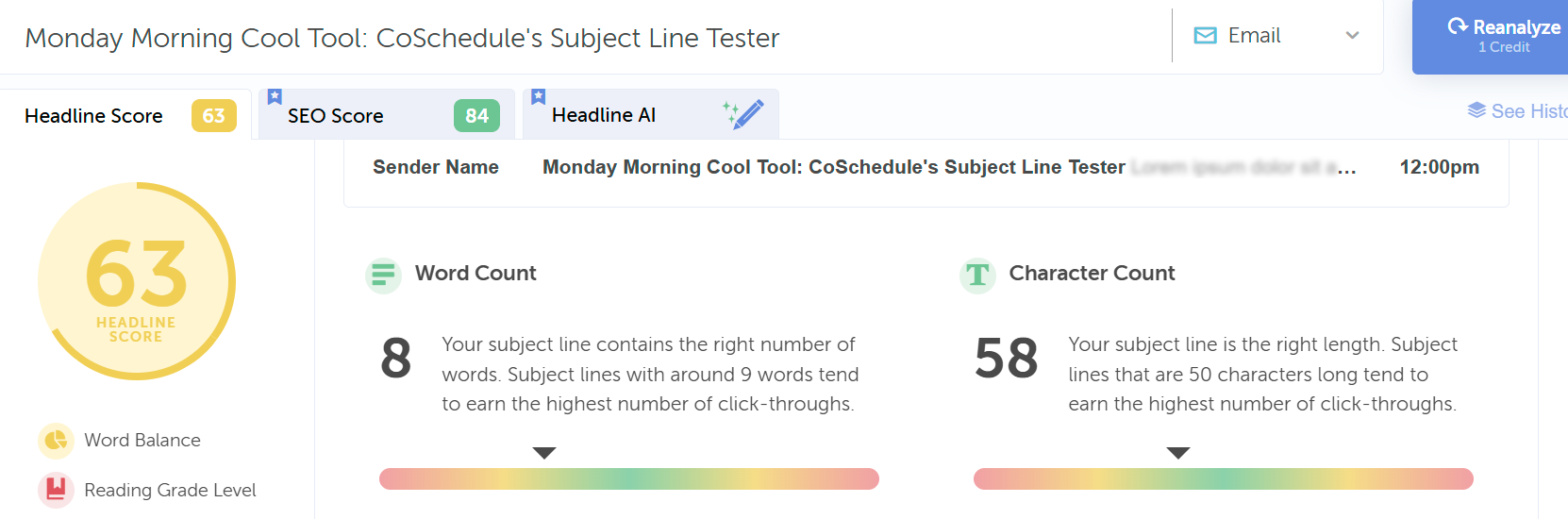
Curious about the effectiveness of this blog post’s title as an email subject line, I entered it into the tool. Take a look at its performance score below:

Here’s an improved score with a different heading; however, it has too many words.

Click Here to Try CoSchedule’s Email Subject Line Tester

Posted in #HCSM

How To Create an Email Marketing Welcome Sequence For Your Healthcare Practice

Welcome back to Part 3 of this series on email marketing for your healthcare practice. In Part 1, we explored why email marketing is an excellent tool for patient engagement and communication, and we discussed the key factors to consider when choosing your email marketing platform. In Part 2, we discussed how to build an email list that is robust and engaging. The third part of our series will look at how email marketing can help you build relationships with your patients, specifically focusing on creating an email marketing welcome sequence.

Understanding the Power of the Welcome Sequence

A welcome sequence is a series of automated emails triggered when a new patient joins your email list. This is your first opportunity to make a positive impression on new patients, set the tone for future communication, and lay the foundation for a trusting and loyal relationship.

Here are some ideas for the welcome sequence of emails:

  • Express gratitude: Thank the patient for choosing your practice.
  • Introduce your practice and team: Showcase your values, mission, and the faces behind your care.
  • Provide essential information: Share contact details, location, hours, and insurance/billing procedures.
  • Educate and engage: Offer valuable health tips, highlight services, and encourage further interaction.

How to Create an Effective Welcome Sequence

A well-structured welcome sequence typically consists of 3-5 emails, strategically spaced out over a few days or weeks.

Here’s a breakdown of key elements for each email:

  • Email 1: The Warm Welcome
    • Express your gratitude for their trust.
    • Briefly introduce your practice and its mission.
    • Set expectations for future communication.
  • Email 2: Getting to Know You
    • Provide essential practice information.
    • Guide patients on accessing the patient portal (if applicable).
    • Address frequently asked questions.
  • Email 3: Showcasing Your Expertise
    • Share valuable health tips or educational content.
    • Highlight your key services and specialties.
    • Introduce your team members.

Key Considerations for Success

To maximize the impact of your welcome sequence, keep these points in mind:

  • Personalization: Address patients by name and tailor content to their interests or needs whenever possible.
  • Visually appealing design: Use clean layouts, high-quality images, and consistent branding.
  • Mobile-friendliness: Ensure your emails look great on all devices.
  • Clear calls to action: Each email should have a clear and concise call to action (e.g., “Book an Appointment,” “Learn More”).
  • Testing and optimization: Analyze open rates, click-through rates, and conversions to refine your sequence over time.

Stay tuned for Part 4 of this series, where we’ll explore how to leverage email for effective patient education and engagement.

Be sure to subscribe to our mailing list so you don’t miss Part 4 of our series and the valuable insights it holds for your healthcare email marketing success!

Posted in #HCSM

Building Your Healthcare Email List – The Foundation of Your Email Marketing Success

Welcome back to Part 2 of this series on email marketing for healthcare practices. In Part 1, we explored why email marketing is an excellent tool for patient engagement and communication, and we discussed the key factors to consider when choosing your email marketing platform. Now that you’ve laid the groundwork, it’s time to focus on the next step of your email marketing strategy – building a robust and engaged email list.

In this post, we’ll share practical strategies for attracting and converting potential patients into loyal subscribers. You’ll learn how to leverage your existing patient base, optimize your website for lead generation, and harness the power of social media to expand your reach. We’ll also cover the importance of compliance with data privacy regulations like HIPAA and GDPR to ensure your email marketing efforts are both effective and ethical.

1. Engage Your Existing Patients

Your current patients are your most valuable asset when it comes to building an engaged email audience. They already know and trust your practice, making them prime candidates for becoming loyal subscribers. While digital strategies are essential, don’t underestimate the power of in-person interactions to build your email list.

Strategic Placement of Sign-Up Sheets

Waiting Room: Position sign-up sheets on tables or clipboards in your waiting room. Make them eye-catching with a clear headline like “Sign Up for Our Email Newsletter for Exclusive Health Tips!”

Reception Desk: Place a sign-up sheet at the reception desk and encourage staff to offer it to patients while checking in or out.

Exam Rooms: If appropriate, consider having a sign-up sheet or a tablet with a digital form available in exam rooms.

Tips

Keep it Simple: The sign-up sheet should be easy to read and fill out quickly. Only ask for essential information (name and email).

QR Codes: Add a QR code to your sign-up sheet that links directly to your online sign-up form for those who prefer to subscribe digitally.

Track Results: Keep track of how many sign-ups you receive from each location to identify the most effective spots.

2. Turn Website Visitors into Subscribers

Your website is a powerful tool for attracting new patients and growing your email list. Add a sign up form to encourage more subscribers.

Keep it Simple: As previously stated, ask for only the essential information – typically just name and email address. The fewer fields, the less friction for the user.

Clear Headline: Use a concise headline that communicates the value of subscribing (e.g., “Get Free Health Tips,” “Stay Informed About the Latest Medical News”).

Compelling Call to Action (CTA): Use strong verbs and persuasive language to encourage sign-ups (e.g., “Sign Me Up,” “Yes, I Want Health Tips!”).

Visually Appealing: Use contrasting colors and clean design to make the form stand out.

Mobile-Friendly: Ensure the form is easy to use on mobile devices, as many visitors will be accessing your site from their phones.

Privacy Assurance: Briefly mention your commitment to privacy (e.g., “We respect your privacy”) to alleviate concerns.

Where to Place Sign-Up Forms

Blog Sidebar or Below Posts: If you have a blog, include a sign-up form within the sidebar or at the end of each post to capture engaged readers.

Website Homepage: Feature a sign-up form prominently “above the fold” (the visible area without scrolling) to ensure immediate visibility. Consider using a pop-up or slide-in form for added emphasis.

Website Footer: The footer is a consistent location across your website, making it an ideal spot for a subtle yet accessible sign-up form.

3. Create Compelling Lead Magnets

One of the best ways to build your list of subscribers is to offer something of value upfront related to the value of your offering. This email incentive known as an opt-in offer or a lead magnet is something you are willing to give away for free, requiring people to provide an email address to download. These free resources serve as a “hook” to capture contact information, specifically email addresses, while delivering immediate value to your audience.

Types of Lead Magnets

  • eBooks: Offer comprehensive guides on specific health conditions, treatment options, or preventive care strategies.
  • Checklists: Provide step-by-step checklists for managing chronic conditions, preparing for appointments, or maintaining a healthy lifestyle.
  • Webinars: Host live or recorded webinars on relevant health topics, featuring expert insights and Q&A sessions.
  • Templates or Worksheets: Create downloadable templates for tracking health data, meal planning, or exercise routines.
  • Discounts or Free Consultations: Offer a limited-time discount on a specific service or a free consultation to new patients who sign up.

3. Promoting Your Lead Magnets

Once you’ve created your lead magnet, you will want to promote it.

Pop-Ups: Use website pop-ups to capture the attention of visitors and promote your lead magnet. Consider exit-intent pop-ups that appear when visitors are about to leave your site.

Banners: Place eye-catching banners on your homepage or relevant landing pages that link directly to your lead magnet.

Facebook: A Facebook sign-up tab is a dedicated section on your Facebook business page where visitors can easily subscribe to your email list. If you don’t already have one, select an email marketing platform that offers Facebook integration. Many providers offer free plans for smaller lists. Follow your email provider’s instructions to connect the landing page or form to your Facebook business page. This usually involves copying and pasting a code snippet.

X (Twitter): Your Twitter bio is one of the most visible elements of your profile. Including a direct link to your lead magnet in your bio creates an immediate opportunity for potential patients to engage with your practice and join your email list. Also, consider pinning a tweet containing your lead magnet. A pinned tweet is a tweet that you manually select to stay at the top of your Twitter profile’s timeline. This prominent positioning ensures that it’s the first tweet visitors see, making it an ideal spot to showcase your lead magnet.

Instagram: Like your Twitter bio, your Instagram bio serves as prime real estate for attracting potential patients. While Instagram only allows one clickable link in the bio, it’s a crucial opportunity to direct traffic and grow your email list. By strategically incorporating your lead magnet link, you can turn profile visitors into subscribers and, ultimately, patients.

LinkedIn: LinkedIn is the premier platform for professional networking and a valuable space to attract potential patients. While LinkedIn doesn’t offer a direct link in the profile like Twitter and Instagram, you can pin a post or article that prominently features your lead magnet and includes a call-to-action (CTA) with a clickable link.

4. Compliance is Key

As a healthcare provider, adhering to data privacy regulations like HIPAA and GDPR is crucial. Ensure your email marketing practices are compliant by:

Obtaining Explicit Consent: Always get explicit consent from individuals before adding them to your email list. Make it clear how you will use their data and allow them to opt out easily.

Protecting Patient Data: Store email addresses and personal information securely and only use them for the purposes stated in your privacy policy.

Transparency and Control: Provide subscribers with clear instructions on how to manage their email preferences and unsubscribe from your list.

Crafting Engaging Healthcare Emails That Get Results (Part 3)

In our next installment, we’ll explore:

  • The Power of Subject Lines: Discover how to write subject lines that entice recipients to open your emails.
  • Compelling Content Creation: Learn the secrets to crafting informative, relevant, and valuable content that keeps your audience engaged.
  • Visual Storytelling: Explore the use of images, videos, and infographics to make your emails visually appealing and shareable.
  • Calls to Action that Convert: Master the art of crafting clear and persuasive calls to action that drive clicks and appointments.
  • Personalization & Segmentation: Discover how to tailor your emails to specific segments of your audience for maximum impact.

Don’t miss Part 3 of this essential series, where we’ll unlock the full potential of your healthcare email marketing strategy. Your journey towards stronger patient relationships and a thriving practice continues!

Be sure to subscribe to our mailing list so you don’t miss Part 3 of our series and the valuable insights it holds for your healthcare email marketing success!
Posted in #HCSM

How To Get Started with Email Marketing For Your Healthcare Practice

Welcome to my new blog series dedicated to the power of email marketing for your healthcare practice. Over the next several installments, we’ll look at strategies, tactics, and best practices that can transform your email list into a powerful engine for patient engagement, loyalty, and growth.

In this first installment, we’ll explore why email is such a valuable tool for healthcare providers, and walk you through the initial steps to build a foundation for success.

Why Email Marketing Matters for Healthcare

  • Owned and Controlled: Unlike social media algorithms or search engine rankings, you own your email list. These are your contacts, and they’ve given you permission to reach them directly.
  • Builds Trust: Regular, informative emails position your practice as a trusted source of health expertise, a critical factor in the healthcare industry.
  • Personalized Connection: Email allows for tailored communication, addressing individual patient needs and interests.
  • Drives Engagement: Targeted campaigns can motivate patients to schedule appointments, participate in screenings, or access educational resources.
  • Extends Word-of-Mouth: If you were asked where most of your new patients come from, you’d likely say “word-of-mouth.” Effective email marketing can amplify this word-of-mouth, encouraging satisfied patients to share your messages and refer friends and family.
  • Stays Top-of-Mind: Consistent, valuable emails keep your practice at the forefront of patients’ minds, so when they or someone they know needs your specific type of care, you’re the first provider they think of.

Choose Your Platform

Selecting the right email marketing platform is a key first step in your email marketing Your chosen platform will serve as the backbone of your communication efforts, so it’s important to choose one that aligns with your specific needs and budget.

Key Factors to Consider

1. HIPAA and GDPR Compliance

Your chosen platform must adhere to both HIPAA (for US patient data) and GDPR (for EU patient data) regulations. Look for platforms that offer:

  • Explicit Consent: Tools for obtaining clear and unambiguous consent from individuals before adding them to your email list.
  • Data Processing Agreements (DPAs): Contracts with your email service provider outlining their responsibilities regarding data protection.
  • Right to Access and Erasure: Easy mechanisms for individuals to access their data or request its deletion.

2. Ease of Use

You don’t need to be a tech whiz to create effective email campaigns. Opt for a platform with an intuitive interface and drag-and-drop editors that simplify the process of designing and sending emails.

3. Features and Functionality

Consider the features that are most important to your practice. Do you need advanced automation capabilities, robust analytics, or the ability to create personalized landing pages? Different platforms offer varying levels of functionality, so choose one that aligns with your goals and budget.

4. Scalability

If you anticipate your email list growing significantly, choose a platform that can accommodate that growth without a major increase in cost or complexity.

5. Pricing

Email marketing platforms come with various pricing structures, often based on the size of your email list or the features you select. Determine your budget and compare pricing plans from different providers to find the best value for your needs.

6. Customer Support

Technical issues can arise, even with the most user-friendly platforms. Ensure the provider you choose offers reliable customer support through email, phone, or live chat, so you can quickly get assistance when needed.

Popular Email Marketing Platforms for Healthcare Providers

  • Mailchimp: A widely used platform with a free plan for smaller lists and a range of features for growing practices.
  • Brevo (formerly Sendinblue): A cloud-based marketing platform particularly well-suited for small to medium-sized businesses.
  • MailerLite: A popular email marketing platform known for its simplicity and affordability.
  • ActiveCampaign: A comprehensive marketing automation platform that offers a wide range of features beyond email marketing, including CRM (Customer Relationship Management), marketing automation, and lead scoring.
  • Constant Contact: Known for its user-friendly interface, robust email templates, and strong customer support.
  • Paubox: Specializes in HIPAA-compliant email marketing for healthcare providers, offering seamless encryption and secure communication.

Choosing the Best Option for Your Practice

The best email marketing platform for your practice will depend on your specific needs, budget, and technical expertise. Take the time to research different providers, compare features and pricing, and consider trying out free trials to get a feel for the interface and functionality.

Building Your Healthcare Email List – The Foundation of Your Email Marketing Success (Part 2)

In our next post, we’ll uncover effective strategies for gathering email addresses from a variety of sources, including:

  • Your Existing Patients: Discover creative ways to encourage current patients to sign up for your emails, both online and in-person.
  • Website Visitors: Learn how to optimize your website to capture leads and convert casual visitors into subscribers.
  • Social Media Followers: Leverage the power of social media to promote your email list and attract new subscribers.

We’ll also share tips for creating enticing lead magnets, designing compelling sign-up forms, and ensuring your list-building practices comply with HIPAA and GDPR regulations.

Be sure to subscribe to our mailing list so you don’t miss Part 2 of our series and the valuable insights it holds for your healthcare email marketing success!
Posted in #HCSM, Thursday Tip

#ThursdayTip: How To Access Your Twitter Data

Welcome to this week’s quick social media tip. Today I want to show you how to review your Twitter data.

Reviewing your Twitter data can give you insights into the type of information stored for your account.

What type of information is available to you?

Your Twitter data provides you with a snapshot of your Twitter information, including the following:

Account: Log into your Twitter account and go to More.

b01e52ad-8d5c-4607-8e33-0b73f624fafd

Click on Settings and Privacy. You will see information such as your username, email addresses or phone numbers associated with your account, etc.  You can update or correct most of this information at any time.

3f94d1cb-efe6-47df-ab6a-91a7de4da016

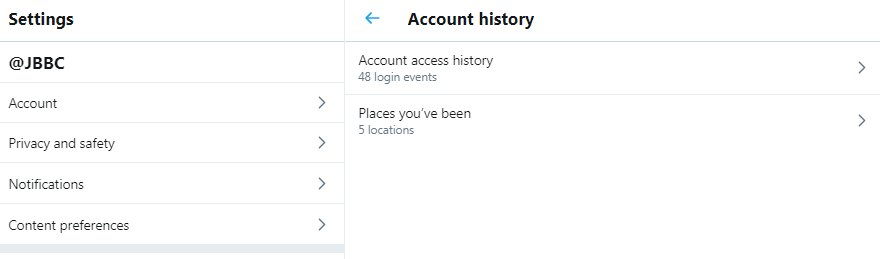
Account history: You’ll also be able to see your login history, as well as the places you’ve been while using Twitter.

download - 2020-03-26T101613.266


Apps and devices: You can also view the browsers and mobile devices associated with your account (if you are logged in) or current device (if logged out), and the apps you have connected to your Twitter account. If you see login activity from an app you don’t recognize or that looks suspicious, you can go to the Apps tab in your settings to revoke its access to your Twitter account. The IP location shown is the approximate location of the IP address you used to access Twitter, and it may be different from your physical location.

Account activity: You will be able to see the accounts you’ve blocked or muted.

Interests and Ads data: You can also see interests that Twitter and its partners have inferred about your account or current device.

download - 2020-03-26T101941.245

You can also view any Twitter advertisers who have included your account or current device in their tailored audiences. You can opt-out of interest-based advertising in your personalization and data settings. This will change the ads you see on Twitter, however, it won’t remove you from advertisers’ audiences.

70fd5d7f-6f80-4ca7-9104-5fedd0768035

Download an archive of your data: You can also download a machine-readable archive of information associated with your account in HTML and JSON files.

4aa6fc91-98fd-4ddc-8473-9fb1ce979d89

Posted in #HCSM, Thursday Tip

#ThursdayTip: How To Build Your Email List

Welcome to this week’s quick social media tip. Today I want you to think about the value of creating and growing a list of email subscribers. 

With the explosion of social media marketing in recent years, the traditional email format may appear outdated. But nothing could be further from the truth.  Even with the pervasiveness of new technology, email still remains a persuasive digital marketing channel for building awareness, boosting acquisition, and increasing conversion.

4 Reasons You Should Build An Email List

1. Email marketing helps you build relationships and credibility

People like to do business with those they know, like and trust. Email is direct, making it more personal and personalized than social media marketing. Email gives people a way to easily contact you with their questions.

2. Email marketing keeps you top of mind

Did you know that at least 91% of consumers check their email on a daily basis? While you can go for a few days without checking social media, most people check their email several times a day.

3. Email marketing is inexpensive

Email is an inexpensive way to reach people who are interested in hearing from you and communicating with them regularly.

4. You own your list

Unlike social media which is subject to change, your list is yours. in the words of Ann Handley, email is the only place where people (not algorithms) are in control. With social and other digital channels — Facebook, Instagram, LinkedIn, paid search, organic search — someone or something else decides who sees your content and when and where they see it.

5. Email marketing converts better than social media

A study by McKinsey & Company revealed that email is a significantly more effective way to acquire customers than social media. People who buy products marketed through email spend 138% more than those who do not receive email offers.

Bottom line — ignoring email as part of your marketing strategy means you are missing out on potential business opportunities.

Take Action: One of the best ways to build your list of subscribers is to offer something of value up front. This email incentive known as an “opt-in offer” or “lead magnet” is something you are willing to give away for free which requires people to provide an email address to download. Check out this list of 15 ways to create your first lead magnet.

Want to subscribe to my newsletter?

Each Monday I send out a weekly digest of social media marketing tips and the latest social media updates.

Click here to subscribe to my mailing list.

Related Reading

20 Email Marketing Dos and Don’ts for More Effective Email Campaigns


Posted in Cool Tool

Monday Morning Cool Tool: MailerLite

This week I’m recommending  MailerLite an email marketing tool that makes it easy to create landing pages, opt-in forms, and emails.

With the explosion of social media marketing in recent years, the traditional email format may appear outdated. But nothing could be further from the truth.  Even with the pervasiveness of new technology, email still remains a persuasive digital marketing channel for building awareness, boosting acquisition, and increasing conversion.

One of the best ways to build your list of subscribers is to offer something of value up front. This email incentive known as an “opt-in offer” or “lead magnet” is something you are willing to give away for free which requires people to provide an email address to download.  This is where a tool like MailerLite is helpful.

MailerLite is free for up to 1,000 subscribers.

The free plan enables you to build landing pages and start mailing your first 1,000 subscribers, but excludes live chat support, free newsletter templates, and certain other features.

Premium plans start at $10/mo for up to 1,000 subscribers, rising in increments per subscribers. Premium plans offer additional features and unlimited emails per month.

Posted in Cool Tool

Monday Morning Cool Tool: Mail Tester

download - 2019-08-11T125603.063

I love learning about new tools to make social media marketing more creative and effective, so I’ve decided to share some of my favourite tools with you at the start of each week. This week’s cool tool recommendation will be of interest to those of you who send email marketing (like newsletters) to subscribers.

Mail Tester is a free tool which tests the “spammyness” of your email. It will analyze your message, your mail server, your sending IP and assign you a spam score along with a detailed report of what’s configured properly and what’s not.

Your result will be accessible for 7 days with the free version or 30 days if you created an account and used your own prefix.

Visit https://www.mail-tester.com to try it out.


You might also like to read How to Build Your Email List On A Firm Foundation