I love learning about new tools to make social media marketing more creative and effective, so I’ve decided to share some of my favourite tools with you at the start of each week. This week’s cool tool recommendation is photo editing app TouchRetouch.
The app is designed to deal with unwanted content in photos, without having to resort to Photoshop. It allows you to remove small items from your photos by drawing over them with your finger.
This week’s cool tool recommendation is WordCounter.
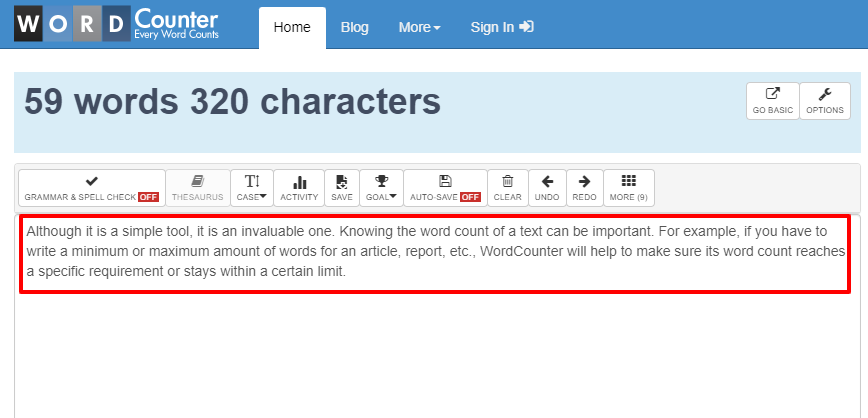
Although it is a simple tool, it is an invaluable one.
Knowing the word count of a text can be important. For example, if you have to write a minimum or maximum amount of words for an article, report, etc., WordCounter will help to make sure its word count reaches a specific requirement or stays within a certain limit.
Apart from counting words and characters, WordCounter can help you to improve word choice and writing style, and, optionally, help you to detect grammar mistakes and plagiarism.
You can also copy and paste text from another program over into the online editor above. The Auto-Save feature will make sure you won’t lose any changes while editing, even if you leave the site and come back later.
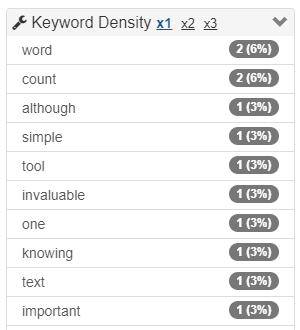
In addition, WordCounter shows you the top 10 keywords and keyword density of the article you’re writing. This allows you to know which keywords you use how often and at what percentages. This can prevent you from over-using certain words or word combinations and check for best distribution of keywords in your writing.
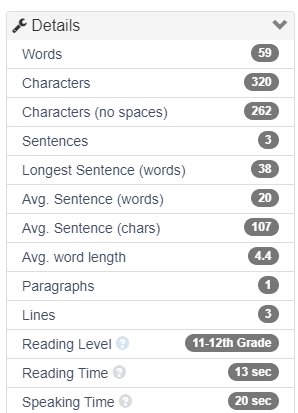
In the Details overview you can see the average speaking and reading time for your text, while Reading Level is an indicator of the education level a person would need in order to understand the words you’re using.
I’m preparing to go Live on LinkedIn this week to mark World Cancer Day on Feb 4. It is my first time going Live and I’m excited to do so. I’ll be using a third-party tool that I’ve used before for Facebook Live videos and it’s this week’s cool tool recommendation.
StreamYardis a live streaming studio which runs on your laptop or desktop. You can use it to stream directly to Facebook, YouTube, LinkedIn and other platforms. It’s great for live interviews. You can have 6 people in the stream. Up to 10 people can enter the broadcast studio (with a paid version of the tool) so you can swap people in and out if you’re doing a dynamic talk show.
Other cool features include the ability to show viewer comments on screen, add a call to action, upload your logo, images, GIFs, and even videos.
Another great feature is the ability to pre-record your “live” stream
This is a great option if you:
have a high stakes stream, and can’t afford mis-steps
are nervous about going live
can’t be online, or schedule a guest, at your normal show time.
StreamYard has both free and paid versions of the product. You can remove the StreamYard logo and upload your own. You can also add overlays and backgrounds, and use the restream integration. Full details are on the pricing page.
I love learning about new tools to make social media marketing more creative and effective, so I’ve decided to share some of my favourite tools with you at the start of each week. This week I’m recommending Twitter chat manager – Twchat.
For those who may be unfamiliar with Twitter chats, they are a public chat, moderated by a host that happens live on Twitter. To filter all the conversations a specific hashtag is used. This hashtag allows you to follow the discussion and participate in it. Most Twitter chats are recurring and focus on specific topics introduced by a moderator. The chats usually last one hour and a transcript of tweets is often made available after the chat has ended.
Twitter chats move fast, which is why using a third-party tool is useful. Twchat allows you to create real-time chat rooms based on Twitter hashtags. TwChat monitors the hashtag and creates a simple, clean interface similar to a chatroom. You can see new messages, send your own, and have total control over the content you see.
Do you use this tool or a similar one? Do you find it helpful?
I love learning about new tools to make social media marketing more creative and effective, so I’ve decided to share some of my favorite tools with you at the start of each week.
This week I’m recommending – photo editing and media sharing tool, VSCO.
The free version gives users access to standard editing tools, such as white balance, exposure, contrast and a sampling of the available presets.
VSCO saves all the photos you edit into a “studio” for you, so you’ll never lose track of any images you want to post. Users can share their images and videos to the app’s feed and/or share them directly from VSCO to other social media.
Check out a review of the app’s other capabilities here.
I love learning about new tools to make social media marketing more creative and effective, so I’ve decided to share some of my favourite tools with you at the start of each week. This week’s cool tool recommendation is Listen Notes – a free podcast search engine.
With this tool, you can not only search the whole Internet’s podcasts, but you can also curate your own podcast playlists. (Note that the Listen Notes search engine is designed to help you find content such as people topics, not specific shows.) If you’re researching a specific person or topic, the search tool can help you find related episodes from a range of podcasts. You can then add results that interest you to a playlist. After you create a playlist in Listen Notes, you receive a playlist URL that you can copy and paste into your favorite podcast app so you can listen to that playlist. You can also use the URL to share the playlist.
More cool features include the clipping feature which lets you annotate, save, and share audio clips from podcast episodes. You can add individual episodes to Listen Later playlists and bring these playlists to your podcast player apps via RSS.
The tool is totally free and if, as many people are these days, you are a podcast fan, you will want to add this tool to your toolkit.
I love learning about new tools to make social media marketing more creative and effective, so I am sharing some of my favourite tools with you at the start of each week.
This week I’m recommending VistaCreate– a graphic design tool to create eye-catching designs for social media posts.
Whether you are creating Instagram Stories, Facebook and Instagram ads, Twitter headers, YouTube thumbnails, VistaCreate gives you access to thousands of editable templates to create your design.
There is a host of other features too such as the ability to remove the background from any image, add speech bubbles, frames, text, and frames to photos. .
Pricing
The free plan allows you to download 5 designs per month. Paid plan starts at $7.99 per month which lets you download designs with no limit.
This week’s cool tool recommendation is writing tool, QuillBot.
QuillBot’s paraphrasing tool helps you rewrite and enhance any sentence, paragraph, or article using state-of-the-art AI.
One of the tools I frequently use in my writing is an online Thesaurus, so I am loving Quillbot’s Thesaurus feature. Simply click on any word in your writing to find the right synonyms and help you find your perfect word.
QuillBot integrates directly into Google Docs and I also have it installed as a Chrome Extension.
Here’s a sample piece of text that I inputted to the tool and the suggested amendents. As you can see from the top bar in the screenshot there are some other features to improve your writing further – such as expanding or shortening your sentences, but these are part of the tool’s Premium feature.
Would you be interested in trying this tool? Do you think it would be useful to you? Drop me a comment below to let me know your thoughts.
This week’s cool tool recommendation is website lead generator tool – Mailmunch.
Looking to grow your email subscribers?
Mailmunch enables users to create a variety of pop-up email forms for their website, giving you a choice of popovers, covers, scroll boxes, top bars, and embedded forms. Although they are often viewed as intrusive and annoying, website pop ups nonetheless have been been shown to work when it comes to increasing signups on websites.
This week’s cool tool recommendation is password saver – LastPass.
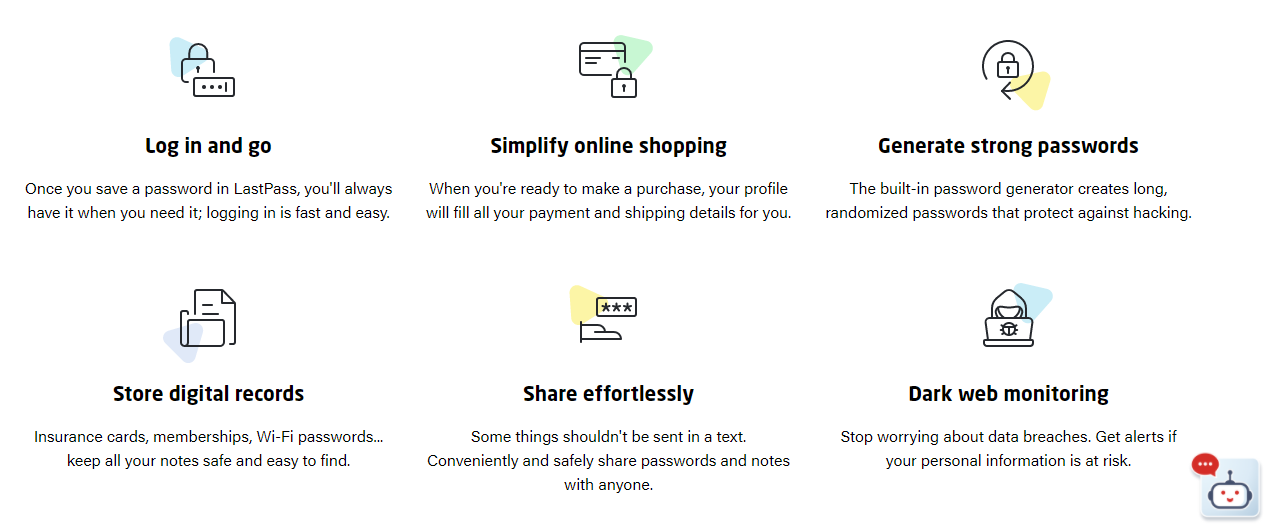
With so many logins and passwords, both personal and client-based, I couldn’t manage without this super-useful site. It allows you to create and save unique passwords for multiple websites thus enabling secure easy login and password management.
Another useful feature is that it allows you to safely share passwords without sending via text or email.
The free account is perfectly adequate but if you require more features, you can upgrade for a small fee.




 Health Care Social Media