With today’s Thanksgiving theme in mind, I’d like to share ten social media tools that I am thankful for. I’m grateful to the developers for creating such easy-to-use, free tools!
A free suite of apps that allow both web and mobile users to create and share visual content — like posts for social media, graphics, web stories, and animated videos. One of my go-to graphic tools (the featured image on this post was created using this tool).
There is so much you can do with this tool to enhance your visual marketing assets, including creating collages, adding “one-click” photo effects (there are over 300 photo effects and filters to choose from) and an array of graphics (eg speech bubbles). The basic account is free to use and provides users with access to a library of 125 digital effects.
Whether you want a Twitter post or Facebook profile picture, you can create them quickly using Canva’s drag and drop editor. Select from a number of pre-set designs, or create something from scratch. You can also add elements such as custom icons, fonts, charts, and illustrations.
This headline analyzer is a free tool from the Advanced Marketing Institute that you can use to calculate the EMV of your own headlines. It scores the EMV of your headline with a breakdown of why it scored that value.
A free writing app available as a Google Chrome Extension. Adding Grammarly to Chrome means that your spelling and grammar will be vetted everywhere you write on the web. I use it all the time and find it super useful.
A proofreading tool that clears your copy of all unnecessary copy. Just paste your text into the editor and you’ll get an analysis that highlights lengthy, complex sentences, adverbs, passive voice, and common errors.
Want to create a quick presentation? Visme makes it easy. Log in and click Presentations. Choose the template that you like and start creating your presentation right away.
This free video-editing tool is easy to use and has both basic and advanced features. The basic video editing features include adding photos, videos, music, and text. You can choose a custom theme with transitions and graphics, adjust the font, filters and graphics and personalize your story with text overlays and title slides. The interface makes it easy to reorder, trim, zoom and rotate photos and video clips.
A free stand-alone video recorder and editing app. Because the app enables you to record and edit video in one place, you don’t have to use several different apps to create your video. Features include the ability to integrate your favorite songs to your video, add subtitles and noises like applause sounds. You can also adjust video speed to slow or fast, merge multiple clips into one and choose transitions to animate between video clips.
One of the most significant developments in communication history occurred in August 1991 when Tim Berners-Lee revealed the world wide web technology he had developed at CERN in Switzerland.
With the advent of broadband internet connections and the inclusion of mobile devices into everyday life, the web has played a major role in revolutionizing our society during the twenty-first century. Mobile devices, which allow users to communicate anywhere and at any time, have greatly enhanced social media’s success. In real-time, we can talk to people we may not have met in person. With social media, we can interact and share information online more dynamically than we could with more traditional means.
The impact of social media extends not only to communication among friends, but also to communication between organizations, hospitals, and medical professionals. This change, along with the growing mobility of data, will result in significant changes in healthcare and will affect professional activities.
One of the driving forces behind a more patient-centric healthcare model is social media. With social media’s highly accessible communication tools, patients and healthcare providers can better communicate about health issues. It has the advantage of making health information accessible to more demographic groups, regardless of age, education, race, or location.
Social media tools give healthcare a unique set of opportunities, but they also present some challenges. Medicine values confidentiality, privacy, one-on-one interactions, and professional conduct. In contrast, social media is more informal and open. Further, social media tools collect, share, and promote unregulated information, so it’s inconsistent and variable.
Conducting a social media audit is a key part of a social media marketing plan.
We can waste time and resources trying to improve things that don’t need improving while neglecting the things that we really need to work on.
A social media audit is a great way to take stock of where you’re at and identify what you can improve on going forward.
List All Your Social Accounts
Create a simple excel spreadsheet and list all your social accounts, including those you set up but haven’t used in a while.
Check that you only have one business profile on each platform.
Make sure you know all the passwords for your accounts and have access to the accounts and associated emails.
Keep your passwords secure and set up a system for changing them regularly.
List all account administrators.
Do you need to change access or permissions for someone who no longer manages your accounts?
Update Your Information
Have you pinned outdated information to the top of your timelines?
Have you fully completed your About sections? Do they contain all the information a prospective customer or client would need to find out about your services?
Do your social profiles include a URL that leads back to your website?
Are your bio details accurate?
Do you need to add or change any of the existing information?
Review Your Images
Are your header images clear and compelling?
Do your cover photos needed updating? Are you still showing that summer picture now that it’s winter?
Is your image resolution good? Are you using the correct image dimensions for each social platform? Find the most up-to-date image sizes here.
How about your bio picture? Are you happy it conveys a professional image? Is it clearly visible on all devices?
Are you consistent in how you use your brand images across all platforms?
Do background colours, logos, and other images follow your branding?
Are all descriptions and URLs uniform?
If you were your ideal customer, would you be able to identify with your brand on social media in terms of image, tone, and voice?
Claim Your Vanity URLs
A vanity URL is the user name that you assign to your social media accounts which uniquely identifies you. Before you create your vanity URL, your social media profile is given a default URL that includes a string of random numbers.
Have you claimed your vanity URLS on Facebook and LinkedIn? For more information on claiming your vanity URL visit these pages at LinkedIn and Facebook.
Dig Into Your Audience Demographics
How well do you know your audience? Finding data on your existing audience will help you identify who you’re currently reaching and if they are within your target market. Use Google Analytics and built-in audience analytics features such as Facebook Insights and Twitter Analytics to dig into detailed demographic data, including countries, occupations and interests, and the gender split of your audience.
Social media is all about engaging with the right audience on the right platform at the right time. Are you sharing the kind of information your audience finds useful? Are you sharing at the right time of the day? Audit how often you are posting on each platform and List which times you are posting and the results you are getting.
Schedule posts according to effective times of day:
Determine where you are getting the most engagement and make a decision about whether to continue efforts on all platforms, or to reduce your efforts to concentrate on just one or two platforms. It’s important, especially if your resources are limited, that you’re focusing your social media efforts in places that will generate the most return for your efforts.
How engaged is your audience with you on each of your social networks?
Do your interactions seem to be coming from your target market?
Are most of your conversions coming from one network only?
Study Your High Performing Content
Review your high performing content across all social networks.
Which content worked best for you? Create more of this content in the future.
Compare your competitors’ digital footprint against your own. While it’s tempting to go straight to vanity metrics such as follower numbers, it will be of more benefit if you skip the quantitative analysis for qualitative.
Look at the type of content your competitors are creating. How often are they sharing it?
How have they chosen to use brand images?
Which influencers are they interacting with?
Are they active on networks you aren’t?
Take note of what they are doing well, and where they are lacking.
I recommend you do a comprehensive audit on your accounts twice yearly to consider any major adjustments to your strategy. In the intervening time, keep an eye on your analytics and metrics on a monthly basis. Use a reporting system to keep track of monthly changes and review these when it comes time to do your twice-yearly audit.
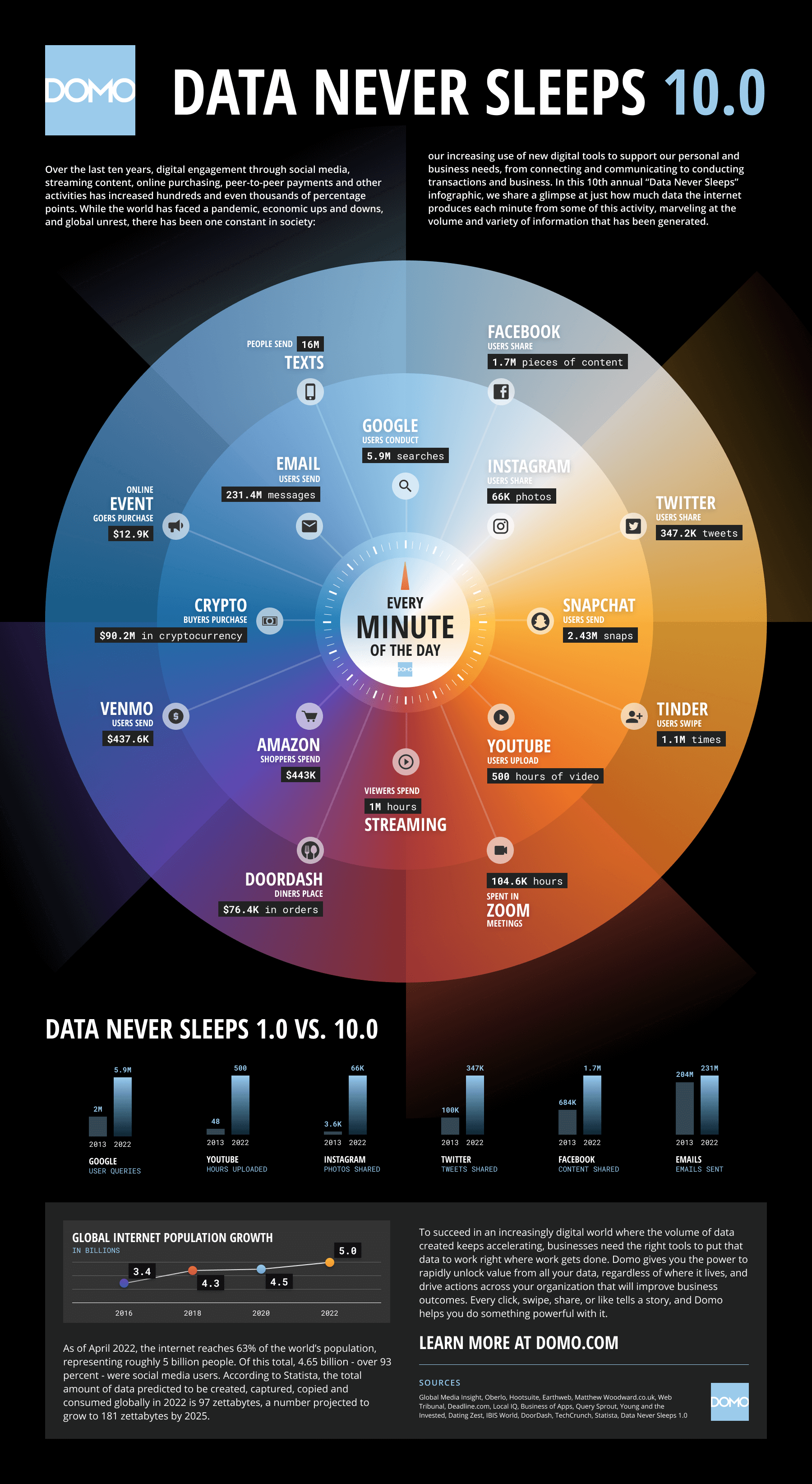
Data never sleeps and it shows no signs of slowing down. Domo
For the last few years, I’ve posted a mesmerizing graphic from Domo showing just what happens every 60 seconds online.
In this 10th annual “Data Never Sleeps” infographic, you can see how much data is accelerating, and it shows no signs of slowing down.
How far have we come in ten years?
Looking at the statistics this year, the most fascinating thing to me is how much the data has grown. You can also see that sharing of image and video content has the largest increase, while email has the smallest increase.
Welcome to this week’s social media quick tip. This week I want you to think about whether you are active on the best social network for your particular audience.
Not all social media is created equal. Different platforms attract different audiences.
It’s important, especially if your resources are limited, that you’re focusing your social media efforts in places that will generate the most return for your efforts.
There’s no point in spending your time on a particular social network if your audience isn’t there. Nor should you spread yourself too thin by trying to be everywhere at once. Every additional platform your business is active on means additional time and effort required to engage on and create tailored content for that platform.
Before becoming active on a social network, try answering the following questions to help you choose the platform that is right for you.
1. Will this platform help me achieve my marketing goals?
Setting SMART goals to which you can align your social media activity is a good guarantee of online marketing success. If you can’t explain how a particular social channel will help you to achieve your goals, then it may not be the right fit for you.
2. Is my target audience active on this platform?
The most effective social media strategies are informed by social media data. Refer to Google Analytics for your website to see which social networks are sending the most traffic to your site. Look at existing data to learn where a specific demographic spends their time online. Statista and GlobalWebIndex are good sources of worldwide statistics on Internet usage.
3. Which social networks are my competitors using?
Which social networks are your competitors using? Are they active on networks you aren’t? Use a tool like Buzzsumo to identify the social channels on which your competitors get the most shares. Chances are if these channels match your demographics and are working well for your competitors, they will work well for you also.
4. Will this platform match the content I create?
If you want your content to do well on social media, you’ve got to be strategic about what you publish and where you publish it. You need to create content that aligns with your audience’s expectations on each social channel. Identify how, when, and where your specific audience likes to engage with content. Certain content formats will be more suited to particular channels than others.
5. Can I integrate this platform with another similar one?
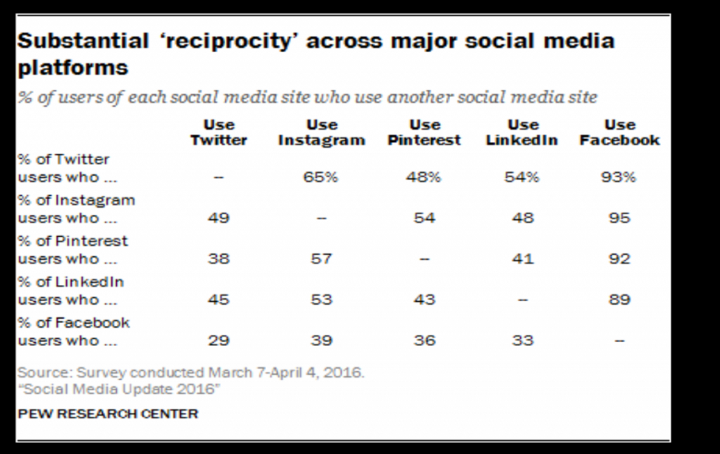
It’s better to use fewer channels well than to stretch yourself thin trying to maintain a presence on every social network. There is a degree of reciprocity between certain platforms — for example, Facebook and Instagram — the key is to choose channels that integrate well with each other to create maximum impact.
Bonus Tip!
Consider broadening your social media horizons. While Facebook, Twitter, LinkedIn, Instagram and Snapchat might be the most popular social networks in the West, there is a world beyond the Big Five waiting for you to explore.
Backed up by research from Hubspot, here are seven tips to help you drive your Twitter marketing forward.
1. Use Both “Title Tweets” and “Copy Tweets”
“Title tweets” start each word with a capital letter — just like a headline. They are tweets with just the title of a blog post or article and the link to that article. There are no extra words. However, a “copy tweet” presents the article or blog post as a sentence or question.
Hubspot’s research showed that their average tweet copy got an average of 98 clicks, while headline-based tweets got an average of 110 clicks.
Image Credit: HubSpot
Insider Tip: The fundamental rule of clickable tweets is the same as the rule of clickable headlines. No matter how amazing your content is, few people are going to click through to read it if they’re not immediately captivated by your headline. Read 15 Ways To Crack Captivating Headlines to find out more about creating better titles for your tweets.
2. Include Shortened Links
Image Credit: HubSpot
A URL shortener is an online tool that converts a regular URL into an abbreviated version that is around 10 to 20 characters long. Use a third-party tool like Bit.ly to help you do this. Here’s what a bit.ly link looks like when it’s shortened.
Insider Tip: Don’t necessarily place the link at the end of the tweet. Zarrella’s analysis of 200,000 link-containing tweets concluded that putting the link approximately 25% of the way through would achieve the highest CTR.
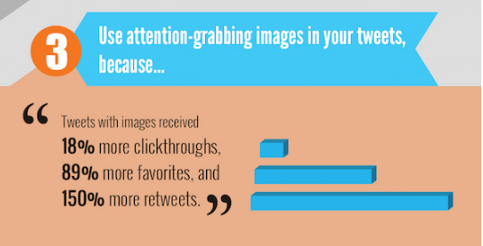
3. Add Images To Tweets
Adding visual appeal to your tweet is a smart way to make your content stand out among a sea of tweets.
Image Credit: HubSpot
Insider Tip: You can add up to 4 images to your tweets ( all you have to do is click on the photo icon after you have added your first image, then add up to 3 more images) so take advantage of this and create a carousel of images to draw a reader’s eye.
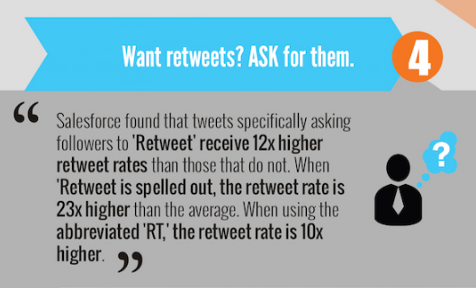
4. Ask For Retweets
Twitter uses Likes and re-tweets as indicators of popularity in the algorithm.
Image Credit: HubSpot
Insider Tip: Though I’d be wary of over-doing this strategy (from a narcissistic viewpoint) it appears that you can also increase your exposure by liking and re-tweeting your own content. An experiment from Buffer found that retweeting their own tweets generated significantly higher click-through and engagement rates.
5. Add A Call-To-Action
Image Credit: HubSpot
What kind of action do you want your followers to take when they read your tweet? Whether it’s “Sign Up Here” or “Download Now”, adding a call-to-action to your tweet increases engagement by 13% according to Hubspot.
6. Recycle Tweets
At about 18 minutes, tweets have the shortest lifespan of any social media post. Even though the latest Twitter algorithm means that posts are no longer displayed chronologically, Twitter is fast-paced, and messages get buried quickly. To counter this, you need to share your post multiple times on Twitter to increase visibility (use a scheduling tool to optimize the times you post it).
Image Credit: HubSpot
Insider Tip: Practice writing multiple versions of your tweets. Then A/B test them by changing some keywords, playing with the structure, etc. to determine which works best for your specific audience. This doesn’t mean you should post the same update every time. Using best practice headline tips, write multiple versions of tweets to post — and don’t forget to include a compelling image too.
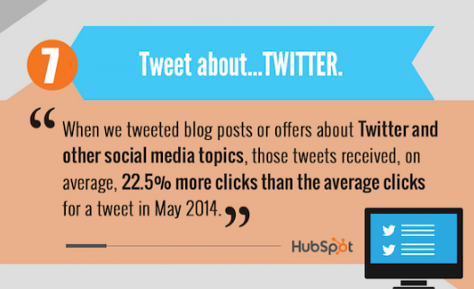
7. Tweet About Twitter
According to Hubspot, if it makes sense for your account to tweet about social media — do it. It found that their tweets that included links to blog posts and offers about Twitter and other social media topics received 22.5% more clicks on average than the average clicks for a tweet during a set period of time.
How can you talk about Twitter if your subject has nothing to do with Twitter? Try one of these:
Hey Twitter users….
Best thing on Twitter all day…
You needed this in your Twitter feed…
Twitter is raving about…
To Sum Up
The key to success with Twitter, as with life, is to work smarter not harder. Implement these tactics the next time you post on Twitter and watch your engagement rate rocket.
I love learning about new tools to make social media marketing more creative and effective, so I am sharing some of my favourite tools with you at the start of each week.
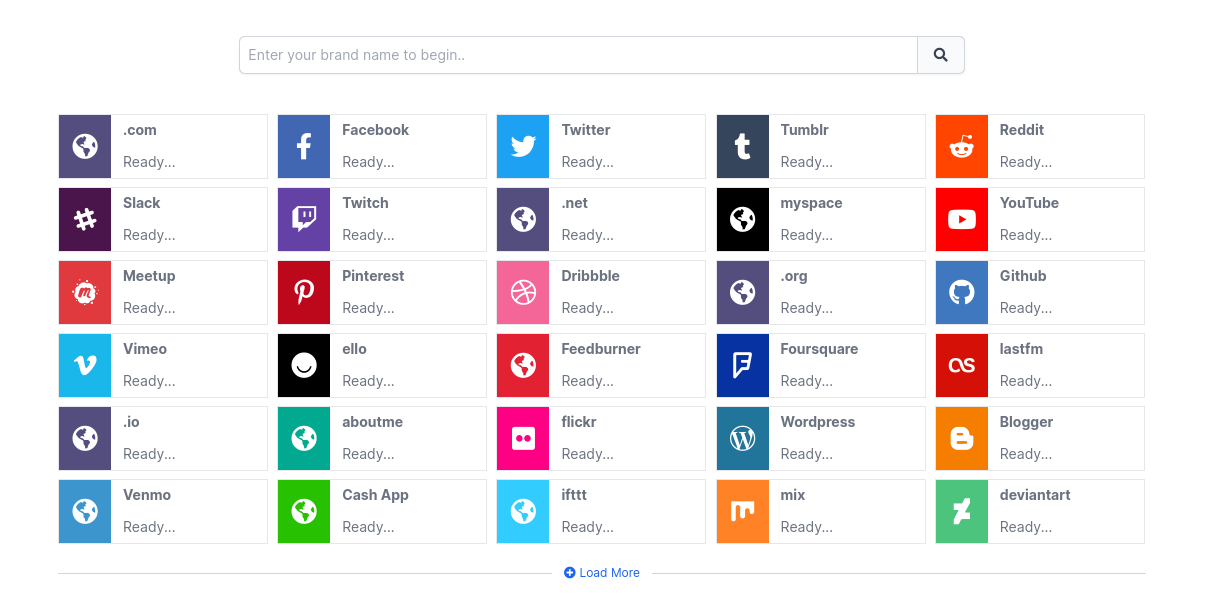
This week’s cool tool recommendation is NameCheckr – a tool to research domain and social username availability.
Picking a unique and available name can be a challenge. This tool aims to simplify that process by helping you find the best name cross the most popular social networks.
This week’s cool tool recommendation is Grammarly an AI writing assistant to analyze and corrects grammatical errors, spelling mistakes, and punctuation errors in written text.
Grammarly works by using AI algorithms that analyze text for grammatical errors, spelling mistakes, and punctuation errors. The software uses natural language processing (NLP) technology to identify and correct errors in real time.
Grammarly has a user-friendly interface that allows users to upload or copy and paste their text into the app. The software then analyzes the text and highlights errors that need to be corrected. Users can then click on the highlighted text to see suggestions for corrections.
Grammarly is available as a web app, a desktop app, and a mobile app, and it can be used with various browsers, including Google Chrome, Mozilla Firefox, and Microsoft Edge.
This post outlines ten questions you should ask yourself before using social media. Whether you are a social media beginner or a seasoned pro, the following questions and actionable steps will help you achieve success with social media.
1. Who Am I Speaking To?
Before you start planning your social media, you need to know who your audience is. To create an experience that connects directly with your audience, you have to get to know them, from their psychological behaviors to their demographics.
Create audience personas that don’t just describe your audience’s demographics, but also their challenges, dreams, hopes, and fears. You should know where your audience hangs out online, and what communities inform, inspire, and influence them.
You can identify who you are reaching and whether they fall within your target audience by finding data on your existing audience. You can do this with Google Analytics and built-in audience analytics features like Facebook Insights and Twitter Analytics.
2. Which Social Media Platforms Should I Choose?
Armed with information on who makes up your audience, the next step is to determine which social media platforms they use and direct your efforts accordingly. This doesn’t mean that you have to be everywhere at once. Do your research to determine where best to focus your social media efforts to be successful.
Use Surveys (e.g. Survey Monkey), Polls (PollDaddy; Facebook; Twitter), and publicly available reports to match your audience demographic to the social networks they use.
Goals and objectives guide every decision and tactic in your strategy. By setting clear goals, you kickstart the process of collecting data and tracking metrics, so your future marketing will be data-driven.
Goals should be as specific and trackable as possible. The more detailed your goal, the easier it will be to see if you’ve accomplished it. Use the SMART goal-setting model, which means specific, measurable, and achievable within a certain timeframe. Also, set benchmarks so you can see what’s working and what’s not so you can put more effort into what’s working.
4. What Is My Social Media Budget?
Social media requires money and man-hours. It’s up to you how you allocate them. There’s a misconception that social media is free. It’s true that all the major platforms are free, but most offer premium features you might want to check out.
It’sa good idea to budget for paid advertising, particularly if you want to make an impact on Facebook, where organic reach has steadily declined over the past few years.
5. How Much Time Can I Give To Social Media?
Time is another cost you need to factor in to the social media equation. To achieve results and credibility you have to be prepared to devote time regularly to producing and promoting content and engaging with your audience.
Ask yourself how much of a time commitment can you afford for social media? Will you concentrate on just one platform and do this really well? Do you need to hire some social media help?
The good news is that there are many ways you can actually save time and become more productive in managing your time online.All it takes is some organization, a few social media tools, and a dash of creativity.
Your answer to the previous question may influence the type of content you will create for social media. Do you have time to write regularly for a blog? Would it be better to make short videos for YouTube or to communicate through a livestream broadcast?
You also need to keep in mind the content that works best on the platforms you have chosen – for example, Facebook, Instagram and Pinterest require high-quality visuals (and increasingly this means video) to stand out. Whichever type of content you intend to create, quality and consistency are more important than quantity.
You can learn a lot by taking some time to observe what your competitors are doing online. Which social media platforms do they use? What type of content do they share? How does their audience respond to them? What are they doing really well? What aren’t they currently doing that you could do well?
Take Action! Compare your competitors’ social footprint and content against your own. How have they chosen to use brand images? How many followers/likes do they have? How often do they post? What types of posts do they create? What is engagement like for each of these post types? What aren’t they doing?
When developing your social media strategy, it’s key to clearly define roles and understand who will manage, monitor, and engage on each account. You may wish to take full responsibility for maintaining your social media presence, but if you are giving the task to someone in your organization, or hiring outside help, you need to ensure they are the right person for the job.
There are many different roles which make up a social media marketing job (for example content creation, e-mail marketing, social media management etc.). Clearly define the roles and outline the responsibilities of this position.
From a marketing perspective, social media monitoring will help you determine the impact on your product, service or brand, and if required, make adjustments to your communication, marketing or sales plans. Responding in real time and resolving issues around your brand should they arise, strengthens public perception that your focus is strongly centred on customer satisfaction.
There are many free and paid monitoring tools, with new services being added continually, which will help you track the metrics relevant to your brand across the web. The tools vary in scope and range across a number of sites, real-time or delayed searching, sophistication of analytics, flexibility of data presentation, integration with other applications, and cost. Which one you choose will depend on your budget and the level of analytics you wish to achieve.
10. How will I measure social media success?
How will you know if you achieve your social media goals? To determine how effective your social media efforts are, you will need to measure your results. Understand and track the metrics that matter to the core of the business and the bottom line. Social media metrics should always be tied to your overall business goals. Go beyond vanity metrics which merely serve as an ego-boost. Instead, ask if these metrics make an impact on your bottom line.
Take Action: Use platform native tools such as Facebook Insights and Twitter Analytics, third-party tools, and measurement of social traffic and conversion with Google Analytics to track and measure your progress.
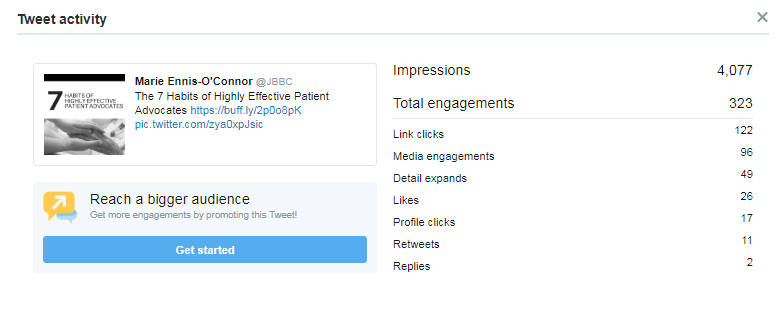
In the Twitter app for iOS or Android, tap the analytics icon visible in your Tweets. Make sure you have installed the latest version of Twitter for iPhone, iPad, or Twitter for Android.
I’m going to show you how this looks on my account on a laptop.
From here I can click into an individual Tweet to see specific data for that Tweet:
Use Twitter Analytics to track your progress over time – see which tweets resonate most with your followers, track your follower growth and more.


 List All Your Social Accounts
 Update Your Information










 Health Care Social Media