Articles

Posted in #HCSM

Click, Like, Retweet: The Role of Social Media In Maintaining Healthcare Reputation

Social media has an increasingly important role to play in maintaining a healthcare organization’s reputation and image. Not only are patients seeking health information online, but many also say their choice of a specific doctor, hospital or medical treatment is influenced by social media.

Patients are also using social media to vocalize how they feel about their doctors, drugs, treatment plans, insurance, and medical devices. Don’t think if you are not on social media, patients aren’t discussing your organization. You can’t opt-out of reputation management – whether you have a social media presence or not, a patient who has a bad experience with your organization is only one tweet or Facebook post away from sharing it with the world.

Be Proactive in Managing Your Online Reputation

It is far better to take control of your reputation by responding to these conversations yourself and correcting any misinformation or misperceptions. Responding in real-time strengthens public perception that your focus is firmly on patient satisfaction.

Remember that everything you do online – every blog post, every tweet, every conversation – is a reflection of your brand. A successful social media presence hinges on the trust between you and your followers. Becoming a trusted source of health information for your patients and proactively developing a strong, consistent, and credible image online will increase patient trust and confidence in your organization.

Social Media Is An Essential Component of Healthcare Marketing

Realising social media’s potential in healthcare requires an organizational culture that values social media as central to its overall strategy. Social media should be viewed not as an add-on, but as an essential component of healthcare marketing. Unlike traditional marketing practices that have stayed constant for decades, social media is still a relatively new marketing channel with new networks, updates, and features constantly emerging. Marketing departments need to invest more of their budget in platforms and resources that takes full advantage of the opportunities presented by social media.

Create A Winning Strategy

The best social media accounts are precisely targeted, updated frequently, and foster an ongoing dialogue with followers. that’s why it’s so important to have a plan in place at the outset and monitor, measure, and adjust your progress as you go.

Recommended Reading: How To Develop A Social Media Strategy For Healthcare Marketing

Start by optimizing your website – think of it as your home-base to which you will be directing your social media followers to find relevant and engaging information. With more people accessing the Internet via mobile devices, make sure your site is optimized for mobile viewing. to increase the likelihood that your website will be placed at the top of google search results, thereby earning you trust with your audience, consider adding a blog to your site. A blog serves to proactively show your patients that you are a trusted source of healthcare information.

Recommended Reading: 9 Proven Ways To Increase The Visibility of Your Healthcare Website

Next, put a content promotion plan in place. In today’s noisy social media world, you need to amplify your content to be heard. Make it easy for people to share your site’s content on social media by incorporating social share icons prominently throughout your website.

Create lots of visual content such as infographics and videos and encourage people to share these on social media. Post updates about your hospital’s accomplishments, showcasing ground-breaking surgeries, cutting-edge research, and the work of high- profile staff members. Cross-promote each piece of content you create but do not copy and paste the same post on each platform—format each of them to meet the requirements of the specific platforms.

Recommended Reading: 10 Places To Find The Best Free Images For Your Healthcare Marketing

At the end of each week, take time to monitor and measure the impact of your social media activity. Monitor your engagement rates and pages views to see which channels get the most attention and measure the return on investment for paid ads and social media promotions.

Wrapping Up

Social media’s influence has still not reached its peak; it will continue to disrupt healthcare in ways we are only beginning to understand. It is equally important nowadays for healthcare organizations to communicate with patients online as it is through more traditional offline channels. Knowing how to leverage this opportunity is an essential skill for the modern healthcare organization. I like to use a quote from Erik Qualman: “We do not have a choice on whether we do social media, the question is – how well we do it”.

You might also like to read Ten Top Tips To Celebrate Social Media Day 2020


This is an edited version of an article that appeared in HealthManagement, Volume 18 – Issue 2, 2018

Posted in Cool Tool

Monday Morning Cool Tool: Emojim

I love learning about new tools to make social media marketing more creative and effective, so I’ve decided to share some of my favourite tools with you at the start of each week. This week I’m recommending Emojim – a browser-based app that helps you search for the right emoji for your social media updates.

Emojim

How to use this tool

You can either scroll through the site until you find the right emoji or use the search feature to type a description of the emoji or feelings you’re looking to convey. You can also search by category, skin color, or theme.

Enjoy 😁

Posted in Thursday Tip

#ThursdayTip: How To Create Live Videos on Twitter

Welcome to this week’s social media quick tip.  This week I want to show you how to create live videos on Twitter.

With the announcement of its new live-streaming option, which will enable users to add audio-only guests into their streams, I thought it might be helpful to go through the steps needed to create live videos on Twitter. I’ve also included  instructions on how to add a guest to your broadcast and how to share your video with followers.

How to start a live video

  1. Swipe left from the home timeline or tap from the composer.
  2. Tap the live mode at the bottom selector.
  3. To go live with audio but not video, tap the microphone at the top right. This will turn off the camera, and you’ll be heard by viewers, but not seen.
  4. Fill in an optional description that will appear as a Tweet, and a location if desired. Then press Go live.
  5. Your live broadcast, with description and location (if added), will appear in a Tweet in your follower’s timeline and on your profile.

How to end a live video

You can end a live video at any time by pressing the Stop button on the top left and confirming your action in the menu that comes up. Your live videos will automatically be posted as a Tweet when you go live. You can also save your live video right to your device’s camera roll at the end of your live video by tapping Save to camera roll.

How to add a guest to live video

D7v4yilXYAIbAxQ

When enabled, viewers of the live broadcast can request to join as a guest. Up to 3 guests can participate in a live broadcast at one time. Broadcasters can choose to turn off the camera, and participate as audio only. Guests will participate with audio, and can be heard by all viewers.


To start a live broadcast with guests:

  1. Open the camera by swiping left from your timeline.
  2. Tap the Live mode at the bottom.
  3. To allow live viewers to request to join your broadcast, tap the icon on the upper right.
  4. Tap Go LIVE to begin your broadcast.
  5. When a viewer has asked to join your broadcast, a notification will appear in the chat. You can also view the call-in list by tapping the icon on the bottom bar and see every viewer who has requested to join the broadcast.
  6. Tap the ± to add them to the broadcast. There will be a 5 second countdown before they join.
  7. To remove a guest from the broadcast, tap the X on the top right of their avatar.

To join a live broadcast as a guest

  1. While watching a live broadcast that has guests enabled, tap the icon, then tap Ask to join.
  2. The broadcaster must approve your request to join as a guest.
  3. Once accepted, a 5-second countdown will appear onscreen before you are added to the broadcast. If you choose not to join, tap Cancel.
  4. Your audio will be heard by all viewers of the broadcast.

To leave the broadcast as a guest

To exit the live broadcast as a guest, tap on the icon on the bottom, and select Hang up, or simply tap the X at the top left of the screen. When you leave the broadcast as a guest, you can continue to watch the live broadcast as a viewer.

How to share a live broadcast or replay

Your live video can go anywhere that a Tweet can go. This means that it’ll be searchable in the Twitter app, on the Twitter website, and it can be embedded on other websites just like any other Tweet. It will also exist and be searchable on Periscope, which powers live videos on Twitter.

From the live video or replay full-screen mode, click or tap the share icon then choose between the following options:

  1. Click or tap Share Live (when live) or Share From Beginning (when in replay mode) to Tweet, Direct Message, or copy the link of a full live video or replay from the beginning.
  2. Click or tap Share from… to Tweet, Direct Message, or copy the link of a live video or replay starting at a point chosen using the selection bar.

How to edit your videos

In the Twitter for iOS and Android apps, you can change the title, thumbnail image, and set a custom starting point after ending a broadcast. To get started, tap on the broadcast you’d like to edit. Tap on the overflow menu, then tap the Edit Broadcast option. Once you make your changes you’ll be prompted to save.

Keep in mind that broadcast titles can only be edited up to three times. Additionally, it will take up to 15 minutes for edits to appear in Twitter, and up to a minute for them to appear in Periscope.

Here’s to your social media success!

Posted in Cool Tool

Monday Morning Cool Tool: Link Checker

This week’s cool tool recommendation is Link Checker

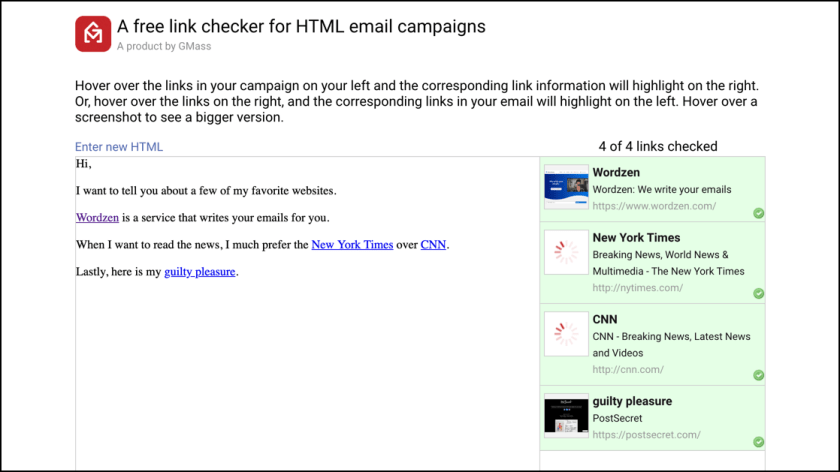
An invaluable tool for email marketing, use it to easily check all the links in an HTML email campaign you’re about to send.

Here’s how it works. 

Just paste the HTML for your next email campaign into the tool. All links are automatically checked, and the title and screenshot of each webpage is shown.

Link-Checker-Social

How does this help you?

If you generally have lots of links in your email campaigns, then this tool ensures that:

  1. Your links are valid and not broken.
  2. Your links point to where you intended. Often when setting lots of links in an HTML email campaign, it’s easy to make a copy/paste mistake and set the anchor text to point to the wrong URL. With the automatically generated screenshots, you can quickly see if you made a mistake.

This tool is free to use, and can be used with any email marketing service like MailChimp or Constant Contact.

Posted in #HCSM

Social Media in Dermatology: A Review of Current Usage

In dermatology, as in other medical specialties, social media has become a platform for patient education, public outreach, and professional development and networking.

A review article published in Dermalogica Sinica sets out to investigate the use of popular social media platforms within dermatology along with the potential benefits and harms of these platforms when used by dermatology providers and their patients. 

Dermatology and Facebook

Facebook remains the most popular social media platform worldwide, with over 1.8 billion monthly active users. In the health-care field, Facebook introduces many new opportunities for networking, professional education, and patient education.

In a 2012 study, [1] Amir et al. showed that almost 13% of dermatology journals were present on Facebook and that number has increased to almost 18% in 2017.   Professional dermatology organizations have also increased their public and professional engagement through Facebook. Popular professional dermatology organizations with the most likes on Facebook include dermRounds, Dermatology, American Academy of Dermatology, and Associated Skin Care Professionals.

Facebook has also been used as an educational platform with the goal of helping providers to provide the highest-quality care to patients. Groups like DermLife and The Dermapaths, a group specifically for dermatopathologists, promote this goal. Another group, The Dermatologists, focuses on providers helping one another with particularly difficult cases.

The communication capabilities of Facebook are also used to improve medical education. In dermatology, reports describe the benefit of visually-oriented social media platforms, such as Facebook for use in medical student education.[2] Moreover, Facebook has found an avenue to enhance patient education and in some cases, patient care. There has been an increase in the number of dermatology journals and patient-centered groups that use Facebook to help educate the public. One study assessing public engagement using Facebook found online educational posts most effective.[3]

Dermatology and YouTube

YouTube is the second-most popular website in the world, hosting over 30 billion monthly users with an average viewing session of 40 min.   The presence of dermatology on YouTube is increasing, with most of its content being educational or advocacy.  One dermatologist, Dr. Sandra Lee (aka Dr. Pimple Popper), uses YouTube to post educational videos and interact with her audience of more than 5 million subscribers. This increase in availability of dermatologic information on YouTube demonstrates an opportunity for HCPs to inform the public about popular dermatologic topics.

Dermatology and Instagram

Instagram is a popular photo and video sharing media platform among teens and young adults.  Instagram “hashtags” allow users to search for and identify content related to a specific topic. In one study, researchers showed that the top three dermatology-related “hashtags” included #acne, #alopecia, and #eczema.[4] Physicians of all medical specialties including dermatologists have created Instagram profiles that allow their followers to see before and after procedure photos, patient education material, and advertisements for cosmetic lines and in-office promotions. In the academic environment, Instagram is used to connect and inform students of events, announce services, and provide public education; however, this tool is underutilized in dermatology. One study found that 7% of dermatology departments have an Instagram profile.[5] A recent study found that 5% of dermatologic focused Instagram posts were made by a board-certified dermatologist.[6] 

Dermatology and Twitter

In dermatology, Twitter has become a popular platform for users to communicate dermatologic concerns. One study shows that almost 85,000 tweets over a 1-year period communicated personal concerns with skin disease [7] while another study shows that the most common type of re-tweeted tweets (43.1%) are about acne.[8] Furthermore, medical schools have begun using Twitter to increase student engagement. For example, Northwest Ohio Medical University used twitter to post weekly dermatology quizzes and successfully increased student engagement from 23.8% to 55.9%.[9]  The authors note, one of the biggest challenges facing Twitter is the dissemination of misperceptions related to dermatologic diseases. With such a large young adult population communicating information through Twitter, there is a significant amount of incorrect information, empirical data, and myths circulating that may influence a patient’s approach to dermatologic concerns.[10]

Dermatology and Reddit

Reddit is a website that allows users to join communities of people with similar interests to share and learn information. There are over 150,000 “subreddits” containing threads of comments pertaining to a particular topic where users are able to comment and communicate with one another. Dermatology has several subreddits with the most common being cosmetic advice, disease identification, and medications.  The authors again point out that Reddit presents challenges as it allows members to post responses to medical questions, thus introducing the possibility for the dissemination of inaccurate or dangerous medical advice. But counter this by highlighting Reddit’s opportunity as an entry point for physicians to provide accurate information and dispel false information, promoting knowledge about common dermatologic topics as a public health measure.[11]

Dermatology and Pinterest

Pinterest started in 2009 as a platform designed to share images, GIFS, and videos.  Users are able to upload images, “pin” images, and create “boards” (collections of pins). With respect to dermatology, studies show that informative pins, advocacy, and home remedies compose the majority of dermatology related “pins” and “boards.” However, it is important to note that only 24% of these “boards” were created by M.D.s or advocacy organizations.[12]

Dermatology and Snapchat

Snapchat, developed in 2011, is a social media application that allows users to share photos and videos with other users for twenty-four hours. Snapchat’s interface of quick 10-second stories captures the attention of the audience and the story features allow millions of people to view the same story posted by a particular user. For example, Dr. Michael Salzhauer (a plastic surgeon better known as Dr. Snapchat) posts his surgeries live and receives over 700,000 views/day. He uses Snapchat as a tool to educate the public as well as generate new clientele, as over 60% of new patients in his office come from Snapchat and other social media.[13] The potential benefit of social media, specifically Snapchat, is clear in healthcare, but the use of Snapchat in dermatology is lagging behind that of other healthcare fields.

Social Media Opportunities in Dermatology

The study authors believe “there is a great opportunity for health care providers to enhance communities and disseminate information at a greater, more efficient rate, through platform interoperability. Improved interoperability would also allow for greater patient recruitment and social media-based research.”

Each platform is designed to function independently; however, there is a degree of interoperability among platforms, of which there is incredible potential.

An additional opportunity for social media in dermatology is patient recruitment for clinical research.

Considering each clinical study has a target population, social media provides tremendous opportunity to gather a large volume of patients.

Finally, dermatologic based social media communication, research, and outreach has tremendous value from a public health perspective.

Social media is one of the fastest means for the dissemination of information, especially when content goes “viral.” In fact, the dissemination of public health knowledge through social media platforms has demonstrated a positive impact on health outcomes and patient behaviors.

Challenges of Social Media and Healthcare

Among the challenges presented by social media in a healthcare context, the authors point to biased demographics.

The majority of social media users are white women between the ages of 30–49. [14] Therefore, social media-based research must be cognizant of the inherent biases that may be present.

Not surprisingly the authors consider “the most concerning challenge of social media use in healthcare is the spread of unreliable and sometimes incorrect medical information.”

Most authors of medical information on social media platforms have unverified credentials and are generally underqualified. Furthermore, the information put forth on these platforms is often incomplete, unreferenced, and based on personal anecdotes.

While most medical literature is evidence-based, medical information through social media focuses on individual stories and experiences that may not be generalizable to the population at large.[15]

Furthermore, professionalism is an additional, ongoing concern with the increased use of social media platforms. Other challenges of social media use in healthcare are centered on patient privacy and violations between patient-provider interactions. Social media has brought forth new challenges in this respect, specifically HCPs using identifying patient information in public posts. In one study, it was found that 17% of blogs written by HCPs describing individual patients had enough information to identify the patient or the provider.[16]

Further Reading: Social Media: Professional Boon or Bane? It’s Complicated

Conclusion

The authors conclude, these risks aside, the opportunity to promote public health, patient education, and professional interactions is impactful and should not be missed.

With 80% of people searching the Internet for health information, there is an onus on HCPs to maintain a presence on social media wherever possible to dispel misinformation and circulate evidence-based knowledge.

Notes

This is an edited version of the original review which can be accessed in full here.

[1] Amir M, Sampson BP, Endly D, Tamai JM, Henley J, Brewer AC, et al. Social networking sites: Emerging and essential tools for communication in dermatology. JAMA Dermatol 2014;150:56-60.

[2] Enhancing dermatology education with social media platforms: Are we there yet? J Am Acad Dermatol 2018;79:AB129.

[3] Enhancing dermatology education with social media platforms: Are we there yet? J Am Acad Dermatol 2018;79:AB129. Back to cited text no. 12.

[4] Braunberger T, Mounessa J, Rudningen K, Dunnick CA, Dellavalle RP. Global skin diseases on instagram hashtags. Dermatol Online J 2017;23. pii: 13030/qt7sk410j3.

[5] St Claire KM, Rietcheck HR, Patel RR, Dellavalle RP. An assessment of social media usage by dermatology residency programs. Dermatol Online J 2019;25. pii: 13030/qt5v62b42z.

[6] Park JH, Christman MP, Linos E, Rieder EA. Dermatology on instagram: An analysis of hashtags. J Drugs Dermatol 2018;17:482-4.

[7] Sarker A, Magge A, Sharma A. Dermatologic concerns communicated through twitter. Int J Dermatol 2017;56:e162-3

[8] Shive M, Bhatt M, Cantino A, Kvedar J, Jethwani K. Perspectives on acne: What twitter can teach health care providers. JAMA Dermatol 2013;149:621-2.

[9] Kunzler E, Graham J, Mostow E. Motivating medical students by utilizing dermatology-oriented online quizzes. Dermatol Online J 2016;22. pii: 13030/qt0p31j0z8.

[10] DeBord LC, Patel V, Braun TL, Dao H Jr. Social media in dermatology: Clinical relevance, academic value, and trends across platforms. J Dermatolog Treat 2019;30:511-8.

[11] Buntinx-Krieg T, Caravaglio J, Domozych R, Dellavalle RP. Dermatology on reddit: Elucidating trends in dermatologic communications on the world wide web. Dermatol Online J 2017;23. pii: 13030/qt9dr1f7x6

[12] Whitsitt J, Mattis D, Hernandez M, Kollipara R, Dellavalle RP. Dermatology on pinterest. Dermatol Online J 2015;21. pii: 13030/qt7dj4267p

[13] Patel S, Bewley S, Hodson N. Snapchat is not for sharing. BMJ 352 (2016): i1543

[14] Sadah SA, Shahbazi M, Wiley MT, Hristidis V. A study of the demographics of web-based health-related social media users. J Med Internet Res 2015;17:e194.

[15] Pirraglia PA, Kravitz RL. Social media: New opportunities, new ethical concerns. J Gen Intern Med 2013;28:165-6.

[16] Chretien KC, Kind T. Social media and clinical care: Ethical, professional, and social implications. Circulation 2013;127:1413-21
 

Posted in #HCSM, SEO

Why and How You Should Optimise Your Medical Website For Local Search

“Near me” searches have grown consistently since 2013, according to Think With Google

Your website is the hub of your digital efforts. You want your site to be optimized for search keywords, usability, and content. Doing so will help your website appear further up Search Engine Results Pages (SERPs) for the services you offer, and help increase the likelihood that users will remain on your site and get to know you better.

In the current digital age, most people find the services they are looking for, including healthcare, through search engines.  If you want more people to find you online, you need to optimize your website through good search engine optimization practices.

And if you want to attract new patients, your website also needs to be optimized for your local area. When someone uses the internet to locate a Medical Practice nearby, it’s critical that your website appears in those results (searches on mobile devices containing the phrase “near me” has skyrocketed in recent years).

internet-trends-report-2018-192-1024 (1)

In recent research carried out by BrightLocal, consumers were asked how they used voice assistants and voice search for local business. The top three most demanded voice search functions involve finding restaurants, grocery stores, and food delivery, with clothing, accommodation, and medicine following closely behind.

what-consumers-want-voice-search.png

The Voice Search for Local Business Study also revealed that 46% of voice search users use voice search to find local businesses daily.

how-often-do-people-search-for-local-businesses-using-voice-search.png

There are a few ways you can drive local engagement via digital channels. Here are a few tactics you should consider integrating into your local marketing strategy:

1. Create targeted advertising campaigns

Digital search or display ads offer you an excellent opportunity to target your audience using various parameters. You can leverage digital ad networks, such as Google Ads, and serve ads only to people within a specific geographic location, such as your town/city.

2. Develop a local SEO strategy

When creating content for your website, it’s useful to include long-tail keywords with your geographic location. Make sure your meta descriptions and keywords include location information. Include your location information on every page of your website, either in the header, footer, or elsewhere on the page. If you have more than one office location, have a separate webpage for each site and include the address and location for each. Finally, include Google maps and/or directions to your office

2. Claim Your Google My Business Listing

Google My Business (GMB) is a free, simple to use tool that allows small business owners  to increase their online visibility and promote their business information on Google Search.According to Google “Providing and updating business information in Google My Business can help your business’s local ranking on Google and enhance your presence in Search and Maps.”

GMB appears on desktop – just to the right of the organic and paid search results. If you’re on mobile, it appears as a top result before the organic results. If you haven’t set up your GMB listing, it’s time to do so. Follow these step-by-step instructions to get started right away.

Once you’ve set up your account, it’s time to optimise it. An optimised page helps Google understand more about your business: who you are, what services/products you sell, where you’re located, etc. The more Google knows about you, the more types of searches your GMB listing can appear in.

Conclusion 

Your website is pivotal to your digital marketing strategy. And with more patients than ever searching online for you via mobile devices, it’s imperative that your website is optimized for them to find you.  It takes time and resources to optimize your site to deliver the best experience possible, but if you are serious about how your business performs, you need to get serious about the performance of your website too.


Sign up for our mailing list to get helpful tips for growing your practice.

Further Reading: 

Posted in Cool Tool

Monday Morning Cool Tool: Related Words

I love learning about new tools to make social media marketing more creative and effective, so I’ve decided to share some of my favourite tools with you at the start of each week.

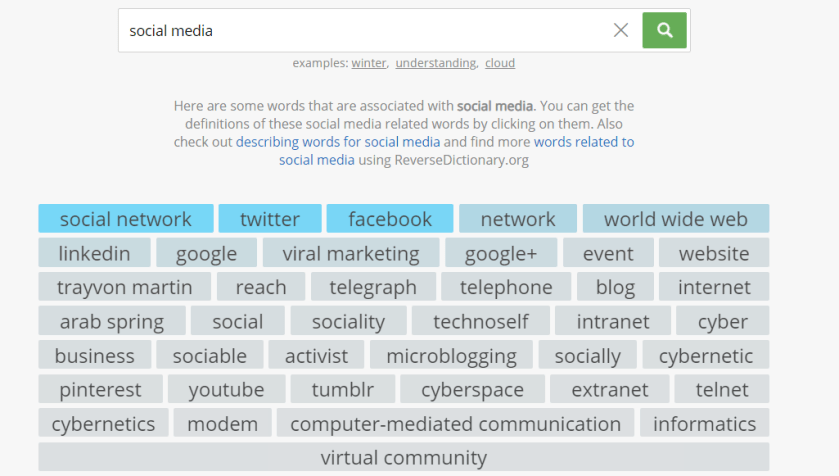
This week’s cool tool recommendation is Related Words a tool to help you find words that are related to a specific word or phrase.

Here’s how it works using the search term “social media” to illustrate.

5be6fdcc-6170-4778-9a9e-6d36fc58ad1c

Use this tool to help brainstorm content ideas and keywords for your social media marketing.


Posted in #HCSM, Thursday Tip

#ThursdayTip: How To Assign Admin Roles on Facebook

Welcome to this week’s social media tip. Today I want you to show you how to assign admin roles on your Facebook Page. 

Facebook allows five different administrator roles: admin, editor, moderator, advertiser and insights analyst. Each role has different capabilities.

27405598-3f14-4948-9887-fe65bb311b81

Admin can manage all aspects of the Page. They can publish and send Messenger messages as the Page, respond to and delete comments on the Page, post from Instagram to Facebook, create ads, see who created a post or comment, view insights, and assign Page roles. If an Instagram account is connected to the Page, they can respond to and delete comments, send Direct messages, sync business contact info and create ads.

Editor can publish content and send Messenger messages as the Page, respond to and delete comments on the Page, create ads, see who created a post or comment, post from Instagram to Facebook, and view insights. If an Instagram account is connected to the Page, they can respond to and delete comments, send Direct messages, sync business contact info and create ads.

Moderator can send Messenger messages as the Page, respond to and delete comments on the Page, create ads, see who created a post or comment, and view insights. If an Instagram account is connected to the Page, they can respond to Instagram comments, send Direct messages and create ads.

Advertiser can create ads, see who created a post or comment, and view insights. If an Instagram account is connected to the Page, they can create ads.

Analyst can create ads, see who created a post or comment, and view insights. If an Instagram account is connected to the Page, they can create ads.

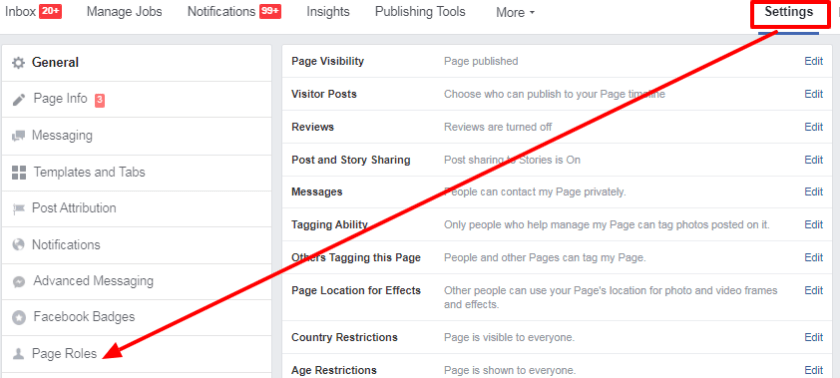
To assign a role go to Settings on your Page, and click on Page Roles. Scroll down through the options above to choose which roles you wish to assign to your team members.

1693526a-0455-4aa9-baa9-c9bc64d55a5b

Here’s to your social media success!

Posted in #HCSM

How Social Media Can Inform Public Health Education and Outreach During COVID-19

A machine learning scan of popular social media platforms could help inform public health education and outreach during Covid-19, according to a new study published in the Journal of General Internal Medicine.

The study measured daily changes in the frequency of topics of discussion across 94,467 COVID-19-related comments on Reddit* in March, 2020 to test the following hypotheses:

  • The pandemic has been accompanied by an “infodemic,” an overabundance of information and misinformation.
  • Public response to the pandemic and infodemic is important, but undermeasured.
  • Real-time analysis of public response could lead to earlier recognition of changing public priorities, fluctuations in wellness, and uptake of public health measures, all of which carry implications for individual- and population-level health.
*Reddit is the 19th most popular website in the world with 420 million monthly active users.

The study identified topics that fell into three categories of interest, tracking daily variations in the average prevalence of topics across all comments.

  1. response to public health measures
  2. impact on daily life
  3. sense of pandemic severity.

Results

52f4e2e4-bbe0-4b90-912b-461f135817ae

This analysis indicates that longitudinal topic modeling of Reddit content is effective in identifying patterns of public dialogue and could be used to guide targeted interventions.

Early recognition of this reality could have led to more specific information dissemination campaigns and earlier public acknowledgment of disease severity.

Questions about safely spending time outdoors peaked in mid-March, representing a missed opportunity for public guidance.

Tracking and responding proactively to common questions, such as what material is best used for a homemade mask, may minimize the spread of misinformation.

Notably missing from these Reddit topics were discussions of contact tracing, a growing area of public concern.

Stokes, D.C., Andy, A., Guntuku, S.C. et al. Public Priorities and Concerns Regarding COVID-19 in an Online Discussion Forum: Longitudinal Topic Modeling. J GEN INTERN MED (2020). https://doi.org/10.1007/s11606-020-05889-w

Notes

Limitations of this study include that Reddit users are not representative of all segments of the population, and that Reddit data is not associated with a geographic location. Real-time monitoring of online COVID-19 dialogue holds promise for more dynamically understanding and responding to needs in public health emergencies.

Further Reading  

Infodemic investigation: Facebook is biggest source of false claims about coronavirus

NUI Galway Study Finds the Sharing of COVID-19 Misinformation linked to Social Media Overload and Trust in Online Information

Disinformation, Misinformation and Inequality-Driven Mistrust in the Time of COVID-19: Lessons Unlearned from AIDS Denialism


Posted in Thursday Tip

#ThursdayTip: How To Analyze What’s Working For Your Competitors

Welcome to this week’s social media quick tip.  This week I want to show you how to analyze what’s working for your competitors and industry peers.

Your competitors and industry peers are valuable sources of insight. Look at the type of content your competitors are creating. Identify which content is performing well for them in terms of social shares, comments, likes, etc. Now, brainstorm around how you can take a piece of content they have created and put your own unique twist on it.

How to do this

Facebook provides an excellent feature to help you “spy” on your competitors with its Pages to Watch feature. To access Pages to Watch, go to your Facebook Page Insights and scroll down to the bottom of the Overview tab.

download - 2019-08-29T104536.596

Here’s to your social media success!