Articles

Posted in Cool Tool

Monday Morning Cool Tool: Unfold

I love learning about new tools to make social media marketing more creative and effective, so I’ve decided to share some of my favourite tools with you at the start of each week. This week I’m recommending photo editor  Unfold – an app to help you easily create and edit Instagram Stories templates.

download - 2019-11-29T134700.069

Once downloaded you can choose from a wide range of 150+ templates to add pages to an Unfold story,  use advanced text tools with curated fonts and add unique stickers and export your stories in high resolution for seamless sharing to Instagram.

·The app is free- however, some of its templates do require in-app purchases to unlock.

Posted in Cool Tool

Monday Morning Cool Tool: Over

I love learning about new tools to make social media marketing more creative and effective, so I’ve decided to share some of my favourite tools with you at the start of each week. This week I’m recommending free photo editing app Over

5c9b768ffeba5a2c10897461_premium-content@2x-min

This tool allows you to add text and captions to your photos, but equally, you get full access to stock photography on Unsplash, Pixabay and Google Images. Use it to create eye-catching designs and make them your own with our blending and masking tools, and use layers to edit elements in isolation.


Posted in Thursday Tip

#ThursdayTip: How To Post To Social Media At The Best Times

Welcome to this week’s social media quick tip.  This week I want to show you how to post to social media at the best times. 

Content has no value unless it’s amplified. One way to ensure amplification and optimize your social media reach is to post your content at the right so they reach your audience when they are online.

If you search for optimum posting times, you will find many guides online. You can follow these recommendations as a starting point, but I do recommend you do your own testing to see which days and times work best for your own particular audience within your industry.

One of the most comprehensive guides to the best times to post for the major social platforms is this one from Sprout Social.

Some of the top-line stats at a glance are listed below. These are global visualizations — for a more granular and industry-specific focus see the report in full.

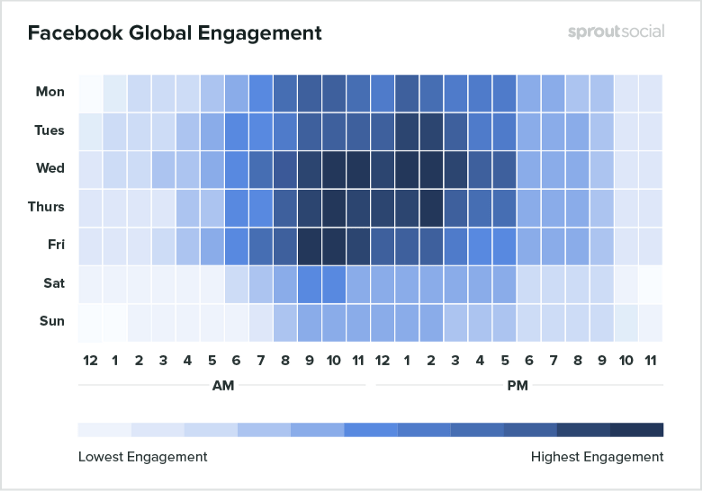
Best times to post on Facebook

1_KlPRovYCuYnHNjBjVzaT1A (1)

  • The best times to post to Facebook are Wednesday at 11 a.m. and 1 p.m.
  • Wednesday is the best day to post on Facebook.
  • The safest times to post are weekdays from 9 a.m.–3 p.m.
  • Sunday has the least amount of engagement for Facebook during the week.
  • Early mornings and evenings, before 7 a.m. and after 5 p.m. have the least amount of engagement per day.

Best times to post on Instagram

1__7s826QfiURRuNpAAMqyEA

  • The safest times to post are Monday through Friday, 11 a.m.–5 p.m.
  • Another higher engagement time period occurs on Saturday around 10 a.m.
  • Sunday has the least engagement, as well as every day from 11 p.m–3 a.m.

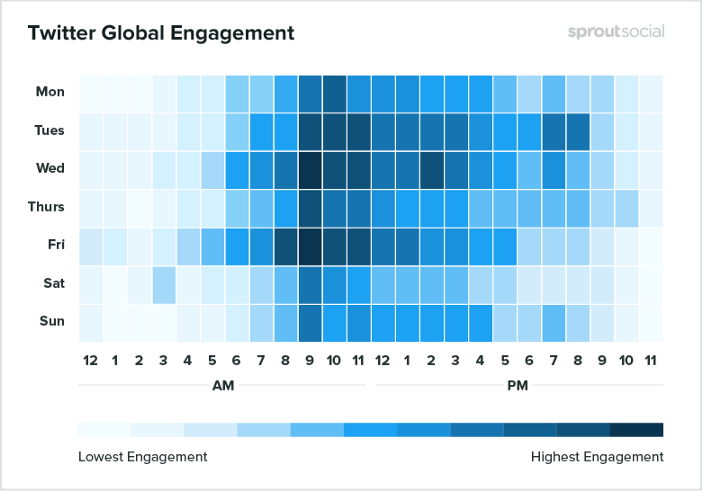
Best times to post on Twitter

1_aRFWZaSkpXwZsJveNDcAeA

  • The best times to post on Twitter are Wednesday at 9 a.m. and Friday at 9 a.m.
  • Tuesday and Wednesday are the best days to post on Twitter.
  • The safest times to post are Monday through Friday from 8 a.m.–4 p.m.
  • Saturday gets the least engagement.
  • Times to avoid that get the lowest engagement are every day from 10 p.m–4 a.m.

To sum up

Consistent social sharing can help you stay top of mind with your audience. It’s a common mistake to only post content once and then not again. To get the most engagement, visibility and reach, reshare your content on multiple networks at various times and in different ways. Vary your updates when you do — for example, highlight a different statistic or quote, or ask your audience a question.

These data points are general but they provide a good starting point to start testing your audience engagement. Try them for a month, take note of your findings and see if your engagement shifts at the end of the month.

Here’s to your social media success!


Posted in Cool Tool

Monday Morning Cool Tool: Rank Tracker

I love learning about new tools to make social media marketing more creative and effective, so I’ve decided to share some of my favorite tools with you at the start of each week. This week I’m recommending keyword ranking tool  – Rank Tracker.

Use this tool to track keywords with no limit, check positions in SERPs, see rankings for the exact location, and analyze the ranking performance of any keyword — all in one ranking tool.

23 keyword tools in one

All the top keyword research tools are integrated right into the Rank Tracker keyword rank tool. Used together, these sources will give you thousands of keywords you wouldn’t have found elsewhere on the web.

screen-03

As you find keyword ideas, the tool will automatically group them by topic, so you can analyze and target entire keyword groups instead of going through bulks of terms one by one.

Geo-specific rankings

Rank Tracker is the only local rank tracking software that accurately checks positions for the exact location of your choice: country, state, city, or even an exact street address.

Keyword analysis

The keyword position checker will not only find thousands of keywords for your site; it’ll also help you pick the best ones and prioritize them for targeting.

screen-04

In addition to such SEO metrics as search volume data and competition, the rank checker can calculate Keyword Difficulty for every term — a complex metric that takes into account all SEO strengths and weaknesses of the sites of your top 10 competitors.

Competitive SEO intelligence

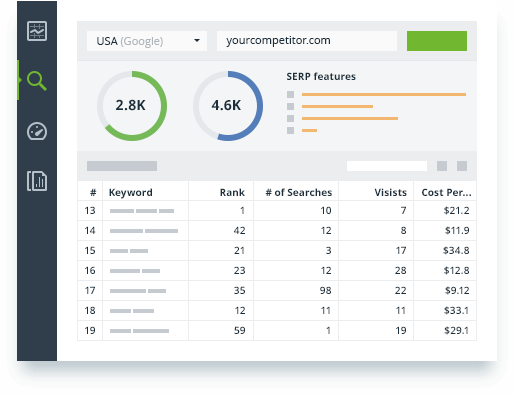
The keyword rank checker lets you track competitors’ keyword tactics and see how well they’re doing in organic search results. The rank checking software will track keywords your competitors already rank for. Analyze their valuable SEO metrics and weigh your chances to rank for those keywords as well.

ranking-keywords


Download Rank Tracker at www.link-assistant.com/rank-tracker

Posted in Cool Tool

Monday Morning Cool Tool: Keyword Tool

I love learning about new tools to make social media marketing more creative and effective, so I’ve decided to share some of my favorite tools with you at the start of each week. This week I’m recommending keyword tool  – Keyword Tool.

download - 2020-04-04T093638.936

You can use Keyword Tool for free, even without creating an account. The free version of Keyword Tool generates up to 750+ long-tail keyword suggestions for every search term.

You can also use the tool to find popular Twitter and Instagram hashtags. If you’re looking for keywords for your YouTube videos, Keyword Tool uses YouTube autocomplete feature to generate highly relevant long-tail keywords about a particular topic.  Keyword Tool for YouTube helps you get over 750+ long tail keywords from YouTube autocomplete by appending and prepending the keyword that you specify with various letters and numbers. To make keyword suggestions more relevant, Keyword Tool allows you to localize results to all countries and languages supported by YouTube.


Posted in #HCSM

Do Online Health Seekers Trust Social Media?

A survey profiling how American adults access, use and feel about health-related information finds that most Americans who regularly seek health information are concerned about incorrect or misleading medical information on social media, and few have found health information on social media to be accurate.

These findings are consistent across generations. The survey, The Great American Search for Healthcare Information, was conducted among 1,700 Americans 18 years of age and older. It was commissioned by global communications and marketing services firm Weber Shandwick in partnership with KRC Research.

I find the results of this survey very interesting for a number of reasons. 

Firstly, it’s interesting to learn that the majority of online health seekers are concerned about incorrect or misleading medical information. This reassures me in a way because it means that, contrary to the pervasive belief that the public believes everything they read online, people are actually far more discerning.

It also underscores for me that patients aren’t looking to supplant knowledge from healthcare professionals with the information they find online. They still look to their healthcare providers as the source of credible health information.

1.jpg

Note that nurses, pharmacists, and eye doctors score higher than medical doctors in terms of satisfaction. This finding surprised me. The survey suggests that physicians may have a millennial problem.

The Millennial generation is least likely to be very satisfied with the information provided by medical doctors. In evaluating other attitudes toward physicians, the study suggests that doctors may be contending with a Millennial trust challenge. In addition to their lower satisfaction levels with information from doctors (on a basis relative to other generations), Millennials are the least likely generation to say they always listen to their doctor(s), the most likely to believe that online health-related information is as reliable as that from medical professionals and the most likely to say they trust their peers more than medical professionals.
download (26)

Secondly, I find it disheartening that survey respondents are not finding accurate health information online. We know for a fact that accurate health information does exist online, so why are people not rating it higher?  Medical information websites fall just below average in terms of satisfaction (39 percent).

Finally, I’m a little surprised to learn that concerns about the accuracy of social health information are consistent across generations, including digital natives.

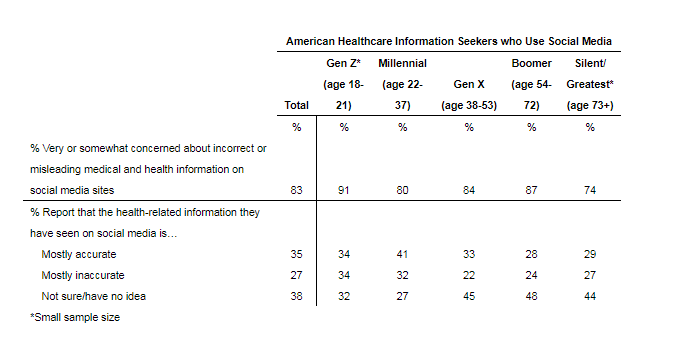
Gen Z, is just as likely to be concerned about incorrect or misleading information as the much older Boomer generation (91 percent and 87 percent, respectively). This suggests that social media comfort and proficiency do not have a bearing on perceptions of legitimacy, leading to the conclusion that it is the content or channel that is the challenge for health-related information communicators.

All of this adds up to a trust and credibility problem we need to urgently address.

A Wake-up Call for Healthcare Professionals

The healthcare industry is still lagging behind in delivering credible and relevant information to patients when and where they need it most.  Healthcare has much to learn from other industries that are adept at mapping the customer journey and providing relevant and timely information at each stage of the journey.

Earning Trust From Online Health Information Seekers

Within each problem lies its solution. To address the trust gap, the authors suggest the following fixes:

Prove your online credibility from the outset

  • information should be cited by a medical professional
  • it should cite a scientific study
  • it should be associated with a trusted brand
  • it should be cited by a trusted school or research organization

Design your content for discovery

By building content that is discoverable across multiple channels – online and offline – you can intersect your customers across their journey and ensure that they find the credible information they’re looking for.

Use succinct, clear and plain language in your communications.

Recognise that people are swimming in information and overwhelmed by the volume, creating confusion and perceptions of conflicting facts.

I would add to this list that it’s important to talk to patients in your offices about the information they find online. For more on this read What’s the Influence of Patients’ Internet Health Information-Seeking Behaviour on the Patient-Physician Relationship?

A Wake-up Call for Healthcare Professionals

In a post published in Physician’s Weekly, primary care physician Mikhail Varshavski, DO, is unequivocal that healthcare professionals’ failure to influence social media is responsible for the rise of misinformation online.

I used to consider the absence of quality physicians online merely a problem of missed opportunity. Now I’ve realized it is much more than that. If misinformation has the power to call in to question the validity of something as grand as an American presidential election, it certainly has the power to influence our patients’ everyday health decisions. The healthcare industry as a whole needs to advocate for more education and focus on this burgeoning global communication platform.


According to a 2017 survey by PM360 Online, only 9% of physicians engage with patients and other health care providers — this includes physicians who reply to comments, join group discussions or share helpful information and links on social media platforms – and as low as 1% of all health care professionals use social media to be content creators — publishing original content via blogs, forums, and websites.

Click here for the full The Great American Search for Healthcare Information report and presentation. It includes additional findings such as the types of health information Americans seek, their use of new digital health services and apps and attitudes about the concerns vs. advantages of the state of healthcare information today.


You might also like to read 

Protecting the Value of Medical Science in the Age of Social Media and “Fake News”

An Opportunity To Build Patient Loyalty In An Era Of Social Media And Fake News

Posted in Cool Tool

Monday Morning Cool Tool: Metricool

metricool-instagram-analytics-2020-home

I love learning about new tools to make social media marketing more creative and effective, so I’ve decided to share some of my favorite tools with you at the start of each week. This week I’m recommending Metricool – a social media marketing tool that analyzes, manages, and grows your social presence.

Metricool unifies the data from your web, social networks and online ads in one place, so it’s easy for you to check them, make the right decisions and improve your strategy.

download - 2020-03-29T101721.724

You can use it to create and manage your Google Ads and Facebook Ads campaigns, and compare the performance of both platforms to optimize your online advertising investment.

896a7a45-2919-4e7d-9051-377826ea87be

The free plan offers basic features.

If you want access to advanced features, opt for one of their paid plans.

Posted in social spotlight

Social Spotlight: Sara Liyanage

book-cover

I recently caught up with Sara Liyanage, author of Ticking Off Breast Cancer, a book about juggling a busy life with treatment for primary breast cancer. 

Sara is also the founder of www.tickingoffbreastcancer.com, a website dedicated to supporting those who don’t know which way to turn for help after receiving a breast cancer diagnosis; those who are overwhelmed by the breast cancer resources online and those just looking for a comfortable, safe, calm place to turn for help. The website provides practical advice for each step of the way, together with many signposts to other online resources and lots of personal stories.


Hi Sara,  I’d like to start off by asking you to tell us how you got started with social media. What prompted you to get involved?

SL: In 2017 following treatment for breast cancer, I set up a website (www.tickingoffbreastcancer.com) for people going through breast cancer treatment and those trying to move on after treatment. The website is a simple one: lots of practical tips and links to good online resources. There’s a lot of information across the internet that people – who in a vulnerable state due to their cancer diagnosis – aren’t finding or accessing because they are are either too nervous to research the web for resources and/or they are overwhelmed with what’s available. I aim to do the research so they don’t have to. I’m constantly updating the links to new information as and when I find it or I’m directed to it by people who I chat to on social media. I also publish a guest blog every week from either an expert (such as a lymphoedema specialist) or someone who is going through or has finished breast cancer treatment. In September last year my book was published (Ticking Off Breast Cancer). This accompanies the website by providing simple practical advice and also talks about my own personal experience of having treatment for breast cancer.

Was the launch of your website your first foray into social media? 

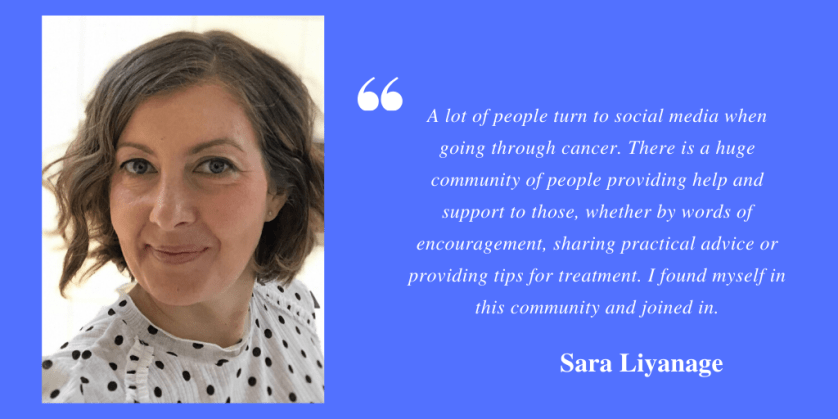
SL: I started using social media when I launched the website. I’d created a site that I was hoping would help people going through treatment, and I then needed to get this site out to those people. So I set up accounts on Twitter, Instagram and Facebook to help raise awareness of the website. I soon realised that using social media wasn’t just about raising awareness of my site – it was about becoming part of a cancer community and helping people that way. A lot of people turn to social media when going through cancer. There is a huge community of people providing help and support to those, whether by words of encouragement, sharing practical advice or providing tips for treatment. I found myself in this community and joined in.

I love the idea of social media being an extension of community – it’s something that resonates very strongly with my own work too.  Which social platforms do you most enjoy using to build community and share information? 

SL: I enjoy using all three platforms (Twitter, Instagram and Facebook) and I’ve found that they all work well in different ways. For example, Twitter is good for chatting about a topic and sharing tips and resources that I come across. Instagram is good for sharing personal updates and interacting with people on a more personal level. And Facebook works well for providing links to useful websites, articles and to things I post on my website.

Which particular topics most interest you online?

SL: I tend to focus on supporting people as they go through breast cancer treatment and try to move on once treatment ends. So I look out for good tips, advice and resources that would help someone in this position. For example, I share articles that I’ve come across that deal with treatment side effects; personal stories from people going through it; articles on exercise and nutrition; recipes; reviews of cancer books; information about support groups, networks and centres; and anything that might be of use to someone going through or finishing treatment.

Do you have any advice for patients using social media?

SL: On balance, social media can most definitely provide more support than discouragement, but for anyone dipping their toe (or whole body) into the social media cancer community it is worth remembering:

1. Use it carefully.
2. Don’t get too invested – dip in and out.
3. Be kind and understanding of others.
4. Don’t take anything too personally.
5. Don’t compare yourself to others.

And if you do all of this, you will hopefully benefit from what is, on the whole, an incredibly warm and supportive place to visit.

Great advice Sara. So, I like to end these interviews with a favorite quote or saying. Do you have one you’d like to share?

SL: Oh there are too many to choose from!! I love a good quote and I started each chapter in my book with a different quote that resonated with the subject matter of the chapter. I guess, I would say that one of my favourites is, “She stood in the storm, and when the wind did not blow her way – and surely it has not – she adjusted her sails.” Elizabeth Edwards.

I love that quote too. What a great note to end this interview on. Thanks so much Sara for taking the time to share your social media journey with us.

If you’d like to learn more about Sara’s work, visit her website www,tickingoffbreastcancer.com Follow her on FaceBook, Twitter and Instagram.


This post is part of an ongoing conversation that explores how patient advocates, healthcare professionals, and researchers use social media to communicate their work. For more interviews, click here

Posted in Cool Tool

Monday Morning Cool Tool: Filmmaker Pro

download - 2020-03-03T063146.422

I love learning about new tools to make social media marketing more creative and effective, so I’ve decided to share some of my favourite tools with you at the start of each week.

This week’s cool tool recommendation is Filmmaker Pro, an app that lets you edit landscape, portrait, and square video clips.

A unique feature of this app is that it lets you install custom fonts.

It’s available for free for iOS,

Posted in Thursday Tip

#ThursdayTip: How To Find Influencers With Buzzsumo

Welcome to this week’s social media quick tip. 

Regular readers will know that I often recommend BuzzSumo as a useful tool to explore which pieces of content are popular on social media around a certain topic.  Today I want to show you another way to use the tool to find the top influencers for your topics of interest on Twitter.

This is a quick and easy process. Simply log in or if you don’t already have an account, sign up for a free trial. At the end of the trial, you have the choice of paying for a PRO plan or switching to a limited free option.

index

Once you’re logged in to Buzzsumo, click on Influencers in the top navigation.

download - 2019-05-25T102755.264

Use the drop-down menu to sort influencers by relevancy – number of followers, domain authority, retweet ratio, etc.

download - 2019-05-25T102910.339

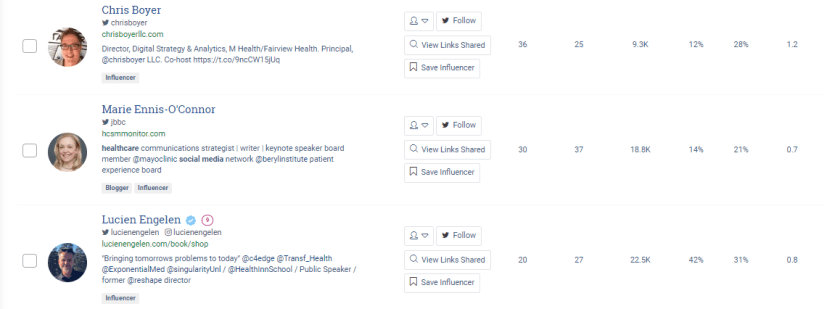
With the free account, you can view the top 10 influencers. Here’s a snapshot from my search for “healthcare social media influencers.”

download - 2019-05-25T103528.452

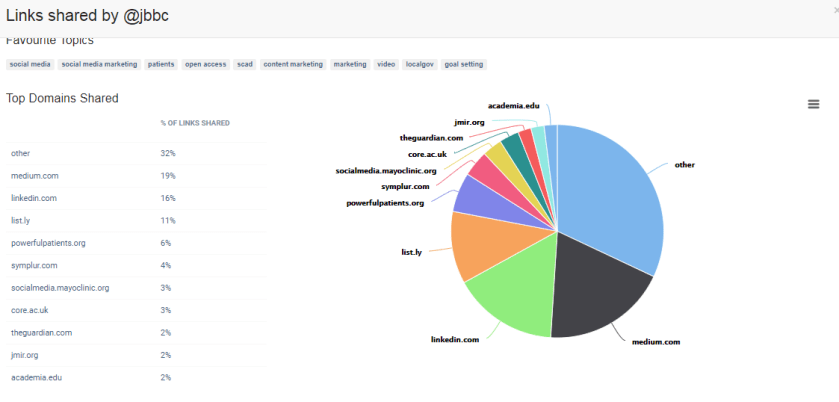
You can dive further into the analytics to discover the most popular topics and sources of links shared by the influencer.

download - 2019-05-25T110225.944

It’s a cool feature and there are many possibilities for how you might use this information. For example, you could ask a question about or comment on something they’ve written or shared in the past week.

Here’s to your social media success!