I love learning about new tools to make social media marketing more creative and effective, so I’ve decided to share some of my favourite tools with you at the start of each week. This week I’m recommending note taking app Evernote.
Evernote is one of the everyday tools I use to keep me organized. A note-taking app that synchronizes all your files by saving them to a cloud service. quickly capture ideas, whether they’re notes, to-do lists, reminders, or even pictures. Because Evernote has apps for mobile, desktop, and web, your notes are instantly available on all of your devices.
Price: Free for basic plan; Premium plan starts at $6.99 pm.
I love learning about new tools to make social media marketing more creative and effective, so I’ve decided to share some of my favourite tools with you at the start of each week.
Billed as the world’s simplest online Portable Network Graphics (PNG) transparency maker. Just import your PNG image in the editor and you will instantly get a transparent PNG. Free, quick, and instantaneous it’s a super easy tool to add to your image creation toolbox.
I love learning about new tools to make social media marketing more creative and effective, so I’ve decided to share some of my favourite tools with you at the start of each week. This week I’m recommending Otter Voice Notes – a super useful tool that helps you take voice notes and generate transcripts simultaneously, or transcribe pre-recorded audio and video files.
Here’s how it works
Record conversations using Otter on your phone or web browser. Import or sync recordings from other services. You can integrate the tool with Zoom.
Get real-time streaming transcripts and, within minutes, rich, searchable notes with text, audio, images, speaker ID, and key phrases.
Share or export voice notes to inform others and get on the same page. Create groups to invite collaborators and keep organized.
Pricing Otter Voice Notes lets you transcribe up to 600 minutes per month for free with a pricing structure based on Basic, Premium, and Teams subscriptions.
I love learning about new tools to make social media marketing more creative and effective, so I’ve decided to share some of my favourite tools with you at the start of each week. This week I’m recommending QuestionDB – a tool designed to help you generate content ideas.
Here’s how it works.
To get started, pick a broad keyword.
From there, whether you’re using the free or paid version of QuestionDB, you can dive deeper.
Then search these individually on QuestionDB, and you will get a list of specific questions about these topics that you can use as content ideas for your blog. And because questions are continually added to QuestionDB, it will help you generate content ideas easily on a continuous basis. To help you write those topics, toggle the “source” button on so that you can click through to where the question was originally asked (and see what others answered).
QuestionDB is free for a maximum of 10 results. The pro version costs $10 per month.
I love learning about new tools to make social media marketing more creative and effective, so I’ve decided to share some of my favourite tools with you at the start of each week. This week’s cool tool recommendation is subject line rating tool – SubjectLine.
According to Copyblogger, on average, 8 out of 10 people will read headline copy, but only 2 out of 10 will read the rest. Your headline is the first (perhaps only) impression you make on a prospective reader.
SubjectLine has studied and analyzed millions of headlines to see what works. Simply enter your subject or title into its online tool and get a grade (out of 100 possible points). It will tell you what works and what can help you to improve.
I love learning about new tools to make social media marketing more creative and effective, so I’ve decided to share some of my favourite tools with you at the start of each week. This week’s cool tool recommendation is infographic maker Piktochart .
Infographicsare great for getting your content shared but many people are put off by the thought that you have to hire a graphic designer to create them. The good news is you don’t have to be a designer nor spend a lot of money to create them. Use a tool such as Piktochart to create engaging infographics. Choose a template and then customize it with text, fonts, and colors.
I love discovering new tools and apps which help make our social media marketing activities more manageable and more productive. Each Monday I share one of favourite social media management tools with you to try during the coming week. Today I want to put some of those tools together in this post organized around the theme of blogging. These tools will help you create, edit and promote your blog content more effectively.
Bit.ly is a tool which creates shortened links to track the performance of your content once you promote it. Use it to create a custom short link for each post you create and share.
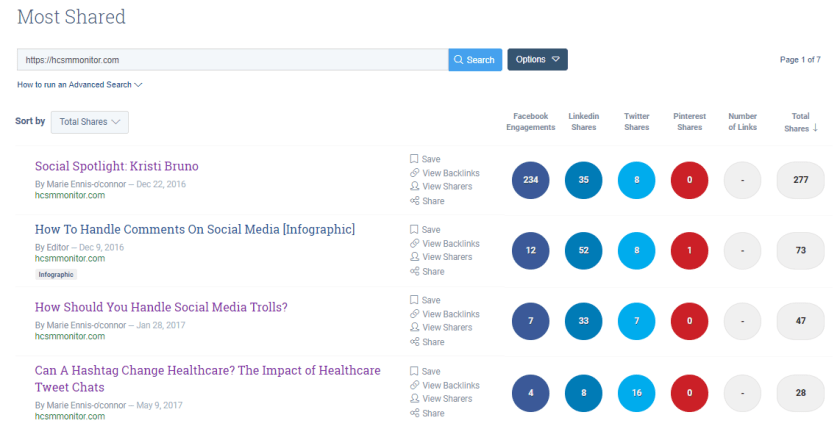
Buzzsumo is a useful tool to explore which pieces of content are popular on social media around a certain topic. Use it to brainstorm popular topic ideas based on keywords related to your topics. You can also input your own domain name (as I have done in the example above) into the search bar and see at a glance how often and where your content is most shared.
While the quality of your content is a vital factor for successful blogging, how you present your information is also very important. Visuals are a key component of a successful blog. Canva is one of my every-day go-to tools when I am creating visuals. It’s so easy and quick to use it with a multitude of layout options, fonts, images and illustrations to choose from. Use the pre-set blog template to create header images for your bog.
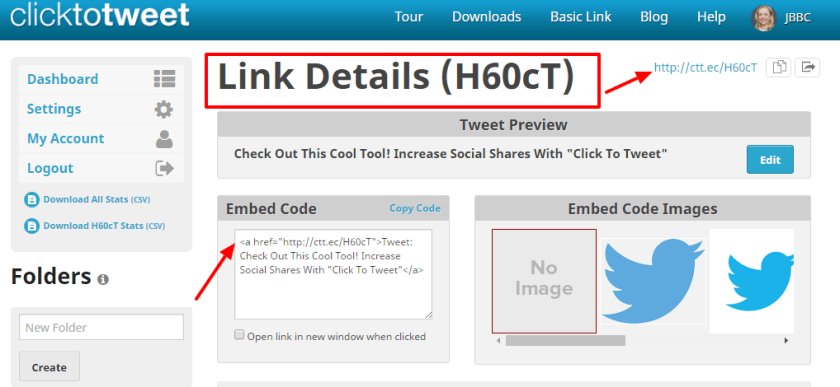
Click to Tweet is a cool free tool which generates one-click tweet boxes or links that can be shared through your website, your blog, or via email. It’s a powerful way to increase social shares and highlight quotes, stats, and key takeaways for your content marketing. It’s also available as a handy Chrome extension.
According to Copyblogger, on average, 8 out of 10 people will read headline copy, but only 2 out of 10 will read the rest. Your headline is the first (perhaps only) impression you make on a prospective reader. Use the EMV headline analyzer to calculate the emotional value of your headlines to create titles which will resonate with your audience.
FreePik offers users, high-quality graphic designs: exclusive illustrations and graphic resources. It operates on a freemium business model which means, the majority of the resources offered at Freepik can be used for free, only having to credit the author of the illustration to Freepik. In addition, for a small fee, you can subscribe to the Premium plan and use the illustrations without any accreditation whatsoever.
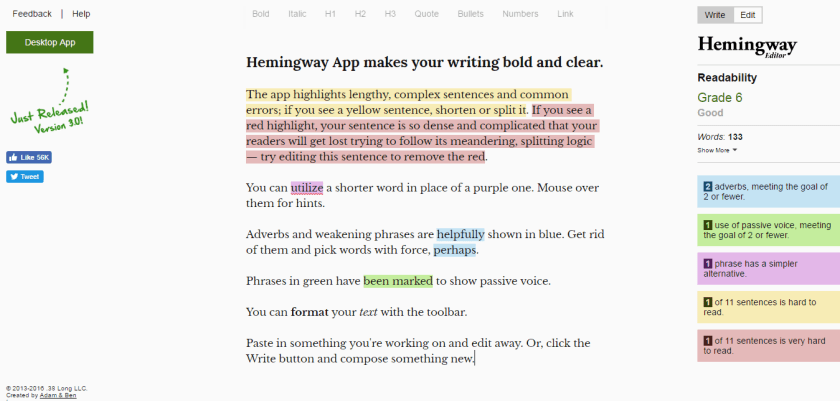
A proofreading tool which clears your copy of all unnecessary copy. Just paste your text into the editor and you’ll get an analysis that highlights lengthy, complex sentences, adverbs, passive voice, and common errors.
This site contains images (mostly from Flickr) organized by themes such as inspiration, recreation, and ambient. On the site, you’ll also find free templates, icons, button makers, and more.
Life of Pix offers free, high-quality images that are available for personal and commercial use. Each comes with a helpful color palette so you can plan your visuals accordingly.
This is a cool tool that enables you to turn your blog posts into slideshow-type videos in minutes. The free plan includes unlimited videos, access to 10 million video files, and 480p-quality video with the Lumen5 watermark. You can also upload your own logo. Upgrading to the Pro plan ($49/month) lets you remove the Lumen5 branding, upload your own watermark and outro, and more.
Simply input your blog post’s url and Lumen 5 will import the text and images from that post and auto-create your video. You can then edit it, swap out images, upload other images and add music before you hit publish. The video above is one I created with Lumen 5 from an original blog post
Pexels provides over 3,800 high-resolution photos, collated from other free image sites — making it one of the largest free image directories. Pexels has also added a large library of stock videos to its site also under the Creative Commons license. Use the site’s list of popular searches to find the most in-demand stock video.
Pikwizard hosts over 100,000 completely free images, with over 20,000 of those exclusive to the site. The site has a good selection of medical-themed images. The site is particularly good for aesthetic procedures and dentistry-related images.
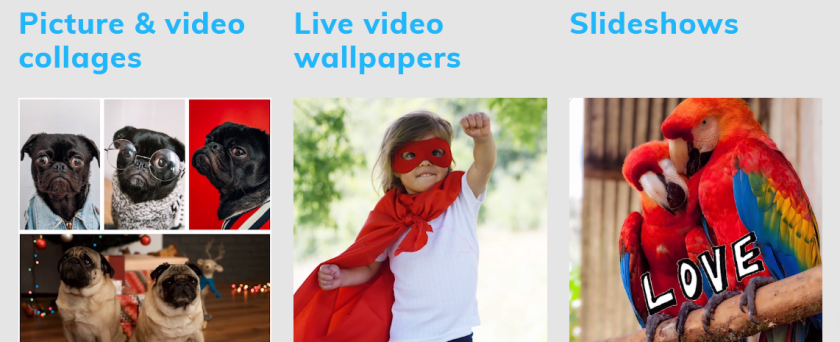
With PhotoFunia you can edit photos online for free in a matter of seconds resulting in high-quality photo collages. As the name suggests, this tool is a lot of fun to use. It helps you make a mark with your photos by incorporating your photos into mock-ups of background images including billboards, magazine covers, and movie posters.
Similar to Bit.ly, this url shortner tool allows you to enhance every link you share (whether your own content or someone else’s) with a call to action (CTA). When people click on the Sniply-generated link, they can view the article you shared and see a CTA.
If you like sharing quotes on your blog you can take advantage of their ready to add quotes feature. It will save you a lot of time. You can save, download or share up to 10 images per month, for free.
This tool takes a sample of your writing and calculates the number of sentences, words, syllables, and characters. It then takes the output of these numbers and plugs them into 7 popular readability formulas to help you find out the reading level and grade level of your materials and help you to determine if your audience can read what you have written.
Quroa is a question and answer platform where you can either ask a question about your topic or simply do a search using your topic keyword to find what people are asking about that topic. It’s a super place for market research.
Unsplash gives you access to a bank of 50,000+ free-to-use photos. All photos are licensed under Creative Commons Zero, which means you can copy, modify, distribute and use the photos for free, including commercial purposes, without asking permission from or providing attribution to the photographer or Unsplash.
Do you have any favourite tools to enhance your blogging? I’d love to hear about them if you do.
I love learning about new tools to make social media marketing more creative and effective, so I’ve decided to share some of my favourite tools with you at the start of each week. This week I’m recommending Emojim – a browser-based app that helps you search for the right emoji for your social media updates.
How to use this tool
You can either scroll through the site until you find the right emoji or use the search feature to type a description of the emoji or feelings you’re looking to convey. You can also search by category, skin color, or theme.
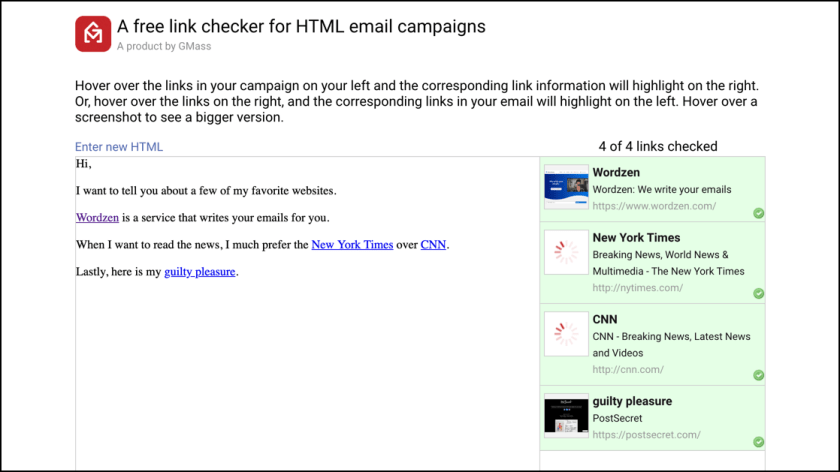
This week’s cool tool recommendation is Link Checker.
An invaluable tool for email marketing, use it to easily check all the links in an HTML email campaign you’re about to send.
Here’s how it works.
Just paste the HTML for your next email campaign into the tool. All links are automatically checked, and the title and screenshot of each webpage is shown.
How does this help you?
If you generally have lots of links in your email campaigns, then this tool ensures that:
Your links are valid and not broken.
Your links point to where you intended. Often when setting lots of links in an HTML email campaign, it’s easy to make a copy/paste mistake and set the anchor text to point to the wrong URL. With the automatically generated screenshots, you can quickly see if you made a mistake.
This tool is free to use, and can be used with any email marketing service like MailChimp or Constant Contact.















 Health Care Social Media