Posted in #HCSM

Still Overlooking YouTube for Patient Education? It’s Time to Rethink

As YouTube celebrates 20 years, healthcare communicators have a golden opportunity to meet patients where they already are—on video.

In my latest Substack article, I share:

🎥Why YouTube matters for patient education

🎥How to use videos, Shorts, and podcasts to educate and connect

🎥3 simple videos you can start creating today

Your next breakthrough in patient education might just start with a simple video!

Click here to read

Posted in #HCSM

How Healthcare Marketers Can Leverage YouTube Shorts and Clips

YouTube Shorts and Clips are dynamic tools that can significantly expand your audience, boost engagement, and drive views across your entire channel. While long-form videos provide depth and detail, relying solely on them can limit your reach and strain your budget. Short-form videos, like Shorts and Clips, offer a cost-effective way to create engaging content and tap into new audiences.

Here’s why short-form content should be a cornerstone of your YouTube strategy:

  • Cost-Effective Patient Education: Producing high-quality long-form videos can be resource-intensive. Shorts and Clips offer a more affordable way to create educational content, repurpose existing materials, and maximize your budget.
  • Reach a Wider Audience: Short-form videos are easily discoverable, appearing in YouTube’s Shorts feed, suggested videos, and even on users’ homepages. This allows you to reach potential patients who might not otherwise encounter your content.
  • Drive Engagement with Longer Content: Think of Shorts and Clips as entry points to your more detailed videos. By creating engaging short-form content that highlights key health tips, addresses common concerns, or offers a glimpse into your services, you can pique viewers’ interest and guide them to your long-form videos.
  • Stay Ahead of the Curve: YouTube’s algorithm favors short-form content. Incorporating Shorts and Clips into your strategy ensures you’re aligned with the platform’s trends and increases your visibility.

The Evolving YouTube Algorithm: Connecting Short-Form and Long-Form Content

YouTube’s algorithm has undergone significant changes since the introduction of Shorts in 2021. In August 2022, YouTube updated its algorithm to connect Shorts and long-form content. Previously, separate algorithms meant limited crossover between the audiences of these formats. Now, a unified algorithm ensures Shorts viewers are also exposed to your long-form videos, and vice versa.

How This Change Benefits You

  • Enhanced Discoverability: Viewers who engage with your Shorts can be recommended your long-form videos, increasing your content’s exposure.
  • Build Trust and Authority: Engaging Shorts can attract new viewers who might then be directed to your long-form content, where you can provide more in-depth information about your services, expertise, and patient care philosophy.
  • Content Synergy: Shorts and long-form videos work together to create a comprehensive content ecosystem. Use Shorts to promote longer videos, answer FAQs, or share quick health tips.

This shift emphasizes the importance of a holistic YouTube strategy that incorporates both short-form and long-form content to maximize your reach and engagement.

YouTube Clips: Creating and Sharing Engaging Snippets

Clips are shareable, short segments (5–60 seconds) you can create from your longer videos, showcasing key moments or highlights.

How to Create a Clip

  1. Open a YouTube video (desktop or mobile).
  2. Below the video player, click or tap the “Clip” button.
  3. A pop-up window will appear, allowing you to select the start and end time for your clip (between 5 and 60 seconds).
  4. Give your clip a title, and you’re done!

Tips for Promotion

  • Cross-Platform Sharing: Post Clips on social media to drive traffic back to your channel.
  • Foster Community Engagement: Encourage viewers to create and share Clips from your videos, boosting interaction.
  • Use Clips as Conversation Starters: Pair them with questions or calls to action to spark discussion in your comments.

Expanding Reach Beyond YouTube

While you can’t share Clips directly within YouTube, they are incredibly versatile for cross-platform promotion.

Here’s how you can share your YouTube Clips

  • Social Media: Share Clips and Shorts on Facebook, Instagram, LinkedIn, and TikTok.
  • Websites & Blogs: Embed Clips in posts to enrich your content and drive traffic to your channel.
  • Email Marketing: Include Clips in newsletters to add engaging visuals and boost click-through rates.

Repurposing Long-Form Content into Shorts

YouTube Shorts offer a fantastic opportunity to repurpose your long-form content and reach a wider audience.

Creating Shorts from Existing Videos

  • Use a Video Editing App: Edit your long-form video into a vertical, full-screen format (up to 60 seconds). Enhance it with filters, effects, and text overlays. Upload via YouTube Studio and include a link to the original video in the description.
  • Create Shorts Directly on YouTube: Open the long-form video in the YouTube app, tap the “Remix” button, and select “Edit into a Short.” Choose your clip (up to 60 seconds), enhance it with music, text, and effects, and publish it. YouTube automatically adds a link to the original video.

Tips for Creating Effective Shorts

  • Hook Quickly: Grab attention within the first few seconds.
  • Optimize Aspect Ratio: Ensure content fits the vertical format.
  • Include CTAs: Add verbal and visual cues directing viewers to your long-form videos.
  • Boost Discoverability: Use relevant keywords, hashtags, and engaging thumbnails.

Driving Long-Form Views with Shorts.

  • Include Clear CTAs: Guide viewers to your long-form videos with verbal and visual cues.
  • Create Compelling Content: Hook viewers with engaging snippets that leave them wanting more.
  • Optimize for Discoverability: Use relevant keywords and hashtags in your Short’s description.

By strategically creating and promoting Shorts and Clips, you can effectively leverage these formats to drive patient engagement, expand your reach, and establish a stronger online presence.

Posted in #HCSM

A Step By Step Guide To Creating A YouTube Channel For Patient Education

As a form of patient education and health promotion, YouTube has great potential but currently, it’s not being used to its full potential.

Aside from patient education, YouTube is a significant addition to your marketing toolkit. Owned by Google, it’s the second largest search engine in the world with added SEO potential due to its Google connection.

YouTube At A Glance

download.png

If you don’t already have a YouTube channel for your practice, perhaps now is the time to consider it.

A Step By Step Guide To Creating Your YouTube Channel

Follow these simple steps and you will have your own YouTube channel up running and ready to reap rewards.

Step #1 You’ll need a Google account to sign-in to YouTube

index

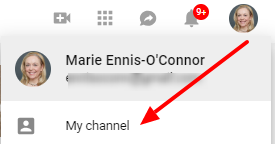
Step #2 Next click on “My Channel”

download (49)

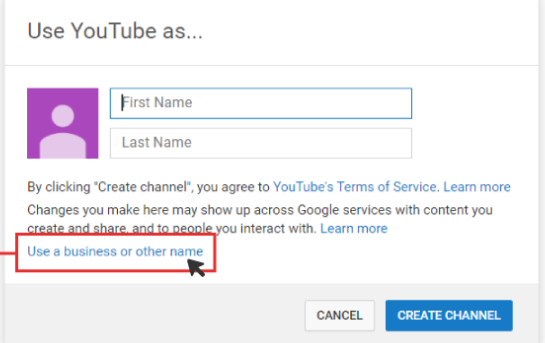
Step #3 Now add your business name or your own name 

download (50)

Step #4 Create a title for your channel

Your channel title should be descriptive and briefly tell viewers what your channel is about.

download (51)

Step #5 Select Customize Channel to fill in more details 

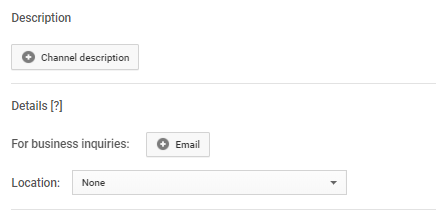
Add a link to your website and a description of your practice.  Adding your location to your YouTube videos will make them geographically searchable,

download (52)

download (55)

Step #6 Add a thumbnail image (e.g your logo) and banner (channel art)

download (53)

I  recommend you use the same picture across all online media: Facebook, Twitter, website, YouTube, etc. Aligning your video branding with that of your business creates a consistent experience for your audience. When existing and potential customers visit your YouTube channel, they need to feel that it is part of a greater whole.

The recommended size for channel art is 2560 px by 1440 px.

Pro Tip: Canva can help you create correctly-sized thumbnail and channel art.

download (54)

Step #7 Connect your social media accounts

Add in your social media accounts.

download (56)

These can be overlayed on your banner image.

download (57)

As you can see it’s super simple to set up your own YouTube channel. In my next post, I’ll show you how to upload your first video and optimize it for viewing. 


Subscribe to my YouTube channel here

Posted in #HCSM

YouTube: A Missed Opportunity For Patient Education

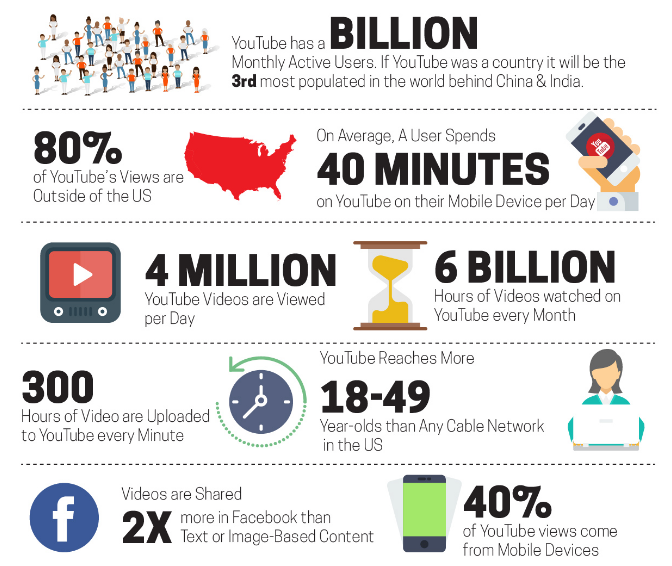
YouTube has more than 1.8 billion monthly active users, and remains the online video leader. 

People around the world are now watching a billion hours of YouTube’s content every single day.  That’s a huge amount of time spent watching diverse content on the channel.  Here are some more staggering stats to consider.

download.png

YouTube is the second largest search engine in the world with added SEO potential due to its Google connection.  YouTube also has live-streaming options and social tools, which it’s expanding as it works to keep in line with evolving consumer trends.

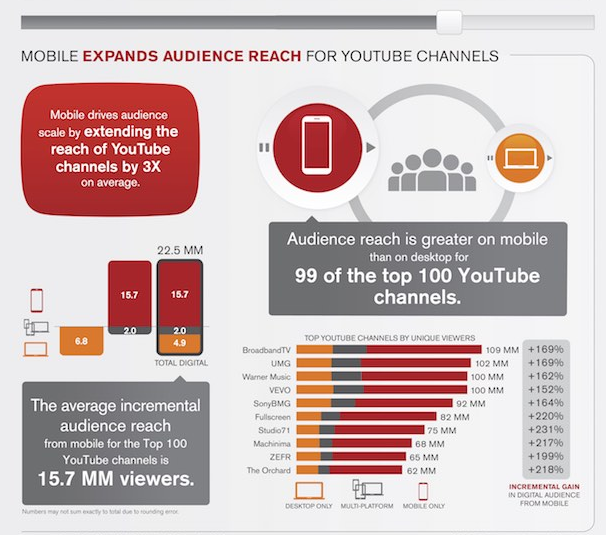
Mobile devices now account for 70% of all time spent on YouTube by adults in the US, according to research from comScore. Audience reach is bigger on mobile than on desktop for 99 of the top 100 YouTube channels in the United States.

download.png

Mobile viewing is especially popular with younger adults (age 18-34) and women, the analysis found. YouTube mobile viewers tend to watch shorter-form videos than desktop viewers do. However, mobile viewers watch nearly three times as many videos per month, on average.

download.png

YouTube is a platform that people are searching every day for how to solve their problems and get their questions answered. As a form of patient education and health promotion, it has great potential but recent studies show it is not being used to its full potential.

A 2013 study which examined the effectiveness of YouTube as a source of medical information on heart transplantation found it time-consuming to find high-quality videos and recommended that more authoritative videos by trusted sources should be posted for the dissemination of reliable information. Similarly, a 2015 study found that in YouTube videos related to skin cancer, there was a missed opportunity for cancer prevention and control.

These findings notwithstanding, there are some good examples of medical organizations who are already using YouTube to communicate health information. Mayo Clinic, in particular, stands out, with 50,917 subscribers to its channel and over 31,000,000 video views. 

If you don’t already have a YouTube channel for your practice, perhaps now is the time to consider it. Check out this article by Sendible which has some useful tips on how to optimise your YouTube channel for success.

Related Reading

Posted in #HCSM, Hospital Marketing

PwC report shows importance of social media to healthcare

See on Scoop.itHealth Care Social Media Monitor

One-third of consumers use sites such as Facebook, Twitter, YouTube and online forums to find health-related information, track symptoms and broadcast their thoughts about doctors, drugs, treatments, medical devices and health plans says a recent report by the Health Research Institute (HRI) at PricewaterhouseCoopers (PwC) US.