Articles

Posted in Cool Tool

Monday Morning Cool Tool: URLList

I love learning about new tools to make social media marketing more creative and effective, so I’ve decided to share some of my favorite tools with you at the start of each week.

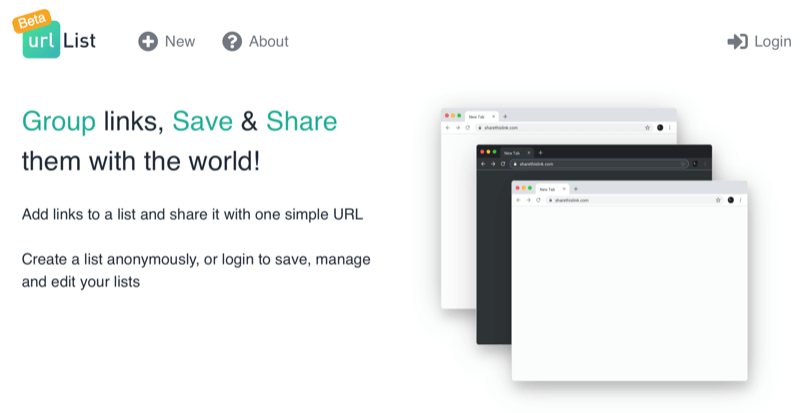
This week I’m recommending URLList – a bookmarklet that allows you to bring a group of URLs together in one place and then share them with a single link.

Pro Tip!

As recommended by Social Media Examiner, “One use case that isn’t explicitly stated on their site is to create a large list of URLs for all of your different product landing pages and then use that one URL in your Instagram bio.”

Posted in Thursday Tip

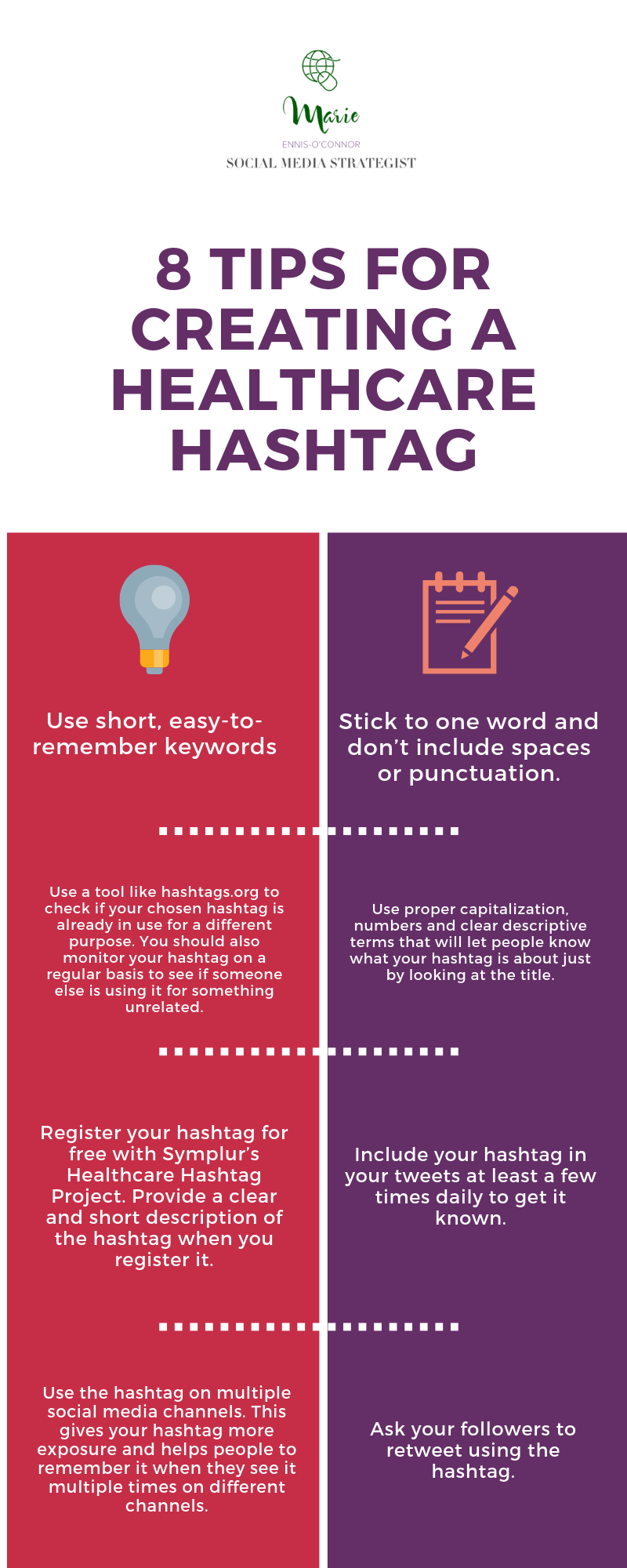
#ThursdayTip: How To Create A New Healthcare Hashtag [Infographic]

Welcome to this week’s social media quick tip.  This week I want to share with you the process of creating a new hashtag. 

If you cannot find an existing hashtag related to your healthcare topic, you might now be considering creating your own.

But, before you do, take a moment to consider your objectivesDoes the world truly need another hashtag?  Ask yourself: Why this hashtag? Why now? Will other users gain value from it?

Having decided the world does need another hashtag, follow the tips below to create yours.fiction (2)

Happy hashtagging and here’s to your social media success!


Posted in Cool Tool

Monday Morning Cool Tool: Quuu

I love learning about new tools to make social media marketing more creative and effective, so I’ve decided to share some of my favourite tools with you at the start of each week.

This week I’m recommending Quuu – a hand-curated content suggestion platform that connects to your scheduling tool of choice.

Here’s how it works

Sign up, connect your account and choose from over 300 interest categories to receive suggestions that matter to you and your audience.

With the free account, you can choose up to 5 interest categories, get suggestions automatically sent to your connected accounts two times a day (six for a paid account).  

Relevant suggestions will be queued to your scheduling too where you can choose to manually curate posts yourself or Quuu will post for you.

Check it out at http://www.quuu.co

Posted in Thursday Tip

#ThursdayTip: How To Embed A Tweet On Your Blog

Welcome to this week’s social media quick tip.  This week I want to show you how to embed a Tweet on your website or blog. 

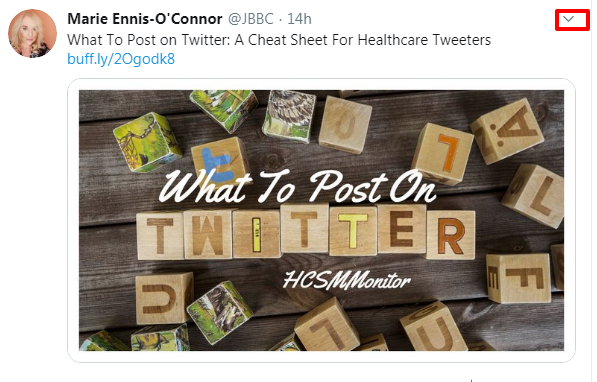
1. Select a Tweet to embed on your site. Click on the down arrow icon (v).

e55892ed-56f9-41fb-86b1-2519eaddbe51

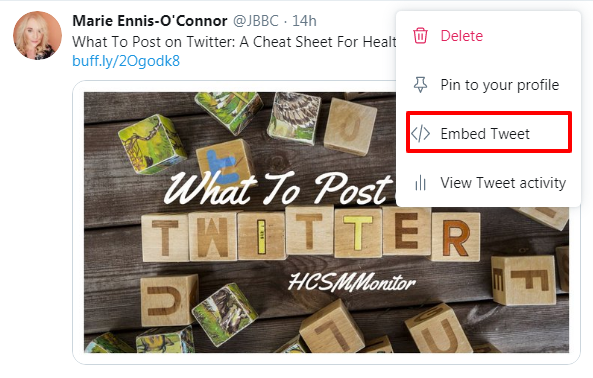
2.  Select Embed Tweet from the drop-down list.

bd659313-8a37-4471-ae2c-7919deaff8fa

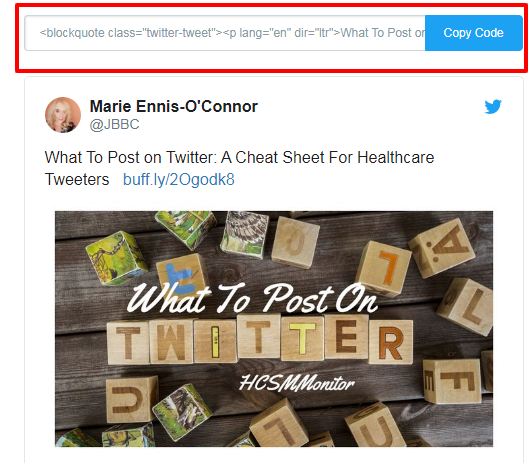
3. Now simply and paste the code provided into your blog or website.

download - 2019-10-10T104924.612

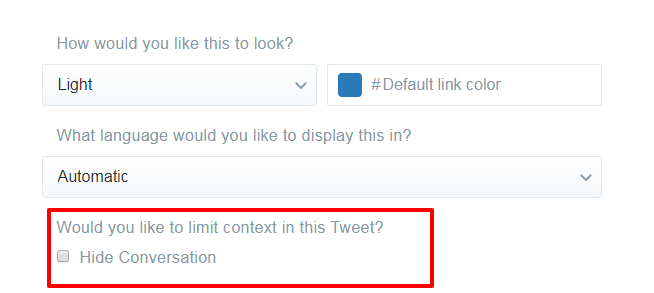
An embedded Tweet includes the Tweet itself, any media contents (photos, video) so if you don’t wish to include these, go to Customization Options and check “Hide Conversation.”

dc544f8b-5627-4293-af28-8d739406df86


Here you also have the option of translating your embedded Tweet into another language and selecting the colour you would like it to appear as on your website or blog.

Here’s to your Twitter success!


Posted in Cool Tool

Monday Morning Cool Tool: TweetsMap

I love learning about new tools to make social media marketing more creative and effective, so I  share some of my favourite tools with you at the start of each week. This week I’m recommending iOS Twitter tool –  Tweeps Map 

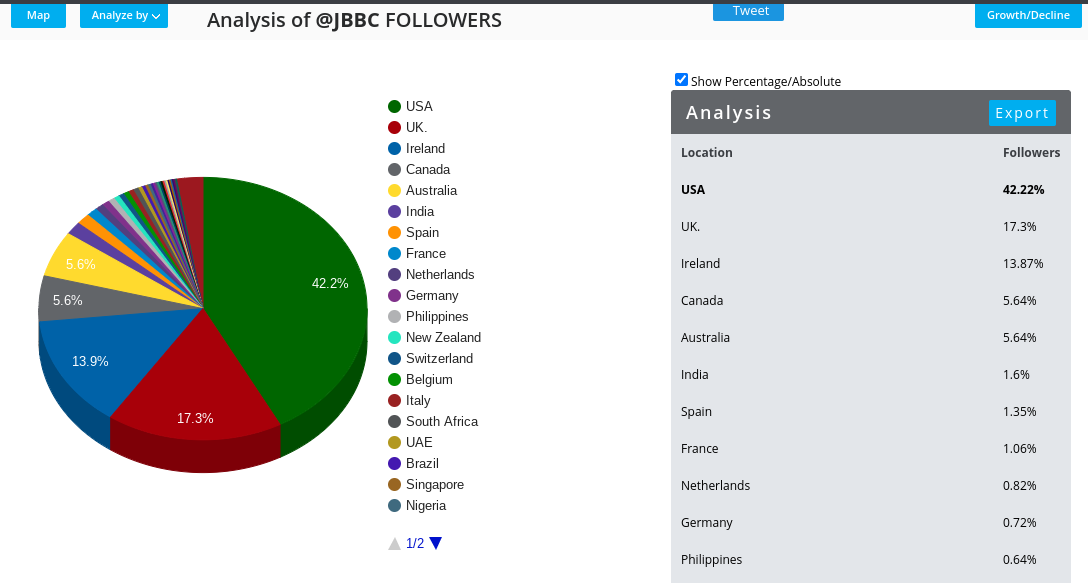
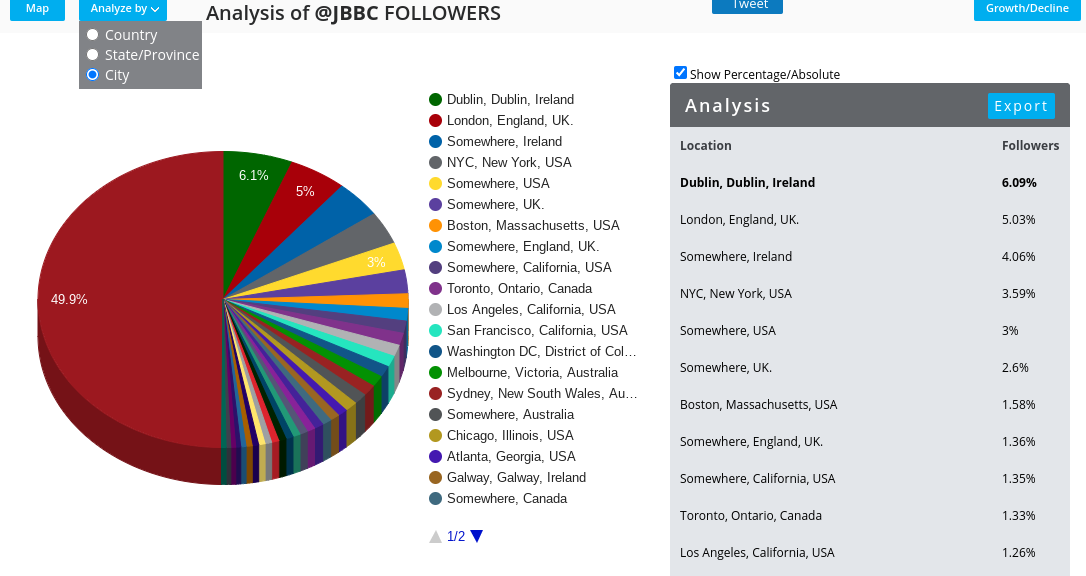
The free version of this tool is limited to a visual representation of where  your Twitter followers are based geographically. 

This can be useful to determine whether the content and the language and references you are using are actually relevant to where your followers are living.  In my case, although I live in Ireland, the majority of my followers are based in the USA. 

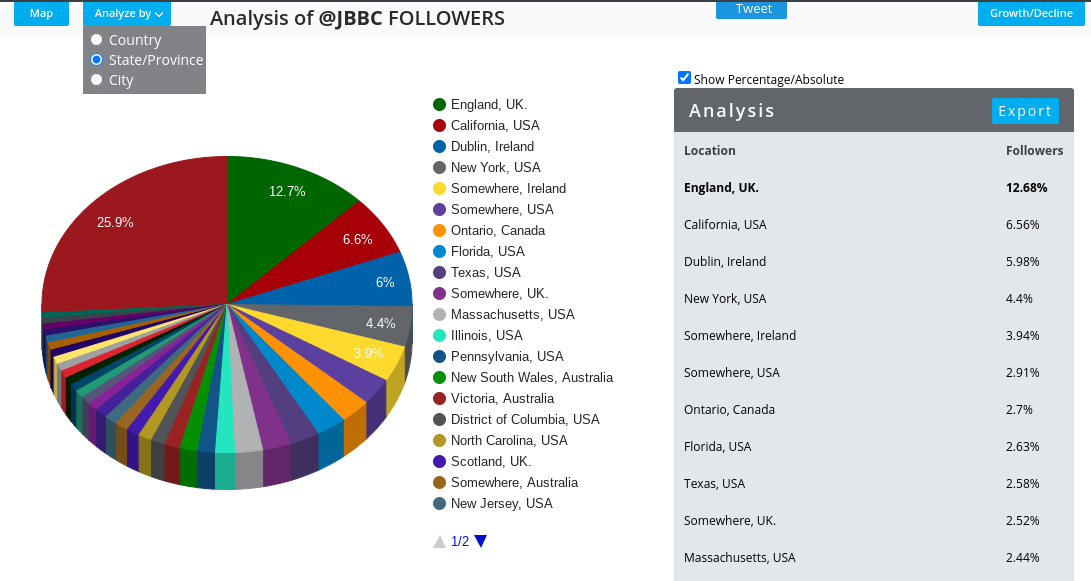
I can further break this down to State and Province

And City

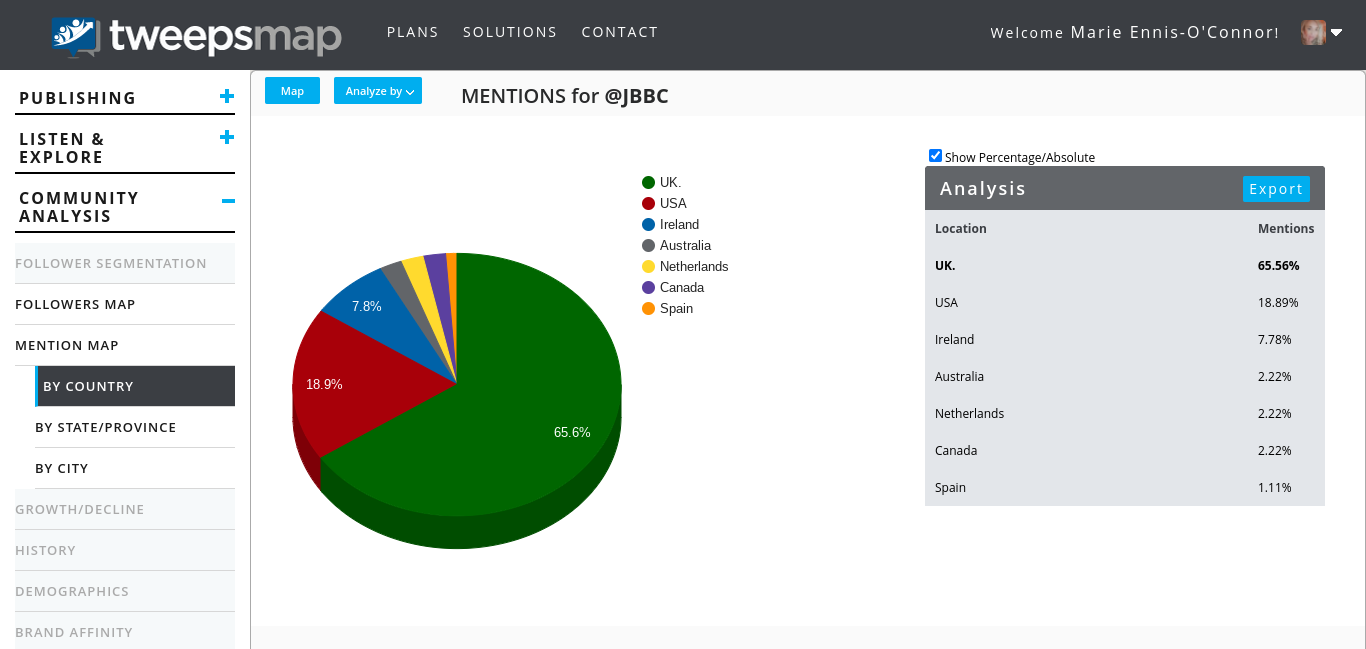
I can also track which follower geographic locations mention my Twitter account most.

The free plan will allow you to also track top unfollowers and inactive accounts.

Learn more at https://tweepsmap.com/

Posted in #HCSM, Thursday Tip

#ThursdayTip: How To Check Your Wall Posting Preferences on Facebook

Welcome to this week’s social media tip. Today I want you to show you how to set your wall posting preferences on Facebook. 

Recently I was teaching a social media workshop when the topic of how to deal with people posting directly to a Family Practice Facebook page came up.  The person who raised the topic hadn’t realised that it’s possible to limit who can post to your Page. In fact, you can set your page’s Posting Ability tab so that only your page admins can post to your Facebook page.

Here’s how to do it.

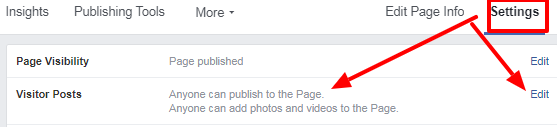
1. Choose Settings from your Admin panel. Then choose Edit.

download - 2019-11-28T153942.983

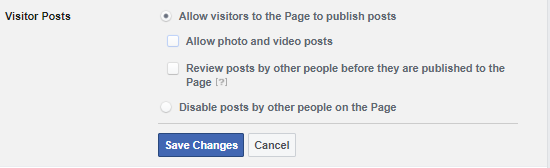
2.  From here, edit the posting ability to decide if you want everyone to be able to post on your page, or if you want to allow only your page admins to post by checking the relevant boxes.

download - 2019-11-28T154554.830

3. When you’re done, hit Save Changes.

A very simple step, and one that those who are new to Facebook can easily overlook.

Here’s to your social media success!


Posted in #HCSM

Which Social Network Is The Right One For Your Medical Practice?

Are you using the right social media platform to maximize your online reach? Not all social media is created equal. Read on find out more about choosing the right platform to enhance your medical marketing activities.

Most small practice owners I’ve talked to find themselves overwhelmed by social media because they feel they need to be active on all platforms.  It’s important, especially if your resources are limited, that you’re focusing your social media efforts in places that will generate the most return for your time online.  Don’t spread yourself too thin by trying to be everywhere at once.  Every additional platform your practice is active on means additional time and effort required to engage on and create tailored content for that platform.

Before becoming active on a social network, try answering the following questions to help you choose the platform that is right for your practice.

1. Will this platform help me achieve my marketing goals?

Setting SMART goals to which you can align your social media activity is a good guarantee of online marketing success. If you can’t explain how a particular social channel will help you to achieve your goals, then it may not be the right fit for you.

160620.snapchat.jpg

Recommend Reading: How To Set SMART Goals For Your Healthcare Marketing

2. Is my target audience active on this platform?

Different platforms attract different audiences. There’s no point spending your time on a particular social network if your audience isn’t there. Look at existing data to learn where a specific demographic spends their time online. For instance, if you’re targeting a younger demographic (25 years and under), then you should consider using Snapchat.

For the female-focused market, Pinterest is a good choice, because of its significant reach among women; 42% of online women are Pinterest users. 34% of users are between the ages of 18 – 29 and 28% are between 30 – 49, which creates a wide demographic of women who can be reached on this platform.

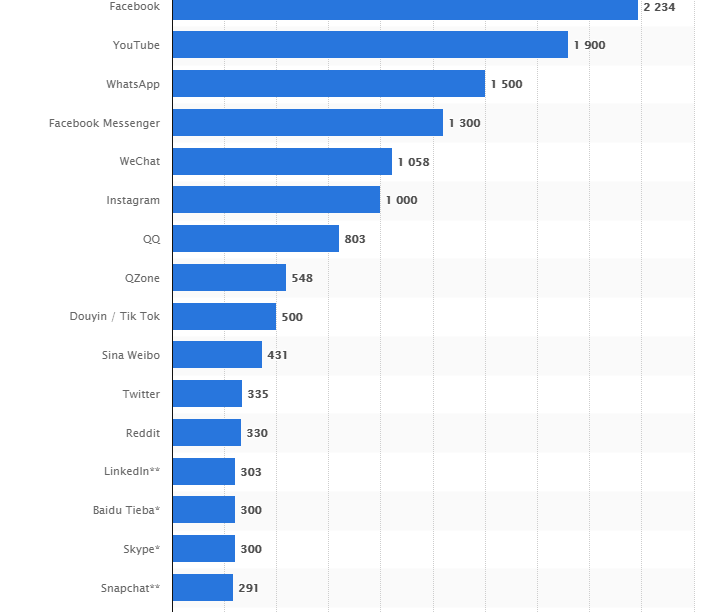
With an average of 1.47 billion daily active users, Facebook is still the king of all social networking sites (though we might see this predominance changing soon), so this is the most logical network to start with.

download (30)
Most popular social networks worldwide as of October 2018, ranked by number of active users (in millions) Source: Statista

However, the catch with Facebook is over 80 million businesses have a presence on the network which makes it a crowded and competitive landscape. And with organic Facebook Reach estimated to currently be as low as 1–3%, succeeding on the platform is more difficult than ever.

Certainly, you should create a presence on  Facebook for your practice,  but be realistic in terms of what you can achieve there.  To succeed you will need to include paid strategies for a successful Facebook marketing plan. The good news is that Facebook advertising allows for a high level of targeting right down to age, interests, income levels, geographic location etc. to ensure your message is delivered to the exact audience type you are looking to attract.

Recommended Reading: 10 Tips To Create More Engaging Content For Your Medical Practice Facebook Page

Look beyond Facebook to the many online groups and fora where your patients are also congregating. For example, Quora is a question and answer platform where you can either ask a question about your topic or simply do a search using your topic keyword to find what people are asking about that topic.

download (31)

3. Which social networks are my competitors using?

Which social networks are your competitors using? Are they active on networks you aren’t? Use a tool like Buzzsumo to identify the social channels on which your competitors get the most shares. Chances are if these channels match your demographics and are working well for your competitors, they will work well for you also.

Recommended Reading: Six Tools To Help You Perform A Competitor Audit

4. Will this platform match the content I create?

If you want your content to do well on social media, you’ve got to be strategic about what you publish and where you publish it. You need to create content that aligns with your audience’s expectations on each social channel.

Identify how, when, and where your specific audience likes to engage with content. For example, Instagram is the best platform for reaching millennials and users there will expect high-quality graphics and videos. It’s a great way to connect visually with your audience.

Twitter, on the other hand, has the most diversity in terms of audience penetration and is the best network for real-time communication. Due to its interactive, in-the-moment nature, it will require more of a commitment of time to participate in online conversations and chats and remain visible in the fast-moving stream of tweets.

Consider creating more video content for YouTube.

It’s no secret that video content is booming across all businesses, including healthcare. People around the world are now watching a billion hours of YouTube’s content every single day.

download.png

YouTube is the second largest search engine in the world with added SEO potential due to its Google connection. As a form of patient education and health promotion, YouTube has great potential but is currently an under-utilized platform for healthcare.

5. Can I integrate this platform with another similar one?

It’s better to use fewer channels well than to stretch yourself thin trying to maintain a presence on every social network. There is a degree of reciprocity between certain platforms – for example, Facebook and Instagram – the key is to choose channels which integrate well with each other to create maximum impact.

6. Consider your existing resources

Do you have the skills or personnel to create the right content for the networks you’ve chosen? While it’s true, you don’t have to pay to sign up for a social media profile on most platforms, these days, the organic reach of most Facebook posts is less than three percent. Running a social presence now requires an investment of resources, both in terms of finances and time.

To Wrap Up

When choosing a social network always keep one eye on the bigger picture. Rather than being led by current trends, back up your decisions by aligning them with your goals and audience.

When assessing a platform ask yourself if it is the right fit for what you are trying to do and for whom you want to reach.  Faris K. Timimi, MD, medical director for the Mayo Clinic Social Media Network (MCSMN) and a practicing cardiologist in Rochester, Minnesota, advises physicians to “look at the demographics and the nature of the platform, the content of what you are putting out there, and what are the characteristics and how does it fit.”

My final piece of advice is to master one social network well before adding another to your strategy.  Regularly review what’s working and what’s not. After a period of say six months, ask yourself this platform is still working for you. If it, then focus on improving your reach on it.  If it’s not working, consider whether it’s worth investing any more time on. Remember you don’t have to be everywhere to make an impact.


Related

Cosmetic Surgery on Social Media – Patients Rate Preferred Social Media Sites and Content

Posted in #HCSM, Twitter

How Does A Health Care Twitter Chat Work?

If you are looking to connect with more people in your industry on a wider scale, joining a Twitter chat is the perfect place to start.

It’s no secret that I love Twitter. I joined it eleven years ago – that’s eons ago in social media years, which as we all know we measure in dog years.

Since then I have watched disheartened as Twitter has become a far less friendly, far noisier place. That said, there are still incredible ways to use Twitter to learn and to connect with other like-minded people.

One of those ways is a Twitter chat.

What is a Twitter Chat?

A Twitter chat is a great networking and learning tool, and a super way to engage in meaningful conversations about shared topics of interest. Think of it as a virtual meet-up for people with common interests.

For those who may be unfamiliar with Twitter chats, they are a public chat, moderated by a host that happens live on Twitter. To filter all the conversations a specific hashtag is used. This hashtag allows you to follow the discussion and participate in it.  Most Twitter chats are recurring and focus on specific topics introduced by a moderator.  The chats usually last one hour and a transcript of tweets is often made available after the chat has ended.

Twitter chats can be fun and lively, and they’re a great place to learn and network. They are also a super place to meet new people. When you attend a Twitter chat regularly, people will get to know you and in this way, you can develop your network and grow your followers

What Is The Impact Of Twitter Chats On Healthcare?

For patients who participate in health-related Twitter chats, there is tremendous potential to motivate participants and encourage change. Much of this change comes from peer-to-peer support which has been shown to be highly effective in motivating change. Many participants share conversational and informational knowledge that they believe is valuable both to themselves and others.

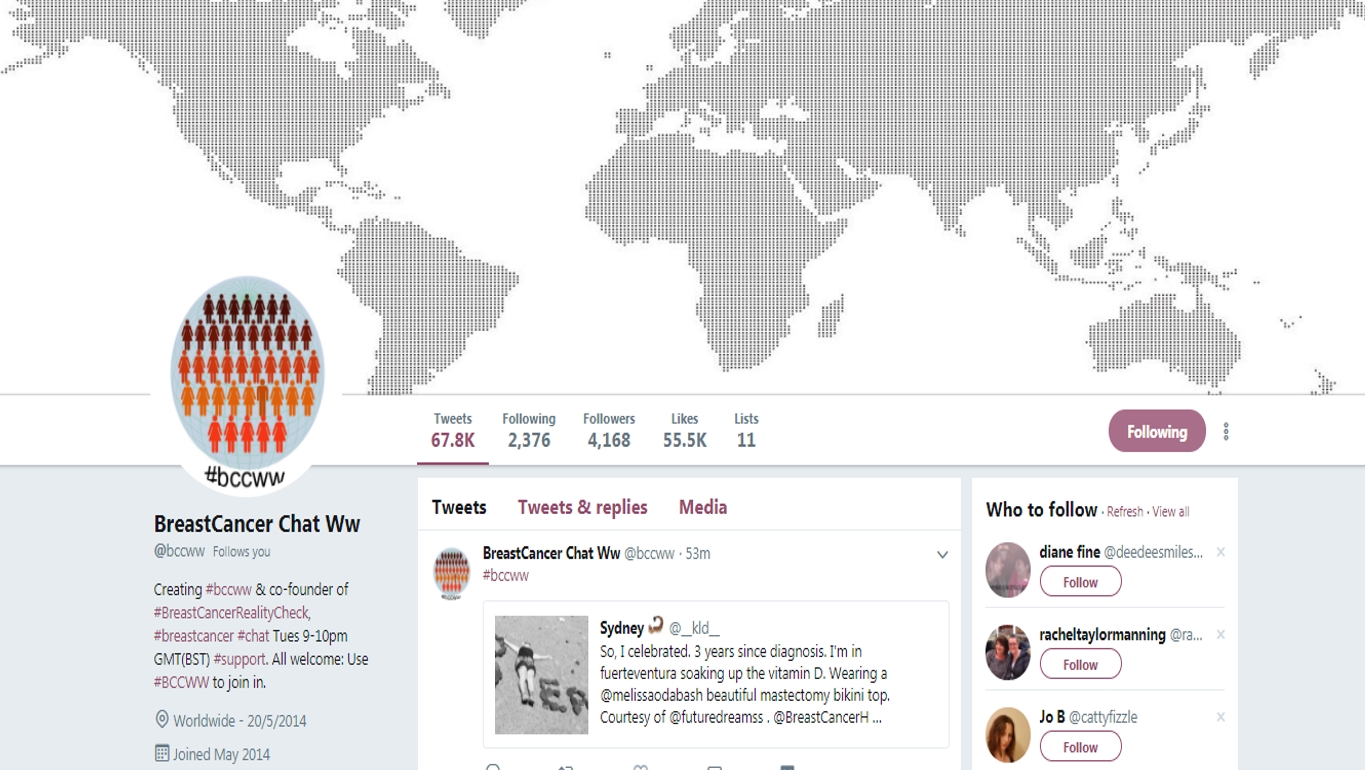
The trailblazer in this area is the Breast Cancer Social Media chat (#BCSM). The first #BCSM chat took place in 2011. Moderated by two breast cancer patients, Alicia Staley and Jody Schoger, the goal was to provide credible, evidence-based information and support for anyone affected by breast cancer.
Picture1

Alicia and Jody were soon joined by breast surgeon, Dr. Deanna Attai who saw immense value in taking part in these conversations. From this inside peek into the world of patients, Dr. Attai surmised that while doctors were providing information, patients, overwhelmed by their diagnosis,  were not necessarily hearing it.

In 2015, BCSM published a study which demonstrated that breast cancer patients’ perceived knowledge increases and their anxiety decreases by participation in Twitter chats like #BCSM. In a separate paper published in 2016, the use of social media was linked to more patient confidence in cancer treatment choices.

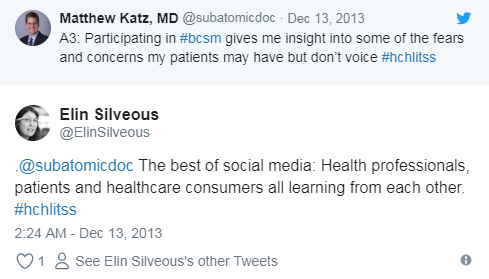
Dr. Matthew Katz, a radiation oncologist based in the US, agrees that Twitter chats provide valuable insight into patient concerns and credits them with making him a better listener.
download (90).png

I also love what Elin Silveous says about Twitter chats being the best of social media. It’s about all healthcare stakeholders coming together to learn from and with each other.

Where To Find Healthcare Twitter Chats

Symplur is doing an impressive job of compiling all of the healthcare hashtags and providing chat transcripts in The Healthcare Hashtag Project. The goal of the project is to make the use of healthcare social media and Twitter more accessible for the healthcare community as a whole (a full list and a tweet chat calendar of meeting times can be found on the Symplur website).

How To Take Part In A Twitter Chat

1. Find a chat you’d like to join using Symplur or another tool like Twubs.

2. When it’s time to join the chat, you can join in straight from your Twitter account. Simply search for the relevant hashtag at the designated time.

Pro Tip! TweetChat is a great tool to use to make participation easier. Simply log in with your Twitter handle, enter the hashtag of the event, and TweetChat will pull up all the related messages so you can follow the conversation. If you plan to tweet a lot during the chat, it’s good etiquette to send out a brief message to your followers letting them know that you are attending a Twitter chat.

3. Take a breath and jump right into the chat with an introduction to who you are and where you’re tweeting from. ​The person hosting the chat will ask questions in order to spark conversation between you and the other participants.

Pro Tip! Twitter chats move fast, which is why using a third-party tool like TweetChat is so useful. Don’t worry if the pace is so fast that you feel you’re missing out on some of the tweets. The host will often provide a transcript after the chat so you to pick up on what you might have missed.

4. If you are new to Twitter chats, you might like to listen at first to get a better sense of how it works before you join in.  However, even if all you do is listen rather than participate, take a moment at the start to introduce yourself when the host asks for introductions. You can let participants know this is your first chat – you will often find that “newbies” receive a lot of encouragement from the group.

5. Remember to use the hashtag associated with the chat for all tweets and retweets during the chat. Again, this is where the TweetChat tool is useful because it will automatically add the hashtag to your tweets, so you don’t have to remember to do it yourself.

6. The host will introduce their questions with Q (for question) or T (for topic) followed by the number of the question, for example T1, T2, etc. When you want to respond to a question, use A (for answer) and the corresponding number, for example, A1, A2, etc.

7. A good tip is to find out in advance what the topic will be so you have time to prepare some tweets in advance. Whether it’s a question or comment relevant to the topic,  a link to some research you have seen, or an article you’ve written, being prepared in this way gives you more confidence to take part.

8. Follow Twitter etiquette. Let your Twitter followers know before the tweet chat that they’ll be seeing a lot of tweets from you for the next hour. You could even invite them to the tweet chat if you think they may be interested in the topic.

9. Enjoy! As I said at the start Twitter chats are super places to learn and find new people to connect with. If you haven’t yet tried a chat, then try one out this week and do let me know how you get on.

How do YOU get the most out of Twitter chats?

Any Twitter chats you’d recommend? What tips and tricks have you learned by participating in Twitter chats?


You might also like to read

 Everything You Ever Wanted To Know About Hashtags in Healthcare…But Were Afraid To Ask!

Posted in #HCSM, Thursday Tip

#ThursdayTip: How To Build Your Email List

Welcome to this week’s quick social media tip. Today I want you to think about the value of creating and growing a list of email subscribers. 

With the explosion of social media marketing in recent years, the traditional email format may appear outdated. But nothing could be further from the truth.  Even with the pervasiveness of new technology, email still remains a persuasive digital marketing channel for building awareness, boosting acquisition, and increasing conversion.

4 Reasons You Should Build An Email List

1. Email marketing helps you build relationships and credibility

People like to do business with those they know, like and trust. Email is direct, making it more personal and personalized than social media marketing. Email gives people a way to easily contact you with their questions.

2. Email marketing keeps you top of mind

Did you know that at least 91% of consumers check their email on a daily basis? While you can go for a few days without checking social media, most people check their email several times a day.

3. Email marketing is inexpensive

Email is an inexpensive way to reach people who are interested in hearing from you and communicating with them regularly.

4. You own your list

Unlike social media which is subject to change, your list is yours. in the words of Ann Handley, email is the only place where people (not algorithms) are in control. With social and other digital channels — Facebook, Instagram, LinkedIn, paid search, organic search — someone or something else decides who sees your content and when and where they see it.

5. Email marketing converts better than social media

A study by McKinsey & Company revealed that email is a significantly more effective way to acquire customers than social media. People who buy products marketed through email spend 138% more than those who do not receive email offers.

Bottom line — ignoring email as part of your marketing strategy means you are missing out on potential business opportunities.

Take Action: One of the best ways to build your list of subscribers is to offer something of value up front. This email incentive known as an “opt-in offer” or “lead magnet” is something you are willing to give away for free which requires people to provide an email address to download. Check out this list of 15 ways to create your first lead magnet.

Want to subscribe to my newsletter?

Each Monday I send out a weekly digest of social media marketing tips and the latest social media updates.

Click here to subscribe to my mailing list.

Related Reading

20 Email Marketing Dos and Don’ts for More Effective Email Campaigns


Posted in Cool Tool

Monday Morning Cool Tool:WordSwag

I love learning about new tools to make social media marketing more creative and effective, so I’ve decided to share some of my favourite tools with you at the start of each week. This week I’m recommending WordSwag – a free mobile application that turns your ideas, quotes, and content into attractive graphics that can be shared on social media.

Here’s how it works

1. Select your picture (Word Swag also includes 590,000+ free backgrounds!)
2. Edit your text (you can also choose from hundreds of captions and quotes)
3. Select one of 48 text styles.
5. Save or share your creative design on Instagram, Twitter & Facebook.