Articles

Posted in social spotlight

Social Spotlight: Barbara Jacoby

I’m delighted to kick off the 2020 series of Social Spotlight interviews with award-winning blogger, and founder of online cancer support community Let Life Happen, Barbara Jacoby.

Barbara has contributed her two-time breast cancer journey, patient advocacy mission and domestic abuse experience to multiple online publications that have touched readers worldwide.


Hi Barbara,  I’d like to start off by asking you to tell us how you got started with social media. What prompted you to get involved?

BJ:  When I was diagnosed with breast cancer for a second time in January 2008, my husband suggested that I put my thoughts and feelings on paper as my way of getting out my emotions. He promised that if I did, he would find a way to share my writing. True to his word, he created the Let Life Happen website that was named the same as the title song of a 15-song CD that he and I had created together in 2002 and he continues to handle all of the technical aspects for the site.

How wonderful to have that support and to have someone to share the success of your work. How has your mission and your site evolved over the years?

BJ: For more than 12 years, I have been writing a weekly blog as my central platform on my website. As I expanded my mission over the years, I added a daily “in the News” feature nearly 7 years ago and a “Clinical Trials” feature just 3 1/2 years ago And now I have been fortunate enough to have a “Paid Opportunities for Cancer Patients” feature on my site for 6 months as a result of the input received from other organizations who are striving to find such gigs for the patient and caregiver communities.

Twelve years is a long time in the social media world. You’ve seen many new social platforms emerge in that time. Which platform(s) do you enjoy using the most?

BJ: I have a great appreciation for all of them as each has a very distinct purpose. LinkedIn is the one where I have been able to best interact with other medical professionals and patient advocates. Twitter is the easiest way to get out a very concise message about something that I want to share. Facebook is of utmost importance for a number of private communities where information is shared among those dealing with similar issues. Intstagram has been a perfect place to provide a short inspirational message from a quote taken from my blogs. Pinterest has been a great place for the sharing of such things like hairstyles, beauty tips, recipes, etc. for those who are or have received treatment that has changed their physical appearance and needs.

Are there any social media that you consciously avoid?

BJ: I avoid everything audio for a couple of reasons. First, as a paralegal for a business unit in a large corporation, I have seen too many people sued for words that were spoken and were either misquoted or misinterpreted. As I do not have either a nonprofit or any other business entity for my work, I can’t afford to be sued as I don’t have the money to defend myself in even a frivolous lawsuit. Second, and perhaps more importantly, when I listen to someone else who is providing information, if I take notes, I miss all of the subsequent info while I am writing. And if I hear something of particular interest that I want to share further with others, my mind wanders off to thoughts of what to say and how to best present it. And third, I find it more difficult to record a presentation and then go back and listen and stop and start the recording over and over rather than to just be able to read something and deal with each point as I go.

Do you have any advice for those who are just getting started with social media?

BJ: Do your best to decide in advance your exact purpose for being on any social media platform, the audience that you want to reach and be flexible enough to change your course as needed as you go. Nothing is ever going to be perfect so just do the best that you can and your audience will know your heart from the work that you share with them.

What super advice  Barbara. I’d certainly agree with you on this. So, I like to end these interviews with a favorite quote or saying. Do you have one you’d like to share?

“If you can’t say anything nice, don’t say anything at all.” – Margaret Atwood

I love the age-old wisdom in that quote. Thanks so much Barbara for taking the time to share your social media journey with us and continued success to you.

If you’d like to learn more about Barbara’s work, visit her website www,letlifehappen.com and follow her on Twitter @letlifehappen


This post is part of an ongoing conversation that explores how patient advocates, healthcare professionals, and researchers use social media to communicate their work. For more interviews, click here

Posted in #HCSM

How To Better Manage Social Media With Hootsuite

Juggling several social media accounts across multiple platforms can be quite the challenge. I rely on a variety of digital marketing tools to streamline my social media activity, and top of the list is Hootsuite.

What Is Hootsuite?

Hootsuite is a very useful application for managing all your social media channels in one place.   The basic Hootsuite plan is free. It enables you to view and monitor multiple streams in a single dashboard and allows you to keep tabs on key phrases, terms, keywords, brand mentions, etc.

What are the Benefits of Using Hootsuite?

Among the many benefits of using Hootsuite (either as part of a team or as an individual) is the ability to save time by scheduling your social updates in advance. Simply pick a day and time of your own choosing. This enables you to create a social media schedule that includes optimal times when your audience is online – even when you aren’t.

How To Use Hootsuite.

In today’s post, I am going to take you step-by-step through the process of setting up a Hootsuite account, and how to get the most from it.

Step 1: Create a Hootsuite account

index

Go to https://hootsuite.com and click Sign Up in the top-right corner.

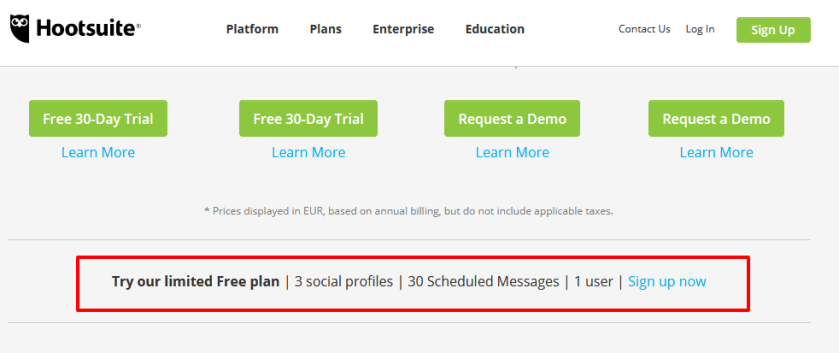
Click to select the plan type that fits your needs.  If you’re looking for a free plan, scroll down the page until you come to this:

index

A free plan is perfect for an individual just getting started.

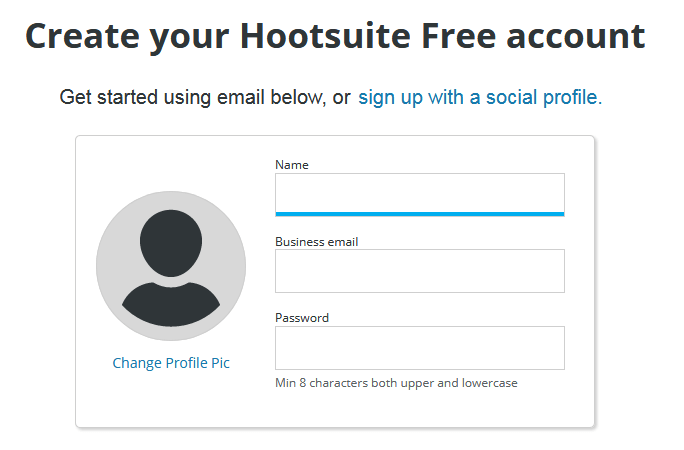
Enter your information.

index

Once you set up an account and log in, Hootsuite will guide you through the basics of connecting networks and organizing streams.

Step 2: Add social networks

Hootsuite is optimized for managing Twitter accounts, but you can also post to your personal Facebook and LinkedIn accounts, as well as to pages and groups of which you’re a member or administrator. You can manage up to three social networks with Hootsuite Free.

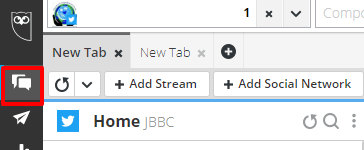
In the Hootsuite dashboard, select Streams  from the launch menu.

download (65)

Click Add Social Network

download (66)

Select a social network from the list.

download (67)

Click Connect – you will then be asked to authorize your accounts to connect to the Hootsuite dashboard.

Step 3: Set up tabs and streams

Now that you’ve added social networks to your dashboard, set up streams for each one to monitor conversations and engage with your followers.

download (68)

Select Streams  from the launch menu.

download (65)

Click Add Tab  in the top-left corner, give it a name, and then press ENTER.

Inside each tab, click Add Stream.

download (71)

Click the streams you want to add for that profile.

Below is a screenshot of how my own Hootsuite dashboard looks with just three streams added.

download (72)

You can add more streams and you can drag and drop the order of each stream to suit you.

Add a Search Stream

Search streams are especially valuable for finding social activity around specific users, locations, hashtags or keywords.

To add a search stream

Select Streams  from the launch menu.

Select a social network from the list on the left, and then select a profile from the drop-down list. I’ve chosen to search for keywords on Twitter in this example.

Enter a search term. You can enter up to 3 words or phrases you would like to track.
download (74)

Twitter searches can include more complex queries. Click Show examples to see how to format search queries. (It’s not essential to include this step unless you want to do a  more robust search.)

download (76)

Click Add Stream when you are done.

This will create a real-time stream of people who are tweeting using that keyword.

download (75)

For more detailed information on adding Search Streams, visit Hootsuite’s Guide. 

Step 4: Publish messages

When you want to publish an update, follow these steps. Click New Post New_post.png in the top-right corner of the dashboard.
This brings up a full-screen Composer window which lets you preview your posts on each social network before you send or schedule them.

Click Select social networks, and then select the social profiles to post your message to. You can search by social network or profile name to surface the right profile.

download (77).png

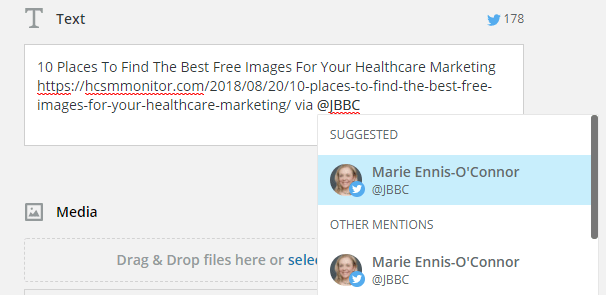
In the Text field, enter the content of your message. The character count for each social network selected will display above the Text field.  To mention a Twitter user, enter @ followed by their username, and then select the correct user from the list that populates.

download (81)

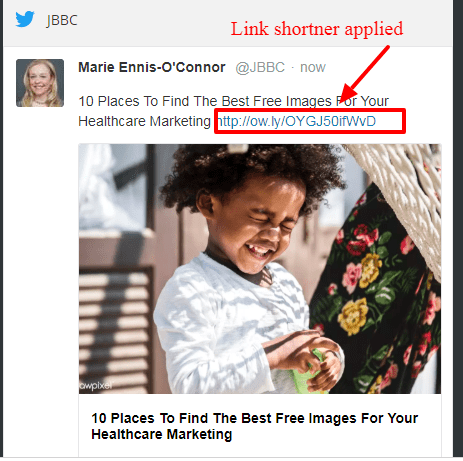
Enter or paste links right into the Text field. You will also be given the option to shorten your link.  

A link preview will appear on the right of the Composer screen.

download (90)


To upload an image, drag and drop files into the Media box or click select a file to upload to attach your own images or a video to your post. Hootsuite will also suggest images it has found in your post to you.

download (84)

Or, you can click Open Media Library to search free stock images or GIFs to include in your message. Click an image to attach it to your post (you can choose up to 4 images).

download (85)Click Close Media Library in the top-right corner when you’ve chosen an image.

On any attached image, you have the ability to edit, crop, add overlays and text, or make other adjustments to it by clicking on Edit with Creative Cloud.

download (86)

Click Save when you are done editing.

download (87)

Find more details about posting images click here.

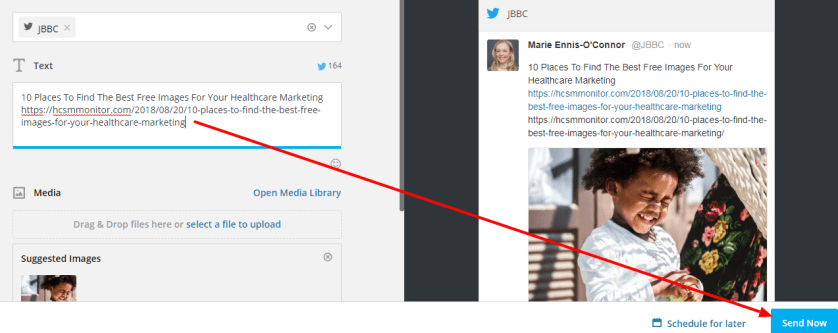
To post the message right away, click Send Now in the bottom-right corner.

download (88).png

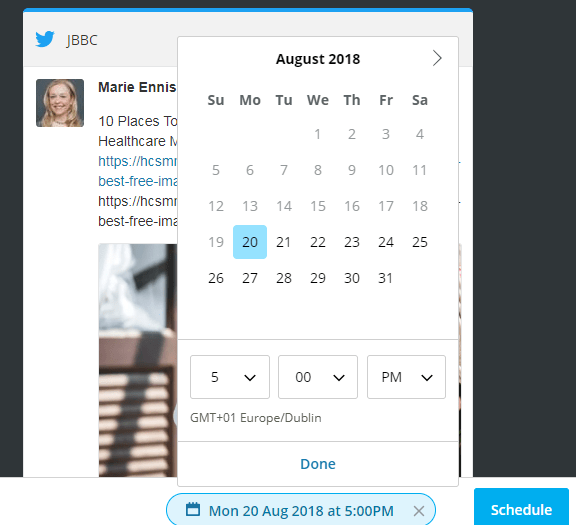
To schedule the message, click Schedule for later, select a date and time to publish the post, click Done, and then click Schedule.

download (89)

You can view your scheduled posts in an easy-to-read calendar format.

download (91)

Other Features To Try

Hootsuite on Mobile

You can manage your social media on the go with the Hootsuite mobile apps for Android and iPhone, iPad & iPod Touch. These can be downloaded from your device’s app store.

Advanced Hootsuite

The Hootsuite App Directory is a library of free and paid third-party apps developed to extend the functionality of the Hootsuite dashboard.

  1. Select App Directory App_Directory.png from the launch menu.
  2. Click Install App beside the app.
  3. Click Finish.

See Install Apps for more details.


Posted in #HCSM

A Grammar Tip for #GrammarDay

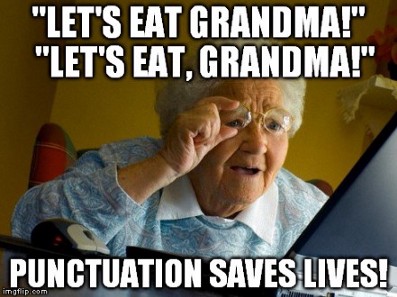
Today, March 4, is designated as #GrammarDay and the perfect opportunity to remind you of the importance of good grammar and spelling as a way to present a positive and professional online impression. 

Even those of us who pride ourselves on our composition and spelling can slip up. It’s easy to type fast and miss that you wrote “their” instead of “there.”

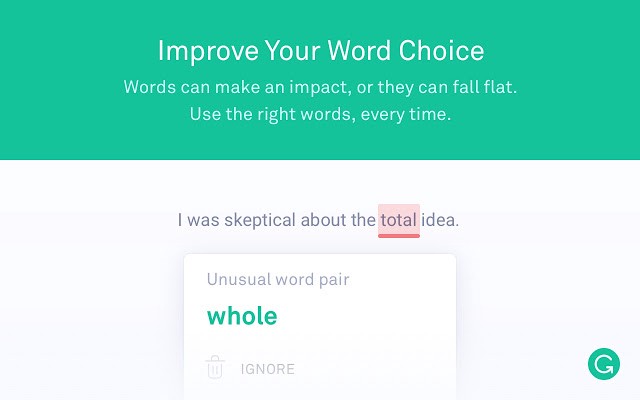
To help avoid these kinds of mistakes, I use Grammarly a free writing app available as a Google Chrome Extension. Grammarly will catch those easy to make mistakes and question your use of the word. It also suggests better ways to get your message across.

1_Ph3S3n5pIJXsucyTRxWUkQ

Adding Grammarly to Chrome means that your spelling and grammar will be vetted on Gmail, Facebook, Twitter, Linkedin, Tumblr, and nearly everywhere else you write on the web.

I use it all the time and find it super useful.

Click here to download the app.

You might also like to read 8 Proofreading Tips and Techniques 

Posted in #HCSM

How to Care for the Millennial Patient

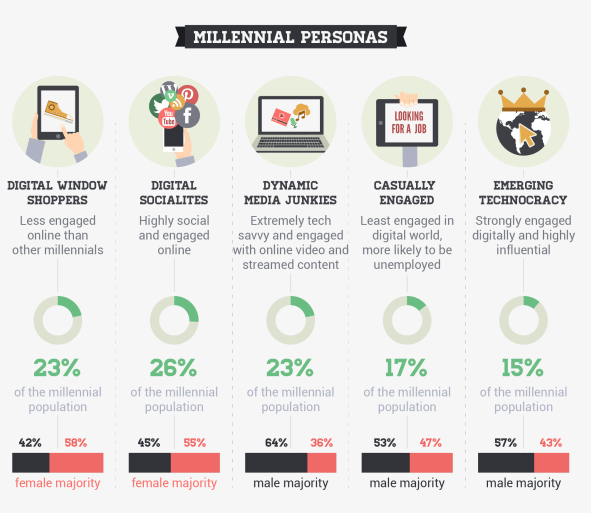
Millennials (aged 20-35) are often called the “C” generation, “C” standing for “connected.” They are the first generation to be born in today’s digital environment where they’ve had 24/7 access to streams of information and constant connection via technology.   Along with this shift in demographics comes changes in experiences, attitudes, and expectations, all of which have implications for health care providers.

download (1).png

2012 study from ZocDoc and Harris Interactive found that 51 percent of millennials surveyed visit a physician less than once per year. They believe seeing a doctor is too much of a “pain.”  According to a Salesforce’s State of the Connected Patient report, millennials are generally frustrated with filling out repetitive forms, and the time wasted waiting in a doctor’s waiting room.  Seeing a doctor is an unwieldy, expensive and unwelcome errand.

Understand that millennials are heavily invested in technology, and then get your own technology in order.

In contrast to authority-driven customer communication modes, nearly half of all millennials want their healthcare experience to feel more accessible and engaging.  While millennials have different and sometimes non-existent relationships with their doctors, they believe digital health has the potential to change that.

Digital healthcare that gives a greater sense of control is of great value to millennials.  Commonly cited examples of digital health include health tracking devices like Fitbit, self-diagnosing websites like WebMD, and apps that make it easier to make appointments, order medication, store individual health data, and recommend preventative health measures.

Millennials Turn Online For Health Information

Millennials are driven by information. It is how they make buying decisions and decisions about their own health.  Unlike previous generations, millennials don’t rely on a strong relationship with their doctor.  They are mistrustful of authority (in a study conducted by Greyhealth Group and Kantar Health, only 58 percent of millennials said they trust their doctors), preferring to google their symptoms and self-diagnose prior to scheduling a doctor’s appointment

Compared to any other generation, they default to — and prefer — information corroborated by multiple channels and influencers. In fact, before even meeting with a healthcare professional, 54% of Millennials have consulted as many as seven information sources for purposes of self-diagnosis from blogs to medical message boards, ratings and reviews and more.

Become The Trusted Online Source

Making a practice accessible online is essential to attract millennial patients.

Take a look at how you deliver information to your patients, as well as how you offer appointment scheduling.  Millennials want health information to be readily available and easily understandable.

Review your website. Weed out any industry jargon and hard-to-digest information.  Make forms available on your site so patients can fill them out ahead of time online.

Embrace social media and content marketing. Create and share high-quality content that provides engaging, important information about self-care.

While millennials are glued to their smartphones, few actually use the device to make a call –  so use more email and automated text messaging (a 2014 Gallup poll shows that 68% of people ages 18-29 utilize text messaging)  to communicate. with them.

Embracing The Future of Healthcare

Millennials are the first of a technologically-savvy generation of health seekers – closely followed by Generation Z (born between 1995 and 2010).  Embracing the future of healthcare means embracing communication channels that reflect millennials’ wants and expectations.  Regardless of specialty, ensuring your practice offers the accommodations younger patients seek out should become a higher priority in 2019.

Further Reading

Posted in Cool Tool

Monday Morning Cool Tool: Charcounter

I love learning about new tools to make social media marketing more creative and effective, so I’ve decided to share some of my favourite tools with you at the start of each week. This week I’m recommending Charcounter –  a free tool that will count the number of characters, letters and words in your text.

download - 2020-02-23T211549.779

It’s a simple tool but certainly useful.

Posted in Cool Tool

Monday Morning Cool Tool: Hype Type

8cd84772-826d-4571-85a2-925cb7cf67e8

I love learning about new tools to make social media marketing more creative and effective, so I’ve decided to share some of my favourite tools with you at the start of each week. This week I’m recommending video text animator Hype Type.

Hype Type is an iOS app that lets you add moving text and typography over images. It’s a super useful tool for Instagram Stories.

Hype Type also provides easy-to-use editing tools for speeding up, slowing down, flipping, or reversing your videos.

Once you’re happy with how your image looks, export it for sharing on Instagram, Facebook, Twitter, or wherever else you want to showcase your motion typography-enhanced photo or video.

Posted in #HCSM, Thursday Tip

#ThursdayTip: How to Create Twitter Moments

Welcome to this week’s quick social media tip. This week I want to show you how to create Twitter Moments.

Twitter Moments are curated stories about what’s happening around the world—powered by Tweets. It’s easy to create your own story with Twitter Moments.

There are three ways to begin creating your own Moment via twitter.com.

You can access Moments through the Moments tab, your profile page, or through a Tweet detail.

Note: Moment creation is only available on twitter.com. It is no longer possible to create a Moment from your Twitter for iOS or Android app. 

To get started from the Moments tab follow these instructions:

From the Moments tab, click the Create new Moment button.

index

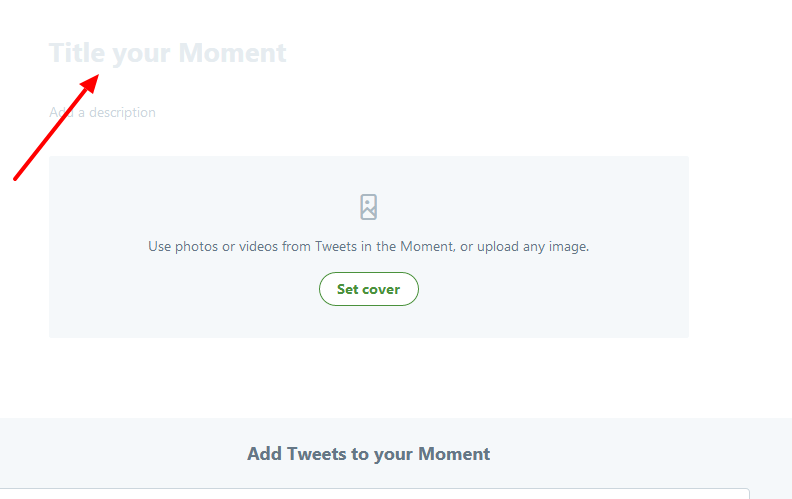
Click the Title your Moment field to give your Moment a name.

index

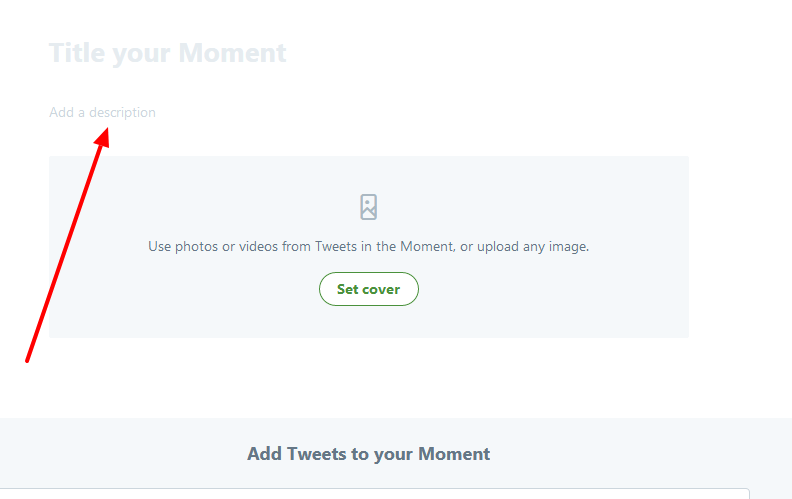
Click the Add a description field to type in a description for your Moment.

index

Choose Tweets to add to your Moment

index

From the Add Tweets to your Moment section at the bottom of the page, quickly access content to select Tweets from Tweets I’ve liked, Tweets by account, Tweet link, and Tweet search prompts. To add a Tweet to your Moment, click on the checkmark.

index


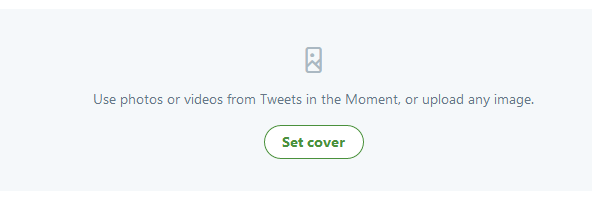
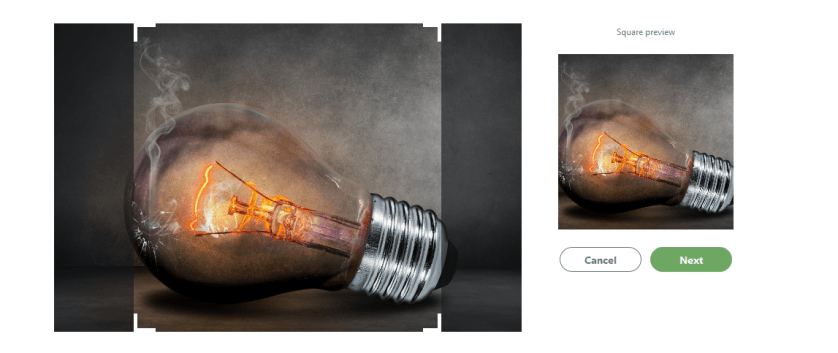
Click Set cover to choose a cover image from one of your selected Tweets, or to upload an image from your computer.

index

index

Drag your selected image to set a Mobile preview, click the Next button, then click the Save button.

index

As you can see this image is cut off in mobile preview, so I might want to change it for something that will show up better on a mobile device.  To change your selected image, hover over the cover image and click on Change cover media.

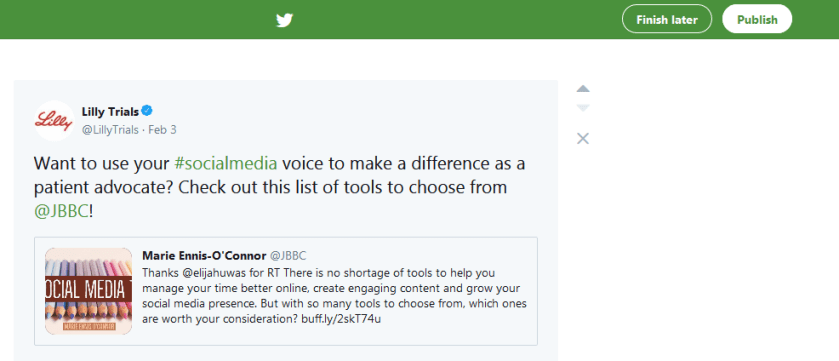
Once you have Tweets in your collection, click on the up or down arrow buttons to the right of a Tweet to move it up or down.

index

Click on the delete (x) button to remove a Tweet from your Moment.

Click the Finish later button at the top of the page to save a draft.When you are ready to make your Moment live, click on the Publish button at the top of the page.

index

You have the option to share Moments privately, making the Moment available to only those whom you share a link with.
Posted in Cool Tool

Monday Morning Cool Tool: AutoDraw

I love learning about new tools to make social media marketing more creative and effective, so I’ve decided to share some of my favourite tools with you at the start of each week. This week’s cool tool recommendation is AutoDraw  – an online drawing tool by Google.

AutoDraw pairs the magic of machine learning with drawings from talented artists to help everyone create anything visual, fast.  Watch this short video to learn more about how you can use this cool tool.

Posted in social spotlight

Social Spotlight: Terri Coutee

It’s my great pleasure to shine the first social spotlight of the year on this week’s guest interviewee. 

Terri Coutee is the Founder and Director of DiepCFoundation.org, a nonprofit organization providing education and resources to empower women and men with information to make an informed decision about options for breast reconstruction after mastectomy. After a second breast cancer diagnosis and her own successful breast reconstruction, she writes about her experience in a blog, DiepCJourney.com.

Terri is a guest speaker and a strong proponent of the shared decision-making process for patients. When traveling for advocacy, she interviews surgeons, healthcare providers, and patients on topics related to breast cancer and breast reconstruction as another resource to empower those in need of education to find their own voice in their healthcare journey.

I’ve known and admired Terri for several years through our interactions on social media. She is a real force for good through her online patient advocacy and a ray of sunshine with her positive motivational style.

And now here is Terri’s social media story. 


Hi Terri,  I’d like to start off by asking you to tell us something about the role that social media plays in your work.

TC: My platform as a patient advocate for breast reconstruction evolved from using social media. I utilize Twitter, Facebook, Instagram, LinkedIn, Pinterest, and Google Plus to reach a global audience for various purposes.

Twitter is my go-to for connecting with the breast cancer and breast reconstruction community. I search for the latest studies and news to share with those who may not be using Twitter. One of my favorite projects is to report from medical conferences I attend.

PSTM photo.jpg

The global community becomes more of a family when you meet your Twitter pals at conferences. The energy and ideas are limitless. I frequently receive direct messages on Twitter asking for specific resources, so it has served me well.

You sure do know how to make full use of so many platforms. When did you start using social media – what prompted you to get started?

TC: Oddly enough, using social media started for me in an entirely different way than what I am doing now. At the time of my second breast cancer diagnosis I was in graduate school to get my M.Ed. in Teacher Leadership. I set up a Twitter account using an anonymous name, so I could be one of those “lurk and learn” social media people. I used the handle, @6state, because I taught schools in six different states.

I knew very little about any social media platforms and had no idea the power of social media at the time. Unbeknownst to me, having successful DIEP flap breast reconstruction after a double mastectomy would be the catalyst for starting a blog about my experience utilizing social media to share my story. I suppose I have nostalgically stuck with the handle @6state. Once an educator, always an educator.

One of the things  I love most about these interviews is getting to learn something new about people I’ve known online for a while. I never knew what prompted you  to use @6state as your Twitter name – that’s s a fun fact for me to learn. I probably interact most with you through Twitter, but I know you’re very active on Facebook. How do you like to use Facebook in your work?

TC: Facebook has been a place of support and solace for a growing number of members in a closed group I set up: https://www.facebook.com/groups/diepcjourney/about/. Women and men who are currently in treatment or planning extensive surgery don’t always have the time or inclination to leave their home to attend a support group meeting.

The Facebook group is a safe haven for many. It is another way of connecting globally. We have members from all over the world. Additionally, we are honored to have medical professionals including surgeons, physical therapists, radiologists, and support resources like tattoo artists who are welcome and lend great value to the group. The resource I provide through these professionals is priceless. I feel very strongly it brings great credibility to the site. The emotional, positive support the members bring to the group is what inspires me daily.

I have found great value in setting up a separate Facebook account for the nonprofit group I founded in 2016, DiepCFoundation. It keeps my followers informed of the Foundation’s activities, outreach, and pertinent topics related to breast reconstruction, including my blogs.

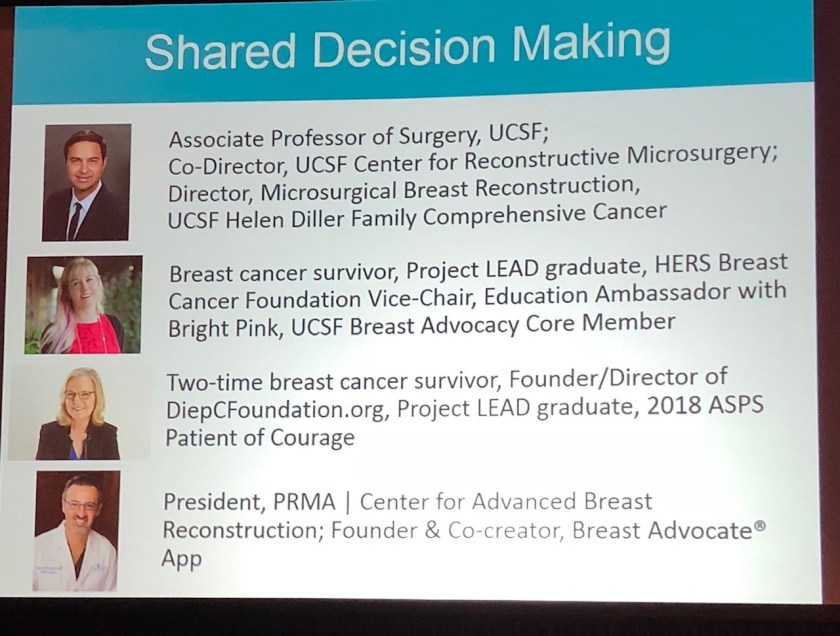
Facebook live is another great way to share topics related to breast reconstruction. Viewers can watch, re-watch, and share the broadcasts with others in their own community. One I am most proud was a presentation I made this year. It was recorded at the national medical conference of the American Society of Plastic Surgeons on a topic I focus on in my work as a patient advocate, shared-decision making.

Shared Decision Making.jpg

You really are rocking Facebook! Let me take you back to Twitter for a moment. Do you take part in any health-related Twitter chats? 

TC: I have been a host on #TweetChats providing information for breast reconstruction. They are fast and furious but preplanning your comments and hashtags makes them far more effective. I participated in a #bcsm Tweet with The American Society of Plastic Surgeons and one of their board-certified plastic surgeons. Living Beyond Breast Cancer invited me to a tweet chat with my own plastic surgeon and others in the breast reconstruction community to coincide with National Breast Reconstruction Awareness Day in October.

Social media obviously plays a vital role in your advocacy work so what advice would you give to others who are just starting out with social media?

TC: Take it slow and don’t be overwhelmed by the wealth of information before you or the speed things seem to travel at with constant changes in social media. As I always say, take it one bite at a time!!!

Educate yourself about all social media platforms. They each serve a different audience and purpose. Give them all a go!

Surround yourself with a tribe who will support and believe you are serious about your message.

Read articles and attend seminars to improve your skills. Know you will make mistakes, receive critique, but also get euphorically hooked on a tool that shares a wealth of valuable information to the world and in particular your viewing audience, your true purpose for using social media!

Such great advice Terri. I love your enthusiastic embrace of social media and your championing of the creation of an online tribe.

So, I like to end these interviews by asking for a favorite quote. I know you are a big fan of inspiring quotes and I always appreciate you sharing them on social media. Do you have one you’d like to share with us now?

The most difficult thing is the decision to act, the rest is merely tenacity. The fears are paper tigers. You can do anything you decide to do. You can act to change and control your life; and the procedure, the process is its own reward.

                                                   -Amelia Earhart-             

What a wonderful quote! 

Thanks so much Terri for taking the time to share the many ways in which you are making a difference using social media. 

If you’d like to learn more about the work that Terri is doing in raising awareness of DIEP flap breast reconstruction, you can find more information at DiepCFoundation.


This post is part of an ongoing conversation that explores how patients, healthcare professionals, and researchers use social media to communicate their work. For more interviews, click here