Articles

Posted in #HCSM

A-Z of HCSM: N is for Newsletter #AtoZChallenge

AtoZ2019tenthAnn

26 posts. 26 days. 26 letters of the alphabet, one blog post beginning with each letter.

N is for Newsletter

Once you build an audience (of email subscribers), anything is possible.” — Joe Pulizzi

With the explosion of social media marketing in recent years, the traditional email format may appear outdated.

But nothing could be further from the truth.

In fact, email marketing is more powerful than ever before.

Even with the pervasiveness of new technology, email still remains a persuasive digital marketing channel for building awareness, boosting acquisition, and increasing conversion.

The most popular type of email, especially for businesses who create online content, is the e-newsletter. Newsletters can help keep your content top of mind with readers and drive more traffic to your website.

6 reasons to send an e-newsletter to subscribers

1. Email marketing helps you build relationships and credibility

People like to do business with those they know, like and trust. The advantage of sending a newsletter is the ability to create and nurture a sense of connection with your reader over time. Once you’ve built solid relationships with your subscribers through free content, you can start sending them relevant offers via email.

2. Email marketing keeps you top of mind

Did you know that at least 91% of consumers check their email on a daily basis? While you can go for a few days without checking social media, most people check their email several times a day.

3. Email marketing is inexpensive

Email is an inexpensive way to reach people who are interested in hearing from you and communicating with them regularly.

4. You own your list

Unlike social media which is subject to change, your list is yours. In the words of marketer Ann Handley (sender of one of the best newsletters around) “email is the only place where people (not algorithms) are in control. With social and other digital channels — Facebook, Instagram, LinkedIn, paid search, organic search — someone or something else decides who sees your content and when and where they see it.”

5. Email marketing converts better than social media

A study by McKinsey & Company revealed that email is a significantly more effective way to acquire customers than social media. People who buy products marketed through email spend 138% more than those who do not receive email offers.

6. Email drives visitors to your website

Email marketing can seamlessly drive more visitors to your website, and provide you with a valuable way to track which parts of your website and your marketing attracts the most interest.

What should you share in your newsletter?

Sending regular emails to your list is the best way to build relationships with your subscribers.

Commit to sending high-quality content on a regular basis to your subscribers.

Each email you send should convey something actionable and valuable, such as an offer or discount, or a solution to a problem they have.

Alongside a digest of your most recent articles or blog posts, you can also include links to quality curated content from other sites, coupons, or special offers. Y

our emails don’t have to be lengthy, but they do need to be useful to your subscriber.

Insider Tip

Don’t just compete on value, but also personality. The best email newsletters show the sender’s personality and have a relatable human voice.

To quote Content Marketing Institute, “newsletters feel inherently more personal — like a personal letter. Don’t waste that unique ambiance by sticking to impersonal corporate speak.”

Using your own voice and personality builds rapport and helps your audience get to know and trust you.

Take this to the next level by opening a two-way discussion with your subscribers.

Give your audience something they can connect back to that can also provoke a conversation.

Your family, pets, sports, or entertainment are good examples. Invite them to respond to your emails or join the discussion on your website or social channels.

Want to subscribe to my newsletter?

Each Monday I send out a weekly digest of social media marketing tips and the latest social media updates.

Click here to subscribe to my mailing list.

Posted in #HCSM

A-Z of HCSM: M is for Mistake #AtoZChallenge

AtoZ2019tenthAnn

26 posts. 26 days. 26 letters of the alphabet, one blog post beginning with each letter.

M is for Mistake

A man should never be ashamed to own he has been in the wrong, which is but saying… that he is wiser today than he was yesterday.    – Alexander Pope

Whether you are just getting started using social media for your brand or you are well acquainted with the do’s and don’ts of social media marketing, it pays to take a fresh look at some of the most common mistakes businesses make online to ensure you are not making them too.

Here are 3 common social media management mistakes I see happen most often — and how to fix them.

Mistake #1 Being Overly Promotional On Social Media

Posting content that focuses solely on your own offering is sure-fire way to turn people off. Sprout Social surveyed more than 1,000 Facebook, Twitter and Instagram users to determine what annoys them about brands on social, what drives them to unfollow and which industries are on the right side of the line. Respondents indicated that the most annoying thing brands do on social is over-promote.

1_XLtv1mGWk0UrsgWFGf-mlQ

Try This Fix: Follow the 80/20 rule: 80 percent non-promotional content and 20 percent posts with calls to action. Experiment with posting quality content from others. To quickly find great relevant content on Facebook, use the Pages to Watch feature in your Facebook Page Insights.

Mistake #2 Not Having A Content Promotion Plan

Content has no value unless it’s shared. You could have the greatest piece of content in the world, but if no one can find it, does it really exist? Cross promote each piece of content you create — but do NOT copy and paste the same post on each platform. The platform and the audience using each, are unique and as such require a unique post. That doesn’t mean that you cannot create similar posts — but format each of them to meet the requirements of the specific platforms.

1_GOweApFcG5DxFf3lsnR7NQ

Try This Fix: Use a scheduling tool like Buffer or Hootsuite to schedule your updates to reach more people, more often. While automating posting is fine for some things, you still need to interact with your audience to gain their respect, earn their trust, and build relationships. Always keep in mind that Social Media is just that — SOCIAL. Connect with content and then focus on building relationships by being there.

Mistake #3 Not Monitoring Social Media

Social media is a two-way conversation that requires you to listen more than you talk. It’s easy to get caught up in the metric of having the most likes on Facebook, views on YouTube and followers on Twitter as an indicator of your impact. But likes, views, and followers are not an objective measure of your brand’s true position. You need to dig deeper to find what people truly think of your product or service.

1_-h_4bwZdXVf30JVEOYs91g

Try This Fix: Set up keyword searches to incorporate your brand name and include words relevant to your industry.

Don’t just monitor mentions of your brand’s name. Aim to evaluate sentiments attached to those mentions. Tweets that indicate issues with your company should be resolved immediately. Doing so strengthens public perception that your focus is strongly centered on customer satisfaction.

Want to learn more about common social media mistakes?

Read 15 Social Media Marketing Mistakes … And How To Fix Them

Posted in #HCSM

A-Z of HCSM: L is for LinkedIn #AtoZChallenge

AtoZ2019tenthAnn

26 posts. 26 days. 26 letters of the alphabet, one blog post beginning with each letter.

L is for LinkedIn

I’m a big fan of LinkedIn. I sing its praises all the time.

At 500 million users and growing, LinkedIn is the social media site that boasts the largest network of business professionals.

Yet many professionals still treat their LinkedIn profile as little more than a place to park their CV and promptly forget about it.

If you’re wondering how to get more out of the platform, it may help to see what other professionals are doing there.

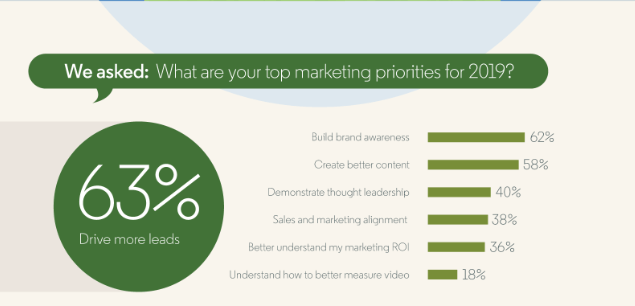
Earlier this year LinkedIn invited readers to fill out an interactive survey asking about their marketing aspirations for 2019.

LinkedIn has published those initial findings in a new infographic which you can view here.

Driving Leads And Building Brand Awareness Top Priorities


0 (8)

63% of respondents see driving leads their top-most priority in 2019, followed closely by building brand awareness. Creating better content (53%), demonstrating thought leadership (40%), and better understanding marketing ROI (38%) follow in line.

Actionable Marketing Tip

Highlight your expertise, build your personal brand and demonstrate thought leadership by publishing original thought-pieces on LinkedIn’s publishing platform.

When you publish an article on LinkedIn:

  • Your original content becomes part of your professional profile. It is displayed on the Articles section of your LinkedIn profile.
  • It’s shared with your connections and followers in their news feeds, and sometimes through notifications.
  • Members that aren’t in your network can follow you from your article so that your next article will be surfaced in their feeds. LinkedIn Publishing is even searchable through Google.

Ready to get started? Read How To Increase Your Visibility On LinkedIn By Publishing Articles

You might also like to read How To Brand Yourself For Success On LinkedIn

Posted in #HCSM

A-Z of HCSM: K is for Keywords #AtoZChallenge

AtoZ2019tenthAnn

26 posts. 26 days. 26 letters of the alphabet, one blog post beginning with each letter.

K is for Keywords

If you want your website to rank higher in Google you have to make sure that you’re using the right keywords. Keyword research is vital because identifying the terms people are searching for will determine the kind of content you create and the way you will optimize it.

I frequently come across clients who use one set of words when describing their services, while their target audience uses a completely different set of words. As a result, your audience doesn’t discover your website, because of a mismatch in search terms. Good keyword research makes sure that you use the same words as your target audience.

The Google Keyword Planner within Adwords is a useful tool to find ideas for content based on keyword search. This is a free Google tool that gives you insight into the volume of monthly searches for a particular keyword, and how much competition there is, based on advertising spend for sponsored links. It also returns suggested terms you could use instead of or alongside your original keyword.

You will need to sign up for an Adwords account with a Gmail account but you don’t have to add any credit card details or create any ads to use the tool.

Pro Tip! Use Google Related Searches

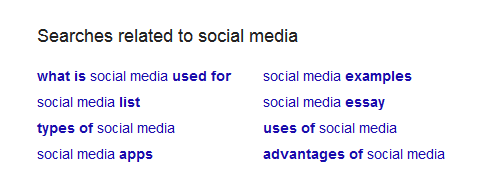
Google displays related search results at the bottom of the first page when you type in your Google search query. This is a super-helpful resource as it returns ideas that are relevant to your topic based on user interest and contextual words.

1_YI5j2PX1tlu9n8NKmlBK4w

Need some help with keyword optimization?

If you’d like more help with keyword optimization for your website, I’m running a special promotion this month for my email subscribers. You’ll find more details here.

Posted in #HCSM

A-Z of HCSM: J is for JPEG #AtoZChallenge

AtoZ2019tenthAnn

26 posts. 26 days. 26 letters of the alphabet, one blog post beginning with each letter.

J is for JPEG

JPEG is Short for Joint Photographic Experts Group, a standard for compressed pictures, widely used on the web. The degree of compression can be adjusted, allowing a selectable tradeoff between storage size and image quality. JPEG typically achieves 10:1 compression with little perceptible loss in image quality. The most common filename extensions for files employing JPEG compression are .jpg and .jpeg.

You should always use images to accompany your social media posts and the content you create.  When at all possible, its better to use original images – those you have taken yourself – than stock photo images. If you can’t do this, use one of these recommended photo sites to source your images.

Once you have found the right image,  the next step is to optimize it for use on your website or blog. Using a JPEG file extension for larger photos will give you good results with a relatively small file size.

1_dKy3I2pT89-8Jehij_fAWw

If you need to reduce the size of your image, use a tool like  JPEGmini, or jpeg.io. Images can have a big impact on loading times – the faster the site, the easier it is to visit and index a page. 

Lastly, be sure to add a caption and alt-text to describe what’s in the image so both search engines and people can make sense of it.

Dive deeper into the topic of optimizing images for search engines with this Yoast post.  


Posted in #HCSM

A-Z of HCSM: I is for Instagram #AtoZChallenge

AtoZ2019tenthAnn

26 posts. 26 days. 26 letters of the alphabet, one blog post beginning with each letter.

I is for Instagram

Instagram is on the rise, and will no doubt play a bigger part in healthcare communicators’ social media strategies over the course of this year.

With Facebook reach on the ever-steady decline, and Instagram’s active audience now rising above a billion per month, it makes sense to add the image-sharing platform to your social media mix.

Why use Instagram for healthcare marketing?

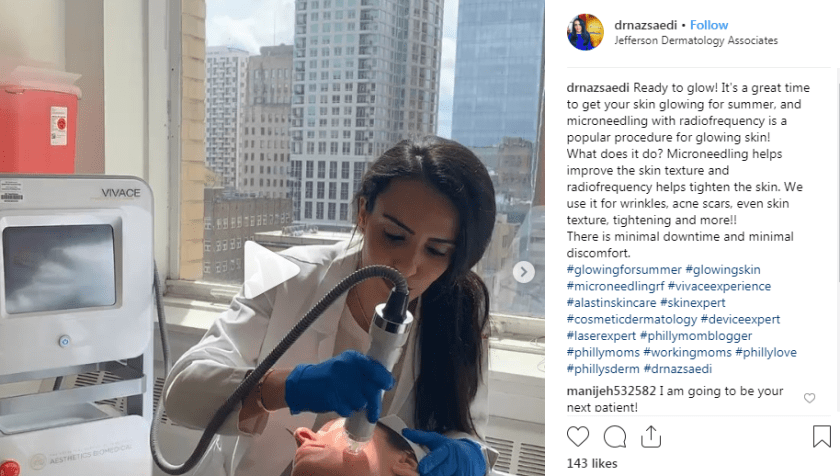
Instagram (IG) enables healthcare providers the opportunity to connect in an immediate way with their patients. It is particularly good for community outreach activities and patient education.  Healthcare providers can also use IG to show users a behind-the-scenes view of their practice.

Here’s how board-certified plastic surgeon, Jonathan Kaplan MD describes his approach to using IG in his practice.

By watching us in our “natural habitat,” the prospective patients feel like they know us. We seem more approachable. By the time they show up, there’s more rapport between us vs patients unengaged with us on social media.

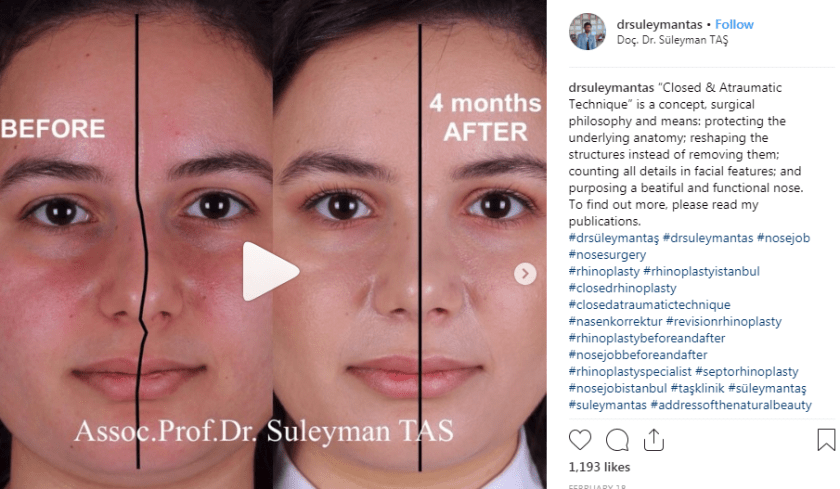
Dermatologists, cosmetic dentists, and plastic surgeons can benefit from Instagram by using photos or video to illustrate their services. Practices can showcase before and after photos of patients, as well as videos or illustrations that educate patients on procedures and treatments.

How to get started with Instagram

To get started with Instagram, set up a business profile (or convert your current Instagram profile) to a business Instagram profile.  If you aren’t sure if you are using a business Instagram account, it’s easy to find out. Go to your account and next to “Edit Profile” check to see if you can see the “Promote” button which will tell you if you are using  Instagram for business.)

When you create a business account on Instagram, you’ll be able to get insights about your stories, posts, and followers. With an Instagram business profile, you can see real-time metrics on how your stories and promoted posts perform, and get insights into how followers are interacting with your content.

Next, choose an Instagram username – pick a name that clearly identifies you, your practice, and/or your specialty.

Complete all of your practice information and don’t forget to include a link to your website in your bio so prospective patients can go directly to your site. Aside from your business name, username, and website URL, your Instagram profile provides 150 characters for writing a bio. According to Hootsuite, “your bio is an opportunity to make a first impression, to articulate what your business offers and why people should care. Your bio should explain who you are and what you do while conveying your brand’s identity.”

Your bio is an opportunity to make a first impression, to articulate what your business offers and why people should care. Your bio should explain who you are and what you do while conveying your brand’s identity.

Adding a profile image that’s high quality and reflects your business is a must. Be sure that your IG is aligned with your website and other social media channels in terms of branding and imagery.

Looking for some inspiration?

Take a look at how these healthcare providers are using Instagram in their online marketing.

download - 2019-04-13T115201.888

download - 2019-04-13T115018.232

download - 2019-04-13T114724.088

Further Reading


Posted in #HCSM

A-Z of HCSM: H is for Hashtag #AtoZChallenge

AtoZ2019tenthAnn

26 posts. 26 days. 26 letters of the alphabet, one blog post beginning with each letter.

H is for Hashtag

Hashtags, a way for users to easily find similarly themed content, are used regularly by millions of social media users, especially on the micro-blogging site Twitter.

Hashtags tie public conversations from different users into a single stream, allowing you to connect more easily with existing conversations and discover new people who are tweeting about the healthcare topics you are interested in.

If you are running a social media campaign, hashtags allow you to measure the level of interest, sentiment (“positive” “negative” or “neutral” attitudes), key demographics and influencers of your campaign. You can then use these findings to plan future campaigns.

What began on Twitter has now spread with varying degrees of success to Facebook, Pinterest, Instagram, Google+ and LinkedIn (LinkedIn has recently started to experiment again with hashtags).

Hashtags on Twitter

Hashtags are a powerful way to maintain your visibility on Twitter and boost engagement with your followers. According to Twitter’s own research tweets with hashtags show a 100 percent increase in engagement (clicks, retweets, likes and replies). Hashtags can also expand the reach of your message beyond just those who follow you to help you grow your network.

Two Ways to Use Hashtags on Twitter

(1) Twitter Chats. Hashtags are an integral part of Twitter chats (live Q&A sessions organized around one unique hashtag) allowing you to follow the discussion and participate in real-time.

(2) Live Conference Reporting. Hashtags are useful when it comes to sharing insights from conferences and events. Nowadays, most organizers will designate a specific conference hashtag. By tagging your tweets with this hashtag you can expand the reach of the conference beyond the physical confines of the event.

#TwitterTip: #Don’tGo #HashtagCrazy on #Twitter.

Too many hashtags can diminish your chances of engagement with a tweet. The basic rule of thumb on Twitter is to use 1-3 hashtags within the messaging of your post. More than that and the post tends to become cluttered, hard to read and might be seen as “spammy.” The key is to use hashtags sparingly and only when they add value.

Hashtags on Instagram

Instagram is another hotspot for hashtags and unlike Twitter where less is more when it comes to using hashtags, interactions are highest on Instagram posts with 11+ hashtags. You can follow hashtags on Instagram to stay connected with interests, hobbies and communities you care about.

Hashtags on Pinterest

On Pinterest when you add hashtags to the description for a new Pin, site users can then visit a feed of all the Pins that share that hashtag.

Want to learn more about using hashtags for healthcare conversations?

Check out The What, Why, Where and How of Using Hashtags in Healthcare

Posted in #HCSM

A-Z of HCSM: G is for Grammar #AtoZChallenge

AtoZ2019tenthAnn

26 posts. 26 days. 26 letters of the alphabet, one blog post beginning with each letter.

G is for Grammar

Do you want to present a positive and professional online impression?

Of course, you do.

Nothing gives a poorer impression than bad grammar and spelling.

Even those of us who pride ourselves on our composition and spelling can slip up. It’s easy to type fast and miss that you wrote “their” instead of “there.”

To help avoid these kinds of mistakes, I use Grammarly a free writing app available as a Google Chrome Extension. Grammarly will catch those easy to make mistakes and question your use of the word. It also suggests better ways to get your message across.

1_Ph3S3n5pIJXsucyTRxWUkQ

Adding Grammarly to Chrome means that your spelling and grammar will be vetted on Gmail, Facebook, Twitter, Linkedin, Tumblr, and nearly everywhere else you write on the web.

I use it all the time and find it super useful.

Click here to download the app.

You might also like to read 8 Proofreading Tips and Techniques 


Posted in #HCSM

A-Z of HCSM: F is for Facebook #AtoZChallenge

AtoZ2019tenthAnn

26 posts. 26 days. 26 letters of the alphabet, one blog post beginning with each letter.

F is for Facebook

Worldwide, there are over 2.23 billion monthly active Facebook users and 1.47 billion people on average log onto Facebook daily. Statistically speaking, Facebook is too big to ignore but at a time when organic Facebook Reach is estimated to currently be as low as 1–3%, succeeding on the platform is more difficult than ever.

Social analytics platform Quintly released a new report, in February, for which they analyzed 94,000 Facebook Pages, and over 105 million posts, in order to achieve “a data-driven foundation” for Facebook insights and predictions.

If you’re struggling to make an impact on Facebook, then these findings may help you find a way forward.

Visuals Lead The Way

Facebook recommends each post you create should include some type of creative, like images, GIFs or videos. Quintly’s findings bear this out.

1_TJsYLx7euIoJAJkNJH8LYg

Key Takeaway: As you can see merely posting a link without a video or image leads status updates to under-perform.

Weekends Are The Best Time To Post

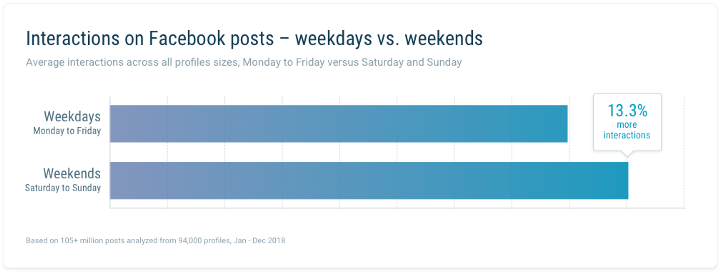
On average, Quintly saw a tendency towards posting during the weekday. with 23% of all posts posted during the weekend.

1_WfqcexT6JQwD_cI24DalbQ

Key Takeaway: Posting on the weekend resulted in 13.3% more engagement. If you’ve not tried posting on weekends, it may also be worth testing.

Want to learn more?

Access the full study here.

You might also like to read 10 Tips To Create More Engaging Content For Your Medical Practice Facebook Page

Posted in #HCSM

A-Z of HCSM: E is for Egg Head #AtoZChallenge

AtoZ2019tenthAnn

26 posts. 26 days. 26 letters of the alphabet, one blog post beginning with each letter.

E is for Egg Head

Twitter suspended 70 million accounts in 2018 as part of a crackdown on malicious activity on its platform. While you may not think this crackdown will impact you, there is one surprising way in which Twitter’s attempts to control abuse on the platform might.

Twitter has made it possible to filter out accounts with the default “egg” profile picture so that they don’t appear in your notifications. Twitter will also let you filter out notifications from users who haven’t verified their email addresses or phone numbers.

It is still surprising to me the number of new (and not-so-new) Twitter users who start tweeting from an account with no clearly identifiable name, bio, or profile picture.

The first and most fundamental thing to understand about Twitter is that it is a conversation. Would you approach someone at an event and not introduce yourself first? Would you keep your face hidden from view while you hold a conversation? And yet this is precisely what some users do when they set up their Twitter accounts.

Many Twitter users will not follow accounts without a profile picture on the assumption it is a fake account.

A study published by researchers from Microsoft and Carnegie Mellon University, “Tweeting Is Believing? Understanding Microblog Credibility Perceptions,” analyzed how users assess Twitter credibility.

The study found that:

  • users are poor judges of truthfulness based on content alone and instead are influenced by heuristics such as user name when making credibility assessments.
  • users represented by the default Twitter icon, or a cartoon avatar are perceived as significantly less credible than users with a personal photo.

As soon as you have created your Twitter account, you should replace the default image with your own picture. Twitter is about human connections. When uploading a picture, don’t use a cartoon, or any other animate or inanimate object for your profile. A professional close-up headshot works best. You also have an opportunity to personalize your profile by uploading a custom header image alongside your profile picture. Use this opportunity to bring more authenticity to your account.

Want more Twitter tips?

Read Become a Social Media Ninja With These 25 Smart Twitter Hacks