Articles

Posted in #HCSM

5 Common Social Media Marketing Myths… And How To Bust Them![Infographic]

Even though social media is a common tactic used by marketers across the globe, myths about how and why to use social media persist. Buying into these myths will seriously undermine your social media marketing. In my latest infographic learn how to counter five of the most prevalent myths with my myth-busting tips.

charity.png

Click to see more social media marketing myths and how to bust them.

Posted in Cool Tool, Infographics, Visual Marketing

Monday Morning Cool Tool: Infogr.am

I love learning about new tools to make social media marketing more creative and effective, so I’ve decided to share some of my favourite tools with you at the start of each week. This week’s cool tool recommendation is Infogr.am – a free design tool which makes it super simple to put together an infographic.

How to use it:

1. Go to https://infogr.am and log in with your Google or Facebook account.

download (4).png

2. Choose from one of the three available themes – Infographic, Chart/Graph, or Map  – or you can click on “Data import or source” to start with your numbers.

download (5).png

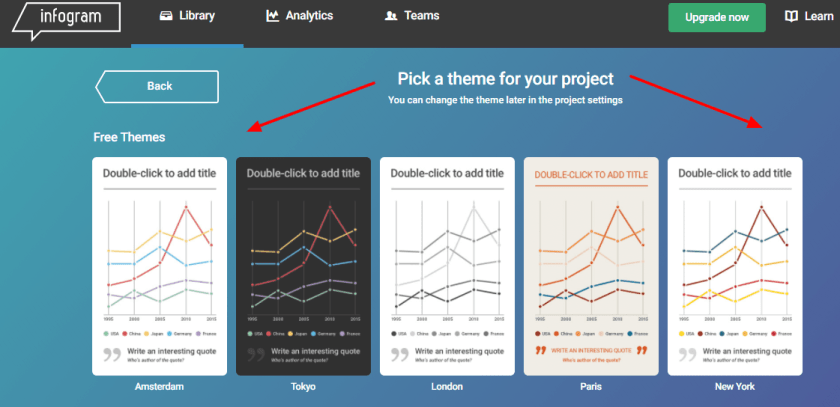
3. Pick a theme for your project.

download (6).png

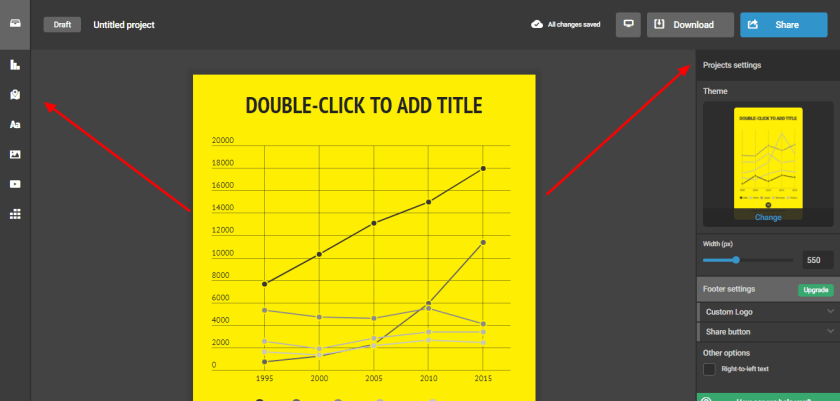
4. To your right, you’ll see the settings bar that lets you set the width, theme, add a custom logo, and specify a share button. To your left, you’ll see several icons. Clicking on them lets you customize your infographic with a map, a chart, text boxes, pictures, data, and even videos.

download (9).png

5. When your project is complete, give your infographic a title and description. Decide on your permission settings. Do you want to make this public? Or is it just for your own use (public is the default setting; you will have to upgrade your account to keep it private)?  Click “Share” to send out your infographic to your social networks, or to get an embed link to add it to your blog or website!

Posted in Cool Tool, Visual Marketing

Monday Morning Cool Tool: Gratisography


425_1.jpg

I love learning about new tools to make social media marketing more creative and effective, so I’ve decided to share some of my favourite tools with you at the start of each week. This week’s cool tool recommendation is Gratisography, a collection of free high-resolution pictures you can use on your personal and commercial projects, free of copyright restrictions.

What I really like about this site is many of the images are quirky and fun – no cheesy stock images here!

Check it out at https://gratisography.com and see for yourself.

Images: Gratisography

Posted in Cool Tool

Monday Morning Cool Tool: Crazy Egg

I love learning about new tools to make social media marketing more creative and effective, so I’ve decided to share some of my favorite tools with you at the start of each week. This week’s cool tool recommendation is  Crazy Egg – a tool that tracks scrolls and clicks behavior on web pages to better understand customer interactions.

download.png

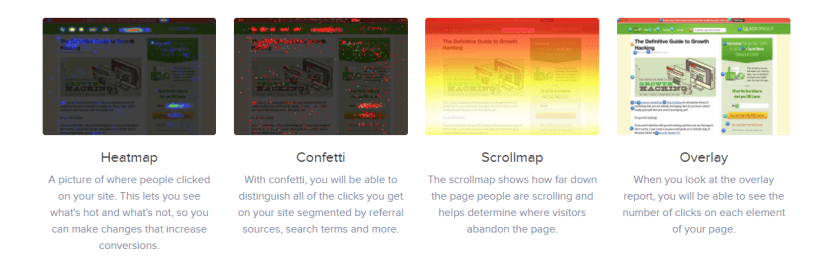
Its features include:

Heatmap

A picture of where people clicked on your site.

Confetti

With confetti, you will be able to distinguish all of the clicks you get on your site segmented by referral sources, search terms and more.

Scrollmap

The scrollmap shows how far down the page people are scrolling and helps determine where visitors abandon the page.

Overlay

When you look at the overlay report, you will be able to see the number of clicks on each element of your page.

All plans are FREE for the first 30 days.


Posted in Cool Tool

Monday Morning Cool Tool: Google Alerts

I love learning about new tools to make social media marketing more creative and effective, so I’ve decided to share some of my favorite tools with you at the start of each week. This week’s cool tool recommendation is Google Alerts

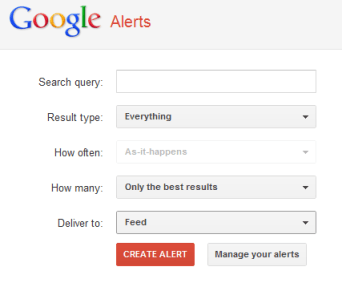
Google Alerts are email updates of the latest relevant Google results (web, news, blogs) based on your choice of query –  for example, keeping updated on emerging healthcare trends.

Start by going to the Google Alerts homepage and entering your keyword. Click on “Show options” to set an alert frequency and any other parameters you’re interested in. If you put the keywords in quotation marks, you will only receive alerts for that exact phrase – thus avoiding Google returning irrelevant results to you.

google-alerts-screenshot.png

You can control how often you receive these alerts (daily or weekly), whether you wish to receive all mentions, or limit it to the most relevant, and you can add new alerts, or delete old ones at any point.

Use Google Alerts to monitor who’s talking about your brand. This is important so you can respond to any criticism, customer complaints or thank someone for writing something positive about you.

Posted in Cool Tool, Infographics, Visual Marketing

Monday Morning Cool Tool: Plotagraph 

I love learning about new tools to make social media marketing more creative and effective, so I’ve decided to share some of my favourite tools with you at the start of each week. This week’s cool tool recommendation is Plotagraph – a really cool app that animates images with magical effects.

download.png
Although you can’t see it in this still image, in Plotograph the water is moving!

You can use Plotagraph to create a looping video, animated GIF, or animated PNG. Then upload your eye-catching image to various social media platforms.  Most of the time, you make looping videos or animated images from a video. However, Plotagraph begins with a still image and creates the movement with what appears to be CGI effects. You can upload an image to the app or website, or take a photo inside the app.

Plotagraph is available via the web for free and the iOS app costs $4.99.


Posted in Cool Tool

Monday Morning Cool Tool: Readable.​io

promo_highlights.png

I love learning about new tools to make social media marketing more creative and effective, so I’ve decided to share some of my favorite tools with you at the start of each week. This week’s cool tool recommendation is Readable.io – a tool to help you measure the readability of any text.

How It Works

Put in your written text – paste it, upload a document or a URL – and you will get a set of scores and measures:

  • Readability scores – including Flesch-Kincaid, Gunning Fog and the SMOG index
  • Text analytics – text statistics (like letter, word and syllable counts), composition stats (like adjective, noun and adverb counts)
  • Keywork densities – for single words, and two or three word phrases
  • Reading and speaking time
  • Sentiment analysis – is the text positive, negative or neutral

Once you’ve scored your text, you’ll want to start working to improve it, and the tool can help there as well. Alongside your readability scores and text analytics, you’ll see an advanced highlighting engine showing areas where your text might be improved:

  • Long sentences are highlighted in yellow – or where very long, in red
  • Long and difficult words are highlighted and underlined
  • Uses of passive voice are highlighted in blue
  • Adverbs are usually shown in gold
  • Spotting cliches is as easy as shooting fish in a barrel

Readible.io is free – with a premium option available from just $3 per month.

Posted in Cool Tool, Visual Marketing

Monday Morning Cool Tool: Typorama

iPhone

I love learning about new tools to make social media marketing more creative and effective, so I’ve decided to share some of my favorite tools with you at the start of each week. This week’s cool tool recommendation is Typorama  another super easy design tool to enhance your social media and content marketing.

Choose from more than 40 different typographic styles, and add professional photo filters, overlays and adjustment tools.  Advanced crop options let you create the perfect size pictures for social media posts, wallpapers, posters, flyers and postcards.

Typorama is available for download from the App Store. 

Posted in #HCSM

What’s New in Social Media This Week?

My latest healthcare social media newsletter has gone out to subscribers. In this week’s round-up of news and tips:

Facebook Page Reach Declined 20% in 2017

unnamed

According to new research by BuzzSumo, the average number of engagements with Facebook posts created by brands and publishers has fallen by more than 20% since January 2017. This report will hardly come as surprising news to those of us who have been despairing at the fall in organic reach on Facebook over the past few years. What I found most interesting in this report is the data on which posts are driving engagement – or not.

WhatsApp Is Testing Verified Business Accounts

unnamed (4)WhatsApp is now testing verified business accounts, which can be identified by their green check marks. The Facebook-owned messaging application said in a frequently asked questions post that the test “is currently limited to a small number of businesses participating in a pilot program.”

Google Announces Major Update To Mobile Search Results Page

Google has announced a major update to its mobile search results pages. Whenever your query brings up a video, Google will now show you a silent six-second clip to help you decide if it’s actually a video you want to see.


Twitter Adds Team Management Feature on Tweedeck’s Mobile App


unnamed (5).png

Multiple Twitter users can now share access to a single account via the social network’s iOS and Android applications without needing to share that account’s password.

Plus

Your weekly cool tool recommendation, social media quote of the week, and six things you should know in the world of social media.

Read this week’s newsletter and subscribe for regular tips.