Social media caption writing goes beyond words on a screen; it’s about capturing attention, stirring emotions, and delivering a resonant message. Whether you’re aiming to inform, inspire, entertain, or promote, crafting a compelling caption can be impactful.
So, how can you write social media captions that convey a message with impact?
1. Clarity of Purpose
Before you write a caption, you need to have a clear idea of what you want to achieve with it. Do you want to inform, persuade, entertain, or inspire your audience? Are you trying to elicit a specific reaction, emotion, or action from them? Depending on your goal, you will need to choose the appropriate tone, style, and length for your caption.
(i) Inform
Goal: Provide factual information, updates, or details.
Tone: Authoritative and straightforward.
Style: Use clear, concise language, avoiding unnecessary details.
Length: Short to medium length, ensuring the information is presented succinctly.
(ii) Persuade
Goal: Encourage the audience to take a particular action or adopt a certain viewpoint.
Tone: Convincing, perhaps slightly emotive.
Style: Utilize persuasive language, storytelling, or testimonials.
Length: Sufficient to explain the benefits or reasons behind the call to action without being overly lengthy.
(iii) Entertain
Goal: Engage the audience, making them smile or laugh.
Tone: Lighthearted, witty, or humorous.
Style: Incorporate jokes, puns, or clever wordplay.
Length: Short and snappy to match the pace of humor.
(iv) Inspire
Goal: Motivate or uplift the audience.
Tone: Positive, empowering, and emotive.
Style: Use quotes, metaphors, or personal anecdotes.
Length: Long enough to express inspirational thoughts, but not too lengthy to lose impact.
(v) Elicit Emotion or Response
Goal: Trigger a specific emotion or prompting a reaction.
Tone: Depends on the desired emotion — could be nostalgic, sentimental, joyful, etc.
Style: Use descriptive language or relatable scenarios.
Length: Varies based on the complexity of the emotion you’re aiming for, but generally, a moderate length can capture nuances effectively.
2. Understand Your Audience
Craft your content in a way that speaks directly to your audience. Use language, humour, or references that they can relate to. Different age groups respond to varying tones and styles. Younger audiences often resonate with casual language, while older audiences might prefer a more refined and formal tone.
While shorter, punchy captions often perform well with younger demographics who tend to prefer quick, easily consumable content, Shorter, punchy captions often perform well with younger demographics who tend to prefer quick, easily consumable content, a more descriptive caption might resonate better with an older audience interested in a deeper understanding of the content.
3. Understand Your Image
It’s important that the caption complements and enhances your image, not repeats or contradicts it. Therefore, you need to know your image well and understand what it shows, implies, and leaves out. Good captions fill in the gaps, provide context, or give your image a new perspective. Your caption should also highlight the most important or interesting parts of your image and draw attention to them.
“Social Media” is more than just a marketing buzzword; as the Internet increasingly becomes the medium of choice for researching health information social media has become a valuable channel for improving the patient experience.
In addition to looking for health information online, patients are also using social media to discuss their doctors, medications, treatment plans, insurance, and medical devices, as well as track and share symptoms. In many cases, social media even influences the choice of a doctor, hospital, or medical treatment.
While social media can have a direct impact on the ability of health organizations to attract and retain new patients, it can also deliver a human touch to the patient experience at scale. Healthcare professionals can connect more meaningfully with patients through social media at every stage of their health journey.
The social media revolution has changed the face of health care, and professionals cannot afford to remain reactive to it. Nevertheless, while it’s tempting to jump straight into social media, a more thoughtful and planned approach is ]called for. There is more to social media marketing than just creating accounts and posting updates occasionally. Nor is it merely a digital tool to broadcast updates. A strategic approach is crucial to making social media an effective means of reaching patients.
Sharpening Your Digital Axe
Abraham Lincoln once said, “Give me six hours to chop down a tree, and I’ll spend the first four sharpening the axe.”
To help you sharpen your digital axe, this article guides you through ten questions that you should ask – and answer – to assist you in developing a social media plan. Whether you are a beginner, or you have been using social media for some time, answering these key questions will help drive your strategy towards success.
#1 What Do You Want To Achieve With Social Media?
Answering this question is a critical first step. Without a clear goal in mind, your social media marketing will remain unfocused.
Would you like to attract more patients? Improve communication with existing patients? Create and maintain an online reputation? There is a good chance that you’d like to accomplish all of these things, but it’s better to focus first on the two to three goals that are most important to you.
Regardless of the goal you wish to achieve, be as detailed and specific as you can. The more trackable your goal is, the easier it will be to see if it has been achieved in a few months.
Take Action: Set S.M.A.R.T. social media goals, i.e. goals that are specific, measurable, and achievable within a defined timeframe. For example, instead of saying you want to grow your number of Twitter followers, set a numerical value and a deadline, such as “grow our Twitter followers by 25 percent by the end of the first quarter.”
It is crucial to understand the people you’re interacting with online so that you can tailor an experience that is relevant to them. Identify your audience, where they go online for research, what issues they care about, and which communities inform or influence them.
Take Action: Start by finding data on your existing audience. Use the Demographics and Interests sections of Google Analytics and the audience analytics features contained within Facebook Insights and Twitter to help you.
#3 Which Social Media Sites Should You Use?
The short answer to this question is to go where your patients already are. While the trifecta of Facebook, Twitter and LinkedIn are extremely popular, newer platforms such as Pinterest, Snapchat and Instagram have gained enormously in popularity in recent times. This doesn’t mean that you have to be everywhere at once. Not all platforms will serve your particular goals and target audience. This is why it’s essential you answer questions #1 and #2 before you decide to invest your time in a particular social platform.
The perception that social media is free is misguided. The days you could make an impact with a few tweets or Facebook posts are long gone. Running a social presence now requires an investment of resources. You may need to buy-in services such as SEO (search engine optimization), analytics software, content or creative support.
Time is also a cost factor. Look at what takes you the most time to do. Can you spend money to make these processes more efficient? You will also need to budget for paid advertising, particularly if you want to make an impact on Facebook, where organic reach has steadily declined over the past few years.
Take Action: Set a realistic budget and create a digital marketing strategy that works within it. Whatever you decide to spend money or time on, be sure to track how your content performs on social media relative to the amount of time and money you put against it. This is your social media return of investment (ROI) and it is closely linked to the goals you set at step #1.
#5 What Style and Tone of Voice Should You Use?
How do you wish to communicate on social media? Do you wish to be seen as authoritative, inspiring, friendly, approachable, or helpful? What values does your organization stand for? What unique qualities make you stand out? Answering these questions will help you develop your own identifiable style and tone of voice.
Take Action:Be human and relatable. Use social media to communicate the “who” and “why” of your practice. Authentic communication and engagement are highly valued traits online as much as offline. Look to build and strengthen trust and credibility in all your online interactions.
#6 What Kind of Content Should You Create?
If patients are searching for health information online you need to be creating and sharing what they are searching for. Tune into the health stories patients are reading about and be ready to provide context, counter misinformation and dispel myths with medically factual information. Keep in mind the content that works best on the social platforms you have chosen to use. Facebook, Instagram and Pinterest require high quality visuals to stand out. A blog on the other hand is better suited to long-form thought pieces. Think about how you can vary your message delivery to complement how people like to consume online information. Alternate between written content, video, infographics, and podcasts to match your audience’s preferences.
Take Action: Create content that truly resonates with your patients. Generally speaking, patients are less interested in your brand, your physicians or your technology, than they are in how you can help them solve their problems. Great content is not about you, but about what you can do for your patients to improve their quality of life.
You can learn a lot by observing what your peers are doing online. Which social platforms do they use? What type of content do they share? How often do they share it? How does their audience respond to them? How have they chosen to use images and videos?
You may wish to take full responsibility for maintaining your social media presence, but if you are giving the task to someone in your organization, or hiring outside help, you need to ensure they are the right person for the job.
Take Action: There are many different roles which make up a social media marketing job (for example content creation, e-mail marketing, social media management, etc.). Clearly define the roles and outline the responsibilities of this position for your ideal candidate.
#9 How Will You Monitor Social Media?
It’s important to monitor social media on a regular basis to keep on top of what people are saying about you, your organization, or topical health issues. From a marketing perspective, social media monitoring will help you determine the impact you are making, and if required, make adjustments to your strategy.
Take Action: One of the main keys to social media success is listening and responding in a timely way. Responding in real time strengthens public perception that your focus is strongly centered on patient satisfaction.
There are many free and paid monitoring tools which vary in scope and range across a number of sites, real-time or delayed searching, sophistication of analytics, flexibility of data presentation, integration with other applications, and cost. Which one you choose will depend on your budget and the level of analytics you wish to achieve. Even setting up a simple Google Alert (email updates of the latest relevant Google results based on your queries) with relevant keywords is a good place to start.
#10 How Will You Measure Results?
How do you know if all the time you’re investing in social media is paying off? A “spray and pray” approach will not help you determine your return on investment. By tying your social media goals to your metrics you will be able to track and measure your activities more strategically. A good way to think about ROI is to measure desired outcomes. For example, if your goal is to attract new patients, think about how you will track the conversion rate from social media.
Take Action: Go beyond vanity metrics such as likes, shares, or retweets to measure reach, audience engagement, sign-ups and conversions. Use Google Analytics, Facebook Pixels (a piece of code that placed on your website that allows you to track conversions from Facebook ads), and UTM parameters (short text codes added to a URL to track important data about website visitors and traffic sources) to track website traffic, conversions, and sign-ups from social media activity.
Conclusion
Social media is a dynamic environment in which new networks emerge, old networks evolve, and user bases continue to grow exponentially. It’s easy to feel overwhelmed by this rapidly moving landscape and unsure of your progress. By building your social media strategy on a solid foundation you are less likely to become distracted by shiny new tools, and more likely to see results over the long-term. Your strategy starts with answering these ten questions; your answers will provide focus for your efforts, grow the reputation of your health experts, attract prospective patients, and ultimately improve the patient experience.
Welcome to this week’s social media quick tip. This week I want you to think about whether you are active on the best social network for your particular audience.
Not all social media is created equal. Different platforms attract different audiences.
It’s important, especially if your resources are limited, that you’re focusing your social media efforts in places that will generate the most return for your efforts.
There’s no point in spending your time on a particular social network if your audience isn’t there. Nor should you spread yourself too thin by trying to be everywhere at once. Every additional platform your business is active on means additional time and effort required to engage on and create tailored content for that platform.
Before becoming active on a social network, try answering the following questions to help you choose the platform that is right for you.
1. Will this platform help me achieve my marketing goals?
Setting SMART goals to which you can align your social media activity is a good guarantee of online marketing success. If you can’t explain how a particular social channel will help you to achieve your goals, then it may not be the right fit for you.
2. Is my target audience active on this platform?
The most effective social media strategies are informed by social media data. Refer to Google Analytics for your website to see which social networks are sending the most traffic to your site. Look at existing data to learn where a specific demographic spends their time online. Statista and GlobalWebIndex are good sources of worldwide statistics on Internet usage.
3. Which social networks are my competitors using?
Which social networks are your competitors using? Are they active on networks you aren’t? Use a tool like Buzzsumo to identify the social channels on which your competitors get the most shares. Chances are if these channels match your demographics and are working well for your competitors, they will work well for you also.
4. Will this platform match the content I create?
If you want your content to do well on social media, you’ve got to be strategic about what you publish and where you publish it. You need to create content that aligns with your audience’s expectations on each social channel. Identify how, when, and where your specific audience likes to engage with content. Certain content formats will be more suited to particular channels than others.
5. Can I integrate this platform with another similar one?
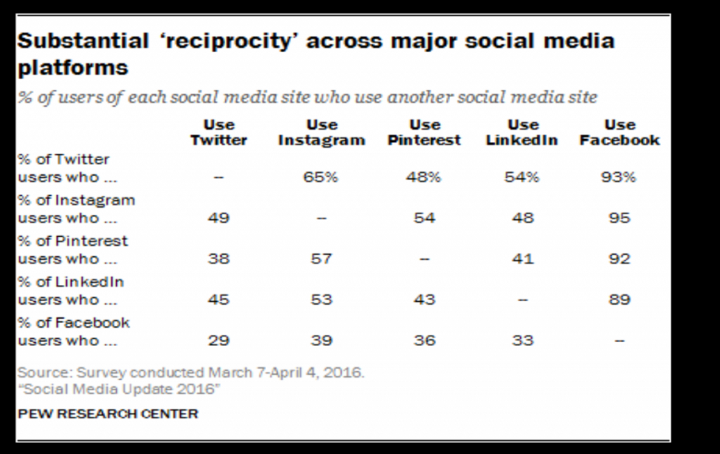
It’s better to use fewer channels well than to stretch yourself thin trying to maintain a presence on every social network. There is a degree of reciprocity between certain platforms — for example, Facebook and Instagram — the key is to choose channels that integrate well with each other to create maximum impact.
Bonus Tip!
Consider broadening your social media horizons. While Facebook, Twitter, LinkedIn, Instagram and Snapchat might be the most popular social networks in the West, there is a world beyond the Big Five waiting for you to explore.
In the Twitter app for iOS or Android, tap the analytics icon visible in your Tweets. Make sure you have installed the latest version of Twitter for iPhone, iPad, or Twitter for Android.
I’m going to show you how this looks on my account on a laptop.
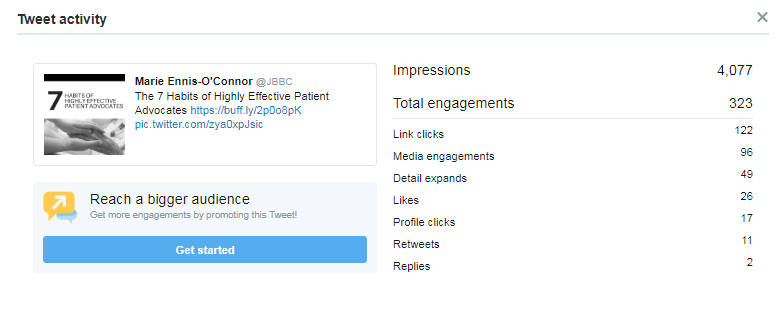
From here I can click into an individual Tweet to see specific data for that Tweet:
Use Twitter Analytics to track your progress over time – see which tweets resonate most with your followers, track your follower growth and more.
Welcome to this week’s social media quick tip. This week I want to show you how to repurpose your existing content.
Do you struggle to find time to create fresh content for your website or blog?
One key to maintaining a steady stream of quality content is to re-purpose what you already have. Repurposing content simply means taking one asset and reusing it somewhere else.
The first step is to identify your most popular content through your blog analytics tool and by using Google Analytics. Perhaps the content can be turned into an infographic or a slide-deck. By re-purposing content you have already written, you can extend and breathe new life into your current and past content.
Source: TopRank Marketing
Pay special attention to the content you published some time ago. Is some of this content out of date? If so, update it, and simply republish it again as an updated post. It’s important to update older content to make sure it continues to be relevant to your readers.
By focusing on producing one piece of really great content for repurposing, rather than several lower-quality pieces, you will improve the quality of your marketing.
Welcome to this week’s quick social media tip. Today I want to show you how to review your Twitter data.
Reviewing your Twitter data can give you insights into the type of information stored for your account.
What type of information is available to you?
Your Twitter data provides you with a snapshot of your Twitter information, including the following:
Account: Log into your Twitter account and go to More.
Click on Settings and Privacy. You will see information such as your username, email addresses or phone numbers associated with your account, etc. You can update or correct most of this information at any time.
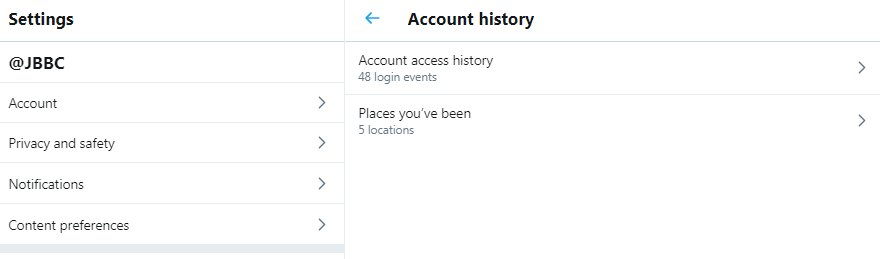
Account history: You’ll also be able to see your login history, as well as the places you’ve been while using Twitter.
Apps and devices: You can also view the browsers and mobile devices associated with your account (if you are logged in) or current device (if logged out), and the apps you have connected to your Twitter account. If you see login activity from an app you don’t recognize or that looks suspicious, you can go to the Apps tab in your settings to revoke its access to your Twitter account. The IP location shown is the approximate location of the IP address you used to access Twitter, and it may be different from your physical location.
Account activity: You will be able to see the accounts you’ve blocked or muted.
Interests and Ads data: You can also see interests that Twitter and its partners have inferred about your account or current device.
You can also view any Twitter advertisers who have included your account or current device in their tailored audiences. You can opt-out of interest-based advertising in your personalization and data settings. This will change the ads you see on Twitter, however, it won’t remove you from advertisers’ audiences.
Download an archive of your data: You can also download a machine-readable archive of information associated with your account in HTML and JSON files.
Welcome to this week’s social media quick tip. This week I want to show you how to use the Mute feature on Twitter.
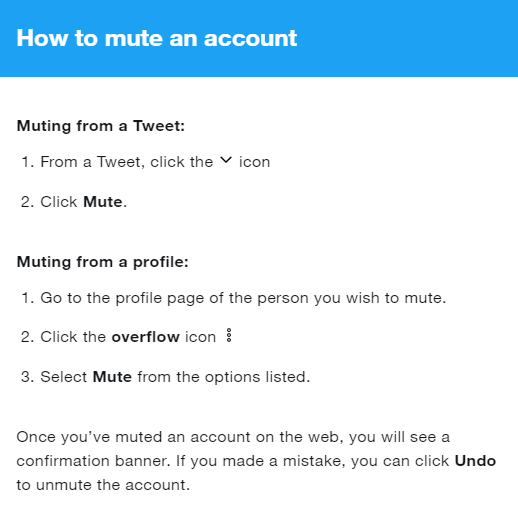
Mute is a handy feature on Twitter, which if you’re not familiar with, can be a real boon to your Twitter experience. It allows you to remove an account’s Tweets from your timeline without unfollowing or blocking that account. Muted accounts will not know that you’ve muted them and you can unmute them at any time.
How To Mute An Account
Some things to note about Mute:
Muted accounts can follow you and you can follow muted accounts. Muting an account will not cause you to unfollow them.
Muting an account does not impact the account’s ability to send you a Direct Message.
You will no longer receive push or SMS notifications from any muted account.
Replies and mentions by the muted account will still appear in your Notifications tab.
Tweets from a muted account – posted before the account was muted – will be removed from your Home timeline.
When you click or tap into a conversation, replies from muted accounts will be visible.
How To Mute Conversations, Keywords, and Hashtags
Twitter also gives you the option to mute Tweets that contain particular words, phrases, usernames, emojis, or hashtags. Muting will remove these Tweets from your Notifications tab, push notifications, SMS, email notifications, Home timeline, and from replies to Tweets.
If you would like to stop receiving notifications for a particular conversation, you can choose to mute it. When you mute a conversation, you won’t get any new notifications about that conversation. You will, however, still see Tweets from the conversation in your timeline and when you click into the original Tweet.
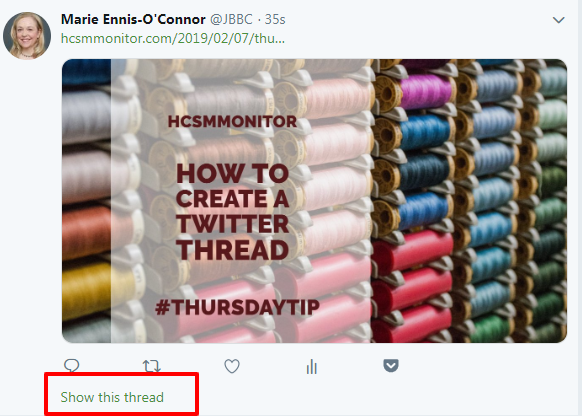
Welcome to this week’s quick social media tip. Today I want you to show you how to create Twitter threads.
Not sure what a Twitter thread looks like?
If you spend any time on Twitter you’ve probably already come across a Twitter thread, but perhaps not know that it was a thread. Threads are a series of related tweets shared in succession by one person.
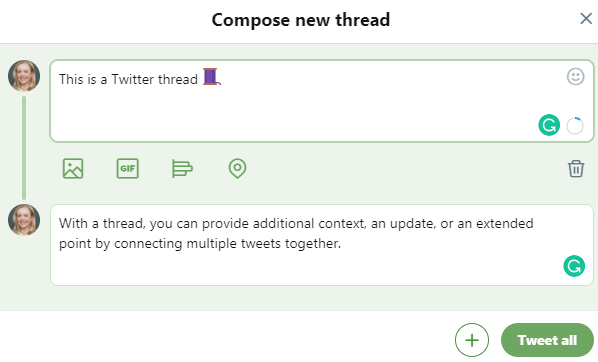
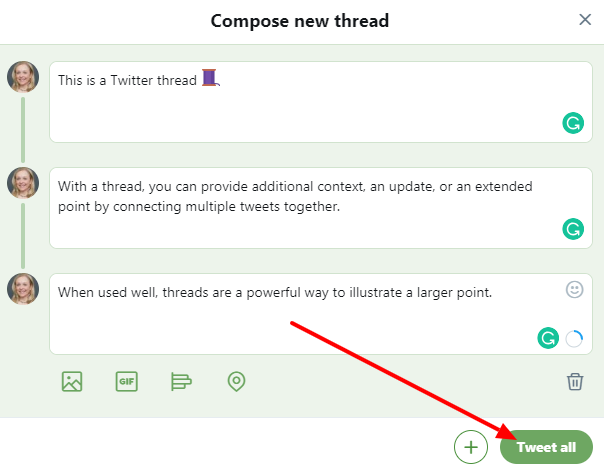
With a thread, you can provide additional context, an update, or an extended point by connecting multiple tweets together. When used well, threads are a powerful way to illustrate a larger point.
Before threads, users would have to just continue replying to their own Tweets in order to link them together. This was a way to work around the old 140 character limit.
How To Create A Twitter Thread
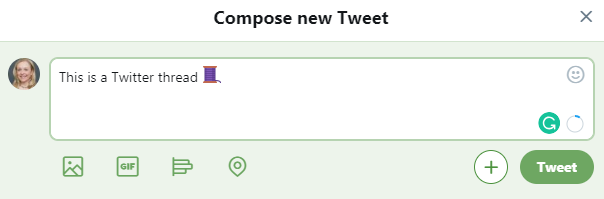
1. Click the “Tweet” button to compose a new Tweet.
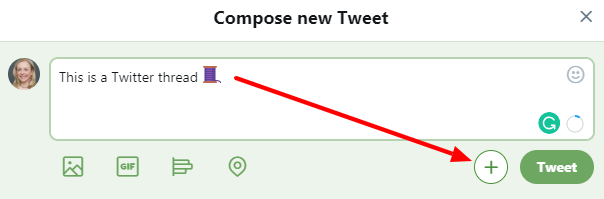
2. Click the new “Add another Tweet” button.
3. This brings up a second Tweet window.
4. Continue in this way adding threads until you’ve said all you want to say. You can either publish the entire thread by hitting “Tweet All”….
Or you can hit post each tweet in succession, which allows you to build momentum, perfect for a live event or an ongoing train of thought.
Publishing the entire thread gives your followers a fully-formed story — a better choice for a message you want to control a bit more, like a nuanced company announcement.
Here’s how your published displays on Twitter when complete.
Today I want to share a tip with you for generating content ideas in under a minute using two similar tools. Use these tools as inspiration for topics you could write about.
1. HubSpot’s Blog Topic Generatortool lets you input up to three different nouns and returns five blog topic ideas for you
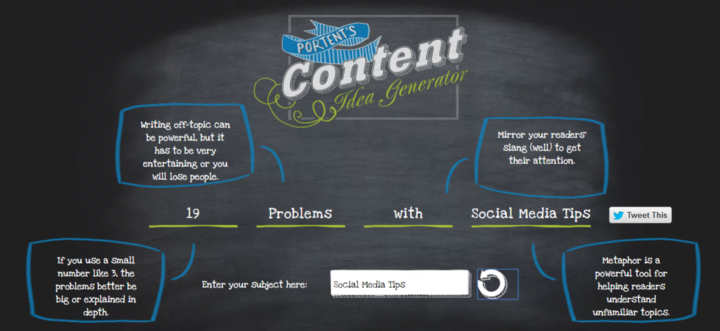
2. Portent’s Content Idea Generator allows you to generate content ideas with just one keyword. Be prepared that the tool can throw up some quirky suggestions, but don’t let that put you off. Keep playing around with it until you find one you can work with. I also really like how it shows you best practice tips, such as using metaphors in your writing.
Sometimes all you need is a little spark to get your creativity flowing again, and these tools may just the thing to get your creative juices flowing again.















 Health Care Social Media