Posted in Thursday Tip

#ThursdayTip: How To Ensure Your Website Is Mobile Compatible

Welcome to this week’s social media quick tip.  This week I want you to take a closer look at your website. 

0 (3)

In the online world, your website is a virtual office location. It showcases who you are and what you do.  Your website has seven seconds to make an impression and your patients are making snap judgments based on what they see and read.

Why You Need A Mobile Responsive Website

Firstly most people aren’t looking at your website on a desktop or laptop anymore. They are looking at it on a phone or tablet.

Secondly, Google now gives ranking priority to those sites that are mobile friendly. In fact, Google has stated that it will penalize websites that aren’t mobile-responsive, so if your site isn’t optimized for mobile devices, you’ll likely lose out significantly in the organic search rankings. To check if your site’s design is responsive, enter its URL into this Google tool.

How To Check If Your Website Is Mobile Compatible

Check how your website looks on a mobile device. If you need a magnifying glass to read it then your website is most likely not mobile responsive.

Below are some tips from Search Engine Watch to ensure your website is mobile compatible:

  • Use a responsive website design that adapts to mobile devices or create a mobile version of your website that is properly redirected for mobile users.
  • Use Google Search Console to add and verify the mobile version of your website.
  • Make sure that all the content formats used on your mobile site can be crawled and indexed (check using the txt testing tool ).
  • Ensure that content is consistent across your mobile site and desktop site.
  • Test your page speed using PageSpeed Insights. If your page is slow, use an auditing tool to find and fix uncompressed content, page errors, and other elements slowing your website down.

Posted in #HCSM, Thursday Tip

#ThursdayTip: How To Embrace Long-Form Content

Welcome to this week’s quick social media tip. Today I invite you to think about how you can add more long-form content to your content marketing strategy.

It seems ironic, but even with the popularity of video and expiring content, there also exists an appetite for longer, more in-depth content.

serpIQ did a study of the average length of the content in the top 10 results of search queries. The company found that the top-rated posts usually were over 2,000 words.

1_po23qamvjgidwtvlcwdrca

Long-form content also gives you an SEO edge. Put simply, search engines are built to serve people the best content, from credible sources, that answers users’ questions. Google has made it explicitly clear that it now prioritizes longer, informative posts over short ones that exist only to sell a product.

Try writing posts that are 1000 to 2000 plus words. Make them a resource type post that people will want to link to when they are writing their posts.

This tactic is no short-cut to success. To write a comprehensive, long-form piece of content with practical application that people want to share and link to takes a lot of research and time.

You won’t write this sort of content every day, but if you plan to make 2020 the year you will produce just one piece of stand-out content, I promise you will look back at the end of the year and feel you’ve really achieved something worth the effort.

Here’s to your social media success!

Posted in #HCSM, Thursday Tip

#ThursdayTip: How To Add Power Words To Your Headlines

Welcome to this week’s quick social media tip. Today I want you to think about the value of adding power words to your headlines.

Your headline is the first impression you make on a prospective reader. An eye-catching headline is a key factor in getting readers to click through to your content.

An attention-getting headline will capture the reader’s attention right away and compel them to want to find out more. Clear, concise, and original content is important, but words that appeal to their emotions is the magic ingredient to giving your visitors a reason to want to dive deeper.
Business2Community

“Trigger” words can entice readers to your content, but use these words with caution because they can also trigger skepticism and distrust. Make sure your content carries through on the promise in the headline and always avoid click-baiting.  Always craft a headline that links to authentic and relevant content.

Your to-do list for today:

Posted in Thursday Tip

#ThursdayTip: How To Track Twitter Hashtags 

Welcome to this week’s social media quick tip.  This week I want to show you how to  track hashtags on Twitter 

Hashtags are a useful way to find others who share your interest in similar topics, but did you know that you can do so much more with them? Analysis of hashtag data allows you to track, measure, manage and grow your social strategy.

3 Reasons You Should Track Hashtags

  1. Connect with existing conversations and people who are tweeting about your topics of interest. With this data, you can identify current trends and key influencers.
  2. Use hashtag analysis to measure and extend your social media reach.
  3. Create more effective campaigns by measuring the level of interest, sentiment (“positive”, “negative”, or “neutral” attitudes), key demographics and influencers of your campaign. Use the findings to plan future campaigns.

Which Tools Should You Use?

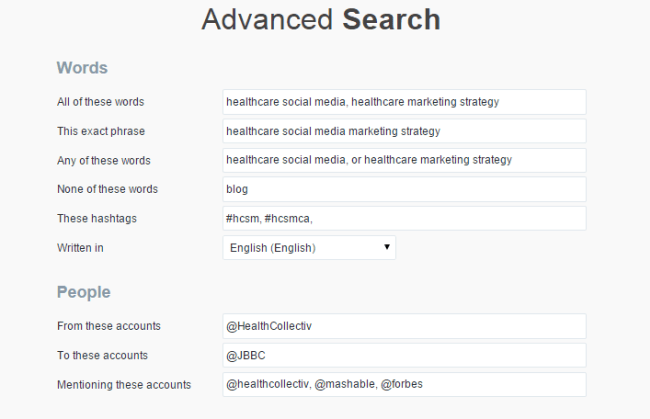
Twitter’s own native search can be a good starting point to track a hashtag — particularly if you make use of Twitter’s advanced search parameters.

1_FeB1OKV4waNXOCnK5fOsPw

Apart from Twitter’s own search facility, there are a number of hashtag analysis tools at different price points. Most will allow you to try out a limited search for free, but for more detailed results, you will need to sign up to use the paid features. Here are three free tools for you to try straight away.

1. Social Searcher

Social Searcher allows you to monitor all public social mentions of your company, brand, product, or service in one easy to use dashboard.

1_t0MtO4Eraank84nrzOk6PA

2. Twitonomy

1_f4r21yfoP4r82wJbw_uHEg

3. Tagboard

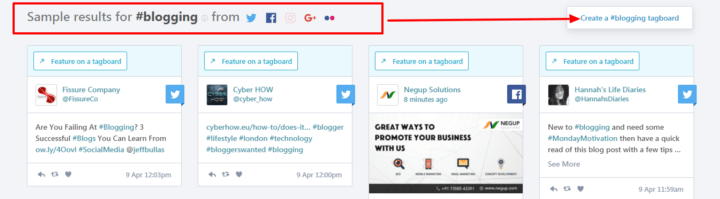
Tagboard uses hashtags to search for and collect public social media within seconds of being posted to networks like Twitter and Facebook. Robust tools offer the power to select specific posts to feature on websites, in broadcast TV, and on large displays.

1_vpoMNidmumbvAf1QcOl-ug

Here’s to your social media success!


Posted in Thursday Tip

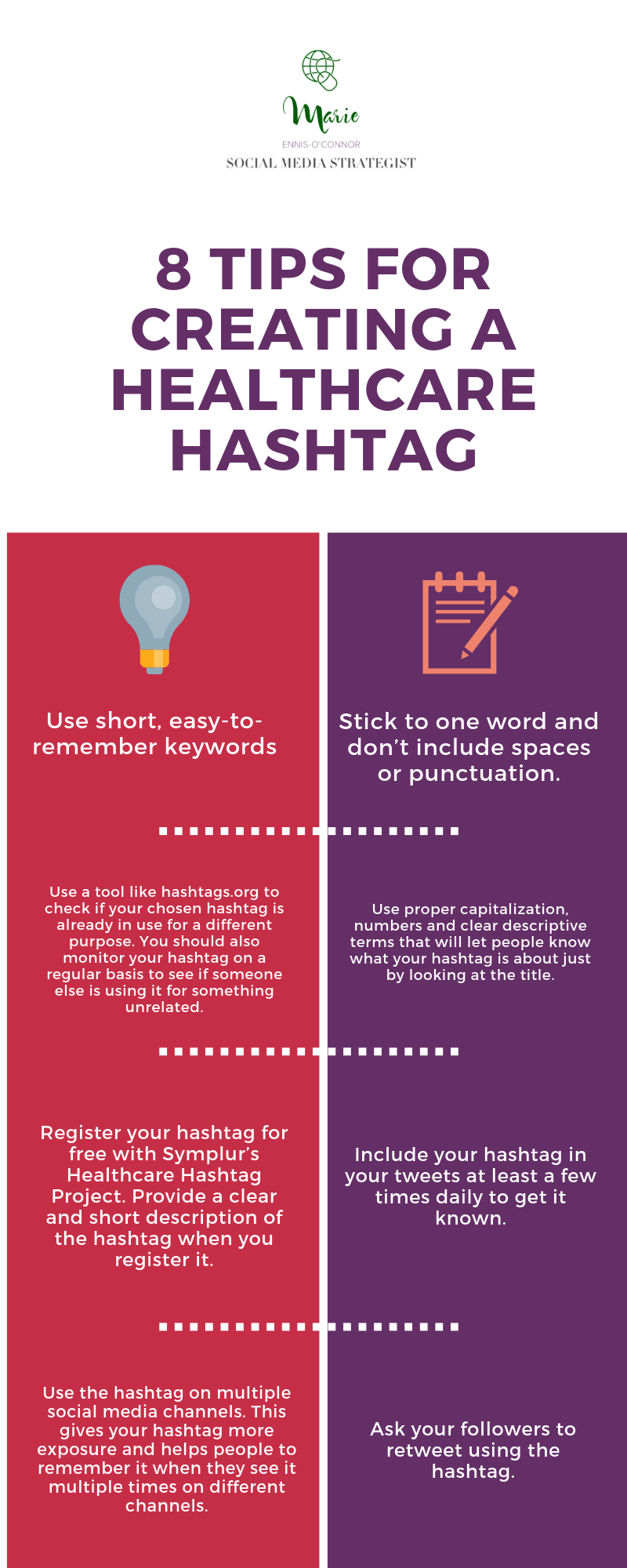
#ThursdayTip: How To Create A New Healthcare Hashtag [Infographic]

Welcome to this week’s social media quick tip.  This week I want to share with you the process of creating a new hashtag. 

If you cannot find an existing hashtag related to your healthcare topic, you might now be considering creating your own.

But, before you do, take a moment to consider your objectivesDoes the world truly need another hashtag?  Ask yourself: Why this hashtag? Why now? Will other users gain value from it?

Having decided the world does need another hashtag, follow the tips below to create yours.fiction (2)

Happy hashtagging and here’s to your social media success!


Posted in Thursday Tip

#ThursdayTip: How To Embed A Tweet On Your Blog

Welcome to this week’s social media quick tip.  This week I want to show you how to embed a Tweet on your website or blog. 

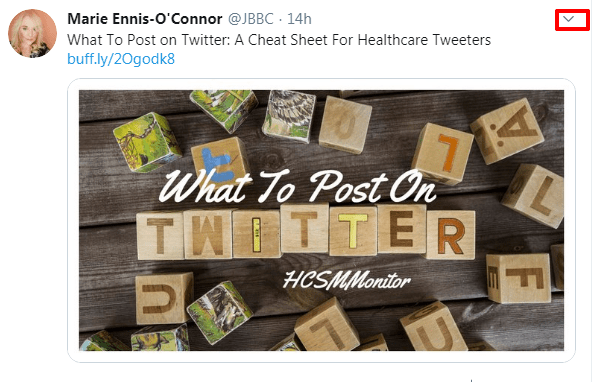
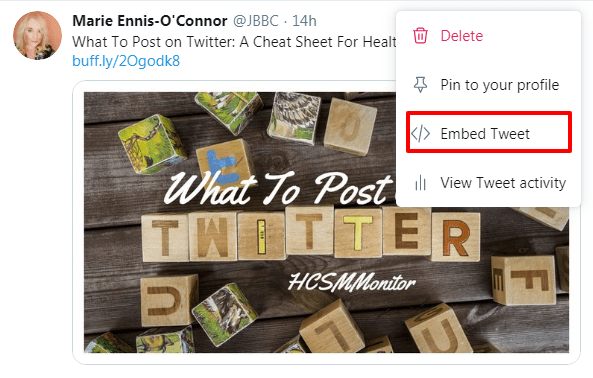
1. Select a Tweet to embed on your site. Click on the down arrow icon (v).

e55892ed-56f9-41fb-86b1-2519eaddbe51

2.  Select Embed Tweet from the drop-down list.

bd659313-8a37-4471-ae2c-7919deaff8fa

3. Now simply and paste the code provided into your blog or website.

download - 2019-10-10T104924.612

An embedded Tweet includes the Tweet itself, any media contents (photos, video) so if you don’t wish to include these, go to Customization Options and check “Hide Conversation.”

dc544f8b-5627-4293-af28-8d739406df86


Here you also have the option of translating your embedded Tweet into another language and selecting the colour you would like it to appear as on your website or blog.

Here’s to your Twitter success!


Posted in #HCSM, Thursday Tip

#ThursdayTip: How To Check Your Wall Posting Preferences on Facebook

Welcome to this week’s social media tip. Today I want you to show you how to set your wall posting preferences on Facebook. 

Recently I was teaching a social media workshop when the topic of how to deal with people posting directly to a Family Practice Facebook page came up.  The person who raised the topic hadn’t realised that it’s possible to limit who can post to your Page. In fact, you can set your page’s Posting Ability tab so that only your page admins can post to your Facebook page.

Here’s how to do it.

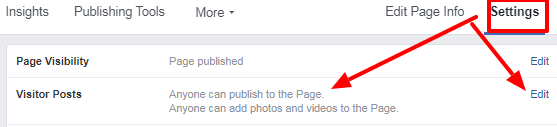
1. Choose Settings from your Admin panel. Then choose Edit.

download - 2019-11-28T153942.983

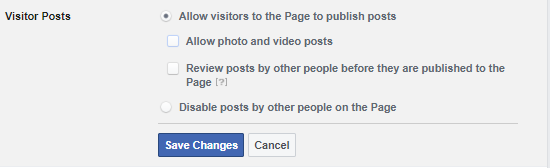
2.  From here, edit the posting ability to decide if you want everyone to be able to post on your page, or if you want to allow only your page admins to post by checking the relevant boxes.

download - 2019-11-28T154554.830

3. When you’re done, hit Save Changes.

A very simple step, and one that those who are new to Facebook can easily overlook.

Here’s to your social media success!


Posted in #HCSM, Thursday Tip

#ThursdayTip: How To Build Your Email List

Welcome to this week’s quick social media tip. Today I want you to think about the value of creating and growing a list of email subscribers. 

With the explosion of social media marketing in recent years, the traditional email format may appear outdated. But nothing could be further from the truth.  Even with the pervasiveness of new technology, email still remains a persuasive digital marketing channel for building awareness, boosting acquisition, and increasing conversion.

4 Reasons You Should Build An Email List

1. Email marketing helps you build relationships and credibility

People like to do business with those they know, like and trust. Email is direct, making it more personal and personalized than social media marketing. Email gives people a way to easily contact you with their questions.

2. Email marketing keeps you top of mind

Did you know that at least 91% of consumers check their email on a daily basis? While you can go for a few days without checking social media, most people check their email several times a day.

3. Email marketing is inexpensive

Email is an inexpensive way to reach people who are interested in hearing from you and communicating with them regularly.

4. You own your list

Unlike social media which is subject to change, your list is yours. in the words of Ann Handley, email is the only place where people (not algorithms) are in control. With social and other digital channels — Facebook, Instagram, LinkedIn, paid search, organic search — someone or something else decides who sees your content and when and where they see it.

5. Email marketing converts better than social media

A study by McKinsey & Company revealed that email is a significantly more effective way to acquire customers than social media. People who buy products marketed through email spend 138% more than those who do not receive email offers.

Bottom line — ignoring email as part of your marketing strategy means you are missing out on potential business opportunities.

Take Action: One of the best ways to build your list of subscribers is to offer something of value up front. This email incentive known as an “opt-in offer” or “lead magnet” is something you are willing to give away for free which requires people to provide an email address to download. Check out this list of 15 ways to create your first lead magnet.

Want to subscribe to my newsletter?

Each Monday I send out a weekly digest of social media marketing tips and the latest social media updates.

Click here to subscribe to my mailing list.

Related Reading

20 Email Marketing Dos and Don’ts for More Effective Email Campaigns


Posted in Thursday Tip

#ThursdayTip: How To Create Graphics With Canva

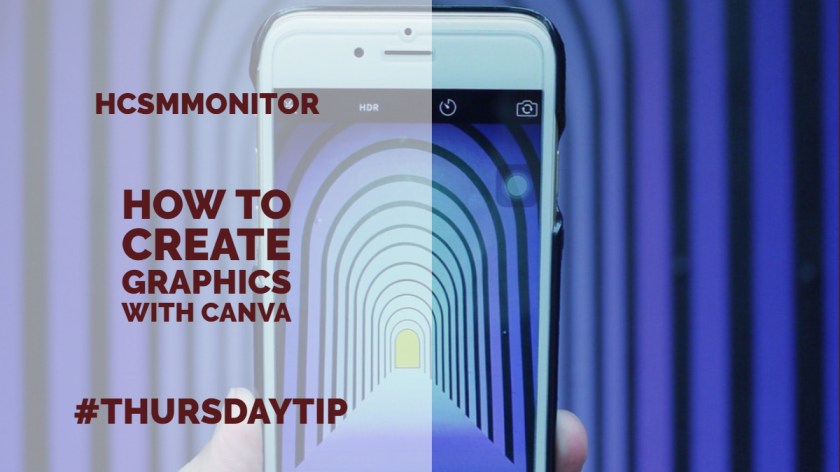
Welcome to this week’s social media quick tip.  This week I want to show you how to create great graphics with Canva. 

Canva is one of my every-day go-to tools when I am creating visuals. It’s so easy and quick to use it with a multitude of layout options, fonts, images and illustrations to choose from. And best of all it’s free! If you want more advanced features, you do also have the option to upgrade for a small fee.

Whether you want a Twitter post or Facebook profile picture, you can create them quickly using Canva’s drag and drop editor. Select from a number of pre-set designs, or create something from scratch. You can also add elements such as custom icons, fonts, charts, and illustrations.

Here’s how to use it

i. Sign up at canva.com. The sign-up process is quick and easy.

ii. Next click on “Create a design” and choose the platform for which you wish to create a visual, for example, blog, Facebook, Twitter, etc. Your image will be automatically resized to fit the size dimensions of each platform.

canva

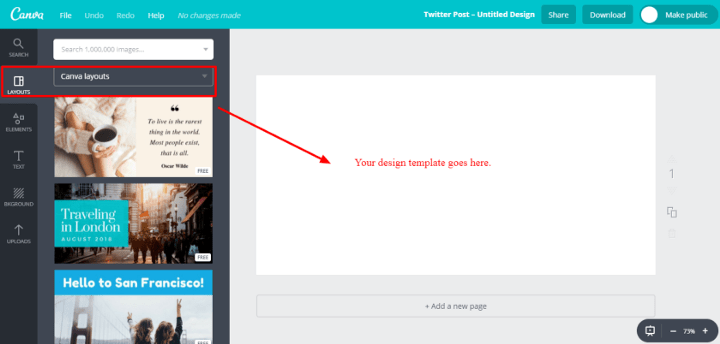
iii. Click on “Layouts” to select a layout for your graphic. There are tons of layouts to choose from. When you find one you like, click on it and it will automatically populate the blank screen for you to work with. You can change out the design at any time by clicking into another layout template.

canvaq

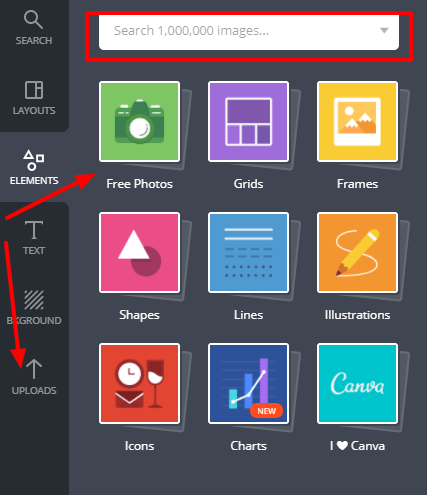
iv. To add an image, select “Elements” which allows you to choose from a variety of shapes, illustrations, and photos from the royalty-free library. Note that not all images are free, some are priced at $1 each. You can also upload your own images to use.

canvaa

v. To add text, click on “Text” and simply drag and drop your heading, subheading and body text. You can also choose from some pre-designed fonts, most of which are free.

can

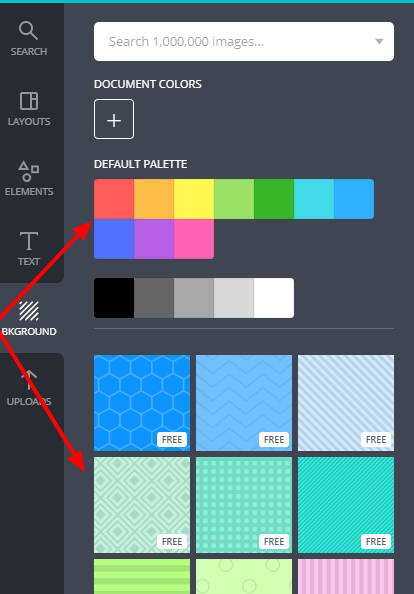
vi. Selecting “Background” allows you to choose different background colours and textures.

backgr

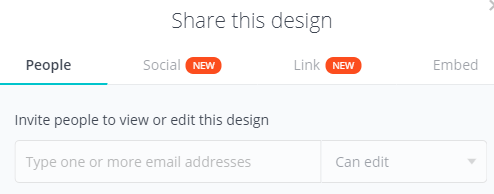
vii. When you’re happy with your design, you have the option to embed it or share it from Canva straight to a social media platform, share a link for others to see the design or edit it if you wish. You can also download it to your computer in jpeg, png, or pdf format.

0_NsY6M3f9nRKMgZ5P

That’s it. You’re all set to create customised graphics for your marketing.

Here’s to your social media success!


Posted in #HCSM, Thursday Tip

#ThursdayTip: How To Create Content With Emotional Resonance

Welcome to this week’s social media tip. Today I want you to think about how you can create emotional resonance through your content marketing.

The word “emotion” is a combination of the prefix e-, meaning “away,” and the Latin word movere, meaning “to move.” In this sense, emotions break us away from our standstills, moving us in new directions and prompting us to take action.

Numerous studies have found emotional arousal plays a key role in driving social sharing. In 2012, researchers Jonah Berger and Katherine Milkman published research based on an analysis of 7,000 articles from the New York Times to see which types of articles were most shared by email.

1_z9Gy_P_eVc44TVx_0QKXVA

The results indicate that virality is partially driven by physiological arousal.

“Content that evokes high-arousal positive (awe) or negative (anger or anxiety) emotions is more viral. Content that evokes low-arousal, or deactivating, emotions (e.g., sadness) is less viral.” — What Makes Online Content Viral?

The Harvard Business Review released research in 2016 which showed that creating a powerful emotional experience increases the chances of going viral. The research, based on an analysis by Frac.tl of the top 100 images of the year from imgur.com, as voted on Reddit.com, found:

  • A significant correlation between content views and positive feelings (specifically joy, interest, anticipation, and trust).
  • Negative emotions were less commonly found in highly viral content than positive emotions, but viral success was still possible when negative emotion also evoked anticipation and surprise.
  • The emotion of admiration was very commonly found in highly shared content, an unexpected result.
1_kBhD0w1ocN5rogIlHR76CA
Heatmap of the aggregate emotional data, representing the totals compiled (HBR)

One way to create emotional resonance is to tell a heartwarming story.

Effective stories inspire people by creating human connection and emotional resonance. In 2015, an article about a husband and wife celebrating 82 years of marriage, topped USA Today’s most shared content. Not only was the story uplifting and inspirational, but it also shared insights on reaching over 100 years of age (if you’re interested — the couple describes a healthy diet and frequent naps as the secret to growing old).

1_LbgwswX5Q6kztsl7kP6Oww.jpeg

Marie Yoland Eveillard speaks with her father Duranord Veillard, who will celebrate his 108th birthday on Saturday, and mother Jeanne Veillard, who turns 105 in May. The couple got married in Haiti in 1932. Tania Savayan/The Journal News

Once you understand how to strike the right emotional chords with your message, you can greatly increase your chance of getting your content widely shared.

Here’s to your social media success!