Articles

Posted in Infographics

How To Handle Comments On Social Media [Infographic]

Salesforce do super infographics – here’s one on handling different types of comments on social media. 

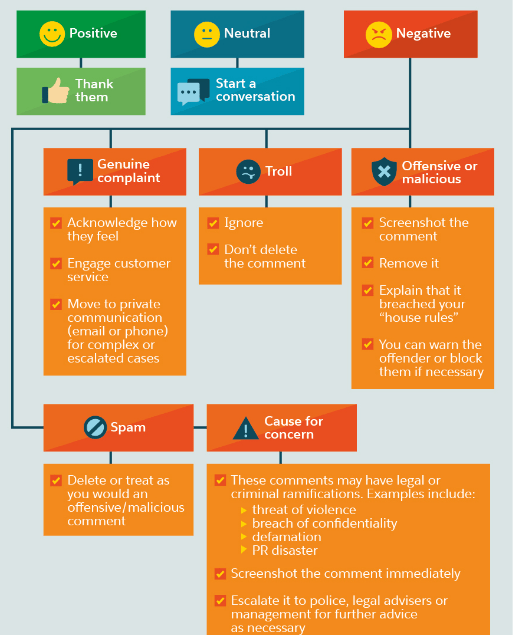
First up, a flow-chart for dealing with positive, negative or neutral comments.

download (1).png

Source: Jeff Bullas

Positive and neutral comments are easily dealt with, but negative comments require a considered approach. If it’s a genuine complaint, acknowledge the complaint, but move it to private communication as quickly as possible.

Trolls are more challenging.  Received wisdom is don’t feed the trolls. Ignore them, but do not attract their attention further by deleting their comment – this only fuels their fire. However, it’s perfectly ok to remove offensive or spam comments, and comments with legal or criminal implications  should be reported to  the relevant authorities.

Finally, some general advice. You should  always personalise your interactions online. Reach out to and engage with your followers regularly.

download (2).png

Related

How Should You Handle Trolls On Social Media?

Posted in #HCSM

Here’s How Bots and Trolls Spread Fake News on Social Media

Fake news. It’ not only a problem in politics; misinformation online is a huge problem in healthcare.

Just like fake news, untrustworthy health information problematically circulates across social media platforms.  Facebook is one of the biggest offenders.

A study conducted by Oxford University showed that content from less reputable sources gets shared 4x more than content from reputable, trusted news outlets across Facebook.

There is some good news on this front. Recently Facebook announced it’s to take a stand against vaccine denial by directing people searching for information or using vaccine hashtags to web pages set up by public health bodies.

And a Finnish Public Broadcasting Company has created a tool which taps into the power of gamification to increase public awareness of  how “fake news, emotive content and bot armies are utilized to affect moods, opinions, and decision-making.”

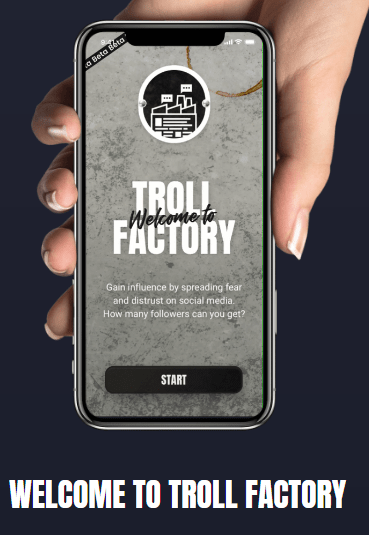
The game, called Troll Factory,  shows you first-hand how information operations work on social media. It makes use of authentic social media content around polarizing themes like climate change and immigration to highlight the roles played by paid bots, demographic microtargeting, fake news, and conspiracy theories in misleading and amplifying propaganda.

73987f4d-5c1a-4260-94ef-d7dd83c009d8

Players learn to wield the tools that trolls use as they seek to influence public opinion: botnets, paid marketing and internet memes in a realistic mobile setting. This gives them an opportunity to reflect on their real-life choices, and to better understand the consequences of their actions.

In its review of the game, TechCrunch states “The best medicine against online disinformation is an informed society that’s thinking critically.”  Troll Factory is a creative and clever way to promote digital media literacy, especially among people who don’t consume traditional news (more people now get their news from social media than from newspapers)  and helps social media users understand how they play a role in spreading false information — even unintentionally.


Related Reading

Anatomy of a conspiracy theory: how misinformation travels on Facebook 

How Disinformation Hacks Your Brain

Posted in #HCSM, Thursday Tip

#ThursdayTip: How To Add Power Words To Your Headlines

Welcome to this week’s quick social media tip. Today I want you to think about the value of adding power words to your headlines.

Your headline is the first impression you make on a prospective reader. An eye-catching headline is a key factor in getting readers to click through to your content.

An attention-getting headline will capture the reader’s attention right away and compel them to want to find out more. Clear, concise, and original content is important, but words that appeal to their emotions is the magic ingredient to giving your visitors a reason to want to dive deeper.
Business2Community

“Trigger” words can entice readers to your content, but use these words with caution because they can also trigger skepticism and distrust. Make sure your content carries through on the promise in the headline and always avoid click-baiting.  Always craft a headline that links to authentic and relevant content.

Your to-do list for today:

Posted in Cool Tool

Monday Morning Cool Tool: Buzzsumo

This week’s cool tool recommendation is Buzzsumo a useful tool to explore what pieces of content are popular on social media around a certain topic.

Use it to analyze what content performs best for any topic or competitor, and find the key influencers to promote your content.

Here’s an overview of what turns up when I input “social media marketing tips” into Buzzsumo’s search tool.


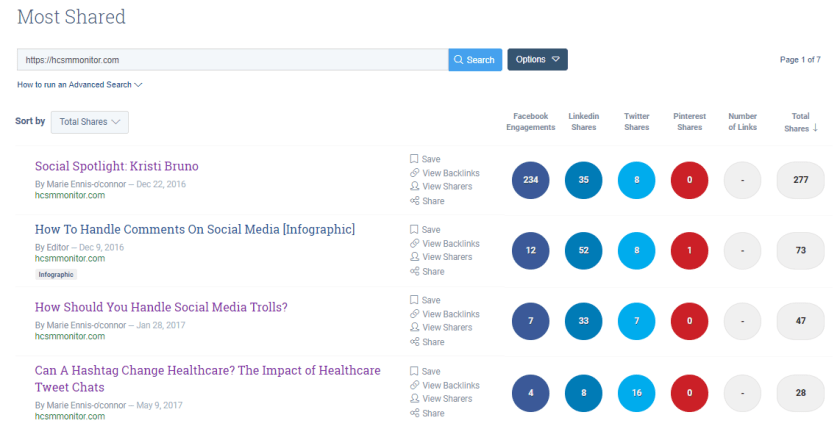
I can easily determine which posts are most popular through the number of shares they get.

And here’s what I see when I input my own domain name into the search bar. I could do the same with my competitors’ domains and see what is performing well for them.

download.png

The free version is useful to get a quick snapshot, but if you are interested in doing more with the tool, such as viewing backlinks and who is sharing your content, you will need to upgrade to the paid version.


You might also like to read 

The Ultimate Guide to Using BuzzSumo for Content Research 

How to Drive 10x Website Traffic Using Buzzsumo

Posted in #HCSM

6 Simple Things You Can Do On Social Media In Under 10 Minutes

As a social media consultant, I work with clients strategically to help them develop a marketing plan which is aligned to their business objectives.

I set up social media accounts for them or optimize the accounts they already have.

I provide them with a social media playbook which includes guidelines, branded templates, content calendars and everything else they may need to keep their social media marketing on track.

And then my job is done. I say goodbye and move on to the next client.

Except I never really say goodbye.

I keep an eye on their progress from a distance. I share their content to my own feeds and I am always a phone call or an e-mail away when they need my help again.

I really care about my clients and I can’t help but feel disheartened when I see all the effort they initially put into setting up their social accounts fizzle out.

As they post less and less I watch as their social media activity dwindles away bit by bit.

When I ask why they often tell me they simply don’t have the time to maintain an active presence and hiring someone to do their social media marketing full-time is beyond their budget right now.

So for those clients, I have devised a 10-Minute-A-Day Social Media Plan to deal with their overwhelm. You can download the plan here.

Below you’ll find 6 simple actions taken from that plan that you can do to keep your social media channels updated every day.

1. Check Out What’s Trending

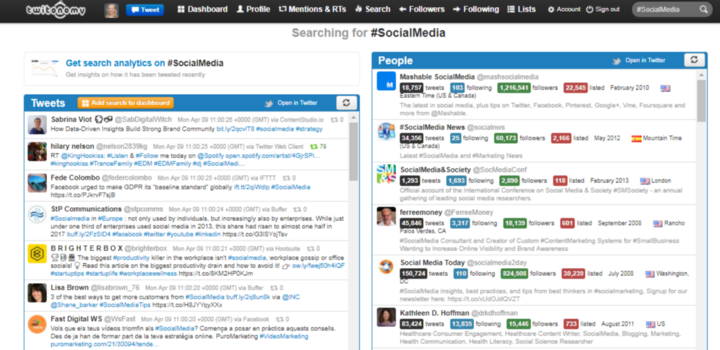
Take a quick look at trending hashtags with tools like Twitonomy to see if you can add your perspective to a trending conversation.

Recommended Reading: 3 Reasons You Should Track Hashtags — And 3 Tools You Should Use

2. Share A Curated Item

Curation helps you provide your audience with relevant, high-quality information on a regular basis without sacrificing your time and resource. Use a tool like Quuu to collect curated content to share with your audience.

Recommended Reading: 10 Golden Rules of Content Curation

3. Whip Up A Quick Graphic

Create a quick graphic to accompany your social media updates using a tool like Adobe Spark or Canva. These graphics creation tools are so quick and easy — you’ll be amazed at what you can do in a couple of minutes with them. To save more time, create pre-made branded templates upfront and then just drag and drop your images into these templates.

Recommended Reading: How To Create Professional Graphics — Even If You’re Not a Graphic Designer

4. Retweet Your Own Tweets

Though I’d be wary of over-doing this strategy (from a narcissistic viewpoint) it appears that you can increase your exposure by liking and re-tweeting your own content. This is because Twitter uses Likes and re-tweets as indicators of popularity in the algorithm.

5. Reshare Your Best Twitter Content

To find your best content, check your Twitter analytics which can be accessed from your Twitter profile. Then use a tool like Hootsuite to share your content at optimal times. The Buffer Browser Extension makes sharing content even quicker and easier. It allows you to open the composer on any web page and add posts right to your Queue, without having to go back to your dashboard. 

6. Automate Social Media With IFFTT

I’m not a big fan of automating social media activity but used well, it is a boon to time-pressed social media marketers. The key to making it work is to spend time creating genuine, engaging content, and then maximizing its performance through the strategic use of automation tools. IFTTT (an acronym for If This, Then That) allows you to sync up multiple apps so that when a certain activity happens, it kicks off a separate activity in another app. I use IFTTT to add my tweets to a Google Spreadsheet to create a Twitter Bank of tweets to draw on.

Towrap up — the 10-Minute-A-Day Social Media Plan is by no means a strategic plan. Rather it’s a tactical plan to get a handle on social media when you feel overwhelmed and pressed for time.

Following the plan ensures that social media becomes a daily habit. You won’t get everything done in ten minutes, but that’s OK. The important thing is that you will get something done and that adds up each week.

Before you know it you will be able to look back at the end of a month and see how much you have scaled your activity just by spending ten minutes a day doing one or two things.

You will then be well on your way to mastering social media overwhelm. In the immortal words of Zig Ziglar:

You don’t have to be great to start; but you have to start to be great!

Posted in Thursday Tip

#ThursdayTip: How To Track Twitter Hashtags 

Welcome to this week’s social media quick tip.  This week I want to show you how to  track hashtags on Twitter 

Hashtags are a useful way to find others who share your interest in similar topics, but did you know that you can do so much more with them? Analysis of hashtag data allows you to track, measure, manage and grow your social strategy.

3 Reasons You Should Track Hashtags

  1. Connect with existing conversations and people who are tweeting about your topics of interest. With this data, you can identify current trends and key influencers.
  2. Use hashtag analysis to measure and extend your social media reach.
  3. Create more effective campaigns by measuring the level of interest, sentiment (“positive”, “negative”, or “neutral” attitudes), key demographics and influencers of your campaign. Use the findings to plan future campaigns.

Which Tools Should You Use?

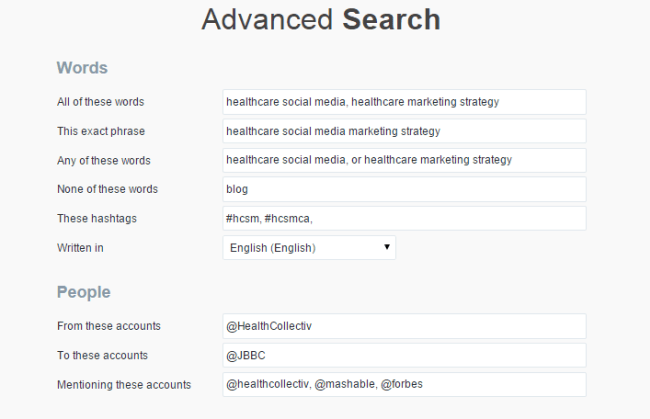
Twitter’s own native search can be a good starting point to track a hashtag — particularly if you make use of Twitter’s advanced search parameters.

1_FeB1OKV4waNXOCnK5fOsPw

Apart from Twitter’s own search facility, there are a number of hashtag analysis tools at different price points. Most will allow you to try out a limited search for free, but for more detailed results, you will need to sign up to use the paid features. Here are three free tools for you to try straight away.

1. Social Searcher

Social Searcher allows you to monitor all public social mentions of your company, brand, product, or service in one easy to use dashboard.

1_t0MtO4Eraank84nrzOk6PA

2. Twitonomy

1_f4r21yfoP4r82wJbw_uHEg

3. Tagboard

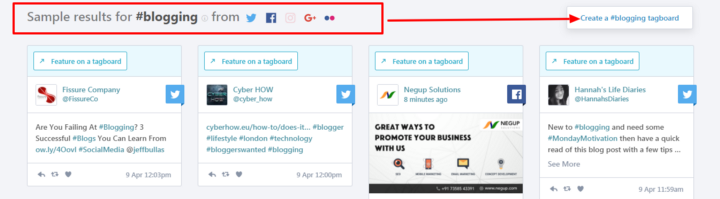
Tagboard uses hashtags to search for and collect public social media within seconds of being posted to networks like Twitter and Facebook. Robust tools offer the power to select specific posts to feature on websites, in broadcast TV, and on large displays.

1_vpoMNidmumbvAf1QcOl-ug

Here’s to your social media success!


Posted in #HCSM

Ten Top Tips To Celebrate Social Media Day 2021 #SMDAY

While every day is Social Media Day, June 30th, 2021 marks the twelfth annual official global celebration of all things social media.

I’ve been a social media evangelist for the past ten years and I am still as excited by its possibilities today as I was when I sent my first tweet and wrote my first blog.

The field of social media is dynamic and constantly changing, so as practitioners we are constantly learning and adapting to changes in the ecosystem. That’s what I find so energizing about working in this area.

To celebrate Social Media Day, here are ten of my tried and tested tips for social media marketing success.

1. Perfect Your Social Profiles

Review each of your existing social profiles with these questions in mind.

· Is it time to update your bio with new information?

· Should you use a more professional image for your avatar?

· Are your header images clear and compelling?

· Are you making good use of keywords?

· Do you need to include a new call-to-action?

Insider Tip: Complete all sections of your profile and schedule a review date every month or two to check your information is still current.

2. Get To Know Your Audience Better

Develop a deeper understanding of your target audience. Where do they like to hang out online? What content is most relevant to them? What kind of information are they looking for? How do they like to consume that information?

Once you deeply know your audience, you can then start to build relationships with them and create content that is relevant to them.

Insider Tip: Creating audience personas is a crucial part of designing your social media strategy and truly understanding who you’re trying to reach.

Download my audience persona template here

3. Meet Effort With Effort

Take the time to acknowledge when a person follows you online, leaves a comment on your blog, or re-shares your content. Share and retweet their content also. Favorite a tweet to let the person know you see them.

Insider Tip: Go out of your way to publicly (and privately) celebrate and acknowledge your followers.

4. Write Better Headlines

Did you know that on average, 8 out of 10 people will read headline copy, but only 2 out of 10 will read the rest?

Your headline is the first impression you make on a prospective reader. An eye-catching headline is a key factor in getting readers to click through to your article.

Insider Tip: Read 15 Ways To Crack Captivating Headlines for tips on creating headlines that attract attention.

5. Add More Images To Your Content

People connect more emotionally with images than text, and in an increasingly crowded digital landscape, when our minds are attracted more readily to content that draws our eye, images can break through the online content clutter to quickly communicate your marketing messages.

Insider Tip: Add an image to all your online posts — even those that are text-based. To aid brand recognition and create a strong visual identity, maintain consistency across all your images by sticking to the same colors, fonts, and layouts.

Check out my guide to creating professional graphics

6. Use The Right Tools

Whether you wish to edit a video for Facebook, design a Story for Instagram, or add visual impact to your blog posts, you’ll get the task done quicker and more effectively when you have a dedicated tool to hand.

Find just the right tool at this mega list of social media tools to try.

7. Make Sure You Are Using The Right Social Network

Not all social media is created equal. Different platforms attract different audiences.

It’s important, especially if your resources are limited, that you’re focusing your social media efforts in places that will generate the most return for your efforts. There’s no point in spending your time on a particular social network if your audience isn’t there. Nor should you spread yourself too thin by trying to be everywhere at once.

Every additional channel your business is active on means additional time and effort required to engage on and create tailored content for that platform.

Read Which Social Network Is The Right One For Your Medical Practice?  for more guidance.

8. Post Content At Optimal Times

Content has no value unless it’s amplified. One way to ensure amplification and optimize your social media reach is to post your content at the right time so it reaches your audience when they are online.

If you search for optimal posting times, you will find many guides online. You can follow these recommendations as a starting point, but I do recommend you do your own testing to see which days and times work best for your own particular audience within your industry.

Insider Tip: Sprout Social publishes an annual review of the best times to post to each of the major social media platforms. It may provide a good point for you to start testing optimum times for your own social media posts.

9. Repurpose Your Existing Content

One key to maintaining a steady stream of quality content is to re-purpose what you already have. By re-purposing content you have already written, you can extend and breathe new life into your current and past content.

Insider Tip: Get into the habit of creating content that can be repurposed in several different ways. Read How to Create Six Unique Social Shares From Just One Piece of Content for ideas on how to do this.

10. Don’t Just “Do Social”; “Be Social”

Finally, we all know those folks who only tweet you when they want you to read, comment or re-tweet their content. Don’t be one of those. Don’t get a reputation for being interested only when you want something. Focus on building online relationships. You can’t expect people to care about your community if you don’t care about theirs.

Posted in Cool Tool

Monday Morning Cool Tool: Google Mobile Friendly Tool

I love learning about new tools to make social media marketing more creative and effective, so I  share some of my favourite tools with you at the start of each week. This week I’m recommending  Google Mobile Friendly Test.


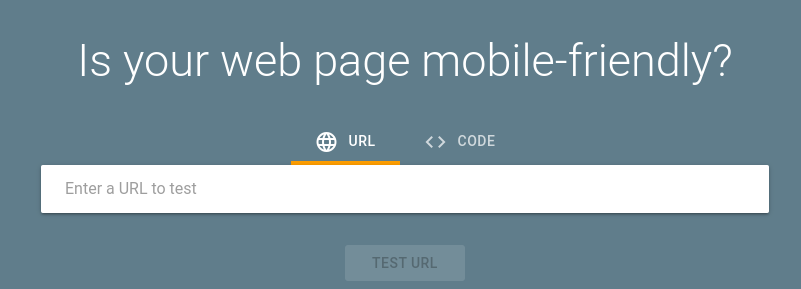
Use Google Mobile-Friendly Test to see how easily a visitor can use your page on a mobile device. Just enter a page URL to see how your page scores.

Having a mobile-responsive site (ie one that automatically changes its layout and placements of certain menus and buttons automatically) is important because firstly, not only are over half of patients searching online for health information on their smartphone, but secondly, Google now gives ranking priority to those sites that are mobile friendly.  In fact, Google has stated that it will penalize websites that aren’t mobile-responsive, so if your site isn’t optimized for mobile devices, you’ll likely lose out significantly in the organic search rankings. 

To check if your site’s design is responsive, enter its URL into this Google tool.

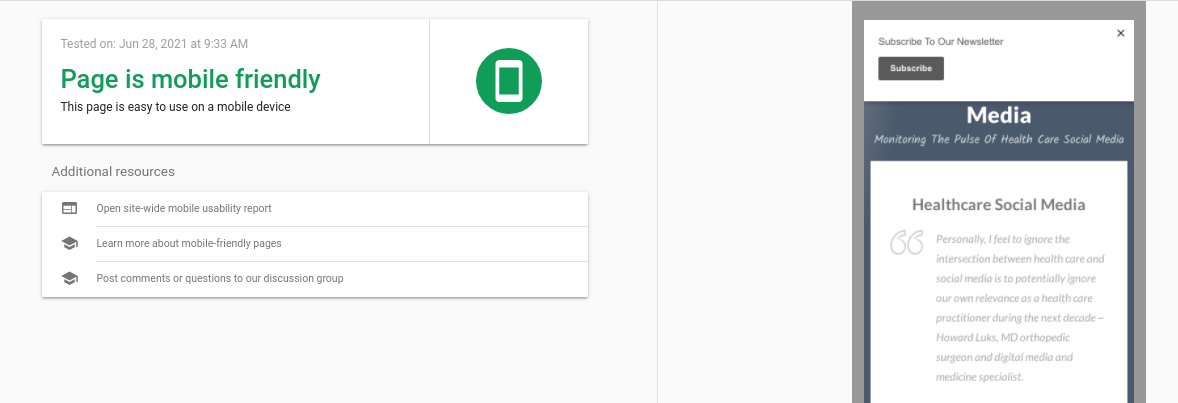
Here are the results I get for my website.

It only takes a few seconds to do and it’s an important element of your website optimisation.

For more tips on optimising your site, check out Digital Health Checkup: 10 Signs It’s Time To Redesign Your Medical Practice Website

Posted in #HCSM

3 Places To Find Interesting Ideas For Your Healthcare Blog

Have you started a blog for your medical practice or healthcare facility? Are you sometimes stuck for ideas when it comes to popular health topics to write about?

I’ve put together this list of places to find topic suggestions when your well of inspiration runs dry. I turn to these places when I need a fresh injection of ideas for my own content marketing and I feel sure you will find them helpful too.

1.Buzzsumo

Buzzsumo is a useful tool to find which popular healthcare topics people are searching for on social media. These are the topics people want to read about so it’s worth brainstorming ideas around this content.

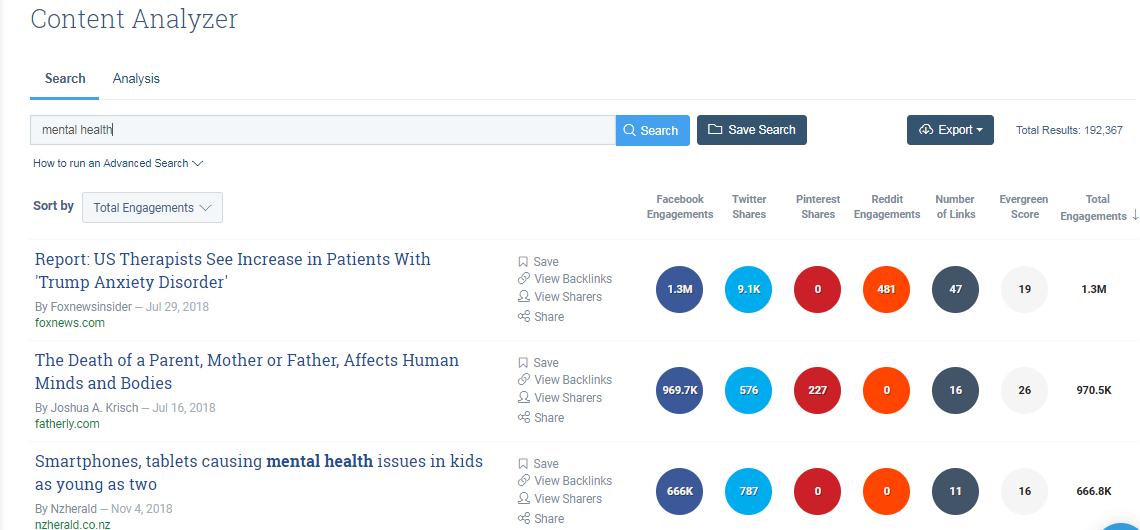
In the example below, I’ve searched for the term “mental health” and you can see it’s brought up some interesting topic ideas!

download


2. Keywords Everywhere

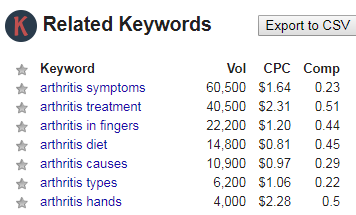
The Keywords Everywhere browser extension returns a host of long-tail phrases based on what people are searching for using specific keywords.

download

Insider Tip: The Google Keyword Planner within Adwords is another useful tool to find ideas for content based on keyword search.

3. Quora

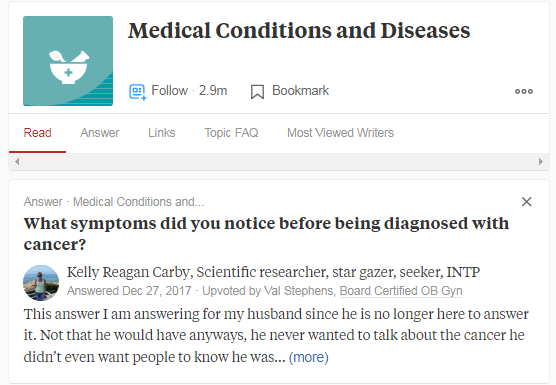
Quora is a question and answer platform where you can either ask a question about your topic or simply do a search using your topic keyword to find what people are asking about that topic. It’s a super place for market research. Make a list of those questions which you feel you could write about.

download

You have the option to follow chosen topics in your niche. Once you do so you’ll keep seeing the ‘Top Stories’ (questions) in your Quora newsfeed. You can also check out the ‘New Questions’ option to see the latest questions. When you have written an article or blog post on the topic, go back into Quora and answer a question related to the topic. You can include a link to your post in your answer.

Insider Tip: Yahoo Answers and Reddit are also good places to do market research online.

Where do you find inspiration for your content marketing?  

Posted in Cool Tool

Monday Morning Cool Tool: CopyChar.CC

download - 2019-11-09T115427.923

I love learning about new tools to make social media marketing more creative and effective, so I’ve decided to share some of my favourite tools with you at the start of each week. This week I’m recommending CopyChar.CCa simple tool to copy symbols.

If you’ve ever found yourself hunting around to find a particular symbol, currency sign or emoji then this tool is great – allowing you to find what you’re looking for at a glance.  I just discovered it a couple of days ago and already I’ve added it to my list of time-saving tools. I think you’ll do the same once you’ve tried it for yourself!