YouTube has more than 1.8 billion monthly active users, and remains the online video leader.
People around the world are now watching a billion hours of YouTube’s content every single day. That’s a huge amount of time spent watching diverse content on the channel. Here are some more staggering stats to consider.
YouTube is the second largest search engine in the world with added SEO potential due to its Google connection. YouTube also has live-streaming options and social tools, which it’s expanding as it works to keep in line with evolving consumer trends.
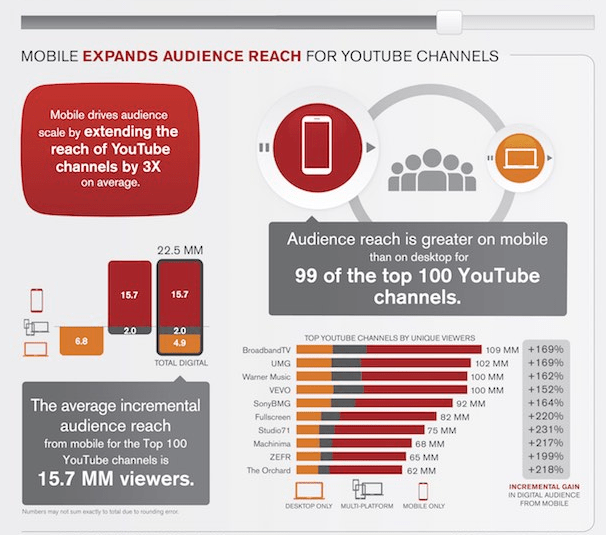
Mobile devices now account for 70% of all time spent on YouTube by adults in the US, according to research from comScore. Audience reach is bigger on mobile than on desktop for 99 of the top 100 YouTube channels in the United States.
Mobile viewing is especially popular with younger adults (age 18-34) and women, the analysis found. YouTube mobile viewers tend to watch shorter-form videos than desktop viewers do. However, mobile viewers watch nearly three times as many videos per month, on average.
YouTube is a platform that people are searching every day for how to solve their problems and get their questions answered. As a form of patient education and health promotion, it has great potential but recent studies show it is not being used to its full potential.
A 2013 study which examined the effectiveness of YouTube as a source of medical information on heart transplantation found it time-consuming to find high-quality videos and recommended that more authoritative videos by trusted sources should be posted for the dissemination of reliable information. Similarly, a 2015 study found that in YouTube videos related to skin cancer, there was a missed opportunity for cancer prevention and control.
These findings notwithstanding, there are some good examples of medical organizations who are already using YouTube to communicate health information. Mayo Clinic, in particular, stands out, with50,917 subscribersto its channel and over 31,000,000 video views.
If you don’t already have a YouTube channel for your practice, perhaps now is the time to consider it. Check out this article by Sendible which has some useful tips on how to optimise your YouTube channel for success.
I love learning about new tools to make social media marketing more creative and effective, so I’ve decided to share some of my favourite tools with you at the start of each week.
This week’s cool tool recommendation is Bitwarden – a secure and free password manager for all of your devices.
Bitwarden makes it easy for you to store all of your logins and passwords while conveniently keeping them synced between all of your devices.
I’m a huge Twitter fan. So many interesting healthcare conversations are happening everyday on the platform.
One of my favourite ways to use Twitter is to take part in Twitter chats. These are great networking and learning opportunities and a super way to engage in meaningful conversations about shared topics of interest. Think of it as a virtual meet-up for people with common interests.
When I teach social media classes, I do sometimes hear that Twitter is a confusing place for those new to the platform. It can take a while to learn the ropes and it’s not uncommon for new users to hesitate to ask about the meaning of some of Twitter’s features.
“What’s Trending” is one of those features that may not immediately make sense – even to those of us who are seasoned tweeters. It’s not always obvious why something is trending.
Twitter aims to fix this (hat tip Amanda Webb).
They are testing adding context to trends by attaching a ‘representative tweet which will give you a clue to the trend and they are also adding descriptions. ‘ The representative tweets will be selected both by the algorithm and human beings.
Testing on mobile in Argentina, Australia, Brazil, Canada, Colombia, Egypt, France, India, Ireland, Japan, Mexico, New Zealand, Saudi Arabia, Spain, the United Kingdom, the United Arab Emirates, and the United States.
When was the last time you took a close look at your medical practice website?
Websites are meant to be living entities that grow along with your business. A website is not a “set it and forget it” type of investment. Just like fashion, technology changes with the times. What once looked fresh and modern may now look old and outdated, giving your patients the impression that your practice is the same.
Why a website matters to your medical practice
In the online world, your website is a virtual office location and the face of your practice. It acts as the initial “touchpoint” for potential patients. It showcases who you are and what you do. A Facebook page is no substitute for a website (particularly given the current difficulties Facebook users face in terms of privacy and trust).
A well-designed website can:
Boost your online reputation
Increase search engine visibility
Attract new patients
You never get a second chance to make a good first impression
Your website has seven seconds to make an impression and your patients are making snap judgments based on what they see and read. Research Gate reports 94 percent of people are more apt to trust websites that boast good designs. Gaining trust is particularly important for medical practices, and you could lose it in a single glance with an outdated site.
In this post, I will take you through 10 signs to watch for to determine if it’s time to get your website upgraded or redesigned.
Take some time this week to look at your website with fresh eyes and ask yourself the following questions.
1. How does your website stack up against your competitors?
If your competitors’ websites are more streamlined, functional and fresher than yours, they may be drawing in more patients with a stronger online presence. Make a list of their sites and critically evaluate them in terms of look, design, and functionality. Do they include a blog? Helpful checklists? Pre-registration forms patients can fill out to save time before their appointment? An online appointment system? Screenshot the design features you think work well and think about how you might incorporate them into your website. Look also at what your competitor might be missing. Do you have a key differentiator that sets you apart from the competition? Highlight that difference on your website.
2. Can visitors easily find what they are looking for when they visit your site?
When visitors land on your medical practice website, they’re typically looking for something specific. You may be surprised to learn that research has revealed that easy navigation and accessibility are more important to patients than reputability.
Users should be able to use your website intuitively. Put yourself in the shoes of your visitors and ask yourself how easy it is to find key information on your site. How many clicks does a visitor have to make to get to the information they are looking for?
Think about the information someone is searching for when they visit your site—and make it easy for them to find it. If your site contains a lot of information (as some hospital websites do) consider creating separate landing pages for specific conditions.
Google has changed considerably over the years. The search engine giant constantly updates its algorithms to ensure users are provided with the best possible results. Each and every update that Google has made has been geared towards providing more user-focused and user-friendly results – Search Engine Watch
Here are some details your patients are likely looking for on your website.
A location map. If there is a link to Google Maps, be sure it’s working. This section is one of the most used aspects of any website.
The services you provide — list any specialties here
A list of doctors and nurse practitioners
The insurance plans you accept
Opening hours, plus emergency/after-hours contact details
Optional: Consider adding software which facilitates online scheduling of appointments.
3. Does your medical website communicate value?
Is your website nothing more than a glorified brochure? To attract patients to your website, you should be prepared to add more value in the form of information. Identify the most frequently asked questions in your practice and create blogs, videos, and FAQs for your website to answer those questions.
4. How well is your website performing?
The most common mistake I encounter when I work with clients, is they have no idea if their website is even attracting any visitors. Unless you regularly track your website performance, you will have no idea whether it’s producing results or not.
Use a tool like Google Analytics to monitor your site’s performance. Has it declined over time? Are there fewer people coming to your site? Do they stick around or “bounce” off your site too quickly? Bounce rate is a contributor to your site’s search rankings, and it refers to the amount of time someone is on your site before “bouncing” off to another site. If you have a lot of people who look and quickly click away, it tells search engines you don’t have useful information on your site.
In order to increase conversions, you’ll need to have a clear and visible call to action (CTA) on your website.
5. Is your website design mobile responsive?
Mobile first-indexing is now fully underway and there’s no excuse for having a website that is not optimized for use across all platforms in 2018. Most people aren’t looking at your website on a desktop or laptop anymore. They are looking at it on a phone or tablet. It is projected that by 2020 there will be 2.87 billion smartphone users.
Recent studies show 52% of smartphone users gather health-related information on their phones, ranging from information around a specific medical procedure to diet and nutrition best practices.
Having a mobile-responsive site (ie one that automatically changes its layout and placements of certain menus and buttons automatically) is important because firstly, over half of patients search online for health information on their smartphone, and secondly, Google now gives ranking priority to those sites that are mobile friendly. In fact, Google has stated that it will penalize websites that aren’t mobile-responsive, so if your site isn’t optimized for mobile devices, you’ll likely lose out significantly in the organic search rankings. To check if your site’s design is responsive, enter its URL into this Google tool.
Check how your website looks on a mobile device. If you need a magnifying glass to read it then your website is most likely not mobile responsive. You may have heard the term “mobile-friendly site” and be wondering if its the same thing. A mobile-friendly site is one where code is created that allows your website to scale to a smaller size. Mobile responsive sites, in contrast, “respond” to the size of device you are using, adjusting the website accordingly. Mobile responsive sites are greatly preferred over sites that are simply mobile-friendly.
Below are some tips from Search Engine Watch to ensure your website is mobile compatible:
Use a responsive website design that adapts to mobile devices or create a mobile version of your website that is properly redirected for mobile users.
Make sure that all the content formats used on your mobile site can be crawled and indexed (check using the txt testing tool ).
Ensure that content is consistent across your mobile site and desktop site.
Test your page speed using PageSpeed Insights. If your page is slow, use an auditing tool to find and fix uncompressed content, page errors, and other elements slowing your website down.
6.Is your medical website optimized for search engines?
Eight-in-ten online health seekers say they began at a search engine such as Google, Bing, or Yahoo. If you want more people to find you online, you need to optimize your website through good search engine optimization practices.
SEO (the ability to optimize your site for search engines), is a detailed and sometimes confusing process, and you may want to hire an SEO expert to do it for you. If you don’t want to hire someone, there are search engine optimization tools available to help you do your own SEO — and many of them are free. I’ve put together this list of the best free SEO tools out there to help you instantly improve your online marketing.
A Note on SEO and Redesigning Your Website
One of the biggest misconceptions among website owners is that SEO only needs to be done once. Numerous fractions are altered during redesign including code and pages. If they are not properly handled, it can negatively impact the website’s SEO and affect the long-term growth of the site. To find how to redesign your website without affecting SEO, read this guide.
7. Does your website take time to load content and images?
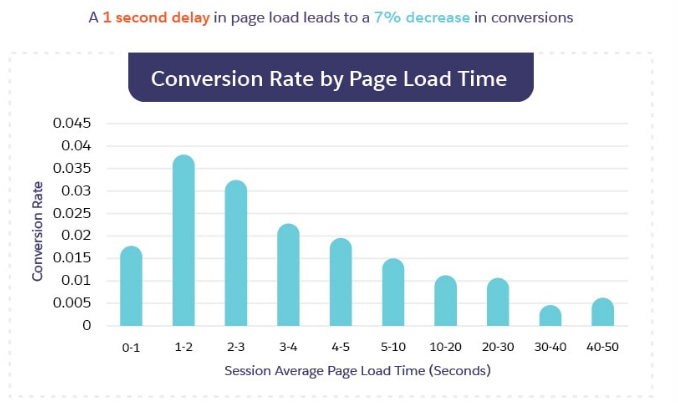
How fast your website loads is critical – a good site will load in 2 seconds. Alarmingly, research shows that a single second delay in site load time can reduce your conversions by 7 percent. If your site is taking longer than that, consider that around 40% of people will leave a website if it doesn’t load in 3 seconds.
Source: Salesforce
The faster your site, the better. Google announced back in July 2018, page speed will be a ranking factor for mobile searches too. Check your site speed: Google PageSpeed Insights. This tool gives you an overview of what aspects need improvement to boost the speed of a particular page.
Insider Tip! Optimize your images for faster loading. A lot of websites have images that are relatively large, which take a lot of time to load. Resizing your images can speed up the loading time.
There was a time when Flash was a key element of every new website, but nowadays Flash is seen an embarrassing relic of the past. It is no longer a matter of IF browsers will stop supporting Flash in the future, it is now a matter of WHEN they will do so, which means you need to take steps now if you want your site to be usable for the widest range of people in the future.
9. Have you included relevant imagery on your site?
High-resolution images are an important component of any website and require care and attention to make the best impression. Including photos of your the interior and exterior of your building, your logo, and your employees creates a welcoming and professional impression on prospective patients Patients want a relationship with the people who will be caring for them.
If you are already using images, are they relevant to what you do? Or are you relying too heavily on generic stock images you can find in many other places on the web? These days there’s no excuse for using boring stock images. In this article, you’ll learn about my best recommendations for sourcing images you can use for free to enhance your medical marketing.
Insider Tip! Don’t forget to add relevant tags to your images. (i.e. don’t upload images as e.g. img_1234). Image tags provide details when the images do not load, ensuring the user receives a similar UX irrespective of whether there is a picture or not.
10. Have you incorporated social media?
Not only are patients seeking health information online, they are also using social media to research health information. Ask yourself if it’s easy for visitors to share your content on social media? Have you included prominent social sharing buttons? Your average reader might never share your content unless you make it seamlessly easy to do so.
To Wrap Up
Your website is pivotal to your digital marketing strategy. And with more patients than ever searching online for you, it’s imperative that your website is optimized for them to find you. It takes time and resources to optimize your site to deliver the best experience possible, but if you are serious about how your business performs, you need to get serious about the performance of your website too.
For the past two years, I’ve posted a fascinating infographic depicting what happens every 60 seconds online.
Now here’s the latest version.
Not surprisingly given the nature of all things pandemic, 2020 has introduced a new era where technology and data have taken ever more significant roles in our daily lives.
I love learning about new tools to make social media marketing more creative and effective, so I’ve decided to share some of my favourite tools with you at the start of each week. This week’s cool tool recommendation is subject line rating tool – SubjectLine.
According to Copyblogger, on average, 8 out of 10 people will read headline copy, but only 2 out of 10 will read the rest. Your headline is the first (perhaps only) impression you make on a prospective reader.
SubjectLine has studied and analyzed millions of headlines to see what works. Simply enter your subject or title into its online tool and get a grade (out of 100 possible points). It will tell you what works and what can help you to improve.
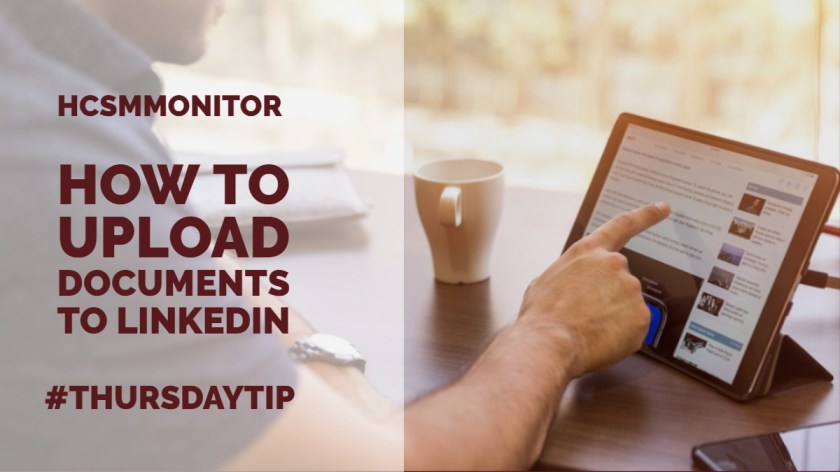
Welcome to this week’s social media quick tip. This week I want to show you how to upload documents to share on LinkedIn.
Did you know that you can now share your presentation slides, research papers, industry reports, and more directly to LinkedIn?
How to share a document
Click on the documents item on your desktop feed.
Choose a document from your computer or upload one from the cloud.
Give your document a name. Below I’m sharing my Speaker Sheet.
Once you’ve uploaded your document, you can provide more information and add a relevant hashtag before you hit POST.
Uploading documents to your feed, in a group, or on your LinkedIn page is a great way to share what you know with your community.
After you post a document, your followers can download it, embed it, and reshare it. You’ll also be able to see the analytics on how people did one of those actions.
Have you availed of this feature yet? Do you think it’s a useful LinkedIn feature?
I love learning about new tools to make social media marketing more creative and effective, so I’ve decided to share some of my favourite tools with you at the start of each week. This week’s cool tool recommendation is infographic maker Piktochart .
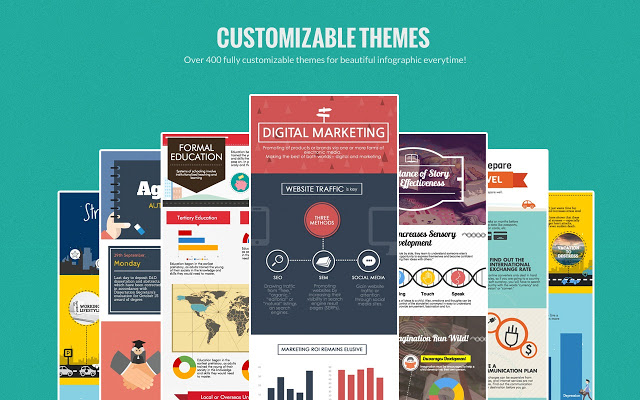
Infographicsare great for getting your content shared but many people are put off by the thought that you have to hire a graphic designer to create them. The good news is you don’t have to be a designer nor spend a lot of money to create them. Use a tool such as Piktochart to create engaging infographics. Choose a template and then customize it with text, fonts, and colors.
I love discovering new tools and apps which help make our social media marketing activities more manageable and more productive. Each Monday I share one of favourite social media management tools with you to try during the coming week. Today I want to put some of those tools together in this post organized around the theme of blogging. These tools will help you create, edit and promote your blog content more effectively.
Bit.ly is a tool which creates shortened links to track the performance of your content once you promote it. Use it to create a custom short link for each post you create and share.
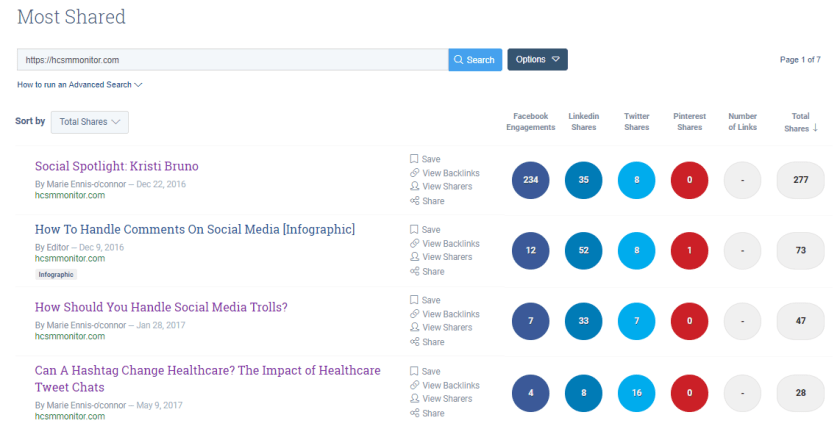
Buzzsumo is a useful tool to explore which pieces of content are popular on social media around a certain topic. Use it to brainstorm popular topic ideas based on keywords related to your topics. You can also input your own domain name (as I have done in the example above) into the search bar and see at a glance how often and where your content is most shared.
While the quality of your content is a vital factor for successful blogging, how you present your information is also very important. Visuals are a key component of a successful blog. Canva is one of my every-day go-to tools when I am creating visuals. It’s so easy and quick to use it with a multitude of layout options, fonts, images and illustrations to choose from. Use the pre-set blog template to create header images for your bog.
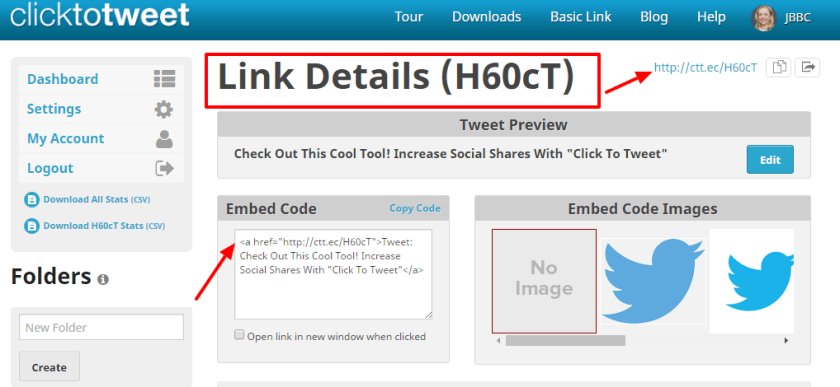
Click to Tweet is a cool free tool which generates one-click tweet boxes or links that can be shared through your website, your blog, or via email. It’s a powerful way to increase social shares and highlight quotes, stats, and key takeaways for your content marketing. It’s also available as a handy Chrome extension.
According to Copyblogger, on average, 8 out of 10 people will read headline copy, but only 2 out of 10 will read the rest. Your headline is the first (perhaps only) impression you make on a prospective reader. Use the EMV headline analyzer to calculate the emotional value of your headlines to create titles which will resonate with your audience.
FreePik offers users, high-quality graphic designs: exclusive illustrations and graphic resources. It operates on a freemium business model which means, the majority of the resources offered at Freepik can be used for free, only having to credit the author of the illustration to Freepik. In addition, for a small fee, you can subscribe to the Premium plan and use the illustrations without any accreditation whatsoever.
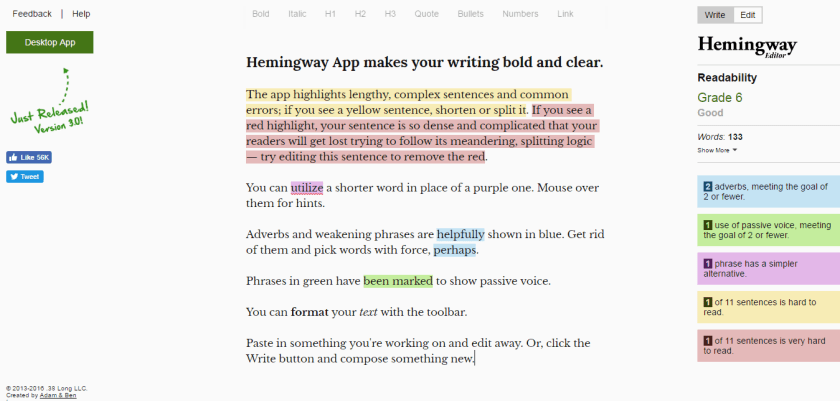
A proofreading tool which clears your copy of all unnecessary copy. Just paste your text into the editor and you’ll get an analysis that highlights lengthy, complex sentences, adverbs, passive voice, and common errors.
This site contains images (mostly from Flickr) organized by themes such as inspiration, recreation, and ambient. On the site, you’ll also find free templates, icons, button makers, and more.
Life of Pix offers free, high-quality images that are available for personal and commercial use. Each comes with a helpful color palette so you can plan your visuals accordingly.
This is a cool tool that enables you to turn your blog posts into slideshow-type videos in minutes. The free plan includes unlimited videos, access to 10 million video files, and 480p-quality video with the Lumen5 watermark. You can also upload your own logo. Upgrading to the Pro plan ($49/month) lets you remove the Lumen5 branding, upload your own watermark and outro, and more.
Simply input your blog post’s url and Lumen 5 will import the text and images from that post and auto-create your video. You can then edit it, swap out images, upload other images and add music before you hit publish. The video above is one I created with Lumen 5 from an original blog post
Pexels provides over 3,800 high-resolution photos, collated from other free image sites — making it one of the largest free image directories. Pexels has also added a large library of stock videos to its site also under the Creative Commons license. Use the site’s list of popular searches to find the most in-demand stock video.
Pikwizard hosts over 100,000 completely free images, with over 20,000 of those exclusive to the site. The site has a good selection of medical-themed images. The site is particularly good for aesthetic procedures and dentistry-related images.
With PhotoFunia you can edit photos online for free in a matter of seconds resulting in high-quality photo collages. As the name suggests, this tool is a lot of fun to use. It helps you make a mark with your photos by incorporating your photos into mock-ups of background images including billboards, magazine covers, and movie posters.
Similar to Bit.ly, this url shortner tool allows you to enhance every link you share (whether your own content or someone else’s) with a call to action (CTA). When people click on the Sniply-generated link, they can view the article you shared and see a CTA.
If you like sharing quotes on your blog you can take advantage of their ready to add quotes feature. It will save you a lot of time. You can save, download or share up to 10 images per month, for free.
This tool takes a sample of your writing and calculates the number of sentences, words, syllables, and characters. It then takes the output of these numbers and plugs them into 7 popular readability formulas to help you find out the reading level and grade level of your materials and help you to determine if your audience can read what you have written.
Quroa is a question and answer platform where you can either ask a question about your topic or simply do a search using your topic keyword to find what people are asking about that topic. It’s a super place for market research.
Unsplash gives you access to a bank of 50,000+ free-to-use photos. All photos are licensed under Creative Commons Zero, which means you can copy, modify, distribute and use the photos for free, including commercial purposes, without asking permission from or providing attribution to the photographer or Unsplash.
Do you have any favourite tools to enhance your blogging? I’d love to hear about them if you do.
Do you want your content to stand out in today’s crowded social media landscape? Then it’s time to get visual with social media.
You probably don’t need me to tell you that great visuals make for great marketing. Visual content can be an incredibly powerful marketing tool, one that increases message association, brand awareness, and encourages engagement and shares. The brain processes visual data 60,000 times faster than text. Additionally, 90% of information transmitted to the brain is visual.
The continuing growth of visual platforms, such as Pinterest and Instagram, confirm that incorporating visual content into your social media strategy is a must. Not only do these platforms drive more traffic and shares, but research has also shown that tweets and Facebook posts with images encourage more engagement. You should also add an image to every single blog post you write and use images to break up the tedium of text.
Whether it’s growing your brand identity or improving medication adherence through instructions, visuals are a key to interacting with and empowering patients. But when it comes to using images, don’t be tempted to reach for the nearest stock photo.
These days, there’s no excuse for using boring stock images; you can find all over the web. In this article, you’ll learn my favorite recommendations for sourcing images you can use to enhance your social media posts – and best of all they’re free!
1. Freepikoffers users, high-quality graphic designs: exclusive illustrations and graphics resources. It operates on a freemium business model, which means the majority of the resources offered at Freepik can be used for free, only having to credit the author of the illustration to Freepik. Additionally, for a small fee, you can subscribe to the Premium plan and use the illustrations without any attribution whatsoever.
2. Gratisographyis a collection of free high-resolution pictures you can use on your personal and commercial projects, free of copyright restrictions.
Image Source: Gratistography
What I really like about this site is many of the images are quirky and fun — no cheesy stock images here!
3. ISO Republicprovides over 3,000 images under the Creative Commons Zero (CC0) license. This means the pictures are completely free to use for personal or commercial purposes, with no attribution required.
Image Source: ISO Republic
4. Life of Pixis a collection of free high-resolution stock images donated to the public domain by the Leeroy Advertising Agency in Montreal.
Image Source: Life of Pix
Their sister site Life of Vids offers royalty-free videos, clips, and loops for you to use to your heart’s content.
5. Morguefile is a free photo archive “for creatives, by creatives.” The photos have been contributed by a diverse range of creatives from around the world, including both amateur photo hobbyists and professionals.
Image Source: Morgue File
6. Pexelsprovides over 3,800 high-resolution photos, collated from other free image sites — making it one of the largest free image directories.
Image Source: Pexels
Pexels has also added a large library of stock videos to its site under Creative Commons license. Use the site’s list of popular searches to find the most in-demand stock videos.
7. Picjumbo is free stock photo site created by designer and photographer Viktor Hanacek in 2013.
Image Source: PicJumbo
Users can click through the different categories of over 600 free high-resolution photos, with the option of upgrading to Premium for new unpublished images to power your social media marketing. No attribution is required.
8. Pixabayhosts over 650,000 free stock photos, vectors, and art illustrations free of copyrights under Creative Commons. On the home page, you’ll find a small, curated collection of images and a search bar for more targeted results.
Image Source: Pixabay
Pixabay also has a collection of stock videos for use in your marketing.
9. Rawpixel prides itself on having the most diverse collection of stock photos on the web. It wants to change the face of stock photography by creating design resources that reflect today’s society as it really is. To this end, it has started the (one) world face project with the ultimate goal of photographing people from every nation in the world.
Image Source: Rawpixel
10. Unsplashgives you access to a bank of 50,000+ free-to-use photos. You can subscribe to receive ten new images every ten days directly into your inbox.
Image Source: Unsplash
Creating compelling visual content can be a powerful way to connect with your audience. People connect more emotionally with images than text, and in an increasingly crowded digital landscape, when our minds are attracted more readily to content that draws our eye, images can break through the online content clutter to quickly communicate your marketing messages.
Spend some time this week perusing these sites and download a selection of your favorite images to your desktop. Then get creative with the help of an image editing tool such as Canva and edit your chosen images into something more interesting for your brand. Save these images to a Dropbox folder so you now have your own library of unique images to draw on each time you write a new piece of content or post something to social media.



























 Health Care Social Media