Articles

Posted in Cool Tool

Monday Morning Cool Tool: Twitonomy

I love learning about new tools to make social media marketing more creative and effective, so I’ve decided to share some of my favourite tools with you at the start of each week. This week’s cool tool recommendation is Twitonomy a freemium tool which yields insights on your followers, influence and interests.

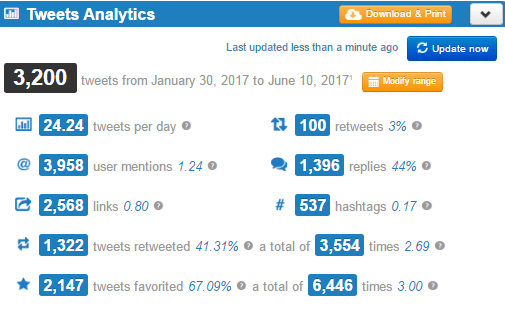
Here’s a snapshot of my analytics — and yes, I do tweet a lot!

1-3ovXIKf-htFMiMoZbUKoMQ.png

You can also get search analytics on any hashtag, user or keyword. With the pro version you can download tweets, mentions, RTs, favorites and reports to Excel & PDF documents — a useful reporting tool.


Posted in #HCSM, LinkedIn

3 New LinkedIn Features To Try Today

LinkedIn has released some new updates recently which are worth checking out. 

1. View Connection History

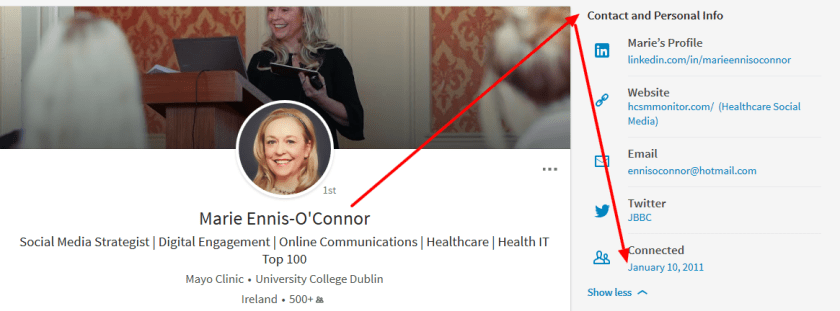
First up, you can now easily view your connection history with your network.  Simply go to a connection’s profile and click on “Contact and Personal Info” to see when you first connected.

index

2. Discover Who Is Searching For You 

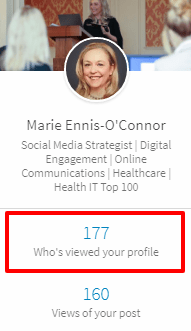
With Search Appearances, you can see how many people found you in search, as well their companies and job titles. This is such a cool feature, particularly for job hunters.

Click on “Who’s Viewed Your Profile”

download.png

You will then get a breakdown of the companies and job titles of the people who found you in search to help signal what types of opportunities you may be a fit for. Click through to see open jobs at each company as well as who the hiring managers are so you can follow up for more information.

download.png

I’m excited that LinkedIn has announced you’ll soon also be able to see the keywords you’re being found for.

3.  Add An Image To Your Comment

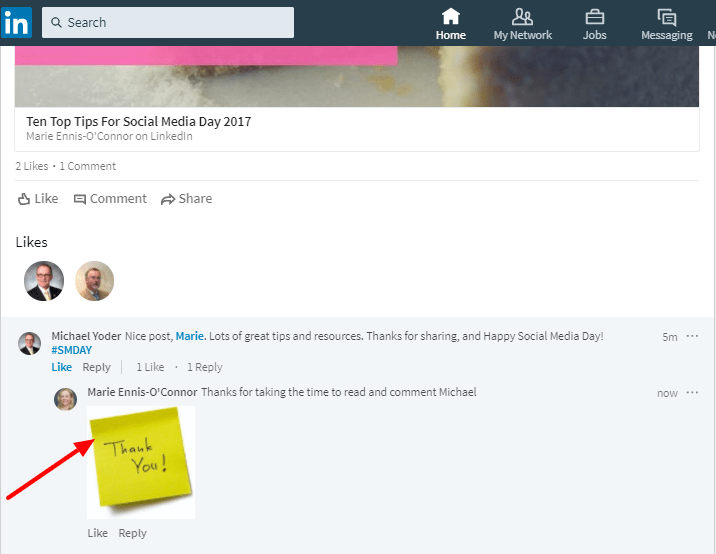
I’ve been having fun trying out this feature.

unnamed.png

  • To comment on a post, click  Comment beneath the post, fill out the Add a comment… field, and click Post.
  • To comment on a comment, click Reply beneath the comment, fill out the Add a reply… field, and click Reply.
  • To add a photo to a comment or a reply, click the  Photo icon in the comment field, and select the picture. Then fill out the comment field and click Post or Reply.

 Have you tried any of these new features yet? Which of them do you find most useful?

Posted in Community Manager, Facebook

Facebook’s New Mission: Bringing Communities Closer Together

Facebook has reached a new milestone: there are now 2 billion people connecting and building communities on Facebook every month.

gd-facebook-2-billion-milestone.png

Last week Facebook hosted its first-ever Facebook Communities Summit where Mark Zuckerberg announced a new mission for Facebook “Give people the power to build community and bring the world closer together”.

With this mission in mind, Facebook announced some new features to help group admins grow and manage their communities on Facebook.

  • Group Insights: With Group Insights, you will be able to see real-time metrics around growth, engagement, and membership — such as the number of posts and times that members are most engaged.
  • Membership request filtering: Facebook has added a way for admins to sort and filter membership requests on common categories like gender and location, and then accept or decline all at once.
  • Removed member clean-up: Group admins can now remove a person and the content they’ve created within the group, including posts, comments and other people added to the group, in one step.
  • Scheduled posts: You can now create and conveniently schedule posts on a specific day and time.

In addition to these updates, Facebook is testing group-to -group linking, which allows group admins to recommend similar or related groups to their members.

Related Reading


Do you run a Facebook group?  Have you noticed any of these changes yet? Which new feature do you think will be the most useful to you?

Posted in #HCSM

How Often Should You Post On Social Media?

Ask the question how often you should post updates to social media, and you will find a variety of answers.

My own advice is to test for yourself. Keep an eye on your analytics to determine the posting schedule which works best for you. However, this takes time, and in the meantime, it would be useful to have a guide to refer to.  But which guide to follow?

CoSchedule has done the heavy lifting for us by sifting through 14 different studies to identify the optimum data-driven times to post to social media.  The following are the recommendations from their research.

Facebook

download.png

Evidence suggests that posting to Facebook more than once a day may be counterproductive. I admit I struggle with this one.

Twitter
download.png

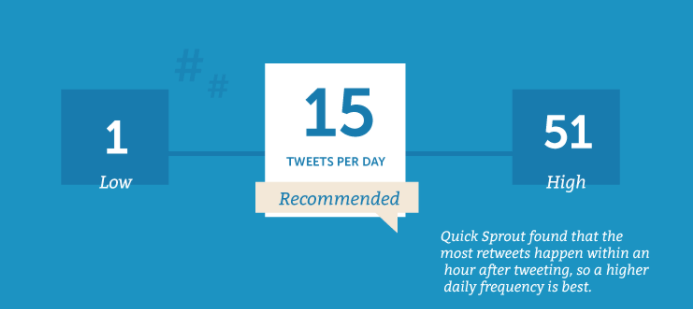
You might be surprised to see this data, but as the shelf-life of a tweet is so short, it makes sense to post quite frequently. I tweet between 10-15 times a day, but it’s important to space out your tweets. I use a scheduling tool to help me do this. Don’t forget to retweet other relevant tweets too.

Pinterest

download.png

The optimum recommended frequency is to pin around 11 pins per day, although some recommended pinning up to 30 daily pins. And again, be sure to repin other users too.

LinkedIn

download.png

Once a day seems like the optimum posting frequency on LinkedIn according to the data.

Google+

download.png

A lower frequency of posting is also recommended for Google+

Instagram

download.png

I’m slightly surprised that 1-2 posts per day is recommended as I see many brands sharing more than this.

Related Reading:

What 20 Studies Say About The Best Times To Post On Social Media 


What do you think of these recommendations? Do you find you are posting less or more than the recommended frequency? Do you have your recommendations to share about an optimum number of times to post to social media?

Posted in #HCSM

What’s New in Social Media This Week?

My latest healthcare social media newsletter has gone out to subscribers. In this week’s round-up of news and tips:

  • Ten Top Tips For Social Media Day 2017

6db938dd-da45-4b4a-9b8e-52b40ca2a067.png

To celebrate Social Media Day, I’ve put together ten of my tried and tested tips for social media success.

  • How To Share A Replay of Your Live Video To Instagram Stories

b3bc2dc8-4fe5-4595-907b-9c1088c6edb7.png

You can now share live video replays to Instagram Stories for 24 hours with a new Share button found at the bottom of the screen once a broadcast ends

  • 3 New Updates To LinkedIN

cef7c997-e226-4aa9-9eb8-72cbcdb932d0.png

LinkedIn’s been steadily adding new tools and features to the platform as part of their recent re-design.

  • The 20 Most Effective Phrases on Facebook

0dd715de-b65d-4dfc-acf1-b98a346dfb08.jpg

Which phrases in headlines are most effective in encouraging people to engage with articles on Facebook?  To find out, BuzzSumo examined the performance of 100 million article headlines published between March 1, 2017 and May 10, 2017.

Plus

Your weekly cool tool recommendation, social media quote of the week, and six things you should know in the world of social media.

Read this week’s newsletter and subscribe for regular tips. 

Posted in Newsletter

How The American Diabetes Association Unleashed The Streisand Effect

My latest healthcare social media marketing newsletter has just gone out to subscribers. In this week’s newsletter, you can catch up on the controversial decision surrounding the American Diabetes Association efforts to ban tweets at their annual congress.

You can learn more about Twitter’s new look for iOS, Twitter for Android, TweetDeck, and Twitter Lite, and WordPress’s new media library for iOs and Android. You’ll also learn about two new features Facebook is rolling out aimed at helping advertisers to reach people who are more likely to take valuable actions towards your business objectives.

Plus regular features:

  • Social Media Quote of the Week
  • Cool Tool
  • Six Things To Know

Read the latest HCSMMonitor and subscribe here. 

Posted in #HCSM, Facebook

Facebook Introduces New Tools For Advertisers

Facebook has introduced two new tools aimed at helping advertisers to reach people who are more likely to take valuable actions towards your business objectives.

The first, value optimization, enables advertisers to optimize their ad campaigns based on purchase value data passed through the Facebook pixel. Value optimization works by using the purchase values sent from the Facebook pixel to estimate how much a person may spend with your business over a seven-day period. The ad’s bid is then automatically adjusted based on this estimation, allowing campaigns to deliver ads to people likely to spend more with your business at a low cost. Value optimization will roll out to eligible businesses over the next few months. Businesses can access value optimization when they create website conversion ad sets that are optimizing for purchases in Ads Manager.

The second, value-based Lookalike Audiences, allows you to include a value column in your customer list, which you can then use to reach new people that look like your highest spending customers. Facebook introduced Lookalike Audiences over four years ago to help marketers reach people likely to be interested in a business based on people who have visited their site or customers added from a Custom Audience.

As Facebook explains:

While Lookalikes are a powerful tool to help grow a customer base, businesses often want to grow specific cohorts of their audience based on the value to their business. In order to provide a more effective solution to do this, we are rolling out value-based Lookalikes globally. With this enhancement, advertisers are no longer limited to creating small groups of audiences based on their spend or LTV prior to creating a Custom Audience. Now, they can include a value column to their entire customer list, which Facebook can use to create an additional weighted signal for people most likely to make a purchase after seeing your ad. Value-based lookalikes can be found across all objectives in Ads Manager or Business Manager.

And advertisers on Facebook will soon have more control over where their ads appear, as Facebook is rolling out several tools aimed at providing more transparency before campaigns go live.  The latest updates will provide advertisers with a list of publishers up front to show where ads might appear via Instant Articles, in-stream ads within Facebook and across the Facebook Audience Network.  This will help provide more transparency for advertisers before campaigns instead of only after. While the tools are now in beta they’ll be rolled out over the course of this year.

Related Reading

Posted in Cool Tool

Monday Morning Cool Tool: Photofeeler

I love learning about new tools to make social media marketing more creative and effective, so I’ve decided to share some of my favourite tools with you at the start of each week. This week’s cool tool recommendation is Photofeeler, billed as the “world’s smartest photo feedback” tool.  I’m intrigued by this free tool designed to help you make the right impression online.


Advanced algorithms by Carnegie Mellon University Ph.D. mathematicians make Photofeeler a valid scientific tool, not just a toy or game.  Photofeeler’s co-founder has a PhD in Optimization Algorithms and experience writing artificial intelligence for Fortune 500 companies. What Photofeeler does with algorithms and machine learning, is monitor vote quality, detect all manners of voter fraud in real time, and use sophisticated score distribution analysis — accounting for factors like individual voter styles — to optimize the accuracy of test results. The consequence is statistical accuracy far beyond what a small number of votes could normally provide.

How It Works

When you start a test on a photo, other logged-in Photofeeler users (within your selected voter demographic) can see that photo on the voting page in order to give their feedback. When the test is ended, the photo becomes entirely private again.


Photofeeler Ranks are a comparison between your photo’s score and all the rest that have been tested on the Photofeeler platform. Photofeeler Ranks are given as a percentile. So, for instance, a Rank of 58% means your photo did better than 58% of photos.

Let me know if you try this tool out – I’d love to hear how you get on with it. 

Sign up at http://www.photofeeler.com


Posted in #HCSM

What’s New in Social Media This Week?

My latest healthcare social media newsletter has gone out to subscribers. In this week’s round-up of news and tips:

  • 10 Steps To A Winning Content Strategy

unnamed (12).jpg

Creating great content begins with having a clear purpose in mind. Check out my ten step process to get there.

  • Mary Meeker’s 2017 Internet Trends Report

unnamed (2).png

Each year, Mary Meeker, partner at the Silicon Valley venture capital firm Kleiner Perkins Caufield & Byers, releases a report, described by Tech Crunch as “essentially the state of the union for the technology industry”. Read more about the report in this week’s newsletter.

  • Snapchat Rolls Out New Web Tool To Create On-Demand Geofilter

unnamed (13).jpg

Snapchat has introduced a redesigned web tool to make it easier for users to create on-demand geofilters from scratch. Find more details in this week’s newsletter.

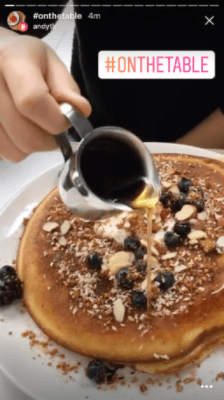
  • Instagram Rolls Out Location Stories and Hashtag Stories

unnamed (3).png

Instagram is rolling out two new features to show you what’s happening around you and find stories related to your interests. More information in this week’s newsletter.

Plus

Your weekly cool tool recommendation, social media quote of the week, and six things you should know in the world of social media.

Read this week’s newsletter and subscribe for regular tips. 

Posted in Cool Tool

Monday Morning Cool Tool: Bit.ly

I love learning about new tools to make social media marketing more creative and effective, so I’ve decided to share some of my favourite free tools with you at the start of each week. This week’s cool tool recommendation is Bit.ly, a tool which creates shortened links to track the performance of your content once you promote it. If you create a custom short link for each content promotion campaign, you can track what works well and what doesn’t.

index

Also check out Snip.ly  a url shortner tool which allows you to enhance every link you share (whether your own content or someone else’s) with a call to action.

download (72).png

When people click on the Sniply-generated link, they can view the article you shared and see a CTA.

Both these tools are extremely useful to track how your content is performing and if  you aren’t already using them, I highly recommend you start today.