Posted in #HCSM, Twitter

12 Ways To Search For Health-Related Content On Twitter

Twitter’s statistics are mind-blowing. According to Internet Live Stats, every second, on average, around 6,000 tweets are tweeted on Twitter which corresponds to over 350,000 tweets sent per minute, 500 million tweets per day and around 200 billion tweets per year!

So, how do you keep up with all those tweets? Obviously it’s impossible to keep up, but you can handle the avalanche better through a combination of maintaining Twitter lists of the people you follow, health-related hashtags, etc., and using Twitter’s Advanced Search Engine.

While the easiest way to do a search on Twitter is to click the native search facility, did you know you can do so much more with Twitter’s advanced search capabilities?

Twitter’s advanced search capabilities allow you to narrow down your search using parameters such as specific keywords, language, people, location, and date range.

In today’s post, I will show you twelve ways you can use this powerful search engine to search for health-related content on Twitter.

1. Search for a phrase: for example “healthcare social media marketing strategy”.

2. Search for any of these words: for example “healthcare social media” or “healthcare marketing strategy”.

3. Exclude any word: for example “blog”.

4. Search for health related hashtags: for example #hcsm.

5. Search for any specific language.

6. Choose specific accounts to search within.

7. Or find tweets directed to a specified Twitter user or referencing a specific username.

Image

8. Search for tweets in a specific location or within a specified mile radius of a location.

9. Narrow down your tweets within a specific date range. This is useful if you want to catch up on tweets around a specific conference or event.

10. Discover sentiment around tweets – i.e. whether negative or positive.

11. Find health-related questions. This feature enables you to search for conversations happening locally that you might like to add your expertise to.

12. Choose to include re-tweets in your search. I usually exclude this search parameter, as I prefer to concentrate on original tweets; however it may be useful if you want to see how many times a tweet has been re-tweeted or who is re-tweeting specific tweets.

And here’s a snapshot of my final search results. As you can, I can zoom in on the most popular tweets, or those who are tweeting in real time. I cans also find photos and videos related to my search. I can even save this search, and embed it on my website.

Image

Considering its capabilities, it is surprising that Twitter’s advanced search engine is so underused. Try using it to create lists, curate content, and as a social media listening tool to find health-related conversations. Once you start, you are sure to find other ways to maximise this powerful search engine to advance your healthcare marketing.

Posted in #HCSM

How To Create A Social Media Mission Statement

Following on from a previous post on the necessity to create a social media strategy for your healthcare marketing, today I want to show you how to turn that strategy into a focussed mission statement.

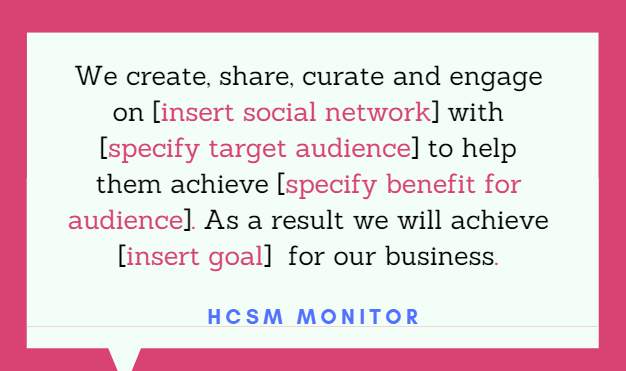
This statement should guide your social media activity and help you focus in on where you need to spend your time and efforts.  Here is a sample statement I use with my own clients.

Social Media Mission Statement

download (43)

Each time you create a new piece of content or make a decision to try a new social media tool or platform, see if it fits the mission statement. Doing so will help make your social media decisions more focused and effective.

Posted in #HCSM, Thursday Tip

#ThursdayTip: How To Use Twitter’s Conversation Settings

Welcome to this week’s quick social media tip.

Today I want to show you how to use Twitter’s Tweet Reply conversation setting. 

Last August Twitter rolled out this function to users to give people more control over the conversations they start.

Sometimes people are more comfortable talking about what’s happening when they can choose who can reply. Users in the test pool have said that they feel more comfortable tweeting, and more protected from spam and abuse, which has lead to them tweeting longer, more in-depth thoughts, particularly on sensitive subjects.

Here’s how it works

Before you Tweet, choose who can reply with three options:

  1. Everyone (the default, standard setting)
  2. Only people you follow
  3. Only people you mention


Tweets with the latter two settings will be labeled and the reply icon will be grayed out for people who can’t reply. People who can’t reply will still be able to view, Retweet, Retweet with Comment, share, and like these Tweets.

I admit I haven’t used the feature, but it’s interesting to see how some brands are utilising it here.

How about you? Do you think this is a useful feature?

Posted in #HCSM, Infographics

The 11 Most Common Website SEO Issues [Infographic]

SEO (the acronym stands for Search Engine Optimization) is the process of getting traffic from “organic” listings on search engines in order to improve your website’s search engine ranking.

Did you know that 39% of total global web traffic comes from search, with Google receiving over 63,000 searches per second on any given day?

But 75% of users never click past the first page of search results.

In this infographic, you can see at a glance some of the most common on-site SEO issues, with duplicate content being the worst offender.

seoissues-semrush-100816

Want to optimize your website? Check out these tools.

Posted in #HCSM

3 Digital Trends Making An Impact In Healthcare Marketing Today

Although digital marketing has been making waves in healthcare for quite some time, the last few years has really seen some dynamic changes.

Digital marketing has moved from a nice-to-have to a must-have for patient acquisition and retention. These changes are driven by trends in patient behavior and preferences, mainly by Gen Z and millennials.

Bottom line, if you don’t have a solid online presence, you’re missing out on many patients.

Here are three of the most important digital trends that have been making the biggest impact in the online marketing world.

1. The Shift To Video Content

Video is booming. YouTube is the second largest search engine in the world with added SEO potential due to its Google connection.

Video has become the predominant way people want to consume information and this goes for patients too.

Information delivered via video vs. print equates to a much higher retention rate. In addition, patients who watch videos featuring a physician feel a greater level of trust.

The type of video content you can create includes Q&As with physicians, patient testimonials, explainer videos, and live streaming.

Live streaming is a powerful medium because it gives your audience a chance to interact directly with you.

All the major platforms are either running and encouraging live video or soon will be. Its power lies in the fact that it is more than just a one-way flow of information. Rather, viewers can pose questions and provide feedback in real time. You can use it to reach beyond the clinic and engage with patients and caregivers wherever they are and whenever they watch to watch.

Additionally, live videos on Facebook and Instagram can be saved and used later, which is perfect for repurposing your videos and getting the most traction out of them.

Viewer engagement levels for live videos are ten times more than regular video by social media metrics such as likes, comments, and shares.

Facebook is now putting a greater emphasis on videos. Their algorithm prioritizes live video while they are being broadcast allowing the content to appear at the top of a user’s News Feed.

Additionally, Facebook Live videos are archived on Facebook and can be viewed and shared after the live broadcast.

The format is easy to use, can be low cost or professionally produced, and enjoys extremely high engagement levels. And with Millennials’ love for dynamic, real-time, interactive digital experience, Live is one of the best ways to reach them.

2. Mobile Responsive Websites Are A Must

Google a year or so ago, announced a major change to the way its search index will rank sites: it will go mobile-first.

As the company explained at the time, Google’s algorithms will eventually primarily use the mobile version of a website’s content to rank its pages.

Without a mobile responsive site, not only are you losing out significantly in the organic search rankings, but Google has made it very clear that it will penalize sites that are not mobile responsive.

Recommended Reading: How To Ensure Your Website Is Mobile Compatible

3. Voice Search Is On The Rise

The majority of patients searching for information on the web still trust search engines but the way people search for information online is changing. Increasingly, people are using voice search on their smartphones, tablets or voice assistants (like the Amazon Echo or Google Home devices) to search for information on the internet (yet another compelling reason to make sure that your site is optimized for mobile).

In essence, voice searches are largely about answering questions, not about focusing on individual keywords. SEO is fast becoming AEO (Answer Engine Optimisation).  To quote NewsCred, “If you’re a marketer, “What’s the Alexa strategy?” will be a question you’ll be expected to answer.”

Recommended Reading: OK Google: Why & How Your Medical Practice Should Prepare For Voice Search

Wrapping Up

Social media is constantly evolving, and while you need to stay abreast of trends, you don’t necessarily need to jump on each and every one of them at once. To stay competitive in the social space, we need to be open to new technology and ready to experiment with new tools, but we shouldn’t fall for the proverbial “shiny object syndrome.”

Keep your sights on the bigger picture — ask yourself how this new technology fits with your overall strategy. The challenge as always is keeping ahead of evolving social media trends, but equally staying true to your mission and vision.


Want to keep right up-to-date with what’s new in digital marketing?

Sign up for our weekly newsletter to be in the know. 

Posted in #HCSM, Thursday Tip

#ThursdayTip: Do These 4 Things Before You Post To Social Media

Welcome to this week’s social media tip. Today I want you to think about how you can do more than just add to the online chatter.

Here are four questions to ask yourself before you post to your social media channels.

1. Is this post valuable to my social media followers?

Ask yourself why your followers (and not just you, personally) would find the content to be valuable.

Better still, ask your audience.

Go right to your audience and ask them what kind of content they’d like to see from you. You can create quick polls on Facebook, Twitter, and Instagram or go deeper with a survey. Survey MonkeyPolldaddy and Google’s own survey forms are all simple tools of the trade which have been around for ages and they still work really well.

Recommended Reading7 Places To Discover What Your Audience Wants To Read (So You Can Write It For Them!)

2. Which channel is best suited for this post?

Now that you are certain the information adds value,  it’s time to decide which channel would be best suited to convey this message.

If you have already created a mission statement for each of your brand’s social media profiles, this step is easy: just see which channel’s mission statement best describes the post.

Recommended ReadingHow To Create A Social Media Mission Statement For Your Healthcare Business

3. Is this post optimized for the social network I’ve selected?

While the quality of your content is a key factor for successful social sharing, how you present your information is also very important.

Study after study confirms that how you create and share content matters — with visual content leading the way. According to research by Kissmetrics, photos get 53% more likes, 104% more comments and 84% more click-throughs on links than text-based posts.

Obviously, if you’re sharing on a visual channel, like Instagram, you’ll want to add high-quality visuals, but consider adding visuals also to more text-based channels like Twitter. Tweets with photos give a boost to engagement rates. 

Pro Tip: You can easily create your own images with drag-and-drop tools, like Canva and Ribbet.  They will also automatically create the right sizes for your Facebook page, so you don’t need to worry about it.

Recommended Reading10 Places To Find The Best Free Images For Your Healthcare Marketing

Other things to consider when it comes to optimizing your posts are using the correct hashtags and creating an impactful headline.

Recommended Reading: 50 Power Words To Super Charge Your Content Marketing

4. Am I posting this at the best time?

To optimize your engagement and reach, you want to share content when your audience is online. If you search for optimal posting times, you will find many guides online. You can follow these recommendations as a starting point, but it’s best to do your own testing to see which days and times work best for your own audience.

Once you’ve determined the right posting times for each social channel, schedule your posts to hit those times. Use a scheduling tool like Buffer or Hootsuite.

Recommended ReadingHow To Better Manage Social Media With Hootsuite

Putting it all together

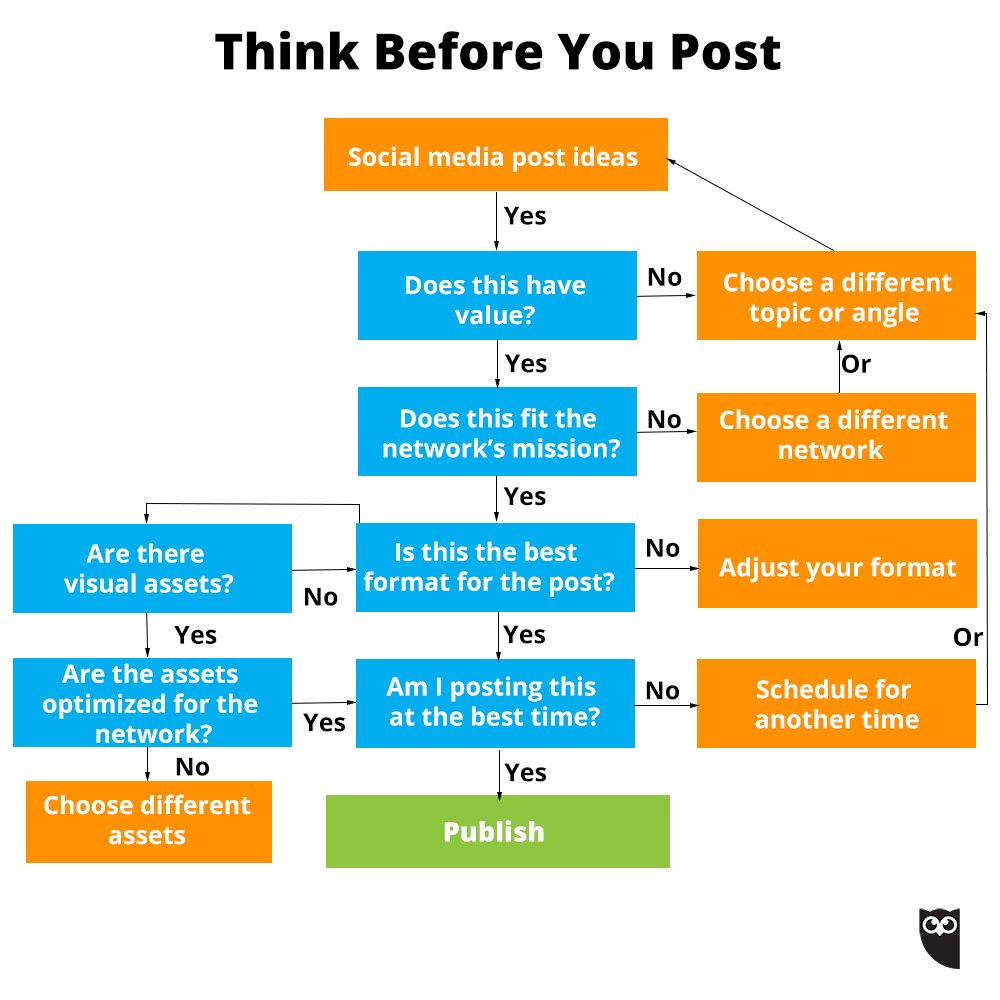
Think-Before-You-Post-Hootsuite-Flowchart.jpg

I’ve been sharing this graphic for the past three years from Hootsuite and I still love it. The questions above are based on this flowchart. Keep it close to you and refer to it often.

Here’s to your social media success!


Posted in #HCSM

How To Write A Content Marketing Plan For Your Healthcare Business

A content marketing plan is a roadmap that, not only tells you what you’re going to create but how you’re going to create it, when you’re going to publish it and how you’re going to promote it.

According to the Content Marketing Institute, having a documented (i.e. written down) strategy means:

  • You’ll feel significantly less challenged by every aspect of content marketing.
  • You’ll generally consider yourself more effective in your use of all content marketing tactics and social media channels.
  • You’ll be able to justify spending a higher percentage of your marketing budget on content marketing.

Below you’ll find my process for developing a content strategy.

Step #1 Audit Existing Content

A content audit allows you to review the content you have published and look for opportunities for improvements or content gaps to fill.

Take a look back at what has worked for you this year. Which of the content (blogs, videos, live streams, images, etc.) that you created and shared performed the best? What length of content worked best (long-form or shorter posts?) Which content fell flat?

Pro Tip: Learn from the success of your competition. Run a competitor audit to see which type of content they’re creating that is making an impact with their followers.

Step #2 Do Keyword Research

Keyword research is vital because identifying the terms people are searching for will determine the kind of content you create and the way you will optimize it.

If you want to rank in Google you have to make sure that you’re using the right keywords. Brainstorm a list of suitable topics related to your business. Then use one or more of these keyword tools to discover more terms related to your core keywords.

Step #3 Set Clear Goals

Setting clear goals will not only propel your content strategy forward but it will also serve as defined metrics when it comes to measuring your progress.

Describe the specific goals and outcomes you’re seeking to accomplish with your content marketing. These should be aligned with your business goals. Are you looking to build brand awareness, drive leads, or increase user engagement?

Whichever goal you wish to pursue, make it as detailed and specific as possible. The more trackable your goal is, the easier it’ll be in a few months to see if you have achieved it.

Take Action: Follow the SMART goal formula to make your goals clear and actionable.

Step #4 Know Your Audience

Your next step is to identify exactly who is going to consume the content you create. Start by finding data on your existing audience. Use the Demographics and Interests sections of Google Analytics and the audience analytics features contained within Facebook Insights and Twitter to help you.

When producing content, your number one goal should be to add value to your community. Content doesn’t work unless it’s targeted. All successful businesses are based on their ability to meet the needs of their audience and content marketing is no different.

Pro Tip: The key here is to really know your audience and their pain-points. Start speaking their language when it comes to the problem you’re solving, and how they relate to their pain points. Write content that specifically answers their particular needs and the types of solutions they’re looking for.

Step #5 Determine Your Content Format

This is a two-part strategy. Firstly, you need to go where your audience is consuming content (many social media platforms lend themselves more naturally to specific types of content). Identify how, when, and where they like to engage with content, and then start to create content on your audience’s preferred platform and preferred way of consuming content.

Secondly, you need to take stock of your own resources. What internal and external resources will you need to run your content marketing engine? Do you have time to write regularly for a blog? Would it be better for you to create video blogs (vlogs) for your website or communicate through a live stream broadcast? What assets do you already have that you can leverage for your content strategy? For example, do you have access to a graphic designer who can create infographics? Use your in-house talent to create unique content and publish it in a format that will attract and retain your audience’s attention.

Step #6 Build A Content Calendar

A content calendar helps you maintain a consistent content production schedule, enabling you to plan for seasonal content, and annual campaigns. It also helps you deliver a more balanced mix of content formats, such as articles, videos, and social posts.

Pro Tip: Add your keywords from Step #2 to keep you focused.

Step #7 Plan Your Promotion

Content has no value unless it’s shared. You need to determine how you will connect your content with the right audience at the right time.

Instead of treating content amplification as something you only do after the content is created and published, you should incorporate promotion strategies into the content planning and creation process. Marketer Rand Fishkin goes so far as to say: “Before you ever create content, I urge you to ask the critical question: Who will help amplify this and why? If you don’t have a great answer, a specific list of people, don’t create it.”

Step #8 Measure Results

How will you know if all the time you’re investing in social media marketing is paying off? You won’t know 

 You won’t know unless you put a system in place to measure and analyze your efforts.

Key metrics to track include:

  • Traffic. How many blog or website visitors did you receive from social media?
  • Engagement. How many likes, clicks, and shares are your posts receiving?
  • Conversions. How many blog or website visitors are completing conversion steps?

Posted in #HCSM, Thursday Tip

#ThursdayTip: How To Embrace Long-Form Content

Welcome to this week’s quick social media tip. Today I invite you to think about how you can add more long-form content to your content marketing strategy.

It seems ironic, but even with the popularity of video and expiring content, there also exists an appetite for longer, more in-depth content.

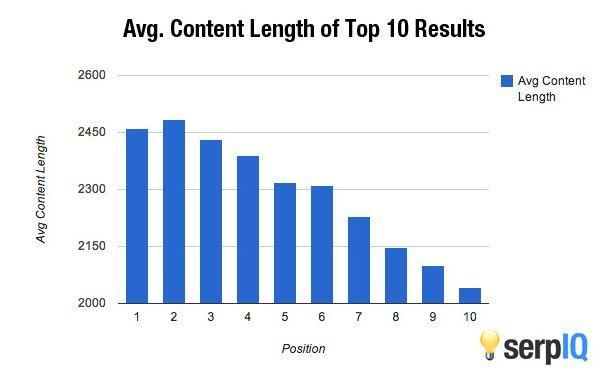
serpIQ did a study of the average length of the content in the top 10 results of search queries. The company found that the top-rated posts usually were over 2,000 words.

1_po23qamvjgidwtvlcwdrca

Long-form content also gives you an SEO edge. Put simply, search engines are built to serve people the best content, from credible sources, that answers users’ questions. Google has made it explicitly clear that it now prioritizes longer, informative posts over short ones that exist only to sell a product.

Try writing posts that are 1000 to 2000 plus words. Make them a resource type post that people will want to link to when they are writing their posts.

This tactic is no short-cut to success. To write a comprehensive, long-form piece of content with practical application that people want to share and link to takes a lot of research and time.

You won’t write this sort of content every day, but if you plan to make 2020 the year you will produce just one piece of stand-out content, I promise you will look back at the end of the year and feel you’ve really achieved something worth the effort.

Here’s to your social media success!

Posted in #HCSM

Here’s How Bots and Trolls Spread Fake News on Social Media

Fake news. It’ not only a problem in politics; misinformation online is a huge problem in healthcare.

Just like fake news, untrustworthy health information problematically circulates across social media platforms.  Facebook is one of the biggest offenders.

A study conducted by Oxford University showed that content from less reputable sources gets shared 4x more than content from reputable, trusted news outlets across Facebook.

There is some good news on this front. Recently Facebook announced it’s to take a stand against vaccine denial by directing people searching for information or using vaccine hashtags to web pages set up by public health bodies.

And a Finnish Public Broadcasting Company has created a tool which taps into the power of gamification to increase public awareness of  how “fake news, emotive content and bot armies are utilized to affect moods, opinions, and decision-making.”

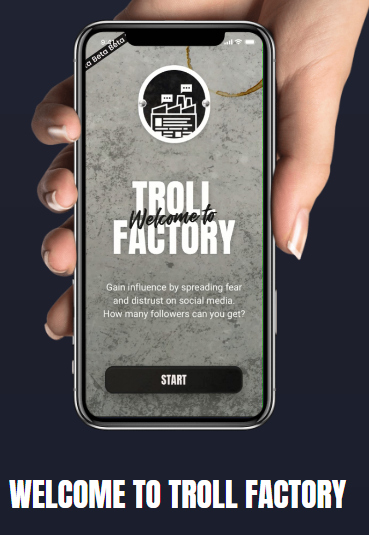
The game, called Troll Factory,  shows you first-hand how information operations work on social media. It makes use of authentic social media content around polarizing themes like climate change and immigration to highlight the roles played by paid bots, demographic microtargeting, fake news, and conspiracy theories in misleading and amplifying propaganda.

73987f4d-5c1a-4260-94ef-d7dd83c009d8

Players learn to wield the tools that trolls use as they seek to influence public opinion: botnets, paid marketing and internet memes in a realistic mobile setting. This gives them an opportunity to reflect on their real-life choices, and to better understand the consequences of their actions.

In its review of the game, TechCrunch states “The best medicine against online disinformation is an informed society that’s thinking critically.”  Troll Factory is a creative and clever way to promote digital media literacy, especially among people who don’t consume traditional news (more people now get their news from social media than from newspapers)  and helps social media users understand how they play a role in spreading false information — even unintentionally.


Related Reading

Anatomy of a conspiracy theory: how misinformation travels on Facebook 

How Disinformation Hacks Your Brain

Posted in #HCSM, Thursday Tip

#ThursdayTip: How To Add Power Words To Your Headlines

Welcome to this week’s quick social media tip. Today I want you to think about the value of adding power words to your headlines.

Your headline is the first impression you make on a prospective reader. An eye-catching headline is a key factor in getting readers to click through to your content.

An attention-getting headline will capture the reader’s attention right away and compel them to want to find out more. Clear, concise, and original content is important, but words that appeal to their emotions is the magic ingredient to giving your visitors a reason to want to dive deeper.
Business2Community

“Trigger” words can entice readers to your content, but use these words with caution because they can also trigger skepticism and distrust. Make sure your content carries through on the promise in the headline and always avoid click-baiting.  Always craft a headline that links to authentic and relevant content.

Your to-do list for today: