Articles

Posted in #HCSM

A-Z of HCSM: D is for Dux-Soup #AtoZChallenge

AtoZ2019tenthAnn

26 posts. 26 days. 26 letters of the alphabet, one blog post beginning with each letter.

D is for Dux-Soup

Dux-Soup is a browser plug-in which works with Google Chrome as your virtual assistant on LinkedIn.

Dux-Soup keeps track of every single profile you visit and allows you to make notes directly on the profile page which are saved. Profile date and notes can be export as a .CSV file to be opened in Microsoft Excel or similar. The .CSV file includes data such as the name of the person whose profile you visited, job title, company name, location, email and notes.

Dux-Soup can save you hours of manual data entry when it comes to tracking all your leads you interact with on LinkedIn. You can take and save notes on each profile such as: have sent invite/need to reply to a message / likes Opera etc.

You can opt to use the free version (which enables you to view a hundred LinkedIn profiles a day) or upgrade to the paid version (which allows you to set the number of profile visits you need to make per day and export the .CSV file and make use of the data you gathered.

Dux-Soup is available as a browser plug-in which works with Google Chrome. Download here.

Want to up your LinkedIn game?

Check out How To Brand Yourself For Success On LinkedIn

Posted in #HCSM

A-Z of HCSM: C is for Content #AtoZChallenge

AtoZ2019tenthAnn

26 posts. 26 days. 26 letters of the alphabet, one blog post beginning with each letter.

C is for Content

A content marketing report based on data from a survey conducted among healthcare marketing professionals who work for hospitals, urgent care centers, physician practices, and other healthcare organizations, found that the rise of content marketing in the healthcare industry continues, with steady growth in usage. 

Chapter1_Graph1.png

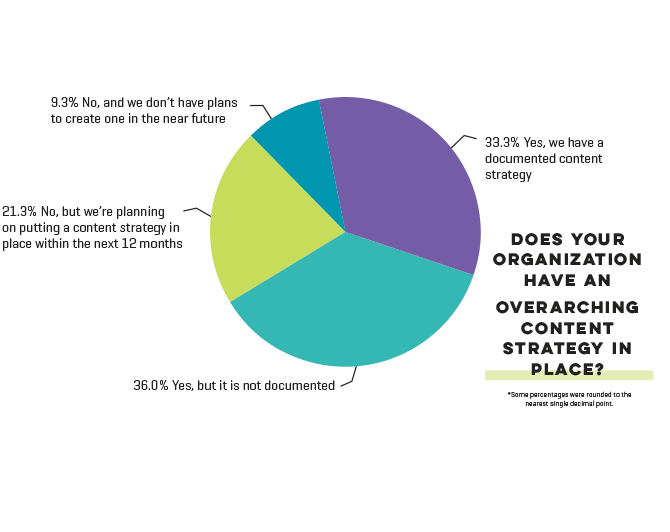
However, only one-third of respondents said their healthcare organization has a documented content marketing strategy.

Chapter1_Graph3-1.png

Why your healthcare organization needs a content strategy

If you’re serious about marketing your business online, you need a strategy and a plan to execute it.

A content marketing strategy is a roadmap that not only tells you what you’re going to create but how you’re going to create it, when you’re going to publish it and how you’re going to promote it.

It helps you create more meaningful, engaging and sustainable content.

According to the Content Marketing Institute, having a documented (i.e. written down) strategy means:

  • You’ll feel significantly less challenged by every aspect of content marketing.
  • You’ll generally consider yourself more effective in your use of all content marketing tactics and social media channels.
  • You’ll be able to justify spending a higher percentage of your marketing budget on content marketing.

If you’re interested in getting a look at the step-by-step process I use for developing a content strategy with clients, click on this link.

You might also like to read 12 Common Content Marketing Mistakes…And How To Fix Them.

Got questions?

Do you have any questions about content marketing? Leave a comment below and I’ll be happy to answer them for you.


Posted in #HCSM

A-Z of HCSM: B is for Blog #AtoZChallenge

AtoZ2019tenthAnn

26 posts. 26 days. 26 letters of the alphabet, one blog post beginning with each letter.

B is for Blog

Want to increase your influence among healthcare consumers? Start blogging.

Blogs written by physicians, nurses, researchers, patients, and allied healthcare professionals add much to the richness and diversity of the online healthcare conversation. Blogs are a super way to educate patients and keep content on your website fresh.

Healthcare blogs vary in content and style; they range from commentary on a topical issue to patients sharing the lived experience of disease and healthcare professionals educating patients on the management of an illness.

Marketing to patients with a blog can be one of the most effective ways a new medical practice can reach more patients. Blogging regularly increases awareness of your practice, as well as help your website rank better in search engine result pages (SERPs) thereby increasing its organic traffic.

Need more convincing? Check out these stats.

What should you blog about?

Creating a blog is relatively easy; the challenge lies in consistently creating fresh content. If you are struggling to come up with new ideas on a regular basis for your blog, then this list of 16 content ideas should help get you started.

How do you attract more readers to your blog?

It’s not enough to write great content and hope that people will find it. You need to actively promote your blog to maximize opportunities for more people to find and learn from your content. In this post, I share 10 tried and tested ways guaranteed to drive more traffic and increase engagement on your healthcare blog and here you’ll find 3 Places To Find Interesting Ideas For Your Healthcare Blog.

You might also like to check out this list of 18 Top Tools For Your Healthcare Blog.

Got questions?

Do you have any questions about starting a blog? Leave a comment below and I’ll be happy to answer them for you.


Posted in #HCSM

A-Z of HCSM: A is for Algorithm #AtoZChallenge

AtoZ2019tenthAnn

26 posts. 26 days. 26 letters of the alphabet, one blog post beginning with each letter.

It’s the tenth anniversary of the Blogging from A to Z Challenge and I only just heard about it today, which means I’m jumping into things a week late, but I’m excited to join in and that’s what counts.

A is for Algorithm

If you are going to take advantage of social media for marketing purposes, you need to understand social media algorithms.

Algorithms now dominate the social media marketing discussion — almost everywhere you engage, within almost every platform you use, machine learning and data sorting is used to decide what it is you see. Social Media Today

Facebook, the first to implement an algorithm feed, is probably the biggest example of a social media platform using algorithms. Facebook’s most recent ‘meaningful interactions’ update, is focused on prioritizing posts that create meaningful conversations, especially those from family and friends.

Unfortunately, Facebook’s algorithm is constantly changing and it now makes it increasingly difficult for businesses to make an impact without paying for advertising.

Expect other social media networks to adopt similar algorithms as time goes on — both Twitter, Instagram, and LinkedIn, though less advanced than Facebook already use their own algorithms.

Want to beat the Facebook Algorithm? Read this.


Posted in #HCSM

23 Things To Tweet About In April

Maintaining a consistent posting schedule on social media – whether it’s writing blog posts, or sharing updates on social media channels – can be a challenge.

When I teach social media classes, I always recommend creating a social media calendar so you can map out in advance upcoming holidays and cause awareness days.   By doing this, you will have a ready supply of things to share on social media.

To help you plan your content in advance, I’m going to highlight some events happening this month which you can add to your calendar.

See which of the following awareness days you could build engagement around. You could write a blog post, create a video or graphic, and then share it on Twitter and Instagram with the relevant hashtag.

Have some fun with these – but do make sure whatever you create and share fits with your brand!

April 2. Tuesday, World Autism Awareness Day #WAAD

download - 2019-03-30T193120.311

April 3. Wednesday, Find a Rainbow Day #FindARainbowDay

download - 2019-03-30T193633.723.png

April 3. Wednesday, National Walking Day #NationalWalkingDay

download - 2019-03-30T194131.567

April 7. Sunday, World Health Day #LetsTalk

D3Cv0dSX0AAyp1a

April 10. Wednesday, National Siblings Day #NationalSiblingsDay

D21STAdWwAAYxFh (1)

April 10. Encourage a Young Writer Day #EncourageAYoungWriterDay

download - 2019-04-01T085255.963

April 11. Thursday, National Pet Day #NationalPetDay

download (36).jpg

April 12. Friday, International Day of Human Space Flight#InternationalDayOfHumanSpaceFlight

download - 2019-04-01T085547.795

April 16. Tuesday, National Stress Awareness Day #StressAwarenessDay

download - 2019-04-01T085717.486

April 16. Tuesday, National Wear Your Pajamas to Work Day #PJDay

download - 2019-04-01T085955.370

April 17. Wednesday, Haiku Poetry Day #HaikuPoetryDay

Da_OghLXUAA0mL1

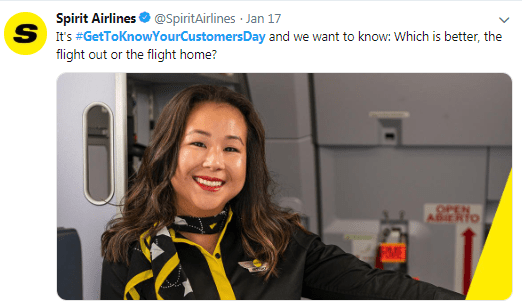
April 18. Thursday, Get to Know Your Customers Day#GetToKnowYourCustomersDay

download - 2019-04-01T090336.353

April 18. Thursday, National High-Five Day #NH5D

african-3797852_960_720

April 22. Monday, Earth Day #EarthDay2018

download - 2019-04-01T090735.992

April 23. Tuesday, National Picnic Day #NationalPicnicDay

download - 2019-04-01T090851.209

April 23. Tuesday, World Book Day #WorldBookDay

download - 2019-04-01T091051.534

April 24. Wednesday, National Administrative Professionals Day#AdministrativeProfessionalsDay

download - 2019-04-01T091147.198

April 25. Thursday, National Telephone Day #NationalTelephoneDay

vintage-telephone-1750817_960_720


April 25. Thursday, World Malaria Day #EndMalariaForGood

download - 2019-04-01T091605.289

April 29. Monday, International Dance Day #InternationalDanceDay

D20E6yAXQAEStpw

April 30. Tuesday, National Honesty Day #NationalHonestyDay

DcDYRr3VwAAokuK

April 30. Tuesday, National Adopt a Shelter Pet Day #AdoptAShelterPetDay

download - 2019-04-01T092141.065

April 30. Tuesday, International Jazz Day #JazzDay

street-musicians-337047_960_720

I feel sure you’ll find something to share on one or more of these days. Tag me on Twitter @JBBC if you do – I’d love to see what you come up with. 

Posted in Thursday Tip

How To Add A Search Stream To Twitter

One of the questions I get asked quite frequently is how to keep track on Twitter of a specific hashtag during a conference or Twitter chat.

The answer is to set up a search stream for your term.

Search streams are valuable for finding social activity around specific users, locations, hashtags or keywords. You have several options to monitor a search stream on Twitter but you’ll need to jump on a third-party tool outside Twitter to do it.

Here are 4 tools I use and recommend for the job.

1. Hootsuite

Hootsuite is a very useful application for managing all your social media channels in one place.   The basic Hootsuite plan is free. It enables you to view and monitor multiple streams in a single dashboard and allows you to keep tabs on key phrases, terms, keywords, brand mentions, etc.

Here’s a screenshot of a search stream I set up for a client recently.

download (74)

For a step-by-step guide to setting up your Hootsuite account, read my previous post, How To Better Manage Social Media With Hootsuite.

2. TweetDeck

Similar to Hootsuite, Tweetdeck is a Twitter client that lets you create several ‘columns’ in a single screen, so you can see everything that’s happening in one place. You can choose the type of columns you want to add, such as mentions, lists, messages, and search.

Here’s a screenshot of a column I have set up to monitor mentions of the hashtag #ePatient.

index

3. Tchat.io

Primarily designed around Twitter chats, you can easily use this tool to also keep tabs on tweets from conferences and events happening in real time.  Unlike Hootsuite, you don’t need any set-up. Simply enter a hashtag that you want to follow and the tool will instantly load all the tweets with that hashtag.

download (1)

Tchat will update the stream with new tweets in real-time. What’s really cool about this tool is that you can pause the stream whenever you like, hide retweets, or switch between hashtags if you are following more than one topic.

4. Twubs

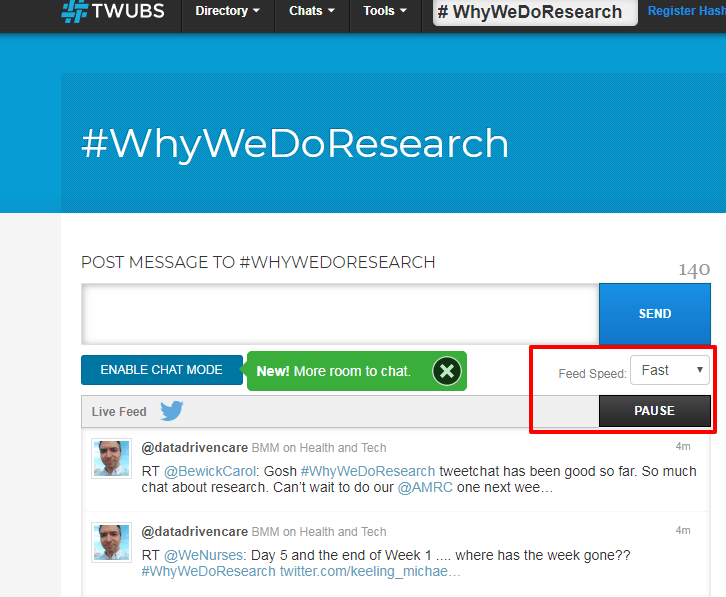
Similar to Tchat’s features, you can use Twubs to monitor tweets in real-time, pause the thread, reply, retweet, favorite, and tweet directly with the hashtag automatically included. Here’s a screenshot of a hashtag I’ve been following this week for the #WhyWeDoResearch Tweetfest. One of the cool features with Twubs is that it gives you the ability to set the feed speed from fastest to slowest.
download - 2019-05-17T090239.099

Do you use any of these tools? Are there other tools you would recommend?



Posted in Cool Tool

Monday Morning Cool Tool: Adobe Spark

I love learning about new tools to make social media marketing more creative and effective, so I’ve decided to share some of my favourite tools with you at the start of each week. This week’s cool tool recommendation is Adobe Spark, a free suite of apps which allow both web and mobile users to create and share visual content – like posts for social media, graphics, web stories, and animated videos.

adobespark.jpg

It comprises three separate design apps: Spark Post, Spark Page and Spark Video.

  1. Spark Post is aimed at letting you create professional graphics in minutes.
  2. Spark Page is focused on helping you craft web stories. That means you can use it for things like magazine-style travel stories, photo albums, online newsletters, reports, or anything else that you want to present on the web. It’s basically a simplified web editing platform, with tools that let you mix text and imagery in a highly visual way.
  3. Spark Video lets you create animated videos. Note, this isn’t a tool for filming content – instead, you combine text, images, icons and themes in a presentation, then speak your voice over the story in order to create the video.

Here’s how I used  Spark Post to create a quick and easy quote graphic for Instagram:

Adobe Spark.jpg

Top Design Tip!

Follow CoSchedule‘s best design practice to create even better graphics.

social-media-plan-design-best-practices.png


Posted in #HCSM

New Study Finds Google Values Social Media Presence Over Academic Pedigree and Experience

Findings from a recent study published in the Aesthetic Surgery Journal reveals that patients are searching for plastic surgeons online, choosing the first-page results from Google to guide their search.

c9c42da804f4f3a624710e2dc6572608-m.jpg

Over the past decades and into the beginning of the new millennium, aesthetic surgery practices anecdotally relied on referrals, word of mouth, and the surgeon’s reputation and pedigree to attract new patients.

Residents were taught that providing excellent results and taking good care of patients would lead to a good reputation in the community, which would attract future patients.

It is now clear that this practice-building model is being rapidly supplanted by a new paradigm based on social media presence to reach potential patients.

The aim of the study was to analyze the respective importance of physician academic pedigree, experience, and social media presence on plastic surgeon Google first-page search result placement.

download - 2019-03-24T091406.503

Given that nearly all prospective patients seeking cosmetic surgery are utilizing the internet to search for their provider and seek health-related information, these findings present significant support for the importance of social media and online presence in directing online traffic and therefore patient flow.

The study authors conclude:

If we consider the importance of the internet and social media in patients’ choice of providers and the influence of search engine ranking on directing these potential patients’ traffic, it becomes obvious that a strong online presence and search engine ranking can be crucial to attracting new patients to a practice

These findings have implications for all healthcare professionals.

download - 2019-03-25T165059.440

If social media presence influences how patients choose practitioners the risk is that those practitioners most qualified (such as board-certified plastic surgeons) must compete for clicks with the least qualified (non-medical professionals).

To quote the study: “It is therefore of the utmost importance to understand the factors that are key to improving search engine rankings.”

Posted in Cool Tool

Monday Morning Cool Tool: Twitonomy

I love learning about new tools to make social media marketing more creative and effective, so I’ve decided to share some of my favourite tools with you at the start of each week. This week’s cool tool recommendation is Twitonomy a freemium tool which yields insights on your Twitter followers, influence and interests.

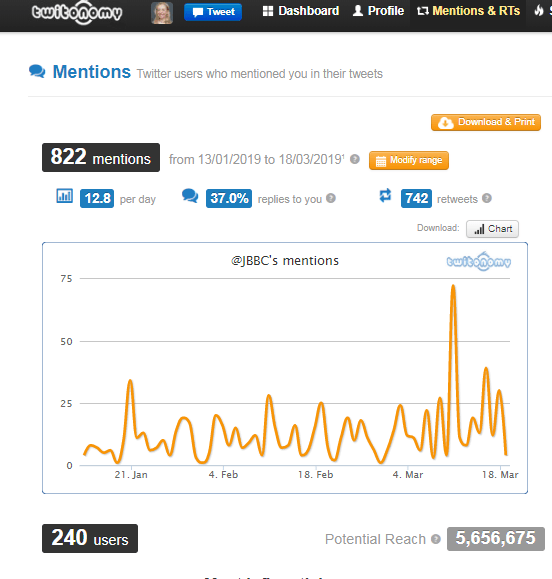
Here’s a snapshot of my @mention analytics.

download - 2019-03-18T092819.344


You can also get search analytics on any hashtag, user or keyword. With the pro version you can download tweets, mentions, RTs, favorites and reports to Excel & PDF documents — a useful reporting tool.